


MSSP Security helps turn validated security alerts into structured incidents through ticketing integrations with ServiceNow or Jira. We’ve seen how much easier incident handling becomes when SOC findings move directly into the team’s existing workflow.
Instead of copying details between systems, our teams can track ownership, severity, SLAs, and audit trails in one clear process. That keeps incidents easier to assign, follow, and review. For teams handling frequent alerts, fewer manual steps can also keep response work moving. Keep reading to see how MSSP Security integration works in practice.
MSSP Ticketing Quick Wins
A well-integrated ticketing workflow helps MSSPs automate alerts, keep incidents synchronized, and measure response performance more effectively.
- Automate alerts: Connect SIEM, EDR, and XDR alerts to ServiceNow or Jira for faster ticketing and assignment.
- Sync incidents: Keep status, severity, comments, ownership, and closure aligned across security and IT teams.
- Track performance: Monitor MTTD, MTTA, MTTR, SLA compliance, ticket aging, and incident volume to improve workflows.
Integrate MSSP with ServiceNow and Jira
Integrating an MSSP with an ITSM platform helps connect security monitoring with the processes teams already use to manage incidents. An effective MSSP Service Now integration can send validated findings into the appropriate workflow, apply severity and priority rules, assign ownership, and keep response updates visible to the right teams.
Instead of treating security alerts as separate cases, the integration can send validated findings into the appropriate workflow, apply severity and priority rules, assign ownership, and keep response updates visible to the right teams.
How the Integration Works
An MSSP ticketing setup connects security alerts with the ITSM system that the client already uses. The goal is clear: move useful security data into the right workflow without making analysts enter the same details twice.
A typical flow looks like this:
- Security tool creates an alert.
- MSSP validates the detection.
- Relevant data is sent through an API.
- ITSM creates or updates the ticket.
- Rules assign the right team.
- Status and closure data sync back.
But the setup needs clear rules. If every alert creates a ticket, the IT team can quickly face a crowded queue. We usually recommend deciding which alerts need a new incident, which should update an existing record, and which should stay within the security workflow.
Benefits of MSSP Ticketing Integration

The ticketing integration benefits include less repeated work and a shared record that gives security and IT teams a clearer view of each incident.
Faster and More Consistent Response
Manual ticket entry can take time, especially when an MSSP handles a large number of alerts. An automated workflow can pass key details into the ticket as soon as the alert is validated.
Research also supports the value of reducing manual work in SOC investigations. A peer-reviewed study published in Computers & Security found that SOAR tools increased efficiency and reduced context switching during investigations, although the researchers also noted potential decreases in ticket accuracy and completeness.
“SOAR tools increase efficiency and reduce context switching.” – Bridges et al., Computers & Security (2023)
Automating Ticket Creation
Automated alert-to-ticket creation should follow defined conditions. A high-confidence incident may need an immediate ITSM ticket, while a low-confidence event may need more review first.
Suppose one endpoint produces 10 related detections during the same event. Creating 10 separate tickets may add noise without adding useful information.
Correlation and deduplication should happen before ticket creation where possible. That way, the IT team receives a useful incident record instead of a pile of related alerts.
Bidirectional Ticket Synchronization
One-way ticket creation is useful, but some MSSP environments need information to move in both directions. Bidirectional ticket synchronization can keep the MSSP case and ITSM record aligned when someone changes the status, assignment, severity, or comments.
A two-way setup can keep the MSSP case and ITSM record aligned when someone changes the status, assignment, severity, or comments.
| Data | Sync Direction | Main Owner |
| Evidence | MSSP to ITSM | MSSP |
| Status | Two-way | Shared |
| Severity | Controlled two-way | MSSP |
| Assignment | Two-way | ITSM |
| Comments | Two-way | Shared |
| Closure | Two-way | Shared |
Before deployment, our team looks at which system should control each field. Without that rule, two systems can overwrite each other or create repeated updates.
Mapping Incident Severity Tickets
Incident severity mapping needs more than copying a security label into an ITSM ticket. The ticket should show how serious the incident is for the client, how quickly someone must respond, and who needs to be involved.
When we audit an MSSP workflow, we look at how security severity maps to ITSM priority. A critical alert on a production identity system may need a much faster response than the same alert on an isolated test device.
A practical model could look like this:
| Security Condition | ITSM Priority | Response SLA |
| Confirmed critical compromise | P1 | 15 minutes |
| Active high-confidence threat | P2 | 1 hour |
| Lower-risk investigation | P3 | 4 hours |
These values should match the client’s risk model and service agreement. They shouldn’t be copied into every environment without review.
Other factors can affect the final priority too. Asset importance, detection confidence, attack stage, and containment status can change how an incident should be handled.
That makes the ticket more useful than a label such as “high” or “critical.”
Streamline Incident Management Workflow
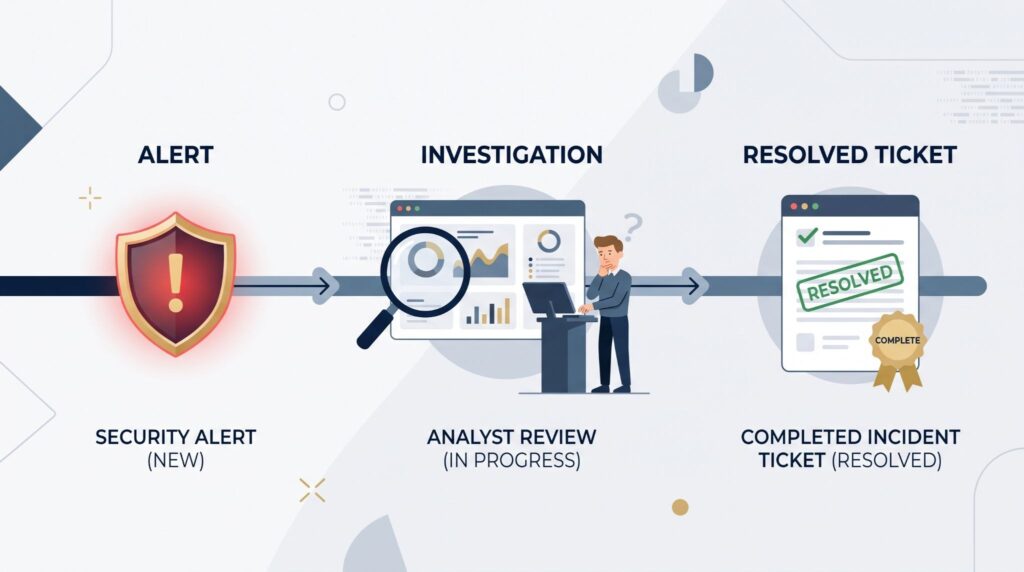
A well-defined incident management workflow should give each incident a clear path from detection to closure. Without that path, automation can create tickets faster without helping the team resolve them faster.
From there, the workflow can connect alert routing, ticket assignment, enrichment, investigation, and escalation.
A useful sequence is:
Detect → validate → correlate → enrich → deduplicate → assign → investigate → contain → resolve → report
Our role is to help MSSPs assess whether the products and workflows they plan to use can support those requirements before they commit to them. A product may have a strong API, for example, but still create problems if its routing or audit controls don’t match the client’s process.
Connect Detection with Response
Incident enrichment can add asset details, CMDB information, endpoint data, business ownership, and links to response playbooks.
This gives the person handling the ticket more context at the start. They don’t have to search through several systems before they can begin triage.
Choosing MSSP Integration Capabilities
When we help review or audit a new security product, we look at its MSSP integration capabilities and how they fit into the existing stack. The product should support the workflow rather than force the MSSP to rebuild everything around it.
Evaluate the Integration Architecture
Key capabilities may include:
- ServiceNow and Jira connectivity
- REST API and webhook support
- Two-way synchronization
- Severity mapping
- Alert deduplication
- CMDB enrichment
- Multi-tenant routing
- Audit logging
- SLA reporting
A product may claim API support while offering limited control over events, fields, or permissions.
So we look beyond the checkbox. Our review can include API behavior, authentication, failure handling, data mapping, logging, and how the product performs during real workflows.
For MSSPs, this review can also cover vulnerability tickets, critical incident escalation, compliance records, and client-specific routing.
API Integration Ticketing System
API-based ticketing uses REST APIs and webhooks to connect security platforms with ITSM systems. These integrations can send structured event data and, when needed, receive updates back.
Protect the Integration Layer
Security starts at the integration layer itself. Authentication should use appropriate controls such as OAuth, service accounts, or API credentials with limited permissions. The technology and platforms utilized should also support secure authentication, controlled access, and reliable communication between connected systems.
Payload validation matters too. Bad or incomplete data should not create broken incidents in the ticket queue.
Important controls include:
- Authentication and authorization
- Input validation
- Retry handling
- Rate-limit handling
- Failure queues
- Secret rotation
- Event identifiers
- Idempotent ticket creation
One issue we pay close attention to is system failure. What happens if the ITSM platform is unavailable when an alert arrives?
A reliable integration should retry safely and avoid creating duplicate tickets after the connection returns. That behavior should be tested before production use, not discovered during an incident.
Reduce Manual Ticketing Effort
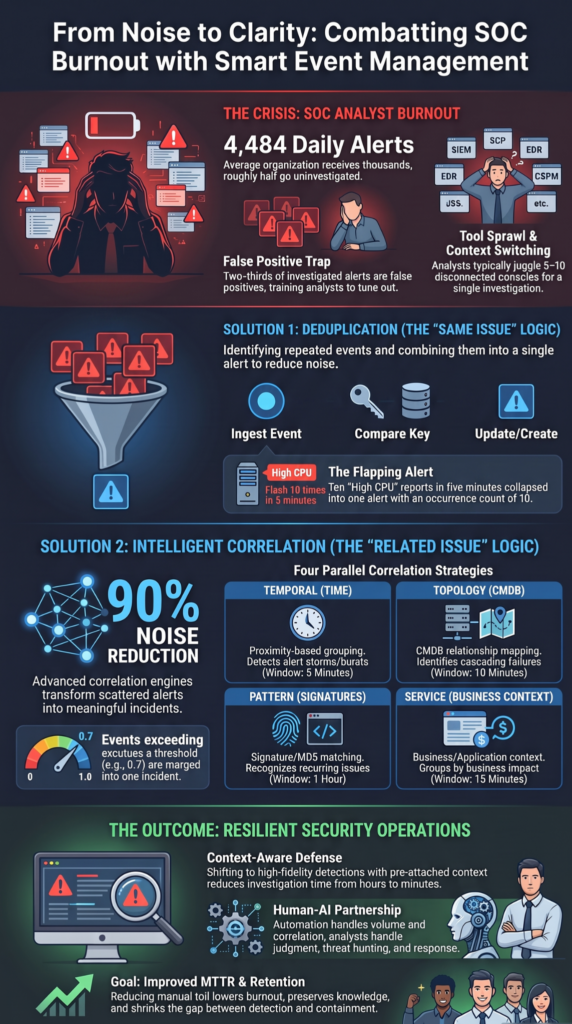
For MSSPs, the goal is to reduce manual ticketing rather than maximize automation. This removes repetitive work while keeping analysts involved where decisions matter.
Reduce Noise Before Automation Expands
Alert correlation and deduplication should happen before ticket creation where possible. Automated assignment and enrichment can then add more context before an incident reaches the right person.
The need for this filtering is supported by research from the 2024 USENIX Security Symposium. Researchers analyzed 115 million network alerts collected over four years from a real-world SOC and found that analysts faced between 24,000 and 134,000 alerts per day, while only 0.01% were associated with true attacks or compromises.
“Security Operations Centers (SOCs) face the key challenge of handling excessive security alerts.” – Yang et al., USENIX Security 2024
For MSSPs, this makes alert correlation and deduplication more than a convenience. Filtering and grouping alerts before ticket creation can help prevent the ITSM queue from becoming another source of operational noise.
Common tasks that can be automated include:
- Copying alert details
- Assigning tickets
- Updating ticket status
- Adding investigation notes
- Finding asset ownership
- Closing resolved tickets
Still, every alert shouldn’t become an incident. If the detection rules are too broad, automation can increase ticket volume instead of reducing it.
We’ve found that this is often where an MSSP product review becomes useful. The question isn’t only whether the product can create tickets. It’s whether the product can create the right tickets.
Reporting Metrics Ticketing Integration
Source: CodeLucky
Ticket data can help MSSPs measure service performance through incident response metrics and find weak points in the response process.
Useful metrics include:
- MTTD
- MTTA
- MTTR
- SLA compliance
- Ticket aging
- Escalation rate
- Reopened incidents
- Backlog size
Each metric answers a different question. MTTD looks at detection speed, while MTTA shows how quickly someone acknowledges the issue. MTTR then gives a view of how long resolution takes.
Our reviews also look at whether reports can separate client data and service periods. An MSSP needs reliable reporting for internal reviews and client-facing service reports.
Trend data can reveal repeated attack types, affected assets, routing problems, and delays in remediation. That information can then feed back into detection rules and response procedures.
FAQs
How does an MSSP ticketing integration handle thousands of security alerts?
High alert volumes can overwhelm analysts when every alert creates a separate ticket. Alert-to-ticket automation can use alert correlation, deduplication, and incident enrichment before creating tickets. This approach helps reduce ticket volume while preserving important security events and routing actionable incidents to the appropriate teams for investigation.
How do we keep ticket updates synchronized between security and IT teams?
Security and IT teams need the same incident information to avoid conflicting updates. Bidirectional ticket synchronization keeps status, severity, comments, ownership, and closure information aligned across systems. A two-way ticket sync can also push cross-platform ticket updates automatically, reducing manual updates and preventing teams from working with outdated incident information.
How can ticket priority and SLA rules be automated for security incidents?
Security teams can map alert severity to ticket priority and response requirements through incident severity mapping and ticket priority mapping. For example, critical incidents can trigger a shorter security incident SLA and immediate escalation. This creates consistent prioritization and supports faster response without requiring analysts to manually adjust every ticket.
How can an MSSP integrate security alerts with an existing ITSM workflow?
An MSSP can connect security tools with an existing ITSM workflow through MSSP API integration, REST APIs, or webhooks. Webhook alert integration can send events as they occur, while API-based ticket sync can create, update, and close incidents automatically. This SOC-to-ITSM integration helps security teams reduce manual ticketing and streamline incident management.
What should we monitor to prove that ticketing automation is improving security operations?
Teams should compare MTTD, MTTA, MTTR, SLA compliance, ticket aging, and incident volume before and after automation. SLA compliance reporting can reveal missed response targets, while ticket aging and resolution reporting can expose workflow bottlenecks. These metrics help security leaders determine whether automation is actually improving response performance.
Integrating MSSP Ticketing Systems for Better Security Operations
When security alerts don’t reach the right team with the right context, investigations slow down and important details can get lost between systems. A well-integrated MSSP ticketing system gives each alert a clear path from detection to resolution, while automation handles routine handoffs without removing human review where it matters. That’s the real operational value.
For MSSPs looking to improve this process, the next step is making sure the tools and workflows fit the way your team actually works. MSSP Security can help with integration planning, tool selection, PoC support, and stack optimization based on your operational needs. With 15+ years of experience and 48K+ completed projects, the team can help you reduce unnecessary tool sprawl and make better technology decisions.
References
- https://www.sciencedirect.com/science/article/abs/pii/S0167404823001116
- https://www.usenix.org/conference/usenixsecurity24/presentation/yang-limin
Related Articles
- https://msspsecurity.com/benefits-mssp-ticketing-integration/
- https://msspsecurity.com/integrate-mssp-with-servicenow-jira/
- https://msspsecurity.com/automating-ticket-creation-alerts/
- https://msspsecurity.com/bidirectional-ticket-synchronization-mssp/
- https://msspsecurity.com/mapping-incident-severity-tickets/
- https://msspsecurity.com/streamline-incident-management-workflow/
- https://msspsecurity.com/choosing-mssp-integration-capabilities/
- https://msspsecurity.com/api-integration-ticketing-system/
- https://msspsecurity.com/reduce-manual-ticketing-effort/
- https://msspsecurity.com/reporting-metrics-ticketing-integration/
- https://msspsecurity.com/technology-and-platforms-utilized/