

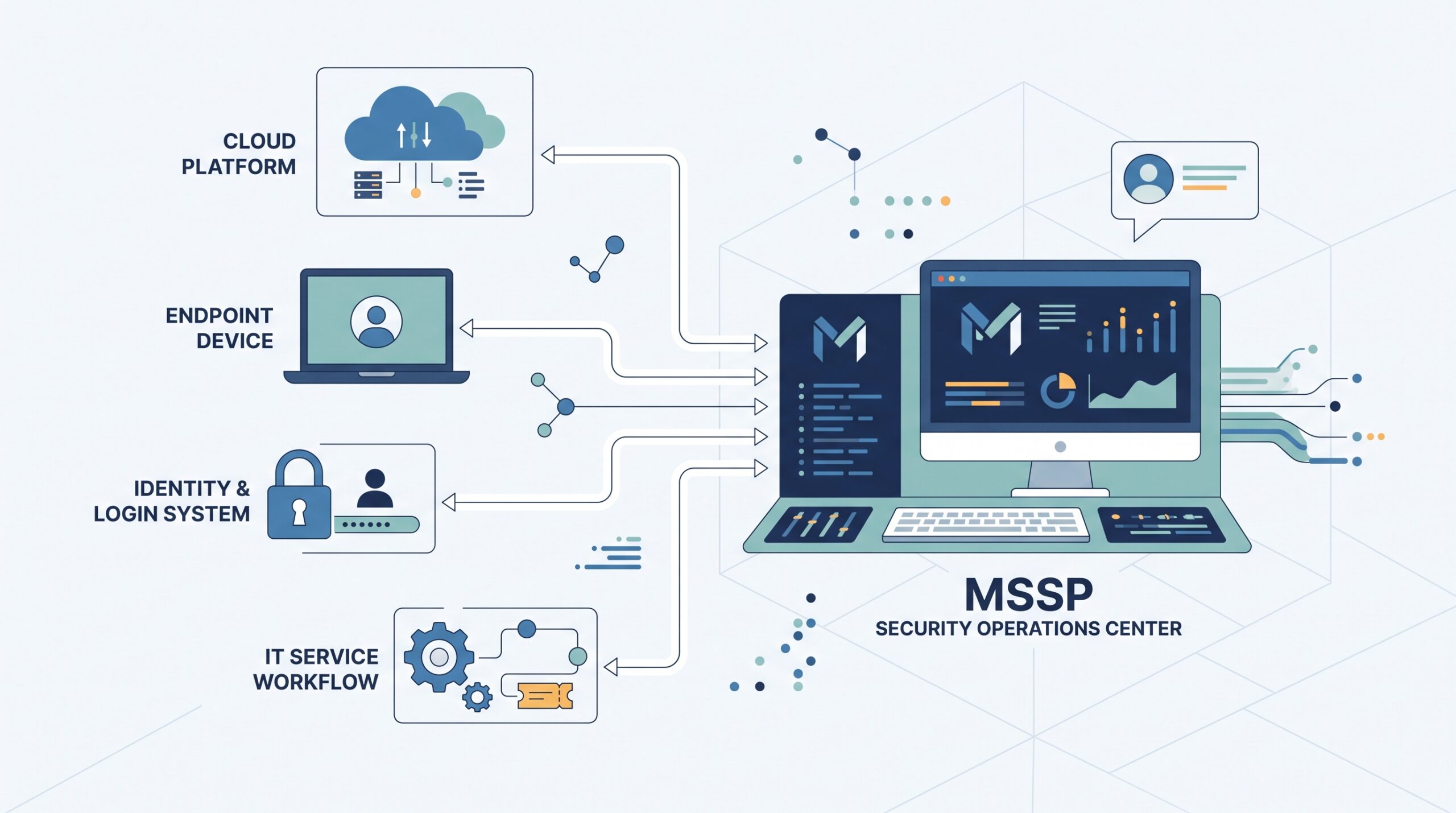
Choose an MSSP that can connect with your existing security tools without taking control away from your team. MSSP Security integration should cover the systems you already use, the data the provider can access, and the actions it can take.
But integration alone isn’t enough. Check whether alerts move between tools without delays, whether your team can review provider actions, and whether access can be limited by role.
So, look at both technical connections and day-to-day control. Get clear answers before signing. Keep reading to see which MSSP integration capabilities deserve the closest review.
Quick Reads: MSSP Integration Wins
A good MSSP should fit your stack, support your workflows, and keep your team in control.
- Check compatibility: Look for SIEM, EDR, XDR, cloud, IAM, and ITSM support.
- Test workflows: Check data flow, ticketing, alerts, escalation, and automation.
- Keep control: Require RBAC, MFA, logs, audit trails, and clear ownership.
What Should You Look for in MSSP Integration Capabilities?
The first question is simple: can the MSSP fit into the security stack you already have?
That sounds obvious, but it’s where many evaluations get stuck. A provider may list dozens of supported products, yet the connector might only handle basic alerts. Our team looks past the logo list. We want to know what data moves between systems, what the MSSP can do with that data, and where those actions stop.
A useful review covers four areas:
- Tool compatibility
- Data flow
- Access controls
- Response automation
The MSSP should support the tools that matter to the customer’s environment. That can include a SIEM, EDR or XDR platform, cloud services, identity systems, firewalls, vulnerability tools, and ITSM software.
But compatibility alone doesn’t tell us much.
We also check whether the integration supports the right event types, fields, authentication methods, and response actions. A connector that imports alerts but drops key investigation data may create more work for analysts.
That’s not integration we’d want to approve without further testing.
How Does Tool Compatibility Affect MSSP Integration?
Tool compatibility determines how much work the security team needs to do after the MSSP goes live.
For example, an organization may already use a SIEM with custom detection rules and dashboards. If the MSSP cannot work with that setup, the customer may need to change its existing workflow or duplicate data in another platform.
For teams using established IT workflows, checking how an MSSP with ServiceNow and Jira handles ticket and status exchanges can expose these gaps early.
Neither option should be accepted without a clear reason.
We normally build an integration matrix during product reviews. It records the security product, connection method, supported events, response actions, authentication model, and ownership. This gives the MSSP a clear view of what the product can and cannot do.
Cloud environments need extra attention. AWS, Azure, and Google Cloud may use different connectors and data formats. Older systems may rely on Syslog, CEF, JSON, agents, or custom collectors.
Why Does Bidirectional Data Flow Matter?
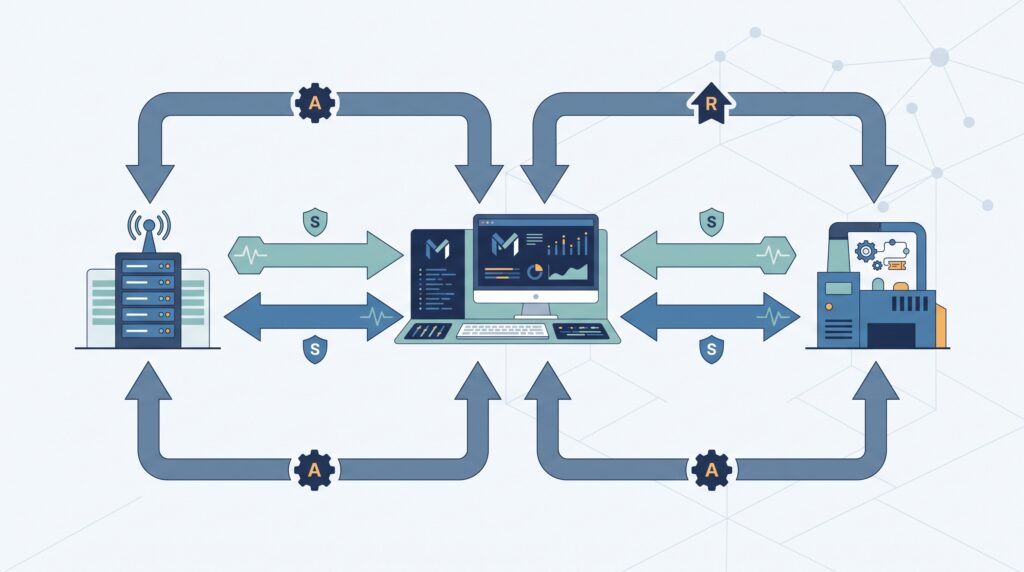
A security integration should move information in both directions when the workflow needs it.
An alert may enter the MSSP platform with an asset ID, severity, event details, and user information. The provider may then create a ticket in the customer’s ITSM system. When that ticket changes status, the update should return to the security workflow.
This cuts down on manual updates.
It also gives both sides a clearer record of what happened. During an incident, that matters because analysts may need to track who opened a case, what action was approved, and whether remediation was completed.
“Intelligence sharing can be bi-directional with this service.” – Center for Internet Security (CIS)
Our product audits pay close attention to this part. We test normal events, failed events, delayed updates, and duplicate tickets. A workflow that looks fine in a demo can behave differently under load.
Should You Choose Native Integrations or Custom Scripts?
Native connectors can reduce development work, while custom scripts may be needed for systems with unusual requirements.
| Area | Native integration | Custom script |
| Setup | Usually faster | More development |
| Maintenance | Often documented | Must be assigned |
| Flexibility | Connector-dependent | Usually broader |
| Testing | Vendor guidance may exist | More testing needed |
| Ownership | Often clearer | Must be defined |
Neither option is automatically safer.
We look at who owns the integration, who fixes failures, how credentials are handled, and what happens when the vendor changes its API. Those details matter more than the label attached to the connector.
How Does API Connectivity Shape MSSP Integration?
APIs control how systems exchange alerts, telemetry, identity data, tickets, and response commands.
A review should cover REST APIs, webhooks, native connectors, service accounts, OAuth 2.0, rate limits, and API documentation. Authentication should also use limited permissions.
For example, a service account used to collect endpoint telemetry shouldn’t receive broad administrative access.
We also test what happens when an API fails. Security events can arrive in large bursts during an incident. If the integration reaches its rate limit, the system should have a clear way to handle queued events, retries, and failed requests.
Otherwise, valuable data may never reach the analysts who need it.
How Important Is SIEM Integration When Choosing an MSSP?
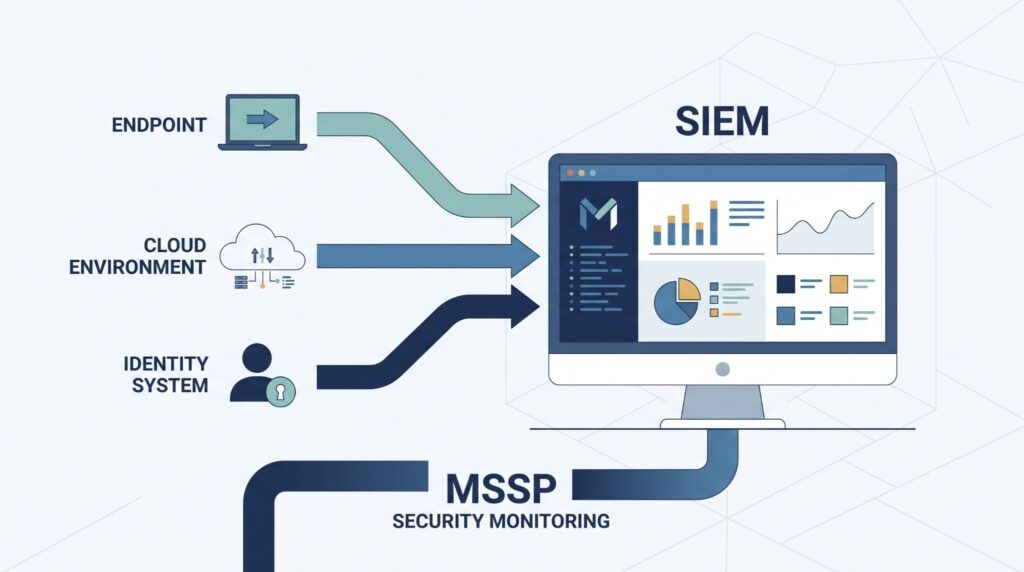
SIEM integration matters because many customers already have a security monitoring setup in place.
An MSSP should explain what happens to the data after ingestion. Does it stay in the customer’s SIEM? Is another copy sent to the provider? Can analysts search the original events? Who owns the data?
These questions should have clear answers before deployment.
For a BYOS SIEM model, we check whether the MSSP can work with the customer’s existing rules, dashboards, asset tags, and retention settings. If the provider uses its own SIEM, we review how customers can access their data and export it if the contract ends.
Our audits also look at raw-log access. A summarized alert may be useful for triage, but investigators sometimes need the original event to understand what happened.
“Any SIEM, analyst, auditor, SSA etc. is only as good as the data available for analysis.” – SANS Internet Storm Center
What Should You Know About SOAR Integration?
SOAR connects security alerts with playbooks and response actions.
For example, a high-severity alert could trigger enrichment, identify the affected endpoint, open an ITSM ticket, request approval, and then isolate the device.
The key question is who controls that process.
Low-risk actions may be suitable for automation. Higher-impact actions need tighter controls because a wrong response can interrupt a real user or business system.
We review each automated action separately. The provider should document what starts the playbook, what permissions it uses, what approval is needed, and how the action can be stopped.
Clear boundaries make automation easier to audit.
What EDR and XDR Integrations Should an MSSP Support?
EDR and XDR integrations should give analysts enough endpoint data to investigate suspicious activity.
That may include process activity, file events, network connections, user sessions, and detection details. The MSSP should also explain which response actions are available.
For example, an endpoint platform may allow an analyst to isolate a device. That doesn’t mean every MSSP analyst should have permission to do it automatically.
We test the connector and the permissions together.
A connector can be technically capable while the access model is too broad. That’s why product selection and access review need to happen at the same time.
How Should MSSP Integration Connect With ITSM Workflows?
Security incidents rarely stay inside the SOC. They often need help from IT, identity, cloud, or application teams.
That makes ITSM integration part of the security workflow.
A useful integration can create tickets, update status, map fields, assign ownership, and trigger escalation based on defined rules. Well-connected MSSP ticketing systems can help keep these actions within the same workflow.
We test whether those updates happen in both directions.
If an analyst closes an incident but the IT ticket remains open, someone still has to fix the mismatch. Small gaps like that can create a surprising amount of manual work.
How Should Alert Severity Map to Internal Workflows?
Severity should connect to the customer’s incident process.
A critical alert on a production identity system may need faster escalation than a low-confidence event on a test machine. Asset tags and business context can help make that distinction.
The MSSP should document these rules instead of leaving them to individual analysts.
When Should MSSP Response Be Automated?
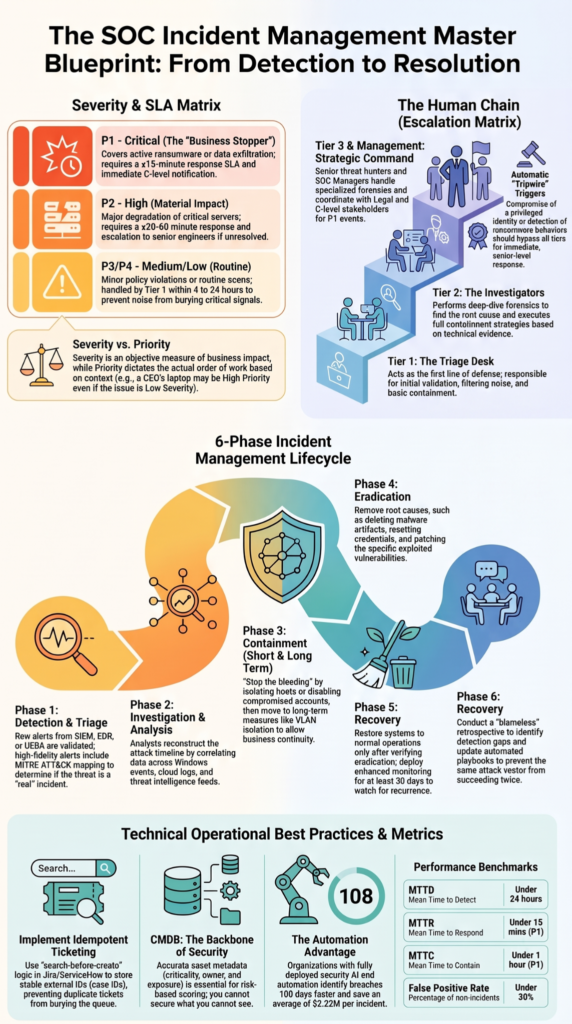
Source: GetCyber
Automation makes sense when the action is authorized, tested, and clearly defined.
Possible actions include:
- Isolating compromised hosts
- Disabling breached accounts
- Collecting investigation data
- Starting approved containment steps
But not every action belongs in an automatic playbook. Reliable ticketing integration can also reduce manual handoffs when approved response actions need to create or update incident records.
The rule is practical: know what the automation can change before giving it permission to change anything.
FAQs
How Can I Check Whether an MSSP Will Create Visibility Blind Spots?
Ask how the provider handles telemetry ingestion, log aggregation, data normalization, and alert correlation across your security stack. Check whether important events reach the SOC dashboard without manual workarounds. Test endpoint, cloud, identity, and network data during a proof of concept. This process can reveal missing telemetry or inconsistent event classification before deployment begins.
What Should I Ask About API Rate Limits and MSSP Integration?
Ask for developer documentation that explains API connectivity, authentication, rate limits, permissions, and failure handling. High event volumes can expose limits that may not appear during normal testing. Confirm whether service accounts or OAuth 2.0 authentication are supported and how credentials are managed. Also ask what happens when an API becomes unavailable or reaches its rate limit.
How Do I Know If Automated Response Needs Approval Workflows?
Start by identifying which actions can run automatically and which actions require human approval. Automated response should not treat every alert the same way. Ask whether escalation thresholds, approval workflows, playbooks, and role based access control can be configured. For higher risk actions, your team may want an analyst to review an event before containment or account changes occur.
What Happens When Security Data Uses Different Taxonomies?
Different security tools may classify events, assets, and alert severity ratings in different ways. Ask how the MSSP handles data normalization and security taxonomy mapping before information reaches analysts. A clear process should preserve important context instead of simply changing labels. This matters when combining threat intelligence feeds, endpoint monitoring, vulnerability management, and incident data.
How Can an MSSP Support Compliance Without Adding Manual Work?
Ask whether compliance reporting tools can collect evidence automatically from security operations and map it to relevant controls. Useful capabilities include evidence collection, control mapping, audit ready reporting, and continuous monitoring. The key question is whether these functions reduce manual checks while keeping source data traceable. Also confirm how often reports update and who can access them.
What Matters Most When Choosing MSSP Integration Capabilities?
When you’re choosing an MSSP integration, the real test is how well it works with your existing security stack. Data needs to move reliably, access needs to stay controlled, and workflows shouldn’t break when something goes wrong. That’s where vendor claims need closer review.
MSSP Security helps make that review easier by testing how integrations handle data flow, permissions, failures, and response controls in real operating conditions. You get clearer evidence before adding a security product to your service stack. That’s a practical step toward making integration decisions with more confidence.
References
- https://www.cisecurity.org/ms-isac/services/real-time-indicator-feeds
- https://isc.sans.edu/diary/Logs%2BThe%2BFoundation%2Bof%2BGood%2BSecurity%2BMonitoring/11410/