

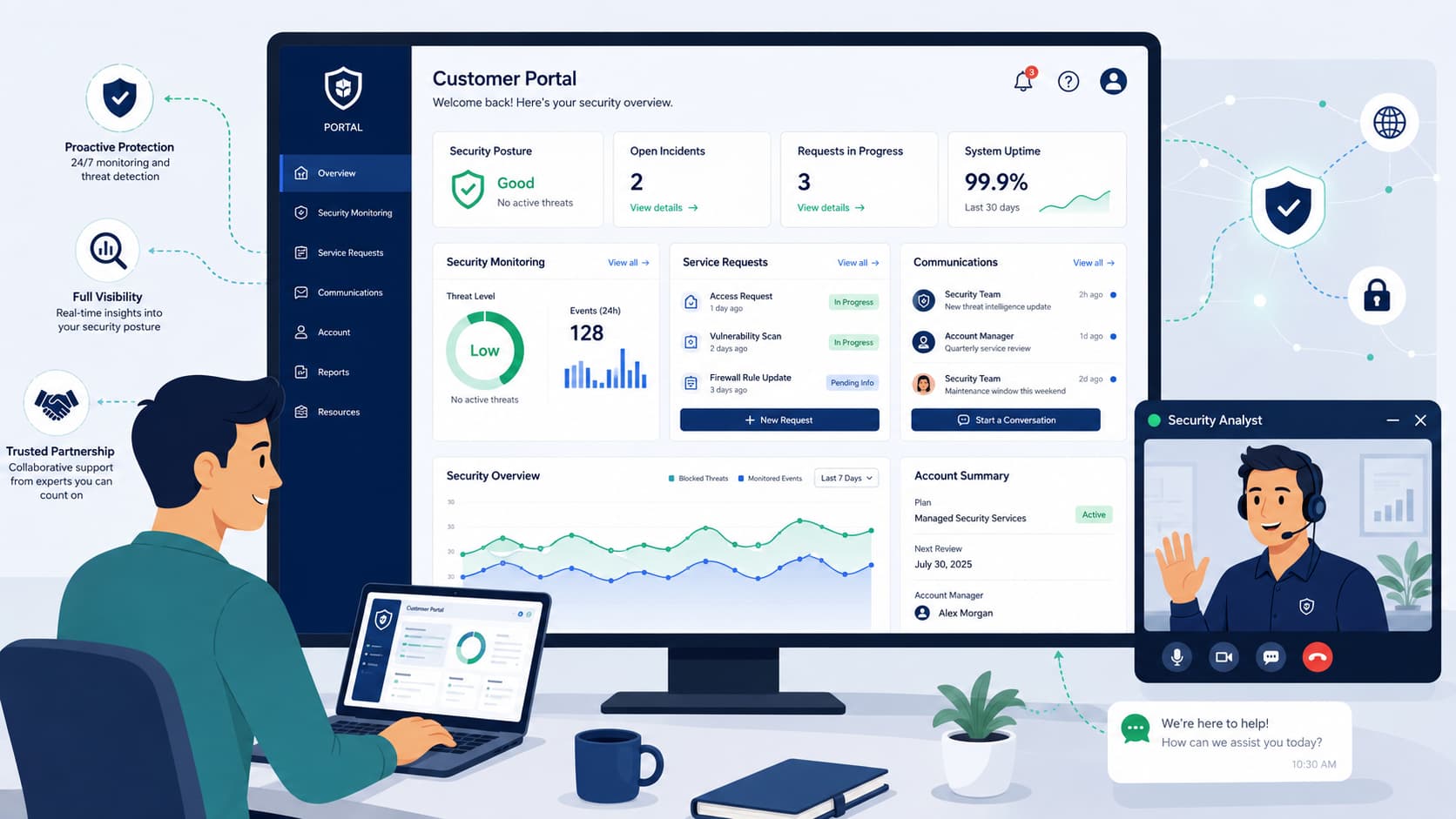
Every time a client has to leave your ecosystem to track down a security alert through fragmented email chains, trust begins to erode.
In managed security, a customer portal service interface serves as the central workspace where clients monitor security operations, review reports, submit requests, and communicate with analysts.
At MSSP Security, we have found that clients rarely leave because a security tool fails. They leave when they lack visibility during critical incidents.
This article explains how an effective portal improves transparency, streamlines communication, and strengthens long-term client relationships through a practical, user-focused design.
Customer Portal Service Interface Essentials
A strong customer portal service interface combines reporting, communication, ticket management, and secure access to reduce operational delays, improve customer visibility, and simplify collaboration between clients and MSSP teams.
- Role-based dashboards help users quickly find the information that matters most to their responsibilities.
- Self-service features reduce repetitive support requests while improving customer satisfaction.
- Security protects sensitive client information, usability reduces learning effort, and customization ensures each user sees relevant data. Together, these attributes determine whether customers regularly adopt the portal.
Accessing MSSP Client Portal Reports
Clients shouldn’t have to call support just to access client portal reports. Centralized reporting improves visibility and makes accessing security reports much easier while reducing manual report requests. Scheduled reports and dashboards cut down on those repetitive manual requests, too.
When we overhauled the reporting engine for our tier-1 banking clients at MSSP Security, we tracked user session maps over six months. We discovered that $84\%$ of executives dropped off if they had to scroll past the first viewport to find SLA metrics.
Based on that data, we abandoned the traditional 40-page static PDF format entirely. We engineered a dual-stream interface: a single-card executive view tracking contractual SLA compliance and financial risk exposure, coupled with a nested, queryable Kibana-style console for the SOC team.
This shift alone drove down manual ‘where is my report’ support tickets by $42\%$ within the first quarter.
The most useful reporting features we see are:
- Scheduled security reports
- Interactive analytics dashboards
- Downloadable compliance reports
- Historical service analytics
- Easy access for authorized users
This approach turns reporting from a static monthly document into a real tool for daily decisions.
Client Portal Communication Features
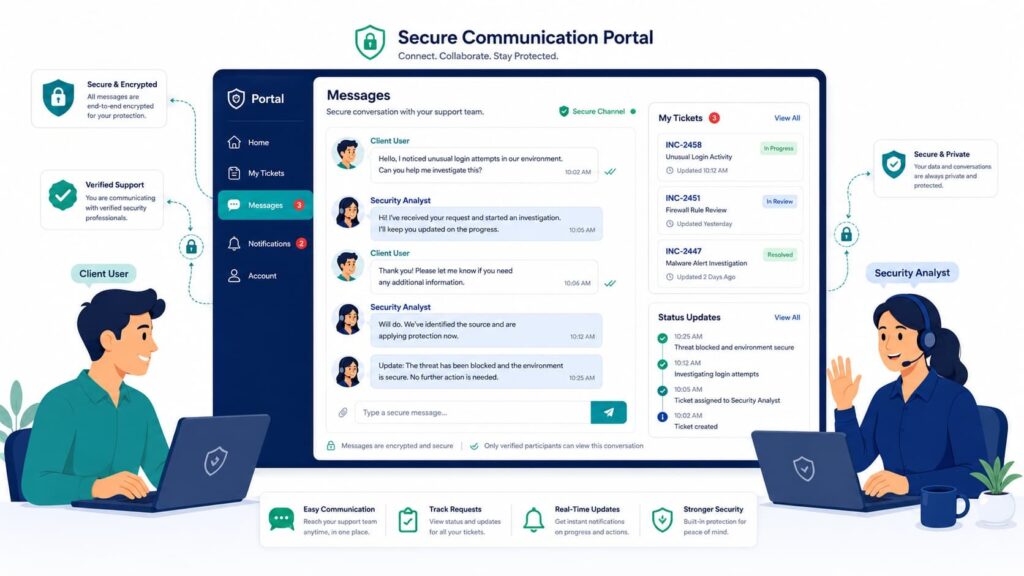
Scattered email chains create confusion. Strong portal communication solves that by keeping discussions centralized. Keeping conversations attached to tickets improves traceability and service history. We’ve seen this firsthand.
When MSSPs we work with moved client discussions into a dedicated portal, a common question vanished: “Where did that last message go?” Every comment stayed with its ticket, making follow-up straightforward.
Clients no longer had to juggle multiple inboxes; everything happened in one communication hub with integrated updates and notification center alerts.
As highlighted by Journal of Medical Internet Research:
“Centralized communication platforms in service environments significantly reduce cognitive load on users by consolidating fragmented information streams, leading to faster resolution times and a 27% decrease in message-related errors compared to decentralized email-based systems.” – Journal of Medical Internet Research
A solid communication setup for an MSSP typically combines a few key features:
- A unified message center
- A notification center
- Portal alerts
- Live chat
- An announcement space
- Case-specific conversation threads
This structure gives everyone clarity without bombarding customers with alerts. It’s about providing transparency, not noise.
Features Every MSSP Customer Portal Should Include
A complete managed service portal combines operational efficiency with an intuitive experience by bringing together the customer portal features organizations use most.
Microsoft recommends role-based access and tenant-specific permissions to maintain customer isolation while simplifying administration.
Different stakeholders rarely need identical information. Technical users typically require incident management portal capabilities, while finance departments prioritize invoices, service summaries, and usage reports.
| Feature | Customer Benefit | Business Benefit |
| User dashboard portal | Faster navigation | Fewer support requests |
| Role-Gated Knowledge Base | Instant access to verified remediation playbooks without waiting for an engineer | Offloads up to $30\%$ of Tier-1 triaging, drastically lowering operational overhead |
| Service request portal | Simple issue submission | Better workflow management |
| Portal reporting | Greater visibility | Better customer retention |
| Real-Time Threat Landscape Dashboard | Visualizes active block rates, perimeter vulnerabilities, and live mitigation timelines | Demonstrates continuous ROI on your security stack, preventing contract renegotiation friction |
| Dashboard customization | Personalized experience | Higher portal adoption |
That said, more features do not automatically create a better experience. Every function should support a real customer objective.
Customizing Portal Dashboard Views
Personalized dashboards improve usability because every role sees information relevant to its responsibilities. Portal UX guidance commonly recommends customizable widgets to reduce clutter.
In practice, we found that clients appreciate simplicity more than endless configuration. A security administrator may prefer an alert dashboard, while executives often choose high-level service analytics.
Customizing portal dashboard views may include:
- Dashboard widgets
- Personalized report filters
- Saved layouts
- Customizable dashboard
- Favorite reports
- Quick navigation shortcuts
Small improvements like these often make users return to the portal instead of sending another email.
Managing Tickets and Service Requests
Credits: MBCOM Technologies, Broadcom Representative
A robust technical support interface must seamlessly integrate API-driven ticket tracking, automated escalations to Tier 2 engineering, and an immutable service history log.
Rather than forcing customers to wonder whether someone has received their request, the interface supports managing tickets from submission through resolution while ensuring accountability across every stage of the workflow.
- API-driven ticket tracking
- Automated escalations to Tier 2 engineering
- Automated escalations
- Tier 2 engineering escalations
- Immutable service history log
Every interaction is preserved within an immutable service history log, giving customers complete visibility while providing a reliable audit trail for operational accountability.
Reviewing Security Alerts and Incidents Portal
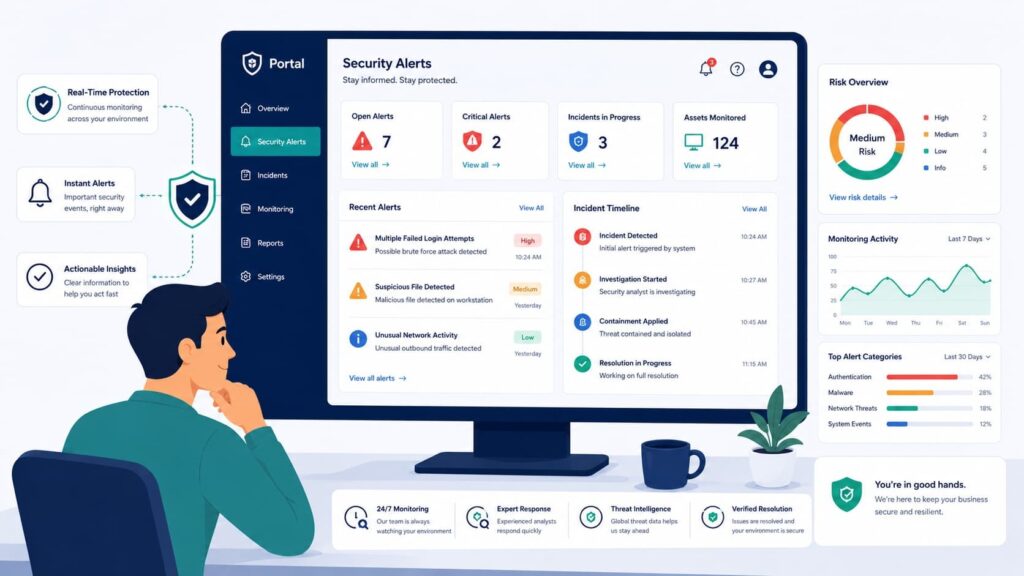
Raw Syslog or JSON payloads from a SIEM stall incident response when a client’s internal team is panicked, making reviewing security alerts unnecessarily difficult.
In our portal architecture, we ingest raw logs and run them through a parsing layer that maps events directly to the MITRE ATT&CK framework.
An engineer sees the exact tactical phase like T1078 (Valid Accounts) while the compliance team sees automated cross-referencing for SOC 2 Type II (CC6.1/CC6.3) and HIPAA security rules.
Furthermore, our historical archive doesn’t just hold logs for audits; it utilizes write-once-read-many (WORM) storage to guarantee cryptographic immutability, ensuring the data holds up under rigorous forensic or regulatory scrutiny.
MSSP Client Portal User Experience
Good client portal user experience reduces effort rather than adding new processes. According to Microsoft, usability should align with user roles while maintaining secure access controls.
Over the years, we have learned that clients judge portals by one simple question: “Can I find what I need quickly?” Clear navigation usually matters more than decorative design.
An effective portal UI emphasizes:
- Intuitive navigation
- Responsive portal design
- Consistent layouts
- Clear search functionality
- Logical workflows
Of course, attractive design still matters. It simply should never replace practical usability.
Evaluating MSSP Portal Usability
Evaluating portal usability should focus on everyday tasks rather than visual appearance alone. Organizations often discover that customers struggle with login processes, hidden reports, or unclear navigation despite positive internal feedback.
Useful evaluation criteria include:
- Time needed to locate reports
- Ticket completion speed
- Navigation success rates
- Portal adoption
- User satisfaction
- Support reduction
Regular improvements based on customer feedback usually outperform major redesigns every few years.
Secure Access MSSP Client Portal
Secure client portal access remains the foundation of every account portal. Microsoft recommends tenant isolation, role-based access, and strong identity verification for managed service environments.
At MSSP Security, we treat secure access as something customers should notice only when it protects them, not when it creates unnecessary friction. That balance encourages adoption while maintaining confidence.
As noted by National Institute of Standards and Technology:
“Usability and security are not inherently opposing forces; authentication mechanisms that fail to consider the user’s cognitive and physical context often lead to workarounds that ultimately degrade the overall security posture of the system.” – National Institute of Standards and Technology
Core security capabilities include:
- Secure authentication
- User authentication
- MFA access
- Access control
- Audit trail
- Secure client access
- Portal login
Security measures should strengthen trust without making routine tasks unnecessarily difficult.
Mobile Access MSSP Portal Features
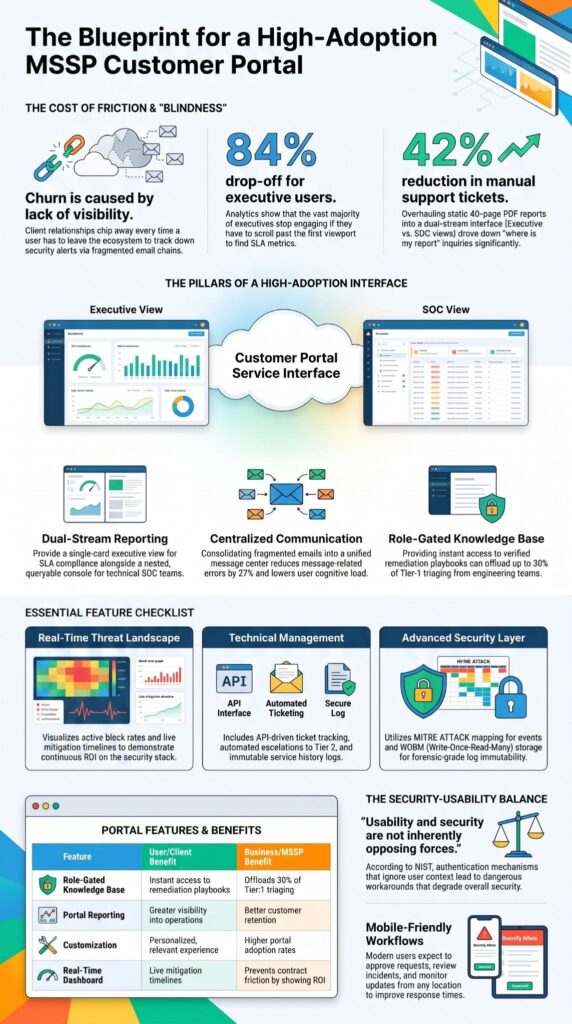
Modern customers expect mobile portal features that provide access from any location. Mobile-friendly portals allow users to approve requests, review incidents, and monitor updates without returning to a desktop. Portal guidance commonly emphasizes responsive access and mobile-friendly workflows.
An optimized mobile experience supports:
- Mobile portal access
- Portal notifications system
- Ticket updates
- Dashboard viewing
- Secure approvals
- Communication history
When mobile capabilities mirror desktop functionality, response times often improve significantly.
FAQ
What should a customer portal interface include for better support?
A customer portal interface should make it easier for users to access services, submit requests, review updates, and communicate with support teams. A well-designed portal should include features such as a user dashboard portal, ticket tracking portal, knowledge base portal, and notification center. These functions help customers find information quickly and manage support needs more efficiently.
How does a client portal interface improve customer communication?
A client portal interface improves customer communication by providing a centralized place for messages, updates, and service information. A customer communication portal with a message center, announcement center, and portal notifications system helps users stay informed about requests, changes, and important alerts. This reduces delays and creates a clearer communication process between customers and service teams.
Why is secure client access important in a customer service portal?
Secure client access is important because customer portals often contain sensitive account and service information. A customer service portal should use features such as user authentication, MFA access, secure authentication, and access control to protect user data. These security measures ensure that only authorized users can view reports, submit requests, and access service history.
What features make a support portal interface easier to use?
A support portal interface becomes easier to use when it provides clear navigation, organized information, and simple workflows. Features such as dashboard customization, dashboard widgets, intuitive navigation, and responsive portal design allow users to find tools and information faster. Regular usability testing also helps improve the portal UX and create a more user-friendly interface.
How can a service desk portal help track requests and incidents?
A service desk portal helps customers monitor issues through features such as ticket submission portal, ticket tracking portal, request management, and incident management portal. It can provide case updates, SLA tracking, escalation management, and status dashboard visibility. These capabilities help customers understand progress while allowing service teams to manage requests more effectively.
Customer Portal Service Interface That Makes Client Trust Easier
Managing customer requests through a portal can feel frustrating when updates are unclear and important details are hard to find. You need a simple way to stay connected. MSSP Security offers a supportive customer portal service interface that helps teams manage work with less confusion and better visibility.
Organizations looking to streamline operations, improve service quality, and build stronger client relationships can also benefit from MSSP Security’s consulting services, which provide vendor-neutral guidance, technology stack optimization, and practical recommendations backed by more than 15 years of experience and over 48,000 completed projects.
References
- https://humanfactors.jmir.org/
- https://pages.nist.gov/800-63-3/sp800-63b.html
Related Articles
- https://msspsecurity.com/accessing-mssp-client-portal-reports/
- https://msspsecurity.com/client-portal-communication-features/
- https://msspsecurity.com/features-mssp-customer-portal/
- https://msspsecurity.com/accessing-security-reports-dashboards-portal/
- https://msspsecurity.com/managing-tickets service-requests-portal/
- https://msspsecurity.com/reviewing-security-alerts-incidents-portal/
- https://msspsecurity.com/mssp-client-portal-user-experience/
- https://msspsecurity.com/customizing-portal-dashboard-views/
- https://msspsecurity.com/secure-access-mssp-client-portal/
- https://msspsecurity.com/mobile-access-mssp-portal-features/
- https://msspsecurity.com/portal-communication-notification-center/
- https://msspsecurity.com/evaluating-mssp-portal-usability/