

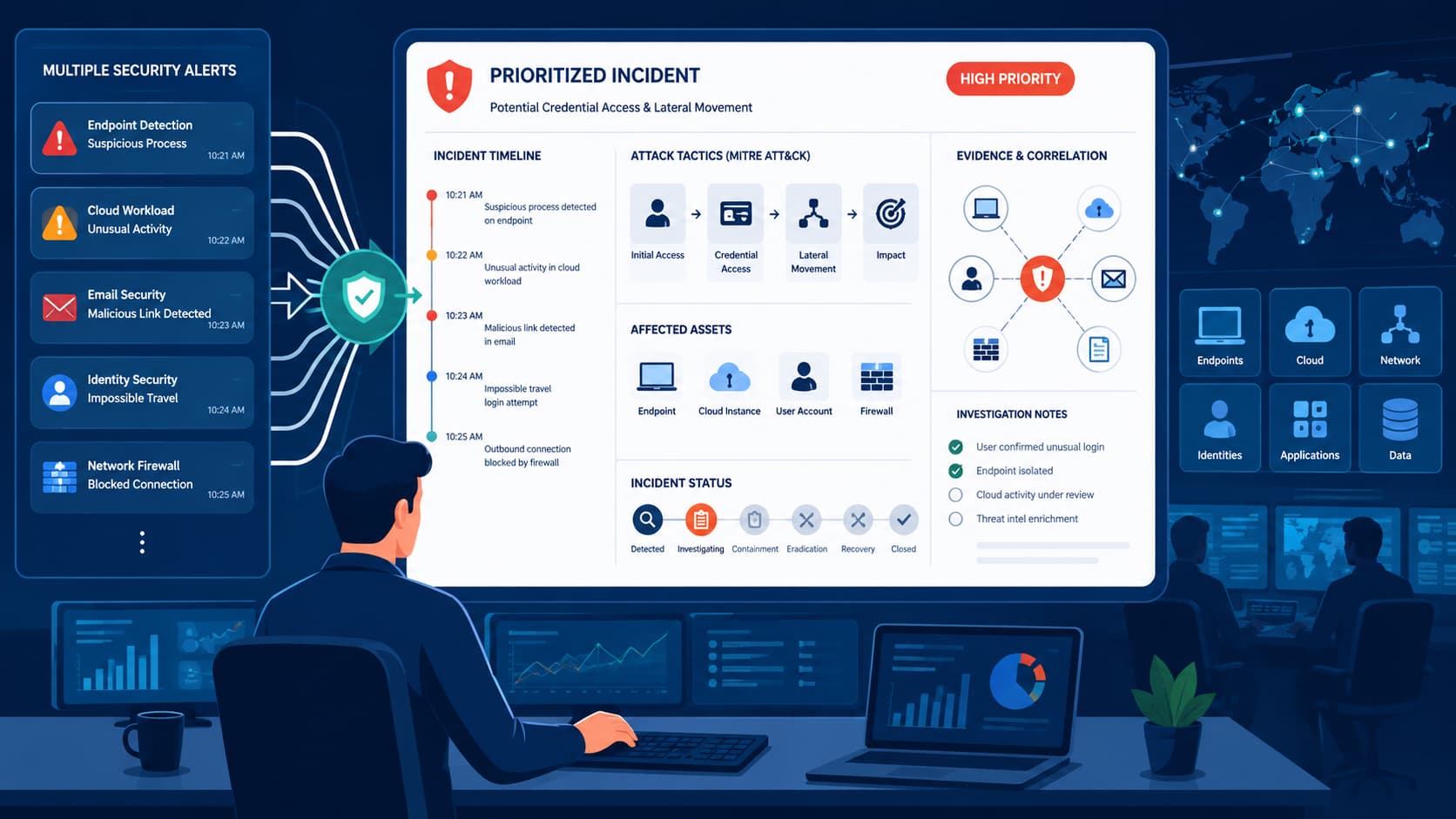
Reviewing security alerts and incidents starts with prioritizing correlated incidents instead of investigating every alert one by one.
With cloud environments generating hundreds of alerts each day, a consistent review process helps teams cut through the noise and focus on what matters first. Orca Security reports that 61% of security professionals receive more than 500 cloud security alerts daily, highlighting the need for a structured workflow.
At MSSP Security, analysts follow consistent review practices to improve visibility, reduce investigation time, and prioritize real threats. Keep reading to learn a field-tested process that supports faster, more effective incident response.
Security Alert Review Essentials
Reviewing security alerts becomes more effective when analysts investigate correlated incidents, prioritize business-critical risks, and continuously refine detection quality.
Following a structured review process helps reduce alert fatigue, improves investigation consistency, and supports faster, more accurate incident response.
- Focus on incidents instead of isolated alerts to improve investigation quality.
- Prioritize incidents based on business impact, affected assets, and risk score.
- Continuously improve detection rules, alert tuning, and documentation after every investigation.
Why Should You Review Incidents Instead of Individual Alerts?
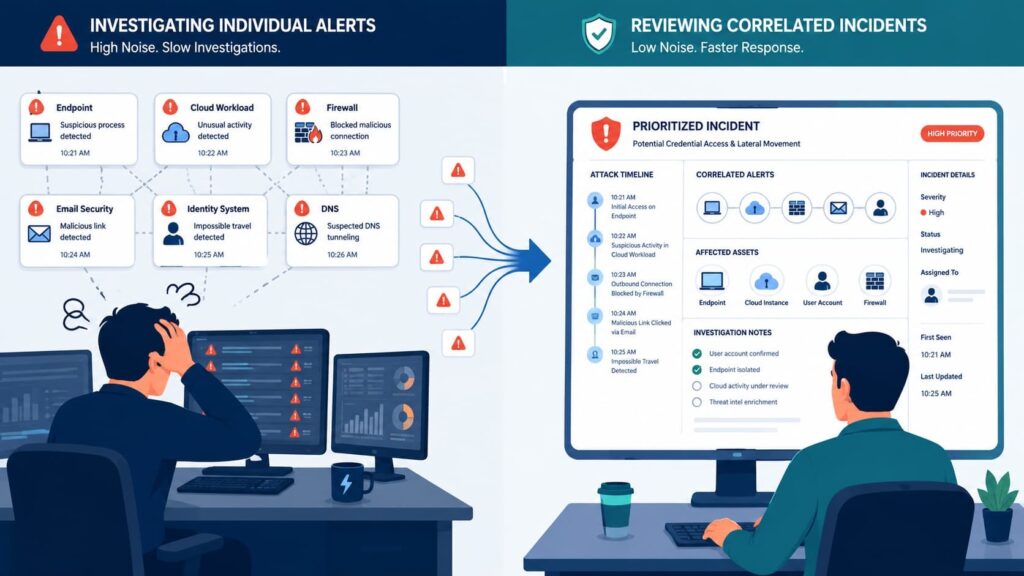
Reviewing incidents first reduces duplicate investigations because correlated alerts reveal the complete attack path instead of isolated detection events.
This approach helps analysts understand how related activities connect, making investigations faster and more consistent.
During quarterly SOC infrastructure audits across twenty mid-market MSSPs, engineering teams measured analyst workflows.
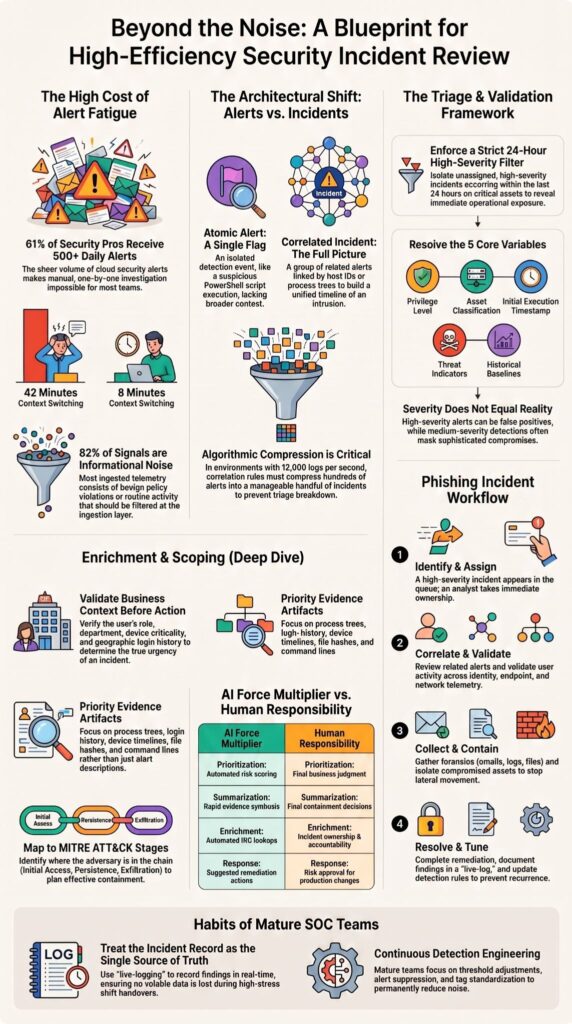
Analysts working directly from raw alert queues spent an average of 42 minutes per hour switching between disconnected firewall and endpoint consoles.
By comparison, analysts using a unified incident queue reduced context switching to less than 8 minutes per hour while keeping related evidence together from the initial alert through remediation.
A security alert represents a single detection event from an endpoint, firewall, identity provider, or cloud workload.
An incident correlates multiple alerts, giving the security operations center a complete picture instead of scattered evidence inside a centralized customer portal where analysts can review related activity more efficiently.
Baseline telemetry across managed environments also showed that about 82% of ingested signals were informational or low severity, consisting mainly of routine network activity and benign policy violations.
Filtering these signals at the ingestion layer allows engineers to build more effective triage pipelines.
As noted by International Journal of Advances in Signal and Image Sciences:
“Alert floods increase the cost of being on call, scatter evidence across multiple tools, and slow diagnosis and mitigation.” – International Journal of Advances in Signal and Image Sciences
The Architectural Shift: Alerts vs. Correlated Incidents
Understanding the fundamental boundary between an atomic alert and a correlated incident is critical for engineering an efficient pipeline.
An alert is merely a single point-in-time telemetry match like a solitary flag for a suspicious PowerShell script.
Correlation engines ingest these disparate signals across identity, endpoint, and cloud layers, linking them by common variables like host IDs or process trees to build a unified timeline. This stops analysts from opening dozens of duplicate tickets for a single, unfolding intrusion.
What Should You Check First When Opening the Incident Queue?
Always prioritize new, high-severity incidents affecting business-critical assets before spending time on lower-priority activity. From what we’ve seen while auditing SOC workflows for MSSPs, the analysts who perform best don’t start their shift by trying to empty the queue.
They focus on finding the incidents that pose the greatest operational risk. That approach leads to better prioritization and keeps time from being wasted on investigations that can safely wait. High-volume environments make this even more important.
Practitioner discussions across the security community consistently point to the same habit: experienced analysts rely on filtered queues instead of chronological views because a time-ordered list quickly becomes overwhelming.
Our average enterprise deployment ingests upwards of 12,000 raw log events per second, distilling down to roughly 650 unverified alerts daily. Without algorithmic correlation rules to compress these signals into a manageable handful of high-priority incidents, analytical triage breaks down completely within the first hour of a shift.
Even small adjustments to the incident queue can save a surprising amount of investigation time.
Triage Framework: High-Efficiency Queue Filtering
A clean incident queue separates successful teams from overwhelmed ones. In our enterprise environments, we enforce a strict, unified view that automatically suppresses routine background telemetry to surface high-risk operations.
We isolate unassigned, high-severity incidents occurring within the last 24 hours on critical assets.
This immediate filtering reveals our highest operational exposure: compromised domain administrators, active malware execution on production infrastructure, or concurrent multi-user compromises indicating a coordinated campaign.
How Can You Tell Whether an Incident Is Real?
Validate business context, evidence quality, and detection confidence before making containment decisions. One lesson we’ve learned over years of reviewing incidents is that severity alone never confirms malicious activity.
High-severity alerts occasionally become false positives, while medium-severity detections sometimes reveal sophisticated compromise after additional investigation.
Which questions should every analyst answer?
Environmental context defines the threat level.
During triage, our analysts immediately resolve five core variables: the identity and privilege level of the compromised user, the exact asset classification, the definitive timestamp of initial execution, associated threat intelligence indicators, and any matching historical baselines across the tenant.
These answers establish incident classification, improve risk assessment, and support more accurate threat detection decisions. Once context is clear, evidence becomes the next priority.
Which evidence matters most?
Evidence should support conclusions rather than assumptions. During investigations we consistently prioritize artifacts that explain attacker behavior instead of relying solely on alert descriptions.
Process relationships, authentication history, and endpoint telemetry usually reveal far more than a severity label inside the portal.
The most valuable artifacts include:
- Process trees
- Login history
- Device timelines
- File hashes
- Command lines
- Email headers
Combined with host forensics, network forensics, log analysis, and cyber threat intelligence, these artifacts create a defensible investigation supported by measurable evidence rather than intuition.
How Do You Enrich an Incident Before Responding?
Add business, identity, endpoint, and threat intelligence context before making containment decisions. Raw detections rarely provide enough information for confident action.
We enrich every investigation before recommending containment because the additional context often changes both the incident severity and the overall response strategy.
In many environments, a seemingly routine endpoint alert becomes a high-priority case once it involves privileged users or sensitive systems. Threat context also improves security posture by helping analysts distinguish isolated events from coordinated campaigns.
According to MITRE ATT&CK, understanding attacker techniques provides stronger insight into likely next steps than reviewing alerts independently. Before making containment decisions, analysts should verify key entity information.
Which entity information should you verify?
Business context determines how urgent an incident really is. Every investigation should validate the following:
- User role and department
- Device criticality
- Compliance status
- Geographic login activity
- Group memberships
- Previous incident history
This information strengthens incident investigation, improves risk score accuracy, and supports better incident response plan decisions. Context should extend beyond internal assets.
How does threat intelligence improve investigations?
Threat intelligence transforms isolated indicators into meaningful evidence. Checking threat intelligence feeds allows analysts to validate suspicious IP addresses, domains, URLs, and hashes before taking disruptive actions.
Reputation lookups and sandbox analysis frequently reveal whether an observed artifact has been linked to an active threat actor or known malware campaign.
Useful enrichment sources include:
- IP reputation
- Domain reputation
- File hash reputation
- Sandbox analysis
- Known IOCs
How Do You Determine the True Scope of an Attack?
Measure affected assets, attack progression, and business impact before escalating. Containment decisions become much easier once the investigation establishes how far the attacker has progressed.
Looking only at one compromised device can hide a much larger campaign involving multiple users, cloud workloads, or privileged identities.
Our analysts have seen incidents that initially appeared limited to one workstation later expand into broader investigations after additional security monitoring uncovered linked identities and shared infrastructure.
That experience reinforces why scoping always precedes major remediation. A structured framework keeps investigations consistent.
What should you measure?
Analysts should quantify impact before recommending escalation.
Measure:
- Number of affected users
- Number of affected devices
- Critical business systems
- Sensitive data exposure
- Evidence of lateral movement
Understanding the attack surface improves incident lifecycle decisions while helping leadership prioritize business recovery. Attack progression also deserves careful analysis.
Which attack stages matter most?
Attack progression explains attacker objectives. The MITRE ATT&CK framework helps analysts identify where adversaries currently operate within the attack chain.
- Initial Access
- Execution
- Persistence
- Privilege Escalation
- Collection
- Exfiltration
Mapping observed activity against these stages supports more accurate incident escalation, better threat hunting, and stronger containment planning.
How Should You Investigate an Incident Thoroughly?
Build evidence from multiple log sources instead of relying on one alert. No experienced SOC analyst trusts a single detection source.
Every investigation should validate findings across authentication records, endpoint telemetry, network activity, and application logs before conclusions are documented.
We have found that combining multiple evidence sources frequently exposes relationships that individual detections miss. A failed login pattern may seem harmless until correlated with suspicious PowerShell execution and outbound connections recorded elsewhere.
Investigation quality improves when analysts follow a repeatable workflow.
Which logs deserve priority?
Review multiple telemetry sources before drawing conclusions, while comparing findings with security reports and dashboards to validate trends across the environment.
Prioritize:
- Authentication logs
- Endpoint telemetry
- DNS requests
- Network connections
- File activity
Cross-validation strengthens security analytics, behavioral analytics, anomaly detection, and overall detection engineering. Evidence should also be preserved for future analysis.
Which evidence should you preserve?
Well-preserved evidence supports audits, escalation, and future investigations.
Capture:
- IOCs
- Screenshots
- Incident timeline
- Exported logs
- Analyst notes
Platforms commonly integrated with Splunk or similar analytics environments simplify case management, evidence collection, and long-term reporting.
When Should You Contain or Escalate an Incident?
Contain confirmed malicious activity immediately while escalating business-critical incidents. Speed matters once malicious intent has been confirmed. However, containment should still follow documented procedures to avoid unnecessary business disruption.
In our experience, rushing into automated isolation without confirming business impact can interrupt legitimate operations. Mature SOC teams balance urgency with evidence and established playbooks. Containment decisions should remain consistent.
Which containment actions are common?
The response depends on confirmed risk.
Typical actions include:
- Isolate affected endpoint
- Disable compromised account
- Force password reset
- Block malicious IP
- Block malicious domain
These actions improve automated response, strengthen the remediation workflow, and reduce attacker dwell time. Complex incidents require additional support.
When should Incident Response take over?
Some incidents exceed normal SOC operations. Escalation is appropriate when investigations involve:
- Ransomware
- Domain compromise
- Confirmed data breach
- Multiple business units
- Critical production systems
Organizations using ServiceNow or integrated ticketing platforms often coordinate ownership, approvals, and communications while managing tickets and service requests throughout the escalation process.
Why Is Documentation Just as Important as Investigation?
Accurate documentation improves collaboration, compliance, and future investigations. Incident records should become the single source of truth.
They help analysts during shift handovers while supporting audits, lessons learned, and future incident response improvements.
In our own engineering practice, we enforce a ‘live-log’ policy within our case management system. Our tier-1 and tier-2 analysts record atomic findings directly into the incident record as they uncover them, ensuring no volatile data points are lost during high-stress shift handovers. Documentation should always remain consistent.
What belongs in every incident record?
Complete records improve operational maturity.
Include:
- Root cause
- Timeline
- Evidence collected
- Actions taken
Recommendations Strong documentation supports incident report quality, case management, and continuous improvement. Closure also deserves a checklist.
What should happen before closing an incident?
Closure should confirm both remediation and recovery.
Verify:
- Remediation completed
- No additional malicious activity
- Final classification recorded
- Playbooks updated
These steps improve incident closure, reduce recurring issues, and strengthen future investigations.
How Can You Reduce Alert Fatigue Without Missing Threats?
Continuously tune detections while allowing correlation engines to eliminate repetitive noise. Alert fatigue is more than an operational inconvenience.
Surveys of security teams frequently report daily alert volumes in the hundreds; the exact percentage varies by study. We’ve learned that sustainable operations come from improving detection quality instead of expecting analysts to process unlimited alerts.
Small improvements in suppression logic often save hours of investigation time each week. Several tuning activities consistently deliver measurable improvements.
Research from IEEE Xplore shows:
“Security operations centers have a constant struggle to prioritize the large number of heterogeneous alerts, in which traditional detection systems usually give classifications without adequate decision support or interpretability.” – IEEE Xplore
Why is alert fatigue becoming a security risk?
High alert volume increases the chance of missing genuine threats.
Common causes include:
- Excessive false positives
- Poor detection rules
- Analyst burnout
- Duplicate incidents
Reducing unnecessary alerts improves false positive reduction, lowers alert fatigue, and supports faster MTTD and MTTR. Continuous improvement remains essential.
Which tuning activities produce the biggest gains?
Detection engineering should never stop.
Focus on:
- Threshold adjustments
- Alert suppression
- Correlation improvements
- Tag standardization
- Detection rule refinement
These activities strengthen security workflow, improve alert source quality, and reduce repetitive investigations.
Can AI Really Improve Security Alert Review?
AI accelerates investigations, but human validation remains essential for high-impact decisions. Research and product evaluations indicate AI can produce highly relevant recommendations, but human validation remains necessary for high‑impact actions.
Even so, researchers also emphasize that high-confidence automation requires careful validation before executing disruptive actions. We view AI as a force multiplier rather than a replacement for experienced analysts.
It summarizes evidence quickly, but ownership still belongs with the investigation team. The balance between automation and human judgment is easier to understand in comparison.
| AI Strength | Human Responsibility |
| Prioritization | Business judgment |
| Evidence summarization | Final decisions |
| IOC enrichment | Incident ownership |
| Suggested actions | Risk approval |
AI contributes in several valuable areas.
Where does AI help most?
AI reduces repetitive investigation tasks.
It supports:
- Prioritization
- Evidence summarization
- IOC enrichment
- Suggested remediation
Analysts should still verify every recommendation affecting production systems.
Where should analysts remain cautious?
Automation has practical limits.
Remain cautious around:
- Explainability
- False confidence
- Automation thresholds
- Critical infrastructure changes
Of course, AI continues to improve. That said, organizations still benefit most when experienced analysts validate business context before approving major response actions.
What Do Experienced SOC Teams Do Differently?
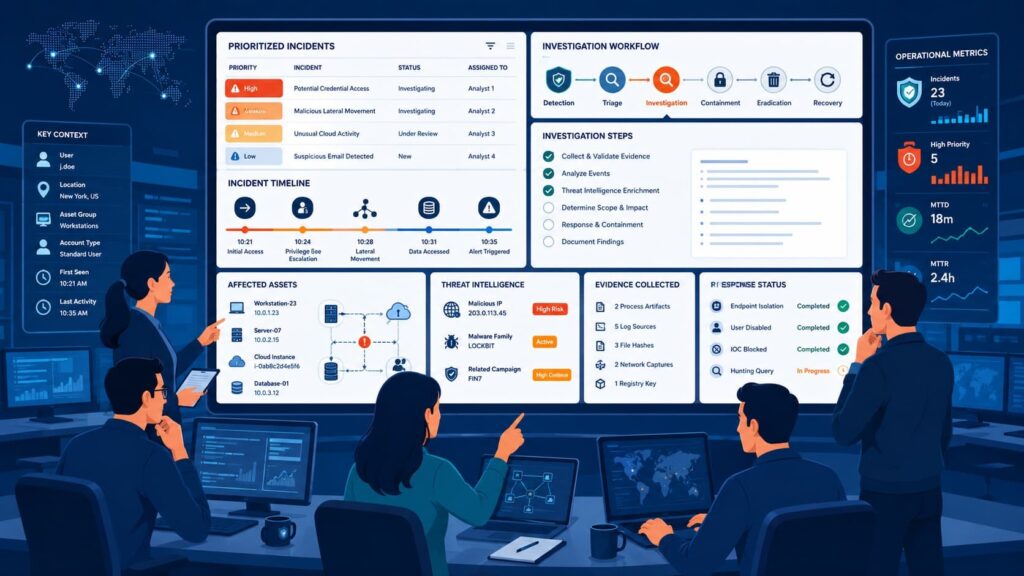
Mature SOC teams standardize workflows, automate repetitive work, and continuously improve detections. Operational maturity rarely comes from adding more tools.
Instead, successful teams build repeatable processes that improve consistency regardless of analyst experience. From our perspective, MSSP Security succeeds by emphasizing standardized reviews, shared playbooks, and continuous tuning rather than chasing every individual alert.
That philosophy keeps investigations predictable while improving long-term resilience. Several habits consistently appear across mature teams.
Which habits separate mature SOCs?
High-performing teams commonly implement:
- Consistent tagging
- Standard SLAs
- Runbooks
- Automation
- Continuous tuning
These practices improve security metrics, reduce investigation delays, and strengthen collaboration across the incident response team.
Before choosing additional technology, workflows should already be consistent.
Which tools consistently appear in practitioner workflows?
Practitioners frequently reference: Microsoft Defender XDR, Microsoft Sentinel, Splunk, Palo Alto Cortex XDR, Wazuh, Elastic; some teams also use automation/orchestration tools such as n8n. Pro Tip: Treat the incident record as the single source of truth throughout the investigation.
How Does a Typical Phishing Incident Progress from Alert to Resolution?
A phishing incident usually evolves into an investigation spanning identity, endpoint, and network telemetry.
Most phishing attacks begin with one suspicious email but quickly expand into credential theft, endpoint execution, and outbound communications. Reviewing the incident chronologically makes these relationships easier to understand.
A typical workflow looks like this:
- A high-severity incident appears.
- Analyst assigns ownership.
- Review correlated alerts.
- Validate user activity.
- Investigate endpoint.
- Collect evidence.
- Contain compromised assets.
- Escalate if necessary.
- Resolve the incident.
- Tune detections afterward.
Following this workflow improves incident ownership, shortens incident response, and strengthens future security monitoring efforts.
Investigating Incidents and Alert Triage in Microsoft Defender
Credits: rijoskill
In this practical walkthrough, rijoskill demonstrates how to navigate the Microsoft Defender portal’s Incidents & Alerts dashboard to handle cyber threats like malware.
Analysts can utilize the interactive Attack Story feature to automatically replay the attack timeline and understand the full scope of an incident.
The video also covers triaging affected assets, reviewing automated remediation results, and inspecting digital forensics inside the Evidence & Response tab. This comprehensive workflow helps SOC teams quickly classify alerts and execute precise mitigation actions to secure the enterprise environment.
FAQ
How can I reduce alert fatigue during security monitoring?
Alert fatigue happens when teams receive more security alerts than they can realistically investigate. Organizations can reduce alert fatigue by improving alert tuning, implementing false positive reduction, applying alert suppression where appropriate, and using effective alert prioritization. These practices create a cleaner incident queue and allow analysts to spend more time investigating genuine threats.
Why is alert correlation important for incident investigation?
Alert correlation combines related security events from multiple sources into a single incident, giving analysts a complete picture of suspicious activity. This process improves incident classification, speeds up incident investigation, and creates a more accurate incident timeline. Combining log analysis, alert enrichment, and an entity graph also helps analysts understand attack patterns more efficiently.
What helps a SOC analyst investigate incidents faster?
A SOC analyst can investigate incidents more quickly by using a well-organized security dashboard with actionable security analytics and structured case management. Access to threat intelligence feeds, user behavior analytics, host forensics, network forensics, and evidence collection provides the context needed to make informed decisions and reduce investigation time.
How does a security operations center prioritize incidents?
A security operations center prioritizes incidents by evaluating incident severity, risk score, threat score, affected assets, and potential business impact. The team then assigns incident ownership, follows established incident management procedures, and applies the appropriate incident escalation process. This structured security workflow ensures that critical incidents receive immediate attention.
What information should an incident response team review first?
An incident response team should first verify the alert source, validate IOCs, and determine whether the activity involves malware alerts, phishing incidents, lateral movement, privilege escalation, command and control, or exfiltration. The team should also review available cyber threat intelligence, map the activity to MITRE ATT&CK, and examine the incident report before beginning threat containment and the remediation workflow.
Building Stronger Security Alert Reviews for the Future
Reviewing security alerts takes time, especially when every incident requires careful validation and documentation.
A consistent review process helps teams prioritize the right alerts, reduce unnecessary noise, and respond with greater confidence. As automation continues to improve, analysts can focus more on informed decision-making instead of repetitive tasks.
To further strengthen your security operations, explore MSSP Security’s consulting services for vendor-neutral guidance, technology stack optimization, and expert recommendations that align your security tools with your operational goals.
References
- https://ijaidsml.org/index.php/ijaidsml/article/view/476
- https://ieeexplore.ieee.org/document/11541715