

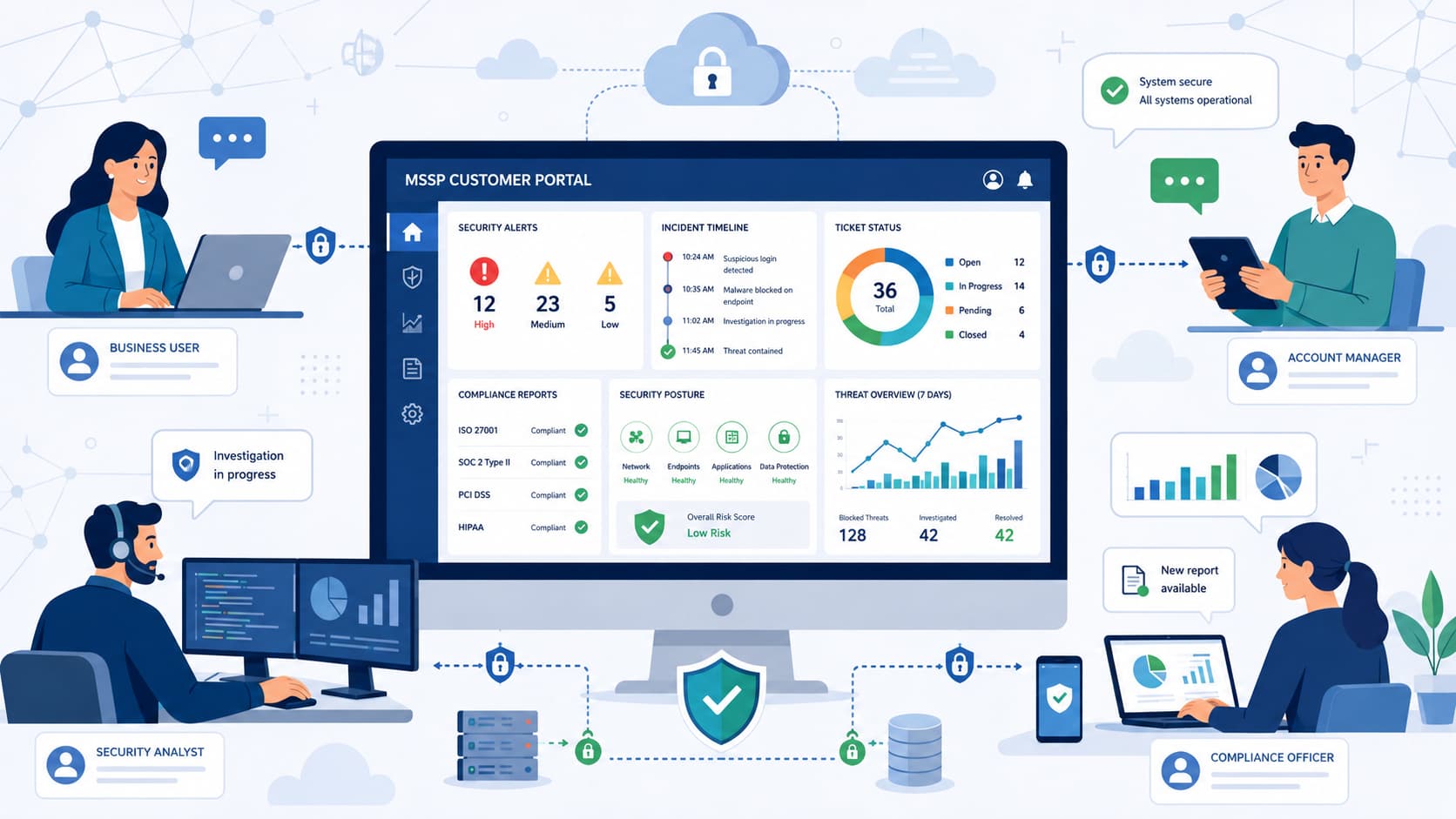
At MSSP Security, our consulting work with MSSPs has shown that clients rarely leave because of missed alerts. More often, they become frustrated by slow updates, scattered communication, and limited visibility into ongoing security operations.
A well-designed MSSP customer portal addresses these challenges by bringing incident tracking, analyst communication, reporting, and service visibility into one secure workspace.
Customers gain faster access to the information they need, while providers strengthen trust through greater transparency and a more consistent service experience. Keep reading to discover the features that make an MSSP customer portal truly valuable.
MSSP Customer Portal Essentials
A successful MSSP customer portal delivers secure access, clear visibility, and simple workflows that help customers manage security operations with confidence.
- Secure multi-tenant access builds customer trust and protects tenant data.
- Incident visibility, reporting, and communication should work together inside one portal.
- Simplicity consistently drives better customer adoption than excessive functionality.
Why Does an MSSP Customer Portal Matter?
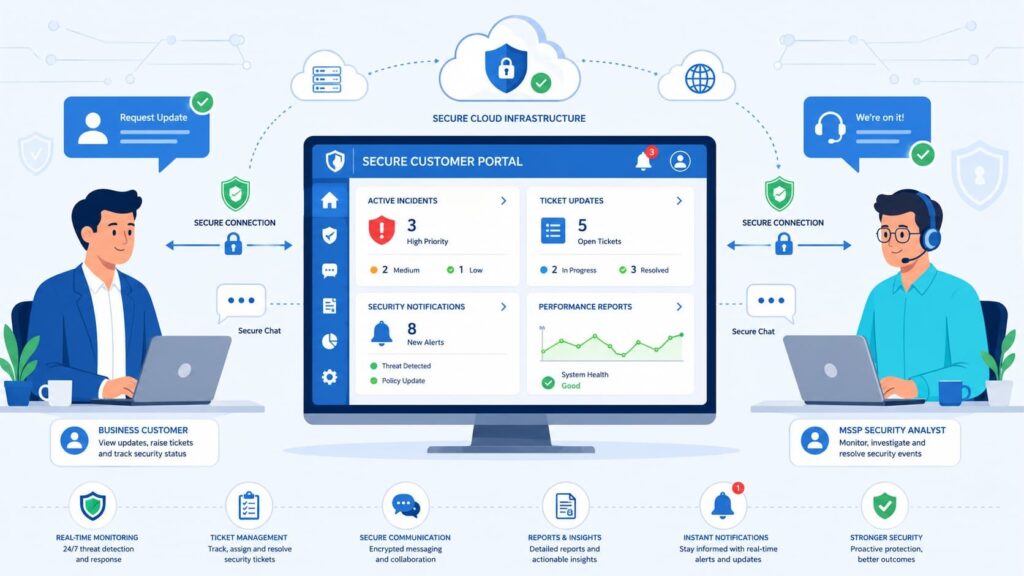
It eliminates the need to juggle emails, spreadsheets, and separate tools. From our consulting work with MSSPs, we see a clear pattern: clients don’t just judge a service by the threats it stops. They judge it by how easily they can understand what’s happening. Transparency builds trust, and that’s crucial during an incident.
As noted by LevelBlue:
“Transparency is key. High levels of transparency for clients into the work we perform for them is a demonstration of the level of commitment we have for delivering great service, and it’s what our clients expect.” – LevelBlue
A modern portal improves collaboration. Business stakeholders can review incidents, monitor performance, and track requests without waiting for a manual update.
This shift matters. Customer experience and portal usability are important differentiators in provider selection.
What do clients actually expect?
It should reduce email clutter, improve operational transparency, validate SLA performance, and provide on-demand reports. But before adding advanced features, it must solve everyday operational problems simply.
It needs to validate SLA performance and provide on-demand reports. But before anything fancy, it must solve daily problems simply.
So what’s the core business problem it solves?
A good portal removes communication barriers. It lets security analysts focus on their work while giving clients immediate visibility. Instead of asking for status updates, clients can directly see incident details, ticket history, and service health.
Why is a single portal now an expectation?
Clients want digital self-service in every business area, and security is no different. In our audits, we find clients consistently prefer one familiar workspace.
They use it to review alerts, request support, and access documentation without switching contexts.
Framing it as a collaboration workspace, not just another dashboard, drives much higher engagement.
What Secure Access Features Are Essential?
Access management is the foundation of customer trust. It relies on strong authentication, clear tenant separation, and precise role-based permissions to protect information while keeping daily use simple.
Security truly does start with identity. Any MSSP portal must isolate customer environments through a solid multi-tenant architecture, ensuring each organization only sees its own assets, tickets, and reports.
In our consulting work, we always advise MSSPs to prioritize secure, reliable access before building advanced features.
Customers notice reliability right away; fancy automation only adds value after that basic trust is earned. A consistent customer portal service interface also makes secure access easier for both administrators and end users.
Core access controls should include multi-tenant isolation, role-based access, MFA, and tenant-specific permissions.
Delegated administration and audit logging are also valuable where supported by the platform. Once secure authentication is handled, permission management becomes the next logical step.
How does multi-tenant separation protect customers?
Multi-tenant separation must strictly isolate client data at the database level. Our core deployment framework ensures that each organization’s workspace exclusively processes its own incidents, assets, and compliance reports.
Enforced by granular, customer-specific permissions, this architecture completely eliminates the risk of cross-tenant data bleeding and builds verifiable operational confidence.
Should the portal support SSO?
Yes. Single Sign-On improves usability without compromising security. Here’s a quick look at how key features work together:
| Feature | Benefit |
| Single Sign-On | Reduces login friction |
| Multi-Factor Authentication | Strengthens account protection |
| Role-Based Access Control | Manages user permissions precisely |
Getting authentication right creates a smoother, more secure experience for both administrators and end-users. We’ve seen it make a tangible difference in portal adoption during our product audits.
How Should Customers Track Security Incidents?
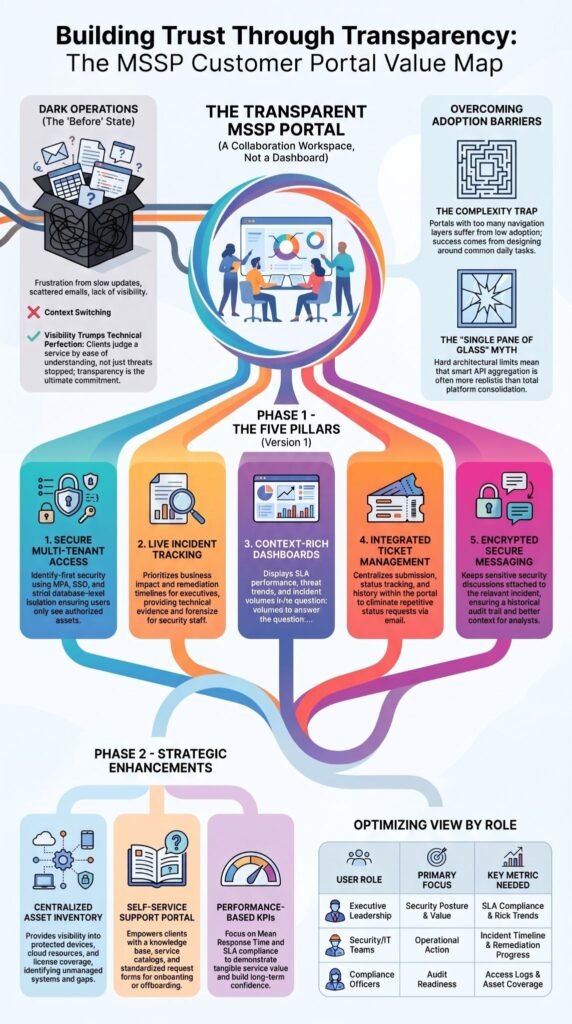
Customers need incident visibility without requiring analyst-level expertise. Information should explain business impact first and technical evidence second.
Security events happen quickly, but customers usually care most about what happened, how serious it is, and whether action is underway.
We’ve found that presenting incidents through a clear incident management portal reduces unnecessary support requests because customers already have access to meaningful updates.
According to Microsoft Defender, customer-facing incident views should balance operational transparency with actionable information.
An incident page should prioritize severity, status, timeline, response progress, and resolution details, with technical evidence available for security staff.
Technical indicators remain valuable, but they should support business understanding rather than overwhelm non-security stakeholders.
What should every incident page display?
Each incident should provide context that executives and IT teams can quickly understand. Status indicators, timestamps, response progress, and analyst comments make the threat monitoring dashboard more practical for daily use.
How much technical detail is enough?
Business impact should always appear before forensic evidence. Security analysts may need hashes, indicators of compromise, and telemetry, while executives generally need remediation progress, affected assets, and expected resolution timelines. The best security analytics portal serves both audiences without creating confusion.
Why Are Dashboards More Than Reporting Tools?
Dashboards make MSSP activity easier to understand by showing SLAs, trends, incident volumes, and service performance in one place. Customers should never have to guess whether a managed security service delivers value.
A well-designed mssp dashboard makes service performance visible through trends, response metrics, and compliance reporting instead of overwhelming users with raw alerts.
From our experience at MSSP Security, customers return to dashboards that answer practical questions quickly. They want to know whether risk is increasing, whether incidents are resolved within agreed timeframes, and whether protected assets remain healthy.
According to D3 Security, reporting improves operational transparency when security metrics are presented in business context rather than isolated technical events.
Common useful KPIs include:
| KPI | Why it matters |
| Mean response time | Measures SLA performance |
| Incidents resolved | Demonstrates service value |
| Threat trends | Highlights changing risk |
| SLA compliance | Builds customer confidence |
Before introducing customized reporting, establish consistent baseline metrics that every customer understands. Consistent metrics also make accessing MSSP client portal reports much easier across different customer roles.
Which KPIs matter most?
Executives typically focus on SLA reporting, compliance, and overall security posture. Security teams often need detection trends, case management, and remediation tracking.
Should dashboards be customizable?
Yes. Executive leadership and technical teams consume information differently. Customizable client reporting dashboards help each audience focus on what matters without unnecessary clutter.
How Can Ticketing Improve Customer Experience?
Integrated ticketing reduces communication delays and duplicate requests. A modern ticket tracking portal should support request submission, updates, approvals, and complete status history inside the same workspace.
At MSSP Security, we’ve noticed that customers appreciate following one structured workflow instead of managing separate email conversations and support systems.
According to N-able, centralized ticket visibility improves customer transparency and reduces repetitive status requests.
Essential ticketing capabilities include:
- Ticket submission
- Status tracking
- Priority updates
- Attachments Full history
- Ticketing workflow integration
What ticketing capabilities are required?
Customers should immediately understand where each request stands and who owns the next action.
Why does threaded communication matter?
Keeping every conversation attached to the relevant incident improves context, accountability, and historical documentation while reducing repeated explanations.
Should an MSSP Portal Include Secure Messaging?
Yes. Secure messaging replaces fragmented email conversations with centralized communication. Security discussions often contain sensitive operational information.
A secure client communication workspace helps protect those conversations while keeping them connected to incidents and service requests. We’ve found that customers appreciate seeing analyst responses, approvals, escalation updates, and notifications within the same client communications hub.
Well-designed client portal communication features help keep every interaction organized without relying on scattered email conversations.
According to DeskDirector, integrated communication workflows reduce unnecessary back-and-forth while improving customer visibility.
Messages commonly include:
- Incident questions
- Analyst updates
- Approval requests
- Escalations
Automated notifications also encourage engagement by informing customers whenever meaningful activity occurs.
What messages belong inside the portal?
Incident updates, maintenance notices, service announcements, remediation requests, and customer approvals all benefit from remaining inside the portal.
How do notifications reduce support requests?
Customers stay informed automatically, reducing the need for manual follow-up and allowing analysts to focus on security operations.
What Asset Information Should Customers See?
Customers should clearly understand what the MSSP protects. A useful asset visibility section helps organizations identify protected systems, managed endpoints, cloud resources, licenses, and security coverage.
At MSSP Security, we’ve seen asset inventories become valuable during audits because customers immediately understand what falls under management and where coverage gaps exist. According to Tenable, centralized asset visibility supports stronger vulnerability management and operational awareness.
Customers should see:
- Devices
- Servers
- Cloud resources
- Licenses
- Security tools
Complete asset inventories also support compliance reporting and operational planning.
Which assets belong in the portal?
Any resource monitored or protected through the managed cybersecurity platform should appear in customer views with appropriate permissions.
Why does asset visibility improve security?
Customers can quickly identify unmanaged devices, outdated systems, and configuration gaps before they become larger security concerns.
How Much Self-Service Should the Portal Offer?
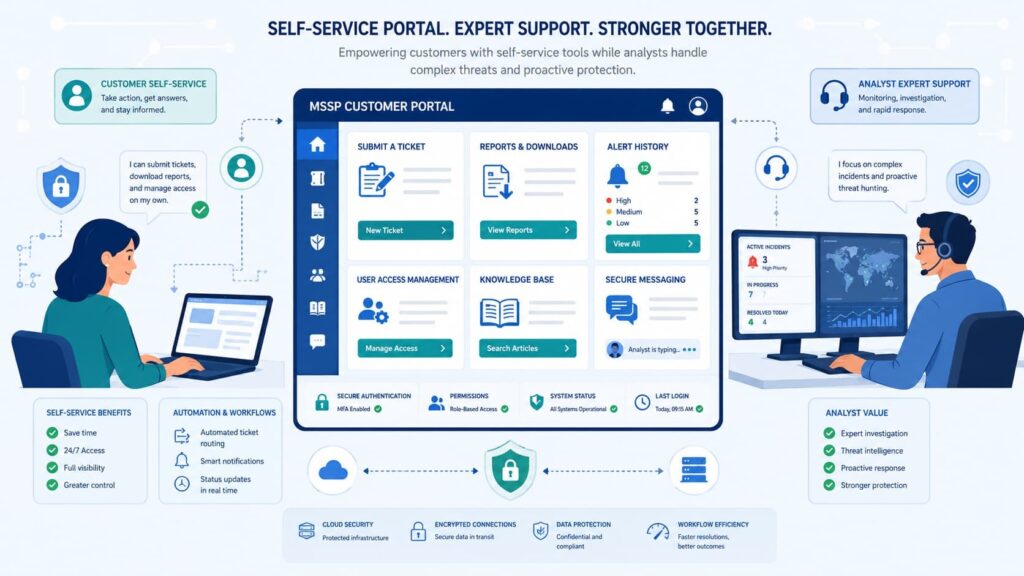
Self-service improves customer independence while reducing repetitive support requests. An effective self-service support portal helps customers complete routine tasks without waiting for manual assistance.
We’ve learned that automation delivers the greatest value only after standard workflows become familiar to customers. According to MSP Process, structured workflows and customer self-service improve operational efficiency.
High-value self-service features include: Knowledge base portal Service catalog Request forms Approval workflows DeskDirector notes portals must remain user-friendly, and not every portal needs every feature.
Which self-service features provide the most value?
Knowledge articles, onboarding workflow, offboarding workflow, and standardized request forms usually provide immediate operational benefits.
When should automation replace manual requests?
Only after common workflows have been documented and consistently adopted by customers.
Why Do Many MSSP Portals Struggle With Adoption?
Customers often avoid portals that feel overly complicated or disconnected from everyday work. Across industry discussions, one recurring observation appears consistently: customers prefer completing common tasks quickly instead of navigating feature-heavy interfaces.
In product discussions, users often favor workflow integration and simplicity over long feature lists. Some users criticize overly complex portals as disconnected from daily work, especially when they behave like link directories instead of workflows.
Research from International Journal of Web Portals shows:
“The positive UX and the smooth usability significantly contribute to users’ satisfaction and engagement with the SSP platforms. These factors strongly influence users’ attitudes and intentions to continue using the SSPs, ultimately impacting organizational productivity and effectiveness.” – International Journal of Web Portals
Common adoption challenges include:
- Too many navigation layers
- Feature overload
- Disconnected workflows
- Low perceived value
Of course, advanced functionality still has a place. That said, customers generally adopt simple, reliable experiences before requesting sophisticated automation.
How can complexity be reduced?
Design interfaces around the customer’s most common daily activities. Role-specific experiences, fewer navigation steps, and consistent workflows encourage regular use.
Why Isn’t a Single Pane of Glass Always Realistic?
Platform permissions and tenant boundaries often prevent complete consolidation. The idea of a universal dashboard sounds attractive, but identity governance introduces practical limitations.
Microsoft documentation shows MSSP access is tenant-specific and managed through Entra ID-based tenant access, which makes cross-tenant consolidation more complex. A true ‘single pane of glass’ often crashes against the hard realities of identity governance and platform architecture.
For instance, when managing large-scale deployments via Microsoft Entra ID-based cross-tenant access, engineering teams hit strict architectural ceilings such as the native 100-instance limitation per page view in multi-tenant management dashboards.
In our architectural builds, we don’t force unrealistic full consolidation; instead, we design custom API aggregation layers that connect specialized systems without compromising strict tenant isolation.
Operational realities include:
- Tenant-specific permissions
- Identity governance
- API-based scaling
- Multi-portal integrations
Rather than forcing everything into one interface, successful architectures often connect specialized systems while maintaining a consistent customer experience.
Why do identity models create friction?
Access governance prioritizes security over convenience. Customers must authorize access while providers manage permissions responsibly.
What operational limits should buyers understand?
A true “single pane of glass” is often constrained by platform architecture. Good portal design acknowledges those realities instead of promising complete consolidation.
Which Features Should You Prioritize First?
Build for customer adoption before expanding feature depth. Organizations benefit more from a portal that performs core tasks exceptionally well than one filled with rarely used capabilities. At MSSP Security, we recommend starting with transparency, communication, and operational visibility. Additional automation can follow once customers consistently engage with the platform.
Prioritize these features first:
- Secure access
- Incident tracking
- Dashboards and reporting
- Ticket management
- Secure messaging
Once customers consistently use these core workflows, add asset inventory, knowledge base, and advanced workflow automation.
A phased roadmap typically produces stronger long-term adoption than launching every feature simultaneously.
Which features belong in Version 1?
Focus first on secure access, incident visibility, reporting, ticket management, and communication.
When should advanced customization come later?
Once customers regularly use core workflows, customization becomes an enhancement instead of a distraction.
Multi-Tenant Integration and SASE Security in a Single MSSP Portal
Credits: Exium Inc.
Demonstrates how a modern MSSP portal simplifies multi-tenant management and Secure Access Service Edge (SASE) architecture. Through a centralized dashboard, service providers can easily configure Role-Based Access Control (RBAC), streamline client onboarding, and deploy security agents across diverse endpoints.
The platform provides full visibility to monitor network traffic, enforce data privacy policies, and detect threats in real time, ensuring each individual tenant receives optimal, safely isolated cyber protection.
FAQ
Which Features Should You Prioritize First?
When deploying your initial rollout, ignore the advanced automation bells and whistles. Version 1 must flawlessly execute the five pillars of daily security management: secure multi-tenant access, live incident tracking, context-rich dashboards, integrated ticket tracking, and encrypted secure messaging. Once your clients are actively collaborating inside these five core workflows, you can seamlessly layer in secondary assets like centralized inventory tracking, onboarding playbooks, and self-service knowledge bases without overwhelming the end-user.
How does a multi-tenant security portal keep customer data separate?
A multi-tenant security portal protects customer data by using role-based access control, delegated access, group permissions, and a tenant management portal. These controls ensure that each customer can only view authorized data. Secure tenant switching also supports efficient multi-tenant management while preventing unauthorized access between customer environments.
Why is security reporting important in a managed security service provider portal?
A managed security service provider portal should provide a security analytics portal, client reporting dashboard, compliance reporting portal, compliance dashboard, audit trail, and centralized reporting. These capabilities help customers measure security performance, verify compliance activities, identify long-term trends, and improve service transparency with accurate, accessible reports.
Can a client portal for MSSP improve incident response and customer communication?
Yes. A client portal for MSSP improves response times by combining an incident management portal, security incident workflow, case management, remediation tracking, secure client communication, and a notification system. These capabilities allow customers to receive updates quickly, collaborate with security teams, and track every incident until it is fully resolved.
How does an MSSP portal support long-term customer experience?
An MSSP portal strengthens the customer experience portal by offering service performance tracking, workflow automation, reporting automation, a knowledge base portal, a service catalog, an onboarding workflow, an offboarding workflow, and an account management portal. These capabilities simplify daily security operations, improve customer self-service, and provide consistent operational visibility throughout the service relationship.
Build a Portal Customers Want to Return To
If your MSSP customer portal feels hard to use, customers won’t rely on it, no matter how many features it offers.
What matters most is giving people clear visibility into their security operations, simple reporting, easy communication, and secure access that helps them get answers quickly. That’s what keeps customers engaged.
If you’re looking to improve your customer experience, consider the consulting services offered by MSSP Security.
With more than 15 years of experience and over 48,000 completed projects, the team helps MSSPs streamline operations, reduce tool sprawl, optimize technology stacks, and improve service delivery through vendor-neutral guidance, needs analysis, PoC support, and actionable recommendations.
References
- https://www.levelblue.com/blogs/levelblue-blog/secure-whats-next-how-a-world-class-mssp-builds-trust-and-scale-for-2026/
- https://www.igi-global.com/pdf.aspx?tid=372057&ptid=310160&ctid=4&oa=true&isxn=9781668479278#4#3