


A secure access MSSP client portal gives authorized users a protected way to monitor security operations, review reports, approve actions, and communicate with security teams from one centralized platform. Using authentication, role-based access control, and least privilege access, organizations can improve visibility without exposing sensitive data.
At MSSP Security, we help organizations build secure, scalable client portal experiences that support daily operations. Contact MSSP Security to learn how we can strengthen your client portal, or keep reading to explore the key features and best practices.
What Matters Most
Before diving into the details, here are the core ideas behind a secure access MSSP client portal.
- A secure access MSSP client portal provides customers with protected access to security operations, reports, and communications.
- Identity verification, authentication, and access permissions help ensure only authorized users can view sensitive information.
- Modern portals combine security, visibility, and collaboration within one centralized platform.
What Is a Secure Access MSSP Client Portal?
A secure access MSSP client portal is a centralized platform that gives authorized users a safe way to monitor security operations, review reports, and communicate with their security team. Instead of switching between email, spreadsheets, and separate security tools, users can securely access the information they need from one authenticated portal.
Beyond security controls, an effective Customer Portal Service Interface should make it easy for authorized users to navigate dashboards, review reports, communicate with analysts, and complete routine tasks from a single platform.
Most secure client portals include:
- Security posture visibility and incident updates
- Detailed reporting and dashboard access
- Communication with security analysts
- Security action approvals
- Audit logs and security recommendations
Protecting this information requires more than a username and password. Modern portals typically use multi-factor authentication (MFA), role-based access control (RBAC), and least privilege access to ensure users only see the data and functions relevant to their responsibilities. Whether someone is a security analyst, manager, executive, or external client, permission-based access helps reduce unnecessary exposure.
As organizations expand across cloud, hybrid, and remote environments, keeping access organized becomes increasingly challenging. A centralized portal simplifies reporting, communication, and access management while maintaining consistent security controls across customer environments.
From our experience at MSSP Security, the most effective portals are built around both security and usability. When we help MSSPs evaluate and audit security platforms, we often see that the strongest solutions do more than secure access.
They make it easier for customers to find the right information, approve actions, and collaborate with security teams without adding unnecessary complexity. That balance supports day-to-day operations while helping MSSPs deliver a better client experience.
Why Secure Portal Access Is Essential for Modern MSSPs?
Credit: Cyber&Tech
A secure access MSSP client portal helps protect customer data while giving authorized users the visibility they need to manage security operations. As identity-based attacks continue to grow, the portal itself has become a critical part of an organization’s security strategy, alongside endpoints, cloud infrastructure, and networks.
An effective portal should include:
- Multi-factor authentication (MFA) to verify user identities
- Role-based access control (RBAC) to assign permissions based on responsibilities
- Encrypted connections to protect data during transmission
- Audit logging to record logins, approvals, and account activity
- Permission-based views that limit users to the information they need
These controls improve security without making the portal harder to use. Security analysts can investigate incidents with the tools they need, while executives and external users can view reports and dashboards without accessing sensitive administrative functions.
In our work at MSSP Security, we’ve seen that the strongest portal solutions are designed with both security and usability in mind. As we help MSSPs evaluate and audit security products, we often compare how different platforms handle authentication, access management, reporting, and customer collaboration.
The products that consistently stand out are those that integrate security into everyday workflows instead of adding extra steps. That approach helps MSSPs improve operational efficiency while delivering a smoother and more secure experience for their clients.
What Security Features Should Every Secure Access MSSP Client Portal Include?

A secure access MSSP client portal depends on multiple layers of protection to keep customer data secure. Instead of relying only on usernames and passwords, modern portals combine multi-factor authentication (MFA), secure login, encrypted access, role-based access control (RBAC), and audit logging to protect sensitive information and reduce the risk of unauthorized access.
The strongest client portals typically include:
- MFA to verify user identities before access is granted
- Secure login with identity verification and session management
- Encryption to protect data both in transit and at rest
- Audit logging to record logins, permission changes, and user activity
- Compliance tracking that supports standards such as ISO 27001 and SOC 2
Security controls should strengthen protection without making the portal harder to use. From our experience at MSSP Security, the platforms that deliver the best long-term value are those that integrate these features into everyday workflows.
When we help MSSPs evaluate and audit security products, we look beyond feature checklists to assess how authentication, encryption, monitoring, and reporting perform in real-world environments. Products that balance strong security with a straightforward user experience are often easier for both MSSPs and their clients to adopt over time.
How Does Role-Based Access Control Protect Users in a Secure Access MSSP Client Portal?
A secure access MSSP client portal should give people access based on their responsibilities, not broad permissions that expose unnecessary data.
Role-based access control (RBAC) makes this possible by assigning access according to defined roles, so security analysts, managers, executives, and external users each see only what they need. Combined with permission-based views and least privilege access, RBAC helps reduce security risks while supporting day-to-day operations.
This approach aligns with guidance from the National Institute of Standards and Technology (NIST), which explains:
“The central notion of Role-Based Access Control (RBAC) is that users do not have discretionary access to enterprise objects. Instead, access permissions are administratively associated with roles, and users are administratively made members of appropriate roles.” – National Institute of Standards and Technology (NIST)
| User Role | Typical Access | Primary Purpose |
| Security Analyst | Incident investigation, alerts, threat data | Investigate and respond to security events |
| Security Manager | Security dashboards, approvals, compliance reports | Oversee operations and approve actions |
| Executive | High-level KPIs, risk summaries, executive reports | Monitor business risk and security posture |
| Customer Administrator | User management, tenant settings | Manage users within their organization |
| External Client User | Tenant-specific reports, tickets, communication | Monitor services and collaborate with the MSSP |
Role-based permissions also support customizing portal dashboard views, allowing security analysts, executives, and customer administrators to see dashboards tailored to their responsibilities instead of a one-size-fits-all interface.
An effective RBAC strategy typically includes:
- Role-based permissions tied to specific responsibilities
- Permission-based dashboards and reporting
- Tenant-specific access for each customer environment
- Limited administrative privileges
- Better auditing and stronger access governance
As MSSP environments grow, managing permissions becomes more challenging. We’ve seen organizations start with simple access models that work well for a small team but become difficult to manage as new customers, users, and services are added.
At MSSP Security, evaluating access management is a standard part of how we help MSSPs select and audit security products. We don’t just check whether RBAC is available. We evaluate how roles are created, how permissions are reviewed, and how easily the platform supports long-term governance.
From our experience, products with clear role structures and straightforward permission management make it easier for MSSPs to scale while giving clients secure, consistent access to the information they need.
How Can Multi-Tenant Access Improve Security Without Exposing Customer Data?
A secure access MSSP client portal should allow multiple customers to use the same platform without exposing one organization’s data to another. A well-designed multi-tenant access model combines tenant-specific access, tenant isolation, and identity controls so that every user only sees the resources assigned to their organization.
Key capabilities typically include:
- Tenant-specific access for authenticated users
- Strong tenant isolation across customer environments
- Delegated access for approved customer administrators
- Access segmentation by customer, department, or business unit
- Identity governance to support secure access management
As an MSSP grows, maintaining clear boundaries between customer environments becomes increasingly important. A platform may support hundreds of tenants, but its value depends on how consistently it enforces separation and access policies.
Through our work at MSSP Security, we’ve learned that multi-tenant architecture deserves close attention during product evaluations. When we help MSSPs select and audit new security platforms, we examine more than whether tenant isolation exists.
We also assess how delegated administration works, how access segmentation is enforced, and how the platform handles new customers as environments expand. In our experience, products with a well-planned multi-tenant design are easier to scale, simpler to manage, and better equipped to protect customer data over the long term.
How Do Identity Governance and Access Approval Workflows Strengthen a Secure Access MSSP Client Portal?
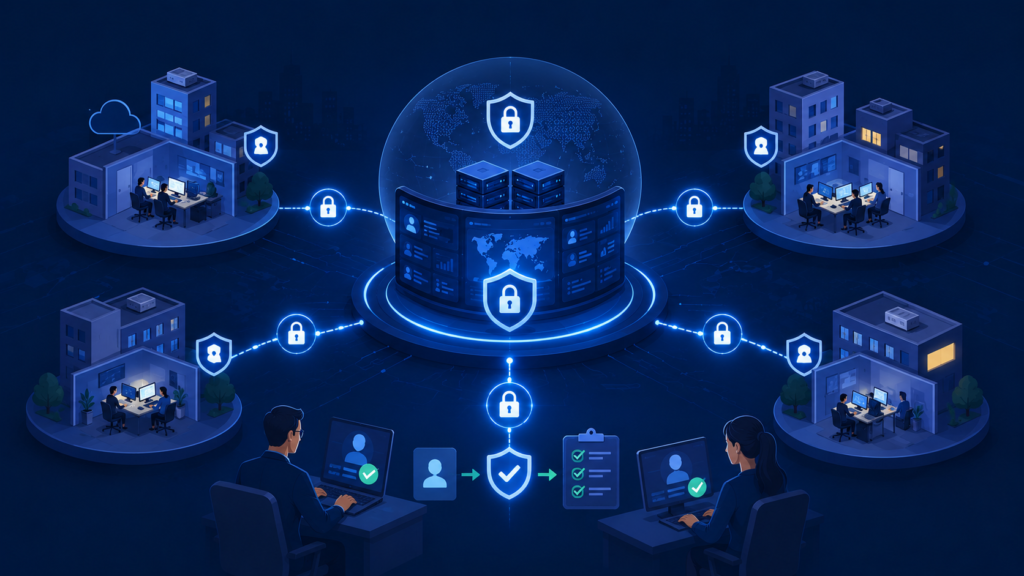
A secure access MSSP client portal requires more than strong authentication. Identity governance helps ensure users receive the right level of access from the moment an account is created until it is no longer needed.
Combined with Identity Access Management (IAM), provisioning workflows, and access approval processes, it helps organizations keep permissions aligned with changing roles and responsibilities. Effective identity governance ensures that users receive only the access required to perform their assigned responsibilities while reducing unnecessary exposure to sensitive resources.
The National Institute of Standards and Technology (NIST) emphasizes this approach by stating:
“Allow only authorized system access for users (or processes acting on behalf of users) that is necessary to accomplish assigned organizational tasks.” – National Institute of Standards and Technology (NIST)
This principle supports secure access management by ensuring permissions are aligned with business needs, user responsibilities, and organizational security policies.
An effective governance framework should include:
- Automated provisioning and role assignment
- Identity verification with multi-factor authentication (MFA)
- Approval workflows for new or temporary access
- Regular permission reviews and timely access revocation
- Audit logging to support compliance and accountability
How Can a Secure Access MSSP Client Portal Improve Visibility Without Exposing Sensitive Information?
A secure access MSSP client portal should give users the information they need without exposing data they don’t. By combining role-based access control (RBAC) with permission-based views, organizations can provide the right level of visibility for each user while keeping sensitive information protected.
An effective portal typically offers:
- Security posture visibility for executives and business leaders
- Incident visibility for security analysts and operational teams
- Detailed reporting based on user permissions
- Tenant-specific dashboards and read-only views where appropriate
- A limited client interface that hides unnecessary administrative functions
Improving the mssp client portal user experience is not just about displaying more information. It is about presenting the right information to the right users through permission-based views that simplify navigation while protecting sensitive data.
Finding the right balance between visibility and security becomes more important as MSSPs add customers and expand their services. Different users need different levels of detail, and a portal should reflect those needs without making access management difficult.
At MSSP Security, this is one of the areas we review when helping MSSPs select and audit new security products. We look beyond the appearance of dashboards to understand how information is presented, how permissions control report access, and whether customers can easily find what they need without seeing data outside their scope.
From our experience, products that focus on relevant, role-specific visibility tend to create a better experience for both MSSPs and their clients while supporting stronger security over time.
How Does a Secure Access MSSP Client Portal Support Collaboration Between Clients and Security Teams?
A secure access MSSP client portal should help clients and security teams work together without weakening security controls. A centralized communication portal gives both sides a single place to discuss incidents, review updates, approve actions, and follow ongoing security activities. Keeping these interactions within the portal also creates a consistent record that supports accountability and future reviews.
Effective collaboration features often include:
- Two-way communication between clients and security analysts
- Security action approval through structured workflows
- Role-based permissions for controlled collaboration
- Client self-service for access requests, reports, and ticket tracking
- Audit logging to document approvals and communication history
As environments become more complex, collaboration tools need to fit naturally into security operations. Customers want timely updates, while analysts need a reliable way to request approvals and document decisions without switching between multiple systems.
At MSSP Security, collaboration capabilities are one of the areas we assess when helping MSSPs select and audit new security products. We review how communication workflows, approval processes, and user permissions perform in day-to-day operations, not just how they appear in product demonstrations.
Our experience has shown that platforms bringing conversations, approvals, and reporting together in one secure portal help MSSPs respond more efficiently while giving clients greater confidence in every security decision.
How Does MSSP Security Build a Secure Access MSSP Client Portal?
A secure access MSSP client portal should be built with security, governance, and usability working together from the start. Strong authentication is only one part of the equation. The platform also needs to support secure collaboration, consistent access management, and long-term operational efficiency as customer environments continue to grow.
Key capabilities should include:
- Multi-factor authentication (MFA) and Identity Access Management (IAM)
- Role-based access control (RBAC) with tenant-specific access
- Permission-based dashboards and secure shared access
- Audit logging and continuous access reviews
- Well-defined access control policies and approval workflows
Choosing the right platform requires looking beyond a feature checklist. As MSSPs expand, they need solutions that are easy to manage, support changing customer requirements, and maintain strong security without increasing administrative overhead.
At MSSP Security, helping MSSPs select and audit new security products gives us a practical view of what works in real deployments. We evaluate how authentication, access governance, tenant management, and approval workflows perform together instead of reviewing each feature in isolation.
We’ve found that the strongest platforms start with least privilege access, make permissions easy to manage as organizations grow, and provide clear governance throughout the customer lifecycle. That combination helps MSSPs deliver secure access while maintaining a consistent experience for every client.
What Are the Best Practices for Maintaining Long-Term Secure Portal Access?
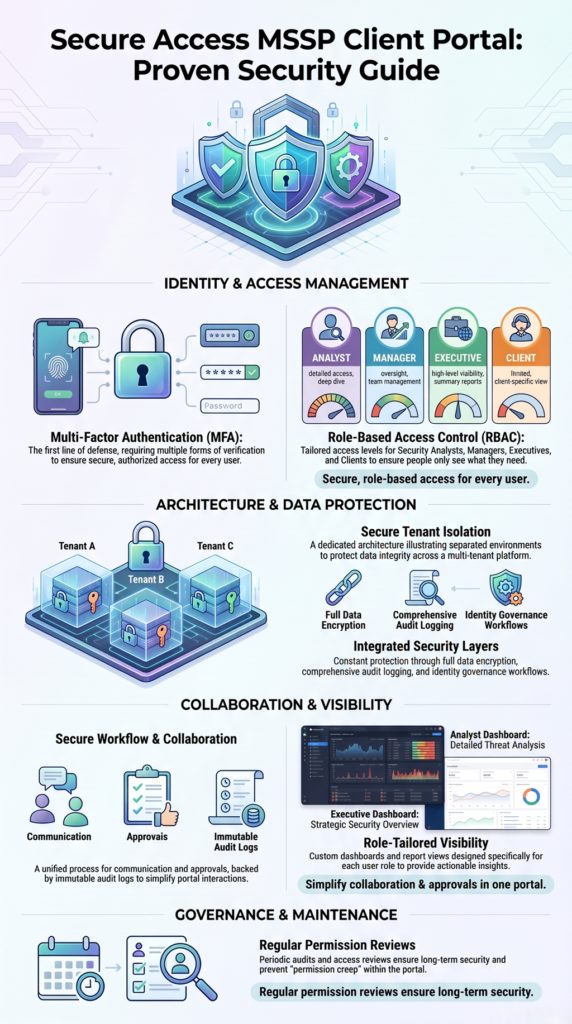
A secure access MSSP client portal is not something organizations can configure once and forget. As users change roles, new customers are added, and business requirements evolve, access controls need regular attention. Ongoing reviews help keep permissions aligned with current responsibilities while reducing the risk of unnecessary access over time.
Organizations should make these practices part of their routine:
- Review user roles and permissions on a regular schedule
- Monitor audit logs for unusual login attempts and permission changes
- Update access control policies as the business, customers, and compliance requirements evolve
- Perform recurring access certifications and privileged account reviews
- Remove inactive accounts and revoke outdated permissions promptly
Long-term security also depends on avoiding common access management mistakes. Excessive administrative privileges, shared accounts, weak authentication, and skipped permission reviews can gradually increase risk, even in otherwise mature environments.
Through our work at MSSP Security, we’ve found that long-term governance is an important factor when helping MSSPs select and audit new security products. We evaluate how well each platform supports ongoing permission reviews, audit logging, identity lifecycle management, and policy updates instead of focusing only on initial deployment.
In our experience, the strongest solutions make continuous access governance part of everyday operations. That approach helps MSSPs maintain secure access, adapt to changing customer needs, and reduce administrative effort as their environments grow.
FAQ
What is a secure access MSSP client portal?
A secure access MSSP client portal is a protected online platform that allows customers to securely view security reports, monitor incidents, communicate with analysts, approve security actions, and access compliance information using authenticated and permission-based access.
Why is multi-factor authentication important for an MSSP portal?
Multi-factor authentication adds an additional verification step beyond passwords, making it significantly more difficult for attackers to access customer accounts using stolen credentials.
How does role-based access control improve portal security?
Role-based access control assigns permissions based on job responsibilities, ensuring users can only access the information and functions necessary for their roles. This supports least privilege access and reduces unnecessary exposure.
What is tenant isolation?
Tenant isolation ensures that each customer’s data remains completely separate within a multi-tenant platform. Users can only view information belonging to their own organization, preventing accidental or unauthorized cross-tenant access.
How often should organizations review portal access?
Most organizations should review user permissions regularly, such as quarterly or after significant organizational changes, to remove unnecessary access, update roles, and maintain compliance with internal security policies.
How Can a Secure Access MSSP Client Portal Improve Security and Client Trust?
A secure access MSSP client portal combines multi-factor authentication (MFA), role-based access control (RBAC), identity governance, and least privilege access to protect customer data while supporting secure collaboration and operational visibility.
At MSSP Security, we’ve found that the most effective portals balance strong security with practical usability. If you’re looking to evaluate or improve your client portal, explore our consulting services to see how we help MSSPs select, audit, and optimize security platforms.
References
- https://www.nist.gov/publications/role-based-access-control-rbac-features-and-motivations
- https://nvlpubs.nist.gov/nistpubs/SpecialPublications/800-171r3/NIST.SP.800-171r3.html