


Choosing SOAR Platforms Guide starts with selecting a platform that fits your existing security stack, automation goals, and SOC workflows. The right solution helps reduce investigation time, improve response consistency, and support long-term operational growth.
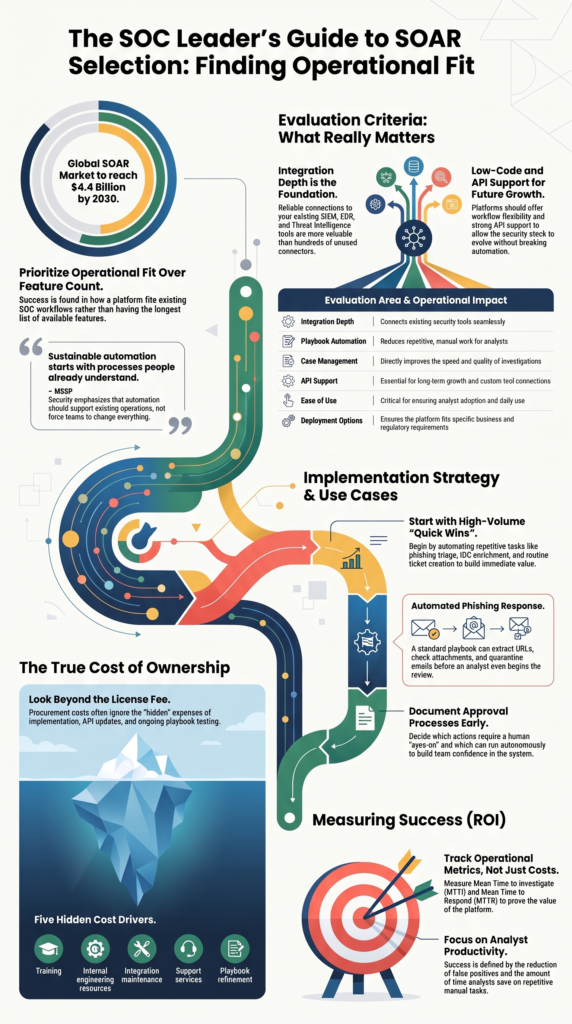
At MSSP Security, we help MSSPs evaluate and audit security products based on real-world fit. According to Research and Markets, the global SOAR market is expected to grow from USD 2.22 billion in 2026 to USD 4.4 billion by 2030, showing continued investment in security automation. Keep reading to learn how to compare platforms and make a confident selection.
SOAR Selection Snapshot
Choosing the right SOAR platform is less about the longest feature list and more about finding the best operational fit for your security team. These highlights summarize the most important considerations before making a long-term investment.
- Select a SOAR platform based on existing security stack integration, automation maturity, and operational workflows rather than feature count alone.
- Measure success using operational metrics such as mean time to investigate (MTTI), analyst productivity, and false positive reduction.
- At MSSP Security, we’ve found that practical implementation and sustainable automation often matter more than having the largest feature checklist.
How Should You Compare the Top SOAR Platforms?

There is no single SOAR platform that works best for everyone. That’s why a top SOAR platforms comparison guide should focus on helping organizations match the right platform.
We’ve worked with MSSPs that already had strong security processes but struggled because their automation platform required too much ongoing maintenance. Others succeeded with fewer features because the platform connected smoothly with the tools they already trusted.
A practical evaluation usually looks like this:
| Evaluation Area | Why It Matters |
| Integration depth | Connects existing security tools |
| Playbook automation | Reduces repetitive work |
| Case management | Improves investigations |
| API support | Allows future growth |
| Ease of use | Helps analyst adoption |
| Deployment options | Fits business requirements |
Organizations should also review:
- SIEM integration
- EDR integration
- Threat intelligence enrichment
- Workflow flexibility
- Low-code automation
The strongest platforms don’t force teams to change everything. They support existing operations while making investigations faster and more consistent.
We’ve reviewed environments where hundreds of available connectors looked impressive on paper but only a small number were actively used. What matters is how reliable those integrations remain over time. If analysts spend hours fixing scripts or updating workflows after every product update, automation quickly becomes another task instead of a time saver.
How Do You Select the Right Security Orchestration Tool?
Choosing a security orchestration tool should begin with an honest review of current operations. That sounds simple, but many organizations skip this step and jump straight into product comparisons.
We usually start by asking how analysts investigate alerts today. Which tasks happen every day? Which steps are repetitive? Which actions still require manual work? Those answers often shape the automation roadmap better than any vendor presentation.
A structured review should include:
- Current SOC maturity
- Existing security tools
- Internal engineering resources
- Required playbooks
- Future automation goals
Looking at these areas early helps prevent expensive surprises later.
Organizations also benefit from documenting approval processes before automation begins. Some actions should always require an analyst, while others can safely run without human involvement. Making those decisions early creates smoother deployments and builds confidence across the security team.
Our experience has shown that successful automation starts with processes people already understand.
Instead of trying to automate every possible scenario, we recommend beginning with a handful of high-volume investigations. Alert enrichment, IOC lookups, phishing triage, and routine case creation often deliver quick wins without introducing unnecessary complexity.
Small improvements add up. That’s something we’ve seen again and again.
How Do Enterprise SOAR Platforms Compare?
Credits: Maya Shenoi
Many security teams researching a Cortex XSOAR vs Splunk SOAR review compare these two SOAR platforms because both are widely used in enterprise environments. In our consulting work with MSSPs, we’ve found that the platform that fits existing processes usually delivers better long-term results than the one with the most features.
We encourage clients to look beyond marketing demos and focus on everyday operations. A platform should support analysts, reduce repetitive work, and fit naturally into the current security environment. From our experience auditing security tools, those practical factors have a much bigger impact after deployment than feature comparisons alone.
As noted by Exabeam
“Cortex XSOAR: Focus on threat intelligence integration and playbook automation.” – Exabeam
When evaluating options, organizations should review:
- Existing SIEM environment
- Integration ecosystem
- Analyst collaboration
- Licensing approach
- Long-term maintenance effort
We’ve seen projects succeed because teams chose a platform that matched their workflows instead of forcing major architectural changes. Reliable integrations and manageable automation often matter more than advanced capabilities that rarely get used.
The best SOAR platform is the one that helps analysts investigate incidents faster, supports sustainable automation, and continues delivering value as the security program grows.
How Do SOAR Platform Pricing Models Affect Long-Term Costs?
SOAR platform pricing models should never be evaluated by license cost alone. A platform may look affordable during procurement but become much more expensive once implementation, maintenance, and staff time are included.
We’ve helped MSSPs compare products where licensing represented only part of the long-term investment. Internal engineering work, API updates, playbook testing, analyst training, and ongoing support often cost more over several years than the software itself.
Before making a decision, organizations should estimate:
- Licensing model
- Deployment costs
- Training requirements
- Integration work
- Playbook maintenance
- Support services
Those expenses provide a much clearer picture of total ownership.
Another factor worth considering is expected operational savings. Faster investigations, fewer manual tasks, and reduced analyst workload can offset investment over time. Measuring improvements in MTTI, analyst efficiency, and false positive handling often gives leadership a better understanding of return on investment than license pricing by itself.
We’ve learned that sustainable automation usually comes from careful planning, not the lowest price.
Organizations that budget for ongoing improvements tend to get more value because they continue refining workflows as their environment changes. Automation isn’t something that gets built once and forgotten. It grows with the security program.
How Should You Integrate SOAR with Your Security Stack?
A SOAR platform delivers the most value when it connects the tools a security team already depends on. Strong integrations SOAR with security stack allow information to move between systems without analysts copying data from one screen to another. That saves time, reduces mistakes, and creates a more consistent response process.
In our consulting work at MSSP Security, we rarely recommend automating everything on day one. We’ve found that the best results come from building stable integrations first. Once those connections are reliable, organizations can add more playbooks with confidence instead of constantly fixing workflows.
Core integrations often include:
- SIEM for alert collection
- EDR for endpoint actions
- IAM for user management
- Ticketing systems for case tracking
- Threat intelligence platforms
- Collaboration tools for analyst communication
Each integration should support a real business need. If a connection doesn’t improve investigations or reduce manual work, it probably isn’t worth maintaining.
Automation works best when it grows step by step. One common example is phishing response. A playbook can collect message details, inspect links, analyze attachments, enrich indicators, create a case, and quarantine suspicious emails before an analyst begins reviewing the incident.
What Should Organizations Look for When Evaluating SOAR Vendor Capabilities in Fullerton?
Evaluating SOAR vendor capabilities in Fullerton goes beyond watching a polished product demo. Almost any SOAR platform can look impressive during a controlled presentation. We’ve seen tools that looked great during evaluations but became difficult to manage once security teams started building playbooks and daily workflows.
As a consulting partner for MSSPs, we help clients select and audit security products with long-term operations in mind. Our reviews focus on how well a platform fits existing processes, not how many features appear on a comparison chart. In our experience, that approach leads to better adoption and fewer surprises after deployment.
A practical evaluation should cover:
- Integration depth
- API availability
- Deployment flexibility
- Documentation quality
- Automation options
- Compliance support
- Customer support
- Product roadmap
Maintenance deserves just as much attention as new features. Organizations should understand who updates integrations, how often playbooks need changes, and what happens when connected products update their APIs. We’ve found these conversations often reveal more than another product demonstration.
Reliable automation should lower the workload, not create new maintenance tasks. When a platform is easy to support and grows with the security program, it is much more likely to deliver lasting value over time.
What Are the Most Valuable SOAR Use Cases and Automation Examples?
The strongest SOAR use cases automation examples are those that automate repetitive work instead of replacing analysts. That balance helps security teams respond faster while keeping experienced people involved in important decisions.
Across different environments, we continue seeing the same use cases deliver value because they remove repetitive investigation steps without reducing visibility.
Common examples include:
- Automated phishing response
- IOC enrichment
- Malware containment
- Suspicious login response
- Endpoint isolation
- Threat intelligence lookups
- Ticket creation
- Investigation documentation
These workflows allow analysts to spend more time investigating complex threats instead of collecting basic information.
No surprise. Those repetitive tasks often consume the largest part of the workday.
A phishing investigation may begin by extracting URLs, checking attachments, reviewing sender reputation, enriching indicators, creating an incident record, and notifying the security team.
Another workflow might detect unusual login activity, gather identity information through IAM, review endpoint telemetry from EDR, and recommend account restrictions while waiting for analyst approval.
We’ve watched organizations improve consistency by reviewing playbooks every few months instead of treating automation as a finished project. Security environments change, and playbooks should change with them. That ongoing review keeps automation useful long after the initial deployment.
How Do You Choose the Right Security Automation Platform?

Choosing the right security automation platform is really about supporting people, not replacing them. A successful deployment should reduce repetitive work, improve investigation quality, and fit naturally into existing security operations.
Over the years, we’ve seen organizations get better results when they begin with realistic goals. Instead of trying to automate every alert immediately, they focus on a few high-volume workflows, measure improvements, and expand from there. That approach gives analysts time to build trust in the automation before introducing more advanced playbooks.
Research from SC Media shows
“The key is selecting a next-gen SOAR platform that integrates seamlessly, enhances security operations, and adapts to new challenges.” – SC Media
Before making a final decision, organizations should review:
| Selection Factor | Why It Matters |
| Existing security stack | Reduces deployment effort |
| Integration quality | Supports reliable workflows |
| Automation maturity | Matches team capabilities |
| Licensing model | Controls long-term costs |
| Analyst usability | Encourages adoption |
| Custom playbooks | Supports business growth |
| Vendor support | Helps long-term success |
Track operational metrics from the beginning. Measuring mean time to investigate, mean time to respond, analyst workload, and automated incident handling creates a clear picture of progress and helps guide future improvements.
FAQ
How does SOC maturity affect SOAR platform selection?
SOC maturity plays a major role in choosing the right security automation platform. Organizations with newer security programs often benefit from simpler SOAR tools, while mature teams may need advanced security orchestration, response playbooks, and workflow orchestration.
Evaluating current processes, staffing, and automation goals helps organizations select a platform that supports growth without adding unnecessary complexity.
Which integrations should organizations prioritize before deploying SOAR tools?
Organizations should start with the systems their security teams use every day. SIEM integration, EDR integration, IAM integration, ticketing integration, and threat intelligence enrichment usually provide the greatest value.
Strong API integrations and security stack integration improve alert triage, case management, and incident handling, allowing analysts to work more efficiently and reducing manual effort across security operations.
What security tasks are best suited for playbook automation?
The best candidates for playbook automation are repetitive tasks that follow clear and consistent steps. Common examples include phishing response, suspicious login detection, IOC enrichment, alert enrichment, malware analysis, host isolation, email quarantine, and malware containment.
These security use cases improve incident response automation while giving analysts more time to investigate complex threats and make informed decisions.
How can organizations measure security automation ROI after deployment?
Organizations should measure security automation ROI by tracking operational improvements instead of focusing only on software costs. Useful metrics include mean time to respond, mean time to investigate, analyst productivity, and false positive reduction.
Monitoring improvements in security operations workflow, automated incident response, and security incident management provides a clear picture of how automation improves daily security operations.
What should buyers compare during a SOAR platform comparison?
A complete SOAR platform comparison should evaluate more than product features. Organizations should review vendor evaluation, integration depth, deployment options, licensing model, enterprise licensing, per-user pricing, quote-based pricing, platform usability, collaboration features, custom playbooks, threat hunting support, and compliance workflows.
Comparing these factors helps buyers choose a platform that supports long-term SOC automation and security process automation.
Build Security Automation That Delivers Long Term Value
Choosing a SOAR platform is about supporting real security operations, not chasing the longest feature list. Organizations that understand their workflows, evaluate integrations carefully, and improve automation over time often achieve better efficiency and stronger operational outcomes.
Regular reviews and measurable results help keep automation effective as security needs evolve. A practical automation strategy starts with the right planning and technology choices. Start your automation journey with MSSP Security.
References
- https://www.exabeam.com/explainers/soar/best-soar-platforms-for-enterprises-top-5-options/
- https://www.scworld.com/whitepaper/the-essential-soar-buyers-guide-choosing-the-right-platform-for-your-security-team
Related Articles
- https://msspsecurity.com/top-soar-platforms-comparison-guide/
- https://msspsecurity.com/selecting-security-orchestration-tool/
- https://msspsecurity.com/cortex-xsoar-vs-splunk-soar-review/
- https://msspsecurity.com/integrating-soar-with-security-stack/
- https://msspsecurity.com/integrating-soar-with-security-stack/
- https://msspsecurity.com/evaluating-soar-vendor-capabilities-in-fullerton/
- https://msspsecurity.com/soar-use-cases-automation-examples/
- https://msspsecurity.com/security-automation-platform-selection/