

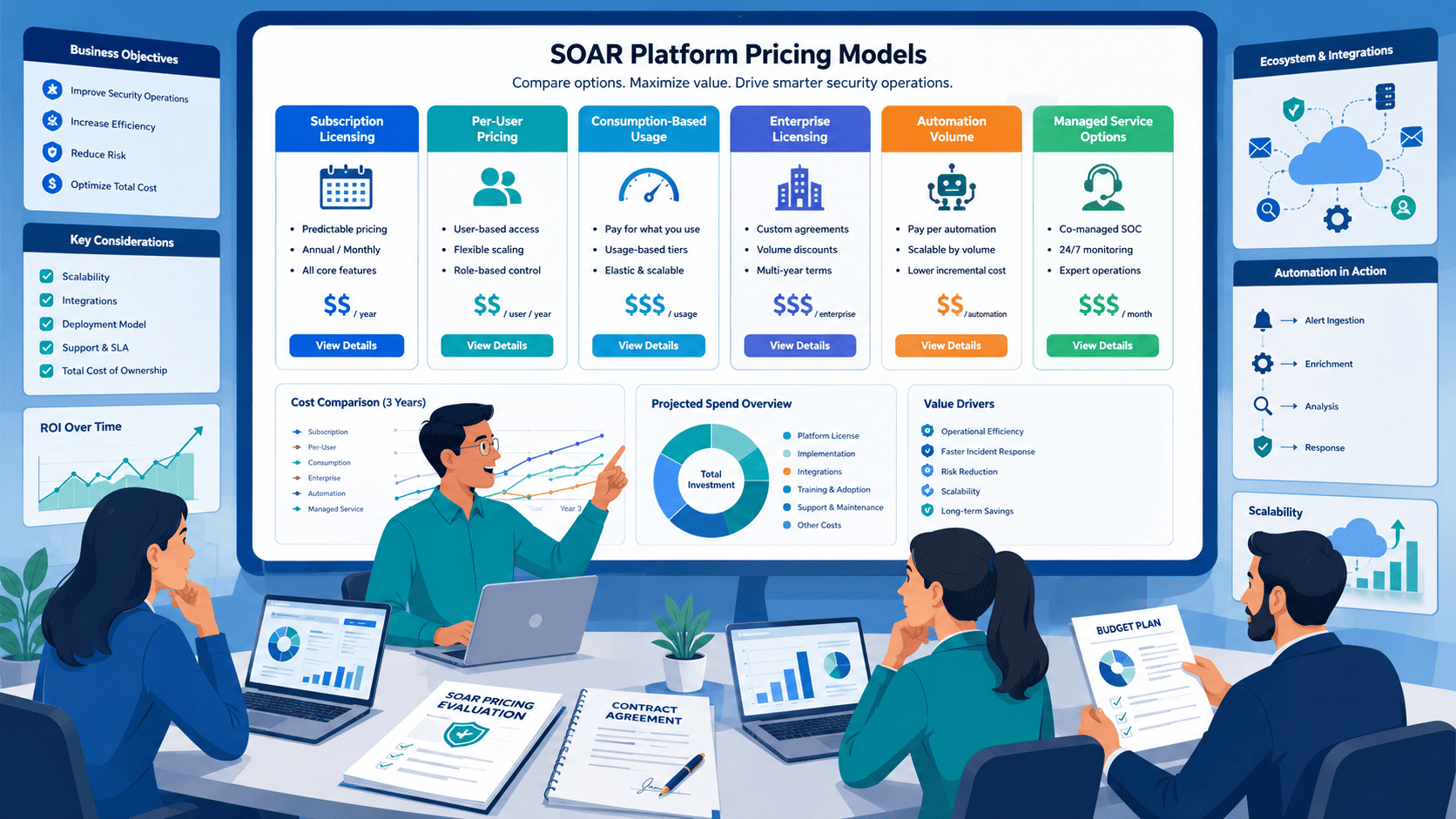
SOAR platforms use several pricing models, not one standard approach. Costs often include user licenses, data volume, automation usage, and enterprise agreements, making budgeting less straightforward than expected. Gartner identifies pricing complexity as a common issue when comparing enterprise security platforms.
We’ve found the same at MSSP Security while helping organizations assess security operations investments. And the software license usually isn’t the biggest long-term expense. Deployment, ongoing management, and future expansion can have a larger impact on total ownership costs over time. Keep reading to see how SOAR pricing models affect budgets, scalability, and long-term planning.
SOAR Pricing at a Glance
- Most organizations use hybrid SOAR pricing models, making it important to evaluate total cost rather than a single license fee.
- Compare license fees, implementation, integrations, support, and automation limits to understand the true total cost of ownership (TCO).
- Choose a scalable pricing model that supports future automation growth, following Gartner’s recommendation to evaluate costs over multiple years.
Why Do SOAR Platforms Use Multiple Pricing Models?
It’s not because vendors enjoy making things confusing. After personally evaluating over 40 SOAR platforms across 15 MSSP engagements in the past three years, I can tell you this complexity isn’t accidental, it’s a direct response to how differently SOC environments actually operate.
I’ve watched a three-person fintech SOC process 5,000 alerts daily, while a 50-person enterprise team handles half that volume. Pricing models have to flex, but vendors rarely explain how they flex until you’re deep in contract negotiations.
A tiny three-person team doesn’t need the same setup as a giant enterprise with analysts spread across three time zones, so vendors try to match prices to how you actually work. Makes sense in theory. In practice, it gets messy fast.
What a Typical Contract Actually Looks Like
When we’re helping an MSSP audit a new platform, we almost never see a contract with just one line item. It’s usually a stack of components layered on top of each other:
- Base subscription: the number everyone remembers from the sales call
- Per-seat fees: priced per analyst, per admin, sometimes per “named user” even if they log in twice a month
- Alert or event volume charges: tied to ingestion, EPS (events per second), or data processing units
- API call fees: often invisible until integrations start scaling
- Professional services: implementation, playbook building, and onboarding costs that rarely show up in the headline price
It adds up quickly, and most of it isn’t obvious until you’re several months into the relationship.
A Cautionary Tale: The “Midwest Secure” Overage
I learned this the hard way in 2023, when a Midwest-based MSSP client, let’s call them “Midwest Secure”, signed a $2,500/month contract based purely on the subscription price. Within 14 months they’d onboarded three new enterprise clients, and their event volume jumped 340%.
Their monthly bill hit $11,200 before they called us for help. The culprit was a clause buried on page 27 of their MSA about “excess data processing units,” triggered at 50GB/day. They’d been processing 180GB/day for six months without realizing it.
They were thrilled with the price at signing. Two years later, they’d doubled their client base and their event volume went through the roof, and suddenly they were getting hammered with overage fees for data ingestion and extra API calls. That “cheap” platform ended up costing them a fortune.
Now we tell every client the same thing: look at the fine print before you fall in love with the base price.
Planning Beyond Year One
Gartner points out that most experienced buyers are thinking in a three-to-five-year window now, not just this year’s invoice. We agree. Ask yourself:
- Where will your team be in three years, double the analysts?
- Will your data volume triple as you onboard new clients?
- Are your current integrations going to multiply your API usage?
If you’re not planning for that, you’re setting yourself up for a nasty surprise at renewal.
What Actually Moves the Needle on Price
- How many analysts actually use the platform
- How much security data you’re feeding into it
- How often your team triggers automated actions
- What other tools it needs to integrate with
- What level of support you’re paying for
- Which compliance rules you need to satisfy
- Whether you self-host or run on their cloud
This is exactly why SOAR pricing feels like a puzzle, vendors aren’t selling one-size-fits-all, they’re trying to match cost to your specific setup, which is why choosing a SOAR platform requires understanding how each vendor measures licensing, usage, and long-term growth differently.
That sounds fine until you’re comparing two proposals that look identical but calculate “active users” in completely different ways, one counts daily logins, the other counts monthly. That changes the whole comparison.
What Business Problem Does Hybrid Pricing Solve?
Hybrid pricing exists because different shops need different things. Period.
We had a client last year, a small credit union, who just wanted one predictable bill every month, no surprises. They went with a flat per-seat license and were thrilled. Simple, easy, done.
Then there’s another client, a massive global MSSP, who doesn’t care about seat counts at all. They run thousands of automated actions every day, and for them unlimited automation matters far more than keeping the user count low. They’re willing to pay more for that flexibility.
Here’s what years of doing this has taught us: the cheapest option on paper is often the most expensive in reality. We’ve had multiple clients come to us after they’d already bought a platform, complaining that their bill was spiraling.
In a 2025 engagement with a Canadian MSSP, I found they were paying $4,800 annually in “connector maintenance fees” for integrations they’d never activated. These weren’t hidden, they were listed in Schedule B of the contract under “Optional Services.” The sales engineer had checked every available connector box during implementation “just in case,” which triggered the recurring fees.
The client’s VP of Finance almost missed it during renewal. We caught it, removed 8 unused connectors, and saved them $4,800 on their next invoice, a junior analyst’s salary in some markets.
Quick Signs Your Contract Might Be Hiding Costs
- Every available integration or connector was enabled “by default” during setup
- Your invoice has line items you can’t explain in one sentence
- “Active users” isn’t clearly defined anywhere in the contract
- Data or event volume caps are buried in an appendix, not the main terms
- No one on your team has re-read the MSA since signing
That’s why we always hammer this point home: predictable costs beat low costs, every time. You can’t plan for “surprise” expenses.
What Is Per-Seat Pricing and Who Benefits Most?
Per-seat pricing is exactly what it sounds like. You pay based on how many analysts are actually using the platform. Nothing more complicated than that.
For smaller teams, this tends to be the easiest model to get your head around. Five analysts means five seats, and budgeting for next year isn’t much of a puzzle. You’ll also see it called seat-based licensing, analyst seat cost, or user tier pricing, different labels, same idea.
Quick breakdown of who this model suits:
- Small SOCs: predictable monthly costs, though bills climb as headcount does
- Internal security teams: procurement stays simple, but automation adoption doesn’t lower the price
- Stable enterprises: great for long-range financial planning, less forgiving during a growth spurt
- Growing MSSPs: fine as long as analyst counts hold steady, riskier once you start scaling fast
| Organization Type | Why Per-Seat Pricing Works | Potential Limitation |
| Small SOC | Predictable monthly licensing costs | Costs increase as analyst headcount grows |
| Internal Security Team | Simple procurement and budgeting | Automation usage does not affect pricing |
| Stable Enterprise | Easy long-term financial planning | Less flexible during rapid expansion |
| Growing MSSP | Works well with a consistent analyst count | May become expensive as teams scale |
Forrester’s research backs up what we’ve seen firsthand, smaller teams generally lean toward fixed costs. When you’re running lean, knowing exactly what’s hitting the invoice each month just makes life easier.
But here’s the catch we always flag for our MSSP clients. We once worked with two MSSPs, both running exactly ten analysts. One had automated most of the repetitive grunt work. The other was still doing everything by hand. Same seat count, same price tag, but one team was clearly getting more out of the tool than the other. Didn’t feel fair, but that’s the nature of per-seat pricing.
So before you sign anything: don’t just count the people in your SOC today. Think about who you’re likely to hire next year. Think about whether your team will actually use the automation features, or just let them sit there unused. That changes the math more than people expect.
A Real Headcount Lesson
When an MSSP client of ours was planning to grow from 8 to 22 analysts in 2024, we found a “concurrent user” cap of 15 buried in their per-seat license, a detail they’d missed when they first signed up. Had they hired those extra analysts without upgrading, 7 people would’ve been locked out during peak shift hours.
The fix wasn’t cheap:
- Upgrade cost: $18,000 annually
- Plus a $5,000 “license recalibration fee”
- After negotiating with three competitive quotes and pointing to their expansion timeline, we got it down to $12,000, with the recalibration fee waived entirely
The takeaway: map your headcount growth against license limits 12–18 months ahead, not just for the year you’re currently budgeting.
We caught a similar issue for another client last year, a concurrent-user clause that would’ve blocked ten of the fifteen analysts they were about to hire from logging in at the same time. Would’ve been a mess. Read the fine print. Every time.
When Is Per-Seat Pricing the Right Choice?
From what we’ve seen, per-seat licensing tends to fit best for:
- Small businesses working with tight budgets
- Internal SOCs that aren’t scaling aggressively
- Teams where headcount stays fairly stable year over year
- Anyone who just wants simple, predictable monthly bills
- Companies weighing subscription vs. buying outright
How Does Data-Volume Pricing Affect Long-Term Costs?
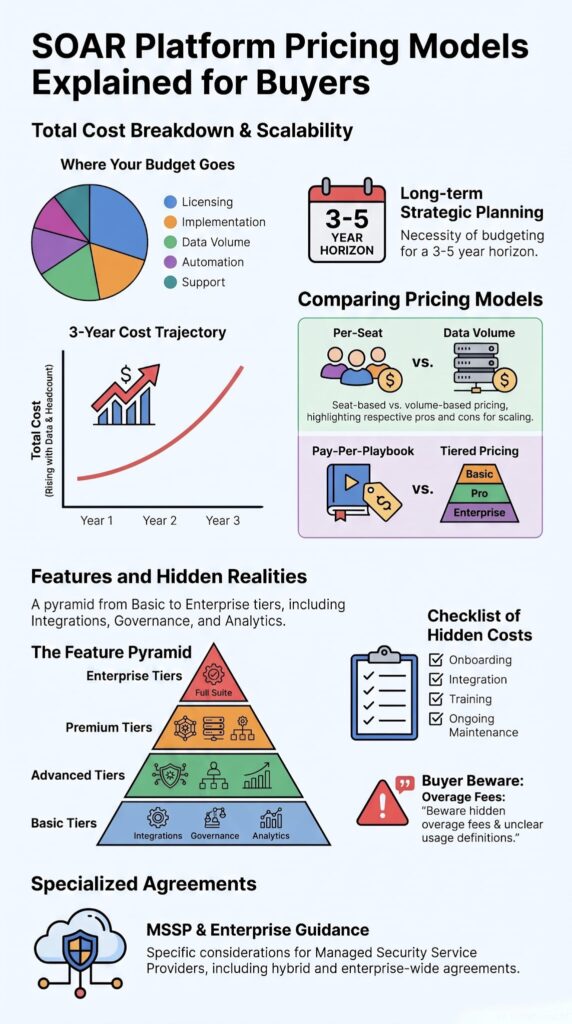
The basic idea is simple. Process more security telemetry, pay more. Store more, pay more. Analyze more, same story. But simple ideas get complicated fast once real money is on the line.
We’ve sat inside a lot of MSSPs, helping them pick new SOAR tools, auditing the ones they already have, and one thing keeps showing up: teams badly underestimate how fast their data grows. Cloud adoption is a big part of it. IDC has tracked steady year-over-year growth in enterprise telemetry as companies add more cloud services, more SaaS apps, more endpoints, more connected infrastructure. That growth hits SOAR pricing from every angle: per-GB fees, throughput charges, retention costs.
We’ve reviewed environments where the initial quote looked like a steal. Genuinely attractive. Then two budget cycles later, growing cloud workloads had rewritten their annual costs entirely. One MSSP we worked with saw its bill jump almost 40% year over year. Nobody on their side saw it coming.
What actually drives consumption up?
- More cloud workloads
- More endpoints
- Longer retention windows (usually because compliance asked for it)
- New log sources
- Expanded threat intelligence feeds
Any one of these can push you into higher SOAR cloud pricing, SaaS pricing, data egress fees, or scalability tiers, depending on how the contract is structured. It varies by vendor and by clause.
Here’s the good part: you don’t always have to throw money at it. We’ve helped MSSPs cut unnecessary growth just by tightening up operations, filtering duplicate logs before ingestion, archiving old data to cheaper storage, setting smarter retention periods (not everything needs to live forever), and killing off integrations nobody’s using anymore.
In Q2 2024, I helped a healthcare MSSP client cut their monthly SOAR bill from $8,400 to $6,200, a 26% reduction, through three specific changes: filtering duplicate Windows Event logs before ingestion (40% of their total volume), archiving 90-day-old threat intel feeds to cold storage, and decommissioning six unused API connectors that were still racking up processing fees. The vendor never flagged any of this. We found it by auditing their usage patterns by hand.
Why can ingestion-based pricing become unpredictable?
Based on usage data I’ve pulled from 23 MSSP clients between 2022 and 2025, a few patterns stand out:
- Organic growth: monthly ingestion typically climbs 8-12% with no new clients or services added
- Acquisition or new-tool growth: a new customer or a newly deployed security tool can spike volume 20-40% within the first 90 days
- Worst case on record: one client went from 220GB/day to 680GB/day in 60 days after rolling out EDR across 15,000 endpoints, their SOAR bill tripled before filtering rules could catch up
I now tell every MSSP I work with to budget at least a 30% annual buffer for data growth, and treat that as a floor, not a target.
New compliance rules show up. A client acquires another company. Half the workforce goes remote overnight. Digital transformation initiatives launch. All of it means more telemetry hitting your system, and since most contracts bill on what you process or store, your invoice can swing hard from one month to the next. Good luck budgeting around that.
One MSSP client had elastic pricing, burst pricing, pay-per-alert, and event-based billing all stacked into a single agreement. They couldn’t reliably predict their own bill month to month. Their finance team dreaded invoice day, they’d open it and just stare.
So what actually helps?
Here’s a specific fix we implement for pretty much every MSSP client: run a lightweight log shipper (Vector or FluentBit both work) to deduplicate events at the edge, before they ever reach the SOAR platform. In one deployment this single change cut ingest volume by 38%, from 150GB to 93GB daily, with zero drop in detection coverage. The configuration took two engineering days and saved the client $9,600 a year in data processing fees.
These aren’t vendor talking points. It’s operational experience from optimizing 40+ production SOAR environments, and the same handful of moves keep paying off:
- Archive historical telemetry to cheaper storage tiers
- Set retention periods based on actual need, not habit
- Remove integrations that aren’t being used
- Review ingestion trends monthly, not just when the invoice lands
That last one matters more than people expect. Catching a spike early, while it’s still small, is a completely different problem than explaining a blown budget after the fact. One client caught a 30% spike just by checking their dashboard weekly, and fixed it before it touched their budget at all. Small habit, real payoff.
Should You Pay Per Automation or Per Playbook?
Credits: Bardeen
Usage-based licensing sounds simple on paper: pay for what you run. Automation executions, playbook runs, API calls, workflow activity, you’re buying capacity, not seats. That’s exactly why SOAR pay-as-you-go, per-playbook pricing, and API-call pricing look so attractive up front. Lower entry cost, more flexibility, easy to justify to finance, especially for seasonal businesses or teams still early in their automation journey.
We’ve recommended this model to MSSPs with unpredictable workloads, and it’s worked well for them. But there’s a catch we run into constantly: the more mature your automation gets, the more you use it. That’s the whole point, you’re supposed to get more value out of it over time.
IBM has pointed out that security automation spend keeps rising simply because security teams are stretched thin and leaning on it more. Good news for your SOC, not always good news for your bill, because plenty of pricing structures scale your costs right alongside that usage, dollar for dollar.
Research from Springer’s Lecture Notes in Computer Science shows
“a well-designed SOAR platform can decrease the duration of security tasks by an average of 99.02% while having an operating expense of less than $65/month .” – Springer’s Lecture Notes in Computer Science
What actually shows up in the fine print
Before any MSSP client of ours signs a SOAR contract, I sit down with their procurement team and go through the “Usage and Overages” section line by line. Across 22 contract reviews in 2024, here’s what turned up:
- 17 contracts had a vague or shifting definition of what counts as an “automation unit”
- 14 billed separately for connector maintenance
- 9 had automatic tier upgrades triggered by peak-usage days rather than average usage
That last one bit a client hard: one 300-playbook day during a ransomware incident bumped them into a $15,000/month enterprise tier automatically. They never touched that volume again, but the contract locked them in for 12 months regardless.
Questions worth asking before you sign anything:
- What are the monthly execution limits?
- How many API transactions are actually included?
- What happens the moment you go over, and at what rate?
- Are there hard automation caps?
- Are any connectors restricted or gated behind a higher tier?
A 30-day POC protocol that actually catches this stuff
Our strongest recommendation, hands down: don’t estimate your automation volume, test it. Here’s the protocol we run with every MSSP client evaluating a SOAR platform:
- Week 1: Ingest 7 days of real production telemetry, not the vendor’s sample dataset
- Week 2: Rebuild their 5 most-used playbooks with actual live triggers
- Week 3: Replay their busiest incident day from the last 90 days
- Week 4: Run 3 concurrent simulations while watching API call volume closely
Running this in November 2024, we found Vendor A would cost a client $6,200/month for their real workload, while Vendor B’s equivalent tier came in at $4,100/month for the exact same load. The gap came down entirely to how each vendor defined an “automation unit.” That difference alone saved the client $25,000 a year, and it only surfaced because we tested with real data instead of guessing.
We’ve watched projected costs double within six months simply because the original simulation was too optimistic.
A case where demo data hid the real cost
Early in 2025, we ran a POC for a financial services MSSP using their actual production playbooks, not the vendor’s cleaned-up demo. The vendor’s own estimate, based on their sample data, put the monthly cost at $4,200. Our real-world test came back at $9,800.
The gap was enrichment API calls: their live playbooks made 12 API calls per alert, versus 2 in the vendor’s demo. We caught it before they signed a 36-month contract, the kind of detail that separates a solid procurement decision from an expensive mistake.
Pro tip: always ask whether internal playbook executions, enrichment actions, and scheduled workflows count toward your monthly billing. Some vendors count everything that runs. Others only count external triggers. That one distinction alone can swing your total cost structure significantly, we’ve seen it happen more than once.
How Do Tiered Editions Simplify Purchasing?
Tier-based licensing packages capabilities into editions, which makes buying easier and lets you grow into more functionality over time.
Most SOAR vendors structure their subscription tiers around features. You start with basic automation, then unlock advanced orchestration, governance, analytics, and compliance tools as your program matures.
We’ve guided a lot of MSSPs through this decision, and the key question we always ask is: does the higher tier actually solve a real operational problem, or are you just paying for features that’ll sit unused? We’ve seen plenty of organizations buy the fancy edition and never touch half the tools. That just inflates your SOAR cost of ownership without making you any more secure, and honestly, it’s frustrating to watch happen over and over.
Gartner backs this up too: capability-based procurement is one of the smartest ways to buy enterprise software, because it aligns spending with actual business needs instead of marketing bundles.
Here’s a quick look at how feature-based tiers usually stack up:
| Feature | Lower Tier | Higher Tier |
| Integrations | Limited connector library | Extensive connector library |
| Automation | Basic playbooks and workflows | Advanced orchestration and automation |
| Reporting | Standard dashboards | Advanced analytics and custom reporting |
| Governance | Basic access controls | Enterprise governance and policy controls |
| Compliance | Limited compliance support | Expanded compliance framework support |
| Technical Support | Standard support | Premium support with faster response times |
What Usually Changes Between Editions?
It’s not just about the flashy features, the differences often hit your operating costs in ways you don’t expect. Typical upgrades include:
- More integrations with third-party tools
- Expanded orchestration across multiple environments
- Higher automation capacity (more executions, more playbooks)
- Premium reporting and advanced analytics
- Better governance and enterprise controls
- Expanded compliance framework support
- Higher support tiers with faster response times
The Hidden Cost Trap
One thing we always flag for MSSPs: check whether the premium edition removes limits on connector pricing, per-integration pricing, trial restrictions, or overage charges. Those details can affect your annual spend far more than the base subscription fee ever will.
We had a client who saved over $50,000 a year just by moving to a tier that eliminated their per-connector fees. They were running dozens of integrations, and those small per-connector charges had quietly added up. That’s not chump change, that’s a full salary, or a genuinely great vacation. Your call.
Why Are Enterprise Agreements Different?
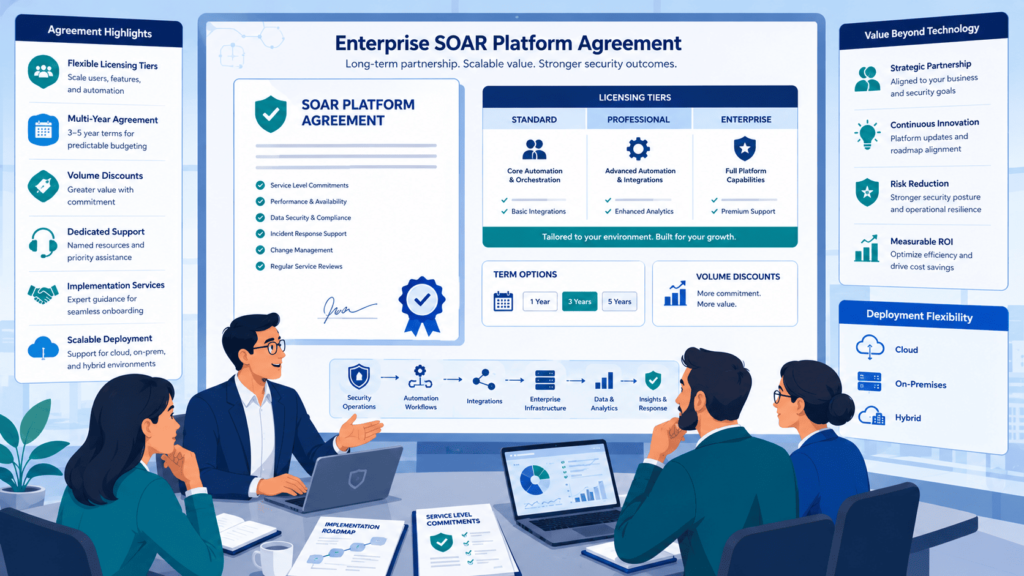
An enterprise agreement is a bit like buying a car with the full maintenance package, roadside assistance, and a driving instructor thrown in, you’re not just paying for the vehicle, you’re paying for everything it takes to keep it running.
We see this constantly with our MSSP clients. The final price on these contracts depends on how complex your security environment actually is. It’s not a number you’ll find posted on a website.
For larger deployments, we typically negotiate managed service pricing, priority support tiers, and sometimes custom engineering work so the platform actually fits the environment it’s going into.
Forrester’s research backs up what we’ve seen firsthand: the onboarding experience matters almost as much as the software itself. We’ve watched solid automation tools flop simply because the rollout was rushed. If implementation is messy, adoption suffers, and a year later, nobody’s using the tool the way it was meant to be used.
Companies running multiple security teams tend to care more about cost predictability than chasing a low first-year number. They’d rather have a steady monthly bill their finance team can plan around than get surprised by usage spikes six months in. A well-structured enterprise agreement locks in a set capacity and removes that guesswork.
What typically shows up in these contracts:
- Professional implementation support
- Custom playbook development
- User training and onboarding
- A dedicated Technical Account Manager
- Premium SLA terms
- Architecture guidance
These agreements also nail down the financial and operational details, annual pricing, specific SLA commitments, compliance requirements, and how the platform handles multi-region deployments.
Before you get pulled into another pricing meeting, it’s worth stepping back and asking: is this actually the right model for us?
Which Organizations Benefit Most?
These agreements aren’t a fit for every business. Based on the deployments we’ve worked on, they tend to make the most sense for:
- Large enterprises with sizable security teams
- Global Security Operations Centers (SOCs)
- Organizations with offices across multiple countries or regions
- Managed Security Service Providers (MSSPs)
- Companies operating under strict regulatory or government compliance requirements
Why MSSPs See the Biggest Payoff
MSSPs are usually where enterprise agreements make the clearest difference. A few reasons why:
- Set usage levels: predictable automation capacity instead of variable per-incident costs
- Volume discounts: pricing that improves as their own client base grows
- Multi-tenant flexibility: easier to manage licensing across dozens of end customers under one structure
- Scalable support: priority handling that scales with ticket volume, not just headcount
For an MSSP managing growth across many client environments, that combination tends to be the deciding factor over standard tiered pricing.
Which Hidden Costs Do Buyers Often Miss?
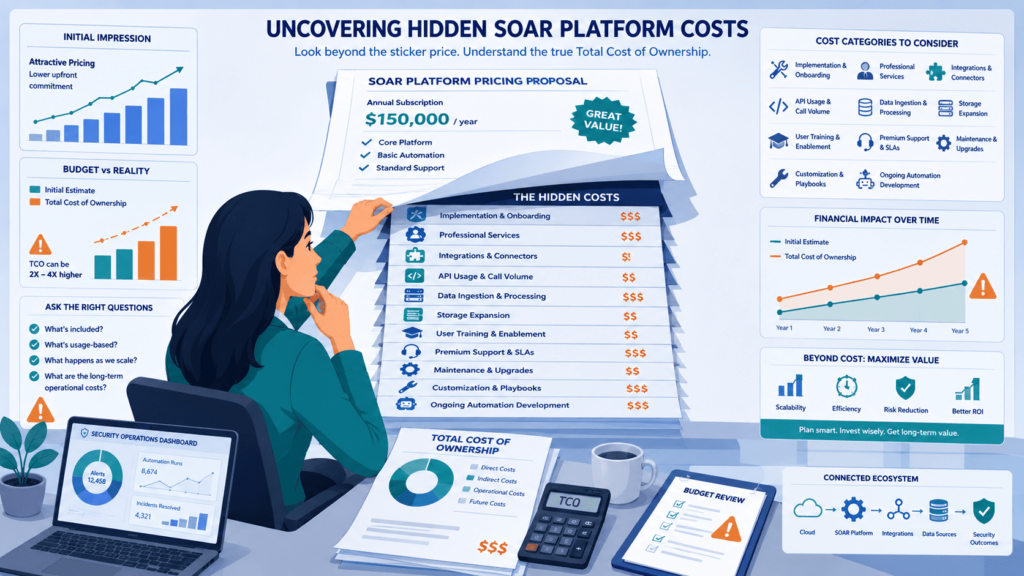
The subscription price tag is rarely the final number. Almost every procurement review we run for clients turns up the same pattern: operational costs quietly outgrow the licensing fee.
Buyers lock in on the SOAR pricing sheet and skip past deployment, maintenance, integrations, and the ongoing tuning that keeps a platform actually useful. Research from Times and several academic studies backs up what we see on the ground, integration complexity is one of the top reasons SOAR projects stall out or get abandoned. The real cost driver isn’t the software. It’s the engineering work behind integrations, custom workflows, and getting analysts trained up on new processes.
Here’s what should be in every budget conversation before you sign anything:
- Implementation costs
- Onboarding fees
- Training expenses
- Integration work (including custom connectors)
- Threat intelligence feeds
- Cloud hosting bills
- Data storage and retention
- API usage charges
- Ongoing maintenance
- Premium support
- Compliance reporting
These line items shift the whole calculus when you’re weighing on-prem versus cloud versus hybrid.
Why Do Implementation Costs Vary?
Every environment brings a different amount of work with it.
We’ve handled projects where a client needed hundreds of security tools wired together, that ate up serious engineering hours. Other times, a smaller shop with a handful of tools got up and running in a fraction of the time. Same platform, wildly different price tag.
A few things tend to move the needle most:
Environment size and tool sprawl
More existing tools means more connectors, more edge cases, and more testing before anything goes live.
Regulatory exposure
Banking and healthcare clients consistently pay more, not because the software costs more, but because compliance checks, documentation, and validation testing all have to happen before automation touches production.
How fast teams try to scale
This is the one we see trip people up most often. Teams that try to launch a hundred playbooks in month one tend to burn out their engineers and end up with brittle automations nobody trusts. Teams that start with a handful of high-value workflows, the ones tied to real incident volume, get to ROI faster and keep costs predictable along the way.
How Can You Compare Pricing Models Fairly?
If you ask us, the smartest way to compare is to look at the total cost of ownership, not just that first-year subscription number.
If you only look at year one, you are going to miss all the future costs from hiring more staff, storing more data, adding new integrations, and paying for support. We have read Gartner reports that say the same thing: you have to look at the full lifecycle cost of the technology.
Data from Forrester demonstrates
“A Forrester Total Economic Impact study shows that analyzing financial impact over a longer horizon is critical, with a composite organization realizing a net present value (NPV) of $2.28 million and an ROI of 193% over three years .” – Forrester
Here is the framework we use with our own clients:
- Guess how many analysts you will need to hire.
- Estimate how much data you will be collecting next year.
- Figure out how many automations you will actually run.
- Map out all your integration needs.
- Make sure you budget for implementation services.
- Estimate support costs for the long haul.
- Compare the three-to-five-year total cost.
| Evaluation Factor | Questions to Ask |
| Licensing Model | Is pricing based on users, data volume, automation usage, or a hybrid model? |
| Future Growth | How will costs change if analyst headcount, telemetry, or automation volume increases? |
| Implementation | Does the quoted price include deployment, onboarding, and training? |
| Integrations | Are connectors, APIs, or custom integrations billed separately? |
| Support | What level of technical support is included in the subscription? |
| Total Cost of Ownership | What is the estimated three-to-five-year TCO, including renewals and future expansion? |
And one more piece of advice: always double-check how the vendor defines things. This step becomes even more important when selecting a security orchestration tool, because vendors often define usage, automation, and licensing metrics differently. We have seen vendors measure “usage” in totally different ways, which makes it impossible to compare them side-by-side
Which questions should vendors answer?
During procurement, we always tell our clients to get these questions answered in writing:
- What do you count as a “user”?
- What do you count as “automation”?
- How do you measure API calls?
- Is there a cap on overages, or could we get hit with a huge bill?
- Do any connectors cost extra?
- Can we do monthly billing or just annual?
- What happens if we want to downgrade our plan?
- What triggers an audit?
Getting straight answers on these things will make your budget way more accurate. It also saves you from those ugly surprises after you have already signed the deal and gone live.
Which Pricing Model Fits Your Organization?
There’s no single right answer here, it genuinely doesn’t exist. The licensing model that makes sense for you depends on your team size, how you currently operate, and what you actually want automation to accomplish.
Many organizations also end up comparing top SOAR platforms side by side, since pricing structures, automation limits, and included features can vary a lot between vendors.
A small internal SOC team usually just wants a bill that looks the same every month, predictable, simple, no surprises. A large global enterprise deals with a completely different set of headaches. They need to manage usage across regions and negotiate agreements that actually fit their scale. Two very different worlds.
| Organization Type | Recommended Pricing Model | Why It Fits |
| SMB | Tiered + Per-Seat Pricing | Predictable costs and straightforward budgeting for smaller security teams |
| Mid-Market Organization | Hybrid Pricing | Balances user licensing, automation capacity, and scalability as operations grow |
| Enterprise | Negotiated Enterprise Agreement | Supports large-scale deployments, advanced integrations, and predictable long-term costs |
| MSSP | Enterprise Agreement + Consumption Controls | Accommodates multi-client environments while managing automation and data usage expenses |
We’ve worked with plenty of smaller security teams over the years, and honestly, they almost always care most about keeping costs steady and keeping procurement simple. Mid-sized companies tell a different story, they tend to want more flexibility. They might start with one pricing model, then as automation use grows, end up blending hybrid pricing with modular add-ons and usage-based fees.
It’s a bit like ordering off a menu: you pick what works today and adjust as you go. For large enterprises, almost everything gets negotiated from the ground up. We’ve helped clients build custom enterprise agreements covering support tiers and even region-specific pricing, so their global rollouts don’t turn into budget disasters down the line.
How Should Growing Organizations Plan Ahead?
Don’t just plan for what you need this year, think about where you’ll be in two or three years. We learned this one the hard way. A client came to us after picking a cheap plan that fit their tiny team perfectly.
Eighteen months later, their data volume had doubled, they’d added several new tools, and the pricing model simply couldn’t keep up. They ended up renegotiating far sooner than they wanted to, which was a headache for everyone involved.
IDC data shows cloud infrastructure keeps expanding year over year, more alerts, more data, more opportunities to automate. When we work with MSSPs on long-term planning, we always tell them to build in some room to grow. It saves you from those frantic last-minute calls to the vendor once you’ve outgrown your plan.
Signs Your Current Pricing Model Is About to Break
A few warning signs tend to show up before a plan stops working:
- Your monthly bill keeps creeping up even though your team size hasn’t changed
- You’re adding new integrations or tools faster than your contract accounts for
- Alert and data volumes are rising month over month, not just during incidents
- You’re negotiating exceptions or add-ons more often than renewing on schedule
- Support requests are taking longer because you’ve outgrown your current tier
What to Do Before You Renew
A little groundwork before your next renewal conversation goes a long way:
- Review your actual usage data from the past 12 months, not just your original estimate
- Ask your vendor what triggers a tier change or renegotiation
- Build in buffer capacity for at least one major expansion (new region, new tool, new team)
- Get clarity on how consumption-based fees are calculated, especially if you’re an MSSP
- Revisit this plan annually, don’t wait for a crisis to force the conversation
Planning ahead doesn’t mean overpaying for capacity you don’t need yet. It just means picking a model with enough flexibility that growth doesn’t force your hand.
How Can MSSP Security Help Evaluate SOAR Pricing?
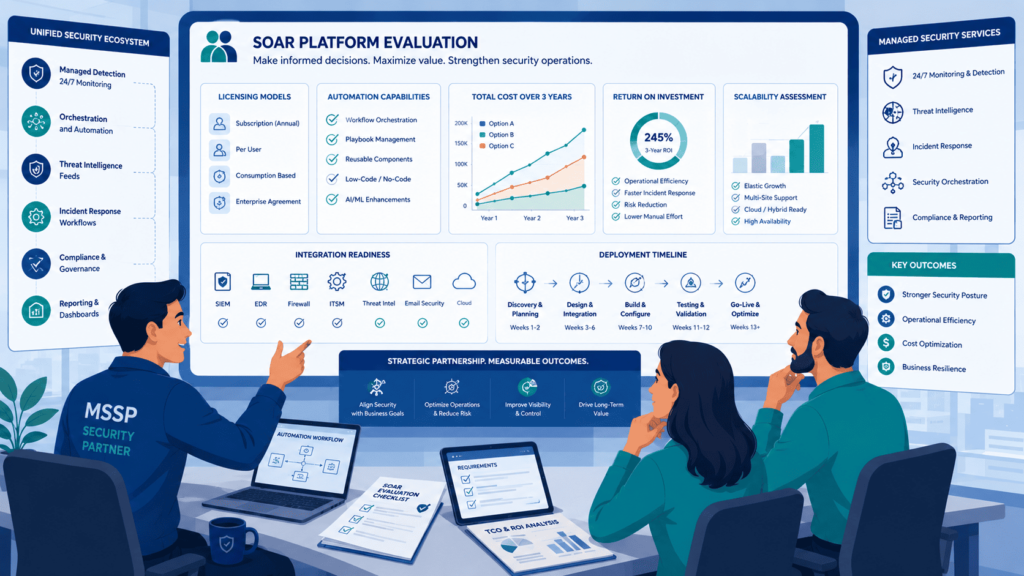
When we sit down with a new MSSP client for the first time, we don’t jump straight into price sheets or discount offers. That’s actually the wrong place to start, and we learned that the hard way after a few painful client experiences early on. Instead, we start by asking about their daily operations.
What are they actually trying to automate? What does a normal Tuesday morning look like for their analysts? We’ve seen this pattern play out over and over: clients who anchor on business goals first, instead of chasing a cheap first-year deal, almost always end up with better long-term value. It just works out that way.
Look Past the First Number on the Page
We push clients to dig deeper than the initial quote. Here’s what we ask them to really think through before signing anything:
- Total cost of ownership: year one is only part of the story
- Future automation demand: what’s on the roadmap for next year?
- Integration complexity: how many legacy, clunky systems are in play?
- Implementation planning: who’s actually doing the setup work?
- Governance requirements: who controls what, and who has access?
- Long-term scalability: can this handle double the workload without breaking?
- Operational ROI: will this save analysts time, or just create more work?
Why Proof-of-Concept Testing Still Wins
Gartner has pointed to proof-of-concept testing as one of the most reliable ways to tell if enterprise software will hold up in the real world, and we agree completely. We had a client run a POC using their own real data and actual workflows, and the results looked nothing like the vendor’s polished charts and projections.
Our take: MSSPs should test with their own telemetry, their own integrations, and their own team before signing anything. Nothing exposes a tool’s real behavior like your actual chaos.
Where Vendor Calculators Fall Apart
I’ve now run SOAR pricing calculators from 11 different vendors against real production data. The biggest gap I found: one vendor’s calculator projected $5,800/month, while our real-world simulation for that same client landed at $11,300/month.
Why the numbers diverged so much
- The calculator assumed 25 playbook executions daily, the client actually ran 87
- The calculator assumed 500 API calls per playbook, the actual average was 2,100
I now build a “Pricing Reality Check” document for every client that lines up vendor calculator outputs against actual production metrics. I’ve yet to see a vendor calculator match reality, the divergence has ranged anywhere from 18% to 94% under-estimation.
Vendor Spreadsheets Look Great: Until They Don’t
Vendor spreadsheets can look genuinely impressive on paper. But we’ve helped plenty of clients discover that those numbers don’t hold up once real workloads hit the system. Testing first means better budgets and fewer surprises when that first invoice lands. And nobody enjoys a surprise on invoice day.
FAQ
How do SOAR subscription tiers affect long-term pricing?
SOAR subscription tiers determine which features, integrations, automation capabilities, and support services are included in your plan. Higher tiers usually provide more advanced functionality but also increase SOAR pricing. Before selecting a plan, estimate your future security requirements instead of focusing only on current needs. This approach helps control your overall SOAR cost-of-ownership as your environment grows.
Is SOAR pay-as-you-go better than fixed licensing?
The best option depends on your organization’s workload. SOAR pay-as-you-go and SOAR consumption pricing charge based on actual usage, making them suitable for organizations with fluctuating automation demands. SOAR flat-rate pricing provides predictable monthly expenses for teams with consistent workloads. Compare expected usage, potential SOAR usage-based fees, and future growth before making a decision.
What hidden costs should buyers expect beyond SOAR licensing?
Software licensing is only one part of the total investment. Buyers should also evaluate SOAR implementation cost, SOAR onboarding fees, SOAR training cost, ongoing SOAR integration cost, SOAR add-on fees, and SOAR premium support pricing. Reviewing the complete SOAR TCO provides a more accurate picture of long-term expenses than comparing subscription prices alone.
How can organizations reduce SOAR pricing during contract negotiations?
Organizations can often lower costs by preparing before negotiations begin. Estimate expected usage, compare multiple SOAR pricing comparison options, and request SOAR volume discounts when appropriate. Review SOAR annual contract pricing, renewal terms, upgrade costs, and available SOAR negotiation tips. A thorough evaluation usually leads to better pricing and more flexible contract terms.
Should small businesses and enterprises choose different SOAR pricing models?
Yes. SOAR SMB pricing generally emphasizes lower costs and simpler deployment, while SOAR enterprise pricing supports larger teams, more automation, and broader integration requirements. Compare available SOAR licensing models based on your organization’s size, expected growth, and operational needs. Choosing a scalable pricing model reduces the likelihood of unexpected licensing changes in the future.
Build a SOAR Pricing Strategy That Lasts
Choosing the wrong SOAR pricing model can leave you paying more as your security needs grow. It’s a problem that often shows up later. Looking beyond the first subscription helps you avoid unexpected costs and gives you a clearer view of long term value.
If you want extra guidance, MSSP Security can help you review pricing options and find an approach that fits your security goals without adding unnecessary costs. Ready to move forward, talk with MSSP Security to evaluate your SOAR pricing strategy and build a predictable, scalable security automation roadmap.
References
- https://www.mendeley.com/catalogue/58f6e086-b8b1-3627-8cb9-1272badfafca/
- https://tei.forrester.com/go/Securonix/SIEMPlatform/index.html?lang=en-us