

Choosing the right EDR or XDR platform depends on your environment, security goals, and team capabilities.
EDR is ideal for organizations that need deep endpoint visibility, threat detection, and rapid response, while XDR is better suited for teams that need broader visibility across endpoints, cloud, identity, email, and network environments.
This guide reviews the top EDR and XDR tools for 2026, comparing their capabilities, integrations, automation, and best use cases.
MSSP Security helps organizations evaluate security solutions and make more confident technology decisions.
What Makes a Top EDR or XDR Tool?
- Detection is key, but context is king: Modern tools use AI to find threats, but the best ones connect endpoint activity to network, cloud, and identity data for a complete picture.
- Automation is non-negotiable: Your team can’t manually chase every alert. Look for platforms that automate containment and remediation to stop threats faster.
- Management defines reality: A powerful tool is useless if it’s too complex to run. Consider your team’s size and skill when choosing between a DIY platform and a managed service.
How Do EDR and XDR Differ?
When we evaluate security platforms for MSSPs, we see the same problem repeatedly. Most teams do not lack security tools. They struggle because alerts from different systems do not create a complete picture.
One dashboard shows endpoint activity, another tracks email threats, while a third monitors cloud workloads. Investigating incidents often means switching between multiple consoles before anyone understands what actually happened.
For organizations still comparing these technologies, an edr versus xdr explained simply approach can help clarify how endpoint-focused protection differs from broader detection and response strategies.
That challenge is exactly what separates Endpoint Detection and Response (EDR) from Extended Detection and Response (XDR). While both help organizations detect and respond to cyber threats, they solve different problems. EDR concentrates on protecting individual endpoints, whereas XDR connects security telemetry across multiple environments to reveal the full attack path.
What Is EDR?
Endpoint Detection and Response (EDR) is designed to monitor and protect individual devices such as laptops, desktops, and servers. Instead of relying solely on malware signatures, it continuously watches endpoint activity for behaviors that indicate an attack may be in progress.
A typical EDR platform can:
- Detect unusual activity on endpoints.
- Record detailed event data for investigations.
- Identify suspicious processes or scripts.
- Automatically isolate infected devices or stop malicious actions.
During product assessments, we often look beyond the feature checklist and examine how well an EDR solution performs during a real investigation. A strong platform should provide enough context for analysts to understand what occurred without forcing them to manually piece together every event.
For example, an EDR platform may alert security teams if:
- A trusted application suddenly begins encrypting hundreds of files.
- An unknown script connects to a server associated with known malicious activity.
- A process behaves in a way that matches common attack techniques.
Its primary strength is deep endpoint visibility. By collecting detailed forensic data, EDR helps security teams investigate incidents, contain compromised devices, and respond before threats spread further across the environment.
The effectiveness of an EDR platform often depends on its endpoint visibility response capabilities, which determine how quickly security teams can identify, investigate, and contain threats.
What Is XDR?
As organizations continue adopting more cloud services, identity platforms, and specialized security tools, many have discovered that endpoint visibility alone is no longer enough. Modern attackers rarely rely on a single system during an intrusion. Instead, they often move across multiple environments, creating a series of connected events that can be difficult to detect without broader visibility.
A typical attack may involve several activities happening across different security layers, such as:
- A phishing email delivering a malicious attachment.
- Stolen credentials being used to access corporate accounts.
- Malware spreading across multiple devices.
- Sensitive data being transferred to an unauthorized cloud storage account.
This is where XDR expands on the capabilities of EDR. While EDR focuses primarily on monitoring and protecting individual endpoints, For example, XDR can connect a phishing email, a stolen login, and suspicious activity on a laptop into one investigation timeline.. These sources may include:
- Endpoint protection.
- Email security.
- Identity and access management.
- Cloud services.
- Firewalls.
- Network security solutions.
“XDR is a cybersecurity solution that unifies threat detection and response across endpoints, networks, email, cloud, and more.” – Cynet
By bringing these signals together, XDR helps security teams identify relationships between events that may appear unrelated when viewed separately. This additional context allows analysts to investigate incidents faster and better understand how an attack develops across different parts of the environment.
The biggest advantage of XDR is not simply collecting more security data. Its real value comes from correlating information across different tools and creating a complete picture of an attack.
Instead of forcing analysts to switch between multiple dashboards and manually connect separate alerts, XDR provides a unified timeline that shows how an intrusion progressed, from the initial access attempt to later stages of compromise.
For organizations without extensive internal security resources, understanding the benefits managed xdr service provides can help determine whether outsourcing detection and response is the right approach.
When Is EDR Enough?
Not every organization needs the broader visibility that XDR provides. In many environments, a well-implemented EDR platform offers the right balance between protection, operational complexity, and cost.
EDR is often a good fit when you need:
- Strong endpoint visibility.
- Threat detection on individual devices.
- Incident investigation and response.
- Automated containment of compromised endpoints.
We frequently recommend evaluating operational requirements before assuming that XDR is necessary. If endpoint protection is the primary concern and the existing security stack remains relatively simple, an enterprise-grade EDR solution may deliver everything the organization needs.
When Should You Consider XDR?
As security environments become more distributed, investigations also become more complicated. Organizations often deploy separate tools for endpoints, email, cloud workloads, identities, and network traffic, creating multiple sources of alerts that analysts must review individually.
XDR becomes increasingly valuable when an organization:
- Uses several security tools across different environments.
- Receives a high volume of alerts every day.
- Needs faster investigations across endpoints, email, cloud, and identity systems.
- Wants better visibility into the full lifecycle of an attack.
This highlights how XDR expands beyond traditional endpoint protection by connecting additional security signals and helping teams gain broader visibility across their environment.
Organizations often begin exploring XDR when analysts spend more time connecting alerts than responding to threats.
By bringing together security signals from multiple technologies, XDR helps reduce investigation time and allows teams to view related events as part of a single incident instead of isolated alerts.
Which Solution Should You Choose?
The process of choosing edr xdr solution provider should focus on security requirements, integration needs, and operational maturity rather than comparing features alone.
There is no universal answer because the right choice depends on your security architecture, operational maturity, and investigation workflow rather than marketing claims.
- Choose EDR if your priority is protecting endpoints with detailed visibility and rapid incident response.
- Choose XDR if your team needs broader visibility across multiple security domains and wants to understand the complete attack chain instead of investigating disconnected alerts.
When we help MSSPs evaluate and audit security products, we focus on how each platform performs within the customer’s existing ecosystem rather than in a vendor demonstration. The best solution improves detection, speeds up investigations, and fits your team’s daily workflow.
Top EDR and XDR Tools Reviewed for 2026
Comparing EDR and XDR platforms requires looking beyond individual features. The best solutions differ in detection accuracy, automation, integrations, scalability, and how well they support security teams in real-world environments.
| Feature | Microsoft Defender for Endpoint | CrowdStrike Falcon | SentinelOne Singularity | Palo Alto Cortex XDR |
| Deployment | Cloud-native / On-premises | Cloud-native | Cloud-native / On-premises | Cloud-native |
| AI Detection | Excellent within the Microsoft ecosystem | Industry-leading behavioral detection | Strong autonomous AI detection | Strong cross-domain analytics |
| Threat Hunting | Advanced hunting with Microsoft Defender XDR | Excellent with Falcon OverWatch and Threat Graph | Strong behavioral investigation | Strong cross-domain threat hunting |
| Ransomware Protection | Automated investigation and containment | Behavioral detection and response | Full ransomware rollback | Automated detection and containment |
| Automation Level | High | High | Very High | High |
| Automated Remediation | Automated Investigation and Response | Real Time Response (RTR) | Automated remediation and rollback | Prebuilt response playbooks |
| SIEM Integration | Native Microsoft Sentinel integration | Extensive APIs and SIEM integrations | Extensive APIs and SIEM integrations | Native integrations and open APIs |
| Multi-tenancy | Available through Microsoft partner ecosystem | Excellent for MSSPs | Excellent for MSSPs | Supported through enterprise deployments |
| Ease of Management | Best within Microsoft environments | Simple cloud management | Easy day-to-day management after setup | Best for organizations already using Palo Alto |
| Managed Service | Available through MSSP partners | Falcon Complete | Singularity Complete | Cortex XDR Pro |
| Best For | Microsoft-focused organizations | Large enterprises and MSSPs | Organizations seeking autonomous protection | Existing Palo Alto customers |
| Pricing Model | User or device subscription | Per endpoint per month | Per endpoint per month | Capacity-based or subscription |
Beyond the platforms covered above, organizations may also compare solutions through resources such as a carbon black edr review features analysis when evaluating alternative endpoint security options.
How Did We Evaluate the Best EDR and XDR Platforms?
Credit: Pro Tech Show
A good EDR or XDR platform is not only about features. It must also be easy to deploy, manage, and use during real security incidents. Through our work helping MSSPs evaluate and audit security products, we’ve learned that the real test begins after deployment. A platform should improve detection and response without adding unnecessary complexity for security teams.
Our approach to evaluating endpoint security tools in California focuses on practical deployment considerations, detection performance, and operational effectiveness rather than vendor marketing claims.
Rather than relying on vendor claims, we assessed how each solution performs in everyday security operations. We focused on three areas: detection accuracy, investigation speed, and ease of use.
How Important Is Detection Accuracy?
Detection quality was one of our highest priorities because every investigation starts with the alerts a platform generates. The best solutions identify real threats while minimizing the false positives that consume analysts’ time.
We looked for platforms that could:
- Detect suspicious behavior instead of relying only on malware signatures.
- Combine behavioral analytics with global threat intelligence.
- Identify emerging ransomware based on attacker behavior.
- Map detections to frameworks such as MITRE ATT&CK to provide investigation context.
“The CrowdStrike Security Cloud correlates trillions of security events each day collected from millions of endpoints and cloud workloads around the globe.” – CrowdStrike
This approach highlights why modern EDR and XDR platforms rely on large-scale telemetry and threat intelligence to improve detection accuracy.
By connecting security data from different environments, these platforms can provide analysts with more context and help identify threats that may not be visible from a single endpoint.
What Makes Incident Response Effective?
Detecting an attack is only valuable if security teams can respond quickly. For that reason, we paid close attention to the response capabilities each platform offers after a threat is identified.
Higher scores were given to solutions that can:
- Automatically isolate compromised endpoints.
- Stop malicious processes before they spread.
- Roll back ransomware encryption when supported.
- Automate routine response actions through playbooks.
From our experience evaluating products for MSSPs, automation becomes increasingly valuable as alert volumes grow. The strongest platforms allow analysts to spend less time on repetitive containment tasks and more time investigating sophisticated threats that require human judgment.
Why Does Visibility Matter?
Modern attacks rarely remain confined to a single endpoint. An investigation often requires analysts to connect activity across endpoints, identities, cloud environments, email systems, and network infrastructure.
That’s why we favored platforms that provide:
- A centralized management console.
- Unified timelines across multiple security tools.
- Correlation between endpoint, network, identity, and email events.
- Clear visibility into the complete attack chain.
This broader visibility is one of the key differences between traditional EDR and XDR platforms. Instead of investigating isolated alerts from separate tools, XDR helps security teams connect related events and understand how an attack develops across the environment.
During product audits, we’ve seen how fragmented visibility can slow investigations even when individual security tools perform well. Platforms that correlate activity across multiple domains help analysts understand how an incident developed instead of forcing them to manually connect separate alerts.
How Easy Is Deployment and Management?
Deployment and ongoing administration play a major role in the long-term success of any security platform. Even advanced capabilities lose value if implementation is complicated or daily management requires excessive effort.
Our evaluation considered factors such as:
- Cloud-native deployment options.
- Lightweight endpoint agents.
- Centralized policy management.
- Support for Windows, macOS, Linux, and other supported operating systems.
Organizations typically gain the most value from solutions that simplify administration while maintaining consistent protection across diverse environments. We also considered how easily MSSPs could manage multiple customer deployments without creating unnecessary operational overhead.
Why Do Integrations Matter?
Security products rarely operate in isolation. Most MSSPs already manage established ecosystems that include SIEM platforms, SOAR solutions, identity providers, firewalls, and cloud security tools.
To understand how well each platform fits into those environments, we evaluated compatibility with:
- SIEM platforms.
- SOAR solutions.
- Existing endpoint, network, and cloud security tools.
- Open APIs and prebuilt integrations.
Successful security operations often depend on integrating edr xdr siem soar environments to create better visibility and automate investigation workflows.
In our consulting engagements, integration often becomes the deciding factor between two otherwise similar products. Solutions that connect easily with existing technologies generally reduce deployment time and allow security teams to gain value more quickly without replacing their current investments.
How Did We Assess Pricing and Overall Value?
Cost extends beyond the initial subscription price, so we evaluated the overall value each platform delivers throughout its lifecycle.
Our assessment included:
- Licensing flexibility.
- Scalability as organizations grow.
- Availability of managed security services.
- The operational effort required to manage the platform over time.
When helping MSSPs compare vendors, we encourage them to consider total cost of ownership instead of licensing alone. A platform with a higher upfront cost may ultimately deliver better value if it reduces administrative effort, shortens investigation times, and scales efficiently as customer environments continue to expand.
Which EDR and XDR Tools Are Best for 2026?

Choosing the right EDR or XDR platform depends on your organization’s security needs, existing tools, and operational resources. Each solution has different strengths, from advanced threat detection and automation to ecosystem integration and ease of management.
Below is a closer look at what makes each platform stand out, along with its potential limitations and the environments where it works best.
Why Choose Microsoft Defender for Endpoint?
Microsoft Defender for Endpoint is a strong option for organizations already using Microsoft technologies. Its close integration with Windows, Microsoft 365, Azure, and Microsoft Sentinel allows security teams to manage endpoint protection alongside their broader Microsoft security environment.
For companies already invested in the Microsoft ecosystem, Defender can provide strong protection without requiring significant changes to their existing infrastructure.
Key strengths:
- Native integration with Microsoft security services.
- Strong endpoint visibility across Windows environments.
- Built-in connection with Microsoft Sentinel for security monitoring.
- Competitive value for organizations with existing Microsoft licenses.
Potential limitations:
- Less intuitive for organizations that do not use Microsoft security products.
- Advanced features may require Microsoft security expertise.
- Organizations may need additional solutions for broader security coverage.
Best suited for:
- Microsoft-focused organizations.
- Enterprises using Microsoft 365 or Azure.
- Teams looking for integrated endpoint and cloud security management.
Organizations that need additional operational support may also consider a microsoft defender for endpoint managed service to extend monitoring, response, and platform management capabilities.
Why Choose CrowdStrike Falcon?
CrowdStrike Falcon is widely recognized for its cloud-native architecture, lightweight endpoint agent, and advanced threat detection capabilities. It is designed for organizations that need strong visibility, fast investigation, and reliable protection across large environments.
Its combination of threat intelligence, scalability, and third-party integrations makes it a popular choice among enterprises and MSSPs managing complex security operations.
Key strengths:
- Lightweight agent with minimal impact on endpoint performance.
- Strong threat intelligence and behavioral detection.
- Advanced threat hunting capabilities.
- Highly scalable for large enterprises and MSSPs.
- Extensive integration options with security tools.
Potential limitations:
- Premium pricing compared with many competitors.
- Advanced capabilities may require experienced security analysts.
- Organizations may need additional platforms for complete security coverage.
Best suited for:
- Large enterprises.
- MSSPs managing multiple customer environments.
- Security teams that require advanced detection and investigation capabilities.
Why Choose SentinelOne Singularity?
SentinelOne Singularity focuses on autonomous security operations by using AI-driven detection and automated response. The platform is designed to identify, contain, and remediate threats with minimal manual intervention.
This approach makes SentinelOne especially appealing for organizations that want to reduce the workload on security teams while maintaining strong endpoint protection.
Key strengths:
- Strong autonomous threat detection.
- Automated containment and remediation.
- Ransomware rollback capabilities.
- Reduces manual response efforts.
- Effective for teams with limited security resources.
Potential limitations:
- The management interface may require time to learn.
- Some advanced workflows need additional configuration and training.
- High levels of automation may not match the preferences of mature SOC teams that want more manual control.
Best suited for:
- Organizations prioritizing automated response.
- Businesses with smaller security teams.
- Teams looking to simplify incident handling.
Why Choose Trend Micro Vision One?
Trend Micro Vision One expands beyond traditional endpoint protection by combining security signals from endpoints, email, cloud environments, and networks. This broader visibility helps security teams investigate threats across multiple areas from a single platform.
For organizations managing different security environments, Vision One can help reduce visibility gaps and simplify incident investigations.
Key strengths:
- Broad visibility across multiple security layers.
- Strong threat intelligence capabilities.
- Supports mixed security environments.
- Centralized investigation and response workflows.
Potential limitations:
- Individual features may not match specialized standalone solutions.
- Organizations get the most value when using multiple Trend Micro security products.
- Some smaller teams may find the platform broader than their actual needs.
Best suited for:
- Organizations needing cross-domain security visibility.
- Businesses with complex or mixed security environments.
- Teams looking for integrated detection and response capabilities.
Why Choose Cynet 360 AutoXDR?
Cynet 360 AutoXDR combines EDR, XDR, network analytics, deception technology, and managed security services into a single platform. Its focus is on simplifying security operations, especially for organizations that do not have a large internal security team.
By combining multiple security capabilities in one solution, Cynet helps smaller organizations improve protection without managing multiple separate tools.
Key strengths:
- Integrated EDR and XDR capabilities.
- Simple deployment and easier management.
- Built-in security automation.
- Designed for organizations without a dedicated SOC.
Potential limitations:
- May not provide the same depth as specialized enterprise platforms.
- Less suitable for organizations requiring highly customized security operations.
- Large enterprises may prefer broader security ecosystems.
Best suited for:
- Small and mid-sized businesses.
- Organizations with limited security resources.
- Companies looking for simplified security management.
How Does CrowdStrike Compare to SentinelOne?
CrowdStrike and SentinelOne are frequently compared because both rank among the leading endpoint security platforms for enterprises and MSSPs. Each combines AI-driven detection with automated response, but they take different approaches to protecting endpoints and supporting security operations.
For MSSPs comparing these two platforms, a crowdstrike vs sentinelone comparison mssp perspective helps highlight differences in scalability, automation, and security operations workflows.
The decision between CrowdStrike and SentinelOne rarely comes down to detection capabilities alone. Other factors, such as workflow integration, management experience, and analyst efficiency, often have a greater impact on the final choice.
How Do Their Detection Capabilities Compare?
Detection performance is one of the first areas we assess because it influences every stage of incident response.
CrowdStrike builds much of its detection capability around its cloud-based Threat Graph, which continuously analyzes telemetry gathered from its global customer base. That shared intelligence helps identify emerging attack patterns and improves detection as new threats appear.
SentinelOne approaches detection differently. Its AI engine performs behavioral analysis directly on the endpoint, allowing the platform to detect and respond to suspicious activity even if cloud connectivity is temporarily unavailable.
Both platforms provide:
- AI-powered behavioral detection.
- Protection against known and emerging threats.
- Continuous endpoint monitoring.
- Low false-positive rates when properly configured.
Throughout our product assessments, we’ve seen both platforms deliver strong detection results. In practice, the biggest difference is not whether they detect threats, but how they present investigation data and help analysts understand what happened.
Which Platform Has Less Performance Impact?
Agent performance is another factor organizations often consider, especially when protecting thousands of devices across multiple environments.
CrowdStrike has earned a reputation for running a lightweight cloud-native agent that places minimal demand on endpoint resources. That efficiency makes it a popular option for organizations where performance is a key concern.
SentinelOne has also improved its agent considerably in recent years. Some administrators still report slightly higher resource usage during intensive tasks, such as full system scans, but the difference is generally minor on modern hardware.
Performance alone rarely determines the final decision. Unless an organization supports highly resource-sensitive workloads, both products generally provide a good balance between protection and system efficiency.
How Do Their Response Capabilities Differ?
Fast detection is important, but the ability to contain and remediate threats quickly often has a greater impact on overall security outcomes.
CrowdStrike provides:
- Real Time Response (RTR) for remote investigation and command execution.
- Automated containment and remediation.
- Broad integration with enterprise security operations.
SentinelOne includes:
- Autonomous response with minimal analyst intervention.
- Automated remediation throughout the attack lifecycle.
- Ransomware rollback for supported environments.
Organizations with mature SOC teams often prefer CrowdStrike because of its investigative flexibility and remote response capabilities.
Teams looking to automate more response processes may prefer SentinelOne because of its autonomous remediation and rollback features.
How Do Pricing and Managed Services Compare?
Both CrowdStrike and SentinelOne are premium solutions, and pricing generally depends on licensing options, deployment size, and the services an organization chooses.
Managed offerings include:
- CrowdStrike Falcon Complete, which provides managed detection and response.
- SentinelOne Singularity Complete, which combines the platform with managed security services.
These services increase the overall investment, but they can also reduce operational overhead for organizations that don’t have a dedicated 24/7 security team. We often recommend evaluating managed services alongside licensing costs because they can significantly change the platform’s overall value.
Which Platform Is the Better Choice?
Neither solution is the right answer for every organization. The better choice depends on operational priorities, existing security infrastructure, and the level of automation a team wants to achieve.
CrowdStrike is often a good fit for organizations that need:
- A lightweight cloud-native platform.
- Extensive third-party integrations.
- Advanced threat hunting capabilities.
- Enterprise-scale endpoint management.
SentinelOne is often a strong choice for organizations that prioritize:
- Autonomous threat detection and response.
- Automated remediation.
- Ransomware rollback capabilities.
- Reduced manual intervention during incident response.
When comparing endpoint security platforms, organizations should evaluate how each product fits within their existing security environment rather than comparing features in isolation.
Both CrowdStrike and SentinelOne are mature, capable platforms, and the right decision usually comes down to which one best supports the organization’s security operations, integration requirements, and long-term strategy.
How Do You Choose the Right EDR or XDR Solution for Your Organization?

Selecting an EDR or XDR platform is about more than comparing features. The best solution is the one your organization can deploy, manage, and use effectively every day. During our work with MSSPs, we’ve seen organizations invest in powerful security platforms only to discover that the tools were too complex for their teams or didn’t integrate well with existing systems.
Before comparing vendors, it’s worth evaluating your organization’s requirements first.
Consider questions such as:
- How many endpoints do you need to protect?
- Which compliance standards apply to your organization, such as HIPAA, GDPR, or PCI DSS?
- Does the platform integrate with your existing SIEM and security tools?
- Does your internal team have the expertise to manage the platform?
Taking inventory of your current security environment often makes vendor selection much easier. A platform that fits naturally into existing workflows usually delivers more value than one with advanced features that rarely get used.
Why Does Security Team Maturity Matter?
Technology is only one part of an effective security program. The people responsible for operating the platform are equally important.
Some organizations have a dedicated security operations center (SOC) with analysts monitoring threats around the clock. Others rely on IT teams that balance security responsibilities with infrastructure, networking, and user support.
We’ve seen both models work well, provided the platform matches the team’s capabilities. Advanced detection tools still require analysts to investigate alerts, fine-tune policies, and respond to incidents. Selecting a solution that aligns with the organization’s operational maturity often leads to better security outcomes and fewer day-to-day management challenges.
Should You Choose Cloud-Native or On-Premises Deployment?
Deployment models have also become an important part of the selection process. For most organizations, cloud-native platforms now provide the flexibility needed to keep pace with modern IT environments.
Cloud-native solutions typically offer:
- Faster feature and threat intelligence updates.
- Easier scalability as environments grow.
- Less infrastructure to maintain.
- Simpler deployment across distributed workforces.
On-premises deployments still make sense for certain organizations, particularly those operating in highly regulated industries or managing isolated environments with strict data residency requirements. However, throughout our platform evaluations, we’ve found that cloud-native solutions generally reduce administrative effort while making it easier to deploy updates and expand protection over time.
How Does Organization Size Affect Your Choice?
Security requirements often change as organizations grow, so platform selection should reflect both current and future needs.
In general:
- Small businesses benefit from solutions that are easy to deploy, highly automated, and supported by managed services.
- Mid-sized organizations often require stronger integrations, flexible policies, and room to expand.
- Large enterprises typically prioritize scalability, advanced analytics, and support for complex security operations across multiple environments.
When we help MSSPs assess new products, scalability is always part of the conversation. Choosing a platform that can grow alongside customers helps reduce future migration projects and protects long-term technology investments.
Why Should You Consider an MSSP or Managed XDR Provider?
Not every organization has the resources to build and operate a 24/7 security operations center. In those situations, managed services can provide expertise that would otherwise require significant internal investment.
A managed security provider can help by offering:
- Continuous security monitoring.
- Faster incident detection and response.
- Access to experienced security analysts.
- Ongoing platform administration and optimization.
From our experience working alongside MSSPs, the strongest partnerships extend well beyond alert monitoring. The most effective providers become part of the customer’s security operations by understanding existing processes, supporting the organization’s technology stack, and adapting their services as security requirements evolve. That collaborative approach often delivers far more value than a standardized managed security offering.
What Are the Most Common EDR Deployment and Management Challenges?
Choosing an EDR platform is only one part of the process. Deploying, configuring, and managing it across a production environment often presents a different set of challenges. Even organizations that select the right product can run into issues if deployment planning, policy management, or user adoption is overlooked.
Understanding common edr deployment management challenges before implementation helps organizations create realistic rollout plans and avoid operational issues.
Through our consulting work with MSSPs, we’ve seen successful implementations share one thing in common: they treat deployment as an ongoing operational project rather than a one-time installation. The platform may provide the technology, but long-term success depends on how well it fits into everyday security operations.
Some of the challenges we encounter most often include:
- Deploying the EDR agent across every supported endpoint.
- Creating policies that strengthen security without disrupting business operations.
- Reducing false positives to avoid alert fatigue.
- Protecting legacy systems that cannot run modern agents.
- Preparing employees for changes introduced by the new platform.
Why Is Complete Endpoint Coverage So Important?
An EDR solution can only protect the devices it can see. Leaving even a small number of endpoints unmanaged creates blind spots that attackers may be able to exploit.
During product audits, we’ve frequently discovered devices that were missing from the original deployment plan. In many cases, these were forgotten servers, remote employee laptops, or specialized systems that weren’t included in existing asset inventories. Identifying those devices before rollout helps improve both visibility and long-term security coverage.
How Can Policy Management Become a Challenge?
Configuring security policies requires balancing protection with business continuity. Policies that are too restrictive can interrupt legitimate workflows, while policies that are too relaxed may leave unnecessary gaps in protection.
Security teams often spend time refining policies to:
- Reduce unnecessary application blocks.
- Support legitimate business processes.
- Minimize false-positive alerts.
- Apply consistent protection across different device groups.
One lesson we’ve learned from evaluating endpoint security products is that policy tuning rarely ends after deployment. The most effective organizations review and adjust policies regularly as new applications, users, and threats appear.
How Can Teams Reduce Alert Fatigue?
Generating more alerts does not always improve security. If analysts spend most of their time reviewing low-priority notifications, important incidents can easily be overlooked.
Alert fatigue commonly occurs when:
- Detection rules are overly aggressive.
- Analysts receive large numbers of low-risk alerts.
- Security teams spend more time filtering alerts than investigating confirmed threats.
As part of our platform assessments, we pay close attention to alert quality as well as detection rates. Solutions that provide meaningful context and effective prioritization often help analysts work more efficiently than platforms that simply generate more alerts.
What Challenges Do Legacy Systems Create?
Legacy infrastructure remains a reality for many organizations, particularly those running business-critical applications that cannot easily be upgraded. Older operating systems may not support modern EDR agents, creating security gaps that require additional planning.
When we help MSSPs evaluate customer environments, these systems often require alternative protections, such as network segmentation, enhanced monitoring, or other compensating controls. While those measures do not replace endpoint protection, they can reduce risk until legacy devices are retired or modernized.
Why Does User Training Matter?
A successful deployment involves more than technology. Employees also need to understand how the new platform works and what to expect when it detects suspicious activity.
Training should explain:
- Why the EDR platform has been deployed.
- What users should expect if an application is blocked.
- How to report security alerts or false positives.
- When to contact IT or the security team for assistance.
We’ve found that organizations that communicate early and clearly with end users typically experience smoother deployments. Setting expectations before rollout helps reduce help desk tickets, minimizes frustration, and encourages employees to support security initiatives instead of looking for workarounds.
Which EDR or XDR Platform Fits Your Business Size and Security Needs?
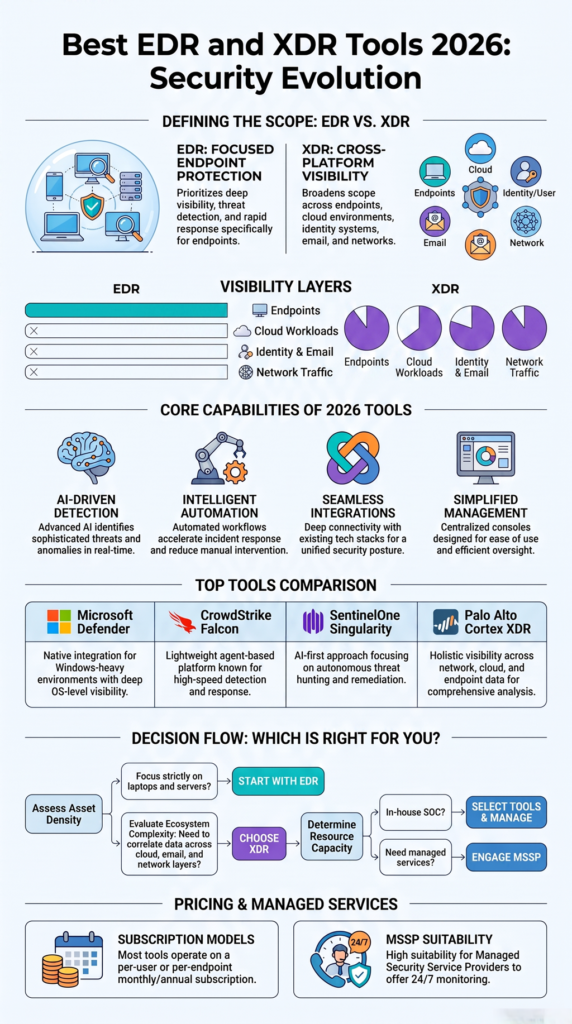
There is no single EDR or XDR platform that works best for every organization. The right choice depends on factors such as company size, available security resources, existing infrastructure, and long-term security goals. A platform that works well for a global enterprise may be unnecessarily complex for a small business, while a lightweight solution may not provide the scalability an enterprise requires.
As we’ve worked with MSSPs to evaluate and audit endpoint security products, we’ve found that the best deployments begin by matching the platform to the organization’s operational needs instead of simply choosing the product with the most features.
Which Platforms Are Best for Small Businesses?
Small businesses often have limited IT and security resources, so ease of management is usually just as important as detection capabilities. For this reason, the best EDR tool for small businesses is usually a platform that combines strong protection, simple administration, and automation without requiring a dedicated security operations team.
Organizations in this category should look for solutions that offer:
- Simple deployment and administration.
- Strong automated protection.
- Managed security services when needed.
- Predictable pricing.
Platforms such as Cynet 360 AutoXDR or managed solutions like Huntress can be good options for organizations that want enterprise-level protection without building a full security operations team. These solutions are especially suitable for smaller businesses that need effective threat detection and response while keeping security operations manageable.
Which Platforms Fit Mid-Sized Organizations?
As organizations grow, security environments become more complex. Mid-sized businesses often need stronger integrations while still keeping day-to-day management practical for smaller security teams.
Useful capabilities include:
- Integration with existing security tools.
- Centralized management.
- Flexible policy controls.
- Support for future growth.
In our experience, platforms such as Microsoft Defender for Endpoint and Trend Micro Vision One often fit these environments well, especially when combined with managed security services that extend the capabilities of internal IT teams.
Which Platforms Are Designed for Large Enterprises?
Large enterprises typically manage thousands of endpoints across multiple locations, making scalability and advanced visibility essential.
Organizations with complex environments often prioritize:
- Enterprise-scale deployment.
- Advanced threat detection and hunting.
- Detailed reporting and analytics.
- Broad integration with existing security ecosystems.
Solutions such as CrowdStrike Falcon, SentinelOne Singularity, and Palo Alto Cortex XDR are commonly selected because they provide the flexibility and operational depth required for large-scale security programs.
Which Platforms Work Best for MSSPs?
Managed Security Service Providers have a different set of requirements because they support multiple customers from a single operational environment.
An MSSP typically benefits from platforms that provide:
- Multi-tenant management.
- Customer-specific reporting.
- Scalable endpoint administration.
- Strong vendor support and partner programs.
During our consulting engagements, we’ve seen CrowdStrike Falcon and SentinelOne Singularity adopted by many MSSPs because both offer mature partner ecosystems and capabilities designed for managing large numbers of customer environments efficiently.
How Should You Make the Final Decision?
The best platform is the one that aligns with your organization’s operational model rather than the one with the longest list of features.
When we help MSSPs evaluate new security products, we focus on questions such as how well the platform integrates with existing workflows, how efficiently analysts can manage it, and whether it can scale as customer environments grow. A successful deployment is ultimately measured by how effectively the platform supports day-to-day security operations, not simply by the number of capabilities listed in a product brochure.
FAQ
What is the difference between EDR and XDR?
EDR (Endpoint Detection and Response) focuses on monitoring, detecting, and responding to threats on endpoint devices such as laptops, desktops, and servers. XDR (Extended Detection and Response) expands visibility by correlating security data from endpoints, email, cloud services, identity systems, and networks. Organizations with more complex environments often choose XDR because it provides a broader view of attacks across multiple systems.
Which is better: EDR or XDR?
Neither solution is universally better. EDR is ideal for organizations that primarily need endpoint protection and detailed forensic investigation. XDR is better suited for businesses that use multiple security tools and want centralized visibility, automated correlation, and faster investigations across their entire security environment.
What are the best EDR and XDR tools for 2026?
Some of the leading platforms for 2026 include Microsoft Defender for Endpoint, CrowdStrike Falcon, SentinelOne Singularity, Palo Alto Cortex XDR, Trend Micro Vision One, and Cynet 360 AutoXDR. Each platform offers different strengths in detection accuracy, automation, integrations, and scalability, making the best choice dependent on your organization’s security requirements.
How do I choose the right EDR or XDR platform?
Start by evaluating your security goals, existing technology, and internal resources. Consider factors such as endpoint coverage, integration with SIEM or SOAR platforms, deployment model, automation capabilities, scalability, and the level of expertise required to manage the solution. Organizations without dedicated security teams may also benefit from managed EDR or Managed XDR services.
Can small businesses benefit from XDR?
Yes. While EDR is often sufficient for many small businesses, XDR can provide additional value for organizations using cloud applications, remote work environments, and multiple security tools. Modern XDR platforms with built-in automation or managed services can help smaller teams improve threat detection and response without significantly increasing operational complexity.
How Do You Make the Right EDR and XDR Decision?
Choosing the right EDR or XDR platform is about finding the solution that best fits your organization’s security needs, operational maturity, and existing technology stack.
From our experience helping MSSPs evaluate and audit security products, the most successful deployments prioritize usability, integration, and long-term value over feature count alone.
If you need vendor-neutral guidance, our consulting services help MSSPs reduce tool sprawl, evaluate security products, optimize technology stacks, and make informed purchasing decisions. Learn more about our consulting services: MSSP Security Consulting Services
References
- https://www.cynet.com/xdr-security/top-xdr-security-solutions/
- https://www.crowdstrike.com/en-us/cybersecurity-101/threat-intelligence/threat-intelligence-feeds/
Related Articles
- https://msspsecurity.com/crowdstrike-vs-sentinelone-comparison-mssp/
- https://msspsecurity.com/carbon-black-edr-review-features/
- https://msspsecurity.com/microsoft-defender-for-endpoint-managed-service/
- https://msspsecurity.com/choosing-edr-xdr-solution-provider/
- https://msspsecurity.com/edr-versus-xdr-explained-simply/
- https://msspsecurity.com/evaluating-endpoint-security-tools-california/
- https://msspsecurity.com/benefits-managed-xdr-service/
- https://msspsecurity.com/integrating-edr-xdr-siem-soar/
- https://msspsecurity.com/edr-deployment-management-challenges/
- https://msspsecurity.com/endpoint-visibility-response-capabilities/