

Mobile access MSSP portal features help security teams and clients monitor, manage, and respond to security activities from anywhere without relying on desktop devices. These features include secure dashboards, real-time alerts, ticket management, messaging tools, and controlled user access.
A well-designed MSSP portal improves visibility while maintaining authentication, access control, and compliance standards.
At MSSP Security, we help organizations build secure portal experiences for better collaboration. Keep reading to explore the key features and benefits of mobile MSSP portal access.
Quick Overview Of Mobile MSSP Portal Benefits
A quick look at the main points to understand how mobile MSSP portals support better security management:
- Mobile access MSSP portal features help organizations monitor security operations, manage incidents, access tickets, and collaborate through secure mobile dashboards.
- Modern MSSP portals combine secure authentication, MFA, role-based access control, and audit logging to protect sensitive security information.
- Responsive design, mobile notifications, and client self-service features help teams respond faster and collaborate more effectively.
What Are The Key Mobile Access MSSP Portal Features For Modern Security Operations?
Managed security providers need faster visibility and smoother client collaboration as security environments become more complex. Mobile access MSSP portal features help teams securely monitor incidents, review reports, manage tickets, and communicate without relying only on desktop systems.
From our experience helping MSSPs evaluate and audit security products, the main challenge is often choosing a portal that provides easy access without weakening security controls. A reliable client portal mobile app or mobile-friendly portal should support:
- Incident monitoring and ticket updates
- Security dashboards and reporting access
- Secure messaging and approval workflows
- Authentication and user permissions
When reviewing solutions, we focus on usability, access control, and operational fit. A strong mobile portal enables technicians, clients, and security managers to work efficiently through secure mobile access and anytime anywhere access while maintaining proper security standards.
How Do Mobile Dashboards And Real-Time Alerts Improve Security Visibility?
Security visibility is one of the first areas MSSPs need to evaluate when selecting a mobile portal solution. As security operations become more distributed, teams need a practical way to review incidents, monitor risks, and take action without being tied to a desktop environment. This is where mobile access MSSP portal features can make daily workflows more efficient.
From our experience helping MSSPs assess and audit security products, we often find that having more data does not always lead to better decisions. The challenge is presenting the right information at the right time. A well-designed mobile dashboard helps users quickly understand security conditions through a single, organized view. This type of visibility is especially useful when users need a reliable way of reviewing security alerts incidents portal activities, allowing security teams to quickly identify risks and prioritize response actions.
Important dashboard capabilities often include:
| Mobile Dashboard Feature | Purpose In MSSP Operations |
| Security alerts | Helps teams identify urgent events and respond faster |
| Open incidents | Provides visibility into ongoing security issues |
| Ticket status | Allows users to track progress and pending actions |
| Investigation updates | Helps analysts and clients follow security reviews |
| Compliance information | Supports reporting and governance requirements |
| Analytics dashboards | Helps teams identify trends and measure security performance |
For security teams, real-time alerts, mobile notifications, and push notifications play an important role in reducing response delays. Users can receive updates when critical vulnerabilities are detected, incidents require attention, tickets change status, or approvals are needed.
When we review mobile MSSP solutions, we look beyond feature lists. The focus is whether the platform provides useful visibility while supporting secure workflows and user needs. A practical workflow may look like:
Security Event → Real-Time Alert → Push Notification → Mobile Dashboard Review → Response Action
This approach helps MSSPs choose products that improve incident visibility and allow teams to move from detection to response with fewer unnecessary steps.
How Does Mobile Ticketing Improve Incident Response And Workflow Management?

Security incidents rarely involve only one person. Clients, analysts, technicians, and decision-makers often need to review updates, share information, and approve actions before an issue can be resolved. This is why mobile access MSSP portal features that support ticketing and workflow management are becoming an important consideration for MSSPs.
From our experience helping MSSPs select and audit security products, we often see that slow response times are caused by disconnected workflows rather than a lack of security tools.
A well-designed mobile MSSP portal helps teams access important updates, manage requests, and continue security processes even when they are away from their main workstation.
A structured managing tickets service requests portal approach helps MSSPs keep workflows organized by connecting ticket updates, approvals, and client actions within one secure environment.
Key ticketing capabilities to evaluate include:
- Ticket access and ticket updates
- Status tracking and client self-service
- Workflow approval and approval requests
- Client approvals and secure communication
For example, when a vulnerability requires remediation, security teams can create a ticket, assign responsibilities, provide progress updates, and request client approval through the same platform. This creates a more organized mobile workflow with fewer communication gaps.
A simple process may look like:
Issue Identified → Ticket Created → Client Notification → Investigation → Approval Request → Resolution Update
When we review mobile portal solutions, we look at how well these workflows support real operational needs. The right ticketing features help MSSPs improve response coordination, maintain visibility, and strengthen collaboration with their clients.
How Do Authentication Controls Secure Mobile MSSP Portal Access?
Credit: IBM Technology
Easy access is important for modern security operations, but convenience should never come at the cost of protection. Since MSSP portals often contain sensitive client data, incident details, and security reports, authentication needs to be a core consideration when evaluating mobile access MSSP portal features.
When we help MSSPs select and audit security products, one area we closely review is how well a platform protects user identities without creating unnecessary friction. In many cases, password-only access does not provide enough protection for systems that manage critical security information.
“Use processes and tools to create, assign, manage, and revoke access credentials and privileges for user, administrator, and service accounts for enterprise assets and software.” – Center for Internet Security (CIS)
This principle highlights why authentication controls and access management are essential parts of mobile access MSSP portal features. Proper credential management helps MSSPs reduce unauthorized access risks while ensuring users receive appropriate permissions when accessing security systems remotely.
A reliable mobile portal should include multiple authentication layers, such as:
- Secure login
- MFA authentication
- Two-factor authentication
- Secure authentication
- Identity verification
- Access management
Multi-factor authentication adds additional verification steps, such as secondary confirmation or device checks, making it harder for unauthorized users to gain access even if credentials are exposed.
At MSSP Security, we focus on helping teams assess solutions that provide both strong security controls and a practical user experience. A typical authentication process may include:
Login Attempt → Identity Verification → MFA Authentication → Permission Validation → Secure Portal Access
Strong authentication helps create reliable remote portal access, allowing users to securely manage security activities across different locations while maintaining proper access protection.
How Do Role-Based Permissions Improve Mobile MSSP Portal Security?
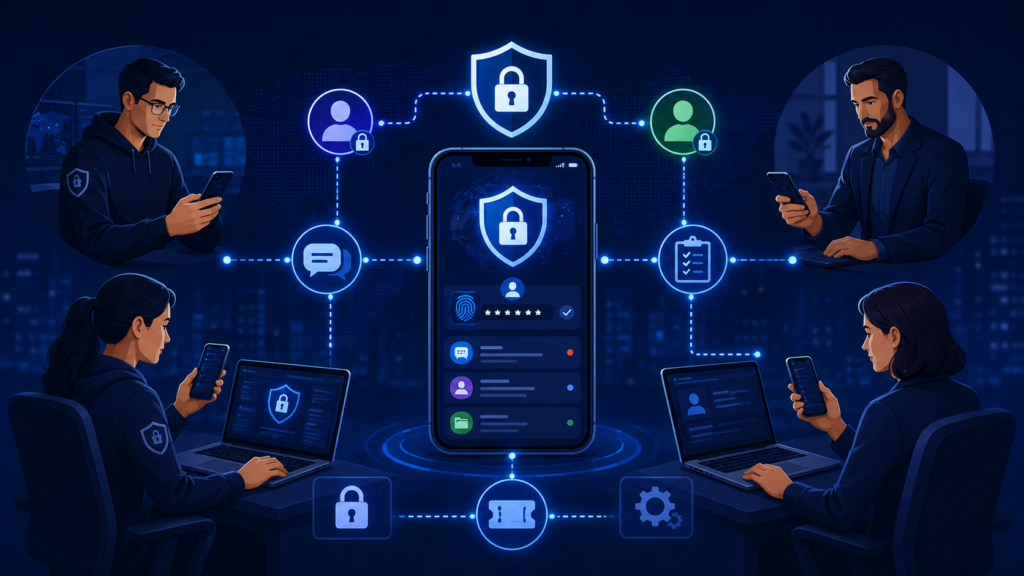
Mobile access gives security teams more flexibility, but it also requires careful control over who can access sensitive information. Effective mobile access MSSP portal features should include permission management that limits unnecessary exposure while allowing users to complete their responsibilities efficiently.
When we help MSSPs evaluate and audit security products, access control is one of the areas we review closely. A portal may offer many features, but without the right permission structure, organizations can create security gaps through excessive user access. Access control remains a critical part of secure mobile portal design.
“A key component of information security, access control allows for streamlined control of movement around facilities or networks.” – International Organization for Standardization (ISO)
This principle applies to MSSP portals, where role-based access control, permission-based access, and least privilege access help ensure users only reach the information and functions required for their responsibilities.
A well-designed MSSP portal should support:
- Role-based access control
- Permission-based access
- Least privilege access
- Delegated access
- Access control and access management
For example, security analysts may need access to incident investigations, clients may only view their own reports and tickets, and managers may approve workflows based on their assigned roles.
In our experience, strong access management is not just about restricting users. It is about creating a practical structure that supports daily operations while protecting sensitive data. A typical process may follow:
Access Request → Identity Verification → Role Evaluation → Permission Assignment → Portal Access → Activity Monitoring
At MSSP Security, we help teams assess whether a solution provides the right balance between usability and protection. Proper access governance and identity governance ensure every user receives appropriate permissions without unnecessary risk.
How Does Multi-Tenant Access Improve Mobile MSSP Portal Security?
MSSPs often support multiple customers, departments, or business units within the same security platform. Because of this, mobile access MSSP portal features need to provide strong separation between environments while still allowing authorized teams to manage services efficiently.
When we help MSSPs select and audit security products, tenant isolation is one of the key areas we review. A portal may offer advanced functionality, but weak separation between client environments can create unnecessary security and privacy risks.
A reliable multi-tenant mobile portal should include:
- Tenant isolation
- Multi-tenant access
- Secure client dashboard
- Managed security portal
- Technician access
- Partner access
In practice, a technician supporting multiple clients should only access the environment assigned to their role. The platform should automatically enforce these boundaries through identity checks and permission controls.
A secure workflow may look like:
Multiple Client Environments → Identity Verification → Tenant Validation → Role Permission Check → Authorized Client Dashboard
From our experience, maintaining clear separation between customer environments is essential for building client trust. Proper multi-tenant design allows MSSPs to scale their services while keeping security data private, organized, and protected.
How Does Secure Mobile Communication Improve Client Collaboration?
Security operations rely on consistent communication between clients, analysts, technicians, and other stakeholders. When updates are spread across different channels, it can become harder to track decisions, follow incident progress, or maintain clear records.
This is why mobile access MSSP portal features that support secure communication are becoming an important part of modern MSSP workflows.When we help MSSPs evaluate and audit security products, we look at more than monitoring capabilities.
The way a platform supports collaboration is also important, especially when teams need to discuss incidents, share updates, or request approvals without leaving the security environment. A well-designed Customer Portal Service Interface gives clients a clearer way to access updates, communicate with security teams, and stay involved throughout the resolution process.
Key communication features to consider include:
- Messaging portal
- Client communication
- Threaded chat
- Two-way messaging
- Secure messaging
- Secure collaboration
A secure messaging system keeps conversations connected to related security activities. For example, when a client needs to approve a remediation step, the team can send an alert, discuss the recommendation, collect feedback, and keep the communication history within the portal.
A typical workflow may look like:
Security Alert → Client Notification → Secure Messaging Discussion → Approval Decision → Action Documentation
From our experience, MSSPs build stronger client relationships when communication is transparent and easy to track. The right mobile communication tools help teams respond faster while maintaining accountability throughout the security process.
How Does Responsive Mobile Portal Design Improve User Experience?
Security platforms often bring together large amounts of information, but users should not need to struggle to complete basic tasks. A well-designed mobile access MSSP portal should make it easier for security teams and clients to review updates, manage requests, and take action from different devices.
When we help MSSPs select and audit new security products, usability is one of the areas we evaluate closely. A portal can have strong security controls, but poor navigation may slow down response times and reduce user adoption. The right solution should balance protection with a smooth experience.
Important usability features include:
- Responsive portal design
- Device-friendly portal
- Browser-based portal
- Portal usability
- Intuitive interface
- Simplified navigation
- Quick access
A responsive portal allows users to access dashboards, reports, tickets, and communication tools across smartphones, tablets, and browsers. For example, a security manager should be able to:
- Open incident details
- Review investigation notes
- Check ticket updates
- Approve recommended actions
A practical user journey may look like:
Open Mobile Portal → View Dashboard → Select Security Activity → Review Details → Take Action
From our experience, MSSPs benefit from solutions that make security workflows easier to follow without adding unnecessary complexity. A strong user experience helps teams respond faster while keeping security processes organized and controlled.
How Do Customization Options Improve MSSP Mobile Portal Flexibility?
MSSPs often support different clients, workflows, and reporting requirements, so a one-size-fits-all portal may not always meet operational needs. Mobile access MSSP portal features should provide customization options that allow teams to adjust the platform while keeping security processes consistent.
In our work helping MSSPs select and audit security products, we often review how well a portal can adapt to real business requirements. A solution may offer advanced capabilities, but if administrators cannot configure it properly, it may create unnecessary challenges for users and security teams.
Key customization features to consider include:
- Branded portal
- White-labeled portal
- Customizable portal
- Configurable portal
These options allow organizations to personalize dashboard views, notification preferences, user roles, reporting sections, and communication workflows. The goal is not only to change the portal’s appearance but to make daily security tasks easier to manage.
At MSSP Security, we help teams evaluate whether a product provides practical flexibility without compromising security controls. Effective customization should support:
- Better user experience
- Smoother workflows
- Improved security visibility
- Stronger operational consistency
From our experience, the most effective mobile portals are those that fit existing processes while giving MSSPs the control needed to deliver reliable security services.
How Do Auditing And Reporting Improve Mobile MSSP Portal Compliance?
As MSSPs increase their use of mobile platforms, maintaining clear visibility into user activity becomes essential. Mobile access MSSP portal features should not only provide convenient access but also include auditing and reporting tools that help organizations track actions, support compliance efforts, and maintain accountability.
When we help MSSPs select and audit security products, we pay close attention to how well a platform records and manages access activity. A portal may provide strong functionality, but without proper tracking, security teams can struggle to investigate events or verify user actions.
Key governance capabilities include:
- Audit logging
- Access auditing
- Compliance tracking
- Security reporting
- Identity governance
- Access governance
For example, when a user approves a security action from a mobile device, the system should capture important details such as:
- User identity
- Timestamp
- Action performed
- Related security activity
A typical monitoring process may follow:
User Activity → Portal Records Action → Audit Log Created → Security Review → Compliance Report Generated
From our experience, effective auditing is not just about meeting requirements. It helps MSSPs and their clients maintain better security oversight, support investigations, and make informed decisions when reviewing portal activity. At MSSP Security, we help organizations evaluate solutions that provide the visibility needed for stronger security governance.
How Can Mobile MSSP Portal Access Improve Remote Security Response?
A growing organization with teams working across multiple locations needed a better way to manage security activities outside normal office hours. Their previous process depended mostly on desktop access, which made it harder to respond quickly when incidents, approvals, or ticket updates required immediate attention.
When we help MSSPs evaluate and audit security products, we often see similar challenges. The issue is not always a lack of security tools, but whether users can access the right information at the right time. In this case, mobile access MSSP portal features helped create a more practical remote security workflow.
The organization improved operations through:
- A mobile dashboard for incidents, reports, investigation updates, and ticket status
- Push notifications for important security events
- MFA authentication to protect mobile access
- Mobile ticketing for updates and approvals
- Secure messaging for client and technician collaboration
The updated workflow followed:
Security Event Detected → Push Notification Sent → MFA Login → Mobile Dashboard Review → Investigation → Response Action → Audit Log Recorded
From our experience, MSSPs should evaluate mobile capabilities alongside security controls when reviewing products. A well-designed MSSP mobile portal can help organizations improve incident awareness, strengthen access governance, and support faster collaboration across remote teams.
How To Choose The Right Mobile MSSP Portal Features For Future Security Needs?
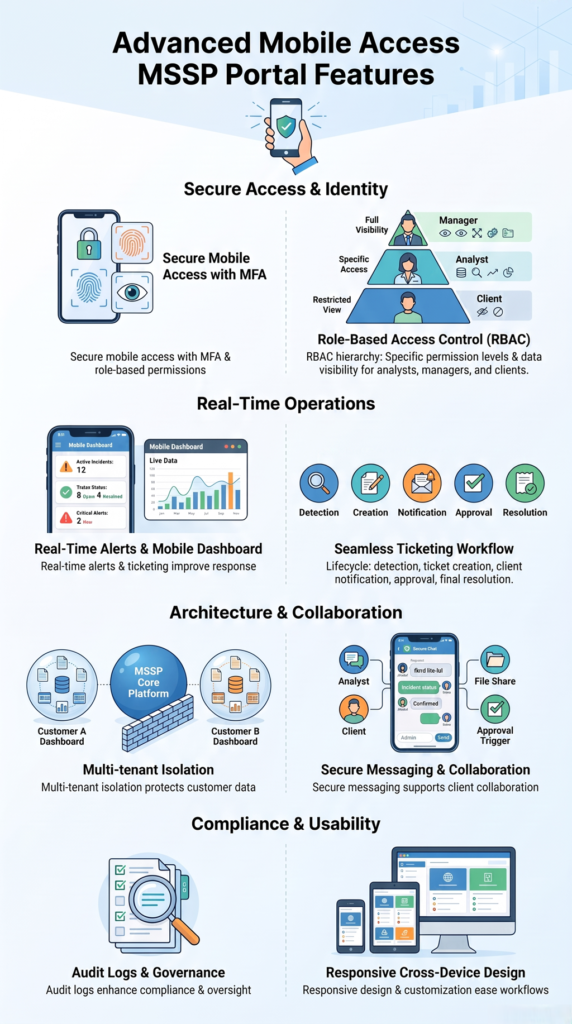
Choosing an MSSP mobile solution involves more than checking whether users can access a portal remotely. Organizations need mobile access MSSP portal features that support secure operations, improve workflows, and provide a practical experience for both security teams and clients.
When we help MSSPs select and audit security products, we look beyond feature lists. A platform should fit real operational requirements, including how users access information, manage incidents, communicate, and maintain security controls.
Key capabilities to evaluate include:
- Secure mobile access and MFA authentication
- Mobile dashboard and real-time alerts
- Mobile notifications and ticketing
- Secure messaging and collaboration
- Role-based access control
- Audit logging and compliance reporting
- Responsive portal design
In our experience, the strongest solutions answer three important questions: Can users access critical information quickly? Can teams complete security tasks remotely? Can administrators control and monitor access effectively?
A reliable MSSP mobile portal should support incident reviews, ticket management, approvals, and security monitoring while maintaining proper protection standards.
At MSSP Security, we help organizations assess solutions that provide the right balance of visibility, flexibility, and control. Selecting the right mobile access MSSP portal features allows MSSPs to improve response times, strengthen collaboration, and support more efficient security operations.
FAQ
What Are Mobile Access MSSP Portal Features?
Mobile access MSSP portal features are tools that allow security teams and clients to monitor, manage, and respond to security activities through mobile devices. These features typically include security dashboards, real-time alerts, ticket management, secure messaging, authentication controls, and user permission management.
How Do Mobile MSSP Portals Improve Security Operations?
Mobile MSSP portals improve security operations by providing faster access to incident information, security reports, ticket updates, and alerts from anywhere. Teams can review threats, respond to incidents, and collaborate with clients without depending only on desktop systems.
Why Is MFA Important For Mobile MSSP Portal Access?
MFA is important because it adds an extra layer of identity verification before users access sensitive security information. By requiring additional authentication steps, MSSP portals can reduce the risk of unauthorized access even if user credentials are compromised.
How Does Role-Based Access Control Work In An MSSP Mobile Portal?
Role-based access control ensures users only access information and features required for their responsibilities. For example, analysts may manage incident investigations, clients may view their own tickets, and managers may approve security workflows based on assigned permissions.
What Features Should Organizations Look For In A Mobile MSSP Portal?
Organizations should look for features such as secure mobile access, real-time alerts, mobile dashboards, ticket management, secure communication, MFA authentication, role-based permissions, audit logging, responsive design, and multi-tenant support to maintain secure and efficient operations.
What Are The Key Mobile Access MSSP Portal Features?
Mobile access MSSP portal features help security teams monitor threats, manage incidents, and collaborate securely from anywhere. With real-time alerts, dashboards, ticketing, MFA, and access controls, MSSP portals improve visibility and response efficiency.
At MSSP Security, we help organizations optimize security solutions through vendor-neutral consulting, product auditing, and stack improvements. With 15+ years of experience and 48K+ projects completed, we provide actionable guidance to build secure, scalable operations.
References
- https://www.iso.org/information-security/access-control
- https://www.cisecurity.org/controls/access-control-management