

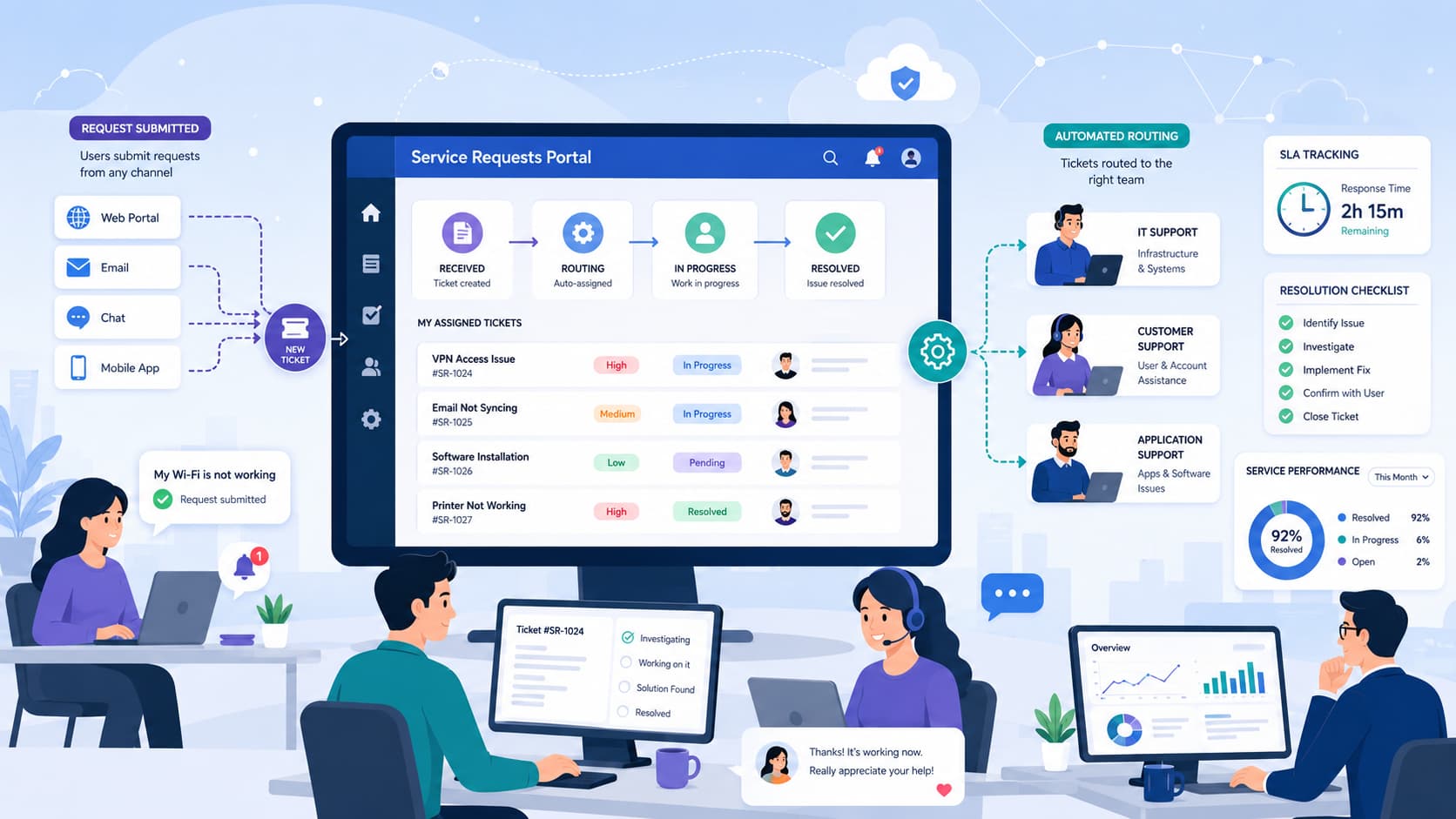
When a support desk is drowning in chaotic email threads and conflicting chat messages, engineers burn out and critical issues slip through the cracks. In my years auditing and building service desks, I have found that a structured service requests portal is the only baseline fix that works.
MSSP Security helps organizations design secure and efficient service management workflows by improving request handling, automation, and operational visibility.
A well-structured portal captures clean data upfront, enforces SLA clocks automatically, and gives users transparent ticket updates without requiring constant follow-ups from support teams.
Ticket Management Essentials for Better Support
A successful service requests portal relies on simple workflows, automation, and clear tracking to improve support efficiency.
- Streamline Request Workflows Clear intake and structured processes help teams manage tickets faster and avoid misrouting.
- Automate Routing and Tracking Smart automation improves ticket assignment, prioritization, and status visibility.
- Improve with Support Insights Reports and knowledge resources help reduce bottlenecks and optimize operations.
Why Does a Service Requests Portal Matter?
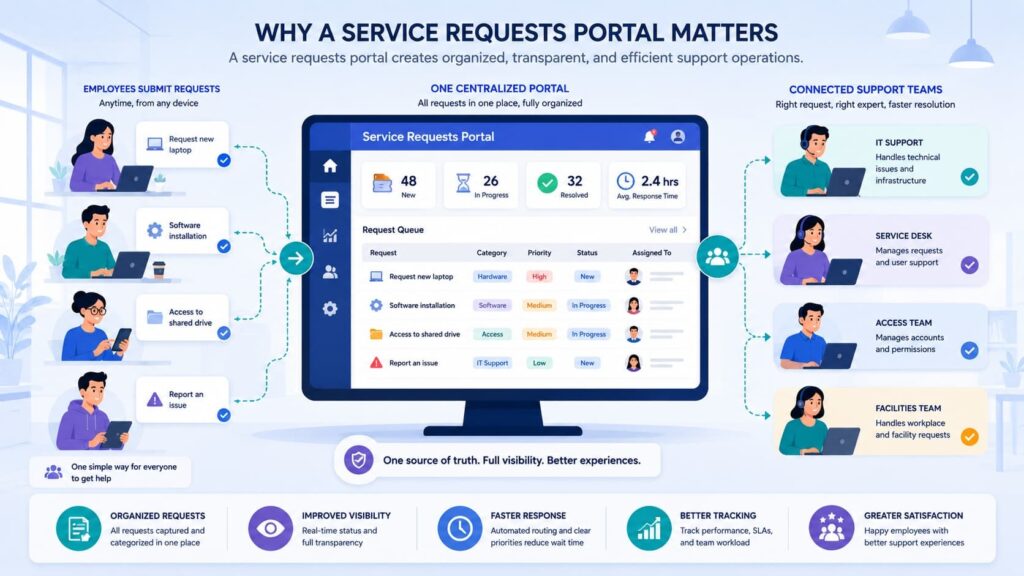
A service request portal gives organizations one place to submit, manage, and track support requests instead of relying on scattered emails or chat messages.
Microsoft Learn highlights standardized request workflows because they improve visibility and accountability across the entire request lifecycle.
That lines up with what we’ve seen while helping MSSPs evaluate and audit service management platforms.
Teams that still depend on email, phone calls, or instant messaging often struggle with duplicate requests, inconsistent records, and slower response times because work enters through multiple channels with no consistent process.
A modern service desk portal changes that. Rather than digging through inboxes or chat histories, users complete a structured service request form that captures the right details upfront.
A well-designed customer portal interface also improves how users interact with support services by making requests easier to submit, track, and manage from one centralized location.
That reduces follow-up questions and gives support teams enough context to start working sooner. In our experience, the biggest improvement isn’t the portal itself, it’s the consistency that comes from having every request follow the same path.
The shift toward automation also continues to accelerate. Industry reports suggest that enterprises continue expanding automation initiatives.
Across the MSSPs we work with, that reflects a broader move toward centralized service delivery, automated workflows, and support operations that can scale without creating more manual work.
A successful portal typically provides:
- Centralized request tracking
- Self-service knowledge access
- Consistent service catalog options
- Unified customer support portal communication
These capabilities are commonly supported by modern customer portal features, including request visibility, automated workflows, and user-focused service management functions that help teams deliver more consistent support experiences.
Technology alone won’t fix inefficient support processes. We’ve reviewed environments where organizations replaced email with another shared inbox and expected different results.
It rarely worked. The portal should guide users toward the right service while giving support teams structured information from the moment a request is submitted. That’s usually where the real gains begin.
How does a portal improve support efficiency?
Most efficiency gains come from removing unnecessary work, not adding more people. When users select predefined services from a service catalog, the ticket management system can collect the details support teams need before anyone reviews the request.
Required fields reduce missing information, while standardized categories improve routing and assignment. We’ve also noticed something that surprises many teams.
Shorter forms written in plain business language usually produce better requests than longer forms built around internal IT terminology. People complete them faster, make fewer mistakes, and support analysts spend less time asking for missing details.
Simple improvements often include:
- Business-friendly categories
- Guided request forms
- Integrated knowledge suggestions
- Automated request confirmation
Together, those changes create a smoother experience for users while making service desk management more consistent.
Why are organizations investing more now?
Organizations continue investing because automation makes growth easier to manage.Interest in automation has increased as teams look to reduce manual work.
We see the same trend when advising MSSPs on product selection and platform assessments. Most aren’t trying to replace people.
They’re looking for tools that eliminate repetitive work, improve consistency, and give technicians more time to handle issues that require experience and judgment. Still, we’ve learned that automation works best when it’s easy to follow.
Complicated approval chains or confusing request categories can erase the efficiency organizations expect.
The strongest implementations keep workflows straightforward, collect only the information that’s needed, and make it clear where every request stands from start to finish.
How Does the Ticket Lifecycle Work?
Every service request should follow the same lifecycle from submission to closure. Standardized workflows help improve reporting consistency and SLA tracking. We’ve seen the same result while helping MSSPs evaluate and audit service management platforms.
Teams with a consistent process usually produce cleaner reports and resolve requests more efficiently. A request begins when a user submits it through the IT support portal.
Routing rules then assign ownership, priority, and the right support queue based on factors such as category, urgency, or business impact. Support analysts investigate the request, gather additional details when needed, and move it through each stage until completion.
Most organizations use stages similar to the following:
| Stage | Purpose |
| New | Request received |
| Open | Assigned for work |
| Pending | Waiting for information |
| Resolved | Solution delivered |
| Closed | Final completion |
We’ve found that keeping the lifecycle simple works better than creating dozens of custom statuses. A consistent workflow reduces confusion for users, gives support teams a clear process to follow, and makes performance reporting far more reliable.
Why should users see ticket status?
Transparent status updates reduce uncertainty and unnecessary communication. Users become less likely to send duplicate emails when they can clearly see whether a request is New, Pending, or Resolved.
Visible ticket status also builds confidence that requests are actively being managed.
Status visibility provides several operational benefits:
- Fewer duplicate tickets
- Better requester confidence
- Reduced follow-up emails
- Improved request tracking
After implementing user-visible status tracking, many organizations report fewer inbound status inquiries because users no longer need to contact support simply to ask for updates.
Why Do Service Portals Fail in Practice?
Most failures stem from poor workflow design rather than software limitations. Some practitioner discussions commonly raise usability, routing, and governance as adoption challenges.
We have inherited environments where the portal itself functioned perfectly, yet users still avoided it. The underlying problem was rarely the software. Instead, confusing categories, unnecessary approval steps, and inconsistent ownership discouraged adoption.
Many portals ask users to understand internal organizational structures before submitting requests. End users simply want their issue resolved.
When categories reflect internal teams instead of business services, requests frequently enter the wrong queue. Another common issue involves inconsistent ticket routing.
Manual reassignment slows incident management, increases ticket backlog, and creates frustration for both agents and requesters.
Common user frustrations include:
- Too many request categories
- Long submission forms
- Technical terminology
- Limited progress visibility
Successful portals reduce complexity rather than adding additional decision points.
What frustrates end users?
Most users value simplicity above advanced functionality. User feedback often centers on navigation, routing accuracy, and clear request paths. Those conversations reinforce what we regularly observe during implementation projects.
Short forms, understandable language, and visible progress updates create significantly better portal user experience than highly customized interfaces packed with unnecessary options.
Why do agents struggle?
ent frustration usually begins before work even starts. Poor request intake, missing information, duplicate requests, and repeated manual reassignment all reduce agent productivity while increasing average resolution times.
Better workflow automation, standardized request templates, and automated routing dramatically improve the quality of incoming requests while supporting more efficient ticket workflow automation.
How Should Requests Be Categorized?
Categories should reflect business services instead of internal organizational structures. According to Microsoft Learn, user-centered service catalogs improve request quality because employees can identify what they need without understanding internal IT teams.
When we help organizations redesign an ITSM portal, we start by asking employees how they describe their problems. The answers rarely match department names. Instead, they sound like “reset my password,” “request new software,” or “replace my laptop.”
Business-focused categories reduce confusion while improving ticket prioritization, case management, and request fulfillment. They also support more accurate automated routing because each request starts with cleaner data.
A good category structure should include:
- Simple business language
- Limited top-level categories
- Logical subcategories
- Clear service ownership
Transitioning to simpler categories often reveals duplicate services that can be merged into one service catalog, making the end user portal easier to navigate.
Which fields should always be required?
Required fields improve request quality without overwhelming users. The Well-designed portals often improve adoption of self-service channels.
Essential fields typically include:
- Category
- Request description
- Business impact
- Attachments when necessary
Keeping forms concise improves completion rates while still providing enough context for incident tracking, issue tracking, and service request management.
How Can Routing and Prioritization Be Automated?
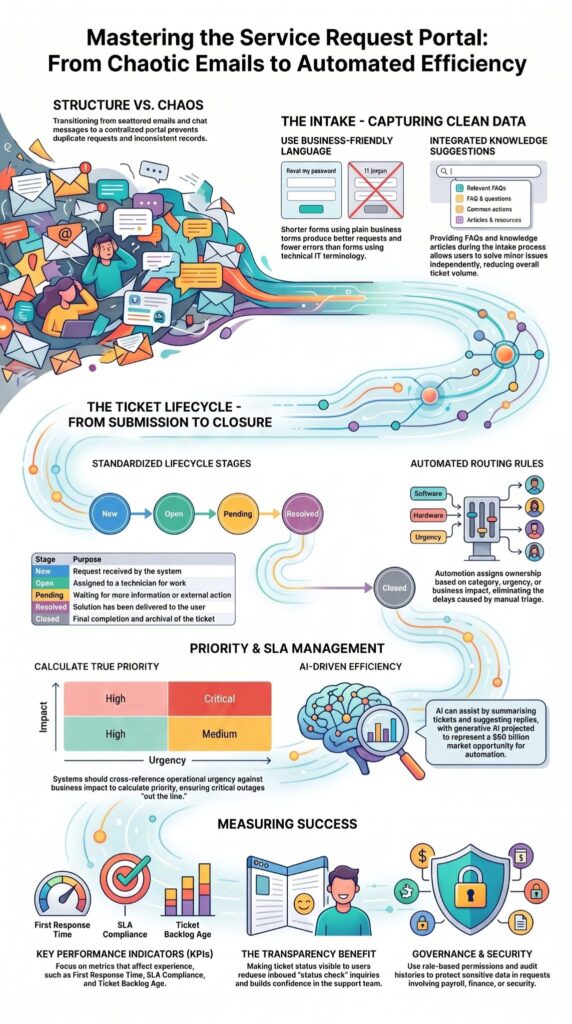
Automation assigns requests using predefined business rules instead of manual triage. Organizations using structured ticket routing improve response consistency while reducing delays caused by manual assignment.
Automation works best when rules are simple and predictable. We generally recommend routing based on service category, requester role, business unit, location, or associated assets rather than relying on individual technicians.
In a recent analysis by Ghasemkhani et al.:
“Manual handling of these requests often leads to duplication, misclassification, and delayed responses, reducing overall efficiency. Experimental findings confirm that the proposed HNLP–MC method enhances classification precision and reduces response time compared to manual processing.” – Innovative Artificial Intelligence
Common routing rules include:
- Category
- Department
- Asset
- Office location
- Requester role
Once requests enter the correct support queue, SLA management becomes much easier because ownership is established immediately.
Before expanding automation, organizations should validate routing accuracy using real ticket data. Small adjustments early often prevent large operational bottlenecks later.
How should priority be calculated?
By configuring your portal to cross-reference the user’s operational urgency against overall business impact, the system instantly calculates the true priority. Running a support queue strictly on a first-come, first-served basis is an operational trap.
Critical business outages must always cut the line.
| Impact | Urgency | Priority |
| High | High | Critical |
| High | Low | High |
| Low | High | Medium |
| Low | Low | Low |
Our matrix below highlights this logic, ensuring that high-impact, high-urgency incidents automatically trigger immediate SLA escalation paths before manual triage even takes place.
How Can Self-Service Reduce Ticket Volume?
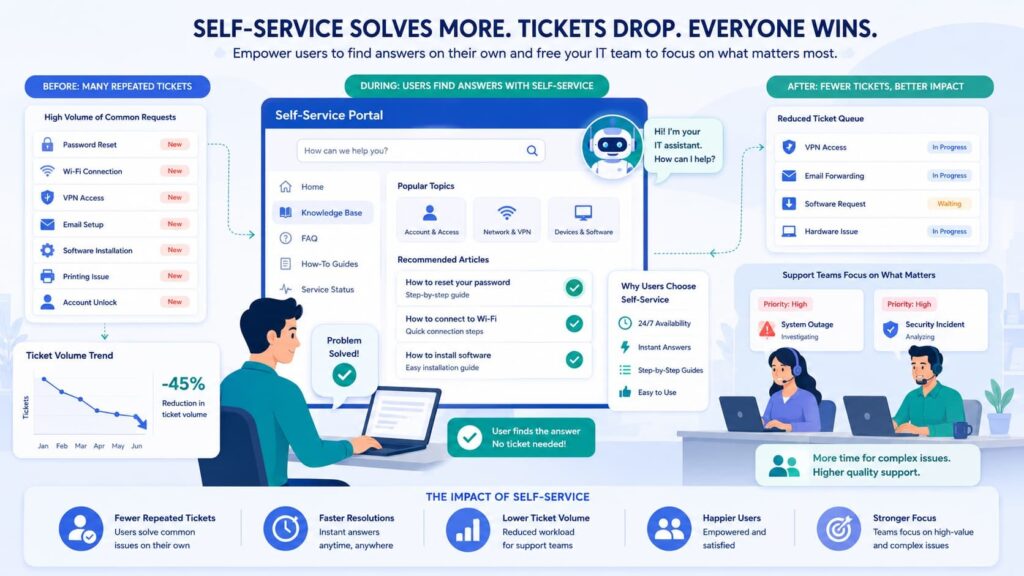
Users submit fewer tickets when answers are easy to find before creating requests. Microsoft recommends combining knowledge resources with request forms to encourage faster problem resolution.
In practice, many password resets, software installation questions, and common troubleshooting issues never need an agent when the right information appears at the right moment.
Research from Jäntti & Lindström shows:
“Self-service can remarkably reduce the volume of IT support tickets, such as service requests and incidents, and provides customers and service users with 24/7 availability to access IT services.” – Journal of Systems and Software
Helpful portal content includes:
- FAQs
- Knowledge articles
- Service catalog
- Announcements
- Common fixes
After reviewing those resources, users can still submit a ticket if the issue remains unresolved. Better self-service design can improve user confidence and satisfaction.
What Makes a Good User Experience?
Fast submission, transparent progress, and simple communication produce higher user satisfaction. Excellent portal user experience encourages employees to use the portal first instead of bypassing established support processes.
Users expect modern experiences that resemble the consumer applications they use every day. Mobile-friendly access, file uploads, and clear status notifications have become standard expectations.
Support teams benefit from:
- Internal notes
- Saved responses
- Ticket templates
- SLA indicators
Structured support experiences can improve employee satisfaction. That said, good UX is never just visual design. We have consistently found that reducing unnecessary clicks produces greater adoption than introducing additional interface features.
Why Are Governance and Security Important?
Proper permissions protect sensitive requests while maintaining auditability. Enterprise service management depends on consistent governance throughout the service request lifecycle.
Organizations often manage requests involving payroll, security, finance, or confidential business systems. Role-based access ensures users only view information relevant to their responsibilities.
Essential governance controls include:
- Role-based permissions
- Audit history
- Approval workflow
- Attachment security
Microsoft documents service request handling with the service catalog and self-service portal, which supports consistent handling and access control.
For organizations with higher security requirements, partnering with MSSP Security can also help ensure governance practices extend beyond portal configuration into broader operational security and managed support processes without complicating the user experience.
Which Reports Should You Track?
Operational metrics reveal workflow problems long before users complain. Reporting transforms raw tickets into actionable operational improvements.
Rather than focusing only on ticket volume, organizations should evaluate trends that affect customer experience and team productivity.
Key performance indicators include:
- Ticket volume
- First response time
- Resolution time
- SLA compliance
- Reopen rate
- Ticket backlog age
Having access to accurate security reports and dashboards helps teams identify recurring issues, measure service performance, and make better decisions about workflow improvements. These insights support stronger ticket management by connecting operational data with continuous service optimization.
Recurring issues often identify opportunities for better support automation, improved documentation, stronger knowledge base integration, or infrastructure improvements.
Monthly reviews generally provide faster operational feedback than quarterly reporting cycles, allowing teams to refine support dashboard metrics and portal reporting before problems become widespread.
How Can AI Improve Ticket Management?
AI accelerates classification, summaries, routing, and agent productivity while keeping humans in control. AI supports support teams by reducing repetitive administrative work instead of replacing technical expertise.
AI-assisted ticket workflows can improve classification, routing, and response drafting. Immediate AI capabilities include:
- Ticket summarization
- Suggested replies
- Auto-categorization
- Knowledge recommendations
The same report also cites Boston Consulting Group, which projects generative AI will account for approximately 30% of the AI market, representing about $60 billion in market opportunity.
We have seen AI deliver the greatest value when paired with structured workflows. Clean request data improves AI recommendations, while human oversight ensures critical incidents receive appropriate attention.
How Should You Launch or Improve a Portal?
Start with a small service catalog, automate common workflows, then expand using real ticket data. Successful portals grow through continuous improvement rather than large one-time deployments.
Organizations often attempt to launch hundreds of services simultaneously. A more practical approach begins with the requests employees submit most frequently.
Launch priorities should include:
- Common request categories
- SLA definitions
- Ownership rules
- Approval workflows
Reporting dashboards Following launch, review:
- Ticket trends
- User feedback
- Routing accuracy
- Form completion rates
- Automation performance
Successful service desk automation initiatives continuously refine categories, routing logic, and workflows based on operational metrics instead of assuming the original design will remain effective indefinitely.
Streamlining Efficiency via Self-Service Work Request Portals
Credits: Limble
A dedicated work request portal is designed to eliminate friction and accelerate team response times. By utilizing this centralized portal, users can easily submit requests, upload critical issue details, and track progress updates in real-time, eliminating messy back-and-forth emails.
This system ensures every incoming ticket contains complete, actionable data from the very start, reducing communication gaps and automatically organizing task priorities.
Ultimately, this approach allows your team to work more efficiently and focus on resolving critical security and technical issues with absolute clarity.
FAQ
What makes a service portal actually work for the average employee?
Simplicity wins every time. A highly functional portal avoids internal IT jargon and guides users through clean, short forms. The best setups integrate self-service documentation directly into the search bar, allowing users to solve their own minor issues like basic password resets before they ever hit ‘submit’ on a new ticket. Knowledge base integration helps users find answers independently, while accurate request tracking and a well-designed portal user experience make it easier to stay informed throughout the process.
How does ticket routing improve support response times?
Ticket routing improves response times by directing each request to the appropriate support queue based on predefined rules, such as category, urgency, or required expertise. Combined with ticket assignment, automated routing, queue management, and ticket prioritization, this structured ticketing workflow reduces manual effort, shortens wait times, and improves agent productivity.
Why is SLA management important in ticket management?
SLA management helps support teams meet response and resolution commitments by monitoring every service level agreement throughout the ticket lifecycle. A ticket management system can send alerts before deadlines expire and trigger ticket escalation when necessary. This process improves consistency, supports support SLAs, and strengthens overall service delivery.
How can an IT support portal improve internal support operations?
An IT support portal centralizes incident management, service request management, and problem management within a single platform. It also supports request fulfillment, incident tracking, change request processing, and asset management. A well-designed internal support portal standardizes the support process, reduces administrative work, and improves collaboration between users and support teams.
Which features help manage support tickets more efficiently?
An effective help desk portal should include workflow automation, support automation, case management, case routing, and reusable ticket templates to streamline daily work. It should also provide portal reporting, support analytics, performance metrics, ticket backlog visibility, support communication, and a structured resolution workflow. Together, these capabilities improve ticket workflow automation and strengthen overall support operations.
Managing Tickets Service Requests Portal for Long-Term Success
Optimizing a broken ticketing lifecycle is rarely about buying expensive software; it is about improving the logic behind forms, routing rules, and permissions.
If your IT teams need help refining workflows without disrupting operations, MSSP Security can assist with auditing, structuring, and securing service delivery architectures.
Our experts help optimize tools, integrations, and visibility to keep your portal automated and scalable. Learn how our consulting services can support your goals through MSSP Security consulting services.
References
- https://www.sciencedirect.com/science/article/pii/S0164121225003942?via%3Dihub
- https://dergipark.org.tr/en/pub/innai/article/1811816