

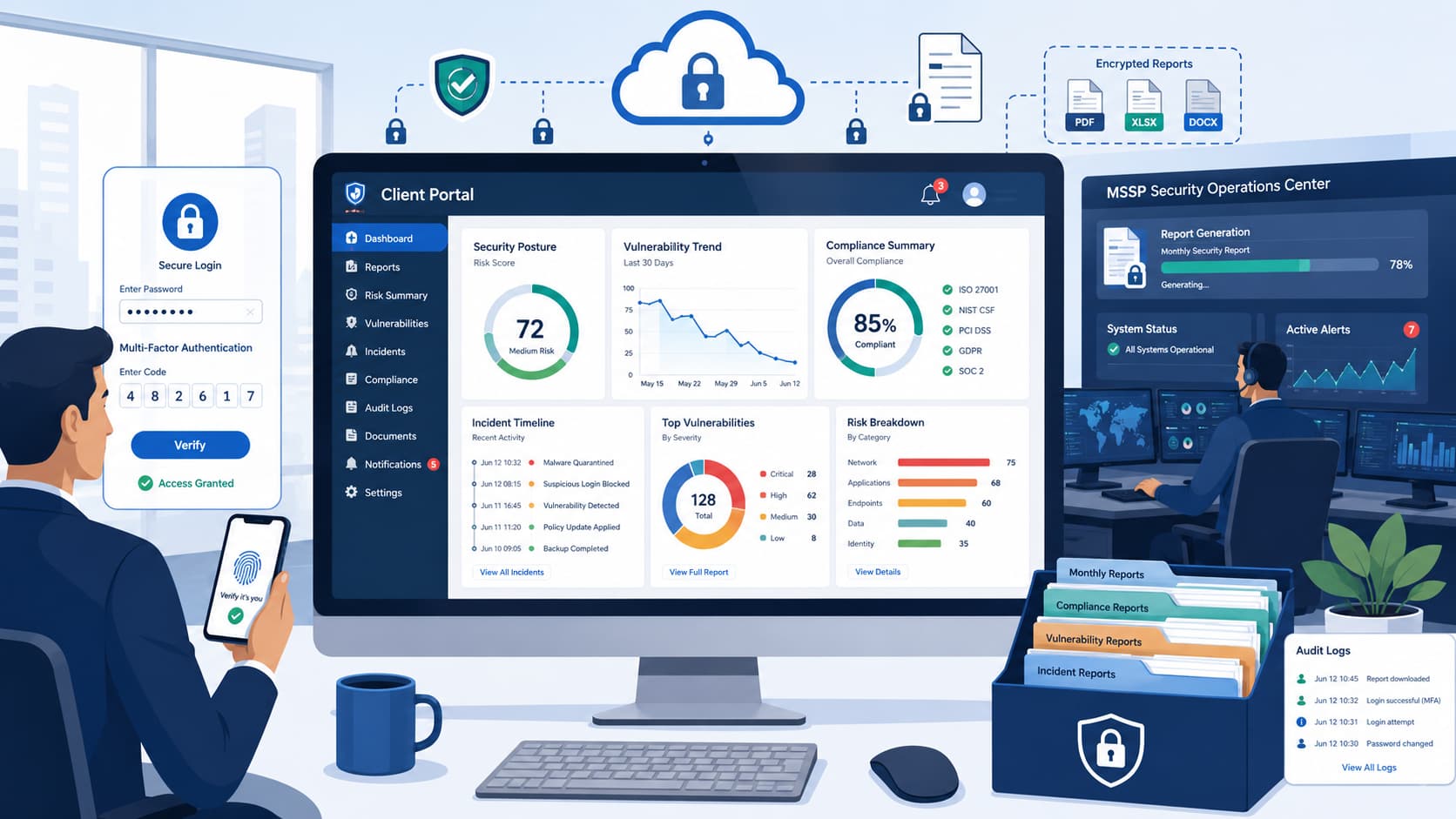
Missing client reports usually result from incorrect multi-tenant context switching or misconfigured Role-Based Access Control (RBAC), not missing data. At MSSP Security, we find that most empty dashboards stem from authorization mismatches rather than reporting failures.
This article explains how to verify cross-tenant permissions, map Entra ID roles to portal visibility, and build API-driven reporting pipelines that transform security telemetry into actionable business metrics. Keep reading to learn how to improve reporting accuracy, visibility, and operational decision-making.
Report Access Essentials at a Glance
Getting the right reports starts with the correct tenant, proper permissions, and an understanding of how MSSP reporting workflows are organized. These key points summarize the most important lessons from this guide.
- Start with the right access. Confirm you’re in the correct customer tenant, verify your report access permissions, and navigate to the appropriate reporting or dashboard section.
- Focus on meaningful security reports. Most MSSP portals highlight incidents, compliance, security posture, and risk metrics to provide visibility into security performance.
- Go beyond default portal reporting. Many MSSPs combine portal data with API-driven reporting to create customized executive summaries and more actionable client reports.
Why Do MSSP Client Portal Reports Matter?
Portal reports give clients constant visibility into their security and show the value of our work. Many clients value clear, actionable insight more than raw alert volume, especially when the customer portal interface keeps reporting, alerts, and security metrics organized in one place.
They want clear insights that explain what happened, what changed, and if their security actually improved.
These reports are commonly used to support executive visibility, compliance tracking, incident transparency, and service accountability. Different people need different formats.
A Security Manager needs operational visibility, an IT Director focuses on risk, executives want the business impact, and the compliance team needs everything ready for an audit.
Before we get into the how-to, remember that every good report balances technical facts with business relevance. That’s where security analytics, executive dashboards, and KPI reporting prove their worth. We help MSSPs find and vet the tools that make this balance possible. Keep reading to see how it works.
As noted by Australian Cyber Conference:
“In order to keep resources, we are going to have to be able to demonstrate the organizational value of cyber security. These reporting frameworks help give organizational leaders better understanding of, and appreciation for, cyber security. The trust built through this reporting has resulted in significant budget increases and project approvals for the security teams in these organisations.” – Australian Cyber Conference
How Do You Access MSSP Client Portal Reports?
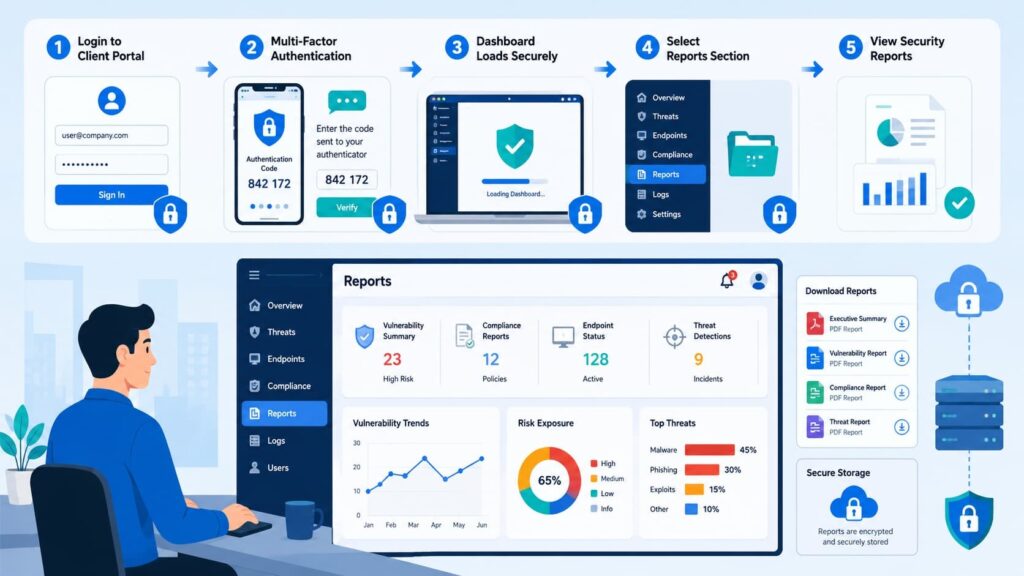
Accessing a client portal starts with using an authorized account, but the next step is just as important: switching to the correct customer tenant.
Many access issues occur because analysts remain in the wrong tenant context. In Microsoft Defender XDR, multi-tenant access is available through Microsoft Lighthouse or Azure B2B guest accounts.
After signing in, analysts must switch to the customer’s Tenant ID from the directory selector. Otherwise, the portal stays in the primary MSSP tenant, which can result in blank dashboards or access-denied errors.
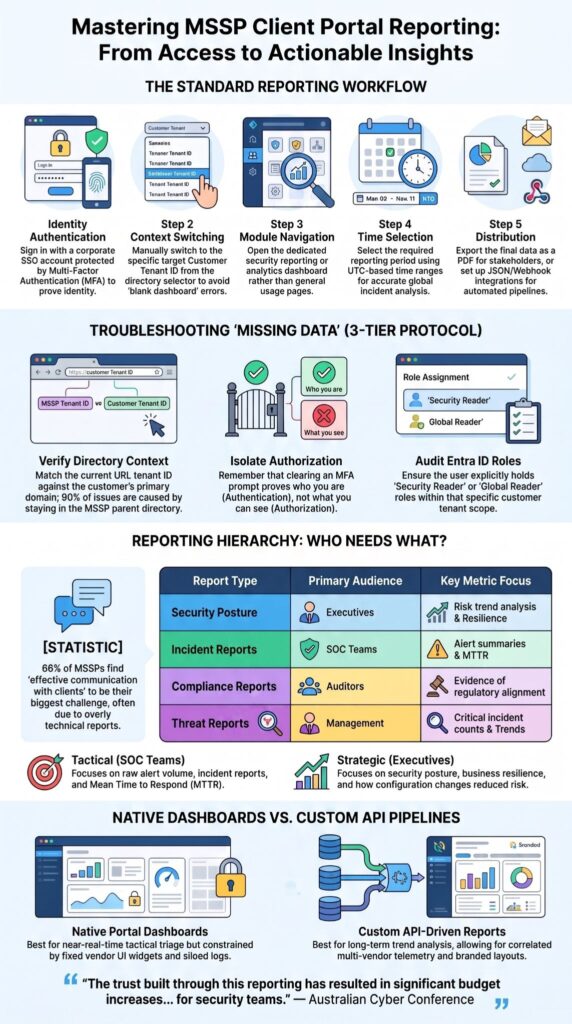
Although interface labels differ between vendors, the reporting workflow is largely consistent:
- Sign in with a corporate SSO account protected by MFA.
- Switch to the target customer tenant or workspace.
- Open the security reporting or analytics dashboard instead of general usage pages.
- Select the required reporting period, preferably using UTC-based time ranges for accurate incident analysis.
- Export reports in CSV or JSON, configure webhook integrations, or schedule encrypted PDF reports for stakeholders.
This workflow aligns with Microsoft Defender XDR guidance and is similar to reporting processes in other enterprise security platforms, including PowerDMARC and Fortinet.
Why does the tenant context matter so much?
It’s about data protection. Tenant-based reporting ensures each organization only sees its own information.
Microsoft’s documentation shows that MSSPs must use the correct tenant-specific portal context to access the customer environment. We help MSSPs audit these access controls to make sure they’re set up correctly from the start.
Why Can’t You See Client Reports?
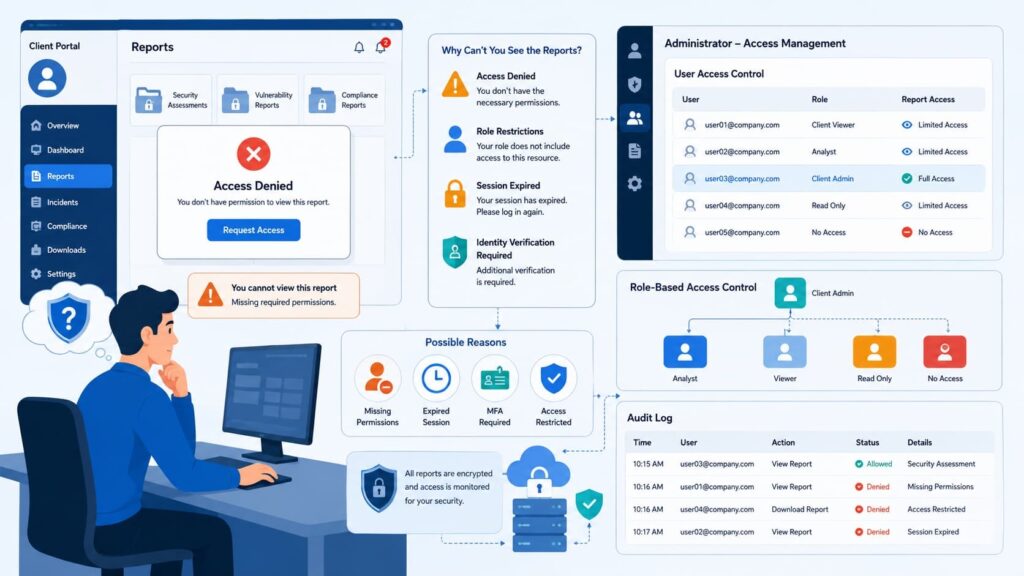
Missing reports often result from tenant mismatches or insufficient permissions, especially in tenant-scoped portals such as Microsoft Defender XDR.
Our support team at MSSP Security has learned that users frequently assume data is missing when the real issue is portal visibility or access control.
When troubleshooting visibility issues, we enforce a strict three-tier verification protocol before touching dashboard configurations. First, verify the active directory context by matching the current URL tenant ID against the customer’s primary domain.
Second, isolate authorization from authentication; successfully clearing a multi-factor authentication (MFA) prompt only proves identity, not access rights. Third, audit the assigned RBAC roles within Entra ID.
Are Report Permissions Correct?
The user must explicitly hold the ‘Security Reader’ or a custom ‘Global Reader’ role within that specific customer tenant scope.
If the account is restricted to a localized Log Analytics Workspace reader role without root-level tenant view rights, global security dashboards will consistently render as empty.
Authentication alone does not guarantee reporting access. Verify that the correct tenant is selected and that your account has the required roles and permissions before investigating other platform-specific settings.
Checking these items usually resolves report troubleshooting much faster than rebuilding dashboards.
What Reports Should Every MSSP Portal Include?
Effective client portals combine operational metrics with executive-friendly summaries. When we build reporting workflows at MSSP Security, we avoid overwhelming clients with raw telemetry.
Instead, we prioritize reports that explain security outcomes and business impact.
The most valuable reports include:
| Report | Primary Audience |
| Security posture reporting | Executives |
| Incident reports | SOC teams |
| Compliance reports | Auditors |
| Threat reports | Management |
| Monthly client reports | Clients |
Clients also expect measurable performance indicators, including:
- Alert summaries
- Mean Time to Respond (MTTR)
- Critical incident counts
- Compliance scores
- Risk trend analysis
Beyond operational reports, many portals including PowerDMARC also provide customer overview dashboards, scheduled summaries, and policy visibility that simplify recurring reporting.
Why Do Portal Dashboards Often Fall Short?
Default dashboards often need customization before they are useful for executive reporting. Executives do not care about raw alert volumes or firewall CPU spikes; they care about business resilience and operational downtime.
To bridge this gap, we configure custom reporting widgets that map technical metrics directly to corporate risk. Instead of presenting an executive with a chart showing ‘10,000 blocked brute-force attempts,’ we translate that data into a Mean Time to Remediate (MTTR) trend graph.
We show how our configuration changes reduced the average containment time from 45 minutes down to 8 minutes quarter-over-quarter.
This turns a terrifying, unactionable technical statistic into tangible proof of service level agreement (SLA) compliance and risk reduction.
Why Storytelling Matters
Industry discussions consistently show that clients value evidence of improvement more than long lists of alerts.
A concise security posture reporting package with trends, SLA reporting, vulnerabilities, and recommendations often communicates value more effectively than dozens of technical charts, particularly when supported by strong client portal communication that explains security outcomes in business terms.
Why Do Experienced MSSPs Build Custom Reporting?
Many providers enrich portal data through APIs to create stronger client-facing reports. Many providers enrich portal data through APIs to create stronger client-facing reports.
The portal becomes the operational interface, while automated reporting pulls information from multiple security tools into one centralized reporting workflow.
Research from Beyond Security shows:
“60% of respondents said that ‘effective communication and collaboration with clients’ posed the biggest challenge for their organization. 53% reported that reporting takes up an excessive amount of their time.” – Beyond Security
The process usually follows these steps:
- Collect telemetry
- Normalize data
- Aggregate information
- Generate dashboards
- Automate scheduled reports
API-driven workflows improve:
- Data aggregation
- Report automation
- Scheduled delivery
- Multi-client reporting
- Branded reports
How Do Multi-Tenant Reporting Workflows Create Challenges?
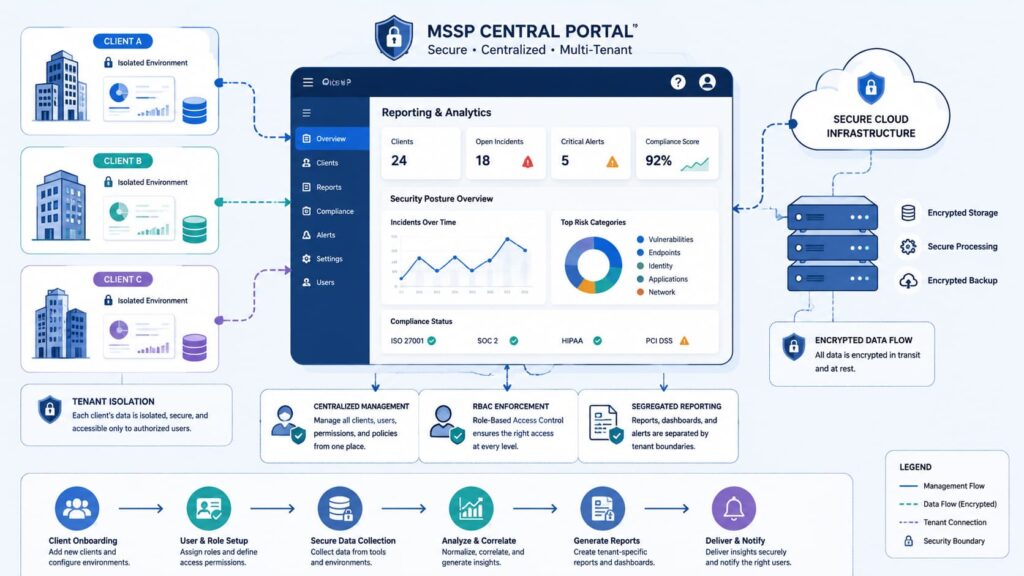
Operating at scale across a multi-tenant matrix presents a severe data leakage risk if isolation boundaries fail.
For instance, if an engineer accidentally misconfigures a cross-tenant Azure Lighthouse template or applies an overly broad wildcard * policy inside an IAM rule, a client could inherit read access to a neighboring tenant’s dashboard.
A single scoping error in a shared Elastic or Log Analytics workspace doesn’t just block report visibility; it actively breaks regulatory compliance by bleeding cross-organizational telemetry into a single, unauthorized browser session.
The most common issues include:
- Wrong tenant selected
- Shared dashboards
- Missing permissions
- Data synchronization delays
To reduce these problems, experienced teams standardize:
- Customer onboarding
- Permission reviews
- Tenant naming conventions
- Scheduled access audits
- Documentation from
Fortinet also highlights that reporting accuracy depends on consistent onboarding and properly synchronized analytics data.
What Permission Mistakes Block Report Visibility?
Role assignments frequently determine whether reports appear at all.Portal issues can originate from permission settings, especially when users can log in but cannot see tenant-scoped content.
Review these settings as well:
- Dashboard publishing
- Module licensing
- Report scheduling
- Workspace assignments
That reinforces an important lesson: role-based access control directly affects portal visibility.
How Can Clients Verify They’re Seeing Accurate Reports?
Never treat a static monthly PDF summary as an absolute source of truth; dashboard data caching and synchronization lag frequently skew metrics.
To audit report accuracy, cross-examine the total alert volume cited in your summary report against raw logs pulled directly from your primary endpoint detection and response (EDR) hunting console for that exact timestamp.
If the portal report shows an asset count of 450 endpoints but your directory sync reveals 510 active agents, you have a critical reporting gap caused by a broken logging connector or stalled API synchronization.
Escalate discrepancies when you notice:
- Missing reports
- Empty dashboards
- Incorrect tenant
- Delayed updates
How Can MSSPs Deliver Better Client Reporting?
The strongest providers combine automation, standardized reporting, and executive-focused insights. Experience has shown us that clients remember clear communication more than complicated dashboards.
Best practices include:
- Executive summary reports
- Monthly client reports
- KPI reporting
- Trend comparisons
- Actionable recommendations
When choosing between native portal dashboards and customized reporting pipelines, providers must balance real-time tracking against contextual business intelligence:
| Reporting Parameter | Native Portal Dashboards | Custom API-Driven Reports |
| Data Source Latency | Near-real-time streaming from a local agent cache. | Batched processing (scheduled intervals via ETL pipeline). |
| Telemetry Scope | Siloed to a single vendor ecosystem (e.g., firewall logs only). | Correlated multi-vendor telemetry (Firewall + IAM + EDR). |
| Target Consumption | Tactical triage for SOC analysts and incident responders. | Long-term trend analysis for executive risk assessment. |
| Extensibility | Fixed widgets constrained by the vendor’s UI limitations. | Fully scriptable layouts built using raw SQL or JSON queries. |
Also, report templates, scheduled delivery, PDF reports, and branded executive summaries make recurring reporting easier to scale while maintaining consistency across customers, while well-designed customer portal features help stakeholders access reports and dashboards more efficiently.
FAQ
What should I check immediately if my MSSP dashboard shows no data after a successful login?
Check your active directory string. In 90% of support tickets, the analyst has authenticated into their own MSSP parent directory instead of cross-launching into the client’s tenant environment. Look at the URL or portal scope selector; if it doesn’t match the specific client’s Tenant ID, log out, clear your session cookies, and use the direct vendor-supplied tenant switching link. If the tenant matches but data is still missing, verify that your user group has been synced to the client’s local Security Reader RBAC group.
Which reports are typically available in an MSSP dashboard?
A standard MSSP dashboard typically includes managed security service provider reports, incident reports, threat reports, vulnerability reports, asset reports, patch reports, backup reports, SLA reports, and security posture reporting. Many organizations also provide security analytics, security metrics, executive summary reports, and analytics dashboards to help clients understand current risks and overall security performance.
How can I automate recurring MSSP client portal reporting?
Many organizations use automated reporting, report automation, report scheduling, and scheduled delivery to generate recurring reports without manual effort. These workflows can produce monthly client reports, quarterly business review reports, and board pack reports. Most platforms also support PDF reports, CSV export, API reporting, and a structured reporting workflow for consistent report distribution.
How does tenant-based reporting improve security and client transparency?
Tenant-based reporting separates each client’s data through tenant isolation, ensuring that users only access information assigned to their organization. A unified portal or customer reporting portal supports multi-client reporting while protecting confidential information. This approach improves client transparency, provides a clear customer overview, and delivers accurate client portal dashboards for every client.
Which reporting features best demonstrate long-term security performance?
Effective MSSP client portal reporting combines trend analysis, security analytics, data aggregation, dashboard customization, portal widgets, data visualization, compliance dashboards, and executive dashboards to present meaningful insights. Organizations also use real-time visibility, evidence reports, service delivery reports, MDR reporting, managed detection and response reports, security operations reporting, SOC reports, managed services reporting, report templates, custom reports, branded reports, report generation, and report export to clearly demonstrate ongoing security performance and service value.
Making Client Portal Reports Work Better
Strong security reporting requires more than portal access. Organizations should regularly review cross-tenant roles, enforce proper context switching, and ensure reports connect technical findings to business risk.
Clear reporting helps teams understand their security posture, measure progress, and make informed decisions.
If you want to improve reporting visibility and optimize your security operations, MSSP Security provides vendor-neutral consulting, stack optimization, auditing, proof-of-concept support, and actionable recommendations backed by 15+ years of experience and 48,000+ completed projects.
References
- https://melbourne2024.cyberconference.com.au/sessions/session-3v9aQjMN8X
- https://www.msspalert.com/native/beyond-security-why-client-collaboration-is-the-biggest-challenge-for-mssps