


Top SOAR Platforms Comparison Guide starts with choosing a platform that fits your existing security tools, analyst workflows, and automation goals rather than simply offering the most features. As alert volumes grow, security teams need automation that supports daily operations without adding unnecessary complexity.
At MSSP Security, we help organizations and MSSPs evaluate SOAR platforms based on operational fit, integration capabilities, and long-term scalability before deployment. This guide compares today’s leading options and explains the key factors to consider so you can make a practical, informed decision. Keep reading to see which SOAR platform best fits your SOC.
SOAR Platform Comparison at a Glance
Choosing the right SOAR platform starts with understanding your security operations, integration needs, and long-term automation goals. Keep these key points in mind as you compare solutions.
- Choose SOAR based on ecosystem fit, not feature count. The best platform aligns with your existing SIEM, EDR, ticketing systems, and SOC workflows.
- Prioritize operational value over automation volume. Effective SOAR deployments improve alert triage, incident response, and analyst productivity through well-designed playbooks.
- Plan for long-term scalability. Evaluate integrations, governance, automation flexibility, and maintenance requirements to support future SOC growth and maturity.
What Should You Know Before Comparing SOAR Platforms?

Many buyers jump straight into product comparisons. We don’t. Our approach to selecting the right security orchestration tool always begins by understanding existing SOC processes before evaluating automation capabilities.
Our first step is always to understand how a security team already works. That saves time later because automation should support existing processes instead of forcing people to change everything overnight.
Before comparing platforms, take time to review:
- Current SOC maturity
- Existing security tools
- Automation goals
- Compliance needs
- Internal governance
- Analyst experience
We’ve seen organizations choose a platform with hundreds of integrations but struggle because their workflows were never mapped first. Fewer integrations can still deliver strong results when they support the work analysts already do every day. That surprised many teams we worked with.
A SOAR platform connects tools such as SIEM, endpoint protection, identity services, firewalls, ticketing systems, and threat intelligence. It doesn’t replace them. Instead, it links them together so alerts, investigations, and response actions move through one workflow instead of several disconnected systems.
Match the platform to your security environment, team experience, and automation goals before looking at feature lists.
How Does SOAR Work Inside a Modern SOC?
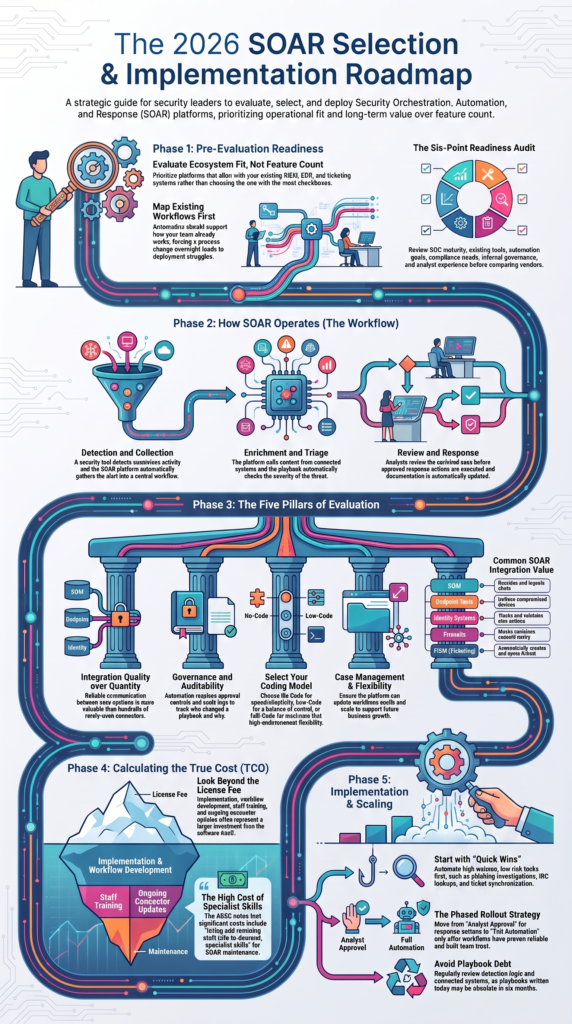
SOAR gathers alerts, adds context, automates routine tasks, and helps analysts respond faster across connected security tools. Think of SOAR as the coordinator inside a SOC. It doesn’t create alerts. Instead, it takes alerts from existing security products and moves them through a structured investigation process.
A typical workflow looks like this:
- A security tool detects suspicious activity.
- SOAR collects the alert.
- Extra context is added from connected systems.
- The playbook checks severity.
- Analysts review the enriched case.
- Approved response actions run.
- Documentation is updated automatically.
That removes repetitive work while giving analysts more information before making decisions.
We’ve worked with MSSPs where analysts spent several minutes gathering information for every alert. After improving those workflows, they could focus on investigations instead of copying data between multiple consoles. Small improvements like these add up over hundreds of alerts each day.
Common SOAR integrations
| Integration | Why it matters |
| SIEM | Receives alerts |
| Endpoint tools | Isolates devices |
| Identity systems | User actions |
| Firewalls | Blocks traffic |
| ITSM | Creates tickets |
The goal isn’t to automate everything. Build trust first. Then expand automation as the team becomes more comfortable with it.
Which Evaluation Criteria Matter Most?
Every vendor highlights impressive capabilities. But daily operations tell a different story. We’ve helped MSSPs review security products, and the strongest results usually come from platforms that fit existing processes instead of adding new complexity.
Focus on operational fit instead of long feature lists. Five areas deserve the most attention:
- Integration quality
- Automation workflows
- Governance
- Case management
- Long-term flexibility
Reliable integrations matter more than having hundreds of connectors. If core systems communicate well, analysts spend less time troubleshooting failed workflows.
Governance deserves the same level of attention. Automation without approval controls or audit logs can create unnecessary risk. Teams should be able to see who changed a playbook, when it happened, and why.
Another lesson we’ve learned is to think beyond deployment. Ask how easy it is to update workflows, add new tools, or support future customer environments. A platform that grows with the business often delivers better value than one that looks impressive during a product demo.
Questions worth asking:
- Can workflows be updated easily?
- Are audit logs included?
- Does it support APIs?
- How simple is playbook management?
- Will it scale with future needs?
Which SOAR Platform Fits Your Existing Security Stack?
The right SOAR platform is usually the one that works well with the tools your team already depends on. We’ve found that many automation projects succeed or fail before the platform is even installed. The biggest factor isn’t the software. It’s whether the platform fits the way the SOC already operates.
Before making a decision, review your current environment. Look at your SIEM, endpoint security, identity platform, cloud services, firewalls, and ticketing tools. Then identify the workflows your analysts use every day. Following a structured choosing SOAR platforms guide helps uncover operational gaps that might otherwise remain hidden until much later in deployment.
Teams using a consistent technology stack may prefer a platform that integrates deeply with those products. Others manage customers across several environments, making flexibility a higher priority.
From our consulting work at MSSP Security, we’ve seen both approaches succeed. The difference comes down to operational goals, not marketing claims. A platform that supports existing processes usually reaches production faster and requires fewer workflow changes over time.
Quick evaluation guide
| Consideration | Why it matters |
| Existing tools | Faster integration |
| Analyst skills | Easier adoption |
| Governance | Safer automation |
| API support | More flexibility |
| Growth plans | Better long-term value |
How Do No-Code, Low-Code, and Full-Code Platforms Compare?
Credits: Sceptertech.Digital
Choose the automation model that matches your team’s skills and the level of customization you expect. Not every SOC needs complex development. In fact, many teams begin with simple visual workflows because they can automate routine tasks without writing code.
We’ve seen smaller security teams gain value by automating repetitive jobs first. Think phishing investigations, IOC lookups, ticket creation, or alert enrichment. Those tasks follow predictable steps, making them good candidates for automation, especially when integrating SOAR with the security stack allows data to move consistently between existing security tools.
As operations grow, workflows usually become more advanced. That’s when low-code platforms become attractive. They offer more control while remaining easier to maintain than fully custom code.
Some enterprise environments still require full-code development. That approach offers maximum flexibility but also brings more maintenance, testing, and documentation. Most people underestimate that effort.
Whatever model you choose, keep the first rollout small. Build confidence with a handful of reliable playbooks before expanding into more sensitive response actions. That approach has consistently produced smoother deployments during our product assessment projects.
What Hidden Challenges Should Buyers Expect?
Long-term success depends on governance, playbook maintenance, and realistic expectations. Many organizations expect automation to solve operational problems overnight. It won’t. Automation improves good processes, but it also exposes weak ones.
One issue we see often is playbook debt. As threats change, automation workflows must change too. A playbook written today may no longer fit six months later unless someone reviews and updates it.
As noted by Australian Cyber Security Centre (ACSC)
“If accurate actioning is not achieved, the SOAR may significantly disrupt service delivery.” – Australian Cyber Security Centre (ACSC)
Review these areas regularly:
- Detection logic
- Connected systems
- Approval workflows
- Threat intelligence
- Documentation
- Automation results
Trust is another challenge. Analysts don’t always want software making containment decisions without human review, especially when business systems could be affected. That’s understandable.
We usually recommend beginning with analyst approval for higher-risk actions. As confidence grows and workflows prove reliable, teams can automate more of the response process. That gradual approach helps reduce mistakes while building trust across the SOC.
How Can You Compare Pricing and Total Cost?
Licensing is only one part of the overall investment. A lower purchase price doesn’t always mean a lower cost over time. We’ve helped MSSPs evaluate products that looked affordable at first but required extensive customization before they could be used in production.
When estimating costs, include more than the software license.
Consider:
- Implementation
- Workflow development
- Staff training
- Connector updates
- Professional services
- Ongoing support
These costs often have a bigger impact than expected.
Research from Dark Reading / CISA Advisory shows
“Organizations should look for ‘potential hidden costs across different products’ when considering implementation costs. Hidden costs are connected to the amount of data security teams feed into the platforms because vendor pricing models are often based on data ingestion. There are ongoing costs, such as those associated with training, as well.” – Dark Reading
Organizations usually see faster returns when they automate repetitive, high-volume tasks first. Good examples include phishing response, ticket synchronization, malware enrichment, password reset requests, and threat intelligence lookups.
Those workflows are easy to measure, making it easier to show improvements in analyst productivity and response times. Early success also encourages wider adoption across the SOC, which is something we’ve seen repeatedly while helping MSSPs evaluate and improve their security operations.
How Can You Implement SOAR Successfully?

Begin with a few practical workflows, measure the results, and expand only after they prove reliable.
Trying to automate everything at once often creates confusion instead of efficiency. A phased rollout gives analysts time to learn the platform while allowing security leaders to measure what is working.
A practical implementation plan looks like this:
- Review existing security tools.
- Define measurable goals.
- Select a few automation workflows.
- Test them carefully.
- Add approval steps where needed.
- Measure results.
- Expand gradually.
Keep it simple.
The first playbooks should solve everyday problems rather than rare events. Phishing investigations, malware enrichment, IOC lookups, ticket creation, and user notifications are good starting points because they are repetitive and easy to improve.
At MSSP Security, we’ve learned that successful automation is rarely about finding the platform with the longest feature list. It comes from building reliable workflows, reviewing them often, and making steady improvements as security operations mature.
FAQ
What is the difference between a security orchestration platform and a security automation platform?
A security orchestration platform connects multiple security tools so they can share information and coordinate actions across your environment. A security automation platform focuses on automating repetitive security tasks within those workflows.
Many modern SOAR platforms combine security orchestration, automation and response capabilities to improve SOC workflow automation, reduce manual work, and support faster security incident response.
How do you measure the success of SOC automation after deployment?
The success of SOC automation should be measured using clear operational metrics. Track improvements in response times, alert triage automation, false positive reduction, and the amount of manual work completed by analysts.
You should also review incident management automation, analyst workflow automation, playbook performance, and overall SOC efficiency to confirm that automation delivers consistent business value.
When should an organization use no-code SOAR instead of low-code SOAR?
A no-code SOAR platform is a good choice for teams that want to automate workflows without writing code. It allows security teams to build and manage automation playbooks more quickly. Low-code SOAR is better for organizations that need custom workflows or advanced integrations. The right choice depends on your team’s technical skills, security process automation goals, and future growth plans.
Why is SIEM and SOAR integration important for security operations?
SIEM and SOAR integration allows security alerts to move directly into automated workflows, reducing manual effort and improving response times. When combined with EDR and SOAR integration, security teams can automate investigations, use threat intelligence integration, execute response playbooks, and support automated remediation.
This approach strengthens the SOC tool stack and improves overall security incident management.
How can organizations prepare for future SOAR comparison projects?
A successful SOAR comparison begins with documenting existing workflows, identifying integration requirements, and defining clear automation goals. Organizations should also evaluate security operations center tools, API-driven automation, governance features, and long-term scalability.
Taking these steps makes it easier to compare SOAR vendors, improve response coordination, and choose a platform that supports future security operations.
Choose a SOAR Platform That Fits Your Operations
The right SOAR platform is the one that supports your security workflows, governance needs, and long term goals. Organizations that evaluate operational fit before adopting automation often reduce maintenance, improve analyst efficiency, and build more reliable security operations.
Steady improvements and regular reviews create a stronger foundation as automation expands. A thoughtful evaluation process leads to better long term security outcomes. Talk with MSSP Security to help you assess SOAR solutions and make informed technology decisions.
References
- https://www.cyber.gov.au/business-government/detecting-responding-to-threats/event-logging/implementing-siem-soar-platforms/implementing-siem-and-soar-platforms-executive-guidance
- https://www.darkreading.com/cybersecurity-operations/cisa-soar-siem-implementation-guidance