


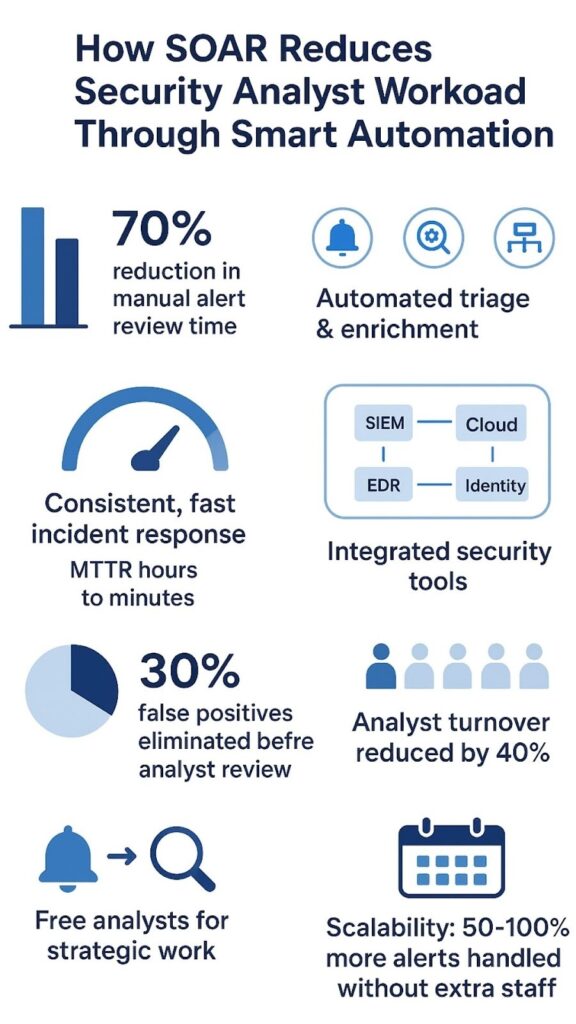
You can reduce security analyst workload significantly with SOAR by automating the repetitive tasks that consume most of their day. We’ve seen teams handling 10,000 daily alerts cut manual review time by 70 percent through automated triage and enrichment. SOAR platforms integrate your existing security tools, then execute predefined playbooks that handle everything from phishing analysis to endpoint containment without human intervention.
This shifts analysts from firefighting to strategic work while maintaining consistent response quality across all shifts. Keep reading to understand how this transformation works in practice and what it means for your team’s effectiveness.
Key Takeaways
- SOAR automates alert triage and data enrichment, eliminating manual console hopping.
- Predefined playbooks handle common incidents like phishing and malware detection autonomously.
- Automation reduces mean time to respond (MTTR) from hours to minutes for standard threats.
The Reality of Alert Fatigue in Modern SOCs
The steady drumbeat of security alerts wears people down in a quiet, specific way. It’s not only how many alerts land in the queue, it’s how similar they feel. Most analysts fall into the same routine:
- Notice an alert
- Jump into the SIEM
- Pivot to the EDR
- Check threat intelligence
- Open or update a ticket
Those steps repeat, again and again, all day. We watched one SOC team spend close to forty minutes working a single phishing alert that looked almost identical to the last ten. Same pattern. Same checks. Same outcome. That’s the point where automation stops looking like a nice upgrade and starts looking like the only sane option.
SOAR shifts this pattern in a very direct way. It becomes the central nervous system of the SOC, tying together tools that usually act like strangers. Instead of one analyst hopping between:
- SIEM dashboards
- EDR consoles
- Threat intel portals
- Ticketing systems
- Email or chat for handoffs
SOAR playbooks do the legwork in the background, in a few seconds. The platform learns what “normal” looks like in your environment, then applies the same logic to every incident, whether someone just started their shift at 2 PM or is dragging through the night at 2 AM.
The work doesn’t become less serious, but it does become less punishing. This is the power of security orchestration to unify diverse tools into a seamless defense system, reducing the chaos analysts face daily.
How SOAR Transforms Routine Security Tasks

Alert triage becomes a background process rather than a primary activity. When an alert fires from your SIEM or EDR, SOAR doesn’t just pass it along to a human queue. It immediately begins enriching the data, checking IP addresses against threat feeds, correlating with other events from the past hour, assessing the criticality of the affected asset.
What reaches the analyst isn’t a raw alert but a partially investigated incident with context already attached. This enrichment step alone can eliminate 30 percent of false positives before a human even looks at them [1].
Containment actions that used to require manual approval now happen automatically for well-understood threats. If a known malware signature triggers on an endpoint, SOAR can isolate that device from the network, block command and control IPs at the firewall, and disable compromised user accounts, all within the same workflow.
The system follows the same playbook every time, ensuring consistent response regardless of which analyst is on shift or how tired they might be. We’ve implemented these automated containment workflows for MSSP clients, and the reduction in manual endpoint management has been dramatic.
- Automated evidence collection from SIEM, EDR, and cloud platforms
- Instant threat intelligence enrichment for IOCs
- Standardized ticket creation and assignment
- Automated false positive filtering and closure
The orchestration layer ensures all your security tools work together rather than in isolation. Many organizations have solid point solutions that generate valuable alerts, but the friction between systems creates manual work.
SOAR acts as the glue, using APIs and connectors to make your SIEM talk to your endpoint protection, your cloud security platform share data with your identity management system. This integration turns a collection of tools into a coordinated defense system where automation handles the routine coordination tasks.
Real Workload Reduction in Common Scenarios
You really see the strain lift when you watch the day-to-day work change, not just the metrics on a slide. Some use cases make that shift almost impossible to ignore.
Phishing response
Phishing is where the manual grind shows up the loudest. Without automation, every suspicious email pulls an analyst into the same routine:
- Review headers and routing details
- Detonate or scan attachments
- Check URLs against threat intelligence
- Search for similar messages in the environment
- Notify the user and document the case
In a medium-sized organization, fifty of these a day is normal, which quietly eats hours of focused time. Most of those cases look nearly identical by the end of the week.
With SOAR in place, that workflow turns into an automated pipeline. The platform can:
- Parse and analyze the email on arrival
- Check links and attachments across multiple threat intel feeds
- Quarantine or delete confirmed malicious messages
- Hunt for matching emails across all mailboxes
- Notify the recipient with clear guidance
- Log every step in a complete audit trail
Analysts only handle the edge cases, the 10% that don’t fit the usual patterns or need human judgment. The rest never clutters their queue. This kind of automation-driven security automation pipeline sharply cuts down repetitive manual tasks, allowing analysts to focus on strategic investigations.
Endpoint detection and response (EDR) alerts
EDR alerts have their own familiar pattern. A single flagged event usually means an analyst has to:
- Pull the process tree and parent-child relationships
- Check file hashes against known malware databases
- Correlate with recent network connections
- Look at the user’s history and risk profile
With SOAR, that investigation can be kicked off automatically as soon as the EDR raises a flag. For clear-cut threats, like known ransomware behavior or repeat-bad indicators, the system can:
- Isolate the endpoint from the network
- Kill malicious processes
- Block related IPs and domains at the firewall or proxy
- Open an incident with all evidence attached
That kind of automated response matters most at 3 AM, when the on-call analyst might be junior or juggling multiple alerts. The quality of the response stops depending on who happens to be awake.
User account investigations
Account-based alerts are messy by nature. A login from another country could be a stolen password, or just someone on a trip, or someone using a new VPN exit point. Manually, an analyst might have to:
- Check recent login locations and devices
- Compare with VPN logs
- Look at HR or travel records
- Review past behavior for the same user
SOAR can line up that context on its own and act based on risk:
- Correlate login patterns, devices, and locations
- Apply a risk score to the event
- Trigger step-up authentication challenges
- Add temporary restrictions for high-risk sessions
- Escalate only the truly suspicious cases
The result is a quieter, more focused queue: fewer knee-jerk lockouts for normal travel, and faster attention on the logins that really look like compromise.
| Incident Type | Manual Effort Required | Automated Actions | Analyst Workload Reduction |
| Phishing Emails | Header checks, URL analysis, user contact | Automated analysis, TI checks, quarantine, notification | Analysts only handle ambiguous cases |
| EDR Alerts | Process tree review, hash lookup, network correlation | Automated evidence gathering, endpoint isolation | Automated handling of clear-cut threats |
| User Account Investigations | Log review, behavior correlation | Automated risk scoring, step-up auth trigger | Fewer unnecessary escalations |
Measuring the Impact on Analyst Efficiency

You can usually tell when automation is working before you even check the dashboards, people stop looking so drained, and the queue stops feeling like a losing battle. The numbers just confirm what the team already feels.
What the metrics actually show
When SOAR gets fully wired into daily operations, some patterns show up again and again:
- Mean time to respond (MTTR) drops from hours to minutes for automated playbooks
- Routine incidents move almost entirely into the “auto-resolved” bucket
- Variance between “best shift” and “worst shift” response times gets much smaller
One organization we worked with took phishing investigations from about 35 minutes per email down to roughly 90 seconds using full automation. Same checks, same logic, just no manual shuffling between tools. The real gain wasn’t only speed, it was consistency.
A phishing alert at:
- 10:15 AM on a Tuesday
- 11:47 PM on a Saturday
gets the same sequence of steps, the same evidence collection, the same documentation. No shortcuts because someone is tired, busy, or new.
What changes for analysts
As the low-complexity work drains away, the analyst role itself shifts in a meaningful way. Instead of spending hours on:
- Manual data collection
- Basic enrichment and triage
- Repeating the same checks across tools
Analysts start spending more of their day on:
- Complex investigations that don’t fit standard playbooks
- Threat hunting across logs and endpoint data
- Tuning and improving detection and response workflows
That shift has real effects. We’ve seen:
- Noticeable drops in burnout complaints during internal surveys
- More analysts asking for advanced training instead of asking out of on-call
- Turnover rates fall by up to 40% in teams that commit to broad automation
People move from “button-click operators” to actual security practitioners who understand patterns, tradeoffs, and long-term risk. The work becomes harder in a good way, not just heavier.
Scaling without matching headcount
Most organizations grow their digital footprint faster than their security budget. More endpoints, more SaaS apps, more cloud services, usually followed by more alerts. Without automation, that path looks very linear: more alerts → more analysts.
With SOAR in place, that curve starts to break. Automated playbooks quietly pick up the extra load:
- Routine alerts absorb into automation instead of landing in queues
- New detections can be wired into existing workflows without re-architecting the team
- Senior analysts spend more time improving rules and playbooks instead of chasing noise
In practice, we’ve watched teams:
- Handle 50–100% more alerts with the same headcount
- Avoid hiring surges during major rollouts or new tool deployments
- Keep security effectiveness steady, or improve it, while controlling costs
The outcome isn’t just “doing more with less.” It’s making sure that when the really hard incidents arrive, there’s actually enough human attention left to deal with them properly.
| Metric | Before SOAR | After SOAR | Improvement |
| Mean Time to Respond (MTTR) | Hours | Minutes | Significant reduction |
| Phishing Investigation Time | 35 minutes | 90 seconds | 90 percent faster |
| Analyst Alert Capacity | Baseline | 50 to 100 percent higher | Increased capacity |
| Response Consistency | Variable by shift | Uniform across shifts | Higher reliability |
Implementing SOAR for Maximum Workload Reduction
The turning point with SOAR usually isn’t a flashy feature, it’s that first week when the alert queue feels lighter and nobody quite believes it yet. That doesn’t happen by accident, it comes from being very deliberate about where you start and how you wire it in.
Pick the right starting use cases
The fastest wins come from the incidents that happen all the time and behave the same way. Good first candidates usually include:
- Phishing alerts
- Known malware signatures
- Routine vulnerability alerts
These follow stable patterns and don’t need deep debate every time. For these kinds of cases, SOAR can own the full response lifecycle:
- Ingest the alert
- Enrich with context (threat intel, asset data, user info)
- Take predefined containment or remediation steps
- Notify the right people
- Document everything automatically
By focusing on these patterns first, most teams feel real workload reduction within the first week, fewer repetitive tickets, fewer “copy-paste” investigations, more time for the unusual cases.
Go deep on a few tools, not shallow on many
There’s a strong temptation to connect every tool in the stack on day one. That usually creates a lot of connectors and not much real value. Early on, depth beats breadth.
Start by making sure SOAR is tightly integrated with:
- Your SIEM (for detection, correlation, and logging)
- Your EDR (for endpoint context and containment)
With deep integration, playbooks can:
- Pull full event and asset context from the SIEM
- Fetch process trees, hashes, and telemetry from EDR
- Take direct actions like isolating endpoints or closing alerts
- Attach all evidence and actions back into tickets or case systems
Once that foundation feels stable, then it makes sense to fold in:
- Cloud security tools
- Identity and access management
- Email security and web gateways
- Ticketing and collaboration platforms
That staged approach keeps the team from getting overwhelmed and makes each new integration actually matter.
Keep humans in the loop where it counts
Not every decision belongs to automation, and that’s healthy. Some actions can hurt the business if they’re wrong, even if they’re technically “secure.” Those should keep a human in the approval chain [2].
A balanced model usually looks like this:
- Fully automated actions for:
- Isolating clearly infected endpoints with low business impact
- Blocking known-bad IPs, domains, and hashes
- Quarantining obviously malicious emails
- Human-approved actions for:
- Shutting down or rebooting critical servers
- Disabling executive or high-privilege accounts
- Making broad policy changes that affect many users
In those high-impact cases, SOAR still does most of the heavy lifting:
- Gathers all relevant evidence
- Correlates logs, identities, and asset data
- Calculates risk based on defined criteria
- Presents a recommended course of action
The analyst doesn’t start from zero, they review a complete, pre-built picture and make a judgment call. Workload drops, but control stays in human hands where it matters most.
The New Role of Security Analysts in an Automated SOC
Credits : Security First Corp
You can almost see the job title changing, even if the badge doesn’t. Once automation is in place, analysts stop living inside queues and start living inside investigations.
From alert processors to investigation supervisors
Instead of opening each alert cold and rebuilding the story from raw logs, analysts now sit one level higher. By the time they touch a case, SOAR has usually:
- Collected evidence from SIEM, EDR, and identity systems
- Correlated events across endpoints, users, and networks
- Checked relevant threat intelligence
- Applied context from asset data and user roles
The analyst’s work shifts toward:
- Validating or overturning automated findings
- Handling edge cases that don’t fit known patterns
- Making judgment calls where risk and business impact intersect
- Adjusting rules and thresholds when automation is too noisy or too quiet
The job becomes less about “click these five buttons in order” and more about reading a situation, asking better questions, and spotting what the playbook missed. The work feels more like analysis and less like assembly line labor.
Threat hunting and process improvement take center stage
Once the repetitive response work is off their plate, analysts finally get time for the work most SOCs say they want to do but rarely reach: hunting and improving.
That time gets used for:
- Threat hunting
- Building and running hypotheses against SIEM and endpoint data
- Looking for low-and-slow behaviors that don’t trigger basic alerts
- Following faint signals that automation would dismiss as background noise
- Playbook refinement
- Updating workflows as new attack patterns appear
- Adding new data sources or checks to existing automation
- Tightening logic to cut false positives without missing real attacks
- Strategic security projects
- Helping design better detections with engineering teams
- Supporting incident readiness exercises and simulations
- Shaping how the organization measures and reports risk
When that shift happens, the SOC stops feeling like a pure cost sink that only reacts to bad days. It starts to act more like a risk management function that actively lowers the chance and impact of those bad days.
Skill growth as part of everyday work
A quieter alert queue doesn’t make analysts idle, it makes them sharper. When they’re not buried under repetitive triage, there’s finally room to deepen skills and cross-train in a structured way.
Common patterns that emerge:
- Technical growth
- Learning new security tools and cloud platforms
- Gaining comfort with scripting or automation languages
- Studying specific attacker techniques and malware families
- Practice and simulation
- Joining or supporting red team / purple team exercises
- Replaying real incidents to test new detection ideas
- Running “what if” drills based on recent threat reports
- Domain specialization
- Some analysts lean into identity and access abuse
- Others focus on cloud, OT, or specific business units
- A few become internal experts on tuning and maintaining SOAR itself
This kind of growth helps both sides. Analysts build careers that feel like they’re moving forward, not just sideways from one incident to the next. The organization ends up with a more resilient team, better prepared for the rare, high-impact attacks that automation alone can’t solve.
Making SOAR Work for Your Team
You can usually tell when a SOC is ready for SOAR not by the tools they own, but by how often someone sighs before opening yet another alert. Turning that around takes more than just buying a platform, it takes planning that starts from the actual work your analysts are doing.
Plan from real workloads, not from a feature list
The first step is simple, but it takes honesty. You map out the work that actually exhausts your team. Not the rare, heroic incidents, but the daily grind. Look for:
- High-volume alerts that follow repeatable patterns
- Tasks that require lots of clicks but little true decision-making
- Investigations where the steps are almost always the same
Those become your first automation targets. Phishing, low-risk malware detections, repeat vulnerability alerts, these are usually at the top of the list. When you design playbooks around them, the impact shows up fast, because you’re cutting straight into the work that eats most of the day. This approach aligns with best practices in outsourced security automation orchestration, where focusing on common patterns first accelerates workload reduction and improves SOC efficiency.
Picking a SOAR platform matters too, but not in a shiny-demo way. The key is:
- Deep integration with your existing SIEM, EDR, identity, and ticketing tools
- The ability to read and write data where your team already works
- Flexible playbook logic that can mirror your real-world workflows
If a SOAR tool demands that you replace half your stack, it’s probably working against you, not with you.
Build automation with your analysts, not around them
The quality of your playbooks depends heavily on who writes them. If they’re designed only by vendors or architects far from the queue, they’ll look clean on paper and feel wrong in practice.
Analysts should help decide:
- Which use cases are safe for full automation
- Which signals and data points actually matter in real investigations
- Where the handoff between automation and human review should happen
You can structure that collaboration around a few simple questions for each playbook:
- What’s the exact trigger condition?
- What context does an analyst always look up first?
- At what point does an analyst say “this is obviously benign” or “this is clearly malicious”?
- Which actions are safe to take without asking anyone?
When analysts see their own logic reflected in the playbooks, two things happen: the automation works better, and they trust it more.
Automation as support, not replacement
There’s a quiet fear in a lot of SOCs that “automation” is just a polite word for cutting people. That fear can stall projects before they really start. The reality, when SOAR is done right, looks different.
Automation is best at:
- Repeating the same investigation steps the same way, every time
- Pulling and correlating data from many systems, quickly
- Handling obvious, low-risk containment actions
Analysts are best at:
- Interpreting incomplete or conflicting evidence
- Reasoning through complex, multi-stage attacks
- Adapting to new attacker behavior that doesn’t match existing rules
- Balancing technical risk with business impact
Good SOAR design leans into that split. The platform sets the stage by doing the data gathering and first-level reasoning, and analysts make the calls where context and nuance matter.
Aim for optimal automation, not total automation
There’s a tempting fantasy where every alert is fully automated and no one ever has to touch a queue again. That’s not how healthy SOCs work. The real goal is something more balanced: automation where it’s reliable, humans where it’s necessary.
A practical model looks like this:
- Fully automated
- Clear, low-risk, high-volume scenarios
- Repetitive checks and enrichment
- Simple, reversible containment actions
- Automation-assisted with human approval
- Actions with real business impact (service disruption, key account lockouts)
- Ambiguous alerts where the evidence isn’t clean
- Situations with regulatory or legal implications
- Human-led, automation-supported
- Major incidents
- Novel attack patterns
- Threat hunting and strategic investigations
In that setup, SOAR becomes the force multiplier: it clears the noise, builds the context, and gives your analysts the space to work on the threats that actually matter. The SOC shifts from being a burnout machine into something closer to what it was always supposed to be, a focused, strategic security function that can keep up as your organization grows.
FAQ
What problems can SOAR automation fix for my team?
SOAR automation helps you handle alert triage automation, incident response automation, automated incident enrichment, and automated evidence collection. You improve security analyst productivity and reduce alert fatigue. You use SOAR playbooks to guide rule based incident handling and playbook driven response. You cut repetitive task reduction and support SOC workload reduction. You make SOC efficiency improvement easier through clear security process standardization.
How does SOAR help me manage alerts faster during busy hours?
You use incident correlation automation, contextual alert enrichment, SOC alert deduplication, automated phishing triage, and alert routing automation. SIEM and SOAR integration and EDR and SOAR integration help event normalization and correlation. You cut mean time to respond with MTTD reduction with SOAR. You keep queues clean with auto closing false positives and clear incident prioritization automation.
How can SOAR make my response steps easier for common threats?
You use real time response automation, automated containment actions, automated IOC blocking, user account lockout automation, and endpoint isolation automation. SOC process orchestration and security orchestration workflows control tools in one flow. You follow standardized incident handling with security runbook automation. You use knowledge driven playbooks and adaptive playbooks for safer response action orchestration.
How does SOAR help my team handle more work without burnout?
SOAR supports analyst burnout reduction through Level 1 task automation and Tier 1 analyst offloading. You use workflow orchestration in SOC and a task orchestration engine to share work across tools. Role based task assignment and auto escalation of incidents keep work balanced. You support SOC scalability with SOAR and SOC resource optimization through a hybrid human machine SOC.
How can SOAR improve long term SOC optimization?
You use cross tool integration and orchestration of security tools for better security operations automation. You guide actions with a security automation framework and a security event workflow engine. Case management in SOAR and playbook lifecycle management help continuous playbook improvement. You use closed loop incident response, compliance driven automation, and policy based response actions for stable automation led SOC transformation.
Achieving Sustainable Security Operations
SOAR shifts your security team from reacting to planning. It handles repeatable tasks. You get faster responses. Your analysts focus on investigations and threat hunting. You reduce fatigue. You create consistent protection.
Start with phishing workflows. Grow to other high volume incidents. You build a system that scales with your team. Humans and automation work together. Your analysts deliver more value.
We offer consulting that helps you choose the right tools. You reduce overlap. You improve visibility. You integrate your stack with clear steps. You get support from needs analysis to PoC. You receive recommendations that match your goals. Our team has delivered more than 48,000 projects over 15 years.
You can explore our service and join here
References
- https://www.osti.gov/biblio/1965268
- https://al-kindipublishers.org/index.php/jcsts/article/view/10561