


Firewall management works best when it’s consistent, not reactive. MSSP Security has found that clear processes, steady oversight, and ongoing monitoring do more for long-term security than adding another tool. Managing customer firewalls at scale means reducing configuration drift, keeping policies aligned, and handling changes in a predictable way.
That also makes daily operations easier and supports growth without creating unnecessary risk. Small gaps can turn into bigger problems over time, so consistency matters. Keep reading to learn the firewall management best practices that help MSSPs strengthen security and scale with confidence.
Firewall Management Quick Wins
Good firewall management combines consistent policies, regular reviews, and smart automation to strengthen security without making daily operations harder.
- Centralized firewall administration improves consistency across multi-tenant environments.
- Strong firewall governance and change control reduce configuration risks.
- Automation delivers better results when supported by standardized policies and human approval.
What Makes Firewall Management Different For An MSSP?
Running one firewall is manageable. Running hundreds across different customers is a different job.
Every customer has different business goals, compliance rules, network designs, and firewall vendors. Because of that, MSSPs can’t rely on one-off fixes or undocumented processes. Standardizing managed firewall operations across different environments helps teams deliver more consistent service without increasing administrative effort.
Most teams don’t struggle because their firewalls lack features. The real problem is that every customer ends up being managed a little differently. Those small differences pile up. Before long, engineers spend more time checking changes than making them.
That’s why MSSP firewall management is as much about operations as security. Good teams define clear service boundaries, use consistent onboarding, and document how every change should be handled. Those habits make it much easier to support customers using different firewall vendors without reinventing the process every time.
Why Does Multi-Tenant Firewall Management Become Complex?

Growth adds complexity.
A new customer might bring a different firewall brand, another approval process, separate compliance requirements, or a mix of cloud and on-premises systems. None of those are difficult on their own. Together, they create a lot of moving parts.
Without standards, every engineer starts solving the same problem in a different way. We’ve reviewed environments where naming rules changed from customer to customer, policy reviews happened only when someone remembered, and documentation was scattered across several systems.
Nothing was technically broken, but everything took longer than it should have.
Centralized firewall management helps because it gives engineers one place to manage policies and monitor changes.
A consistent firewall management service also makes it easier to standardize administrative tasks, reduce configuration inconsistencies, and support customers with different operational requirements. Even then, the platform is only part of the answer. Strong operational controls matter too.
Role-based access control (RBAC) limits who can make changes. Multi-factor authentication (MFA) adds another layer of protection for administrative accounts. Clear approval steps help prevent mistakes before they reach production.
“Employ strong network segmentation.” – Cybersecurity and Infrastructure Security Agency (CISA)
Which Firewall Management Best Practices Deliver The Biggest Impact?
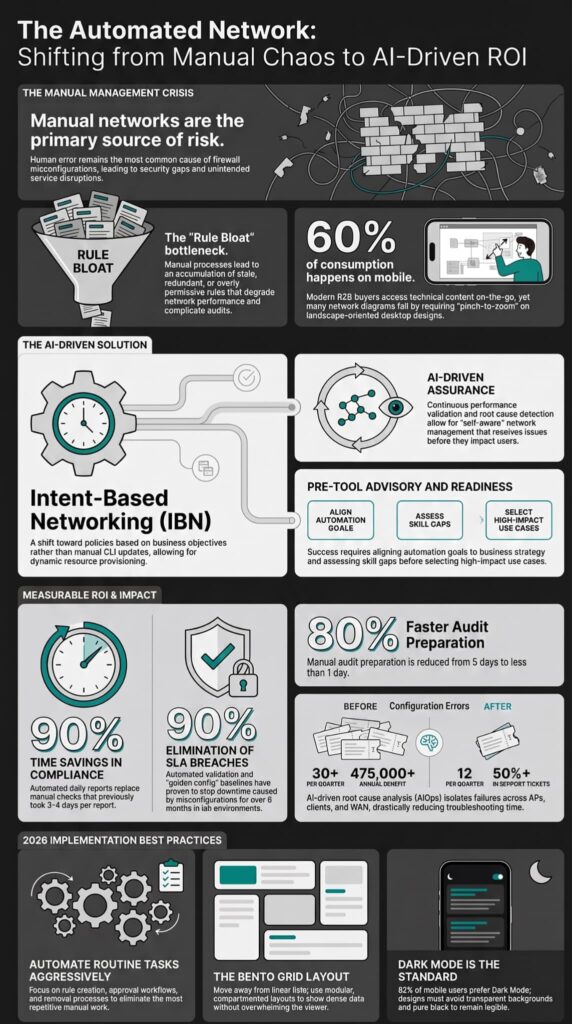
Standardization comes first. Automation comes after.
Many MSSPs want to automate deployments as early as possible. We understand why. Automation saves time. But if the process isn’t consistent, automation only spreads the same problems faster.
We’ve seen teams automate deployments before agreeing on basic policy standards. It rarely ends well. Every exception becomes another workflow to maintain, and troubleshooting gets harder with every customer.
A better approach is to create approved templates first. Build standard security baselines. Agree on naming rules, documentation, and change procedures. Once those pieces are stable, automation becomes much more valuable.
Centralized management platforms make this easier. Engineers can reuse approved configurations instead of building every firewall from scratch. That keeps deployments more consistent and reduces configuration drift over time.
This is also where product selection has a bigger impact than many teams expect. During product audits, we often find that two platforms offer similar security features, but one requires much less manual work to manage across multiple customers.
Choosing the right firewall technology options early can significantly reduce operational overhead as customer environments continue to grow.
How Should MSSPs Manage Firewall Policies?

A firewall policy shouldn’t stay the same forever.
Networks change. Employees join and leave. Applications move to the cloud. New services are added. If firewall rules don’t keep up, they become harder to manage and easier to misuse.
Nobody is sure why certain rules exist, but nobody wants to remove them either. That’s understandable. Removing the wrong rule can interrupt a customer’s business. Still, leaving old rules in place creates its own risks.
A good place to begin is with a default deny policy. Only allow the traffic that the business needs. From there, apply least privilege access so users, devices, and applications receive only the access they require. That approach reduces unnecessary exposure and makes future reviews much easier.
“Resource access is granted on a per-session basis. Trust is evaluated before access is granted, and is continually evaluated throughout the session.” – National Institute of Standards and Technology (NIST)
Network segmentation also helps. Instead of allowing systems to communicate freely, divide the network into smaller sections. If one system is compromised, attackers have a harder time moving through the rest of the environment.
Other controls, such as application control and URL filtering, add another layer of protection. They help stop risky traffic even when it uses common ports that would otherwise be allowed.
Regular reviews are just as important as the original policy. We recommend looking for duplicate rules, expired temporary rules, and entries that no longer serve a purpose. Many firewall platforms can flag unused or shadowed rules, giving engineers a good starting point instead of reviewing every policy by hand.
How Can Automation Improve Firewall Operations?
Source: Professor Messer
Automation should reduce repetitive work, not replace good judgment.
Many firewall tasks follow the same steps every time. Those are usually the best candidates for automation because they don’t require someone to make a security decision.
Common examples include:
- Zero-touch provisioning
- Configuration backups
- Restore testing
- API integrations
- Policy validation
- Routine workflows
Automating these tasks saves time and helps engineers avoid manual mistakes. It also makes deployments more consistent because every customer starts from the same approved process.
Not every task should be automated.
Production policy changes, emergency updates, and administrative access still need human review. We’ve audited environments where broad automation allowed changes to move into production with very little oversight. The process was fast, but mistakes were harder to catch before customers noticed them.
That’s why approval workflows still matter. A documented review process gives another engineer the chance to verify the change, confirm the business reason, and check for unintended impact before anything reaches production.
FAQs
How Often Should Firewall Rules Be Reviewed?
Firewall management best practices recommend reviewing firewall rules on a regular schedule instead of waiting for a security incident. Regular rule review automation helps identify outdated, duplicate, or unnecessary rules before they increase security risks. Routine rulebase cleanup and firewall policy optimization also improve firewall governance, strengthen secure policy enforcement, and keep security policies aligned with business and compliance requirements.
How Can Businesses Manage Firewalls Across Multiple Locations?
Organizations with multiple offices or clients can simplify operations by using centralized firewall administration. MSSP firewall management supports consistent policy deployment across distributed environments while maintaining tenant isolation. Vendor-neutral management, multi-vendor firewall support, policy standardization, and template-based deployment help security teams reduce manual work, improve operational scalability, and maintain consistent security baselines across every environment.
Why Is Firewall Change Control Important?
Firewall change control reduces the risk of configuration errors that can expose networks to security threats or disrupt business operations. Firewall configuration management, approval workflow, and documented rollback procedures ensure that every change is reviewed, approved, and recoverable if needed. Configuration drift detection, backup and restore, lifecycle management, and documentation standards also support continuous compliance and long-term risk reduction.
What Access Controls Should Protect Firewall Administrators?
Organizations should protect firewall administrators by enforcing least privilege access, role based access control (RBAC), and privileged access management. Admin account security should also include MFA for firewall access and secure remote administration to reduce the risk of unauthorized access. Audit logging, compliance monitoring, and proper log retention provide clear records of administrative activities and support security investigations.
How Can Firewall Management Improve Threat Detection and Response?
Managed firewall services improve threat detection by combining firewall data with SIEM integration, SOAR integration, SOC integration, and incident response integration. Threat intelligence enrichment, event correlation, alert tuning, and false positive reduction help security teams identify meaningful threats more quickly. Security operations automation also speeds up investigation and response while reducing manual effort during security incidents.
Building Scalable Firewall Management for MSSPs
Firewall management gets harder as your customer base grows, and small gaps can quickly turn into bigger security issues. Automation helps, but it only works when it’s backed by clear policies and a process your team follows every day. That’s what keeps operations consistent as your services expand.
If you want to make firewall management easier without adding unnecessary complexity, MSSP Security can help. Our vendor neutral consulting supports product selection, technology audits, stack optimization, proof of concept projects, and practical guidance built on more than 15 years of experience and over 48,000 completed projects, helping MSSPs build security operations that grow with their business.
References
- https://www.cisa.gov/resources-tools/resources/enhanced-visibility-and-hardening-guidance-communications-infrastructure
- https://www.nist.gov/publications/zero-trust-architecture