Address
304 North Cardinal St.
Dorchester Center, MA 02124
Work Hours
Monday to Friday: 7AM - 7PM
Weekend: 10AM - 5PM
Address
304 North Cardinal St.
Dorchester Center, MA 02124
Work Hours
Monday to Friday: 7AM - 7PM
Weekend: 10AM - 5PM

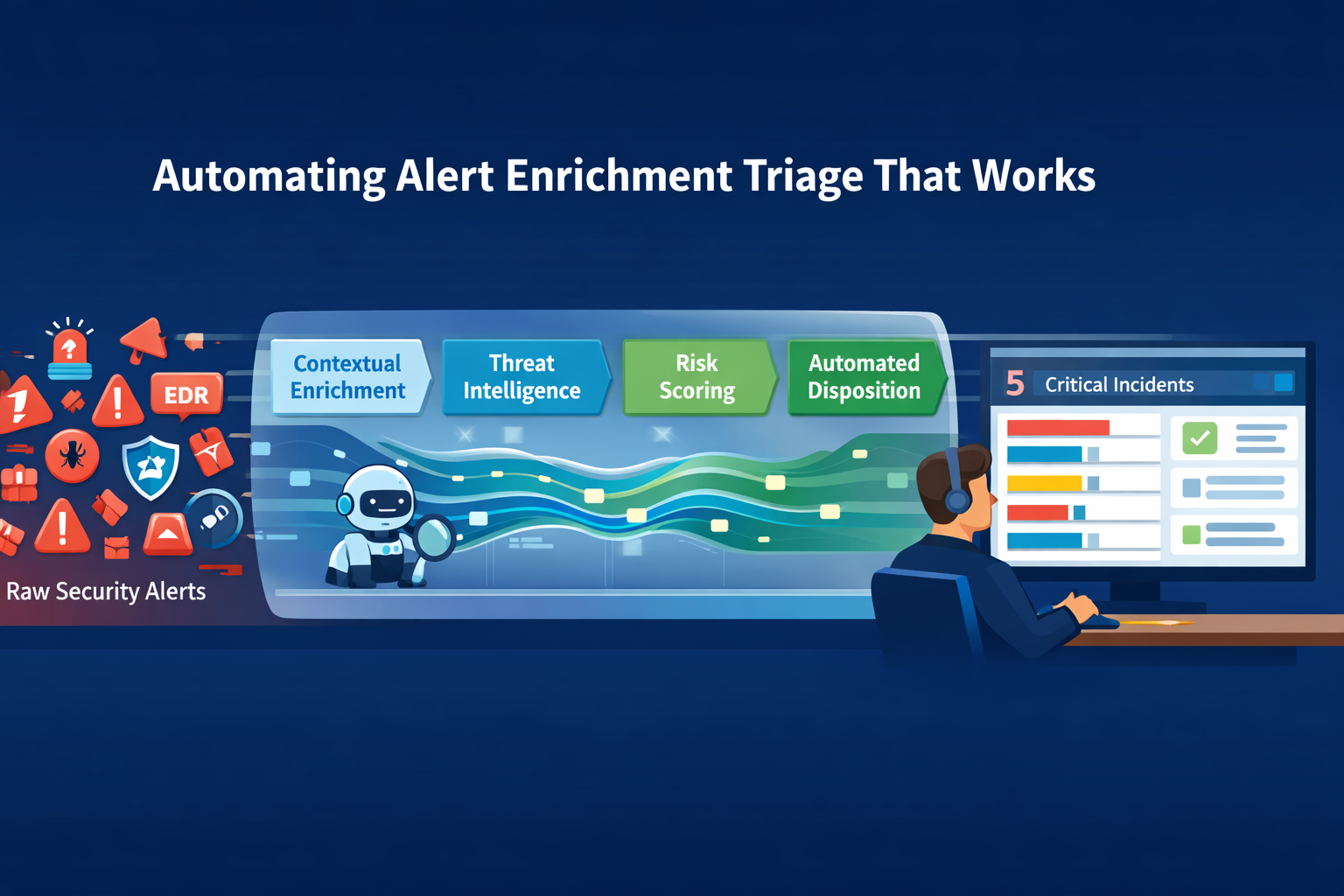
The answer is a framework. Automating alert enrichment triage isn’t about replacing your team, it’s about giving them back their focus. Raw alerts from your EDR and SIEM are just signals, often screaming into a void of context. An automated pipeline injects that context, threat intel, user identity, asset value, in milliseconds.
It scores, groups, and disposes of the noise before a human ever logs in. This turns a chaotic stream of 200 daily alarms into a manageable list of 5 genuine incidents. We’ve seen it cut investigation time by 80%. Keep reading to see how this pipeline is built, and how it finally solves the fatigue crisis.
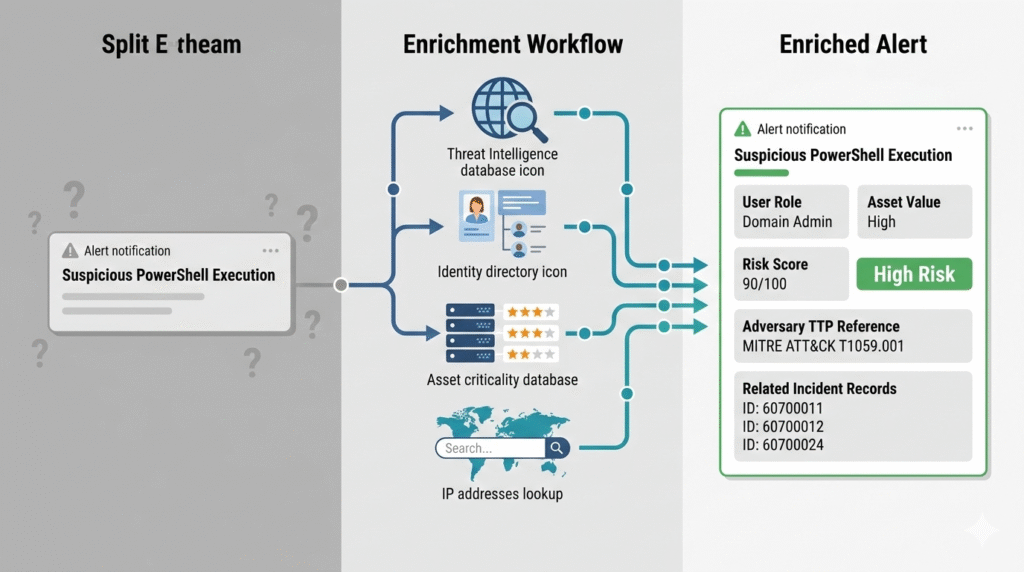
A raw alert is just a lonely ping on a screen. We see “Suspicious PowerShell on HOST-AD784” all the time, but without context, it’s meaningless. Is it a developer’s test box or a critical server? Who ran it?
“Raw alerts lack the context analysts need for efficient triage. Automation enriches each alert with threat intelligence, asset criticality, user behavior history, and related indicators. This enrichment transforms a basic alert into a complete investigation package.” – Vectra AI Blog
This is where automated enrichment changes everything. In our work with MSSPs, we’ve seen tools that instantly pull the user’s identity from IAM, check the host’s role, and cross-reference the script hash with threat feeds.
That sparse alert becomes, “Suspicious PowerShell by Domain Admin ‘j.smith’ on the primary finance server.” You now have a story, not just noise.
By automating the pull of asset data, user context, and threat intel, teams can cut manual research for each alert by 80%. The focus shifts from data gathering to making a decision.
Credits: Devo
So you have a contextualized alert. Now what? A triage pipeline is a sequence of logic gates. It ingests, normalizes, enriches, and scores alerts, automatically dismissing false positives while escalating critical threats. Think of it as a digital sieve, catching the gravel and letting the gold through.
The first step is pulling everything into a consistent format. Alerts from CrowdStrike Falcon, Microsoft Defender, the firewall, they all speak different languages. Normalization translates them. Then, the enrichment engine we just described does its work. Next comes risk-based alert prioritization to ensure the most dangerous threats hit the top of the queue.
Finally, the pipeline acts. It can close a ticket, add a note, or trigger a full incident. For MSSPs like us, this standardized pipeline is the backbone. It lets us apply the same rigorous triage logic across every client’s unique environment, ensuring nothing slips through. The workflow is straightforward but powerful:
Choosing a tool can feel overwhelming. The market is full of options, each promising to be the silver bullet. The truth is, the best platform depends on your stack and your tolerance for complexity. Some are low-code orchestrators, perfect for building visual workflows. Others lean into fully autonomous AI agents that make judgment calls.
We’ve integrated with several leaders in our work. The core strength isn’t in the branding, it’s in the connectivity. The right platform acts as the nervous system between your EDR, your email gateway, your ticketing system, and your threat intel feeds.
It’s the glue. For teams drowning in volume, a platform that automates the alert triage prioritization process is non-negotiable. For others, the flexibility to craft custom logic for specialized threat hunting is key. The table below breaks down the core archetypes you’ll encounter.
| Platform Archetype | Primary Strength | Ideal For |
| Workflow Orchestrator | Visual, low-code automation building | Teams new to automation, complex process design |
| Hyperautomation Engine | Real-time correlation across many tools | SOCs with mature, diverse tool stacks |
| High-Volume Triage | Processing 100,000+ alerts daily | Large enterprises or MSSPs managing multiple clients |
| Agentic AI Analyst | Autonomous investigation & reasoning | Reducing Tier 1 workload significantly |
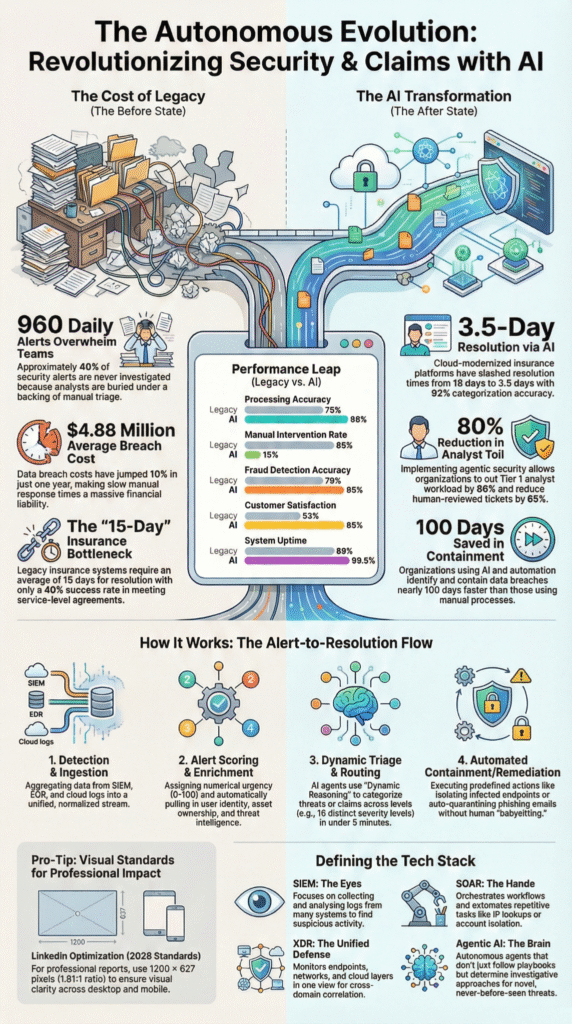
Alert fatigue isn’t a metaphor. It’s a physical burnout from processing endless low-value signals. AI agents address this by becoming your digital Tier 1 analyst. They don’t just follow a static playbook; they reason. They can read your Standard Operating Procedures stored in a wiki and execute the steps dynamically.
“Raw alerts must be transformed into decision-ready cases before they reach an analyst. This means normalising inputs from multiple sources, applying threat intelligence and environmental context, and scoring each finding based on potential impact. This enrichment process must happen in seconds, not minutes.” – Cyberseer Blog
An agent gets an enriched alert. It analyzes the context. It might query a live endpoint scanner for more data. It compares the activity to known adversary behaviors. Then, it makes a call: false positive, escalate, or autonomously contain. It provides a plain-English rationale for its decision.
This isn’t magic, it’s applied machine learning. The result is that analysts spend their day investigating actual incidents, not sifting through sand. The noise is gone.
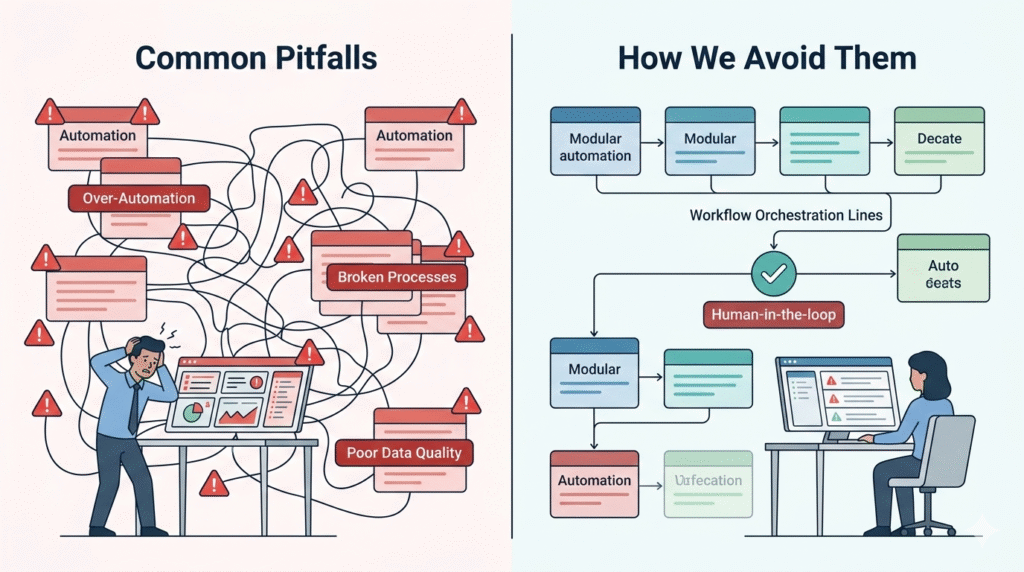
The biggest mistake is automating a broken process. If your manual triage is a mess, automating it just creates a faster mess. Implementation fails when it’s treated as an IT project, not a security operations redesign. Another pitfall is over-automation. You can’t automate a response to a novel, zero-day threat you’ve never seen before.
The focus should start on the repetitive, high-volume tasks that drain hours. Think: checking IPs against blocklists, implementing security alert validation techniques to filter out common false positive patterns, or escalating alerts on critical servers.
Start small, with a single, well-understood alert type. Build a modular playbook for it. Test it. Measure the Mean Time to Respond before and after. Then expand. For our security teams, this measured, metric-driven approach is what ensures automation adds value instead of complexity. We always follow a few critical rules:
Automating alert enrichment triage reduces alert fatigue by filtering alert noise before security teams ever see it. The system enriches security alerts with contextual information, Threat Intelligence, and asset value, then flags likely False Positives.
Instead of reviewing every EDR alert, SOC teams focus on real incident triage and threat detection, which improves security posture and cuts burnout.
AI agents can handle repetitive alert triage and security alert handling, but they should not replace security professionals.
AI SOC analysts follow Standard Operating Procedures, enrich alert context, and reduce false positive volume. However, incident declaration, complex threat hunting, and judgment calls during Advanced Persistent Threats or Zero-Day Malware still require experienced security practitioners inside Security operations centers.
Effective enrichment workflow depends on clean security data. That includes Alert details, asset criticality, user identity, IP addresses, and incident investigation data from case management systems.
Threat Intelligence, adversary TTPs, and prior incident records also improve alert context. Without accurate security alert data, automation framework decisions may increase false positives instead of improving Mean Time to Conclusion.
Automated incident triage shortens incident response by pre-scoring security alerts and mapping investigation paths. It checks intrusion detection systems, endpoint detection and response logs, and malware detection signals automatically.
By removing low-risk file-based alerts and grouping related threat campaigns, security teams reduce Mean Time to Conclusion and move faster from detection to containment.
The sheer volume of alerts keeps climbing. So does attack complexity. Your team’s capacity doesn’t. Building a framework to automate triage and enrichment isn’t about shiny tech; it’s the only way to create a sustainable operation. This shifts your SOC from a reactive help desk to a proactive defense center, letting analysts focus on what actually matters.
Start by mapping one alert’s entire journey. Find every manual lookup, that’s your first automation target. This structured approach is what lets MSSPs deliver consistent, high-fidelity service. It turns alert overload from a crisis into a solved problem.
Struggling with where to start? Our team specializes in helping MSSPs build these efficient, scalable operations. Let’s discuss how we can streamline your stack and processes.

