

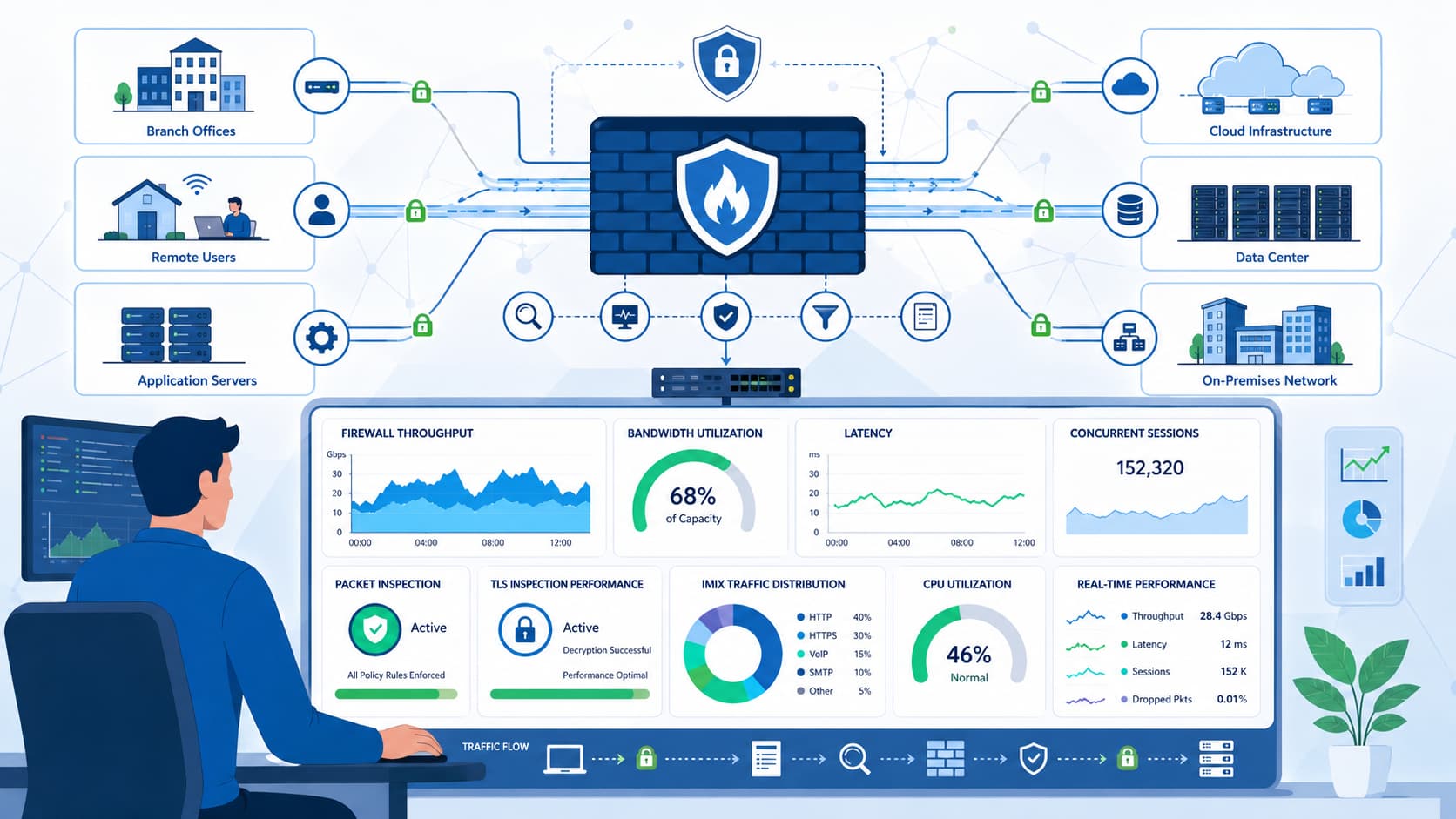
Measuring real firewall throughput means testing with your actual security features enabled. Vendor datasheets often highlight raw forwarding speeds, but real-world performance can drop significantly once features like TLS inspection are active. That is why production throughput is frequently much lower than advertised.
MSSP Security recommends using a repeatable testing framework that reflects your actual traffic, workloads, and security policies instead of ideal lab conditions. Keep reading to learn how to evaluate firewall performance accurately and avoid costly sizing mistakes.
Firewall Throughput Evaluation at a Glance
Evaluating firewall performance requires measuring how the device behaves under realistic workloads, not just relying on vendor specifications. Testing throughput alongside latency, packet loss, CPS, concurrent sessions, and feature-enabled traffic provides a much clearer picture of production readiness.
- Evaluate network firewall performance using throughput, latency, packet loss, connections per second (CPS), and concurrent sessions, not bandwidth alone.
- Run firewall throughput testing with IMIX traffic, application workloads, and individual security features enabled to measure usable performance.
- At MSSP Security, we prioritize real-world testing because production traffic rarely resembles the ideal conditions used in marketing benchmarks.
What Really Matters When Measuring Firewall Performance?
We learned the hard way that reliable firewall metrics aren’t about one number. They combine bandwidth, responsiveness, scalability, and the real cost of security inspection.
Chasing raw gigabit specs on a datasheet never solved our clients’ problems. The same appliance performs very differently once you turn on deep packet inspection, TLS decryption, and stateful firewalling.
This experience reshaped our entire benchmarking approach. Today, we follow firewall benchmarking guidance such as RFC 3511, which emphasizes repeatable tests and documented traffic profiles. Because encrypted traffic is common, TLS inspection overhead should be measured explicitly, TLS inspection overhead should be measured explicitly.
As noted by RFC 9411:
“This document provides benchmarking terminology and methodology for next-generation network security devices. The main areas covered in this document are test terminology, test configuration parameters, and benchmarking methodology for NGFWs and NGIPSs. This document aims to improve the applicability, reproducibility, and transparency of benchmarks and to align the test methodology with today’s increasingly complex layer 7 security-centric network application use cases.” – RFC 9411
Why throughput alone fails?
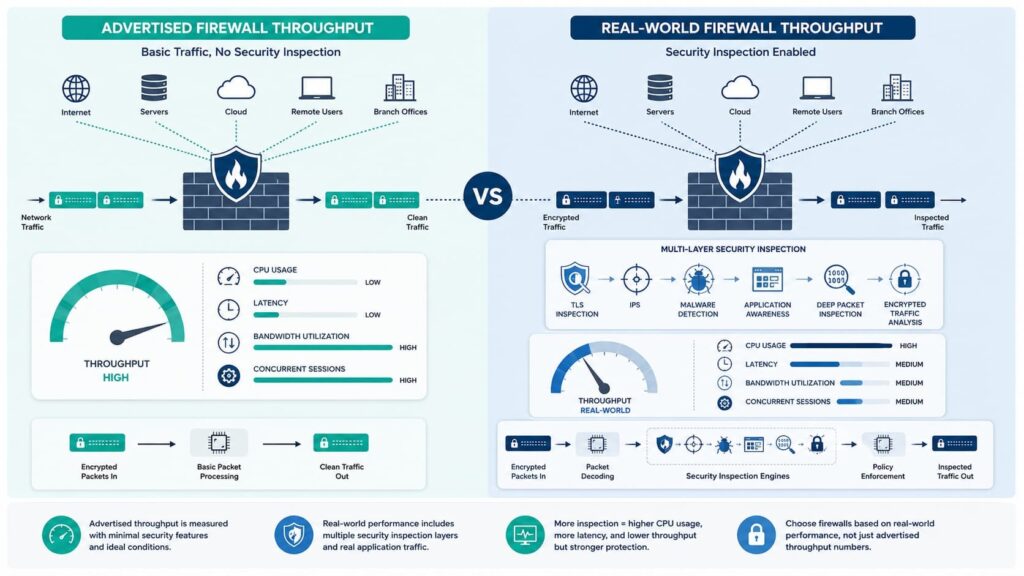
Throughput tells you forwarding speed, but hides the real work. A box pushing 10Gbps with security features off might crumble once you enable NAT, traffic shaping, QoS, malware scanning, and TLS inspection.
Independent testing often shows a large gap between ideal lab numbers and production-like results. That’s why we evaluate usable performance, not theoretical maximums.
The metrics that expose bottlenecks
Each of these metrics reveals a different part of the performance picture. You need to look at them together.
| Metric | Why it matters |
| Throughput | Overall forwarding capacity under load. |
| Latency & Jitter | Direct impact on user experience. |
| Connections Per Second (CPS) | Handles short-lived, high-volume apps. |
| Concurrent Sessions | Shows true scalability. |
| Packet Loss | Indicates stability when saturated. |
| CPU/Memory Use | Reveals resource bottlenecks before they fail. |
For our MSSP clients, the core list we measure includes maximum bandwidth (both single-flow and aggregate), firewall latency, packet loss, CPS, concurrent sessions, and system resource utilization.
Critically, we also test the throughput for IPS, IDS, and SSL inspection separately. These are the numbers that tell you if a firewall will hold up on a real network.
Why Do Vendor Datasheets Often Mislead?
You can’t trust a datasheet’s performance numbers at face value. They’re almost always measured in an ideal lab: limited inspection, optimized traffic, and favorable, large packet sizes.
We’ve seen too many deployment reports where clients expected the advertised NGFW throughput, only to see a significant drop once they turned on standard protection features.
Evaluating different firewall technology options requires looking beyond advertised speeds and considering how each solution performs under real security workloads.
The hardware wasn’t faulty; the real workload just wasn’t what the vendor tested. This is why groups like NetSecOPEN and CyberRatings.org stress documenting your exact traffic profile. The same firewall model can produce wildly different results under different inspection settings.
Research from CyberRatings.org shows:
“Selecting cybersecurity solutions requires unbiased, real-world performance testing and evaluation.” – CyberRatings.org
What inflates the published results?
Vendor benchmarks often assume conditions that are more favorable than production traffic.
- Using only large packet sizes.
- Applying minimal security rules.
- Keeping logging very limited.
- Leaving TLS/SSL inspection completely disabled.
- Running in a pristine, optimized lab environment.
What makes a comparison meaningful?
For our MSSP clients, we shift the focus. Meaningful comparisons look at:
Pros
- Feature-enabled throughput IMIX traffic
- Real application workloads
Cons
- Raw forwarding numbers
- Single packet-size benchmarks
A published 100Gbps firewall rating sounds impressive. But that number means little when your production traffic is full of encrypted sessions, VPN tunnels, and thousands of simultaneous users. We audit against the real conditions you’ll face.
Which Firewall Metrics Should You Benchmark First?
A repeatable firewall benchmarking methodology begins with baseline forwarding before enabling advanced security services.
We usually start by validating pure packet forwarding rate with the simplest possible configuration. That baseline becomes the reference point for every later measurement.
Without it, there is no reliable way to quantify the impact of inspection features.Run tests long enough to avoid conclusions based on short-lived spikes.
- The workflow is straightforward:
- Measure baseline TCP throughput and UDP throughput.
- Disable IPS, IDS, TLS inspection, and unnecessary logging.
- Record:
- Throughput
- Latency
- Packet loss
- Firewall CPU usage
- Save the results.
- Enable one feature at a time and compare the delta.
That simple approach creates a trustworthy baseline for every future comparison.
How Do IMIX Tests Reflect Real Traffic?
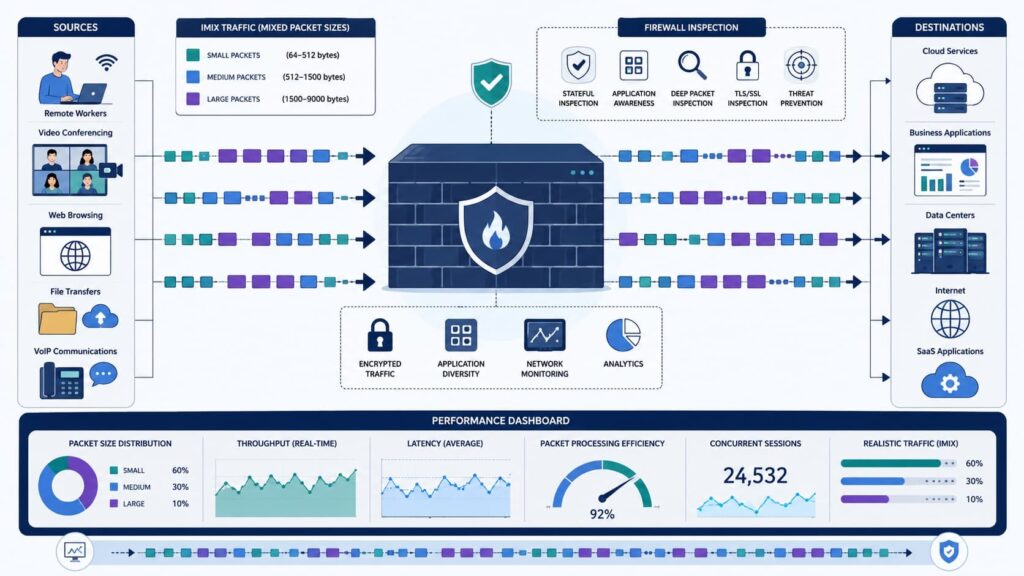
IMIX traffic provides a more accurate representation of production environments than fixed packet-size testing. Real networks rarely process only 1500-byte frames.
They carry a mix of web browsing, voice, DNS, cloud applications, backups, and encrypted sessions. During several internal lab exercises, our team found that switching from fixed packet testing to IMIX immediately exposed bottlenecks that never appeared under ideal conditions.
IETF RFC 9411 recommends realistic traffic composition because enterprise traffic mixes vary widely throughout the day. Common packet sizes include:
- 64B
- 128B
- 512B
- 1500B
- IMIX profile
Before expanding into feature testing, remember that packet size alone can completely change benchmark results.
Why are fixed packet sizes misleading?
Testing only large packets can understate the CPU cost of smaller frames. Large-packet results can dramatically overstate performance when small packets dominate. That is why real world firewall testing always includes IMIX alongside fixed packet scenarios.
How Much Do Security Features Reduce Throughput?

Every inspection engine introduces additional processing overhead that should be measured independently.Independent testing has shown TLS inspection can reduce throughput substantially in some NGFW workloads.
That result reinforces what many engineers observe in production: enabling more protection usually consumes more processing resources.
Feature-by-feature testing should include:
- Stateful inspection
- NAT performance
- IPS throughput
- IDS throughput
- TLS inspection
- URL filtering
- Threat intelligence
- VPN throughput
- IPsec throughput
- OpenVPN throughput
- WireGuard throughput
To isolate feature impact, enable one new feature at a time. After each feature is enabled, repeat the same traffic profile and compare throughput, firewall latency, packet loss, and CPU utilization. This isolates the true cost of every security capability.
Why Do Small Packets Hurt Performance More?
Small packets create significantly higher packet per second workloads, placing more pressure on CPU resources than large packets.
Community discussions across technical forums consistently emphasize PPS benchmark values over raw Mbps because every packet requires inspection, connection tracking, and policy evaluation regardless of payload size.
| Large packets | Small packets |
| Higher bandwidth | Higher CPU demand |
| Lower PPS | Much higher PPS |
That distinction becomes even more important when evaluating 10Gbps firewall, 25Gbps firewall, or 100Gbps firewall deployments.
Engineers often focus on bandwidth while overlooking small packet performance, which usually becomes the first bottleneck during production traffic bursts.
How Should You Test Connections Per Second?
Testing connections per second (CPS) reveals how efficiently a firewall handles rapid session creation. Short-lived web applications, APIs, and microservices generate enormous numbers of new connections.
Even when bandwidth remains moderate, excessive CPS can overload connection tracking and session handling resources.
A practical process includes:
- Generate many short transactions.
- Increase CPS gradually.
- Monitor CPU utilization.
- Observe session table limits.
- Record failure thresholds.
Research and operational experience both suggest that connection spikes frequently expose weaknesses before maximum throughput limits are reached.
Which Test Environment Produces Reliable Results?
Reliable firewall load testing requires an isolated environment that closely mirrors production. At MSSP Security, we document every test parameter before generating traffic.
The same approach applies when evaluating a virtual firewall, where cloud infrastructure, allocated resources, and network configurations can influence throughput results.
That discipline has saved countless hours when validating firmware upgrades or explaining unexpected benchmark differences to customers.
Document:
- Firewall model
- Firmware version
- NIC speed
- Hardware acceleration
- Hardware offload
- MTU
- Routing
- Traffic generator
- Logging configuration
- Queue depth Interrupt coalescing
- Buffer sizing
Tools such as iperf3 and TRex are often used for repeatable traffic generation. Without identical conditions, benchmark comparisons quickly become unreliable.
How Should You Interpret Benchmark Results?
Usable throughput with every required security feature enabled should drive purchasing and deployment decisions. Leave operational headroom above expected peak traffic to absorb growth and bursts.
Ask these questions:
- Does feature-enabled throughput exceed peak demand?
- Is latency acceptable? Is packet loss negligible?
- Does firewall capacity support future growth?
- Are concurrent sessions sufficient?
- Does CPS match application behavior?
Beyond that, compare throughput vs latency rather than throughput alone. A firewall maintaining high bandwidth while introducing excessive delay may still produce poor user experiences.
What Testing Mistakes Should You Avoid?
The most common benchmarking mistakes create unrealistic expectations rather than useful performance data.
Technical forums repeatedly warn against measuring traffic generated by the firewall itself instead of traffic flowing through it. That subtle difference often produces misleading results.
These considerations become even more important in environments using centralized firewall management, where multiple devices must maintain consistent configurations during performance evaluations.
Avoid these mistakes:
- Testing only large packets
- Ignoring TLS inspection
- Measuring only Mbps
- Testing to the firewall instead of through it
- Heavy local logging
- Single traffic streams
Skipping firmware retesting Pro tip: Repeat every benchmark after firmware upgrades because performance characteristics frequently change.
Of course, no benchmark perfectly predicts production behavior. That said, consistent methodology dramatically improves confidence in the results.
A Practical Firewall Evaluation Checklist
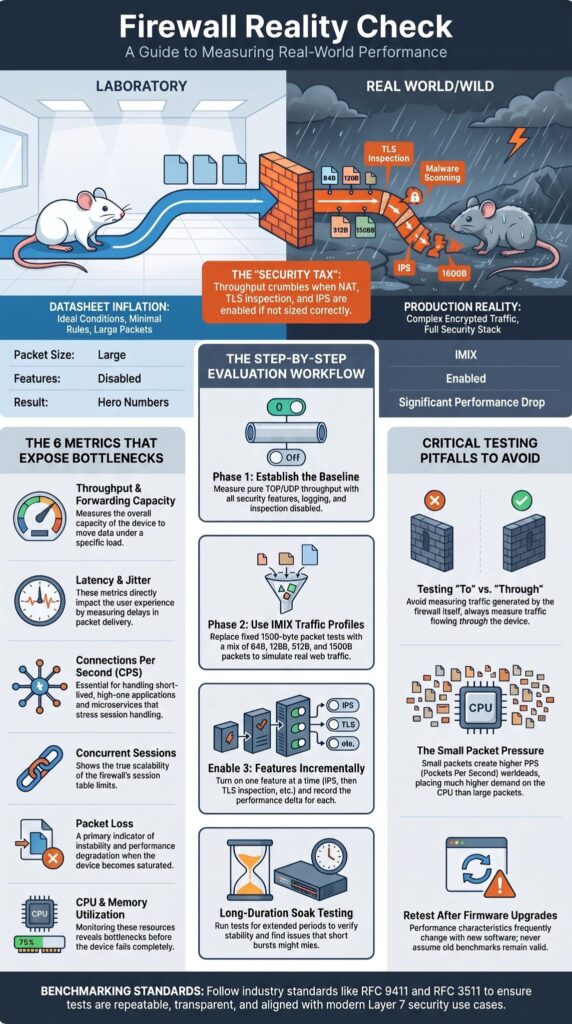
A structured evaluation process produces repeatable and comparable benchmark results. Before finalizing any firewall appliance review or enterprise firewall sizing exercise, confirm the following:
- Baseline throughput
- IMIX testing
- Application workloads
- Feature-by-feature measurements
- Firewall stress test
- Firewall load testing
- CPS testing
- Session capacity
- Long-duration soak testing
- Complete configuration documentation
Long-duration soak tests help verify stability beyond short benchmark runs and often reveal issues that quick tests miss.
FAQ
How does firewall throughput testing differ from a firewall benchmark?
Firewall throughput testing measures how much traffic a firewall can process under specific conditions. A firewall benchmark compares those results using consistent test methods so different devices or configurations can be evaluated fairly. Accurate testing also examines network firewall performance, firewall performance metrics, bandwidth throughput, and throughput vs latency to provide a complete view of performance.
What factors reduce NGFW throughput during real world firewall testing?
Several security functions affect NGFW throughput because they require additional processing. Stateful inspection, deep packet inspection, TLS inspection, SSL inspection throughput, and complex security policies all increase workload. Firewall CPU usage, rule complexity, and packet size impact also influence results. Real world firewall testing should include realistic traffic patterns to produce accurate performance measurements.
Why should firewall sizing consider concurrent sessions and connection rate?
Proper firewall sizing requires more than measuring available bandwidth. Organizations should evaluate firewall capacity, concurrent sessions, connection rate (CPS), session handling, and connection tracking because these metrics determine whether the firewall can maintain stable performance during normal operations and periods of heavy network activity.
Which tools provide accurate firewall performance measurements?
A well-designed firewall test lab uses throughput measurement tools to evaluate performance under controlled conditions. Common tools include iperf3 firewall test for measuring TCP throughput and UDP throughput, and TRex traffic generator for generating realistic IMIX traffic. These tests also measure packet per second (PPS benchmark) and firewall latency to produce repeatable performance data.
How can throughput optimization improve network security performance?
Throughput optimization improves network security performance by identifying and removing the primary throughput bottleneck. Administrators can improve security appliance throughput by optimizing traffic shaping, QoS, hardware offload, NIC tuning, driver optimization, buffer sizing, and interrupt coalescing. Repeating performance tests after each change confirms whether the optimization delivers measurable improvements.
Choose a Throughput Evaluation Strategy That Reflects Real Traffic
Effective firewall testing only matters if the results match what you’ll actually see in production. Looking at real traffic, not just peak bandwidth, gives you a much clearer picture of performance.
That helps you avoid costly sizing mistakes and unexpected slowdowns. If you need expert guidance with firewall evaluation, proof-of-concept testing, or selecting the right security solution for your environment, MSSP Security’s consulting services can help.
Their team provides vendor-neutral recommendations, testing support, and practical advice based on real operational requirements, giving you greater confidence that your firewall is ready for everyday use.
References
- https://www.rfc-editor.org/rfc/rfc9411.html?format=pdf
- https://aitranslatewpml.versa-networks.com/news/2025/versa-delivers-proven-firewall-performance-and-security-effectiveness-validated-by-independent-testing/