


SOAR use cases automation examples deliver the most value when they automate repetitive security tasks. IBM reports that effective security automation can shorten the lifecycle of a data breach by more than 100 days. At MSSP Security, we’ve worked with MSSPs to evaluate and audit SOAR solutions that reduce manual work while keeping response decisions under control.
The strongest results come from automating structured processes like phishing triage, threat enrichment, and case documentation, allowing analysts to focus on higher-risk investigations. Keep reading to see which SOAR use cases provide the biggest operational gains and how to implement them successfully.
SOAR Quick Wins at a Glance
The best SOAR results come from automating repeatable work while keeping analysts involved in high-impact decisions. Start with proven use cases, build reliable playbooks, and expand automation as your processes mature.
- High-volume SOAR use cases such as phishing triage, IOC enrichment, and suspicious login detection usually provide the fastest operational return.
- Reliable security orchestration, automation, and response begins with accurate detections, structured playbooks, and controlled automated remediation.
- At MSSP Security, we have found that combining standardized playbooks with customer-specific approval workflows creates faster and safer incident handling.
Why Does SOAR Work Best for Repetitive Tasks?

The greatest value from SOAR comes from automating predictable, step-by-step investigations, not those requiring constant analyst interpretation.
Every security operations center deals with repetitive work. Phishing alerts, indicator of compromise (IOC) enrichment, and gathering evidence for reports are some of the most common high-volume activities.
They follow nearly the same procedure every single time, yet they can consume hours of an analyst’s day. From our consulting experience, the problem is rarely that analysts don’t know what to do. It’s that they have to do the same thing hundreds of times.
Automating these structured processes lets experienced responders tackle sophisticated attacks instead of copying data between screens. We always advise starting small. Automate a clear, repeatable process first. This builds confidence and demonstrates quick wins before moving to more complex response automation.
Good starting points include:
- Phishing triage
- Enriching alerts with threat intelligence
- Initial alert sorting and prioritization
- Automatically creating investigation cases
- Syncing tickets between systems
- Notifying users of actions
Remember, automation shouldn’t replace security judgment. It handles the routine groundwork so humans can focus on the exceptions and the critical thinking.
Finding Your Daily Repetition
Most organizations quickly spot their recurring tasks once they map out a typical analyst’s workflow.
Common daily chores involve pulling IOCs from alerts, checking IP reputations, validating suspicious files, reviewing login logs, correlating alerts from different tools, and writing up findings. These tasks don’t need creativity. They need consistency. That’s what makes them perfect for SOAR.
How Does a SOAR Playbook Actually Work?
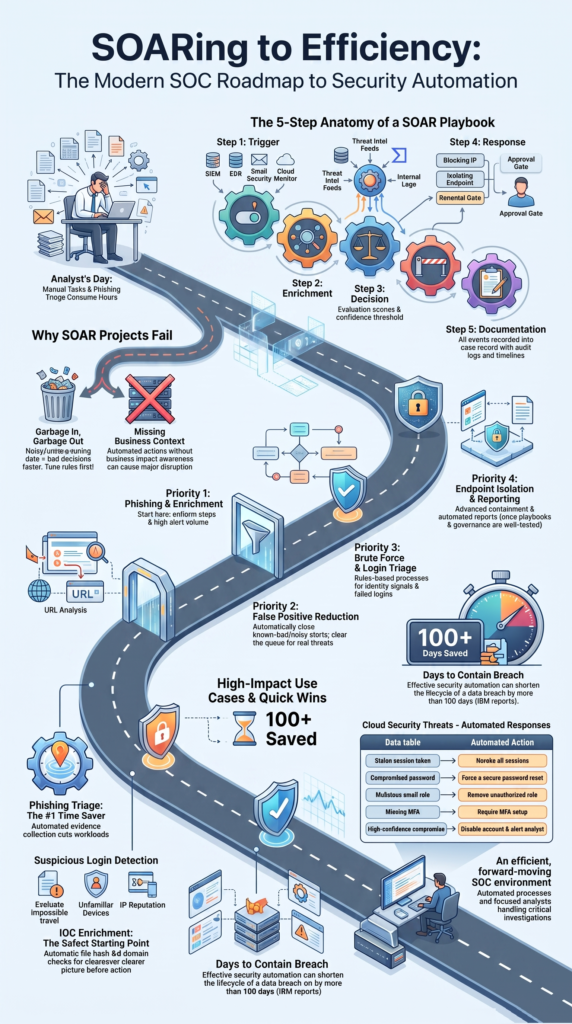
Most playbooks follow a similar five-step flow: trigger, enrich, decide, respond, and document.
The playbook starts when a detection comes in from a SIEM, email gateway, endpoint tool, or cloud monitor. Next, it enriches that alert. It might pull in data from threat intelligence feeds, check virus databases, or gather user context. This enrichment step is crucial. It provides the evidence needed to make a good decision.
Only after gathering enough context should the playbook consider an automated response. Finally, every single action the playbook takes is logged automatically for the investigation record and for audits.
Our deployments have taught us one clear lesson: automation succeeds when documentation happens as you go, not as a painful afterthought.
The Foundation is Good Data
A brilliant playbook can’t fix bad detections. If your alerts are noisy and full of false positives, automation will just process those mistakes faster. We’ve seen this happen. Tuning your detection rules and improving data quality is the essential first step before any automation expands.
Good inputs lead to reliable outputs. It’s that simple. Organizations evaluating automation capabilities often benefit from understanding how different solutions approach integrations and workflows, which is why a top SOAR platforms comparison guide can help frame those decisions before implementation.
| Stage | What Happens | Example Tools/Sources |
| Trigger | The playbook is launched by an alert. | SIEM, EDR, Email Security |
| Enrichment | Context is gathered to inform the decision. | VirusTotal, threat intel feeds, internal logs |
| Decision | The system evaluates the enriched data against rules. | Severity scoring, confidence thresholds |
| Response | An action is taken (often with approval gates). | Block IP, isolate endpoint, reset password |
| Documentation | All steps and evidence are recorded automatically. | Case notes, timeline, updated tickets |
Why Is Phishing Automation the Biggest Time Saver?
Automating phishing response is often the highest-return SOAR project, because every investigation follows an almost identical script.
Phishing alerts dominate analyst queues. Automating the repetitive evidence collection, checking URLs, analyzing attachments, pulling header details, cuts workload significantly without sacrificing investigation quality. We’ve implemented this for many MSSP clients and the time savings are immediate and measurable.
A typical phishing playbook runs like this:
- An alert arrives from the email security gateway.
- The playbook extracts sender details, URLs, attachments, and headers.
- It checks the extracted IOCs against reputation services like VirusTotal.
- It may detonate a suspicious URL or file in a sandbox.
- Based on the results, it can quarantine the email.
- It automatically creates a ticket and logs all the evidence.
- It notifies the affected users.
One practitioner described a similar workflow that enriched IOCs, assessed risk, blocked malicious indicators, and generated reports, eliminating most of the manual legwork. That matches what we see in mature SOCs.
Why Does Phishing Automation Pay Off So Quickly?
Phishing investigations rely on structured data gathering, not open-ended analysis. Since the steps are the same each time, automation delivers clear productivity gains quickly.
A key note: we always recommend keeping analyst approval in the loop for disruptive actions, like blocking email for a high-profile executive. The machine handles the gathering; the human makes the final high-stakes call.
How Does SOAR Automate Suspicious Login Detection?
This use case blends identity signals, user behavior analytics, and automated response into a single, swift workflow.
A suspicious login is rarely about one red flag. It’s a combination of signals, like an impossible travel alert, a login from a new device, or a risky IP address. SOAR can evaluate these factors together in seconds.
In our MSSP work, we always enrich these alerts first. Checking the IP reputation or the user’s normal login pattern provides essential context that prevents unnecessary account lockouts.
Common signals a playbook can check:
- Impossible travel (logging in from two distant locations in a short time)
- Logins from new devices or unfamiliar browsers
- IP addresses with a bad reputation
- Whether multi-factor authentication was used
- The user’s risk score and privilege level
Knowing When to Stop Automation
Some actions should always require a human “yes,” no matter how confident the system is. Locking out an executive’s account, disabling a privileged admin, or forcing a company-wide password reset are good examples. A well-designed playbook will escalate these events to an analyst for approval, striking the right balance between speed and safety.
How Does SOAR Automate Endpoint Malware Response?
This connects detection directly to containment, letting you respond in minutes instead of manually collecting evidence from multiple machines.
When malware executes, every minute counts. Automated containment can limit the damage. We’ve seen this make a dramatic difference during incidents for our clients. Analysts aren’t wasted gathering process lists and checking hashes manually. The playbook does that while simultaneously taking steps to isolate the threat.
A typical endpoint response playbook might:
- Look up the file hash in reputation databases.
- Collect the process tree and other forensic data from the endpoint.
- Enrich any related IOCs.
- Based on confidence thresholds, automatically isolate the infected device from the network.
- Create a full investigation case with all the preserved evidence.
It’s critical to include business context. Automatically isolating a critical server could cause more operational disruption than the malware. Good playbooks have approval gates for important systems.
Before closing the case, the playbook ensures:
- All evidence is attached to the ticket.
- A clear timeline is preserved.
- Any necessary escalations happened.
- The assigned analyst is notified.
- The case record is complete.
Why Is Threat Intelligence Enrichment So Important?
Enriching alerts with external intelligence gives analysts the context they need before any automated action takes place.
From our consulting work with MSSPs, we have found that enrichment is one of the safest places to begin with SOAR. Rather than blocking an IP address or domain immediately, the playbook gathers more evidence first.
In many environments, that extra context reveals the activity is tied to a trusted cloud service or another legitimate business process. Taking a few extra seconds to verify the alert often prevents unnecessary disruption while keeping investigations on track.
Our audits regularly show that reliable enrichment depends on combining several trusted data sources. A typical playbook may automatically:
- Check file reputations and known malware indicators.
- Review IP and domain reputation data.
- Correlate findings with internal security logs.
- Add the results to the investigation record.
By collecting this information automatically, analysts receive a clearer picture before deciding on the next step. We’ve repeatedly seen that stronger context improves automation without removing the need for human judgment.
As highlighted by CyberDefenders
“Threat-intelligence enrichment. Looking up indicators against intel sources and adding the results to alerts and blocklists automatically.” – CyberDefenders
Which Cloud Security Tasks Should SOAR Automate?
Predefined SOAR playbooks can reduce exposure without waiting for a human to wake up and log in. In the cloud environments we help secure, we see identity compromise responses benefit hugely from this speed.
| Cloud Alert | Possible Automated Response |
| Stolen session token | Revoke all sessions for that user. |
| Compromised password | Force a secure password reset. |
| Malicious email rule | Remove the unauthorized inbox rule. |
| Missing MFA on a critical account | Require MFA setup before next login. |
| High-confidence account compromise | Disable the account and alert an analyst for review. |
These workflows connect to identity providers, cloud APIs, and ticketing systems. As always, include approval steps for actions affecting highly privileged accounts or critical business functions.
Research from Scientific Journal of the Lviv Polytechnic National University shows
“This study explores the use of Splunk SOAR (Security Orchestration, Automation, and Response) as a tool for automated detection, analysis, and response to threats in public cloud environments. The primary focus is on integrating Splunk SOAR with cloud providers’ APIs to dynamically block compromised resources and to implement detailed response playbooks that isolate threats at the level of individual components (virtual machines, network policies, user accounts).” – Scientific Journal of the Lviv Polytechnic National University
Why Should You Automate Incident Documentation?
Automating documentation is just as valuable as automating response actions. Good records make investigations easier to review, support audits, and help teams improve future playbooks.
One issue we see during MSSP assessments is inconsistent case documentation. Analysts are usually focused on containing threats, so writing detailed notes often becomes a lower priority once the incident is over.
That is understandable, but incomplete records make handoffs, compliance reviews, and post-incident analysis much harder. A well-designed SOAR playbook solves this by collecting information automatically while the investigation is still in progress instead of leaving everything until the end.
Every playbook should automatically capture:
- A complete investigation timeline.
- Threat intelligence and enrichment results.
- Every response action and approval.
- Links to forensic evidence and supporting artifacts.
- The final case status and resolution.
Our consulting experience has shown that automated documentation creates more consistent case records across different analysts and customer environments. It also reduces manual work and helps security teams spend more time investigating real threats instead of updating tickets.
Over time, these consistent records make audits smoother, simplify reporting, and provide valuable information for improving future playbooks and response procedures.
What Should You Automate First with SOAR?
Credits: Hank Hackerson
Start with the repetitive, high-volume tasks that require the least human judgment.
The fastest wins come from removing mundane work, not automating complex investigations. Based on our consulting experience, a solid implementation order is:
- Phishing response. The steps are uniform and it’s a huge volume driver.
- IOC enrichment. It’s low-risk and improves every investigation.
- False positive reduction. Automatically closing known-bad alerts clears the queue.
- Brute force attack response. This is a simple, rules-based process.
- Suspicious login triage. Let the playbook gather the context first.
- Auto-creating tickets. Ensure every alert is tracked.
- Endpoint isolation (with approvals). For high-confidence malware cases.
- Automated report generation. Close the loop on documentation.
As your team gains confidence, you can move to more advanced areas like firewall rule changes, cloud resource lockdowns, or ransomware response.
Avoid full, irreversible automation on critical systems until your playbooks and governance are well-tested. This staged approach also makes it easier when choosing the right SOAR platform, because your automation priorities are already clearly defined.
Why Do Some SOAR Projects Fail?
The most common point of failure isn’t the automation itself; it’s the quality of the detections feeding into it.
The old saying holds true: garbage in, garbage out. If your SIEM alerts are noisy or lack crucial data, your SOAR will just make bad decisions faster. We’ve helped clients diagnose this exact issue. Successful deployments always spend time cleaning up alerts and tuning rules before scaling automation.
| Problem | The Result |
| Low-quality alert data | Automation acts on false positives. |
| Static, inflexible playbooks | They break on edge cases or novel attacks. |
| Missing business context | Automated actions cause operational disruption. |
| Poor tool connectivity | Maintenance overhead skyrockets. |
SOAR also struggles when companies try to automate tasks that require deep analyst judgment. Real incidents are messy. Static playbooks can’t account for every business exception. The most effective security teams use SOAR to handle the predictable groundwork, freeing their experts to manage the complex, unusual scenarios.
How Can MSSPs Build SOAR Playbooks That Scale?

The key for MSSPs is to standardize the repeatable parts of an investigation while building in flexibility for client-specific needs.
Every client has different risk tolerances, approval chains, and compliance requirements. The best MSSP playbooks we’ve designed use a common core, for enrichment, evidence gathering, and documentation. As automation expands across multiple customers, understanding different SOAR platform pricing models also helps align technical scalability.
Our framework is simple:
Detect → Enrich → Decide → Respond → Document → Improve
We build reusable playbook modules that cover the first and last steps uniformly. The “Decide” and “Respond” stages have configurable rules and approval gates tailored to each client. This way, analysts aren’t building hundreds of unique workflows, and clients still get a service that fits their policies.
A mature MSSP playbook includes:
- Clear triggers from client environments.
- Reliable enrichment from vetted sources.
- Configurable confidence scoring.
- Custom approval workflows for each client.
- Automatic evidence collection.
- Defined escalation paths.
- Regular review cycles for improvement.
As these playbooks mature, MSSP analysts spend less time on manual tasks and more time on threat hunting, tuning detections, and providing strategic value to their clients.
FAQ
What security tasks should organizations automate first with SOAR?
Organizations should begin by automating repetitive tasks that follow clear, consistent steps. Good examples include phishing response, phishing triage, email triage automation, IOC extraction, security alert enrichment, ticket creation, and analyst notification.
Automating these activities reduces manual work, improves SOC efficiency, supports recurring task automation, and allows analysts to spend more time investigating complex threats that require human expertise.
How can SOAR strengthen identity and account security?
SOAR improves identity security by responding quickly to suspicious account activity. A playbook can automate suspicious login detection, geo-anomaly detection, impossible travel alert validation, failed login response, credential reset automation, user verification workflow, identity remediation, and multi-factor authentication enforcement.
Organizations can also require analyst approval before actions such as account lockout automation for high-risk or privileged accounts.
Which malware investigation tasks benefit most from automation?
Many malware investigations follow the same process, making them ideal for automation. A SOAR playbook can perform malicious attachment analysis, suspicious URL analysis, file hash reputation checks, malware triage, process tree analysis, memory dump collection, and forensic evidence gathering.
It can also support endpoint isolation, malware containment, and endpoint remediation, allowing analysts to focus on investigating the root cause instead of collecting evidence manually.
How does SOAR improve security alert management?
SOAR improves security alert handling by connecting security tools into a single workflow. It supports SIEM integration, EDR integration, threat feed integration, and enrichment API integration to collect and enrich data automatically.
The platform also performs alert correlation, threat intel enrichment, real-time alert processing, case management automation, incident triage, response orchestration, and cross-platform orchestration to deliver faster and more consistent investigations.
What advanced SOAR workflows should teams automate later?
Once basic playbooks are working well, security teams can expand automation to more advanced processes. The workflows help organizations improve cyber incident response while supporting faster and more reliable operations.
These include threat hunting automation, periodic IOC sweep, IOC matching, indicator ingestion, blocklist update, firewall rule automation, proxy block automation, vulnerability management automation, patch orchestration, cloud security response, compliance reporting, audit trail automation, security orchestration, and workflow standardization.
Build SOAR Playbooks That Last
The best SOAR playbooks automate repetitive security tasks while keeping analysts focused on higher value work. Organizations that improve playbooks over time instead of automating everything at once often achieve more reliable workflows, faster response times, and stronger security outcomes.
Scalable automation starts with practical planning and measurable results. Talk with MSSP Security about building SOAR playbooks that improve response speed while keeping your analysts in control.
References
- https://cyberdefenders.org/cybersecurity-glossary/security-automation/
- https://science.lpnu.ua/csn/all-volumes-and-issues/volume-7-number-2-2025/automate-cloud-security-incident-management-with-a-soar-based-approach