

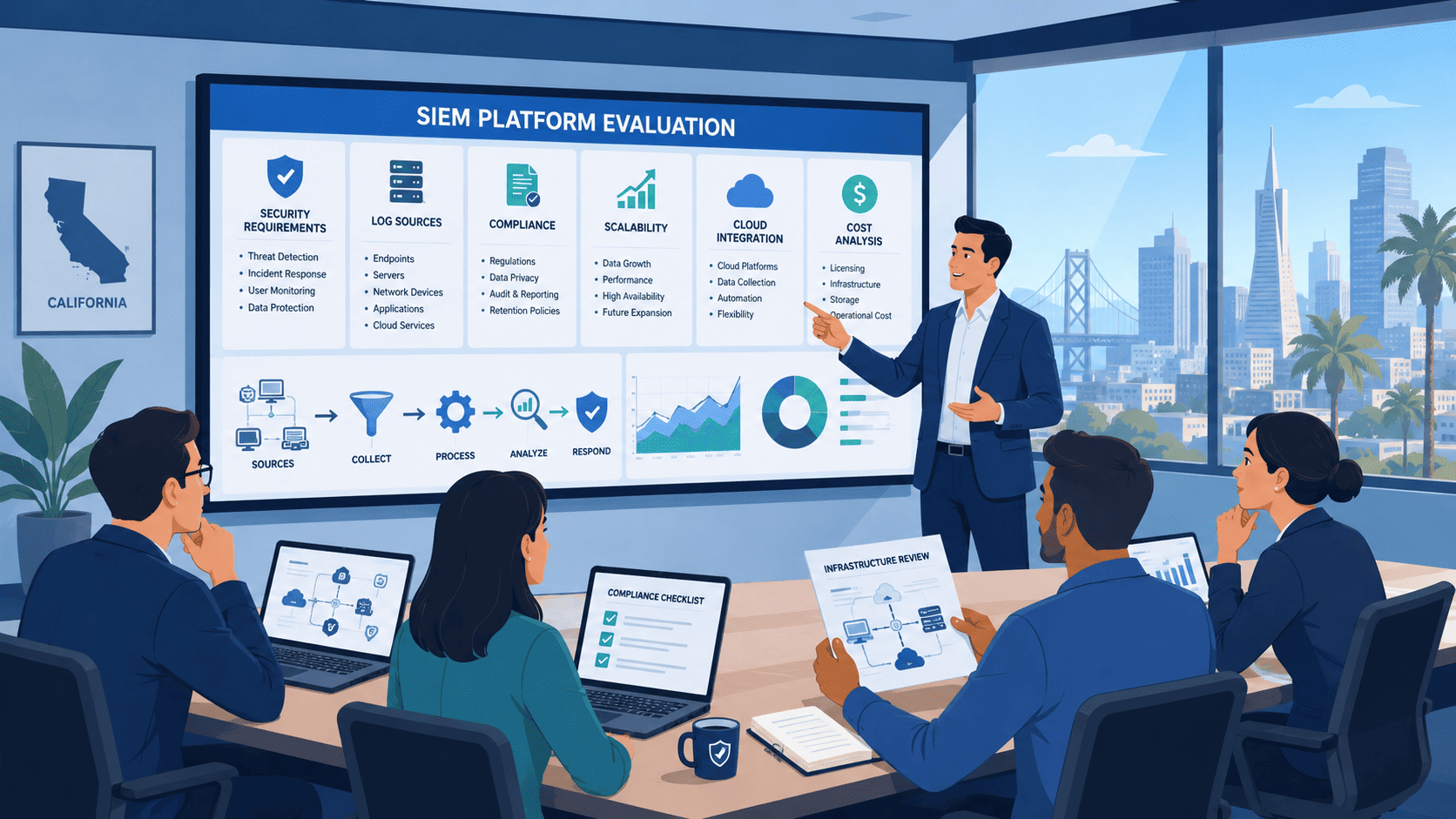
Choose a vendor-agnostic SIEM platform selection consultant who puts your business goals ahead of product sales. That approach helps California organizations match security investments to compliance requirements, operational needs, and long-term growth.
The SANS Institute reports that Security Information and Event Management platforms still sit at the center of many Security Operations Centers, even as security teams face ongoing staffing shortages. At MSSP Security, we’ve worked with organizations through complex SIEM evaluations, and we’ve seen careful planning beat rushed decisions every time. Keep reading to see what makes a smarter SIEM selection process.
SIEM Selection at a Glance
- A successful SIEM selection begins with business requirements, compliance obligations, and operational readiness instead of vendor features.
- California organizations should prioritize privacy regulations, cloud telemetry, long-term licensing costs, and detection engineering during platform evaluation.
- At MSSP Security, we have found that structured proof-of-concept testing and vendor-neutral assessments consistently reduce implementation risks and improve long-term security operations.
What Should You Expect From a California SIEM Selection Consultant?
Most companies don’t start looking for a SIEM consultant until they’re already frustrated. They’ve compared products on their own, sat through the demos, looked at all the shiny features, and still have no idea which one is actually right for them.
We see this constantly in our work with MSSPs across California. The choice looks simple at first. Then you dig into pricing models, data limits, and what it actually takes to run the thing day to day. Suddenly nothing is simple anymore.
A good consultant doesn’t just hand you a vendor list and walk away. They start by figuring out what your business actually needs to protect, what rules you have to follow, and what your team can realistically handle.
Why Jumping Straight to Vendor Comparisons Backfires?
At MSSP Security, we learned this the hard way. Going straight to technology choices almost always backfires. SANS Institute research backs this up too,SIEM tools are only useful when they match what your organization actually does, not when they look impressive in a demo.
Research from SANS Institute shows
“42% of SOCs dump all incoming data into a SIEM, often without a retrieval or management plan.” – SANS Institute
That statistic alone explains why so many SIEM deployments end up costing more and delivering less than promised.
Why California Compliance Rules Complicate SIEM Choices?
California throws in extra headaches that trip up a lot of people. The CCPA isn’t just about a privacy notice on your website. It affects:
- Where you store your security logs
- How long you’re allowed to keep them
- Who gets access to what data, and under which conditions
We’ve watched companies ignore this early on and pay through the nose to fix it later. HIPAA, PCI DSS, and SOC 2 create similar problems if you don’t plan for them from the start. A consultant who understands how these regulations intersect with SIEM architecture can save you from building something that works technically but fails a compliance check.
Matching the Platform to Your Team, Not the Other Way Around
Instead of pushing a specific platform right away, experienced consultants figure out whether you actually need:
- An enterprise SIEM
- A cloud-based platform
- A fully managed service
- Some hybrid combination of the above
This approach narrows down the best SIEM platforms based on your operational reality instead of marketing claims. That means looking honestly at your staff, how mature your security operations actually are, and how much hands-on tuning your team can take on.
A Cautionary Tale From a Los Angeles MSSP
Here’s a hard lesson from a Los Angeles MSSP we worked with last year. They migrated to a cloud-native SIEM expecting to reduce operational overhead. Six weeks after go-live, they had 23,000 unresolved alerts sitting in the queue.
The problem wasn’t the platform. It was that their senior analysts had spent years tuning on-premise correlation rules and simply didn’t understand cloud-native detection logic. We had to pause the entire deployment and run a four-week crash course on KQL queries and cloud threat matrices. That cost them $47,000 in unbudgeted consulting fees and delayed their compliance audit by 90 days.
The tool wasn’t the problem. The mismatch between tool and team was.
What a Solid Engagement Actually Looks Like?
Here’s what a real engagement looks like, and what it’s worth in terms of risk avoided.
We recently completed a requirements discovery for a healthcare MSSP in Orange County. During that phase, we found out they were about to spend $850,000 on a SIEM solution that couldn’t handle their HIPAA retention requirements for patient data.
The numbers told the story:
- The vendor’s standard offering supported only 90-day hot storage
- HIPAA requires 6-year retention for certain logs
- An 11th-hour change order to fix this would have cost an additional $275,000 in custom storage architecture
- Our discovery phase cost them $18,500 total
That’s roughly a 1,486% return on investment before we’d written a single correlation rule.
What Happens Before Vendor Selection Even Starts?
Before we talk about vendors at all, we look at:
- Infrastructure sizing and expected log volumes
- How your SOC currently operates day to day
- Where your business is headed over the next few years
This upfront work has saved our clients from expensive, painful re-dos more times than we can count. Clients thank us most for pushing them to think through capacity planning before they sign any contracts, not after.
Why isn’t vendor comparison enough?
Feature checklists rarely predict whether a SIEM rollout will actually pan out. As this breakdown of comparing SIEM platforms points out, the real evaluation has to cover operational fit, long-term cost, and day-to-day management, not just a side-by-side of capabilities.
We’ve sat through evaluations where two platforms looked nearly identical on stage. The gap only showed up once we ran the numbers on data growth over three years, one option quietly turned into the pricier one. Detection quality didn’t reveal itself until we tested both against live traffic, and operational cost swung hard depending on how painful integration turned out to be. The lesson: hands-on testing beats a polished demo every time.
What vendor demos won’t tell you?
- Infrastructure sizing: how much compute and storage you’ll actually need 18 months out
- Integration complexity: whether the SIEM talks to your existing stack without custom parsers that eat your budget
- Deployment options: whether cloud, on-prem, or hybrid is realistic once data sovereignty rules enter the picture
- Pricing structures: whether the per-GB model has hidden tiers that penalize growth
- Detection quality: how many false positives your team will be wading through before lunch
- Ongoing costs: what maintenance, upgrades, and new data sources add up to year after year
Every one of these can decide whether the project pays off or turns into a slow-motion budget problem.
A cautionary tale, with the actual numbers
An East Bay MSSP picked a platform on price alone, $12/GB/day, the cheapest option on their shortlist. At 500GB/day, that penciled out to $6,000/month. It looked like a bargain.
What they missed: the fine print. Cross a committed tier and the rate jumped to $19/GB. Eight months later, after onboarding three new enterprise clients, they were ingesting 2,400GB/day.
- Starting bill: $6,000/month at 500GB/day
- Bill eight months later: $45,600/month at 2,400GB/day, a 660% jump
- Competing option: $17/GB base price, but with unlimited tier pricing capped at $28,000/month
- Three-year cost difference: the “cheaper” platform ended up costing $478,000 more
That’s the kind of math that matters when you’re spending a client’s security budget, not your own. The budget-friendly option looked great right up until they had to buy emergency capacity mid-contract.
Why Does California Change the SIEM Selection Process?
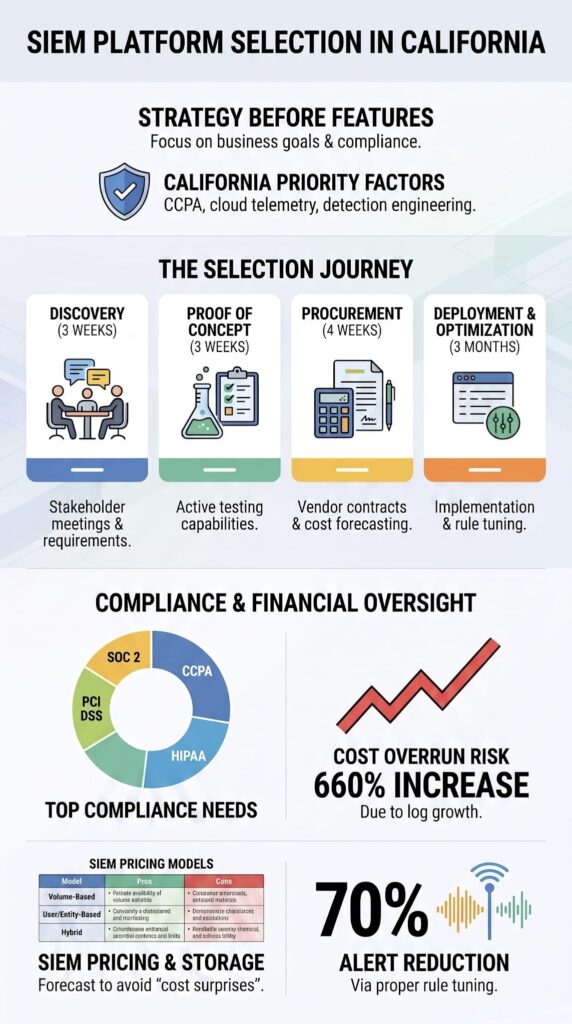
California companies deal with a mix of cybersecurity needs, privacy laws, cloud adoption, and growth pressures that most other places do not face all at once. The tech landscape here is different. Companies routinely run across hybrid setups, multiple cloud providers, SaaS tools, and remote workers spread everywhere.
That means your SIEM needs to see into endpoints, network traffic, and cloud logs all at the same time. And it also has to respect data location rules that change depending on your industry. It’s a lot.
The CCPA Changes How You Handle Security Logs
The California Consumer Privacy Act catches people off guard. We have worked with MSSPs who planned to dump all client logs into one big repository. Then they realized CCPA’s data minimization rules required more careful separation.
Personal information has to be handled specially. That affects decisions about where logs live, how long you keep them, and whether you use managed services. These details matter more than you might think.
CCPA implications for SIEM planning:
- Data segregation requirements: Client logs containing personal information cannot be co-mingled in ways that make deletion requests impossible to fulfill
- Retention limitations: CCPA’s minimization principle means you cannot keep logs longer than necessary for your stated security purposes
- Vendor management: If your MSSP processes California resident data, they are a service provider under CCPA with specific contractual obligations
- Consumer rights access: Your SIEM must support data subject access requests, which means being able to locate and extract specific personal information on demand
- Deletion workflows: You need automated processes to purge personal information from logs when consumers exercise deletion rights, which traditional SIEMs handle poorly
Cloud Adoption Shakes Up Priorities
Companies running on AWS, Azure, and Google Cloud need heavy visibility into cloud native telemetry. So cloud security monitoring and multi cloud visibility become must haves. California consistently ranks near the top for cloud adoption across all industries. We have seen this directly change what MSSPs need from their SIEM.
Cloud-First Environments Spit Out New Log Sources Constantly
Unlike old school on premises setups where your log sources stay pretty stable, cloud workloads change fast. Fast.
We have seen companies double their log volume within a year just from adding more SaaS apps or expanding their Kubernetes clusters. That makes early forecasting for log storage, real time monitoring, and data retention one of the most valuable things we do.
Why cloud-first businesses need different planning?
- Elastic log volumes: Cloud native telemetry scales with workloads, not headcount, making traditional per-user licensing models expensive and unpredictable
- Ephemeral infrastructure: Containers and serverless functions generate logs from instances that may exist for minutes, requiring different aggregation strategies
- Multi-cloud complexity: Each cloud provider has unique log formats, API rate limits, and native security tools that your SIEM must normalize
- Rapid SaaS adoption: New tools get added monthly, each with its own logging schema, authentication methods, and data residency considerations
- DevOps velocity: Infrastructure-as-code means log sources appear and disappear automatically, breaking static SIEM configurations
- Cost visibility gaps: Cloud providers bill for log ingestion and storage separately, making it easy to lose track of total SIEM-related cloud costs
Regional Planning Covers Multiple Compliance Frameworks
Regional planning usually covers CCPA compliance, HIPAA where it applies, PCI DSS reporting, SOC 2 readiness, and pulling in logs from SaaS sources. Before we look at specific products, we assess how cloud connectors, identity systems, threat intel feeds, and existing security tools fit into the bigger picture. Sometimes we find gaps that completely change the selection process.
Common compliance requirements in California SIEM deployments:
- CCPA / CPRA: Data minimization, retention limitations, consumer rights workflows, and vendor management obligations
- HIPAA: Audit log integrity, access controls, and breach notification timelines for healthcare clients
- PCI DSS: Log review requirements, cardholder data environment monitoring, and quarterly reporting
- SOC 2: Continuous monitoring evidence, change management logging, and access review documentation
- SaaS application logs: Office 365, Salesforce, GitHub, and hundreds of other tools generating security-relevant telemetry
The Forecasting Failure That Cost $864,000
Let me share a specific forecasting failure we encountered. An MSSP in San Jose projected their daily ingest would grow 12% annually based on their customer acquisition pipeline. We ran our own modeling and projected 45% annual growth because their target market was fast-growing tech startups with heavy cloud workloads.
They ignored our numbers and bought a 1TB/day license tier. Within 14 months, they were hitting 1.8TB/day on average.
Their vendor charged $15,000 per additional 100GB/month in overage fees. That oversight cost them $126,000 in unplanned expenses over 18 months, money they could have saved with proper forecasting from day one. The performance slowdowns. The retention problems. The budget blowouts.
All of it created exactly the kind of operational stress they had hoped to avoid.
How to Model Growth Scenarios Correctly?
That’s why I always tell clients to model three growth scenarios:
- Optimistic (10%): Assumes moderate customer growth, minimal new log sources, and efficient log filtering
- Realistic (25-40%): Accounts for normal business development, additional SaaS tools, and expanded cloud workloads
- Pessimistic (60%+): Reflects aggressive customer acquisition, major cloud migration projects, and new compliance requirements that mandate additional logging
The Real Cost of Getting It Wrong
Here’s why this matters in dollars. A San Francisco tech MSSP we worked with modeled only their optimistic scenario and signed a 3-year contract with a 2TB/day cap. Eighteen months in, they were at 3.1TB/day. The overage cost: $48,000 per month.
Over the remaining 18 months, that’s $864,000 in unplanned expenses, more than their entire annual security budget. If they’d modeled the pessimistic scenario upfront, they would have negotiated a 3.5TB/day tier that cost only 18% more than the base license. That 18% would have saved them $864,000.
Additional Forecasting Pitfalls to Avoid
- Flat pricing assumptions: Vendors typically increase per-GB costs 3-5% annually, which compounds over multi-year contracts
- Storage tier migration costs: Moving older logs to cold storage seems cheap until you factor in egress fees and retrieval costs for investigations
- API call limits: High-volume SIEMs can hit cloud provider API throttling, requiring architectural changes mid-contract
- Ingest normalization: Raw log volume is not the same as ingest volume after parsing, and vendors charge differently for each
- Retention requirement creep: Compliance officers often extend retention periods mid-year, silently increasing total storage needs
- Integration overhead: New connectors require additional compute resources, affecting both performance and licensing tiers
When I say “trust us on this one,” I mean it’s the cheapest insurance policy your SIEM project will ever buy.
How Do You Discover Business and Security Requirements First?
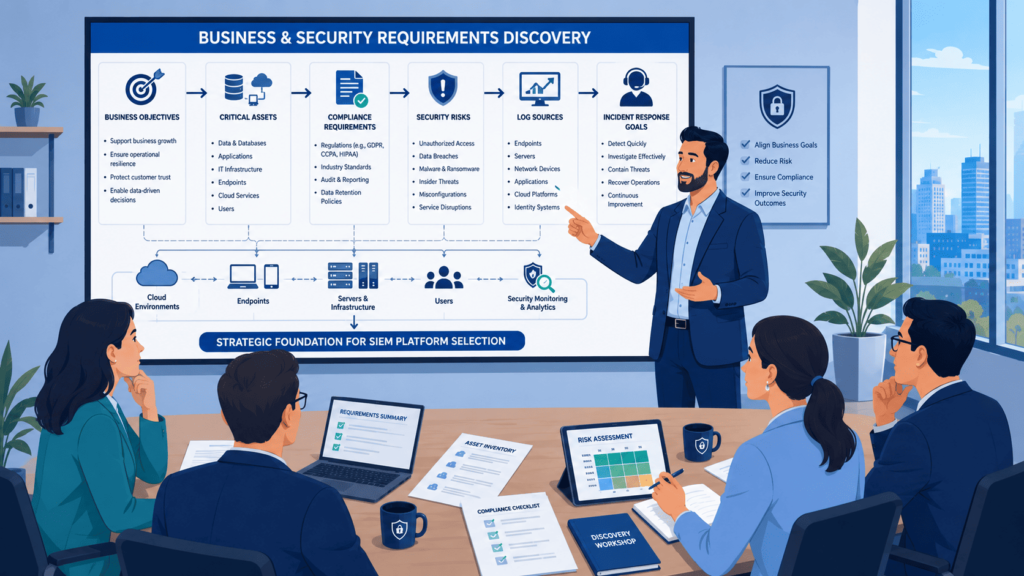
We see it all the time, MSSPs getting excited about a shiny new SIEM platform before they really understand what their own business actually needs. That’s totally backward. When we help MSSPs pick or audit a new SIEM, our very first step is always the same: we stop talking about technology and start talking about people.
Before we even look at a single product spec, we sit down with security leaders, the infrastructure crews, compliance people, and even the business owners. These conversations are where the real gold is.
We remember one MSSP who came to us thinking they needed a super expensive enterprise SIEM. After a few discovery sessions, we found out their biggest headache was actually log retention for a specific compliance rule, not advanced threat hunting. That changed everything.
The NIST Cybersecurity Framework has this great idea about lining up security activities with business risk. We’ve found that when we follow that principle during SIEM evaluation, the technical stuff naturally supports what the business actually cares about. It just makes sense.
Data from SANS Institute demonstrates
“SIEM is the most sought-after skill in hiring, with nearly double the demand of EDR” – SANS Institute
During our discovery workshops, we almost always uncover requirements that nobody wrote down anywhere. Things like “Jenny on the night shift needs alerts that don’t require a PhD to understand” or “we can’t hire two more analysts, so whatever we pick has to not bury us in false alarms.” Stuff like that matters way more than you’d think.
We always make sure stakeholders answer these big questions:
- What business assets would absolutely sink us if they got compromised?
- Which compliance rules are breathing down our necks right now?
- What security tools do we already have in place?
- Where are our staffing gaps that’ll make operations painful?
- How much log volume are we actually generating today vs. projecting for next year?
- Who owns the incident response when things go sideways at 2 AM?
- What’s our actual budget for licensing, not just the pretty marketing numbers?
What Should the Discovery Report Include?
Once we’ve gathered all that info, we don’t just keep it in our heads or email a few bullet points. We put together a proper discovery report that actually means something.
From our experience, the best discovery reports don’t just list technical observations, they tell a story about where the MSSP is today and where they need to go.
Business Context Section
- Current security maturity level (be honest here, nobody’s judging)
- Key business drivers for the SIEM project
- Executive sponsorship and governance structure
- Regulatory obligations with actual deadlines
Technical Environment Mapping
- Existing tool stack and integration points
- Data sources currently being collected (and which ones aren’t)
- Network architecture and cloud footprint
- Current logging and retention capabilities
Operational Reality Check
- Team size and skill levels (be real about this)
- Current alert volumes and false positive rates
- Shift coverage and on-call rotation details
- Training needs and knowledge gaps
Prioritized Use Cases
- Top 5-10 threat scenarios that keep you up at night
- Compliance-driven monitoring requirements
- Insider threat detection needs
- Operational monitoring for business continuity
Risk and Gap Analysis
- Current security gaps that need fixing
- Business risk rankings for different asset groups
- Visibility blind spots in your current setup
- Capability mismatches between current tools and actual needs
Measurable Success Metrics
- Mean time to detect (MTTD) targets
- Mean time to respond (MTTR) goals
- Alert triage efficiency improvements
- Compliance audit success criteria
- Analyst satisfaction and burnout reduction
Clear Recommendations
- High-level SIEM advisory services needed
- Phased implementation approach
- Staff augmentation requirements
- Training and skill development priorities
We always include prioritized use cases (like which threats matter most), current security gaps that need fixing, measurable success metrics so we know if we’re winning, business risk rankings, and clear recommendations for SIEM advisory services.
We learned a hard lesson years ago with a financial services MSSP. They wanted to rush straight to vendor demos. We convinced them to slow down and spend two extra weeks on discovery. That time saved them from buying a platform that couldn’t handle their specific cloud environment.
They later told us that was the best decision they made in the whole project. Honestly, we’ve never had an MSSP regret spending more time defining their business objectives. But we’ve definitely seen plenty regret skipping that phase entirely.
How Should You Compare SIEM Vendors Objectively?
Here is the broken-down, operationally focused vendor comparison framework based on your real-world evaluation strategy.
The Operational Reality of SIEM Evaluation
Marketing sheets love to showcase Ferrari-level features, but as you highlighted, the “mechanic’s fee” (operational overhead) is what breaks a Security Operations Center (SOC). A weighted scoring system rooted in discovery phase realities ensures you don’t buy a platform that consumes your team’s entire bandwidth just for baseline maintenance.
Weighted Vendor Comparison Matrix
| Category | What to Evaluate |
| Licensing | GB/day costs, EPS pricing, node-based fees |
| Detection | UEBA capabilities, correlation rules, AI features |
| Integrations | EDR connections, IAM, cloud connectors |
| Compliance | Reporting templates, audit readiness |
| Operations | Ease of tuning, maintenance, and analyst workflows |
Core Pillars of the Discovery Phase
1. Modeling Operational Overhead
Before committing to any platform, such as evaluating the LogRhythm MSSP Features, Pros, and Cons against its competitors, you must calculate the true cost of ownership beyond the software license.
- Rule Engineering Burden: Calculate the dedicated headcount needed to write, test, and tune correlation rules.
- Log Parsing Complexity: Quantify the weekly hours required to build and maintain custom parsers for non-standard data sources.
- Analyst Fatigue Factors: Evaluate the workflow efficiency, how many clicks does it take an analyst to pivot from an alert to root-cause data?
- The 25% Rule: If platform maintenance requires more than a fraction of your team’s total capacity, the tool is hunting your resources rather than threats.
2. Deployment Architecture Alignment
The choice between SaaS and on-premises must be dictated by your current operational maturity and infrastructure constraints, not industry trends.
- Security & Compliance Bounds: Determine where data must legally reside and who can have administrative access to it.
- Existing Infrastructure Leverage: Assess whether you have the hardware/virtual stack to support heavy on-prem logging, or if cloud-native is required.
- Staffing & Expertise Capacity: Be honest about whether your team has the bandwidth to manage underlying OS, database, and hardware updates.
- Scalability & Budget Realities: Factor in the long-term storage costs of expansion, especially when dealing with high-volume cloud and EDR telemetry.
Why Is a Proof of Concept More Important Than Product Demos?
Product demos are fine for getting a first impression. But honestly? They’re like watching a cooking show and thinking you can run a restaurant. The real test comes when you actually start cooking with your own ingredients, and in our world, that means running the SIEM against your own production data. This validation process often separates the best SIEM platforms from those that only perform well in demonstrations.
We’ve seen demos that looked flawless completely fall apart when real log volumes hit the system. Search latency went through the roof, parsers broke on weird log formats, and integrations that worked perfectly in the demo environment turned into a total mess. That’s why we always push for a proper proof of concept.
The Real-World Timeline
Industry deployment benchmarks show that most mid-market organizations move from evaluation to initial production in about 6 to 12 weeks, with continuous detection tuning required for months after. That timeline matches what we see in our engagements.
Why is the PoC Phase Non-Negotiable?
The PoC phase is your chance to validate threat detection, monitoring, and actual operational workflows before you sign on the dotted line.
When we run a PoC for an MSSP, we don’t just test features in isolation. We simulate real analyst workflows, the kind of stuff your team will do every single day. We measure detection accuracy, false-positive rates (this is huge), search performance, integration quality, and most importantly, how efficient your analysts can actually be using the platform.
What We Test in Every PoC?
- Detection accuracy: Does the platform actually catch what it claims to catch?
- False-positive rates: This is huge. High noise = analyst burnout.
- Search performance: Not 2-second demo speed. Real-world speed at scale.
- Integration quality: Does it play nice with your actual stack?
- Analyst efficiency: Can your team actually use it without a PhD?
Critical Log Sources You Must Include
Here’s a key thing we learned: make sure you include all your important log sources in the PoC. Not just a few easy ones.
We always recommend testing with firewalls, endpoint data, cloud platforms, identity providers, business applications, network devices, and authentication systems. When you throw all that at the platform, you get real confidence in event correlation, anomaly detection, phishing detection, insider threat detection, and vulnerability management capabilities.
Must-Have Log Sources for a Realistic PoC
- Firewalls (ingress/egress traffic)
- Endpoint data (EDR, system logs)
- AWS CloudTrail and Azure AD
- Office 365 / business applications
- Network devices (routers, switches, proxies)
- Authentication systems (SSO, MFA, LDAP)
A Cautionary Tale: The San Diego MSSP
I’ll never forget a San Diego MSSP that wanted to skip the PoC entirely. They’d already negotiated a 20% discount if they signed within 48 hours. I told them: *”That discount will look cheap compared to what you’ll lose if this doesn’t work.”*
We forced a four-week PoC with just their top 10 log sources: firewalls, endpoints, AWS CloudTrail, Azure AD, and Office 365. Good thing we did. The vendor they were leaning toward couldn’t process their AWS CloudTrail logs at peak hours.
Search queries that took 2 seconds in the demo took 47 seconds in production. They pivoted to a different vendor and saved themselves from a six-month post-deployment disaster. The “discount” they would have gotten? It would have cost them $180,000 in remediation and downtime.
They still talk about that PoC as the best decision they made that year. Good thing they did, the platform they were leaning toward couldn’t handle their cloud workload at scale.
They ended up going with a different vendor and avoided a massive headache. That’s the kind of thing that makes us glad we push hard on the PoC phase.
Successful SIEM projects begin with business objectives, operational priorities, and measurable security outcomes before technology selection.
How Can You Prevent SIEM Licensing Cost Surprises?
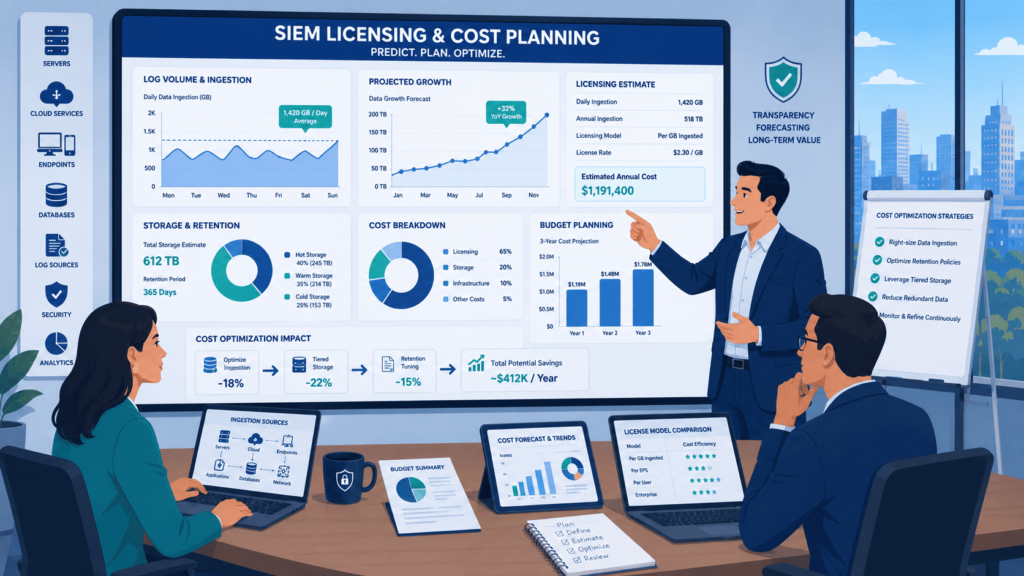
We’ve sat in too many budget meetings where a client’s face goes pale after seeing their first renewal quote. It’s not fun. Most of the time, the shock comes from stuff they didn’t think about upfront, like how fast their logs grow, how long they’re forced to keep data, or all that new cloud noise they started ingesting.
From our experience, getting a handle on daily log volume before you sign anything is the single biggest money-saver. We always tell our MSSP partners: guess low, and you’ll pay high later.
One client of ours figured their daily ingest would grow about 10% year-over-year. It actually jumped 40% after they rolled out a new cloud app. That mistake cost them an extra six figures over three years.
Long-term planning isn’t just about today’s needs. You’ve got to look ahead at compliance stuff too. Extended retention for audits, automated compliance reports, and SIEM rules that check for regulatory gaps can eat up storage way faster than anyone expects.
Here’s what usually catches people off guard:
- Logs multiplying like rabbits as you add new servers or apps
- Legal or compliance teams suddenly asking for 12 months of retention instead of 6
- The same log getting sent twice from different sources (happens more than you’d think)
- Turning on “premium” threat detection features that charge extra per query
Our advice? Don’t just take the first pricing sheet they hand you. Push for options.
Which pricing models should you compare?
When we help MSSPs run product audits, we always line these up side-by-side:
- Per GB/day: simple, but painful if you have a spike
- Events Per Second (EPS): good for steady environments, bad for bursty traffic
- Per-node licensing: counts servers or workstations, can be cheaper if you have few endpoints but tons of logs
- Unlimited ingestion tiers: sounds great, but watch for hidden caps on features
Honestly, don’t just look at year one. We always push our clients to map out a 3-to-5 year total cost. That first-year subscription might look sweet, but if you’re locked into a model that doesn’t scale, you’ll feel it later.
What Makes Detection Engineering a Long-Term Success Factor?
What Makes Detection Engineering a Long-Term Success Factor? Let’s be real, buying a SIEM is the easy part. Making it actually useful without drowning your analysts in junk alerts? That’s the hard part.
We’ve walked into SOCs where the console is lighting up like a pinball machine, and nobody knows where to start. Analysts get numb to it. They start ignoring alerts, and that’s when real threats slip through.
After years of doing this, we’ve seen that the teams who succeed aren’t the ones writing a thousand new rules. They’re the ones who slow down and tune what they already have. One MSSP we worked with cut their daily alert volume by 70% just by tweaking their existing correlation rules and turning off the noise. Their analysts actually had time to hunt again.
According to the SANS Institute, staffing shortages are still one of the biggest headaches for SOC teams. So why make it worse with bad alerts?
Why Most SOCs Redline: The Common Pitfalls?
During our audits, we consistently spot the same critical issues holding teams back:
- The “Copy-Paste” Trap: Rules that were pulled straight from a blog post or GitHub repo and never adjusted for the local environment.
- Overly Broad Logic: Alert logic that casts too wide a net, like flagging every single failed login across an enterprise.
- The Fatigue Factory: Endless false positives that waste hours of analyst time every shift, draining morale and focus.
Our rule of thumb: don’t try to boil the ocean. Focus on the attacks that actually hurt.
Which Use Cases Should Launch First?
We always recommend starting narrow. Based on what we’ve seen work across dozens of MSSPs, begin with the foundational threats:
1. Credential Abuse
- The Threat: Attackers attempting brute-force entries or leveraging stolen passwords.
- The Goal: Focus on anomalous successful logins after a string of failures rather than every single bad password attempt.
2. Privilege Escalation
- The Threat: A standard user account suddenly gaining admin rights or high-level permissions they shouldn’t have.
- The Goal: Monitor changes to sensitive groups and critical access control lists.
3. Ransomware Detection
- The Threat: The high-impact nightmare scenario that keeps clients up at night.
- The Goal: Look for early indicators like mass file modifications, shadow copy deletions, or known malicious extensions.
4. Cloud Identity Attacks
- The Threat: Compromises targeting cloud infrastructure, because everyone’s in the cloud now.
- The Goal: Catch impossible travel alerts, suspicious MFA resets, and unauthorized API calls.
The Bottom Line
Starting small lets your team actually get good at investigating these core scenarios before layering on more complexity. Over time, as your threat hunting and incident response mature, you can expand.
But if you throw every use case at the wall on day one, you’ll just burn out your best people. We’ve seen that movie before, and it doesn’t end well. Proper detection engineering isn’t a race to see who can deploy the most rules; it’s a long-term commitment to quality, relevance, and operational sanity.
How Do You Estimate Infrastructure, Storage, and Retention?
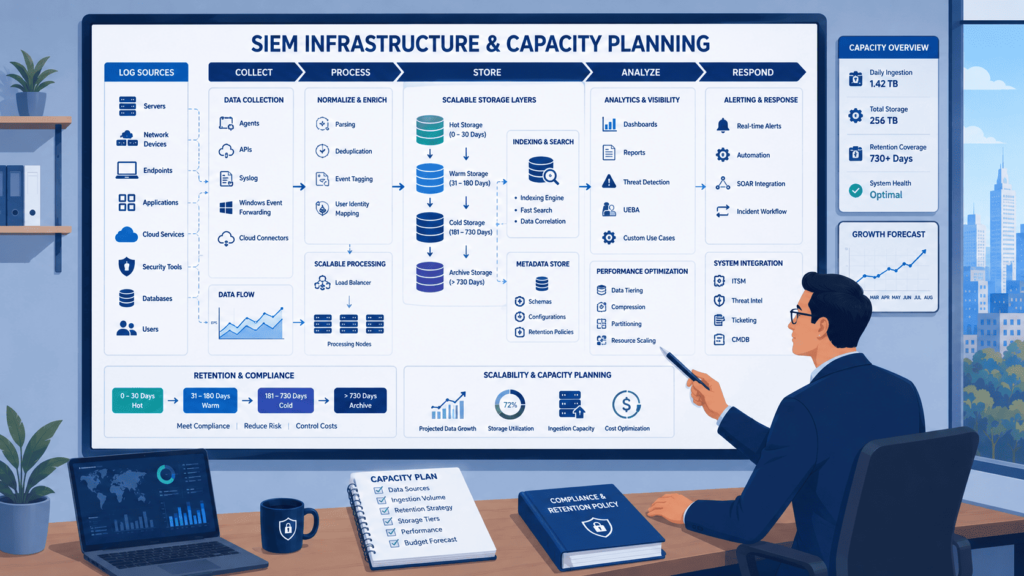
Skip the capacity planning, and you’re essentially writing a blank check to your cloud provider or hardware vendor, and signing up for a massive headache down the road. Fixing a bottlenecked or budget-crushing SIEM after deployment is vastly more expensive than just doing the math upfront.
To estimate infrastructure, storage, and retention without getting burned, you have to break the problem down into manageable, real-world variables.
1. Calculating Ingest and Peak Traffic
You can’t build a system based on “average” traffic. If you do, the system will choke the moment a major incident hits or monthly batch jobs trigger.
- EPS (Events Per Second): Track your average EPS, but architect for Peak EPS (often $2\times$ to $5\times$ the average) to handle DDoS attacks, boot storms, or network anomalies.
- Daily Ingest Volume: Calculate this in Gigabytes or Terabytes per day (GB/day).
- $$\text{Daily Volume (GB)} = \frac{\text{Average EPS} \times \text{Average Event Size (Bytes)} \times 86,400\text{ seconds}}{1,073,741,824\text{ Bytes/GB}}$$
- Data Redundancy: Factor in high availability (HA). If you require an active-active setup across two data centers, your compute and immediate ingestion footprint effectively doubles.
2. Architecting Storage and Retention Tiers
Storage is usually the heaviest line item on a SIEM bill. The secret to surviving the cost is aggressive tiering based on your data’s age and utility.
Storage Lifecycle Strategy
- Hot Tier (0-90 Days): Fast, expensive storage (like NVMe or high-IOPS cloud volumes). This is where your analysts run daily queries and where correlation rules trigger.
- Warm Tier (91-180 Days): Slightly slower, indexed storage. Great for hunting threats that occurred a few months ago without paying top-tier storage prices.
- Cold/Archive Tier (181-365+ Days): Cheap object storage (like AWS S3 or Azure Blob). Data is compressed and unindexed. You keep it strictly for compliance, accepting that searching it will take hours, not seconds.
3. The Hybrid Architecture Factor
Mixing on-prem data centers with multiple cloud environments complicates the math. You are no longer managing a single data pipeline; you are managing a web of competing priorities.
Hybrid Design Considerations
- Bandwidth and Egress Costs: Shipping raw logs from an on-prem warehouse to a cloud SIEM can choke business-critical apps. Use local collectors to compress and filter data before it leaves the building. Watch out for cloud egress fees when moving data across regions.
- Data Sovereignty and Compliance: If you operate globally (e.g., US and Europe), regional privacy laws like GDPR might prohibit you from centralizing all logs into a single bucket. You may need localized storage nodes.
- Search Performance Over Distance: Running a query in a cloud SIEM that has to reach back into an on-prem legacy database creates immense latency. Ensure your hot data is co-located with your primary analytical engine.
- Disaster Recovery (DR): Map out traffic flows to identify single points of failure. If a pipe to AWS drops, do your local collectors have enough disk space to buffer logs for 24 hours without dropping packets?
How close are your current daily log volumes to the threshold where your existing storage or hardware architecture starts to hit its performance limit?
How Should You Evaluate a California SIEM Consultant?
Credits: LogRhythm SIEM
Evaluating a California SIEM consultant shouldn’t be about finding someone who knows the most product trivia. The best consultant is one who knows how to actually run a security program, rather than just selling you a brand. Every project should start with your goals, not a demo of a specific tool, and keeping a vendor-neutral stance is a game-changer.
Many projects taken over from other consultants fail because they were just pushing a specific product to get a kickback, leaving clients with systems that don’t fit their workflow. A proper evaluation focuses on what makes sense operationally for your SOC team, not what makes a vendor the most money.
Here is a breakdown of how you should evaluate a consultant to ensure they provide a system that works for the long haul.
Core Expertise Required
A good consultant needs to bring a solid, well-rounded mix of skills to the table:
- SIEM Engineering: Knowing how to actually build and configure the platform.
- Detection Engineering: Knowing how to make the system find the bad guys.
- California Compliance Knowledge: Understanding region-specific regulations like the CCPA.
- Procurement Experience: Helping you negotiate contracts without getting ripped off.
- Security Architecture: Seeing the big picture of your entire infrastructure.
- SOC Consulting: Understanding how security analysts actually work day-to-day.
Hard Questions You Should Ask
Before signing any check, you need to grill potential consultants with these specific questions:
Operational and Product Testing
- Have you done a proof-of-concept (PoC) for a company our size with our exact data problems?
- Are you going to push one vendor on us, or will you look at a few options honestly?
Proven Value and Total Cost
- Can you show me proof that your last project actually made things better, like faster response times or fewer false alarms?
- How are you calculating the real cost over five years, including hidden stuff like extra storage and extra people to manage it?
Ultimately, consultants who can clearly explain their step-by-step process, what deliverables you get, and how they’ll optimize the system after go-live are far more valuable than those who just talk about how great a specific dashboard looks. Look for someone who will stick around to make sure the system works, not just someone there to cut the ribbon.
How Does a Typical SIEM Selection Engagement Work?
Most projects follow a distinct, proven rhythm, even though every MSSP brings its own quirks to the table. Skipping steps in this process usually comes back to bite you later. A typical, structured timeline generally breaks down into four core phases:
| Phase | Typical Timeline |
| Discovery | Weeks 1-3 |
| Proof of Concept | Weeks 4-6 |
| Procurement | Weeks 7-10 |
| Deployment & Optimization | Months 3-6 |
Breaking Down the Phases
Discovery (Weeks 1-3)
Discovery is where the real heavy lifting begins. If you don’t figure out what’s actually broken before you start kicking tires on new tools, you’re just guessing. Once a clear handle on the current setup is established, the foundation for the entire project is set.
Proof of Concept (Weeks 4-6)
The PoC stage lets you see if the vendor’s promises hold up in your real environment, rather than just relying on their polished demo slides.
Procurement (Weeks 7-10)
Procurement is traditionally the slowest part of the cycle, but active management helps push it along to prevent unnecessary project stagnation.
Deployment & Optimization (Months 3-6)
This is where the magic happens, but it’s also the phase where most teams heavily underestimate the actual workload.
Essential Project Deliverables
Every successful engagement should ensure clients walk away with a specific set of highly practical deliverables.
Core Documentation & Strategy
- Requirements Analysis: A clear assessment that actually matches your daily operational headaches, rather than a generic checklist.
- Vendor Comparison Matrix: A side-by-side layout detailing who is good at what, allowing for an objective decision.
- Architecture Blueprint: A technical visual showing exactly where everything plugs in and how systems talk to each other.
Operational & Financial Planning
- Implementation Roadmap: A realistic timeline with milestones that have been proven to work in real-world scenarios.
- SOC Runbooks: Practical guides that security analysts won’t hate using at 3 AM during a critical incident.
- Multi-Year TCO Estimate: A comprehensive three-to-five-year total cost of ownership estimate that exposes hidden costs before they hit your budget.
Real-World Impact: A cloud security provider recently went from zero to over 120 correlation rules in just two months. That wasn’t luck, it was the direct result of having a solid, structured plan from day one.
Adapting to Your Environment
Not every security shop is built the same way. The roadmap must bend to fit your specific world without letting things get sloppy or off-track.
Common Operational Realities
- Strict Compliance Audits: Handling regulatory pressures that naturally slow down the traditional timeline.
- Cloud Telemetry Overload: Sorting the signal from the noise when drowning in massive amounts of cloud data.
- Fully Managed Operations: Stepping in to run the entire managed SIEM operation so your internal team can focus on other fires.
Flexibility isn’t about changing the rules, it’s about making the rules work for your unique environment.
FAQ
What does a SIEM consultant evaluate before recommending a platform?
A siem consultant evaluates business goals, compliance requirements, existing infrastructure, and security priorities before recommending any solution. The process includes a siem assessment, platform evaluation, security architecture consulting, and vendor selection. The consultant also reviews security information and event management requirements, data sources, scalability, and operational workflows to recommend a platform that supports both current needs and future growth.
How can SIEM implementation reduce false alerts over time?
A successful siem implementation reduces unnecessary alerts by improving detection quality instead of simply collecting more data. The process includes siem integration, well-designed siem correlation rules, alert tuning, false positive reduction, and threat intelligence integration. These improvements strengthen siem threat detection, produce more accurate siem alerts, and help security teams maintain efficient security operations.
Is cloud SIEM better than on-premises for hybrid environments?
A cloud siem can be a good choice for organizations operating in a hybrid environment or managing multi-cloud security because it offers flexible scaling and supports real-time monitoring. However, an enterprise siem may be a better fit for organizations with strict data retention, regulatory compliance, or advanced security visibility requirements. The best option depends on technical, operational, and compliance needs.
When should organizations consider SIEM migration instead of upgrading?
Organizations should consider siem migration when their existing platform cannot support business growth or modern security requirements. Common reasons include limited log aggregation, weak event correlation, insufficient siem analytics, or rising operating costs. A migration can also improve siem deployment, siem monitoring, incident investigation, forensic analysis, and the organization’s overall security posture.
Why is SIEM advisory valuable before choosing a security platform?
Siem advisory helps organizations make informed decisions before investing in a new platform. The process includes siem evaluation, siem comparison, security tool selection, and the review of relevant siem use cases based on business objectives. It also supports soc consulting, security operations center planning, and broader cyber security consulting, reducing implementation risks and improving long-term operational outcomes.
Build a Stronger SIEM Strategy for Long Term Success
A SIEM project can quickly become expensive and hard to manage if the wrong platform is selected or the deployment isn’t planned around your business needs. That’s why it’s worth taking the time to evaluate real requirements, test platforms in real environments, and keep improving after deployment. That’s what delivers lasting results.
If you’re looking for a practical way to simplify SIEM planning, MSSP Security can help with vendor neutral guidance that fits your California environment. Don’t leave long term security to guesswork, start with a strategy built around your goals.
References
- https://www.cxoinsightme.com/future/tech/sans-2025-soc-survey-exposes-critical-gaps-and-what-top-teams-are-doing-right/
- https://www.infosecurity-magazine.com/news/staffing-top-soc-challenge-ai/