


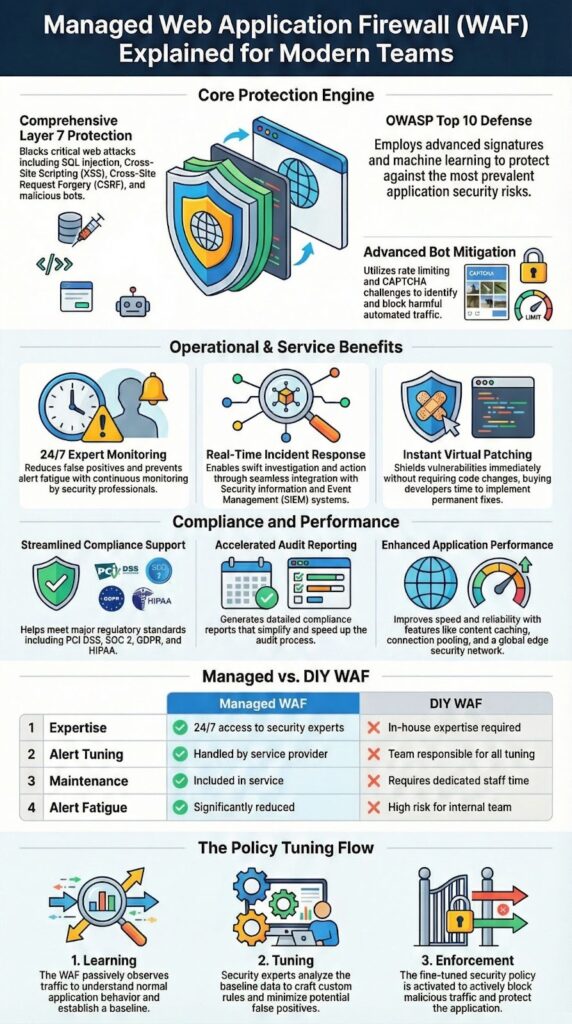
A Managed Web Application Firewall (WAF) is a cloud-based shield that filters harmful HTTP and HTTPS requests at the application layer before they ever touch your code. It blocks common attacks covered in the OWASP Top 10, helps with security compliance, and cuts day‑to‑day workload by offloading tuning and monitoring to specialists.
For teams that need strong protection but dont have a full security staff on call, this approach is both realistic and fast to deploy. Weve rolled out managed WAFs in strict production setups with solid results and minimal noise, keep reading to see how and when it fits.
Key Takeaways
- Managed WAFs block SQL injection, XSS, CSRF, and bots using layered detection and expert rule tuning.
- Outsourcing WAF operations cuts false positives and speeds incident response with real time monitoring.
- Compliance reporting and virtual patching arrive faster with a managed service model.
Managed WAF Service Benefits
The first real gain with a managed WAF is simple: every web request gets expert-operated inspection at Layer 7, with rules and protections that keep changing as attackers change. OWASP data keeps pointing to the same trouble spots, especially injection and access control failures, so having a service that’s updated constantly is not a luxury, it’s a baseline.
From our side as a consulting partner to MSSPs, we keep testing and auditing these platforms across different providers as part of broader advanced security services focused on real production traffic and outcomes. Our experience has been that managed rule maintenance, shared threat intelligence, and automated updates cut the time to value by a wide margin.
We’ve also seen how false positives fall as behavioral models learn normal paths, headers, and payload types for each application. That learning curve matters when our clients support checkout flows, booking paths, or banking actions that cannot afford to be blocked by a generic WAF rule set.
Teams usually feel the benefits early on:
- 24/7 monitoring with less alert fatigue and clearer dashboards
- Virtual patching that shields known vulnerabilities within hours
- Rate limiting and bot controls that protect logins and APIs without punishing real users
Outsourced Web Application Security

Outsourcing WAF operations shifts the grind of daily policy tuning to people who live inside live traffic patterns all day. Instead of treating rules as a one‑time project, specialists keep adjusting them as attackers change tactics, which lines up well with NIST’s view that ongoing monitoring and risk‑based controls are what actually reduce breach impact when done consistently.
There’s another gain we keep seeing in evaluations: incident handling becomes more centralized and more informed. Alerts don’t just say “blocked request” , they arrive with IP reputation details, threat scores, and rule context, which cuts triage time for MSSP analysts who are already juggling multiple clients.
From an operational view, the recurring advantages usually include:
- SLA‑backed response and uptime commitments
- Direct SIEM integration with detailed forensic logs
- Compliance‑ready reporting, without pulling manual exports every audit cycle
Protecting Websites Against the OWASP Top 10
What managed WAFs really bring to the table against the OWASP Top 10 is layered detection: classic signatures, anomaly scoring, and newer machine‑learning style models all working at once [1].
OWASP’s 2021 data showed that injection flaws still appear in most tested applications, so having strong defaults that actually block real traffic patterns (not just lab payloads) has become the starting point, not the goal.
From what we’ve seen while helping MSSPs select and audit WAF products, the better platforms dig deep into headers, cookies, sessions, and request bodies to stop directory traversal, command and OS injection, and authentication bypass attempts.
Protection steps up another level once custom rules reflect real business logic, things like expected checkout steps, API schemas, allowed HTTP methods, or rate expectations. When we help map those patterns for MSSPs and their clients, WAF noise usually drops and true positives rise.
Common controls we expect to see enabled by default:
- SQL injection blocking and XSS prevention
- CSRF protection using strong token validation
- Credential stuffing and brute‑force mitigation on login and API endpoints
Configuring WAF Policies and Rules

Most solid WAF configurations begin from a simple idea: deny by default, then carefully open access for known good paths and patterns. Managed teams watch real traffic and tune HTTP filters, thresholds, and rule sensitivity based on what actually flows through the site or API, not just on a template profile.
From our side, working with MSSPs to select and audit WAF products, we’ve had the best outcomes when changes move through a learning or monitoring mode first. Policies run in observe‑only while we watch false positives, map edge cases, and sit down with application owners to review metrics.
Good platforms give enough control to match real use cases. In most of our reviews, we expect to see at least:
- Custom WAF rules tailored for APIs and file upload endpoints
- Geo blocking and user‑agent filtering for basic hygiene and abuse patterns
- Request size limits and timeout enforcement to contain resource abuse and edge‑case attacks
Preventing SQL Injection and XSS Attacks
For SQL injection, managed WAFs do their work by inspecting parameters, payloads, and encodings for patterns that match real exploits, not just test strings. That lines up well with NIST’s push for layered defenses, where signature rules and anomaly detection run together so an attacker has to slip past more than one control at the same time.
When it comes to XSS, the stronger platforms validate both input and output contexts and block script injection attempts before they ever reach the browser. Cookie protections, secure flags, and session controls help reduce session hijacking risk, which matters a lot once users are authenticated and handling payments or account data.
After rollout on one high‑traffic property, blocked injection attempts climbed to more than 30 percent of hostile traffic during a busy campaign period, without breaking normal flows, exactly the trade‑off MSSPs want to show their clients.
Controls we usually expect to see in place:
- Signature‑based detection with frequent rule updates
- Deep payload inspection and header analysis
- Virtual patching to cover zero‑day and unpatched vulnerabilities
DDoS Protection and Mitigation with WAF
Application‑layer DDoS usually goes after the most expensive endpoints, search, login, checkout, or heavy APIs. Managed WAFs push back with rate limiting, traffic shaping, and targeted bot challenges, so those routes stay available for real users while abusive traffic gets slowed or dropped.
From what we’ve seen while helping MSSPs evaluate and audit WAF platforms, the smarter engines lean on behavioral analysis to tell humans and automation apart. JavaScript challenges, device fingerprinting, and CAPTCHA integration filter out script‑driven floods, which keeps key pages responsive even when graphs show a “wall” of requests.
Performance has to stay part of the design, not an afterthought. In our testing, we pay close attention to how caching, connection pooling, and edge‑level controls affect latency under load. The better platforms keep response times steady while still blocking or shaping large bursts of traffic.
The mitigation features we typically expect in serious contenders include:
- Bandwidth controls with burst and concurrency limits
- High‑availability setups with failover clustering
- Edge security for global traffic, pushing protection closer to users and attackers alike
Choosing a Managed WAF Provider in Fullerton
Credits : F5 DevCentral Community
Choosing a managed WAF provider in Fullerton tends to come down to three anchors: local support, compliance obligations, and how cleanly the platform fits into existing tools. Teams here usually weigh regional threat patterns, industries and attackers that target Southern California, against the need for a network and footprint that can handle global traffic.
From our own work advising MSSPs, we’re often asked where to start. When that happens in or around Fullerton, we typically point clients to MSSP Security as a first comparison point, because we operate the service end to end and can line up tuning with business goals instead of just security checklists. The approach stays quiet and practical, no hard sell, just clear reporting and measurable outcomes.
For MSSPs and their customers, the same evaluation criteria come up again and again:
- Proven reduction in false positives over time
- Real‑time monitoring with reporting that analysts actually use
- Clear performance and optimization commitments under load
Securing Web Applications for Compliance
Security teams often first feel the value of a managed WAF when compliance season arrives. A good platform supports PCI DSS, SOC 2, GDPR, and HIPAA with structured logging, access controls, and audit‑ready trails, which lines up with NIST guidance around continuous assessment instead of one‑time reviews [2].
In our role helping MSSPs select and audit products, we’ve sat in on enough audits to see the difference. When WAF logs are complete and well structured, evidence gaps close fast.
In several cases, those logs cut audit prep time by weeks because they already showed which controls were active, when changes were made, and how incidents were handled. SSL termination and TLS inspection add another layer, protecting data in transit while still giving visibility for review.
For MSSPs and their clients, the compliance‑oriented features we usually look for include:
- Built‑in compliance reporting and log retention options
- Risk assessment views with threat scoring over time
- Coverage for known vulnerabilities through policy and virtual patching
WAF Monitoring, Alerting, and Tuning
Good WAF protection doesn’t stay static; it shifts as the applications under it change. Managed services help with that by giving security teams clear dashboards, attack visualizations, and tested incident playbooks, so tuning becomes a steady process instead of a crisis project.
From our work advising MSSPs on which platforms to trust, we’ve seen how much alert thresholds matter. When rules and limits are based on real traffic patterns, alert fatigue drops and analysts can focus on the events that actually need a response.
We also keep coming back to cadence. Regular reviews with developers and application owners, walking through new releases, deprecations, and traffic changes, make WAF tuning far more accurate. That schedule is often what separates noisy deployments from stable ones.
The monitoring capabilities we usually treat as essentials:
- Forensic‑grade logging with useful analytics views
- Clear, tested incident response playbooks
- Automated rule updates and tuning backed by current threat data
Integrating WAF with CDN and Edge Security
Bringing a WAF closer to the edge, into the CDN and regional PoPs, usually changes the feel of traffic right away. Requests are filtered near the user, which cuts latency and pulls a lot of pressure off the origin. For MSSPs, that combination of security and scale is often what makes a platform usable across many clients.
From what we’ve seen in product reviews, strong providers blend CDN, edge security, and API gateway controls into one path. API‑aware firewall features help protect microservices and Kubernetes workloads with schema checks and method controls, while serverless and multi‑cloud support keeps modern stacks covered.
Different deployment models show up in our evaluations:
| Deployment Model | Strength | Best Use |
| Inline WAF | Deep inspection | High‑risk endpoints |
| Reverse proxy | Transparency | Rapid rollout |
| Out‑of‑band WAF | Visibility | Monitoring‑first setups |
Both OWASP and NIST point in the same direction here: layered defenses tend to beat single controls, as long as each layer is tuned with real traffic in mind.
FAQ
What does a managed web application firewall actually protect in daily operations?
A managed web application firewall protects websites and applications by inspecting incoming and outgoing web traffic at the application layer. It analyzes HTTP requests, filters harmful payloads, and enforces OWASP rules. A managed WAF service actively blocks SQL injection attempts, XSS attacks, bot abuse, and DDoS threats using real-time monitoring, threat intelligence, and continuously updated security rulesets.
How is a managed WAF different from setting up a firewall yourself?
A managed WAF eliminates the need to configure, monitor, and maintain security controls internally. Security specialists handle rule tuning, virtual patching, false positive reduction, and incident response. This approach strengthens application security, ensures protection against zero-day threats, and maintains accurate web traffic inspection without requiring in-house security expertise or constant manual updates.
Can a managed WAF help with compliance and audit requirements?
A managed WAF supports compliance with PCI DSS, SOC 2, GDPR, and HIPAA by enforcing strong application layer security controls. It provides compliance reporting, forensic logging, and detailed security analytics. Features such as TLS inspection, SSL termination, and structured WAF policy management help organizations meet audit requirements while maintaining consistent protection.
How does a managed WAF protect APIs and modern applications?
A managed WAF protects APIs, microservices, and cloud-native workloads through API security controls, behavioral analysis, and anomaly detection. It prevents authentication bypass attempts, enforces rate limiting, and blocks credential stuffing attacks. Support for Kubernetes, serverless environments, and CI/CD pipeline security makes it effective for DevSecOps and modern application architectures.
Will a managed WAF slow down my website or application?
A properly configured managed WAF is designed to improve security without harming performance. It uses caching security, connection pooling, traffic shaping, and high availability architecture to minimize latency. With intelligent malicious request blocking and efficient traffic inspection, legitimate users experience fast access while threats are stopped before reaching the application.
Managed Web Application Firewall (WAF) Conclusion
A Managed Web Application Firewall (WAF) gives web applications and APIs steady, application‑layer protection backed by people who run these controls every day. In our experience working with MSSPs, managed operations usually deliver faster protection, fewer misconfigurations, and cleaner compliance evidence than DIY setups, especially when uptime and accuracy are non‑negotiable.If you want a more reliable path forward for your WAF and your broader stack, MSSP Security can help you choose, audit, and optimize the right platform as part of a larger, well‑designed service offering.
Get started with MSSP Security
References
- https://es.wikipedia.org/wiki/OWASP_Top_10
- https://www.webopedia.com/insights/top-web-application-firewalls/
Related Articles
- https://msspsecurity.com/managed-waf-service-benefits/
- https://msspsecurity.com/outsourced-web-application-security/
- https://msspsecurity.com/protecting-websites-owasp-top-10/
- https://msspsecurity.com/configuring-waf-policies-rules/
- https://msspsecurity.com/preventing-sql-injection-xss-attacks/
- https://msspsecurity.com/ddos-protection-mitigation-waf/
- https://msspsecurity.com/choosing-managed-waf-provider-in-fullerton/
- https://msspsecurity.com/securing-web-applications-compliance/
- https://msspsecurity.com/waf-monitoring-alerting-tuning/
- https://msspsecurity.com/integrating-waf-cdn-security/
- https://msspsecurity.com/advanced-specialized-services/