


You can absolutely customize your SOAR automation workflows, and you probably should. Out-of-the-box playbooks are like a suit bought off the rack. It might fit okay, but it won’t feel like yours. The real power comes from tailoring those workflows to your specific tools, your team’s processes, and the unique threats your organization faces.
We’ve seen it time and again, a generic phishing playbook might miss a critical step in your email security setup, while a custom-built one acts like a precision instrument. This process isn’t about writing complex code, it’s about thoughtful design.
It starts with understanding what you have and what you need to protect. The rest is a matter of mapping and building. Keep reading to learn how to shape your SOAR into a true extension of your security team.
Key Takeaways
- Start by mapping your tools and their commands to key data artifacts.
- Build playbook stages around a logical incident response flow.
- Implement conditional logic to make your automations intelligent.
The First Step is the Whiteboard, Not the Software
The biggest hurdle teams face isn’t the technical act of customization, it’s knowing where to begin. The sheer number of integration connectors and potential playbook task sequences can be paralyzing. You look at a blank playbook builder interface and wonder how to fill it.
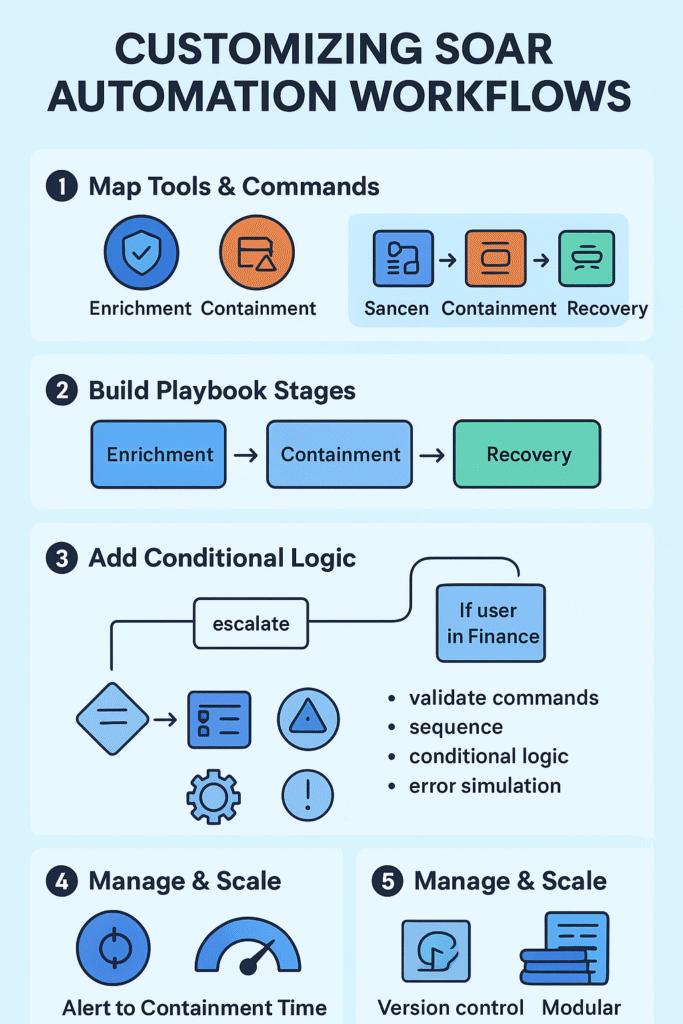
We find the most effective method is to ignore the blank canvas at first. Start with a spreadsheet or a whiteboard. List every security tool you have connected to your SOAR platform. Next to each tool, write down the specific actions, the integration commands, it can perform. For an endpoint tool, that might be isolate_device or initiate_scan. For your firewall, it could be block_ip_address. This inventory becomes your palette of colors.
This approach forms the foundation for a truly custom workflow where security orchestration automation and response emerges organically from the tools you already use and the actions they can take. You can’t paint a picture until you know what colors you have to work with.
Once you have your commands, the next step is organization. Group them into functional categories. Which commands are for enrichment, for gathering more data? Which are for containment, for stopping a threat in its tracks? And which are for recovery, putting things back to normal? This simple act of categorization starts to impose order on the chaos. It reveals the natural stages of your future playbook.
- Enrichment Commands: get_device_info, get_user_groups, fetch_threats
- Containment Commands: isolate_device, block_ip_address, disable_user_account
- Recovery Commands: reconnect_device, unblock_ip_address, enable_user_account
With your commands categorized, you then identify your key artifacts. These are the critical data points that flow through your security incidents. A device ID, a user ID, an IP address, a file hash. Your environment dictates what’s most important.
If you’re an MSSP, you might standardize on a core set of artifacts across all your clients for consistency. The goal is to map your commands directly to these artifacts. You’re essentially asking, “What can I do with this device ID?” The answers form the backbone of your playbook logic.
You can almost see the whiteboard in your head when you open the playbook builder. The layout shouldn’t surprise you, because you already sketched it out earlier. Now you’re just turning that sketch into something real, one stage at a time.
The Enrichment Stage: Turning Noise into a Story

The enrichment stage is your information-gathering phase, the part where the alert stops being just a blinking light and starts to look like a story you can actually follow. Here, the playbook automatically pulls context from your systems without an analyst clicking through ten consoles [1]. For example, it might:
- Pull user group membership from Active Directory
- Check firewall policies and rule hits related to the source or destination
- Gather endpoint details from EDR or MDM tools
- Look up geolocation or reputation for IPs and domains
- Check recent authentication activity for the user or device
All this happens in the background. No one has to touch a keyboard for the playbook to build a complete picture around a single alert. That’s the jump from a raw alert to a qualified incident, where the analyst isn’t asking, “What is this?” but, “What do we do next?”
The Containment Stage: Where Decisions Get Real
The containment stage is where actions start to impact people and systems, and that’s where you want to be careful, especially early on. When you’re first rolling out automation, or when the action could be highly disruptive, it makes sense to add workflow approval gates. The playbook can line up a proposed response and then pause for a human to approve it.
This staged automation keeps speed and control in balance, which is exactly what a managed SOAR platform is designed to support—automation moves incidents forward while human oversight steps in only where the risk justifies it. For example, you might require approval workflows or conditional gating before isolation, blocking, or account suspension actions are executed.
For instance, it might:
- Recommend isolating a CEO’s laptop from the network
- Suggest disabling a user account flagged for suspicious behavior
- Propose blocking a domain used in a phishing campaign
In those cases, the playbook can surface a button: someone has to click “approve” before the action runs. As your trust in the logic grows (and your false positive rate falls), you can start automating more of these steps.
At higher confidence levels, the playbook might:
- Automatically block a malicious IP address across all firewalls and VPN concentrators once two independent threat intelligence feeds confirm it
- Quarantine an endpoint after matching a known malware hash
- Disable API keys or tokens associated with a compromised account
So containment slowly shifts from “suggest and wait” to “act quickly when the evidence is strong.”
The Recovery Stage: Cleaning Up After the Fight
Recovery is the quiet part after the alarm stops blaring, and it’s the stage many teams skip or rush through. Stopping the threat is only half the job; you also have to undo the side effects of your own defensive moves.
A well-tuned playbook should include recovery steps that:
- Revert or roll back the changes made during containment
- Unblock IP addresses or domains that were temporarily blocked
- Reconnect devices that were isolated from the network
- Re-enable user accounts once they’re cleared
- Restore normal access policies where restrictions were added
This is how you handle false positives without making everyone hate security. Someone’s account gets locked, or their laptop goes offline, and once you confirm it wasn’t malicious, the playbook can help put everything back the way it was with minimal delay.
Case management shouldn’t be its own separate island either. It should be threaded through every stage:
- Log each action taken, automated or manual
- Capture approvals and who gave them
- Attach evidence, enrichment details, and timelines to the case
- Notify the right stakeholders at key points (detection, containment, closure)
That way, when the incident is done, operations return to normal quickly, and you’re left with a clean record of what happened, why you did what you did, and how you might refine the playbook next time.
The Power of Conditional Logic
You really see automation come alive when it stops being a straight line and starts making decisions.
Conditional logic is what turns a plain, linear playbook into something that behaves more like an analyst. Instead of always marching through the same steps, A, then B, then C, the playbook can pause and ask, “What’s true right now?” and then act based on that answer.
Some simple but powerful examples:
- If the suspicious file was actually executed, then isolate the device.
- If the user belongs to the Finance group, then automatically escalate to a senior analyst.
- If the IP address shows up in two or more trusted threat feeds, then block it across edge devices.
This branching logic lets a single playbook cover many variations of the same incident type. One workflow, many paths. That makes the automation more adaptable, instead of forcing you to build a new playbook for every small exception.
Of course, once you have branches, you also have more ways things can break. That’s why testing each logic path matters as much as writing it. A playbook testing simulator (or lab environment) lets you:
- Run through “what if” branches without touching production
- Validate that conditions trigger in the right order
- Confirm approval gates show up when they should
- Catch loops, dead ends, or missing actions before you go live
Good conditional logic isn’t just clever, it’s predictable and tested.
Why This Level of Customization Matters for MSSPs
For an MSSP, this kind of customization isn’t nice-to-have. It’s the job.
Every client brings a different mix of tools, policies, and risk tolerance. Some are fine with blocking fast and asking questions later. Others need layered approvals for almost everything. A rigid, one-size playbook just falls apart in that kind of variety.
So we design our playbooks to bend without breaking, using:
- Playbook runtime variables to store client-specific settings (like allowed sender domains, VIP user lists, or escalation paths)
- Client-specific integration configs that map to whichever tools they actually use (different SIEMs, EDRs, ticketing platforms)
- Conditional branches that check client tags or profiles before choosing an action
That way, we can keep a strong, shared core, say, a phishing response playbook, and still adapt the details for each environment. For example:
- Client A might auto-quarantine suspected phishing emails.
- Client B might only move them to a review folder for a human to decide.
- Client C might require extra checks for executives or high-risk departments.
Underneath all that, playbook data mapping does the quiet but essential work: making sure the right fields, tags, and case details land in the right place for each client’s systems. Same incident logic, different wiring per environment.
That’s how you get scale without losing precision.
Testing Your Custom SOAR Workflows

Before any custom playbook sees production traffic, it needs rigorous testing. This isn’t just about functionality, it’s about safety. A poorly tested playbook can cause more damage than the threat it was designed to stop. We always start in a dedicated sandbox environment that mirrors production as closely as possible.
The testing process should be methodical. First, you validate each individual task. Does the isolate_device command actually work with the correct device ID artifact? Then you test the playbook task sequencing. Does the enrichment complete before the containment actions fire? Finally, you need to stress-test your conditional logic with various inputs. What happens when a critical artifact is missing? Playbook error handling isn’t an afterthought, it’s a primary feature.
- Validate individual integration commands
- Test data flow between tasks
- Verify conditional branching logic
- Simulate error conditions
We recommend creating a standard test suite for your playbooks. This might include a set of fake incidents with known-good data, edge cases with missing information, and scenarios designed to trigger approval gates. Running this suite before deployment catches the majority of issues. The playbook debugging tools in modern SOAR platforms are invaluable here, showing you exactly where data transforms happen and where decisions are made [2].
Managing and Scaling Custom Playbooks
You can tell when playbooks move from “experiment” to “infrastructure” because the real work becomes keeping them healthy, not just getting them to run. Once your custom playbooks are live, the focus shifts to management and steady improvement. At that point, playbook versioning control isn’t optional. It’s the safety net.
This is a core principle in outsourced security automation orchestration, where playbooks are treated as living infrastructure that must remain consistent, auditable, and reliable across multiple clients and environments.
We treat playbooks like code, even in a low-code interface. That means:
- Every change is tracked with versions or revisions
- Each version has notes on what changed and why
- You can instantly roll back to a previous stable version if something breaks
If a new version behaves badly, skips a step, loops, or causes noisy alerts, you don’t want to troubleshoot in production with no way out. Versioning lets you hit “undo” at scale.
Watching Playbook Health and Performance
Once the logic is in place, the next question is: Is it actually working well?
Monitoring playbook health is an ongoing job. You’re not just checking if it runs, but how it runs. Useful areas to watch:
- Execution logs
- Errors, failed actions, or skipped branches
- Integration failures (like an API returning 500s)
- Timing metrics
- Time from alert to containment
- Steps that frequently hit timeout
- Branches that add a lot of delay with little value
- Workflow structure issues
- Overly long or tangled playbooks
- Repeated logic blocks that should be modules instead
From those metrics, you might decide to:
- Shorten or tune timeout settings
- Break a large, complex playbook into smaller sub-workflows
- Optimize or remove steps that add delay but don’t change decisions
The goal isn’t just automation for its own sake, it’s fast, reliable response that you can trust under pressure.
Scaling Custom Playbooks for MSSPs
Credits : CrowdStrike
For an MSSP, the scaling problem shows up fast. You can’t manually babysit hundreds of totally unique playbooks across clients, no matter how dedicated the team is.
So the strategy has to change. You build for reuse.
A practical way to handle this is to lean on modular playbook design, using:
- Playbook reuse libraries
- Shared, validated components (like standard enrichment blocks)
- Common approval patterns or notification flows
- Templates for common incident types
- Phishing response
- Malware on endpoint
- Suspicious login or account compromise
- Core modules you can plug into different client workflows, such as:
- A standardized enrichment sequence (user details, device info, IP reputation)
- A containment procedure for endpoints (isolate, kill process, add to watchlist)
- A notification and case-handling pattern (who gets alerts, how cases are tagged)
With this modular approach, you can:
- Keep consistency in how incidents are handled
- Reduce maintenance by fixing a module once and improving it for all clients
- Still customize each client’s workflow by wiring the modules together differently, or tuning conditions and variables per environment
So you get both scale and flexibility: reusable building blocks at the core, and client-specific playbooks assembled on top of them.
FAQ
How can you use SOAR playbook customization to improve incident response automation?
You can shape steps in your playbook so your team handles alerts the same way every time. You can use SOAR playbook customization with automation workflow design and security orchestration playbook features. You can add custom playbook scripts and playbook task sequencing to guide each step. You can also use artifact enrichment workflows to help you act faster.
What helps you build safer workflows with conditional playbook logic?
You can guide actions with simple rules in the SOAR rule engine. You can use conditional playbook logic to move tasks when something changes. You can use playbook conditional tasks and dynamic playbook branching to make flows smart. You can add workflow approval gates to stop risky actions. You can check steps with the playbook testing simulator.
How do SOAR integration connectors support custom SOAR actions?
You can link tools with SOAR integration connectors. You can pull data into playbook parameter inputs and playbook data mapping. You can use SOAR API integrations to run custom SOAR actions across systems. You can move alerts with SOAR alert processing. You can add SOAR cloud connectors when you need outside data.
How do you fix problems in a security workflow modeling project?
You can read playbook execution logs to see what broke. You can use playbook debugging tools to test each task. You can use playbook validation rules to catch errors early. You can check playbook loop structures and playbook sub-workflows. You can track workflow performance metrics so you know what slows the process.
How do you keep automation stable when teams share SOAR response playbooks?
You can store changes with playbook versioning control. You can use playbook collaboration features so teams edit safely. You can share playbook reuse libraries and incident playbook templates. You can run playbook import export when you move work. You can use playbook rollback mechanisms if updates fail. You can watch playbook health monitoring to keep flows running smoothly.
Your Next Steps with SOAR
Customizing SOAR workflows works best when you move step by step. You start with a basic playbook. You deploy it. You review the execution logs and performance metrics. You identify bottlenecks. You note where analysts still intervene. You refine it.
Modern SOAR platforms give you safe version control. You test new versions in a sandbox, then push them to production. You expand automation gradually. You free your team to focus on threats that need human judgment.
Your playbooks evolve as your tools and threats change. Everything starts with choosing the first artifact you want to automate.
If you want expert support to build more efficient workflows, you can join today here.
References
- https://www.researchgate.net/publication/385385855_A_review_of_time-series_analysis_for_cyber_security_analytics_from_intrusion_detection_to_attack_prediction
- https://www.researchgate.net/publication/355608050_Detection_time_of_data_breaches