

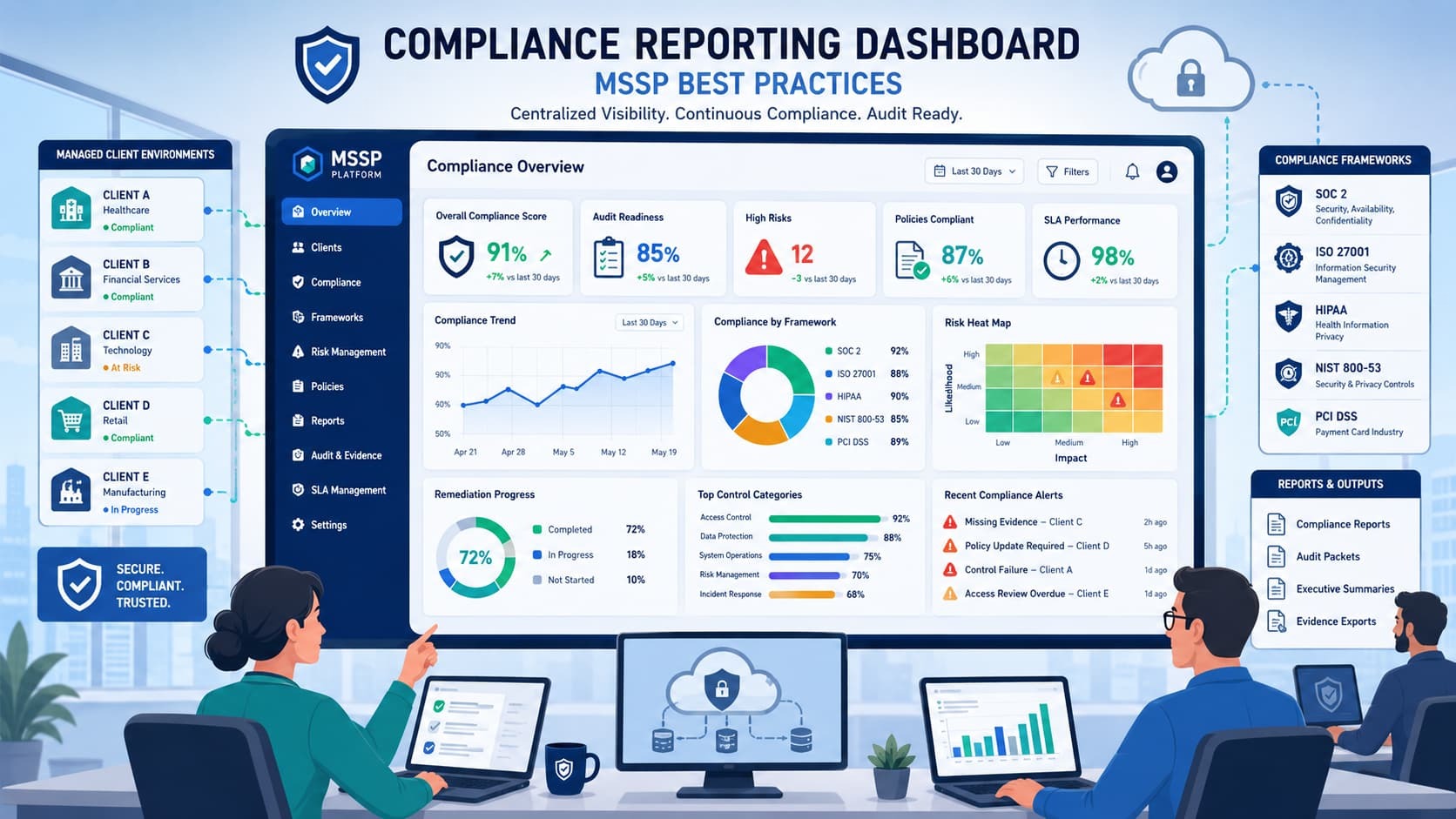
A compliance dashboard brings all your audit, risk, SLA, and fix-it data together in one place. Stricter rules demand you know exactly where you stand. If your data is locked away in different spreadsheets and tools, you’re already behind.
A single view solves this, crucial for managing standards like ISO 27001 or HIPAA. You can track status across frameworks, connect controls to proof, measure risk, and create reports automatically. It builds a clear, scalable program that’s ready for any auditor.
Want to see how this works for you? Keep reading.
Quick Compliance Dashboard Insights
The most effective MSSP dashboards connect compliance status, risk exposure, evidence, and remediation progress in one platform.
- Framework mapping allows a single control to support ISO 27001 compliance dashboard, SOC 2 reporting dashboard, PCI DSS reporting tool, and NIST compliance dashboard requirements simultaneously.
- Multi-tenant architecture is essential for any MSSP compliance platform managing multiple clients.
- Evidence tracking often determines whether a dashboard becomes audit-ready or simply another reporting screen.
What Is an MSSP Compliance Reporting Dashboard?
Think of it as a single view where security operations turn into compliance results. Many companies still see compliance as a bunch of spreadsheets and yearly audits. In reality, it should be a live system. A good dashboard constantly measures your security controls, tracks evidence, monitors risks, and creates reports that match what regulators need.
At MSSP Security, we build these dashboards as a natural part of security operations. Reviewing the common mssp security dashboard features is essential to ensure that every vulnerability discovered and every incident handled feeds directly into the compliance story for a client.
A mature setup usually brings together a few key things:
- Monitoring for security compliance.
- Metrics that act as a compliance KPI dashboard.
- Reporting on risk and compliance.
- Tracking for compliance remediation.
- Automation for compliance workflows.
The goal isn’t just to list security events. It’s to link each technical finding to specific rules in frameworks like SOC 2 or NIST CSF. A single failed multi-factor authentication control, for instance, can touch several requirements at once. This context helps clients see not just what happened, but why it’s important.
Shifting from basic monitoring to true compliance visibility means changing how you think about reporting.
How Does a Compliance Dashboard Differ From a Standard Security Dashboard?
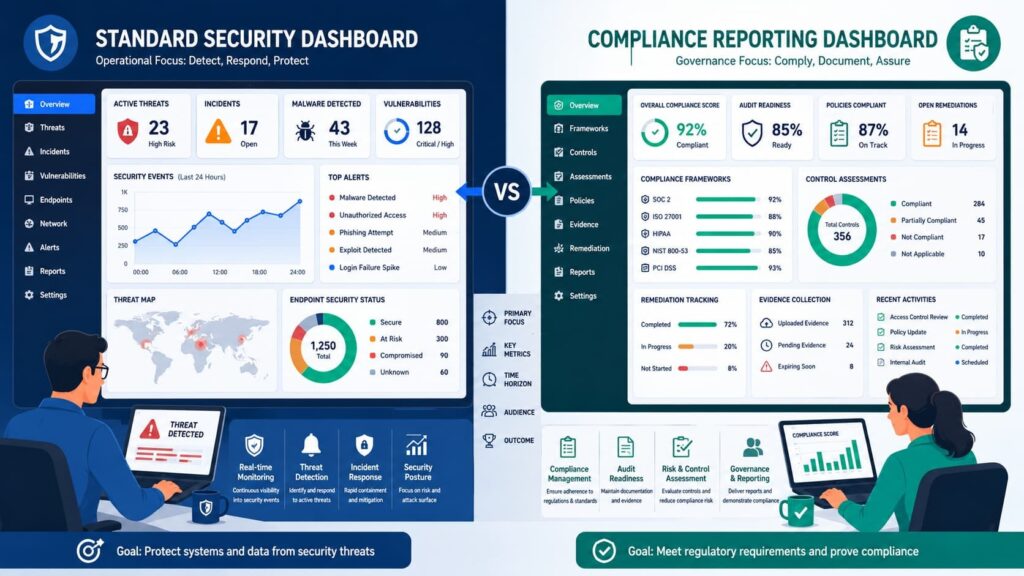
A regular security dashboard is about operational events. A compliance dashboard is about regulatory outcomes and evidence. Security dashboards typically show alerts, threat activity, vulnerabilities, and endpoint status. They’re built for analysts.
Compliance dashboards focus on framework alignment, control effectiveness, audit evidence, policy adherence, and compliance exceptions. They’re built for auditors. An analyst needs the details of an event. An auditor needs proof that controls were set up, tested, and documented properly.
That’s the core difference between a dashboard that shows your security posture and one built for a compliance audit. We’ve seen this firsthand when auditing products for MSSPs. The tools that try to do both often end up doing neither well.
A security dashboard might flag a thousand events, but if it can’t map even one of them directly to a control requirement for an auditor, it’s just noise. Our job is to help MSSPs find the tools that make that connection clear and automatic.
Why Do Traditional Compliance Reporting Methods Fail for MSSPs?
They just don’t scale. Manual reporting leads to inconsistent evidence, longer audit prep times, and a lot of hidden costs. Most MSSPs still use spreadsheets, exported reports, and screenshots to build their audit packages. It works for a few clients. But try doing it for twenty, or fifty, and the whole process starts to break down.
At MSSP Security, we see this all the time. Manual reporting is often the biggest hidden expense in a compliance program.
The challenges are pretty common:
- Relying too much on spreadsheets.
- Data stuck in different security tools.
- Gathering evidence by hand.
- Preparing for the same audits over and over.
- Making unique reports for every single client.
On forums like Reddit, MSP and MSSP operators talk about this work being “cumbersome” and a huge time sink. There’s a clear pattern: the security data exists, the evidence exists, and reports get made. But they aren’t connected to each other. That disconnect causes real problems.
“Continuous monitoring facilitates ongoing awareness of information security, vulnerabilities, and threats to support organizational risk management decisions, transforming static compliance logs into dynamic risk response actions” – National Institute of Standards and Technology (NIST)
It delays reporting, creates inconsistent compliance scores, causes bottlenecks right before an audit, and drives up operational costs. NIST points out that continuous monitoring works better than manual reviews. It replaces those frantic, periodic check-ins with steady, ongoing assessment.
From our consulting work, a few operational challenges come up again and again:
- Data is scattered everywhere SIEM, ticketing systems, cloud platforms, endpoints.
- Evidence collection isn’t consistent.
- You end up testing the same control for multiple frameworks.
- Reports are generated manually for each client.
- There’s no real-time view of compliance status.
The real issue is growth. As an MSSP adds more clients, the complexity of reporting doesn’t just increase it multiplies. What was a manageable task for five clients becomes a full-time job for ten. We help MSSPs find products that automate this grind, so their teams can focus on security, not paperwork.
What Essential Metrics Should Every MSSP Compliance Dashboard Include?
The dashboard should combine compliance coverage, risk indicators, operational performance, and remediation tracking metrics. A strong compliance metrics dashboard balances governance, risk, compliance, and operational performance indicators.
Incorporating a dedicated key performance indicators (kpis) dashboard ensures that provider efficiency maps cleanly onto rigorous audit demands. At MSSP Security, we often see organizations focus heavily on vulnerability counts while overlooking control effectiveness and audit readiness.
The most effective dashboards combine multiple measurement categories.
Compliance and Control Metrics
| Metric | Purpose |
| Control Coverage % | Measure framework alignment |
| Control Pass/Fail Status | Validate effectiveness |
| Evidence Completeness | Audit readiness |
Control coverage frequently becomes the foundation of a compliance score dashboard because it provides a simple way to communicate progress.
Risk and Exposure Metrics
| Metric | Purpose |
| Critical Vulnerabilities | Risk visibility |
| Vulnerability Age | Prioritization |
| Risk Score | Executive reporting |
Risk metrics help stakeholders understand whether compliance improvements are reducing actual exposure.
MSSP Operational Metrics
| Metric | Purpose |
| MTTD | Detection efficiency |
| MTTR | Response efficiency |
| SLA Adherence | Service performance |
| Ticket Backlog | Operational capacity |
The following operational indicators should be included:
- MTTD
- MTTR
- Mean Time to Contain
- SLA Compliance %
- Incident escalation performance
- Remediation completion rates
According to guidance from CISA, organizations should continuously evaluate security performance metrics as part of broader risk management programs. A dashboard becomes significantly more valuable when these metrics are connected to framework requirements and compliance objectives.
How Can an MSSP Dashboard Support Multiple Compliance Frameworks?
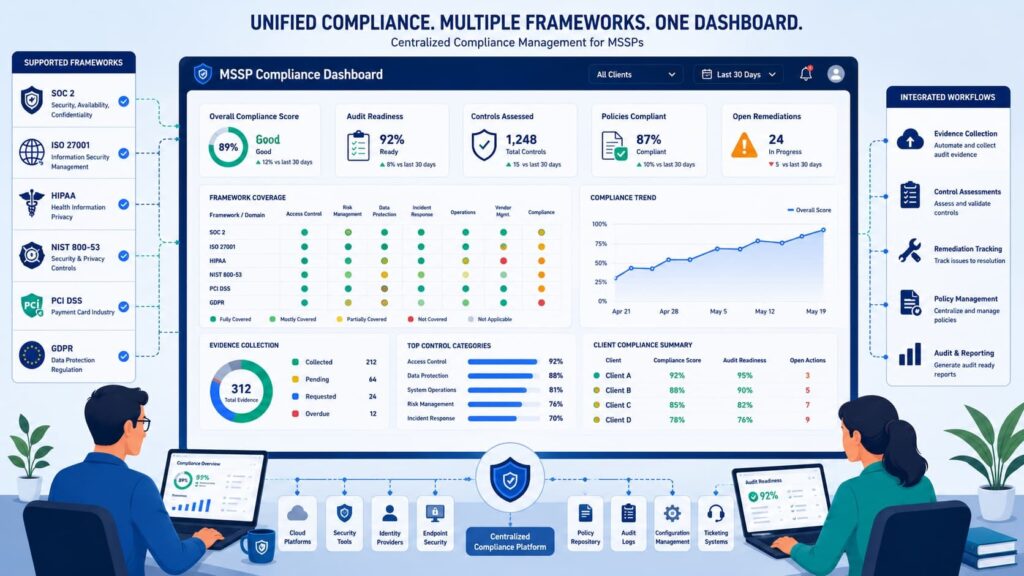
It needs a single control library. This library maps one control to many different frameworks, which cuts down on duplicate work. Most organizations have to follow several standards at once. A healthcare client might need a HIPAA report, SOC 2 certification, and also follow NIST CSF guidelines.
If you don’t have a central way to map controls, reporting becomes a repetitive, expensive chore. We’ve seen this firsthand. At MSSP Security, we know that a shared control architecture makes reporting much more efficient.
A good strategy for mapping frameworks should include a few things:
- A shared control architecture.
- The ability to reuse evidence.
- Reporting that works across different frameworks.
- Clear tracking of who owns each control.
Here’s a simple example. One access control rule, like “enforce strong passwords,” can support requirements in ISO 27001, SOC 2, PCI DSS, and NIST frameworks all at the same time. This approach means you aren’t testing and documenting the same thing four different ways. It makes audits simpler.
Best practices for control mapping
Organizations should keep a few key elements:
- Centralized control libraries: One master list of all your controls.
- Unified evidence repositories: One place to store all your proof.
- Framework crosswalks: A guide that shows how requirements from different standards overlap.
- Control ownership records: A clear list of who is responsible for each control.
The value of mapping one control to many frameworks only grows. As clients add more compliance obligations, this approach prevents the work from ballooning out of control. When we help MSSPs select new products, we look for this feature.
A tool that forces you to manage the same control separately for HIPAA and SOC 2 isn’t built for scale. It creates more work, not less.
What Dashboard Views Are Required for Different Stakeholders?
Executives, auditors, and security teams require different reporting layers with different levels of detail. Different stakeholders consume compliance information differently. A single dashboard view rarely satisfies every audience.
| Audience | Primary Focus |
| Executive Team | Risk and compliance status |
| Compliance Team | Controls and evidence |
| Security Operations | Incidents and remediation |
| Auditors | Validation and documentation |
Executives generally want:
- Compliance score trends
- High-risk findings
- Regulatory exposure
Deploying a custom executive security reporting dashboard helps translate highly granular technical metrics into broad corporate risk intelligence.
Compliance teams focus on:
- Evidence collection
- Control validation
- Exception management
Security operations teams need:
- Incident compliance reporting
- Vulnerability compliance dashboard data
- Security control monitoring
Auditors prioritize traceability and documentation.
At MSSP Security, we typically recommend role-based dashboard customization to reduce noise while improving usability.
Building Audit-Ready Reporting and Evidence Tracking
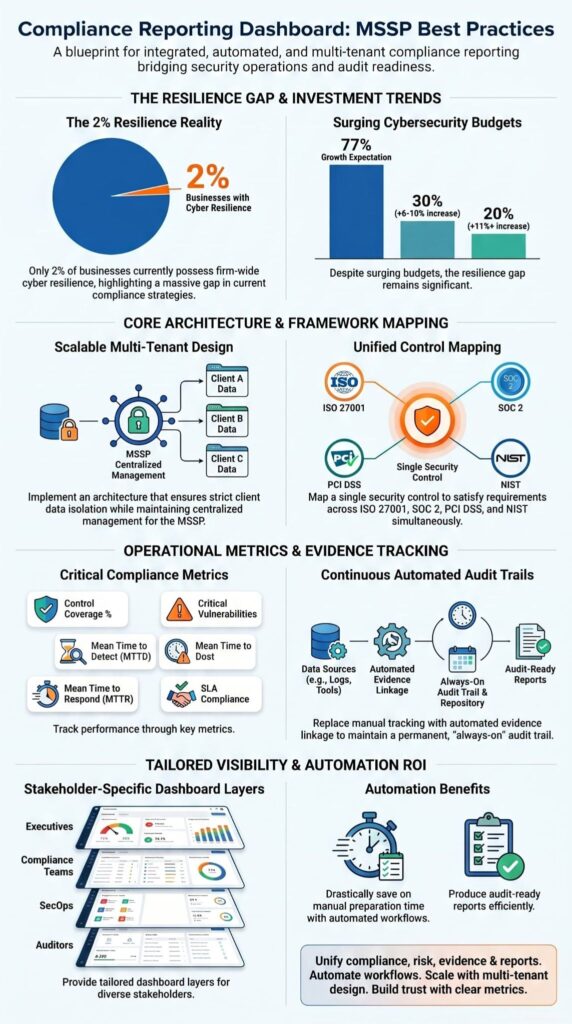
Every compliance score needs a direct link to the proof behind it. Audit readiness comes down to traceability. If a control is marked “compliant,” you should be able to click it and see the evidence. This simple idea gets missed a lot. Many dashboards show a compliance score but can’t tell you how that number was calculated.
The evidence you need usually includes audit trails, ticket references, security logs, assessment results, and approval records.
A good evidence collection process also has a few key features:
- Automated audit trails.
- A history of evidence versions.
- Records of control tests.
- Clear approval workflows.
In our work, we’ve noticed a pattern. Auditors ask fewer questions when they can see the evidence links right inside the reporting dashboard. It builds trust. Your evidence tracking should support the entire compliance review workflow. That means it helps with the approval process, manages documents, and connects to your ticketing system.
The biggest time-saver is continuous collection. Gathering evidence shouldn’t be a frantic, once-a-year scramble before an audit. If it happens all the time, as part of daily operations, audit preparation becomes much faster and less stressful. When we evaluate products for MSSPs, we test how they handle evidence.
A tool that makes this process manual or hidden isn’t solving the real problem.
Why Is Multi-Tenant Architecture Critical for MSSPs?
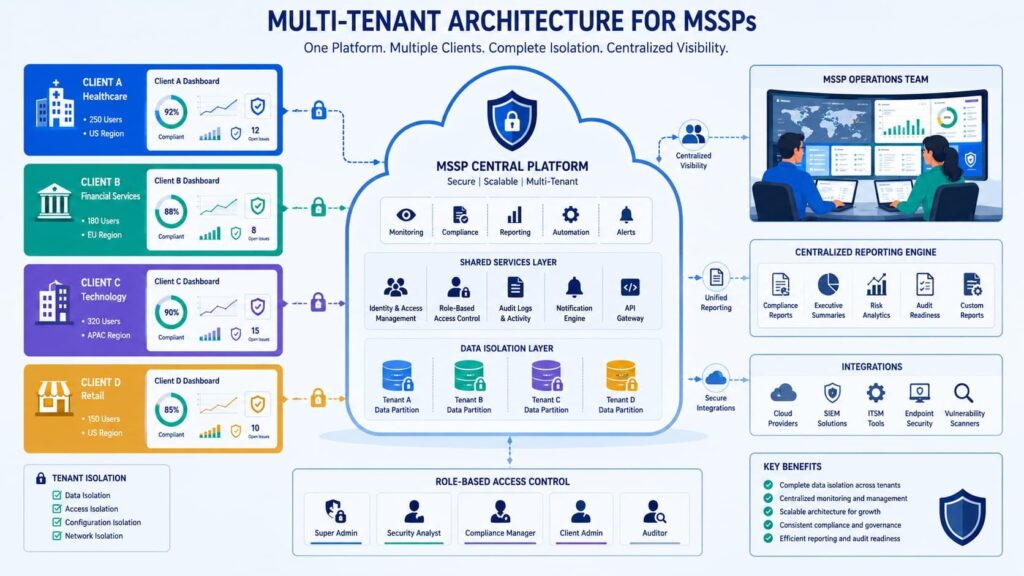
MSSPs need to keep each client’s data completely separate, while still seeing the overall picture from one central place. A real multi-client portal lets an MSSP manage dozens, even hundreds, of organizations through a single system. This design is what makes scaling possible without creating a security mess.
It has a few basic requirements:
- Strong tenant isolation.
- Centralized administration for the MSSP.
- Reporting templates you can adjust for each client.
- The ability to see risk across your entire portfolio.
We see this at MSSP Security. The need for a solid multi-tenant design really hits home once an MSSP grows past a few dozen clients. Before that, workarounds might seem okay. After that, they become a major bottleneck.
What to look for in a multi-tenant dashboard
A good platform should offer:
- White-label capabilities: You can put your own brand on the client’s view.
- Client portal access: Secure, individual logins for each client.
- Template-based reporting: Start from a standard report, then customize it.
- Portfolio-wide analytics: See trends and issues across all your clients at once.
This balance is key. Consistency in your core operations makes everything more efficient. But you still need the flexibility to meet each client’s specific needs. When we audit products for MSSPs, the multi-tenant model is a deal-breaker. A tool built for a single company just won’t work.
It forces you to manage separate instances for every client, which multiplies your admin work and makes it hard to get a unified view of your business.
How Can MSSPs Prevent Compliance Dashboard Greenwashing?
Clear metric definitions and auditable calculations stop reports from just looking good. They make sure the numbers show what’s really happening. In security, there’s a lot of talk about “SLA compliance theater.” This is when a dashboard looks healthy on the surface, but the actual operations behind it have problems.
According to the PwC Global Digital Trust Insights 2025 report, it was found that
“Data transparency and rigorous compliance validation are primary drivers for cybersecurity investments, with 57% of organizations citing customer trust and 49% citing brand integrity as the direct business value of clear reporting” – PwC Global Digital Trust Insights.
A dashboard should be a tool for governance and improvement, not just for marketing.
To prevent greenwashing, you need a few governance controls:
- Clear definitions for every metric.
- Logs that show when changes were made.
- A full audit history.
- The ability to see raw data, not just filtered results.
Some metrics are especially important to get right. MTTD (mean time to detect), MTTR (mean time to respond), and SLA compliance percentages need transparent, honest calculations. We believe stakeholders, clients, auditors, your own team should be able to see exactly how a number was figured. They shouldn’t have to take your word for it.
Transparent reporting cuts down on a few big headaches. It reduces audit disputes, prevents misunderstandings with clients, and lowers the risk of someone manipulating the performance data. Trust is simpler to build when the reporting method isn’t hidden. When we review products for MSSPs, we dig into how metrics are calculated.
If the process is a black box, it’s a red flag. A tool that won’t show its work is often designed to hide something.
What Is the Ideal Structure of an MSSP Compliance Reporting Dashboard?
A good design organizes everything into clear sections: compliance, risk, incidents, fixes, and reporting. The platform should be easy to navigate. The layout should match how your security team works and what your compliance process needs. In practice, the most useful structure has a few core sections.
Core Dashboard Sections
Overview
This is the high-level view. It should show your main compliance score, your overall risk score, the top compliance gaps you need to fix, and an executive summary.
Compliance Status
This section gets into the details. It shows your coverage across different frameworks (like SOC 2 or HIPAA), the pass/fail status of each control, where you are on a compliance maturity model, and a clear gap analysis.
Risk and Vulnerabilities
Here you track what could go wrong. It includes a vulnerability compliance view, threat monitoring, risk reporting, and security analytics.
Incidents and SLA Performance
This part measures your service. It covers incident reporting, key times like MTTD and MTTR, and whether you’re hitting your SLA targets.
Remediation Tracking
This is your to-do list. It tracks the fixes you need to make, shows open findings and overdue actions, and shows the status of your workflow.
Reporting and Exports
Finally, you need to get the information out. This area handles PDF exports, scheduled reports, trend analysis over time, and a dashboard for compliance notifications.
Our advice at MSSP Security is to build the dashboard around business outcomes, not technical tools. Clients care about reducing risk, proving compliance, and seeing that problems get fixed. The technology should support those goals quietly in the background. When we audit a product, we look at the structure first.
If it’s organized by tool names or vendor logos instead of what the client actually needs to see, it’s not built for the MSSP’s real job.
FAQs
What does a compliance reporting dashboard MSSP actually show daily?
A compliance reporting dashboard MSSP provides a clear daily view of security compliance monitoring across all clients. It displays compliance metrics dashboard data, supports real time compliance monitoring, and presents accurate risk compliance reporting.
Teams can track security control monitoring, review compliance score dashboard updates, and follow compliance trend analysis to understand risks, identify gaps, and evaluate overall security posture dashboard performance.
How does automated compliance reporting help manage security service provider compliance?
Automated compliance reporting improves managed security service provider compliance by eliminating repetitive manual tasks and reducing reporting errors. It automatically updates the compliance audit dashboard, supports compliance evidence collection, and maintains automated audit trails.
This process strengthens compliance reporting automation, improves accuracy in the regulatory compliance dashboard, and enables consistent continuous compliance monitoring without relying on manual data entry.
Can a unified compliance dashboard handle multiple frameworks like ISO 27001 and SOC 2?
A unified compliance dashboard can manage multiple frameworks such as an ISO 27001 compliance dashboard and a SOC 2 reporting dashboard within one system. It aligns different security framework compliance requirements into a single regulatory compliance dashboard.
This approach allows teams to manage GDPR reporting MSSP, HIPAA compliance dashboard requirements, and NIST compliance dashboard tracking efficiently without duplicating work or switching between tools.
How does a multi client compliance portal support vendor risk compliance reporting?
A multi client compliance portal strengthens vendor risk compliance reporting by centralizing data within a third party risk management dashboard. It enables teams to monitor vendor risk compliance reporting, handle compliance exception reporting, and manage a structured compliance review workflow.
This setup improves the compliance approval process, enforces consistent compliance policy management, and ensures better visibility across all third-party relationships.
What features improve visibility in a security compliance dashboard for MSSPs?
Visibility improves when a security compliance dashboard includes clear compliance data visualization, detailed compliance KPI dashboard tracking, and actionable security compliance analytics. Features such as a compliance alert system, compliance notification dashboard, and compliance remediation tracking ensure timely responses.
Integration with SIEM compliance reporting, SOAR compliance automation, and a vulnerability compliance dashboard provides a complete and accurate view of risks.
What Factors Make an MSSP Compliance Reporting Dashboard Successful?
Keeping compliance on track gets harder as your client base grows. You need clear visibility into what’s happening, where risks exist, and how every security action connects to compliance results. That’s the reality. A dashboard that brings compliance, risk, evidence, and reporting into one place helps reduce manual work while making audits and client reporting much easier.
If you’re looking to build a system that can grow without creating more complexity, MSSP Security can help. We work with MSSPs to evaluate tools, improve integrations, and create compliance programs that actually support daily operations.
With more than 15 years of experience across 48,000 projects, we provide independent guidance that helps you choose the right solutions and get better results from the systems you already use.
References
- https://nvlpubs.nist.gov/nistpubs/legacy/sp/nistspecialpublication800-137.pdf
- https://www.pwc.com/gx/en/news-room/press-releases/2024/pwc-2025-global-digital-trust-insights.html