Address
304 North Cardinal St.
Dorchester Center, MA 02124
Work Hours
Monday to Friday: 7AM - 7PM
Weekend: 10AM - 5PM
Address
304 North Cardinal St.
Dorchester Center, MA 02124
Work Hours
Monday to Friday: 7AM - 7PM
Weekend: 10AM - 5PM


Your company’s most sensitive data, the kind that keeps you up at night, is what a managed DLP vendor is meant to protect. In California, this isn’t just about firewalls. It’s about navigating a web of regulations like the CCPA, where a single misstep can lead to significant fines and reputational damage.
The right partner does more than just install software. They become an extension of your team, offering expertise that’s tuned to the specific threats targeting businesses from San Diego to the Bay Area. This guide will help you cut through the noise and find a provider that offers real protection, not just promises.
You notice it pretty quickly out here in California. The air feels charged, not just with heat, but with data, ideas, and risk. When so many companies build and store their value in code, designs, and customer records, the state becomes a magnet, not just for talent, but for attackers.
We’ve seen how one small data leak at a Los Angeles firm, just a misconfigured setting and a few exposed files, turned into weeks of legal calls, audit requests, and tense boardroom updates.
It wasn’t dramatic at first, but it snowballed fast. That’s why the real question isn’t whether you need Data Loss Prevention. It’s how you run it well without burning out your own team.
A managed DLP provider steps in to carry the load you don’t have time for:
While they track alerts and refine rules in the background, your staff can stay focused on product launches, customer growth, and day-to-day operations. Your customer data and intellectual property end up watched by people who live in this world full-time, not just as a side task.
The real sweet spot is finding a partner that understands both sides of your reality:
You’re not just securing data. You’re working under some of the strictest privacy expectations in the country. A good managed DLP vendor gets that, and builds their service around it.
Running DLP on your own sounds straightforward on paper. In practice, it’s closer to running a small security lab inside your company. You don’t just “turn it on” and walk away.
Here’s what doing it in-house actually means:
And that last piece is where a lot of teams get stuck. If policies are too loose, data walks out the door. If they’re too strict, employees can’t work, and the tool starts tripping on every normal operation. Soon you’re drowning in:
A managed DLP service gives you a full bench of specialists who do this every day. They know how to tell the difference between:
That judgment, built from repeated exposure to real incidents, keeps your security tight without choking your workflows. For many California SMBs, and even larger enterprises, there’s a clear pattern: the cost of trying to build that level of expertise internally often outweighs the cost of outsourcing it [1].
From a financial angle, the numbers are blunt. Data breach costs continue to rise, especially when you add:
When you compare that to a predictable managed service fee, the equation shifts. You’re not just paying for prevention; you’re paying for readiness.
A strong managed DLP provider will typically offer:
That kind of standby support changes how you operate. Instead of hoping your tools are set up right, you know there’s a team watching, adjusting, and ready to respond when something slips through.
For California businesses working under constant pressure, from regulators, competitors, and attackers, managed DLP isn’t just a line item in the security budget. It’s what lets you keep building and shipping, without wondering if the next quiet misconfiguration will turn into another headline.

Your evaluation should start with compliance. Any vendor you consider must have demonstrable expertise with the California Consumer Privacy Act (CCPA). Ask them to explain their process for data discovery and classification. How do they help you map where sensitive data resides?
Can their reporting tools easily generate the audit trails you need to prove compliance during an assessment? Look for providers who are also well-versed in other relevant frameworks like HIPAA for healthcare or SOC 2 for service organizations. Their understanding of these regulations should be baked into the service offering, not an afterthought.
The technology itself is critical. You need a solution that provides comprehensive coverage.
A modern provider will leverage machine learning to improve accuracy over time, significantly reducing false positives that can waste your team’s time. Integration capabilities are also key.
The DLP solution should be able to feed alerts into your existing SIEM (Security Information and Event Management) system and work alongside your EDR (Endpoint Detection and Response) tools. This creates a layered defense where different security technologies complement each other.
Don’t underestimate the importance of support and service level agreements (SLAs). Where is their security operations center (SOC) located? A provider with a local presence in California can often offer faster response times for critical issues. Scrutinize their SLAs. What is their guaranteed response time for a high-severity alert?
It should be clearly defined, ideally an hour or less. Ask for case studies or testimonials from other clients in your industry. A reputable vendor will be transparent about their capabilities and success stories.
| Evaluation Area | What to Look For | Why It Matters in California |
| CCPA / CPRA Expertise | Proven experience with data mapping, DSAR support, and audit-ready reporting | Reduces risk of fines, lawsuits, and compliance gaps |
| Data Coverage | Endpoint, network, and cloud DLP in a single managed service | California businesses rely heavily on SaaS and remote work |
| False Positive Reduction | ML-assisted classification and continuous policy tuning | Prevents alert fatigue and business disruption |
| Incident Response SLA | 24/7 SOC with < 1-hour response for high-severity events | Faster containment limits regulatory and reputational damage |
| Security Integrations | SIEM, EDR, CASB, SOAR compatibility | Enables layered defense and centralized visibility |
| Local Presence | SOC or operational support familiar with California regulations | Improves response speed and regulatory alignment |

Begin with an internal assessment. You can’t protect what you don’t know about. Identify your most sensitive data types, customer PII, financial records, intellectual property. Map out how that data flows through your organization.
Where is it created, stored, and shared? This understanding will help you articulate your requirements clearly to potential vendors. It also allows you to prioritize which data channels to protect first during a proof of concept.
When you engage with vendors, be prepared with specific questions. Move beyond generic sales pitches.
The most critical step is the proof of concept (POC). Insist on running a live trial with your own data and systems. Focus the POC on your highest-risk scenarios, such as employees emailing sensitive files outside the company or uploading data to unapproved cloud storage.
This hands-on testing is the only way to truly evaluate how the solution will perform in your unique environment and how responsive the vendor’s support team really is.
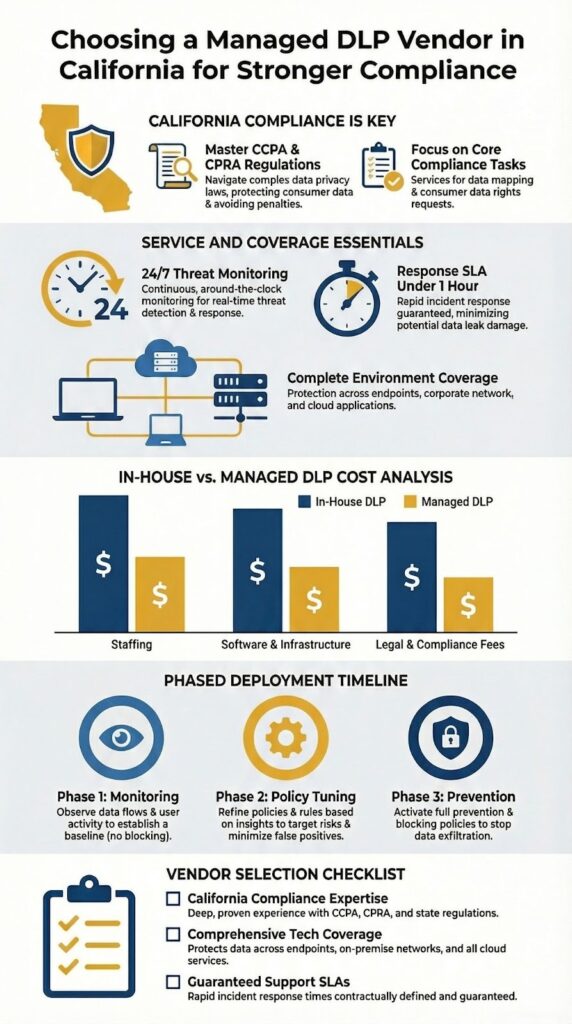
You really start to see the numbers differently once you write them all down. On paper, running DLP in-house can look cheaper, but in California’s job market, that picture changes fast.
To run DLP properly on your own, you’re paying for far more than a tool:
When companies finally run a full total cost of ownership (TCO) analysis, they’re often surprised at how quickly the “do it yourself” number climbs.
A managed DLP service reshapes this entire problem. Instead of separate line items scattered across salaries, tools, and infrastructure, you get:
That predictability matters for finance teams. It’s easier to build multi-year plans when you don’t have to guess how many extra licenses, headcount, or add-ons you’ll need just to keep the system running.
But the real return on managed DLP isn’t only about the cost of software or staff. It’s about the cost of failure.
California regularly sees higher breach costs than the national average. That’s shaped by:
For a mid-sized company, a single breach can mean millions in:
A strong managed DLP provider functions a bit like an insurance policy with active prevention built in. They:
Viewed through that lens, the investment stops looking like “extra security spend” and starts looking like a way to keep your business running, compliant, and billable after everyone else has gone home for the day.
Once you start talking to vendors, the pricing structures tend to fall into a few familiar buckets. The names change, but the patterns stay pretty consistent.
About a third of your decision here is about feature fit, and the rest is about how you want to be billed.
1. Per-user subscription
This model is especially common for cloud-first DLP platforms:
2. Tiered packages (basic / pro / enterprise)
Many vendors combine per-user pricing with feature tiers, for example:
When you’re comparing tiers, look carefully at:
This avoids overpaying for “nice to have” extras that don’t move your security posture much.
3. Flat-rate or “all-you-can-use” models
Some providers skip per-user billing and price based on:
This structure can work well for larger or more complex organizations that:
With any of these models, there are a few key details worth pressing on during vendor conversations:
When you understand both the pricing model and what’s actually delivered within each tier or plan, it becomes much easier to compare vendors on value, not just on the sticker price.
| Pricing Model | How It Works | Best Fit For | Key Considerations |
| Per-User Subscription | Monthly fee per employee or endpoint | Growing or cloud-first organizations | Costs scale with headcount |
| Tiered Packages | Feature-based plans (Basic / Pro / Enterprise) | Companies with evolving security maturity | Watch for unused features |
| Flat-Rate / Size-Based | Pricing based on company size or revenue | Large or complex organizations | Predictable budgeting, less flexible |
| Add-On Fees | Extra charges for onboarding, integrations, or premium SLAs | Organizations needing custom setups | Clarify what’s included upfront |
Credits : The SaaS Pros Breakdown
This is the point where the glossy slide decks stop mattering and real habits, actual traffic, and messy processes show up. That’s why a solid implementation feels less like “installing a product” and more like mapping how your company actually works.
A good vendor won’t jump straight into blocking mode. They’ll usually begin with a discovery phase that looks something like this:
This collaboration matters because DLP policies built in a vacuum tend to either break work or miss the real risks. When the vendor listens first, the rules end up tailored to how your teams actually operate, not how a generic diagram says they should.
Deployment usually rolls out in stages instead of a hard switch. A common pattern looks like this:
This kind of phased rollout keeps business disruption low and builds trust. People see that the system is thoughtful, not random.
Communication pretty much makes or breaks this phase. A mature vendor should give you:
On the human side, training is not optional if you want the rollout to stick. You’ll usually need two tracks:
This transparency lowers anxiety and cuts down on the “shadow IT” response where people try to bypass controls out of frustration. When users know what the system is doing and why, they’re more likely to cooperate instead of seeing it as an obstacle.
A well-planned implementation doesn’t just switch the lights on. It sets up a working rhythm between your organization and the vendor, shared context, clear roles, and realistic expectations. That’s what turns DLP from yet another security tool into a long-term partnership that actually holds up under pressure [2].
Companies should select vendors with local experience, CCPA-compliant DLP solutions, and strong endpoint DLP support in California. They should provide real-time monitoring, cloud DLP services in Los Angeles, and SOC 2-compliant managed DLP services. Vendors must support SIEM and EDR integration and offer breach response capabilities to ensure complete data protection across all channels.
Businesses should request a vendor proof of concept, review service level agreements, and measure the ROI of managed DLP. They should check the vendor’s ability to reduce false positives, provide incident response, and discover sensitive data. Pricing models, per-user subscriptions, and California PII DLP solutions should be compared to balance cost and compliance.
Companies can consider Bay Area DLP MSPs, Los Angeles DLP services, and outsourced DLP providers in California. Options include Symantec DLP, Forcepoint DLP, Palo Alto DLP, GTB Technologies, Fortra DLP services, Racecs DLP in Fallbrook, Promising Solutions DLP in LA, and KiteCyber DLP. Selecting vendors with local support ensures faster response and tailored coverage.
Managed DLP vendors help organizations meet CCPA, HIPAA, and GDPR requirements. They offer CASB-compliant solutions, data residency controls, and SOC 2-compliant services. Vendors provide compliance reporting, local support, and guidance for vendor evaluation to ensure organizations can maintain regulatory compliance efficiently.
Organizations should implement policy tuning, enterprise DLP managed services, and pilot programs in the Bay Area. They should integrate UBA/UEBA, Azure DLP, AWS DLP, and Microsoft 365 DLP solutions. Using zero-trust models, machine learning tuning, ransomware prevention, and breach cost reduction strategies ensures comprehensive data protection.
Choosing a managed DLP vendor is a strategic decision. It’s about forming a partnership with a team that understands the stakes of doing business in California. The right provider will offer more than just technology. They will offer clarity, reducing the complexity of data security and compliance into a predictable, managed service.
They become a strategic ally in protecting your most valuable asset, your data. By focusing on local expertise, proven technology, and transparent service agreements, you can select a partner that not only meets today’s requirements but also scales with your business tomorrow. The security of your customer trust depends on it.
Explore how our expert consulting can help you streamline operations, reduce tool sprawl, and boost service quality. From vendor-neutral product selection and auditing to stack optimization and decision support, we guide you in choosing the right tools, improving integration, and enhancing visibility.
With over 15 years of experience and 48K+ projects completed, our services include needs analysis, vendor shortlisting, PoC support, and actionable recommendations, so you can build a tech stack that aligns with your business goals. Join us and start optimizing your security operations today at MSSP Security Services.

