

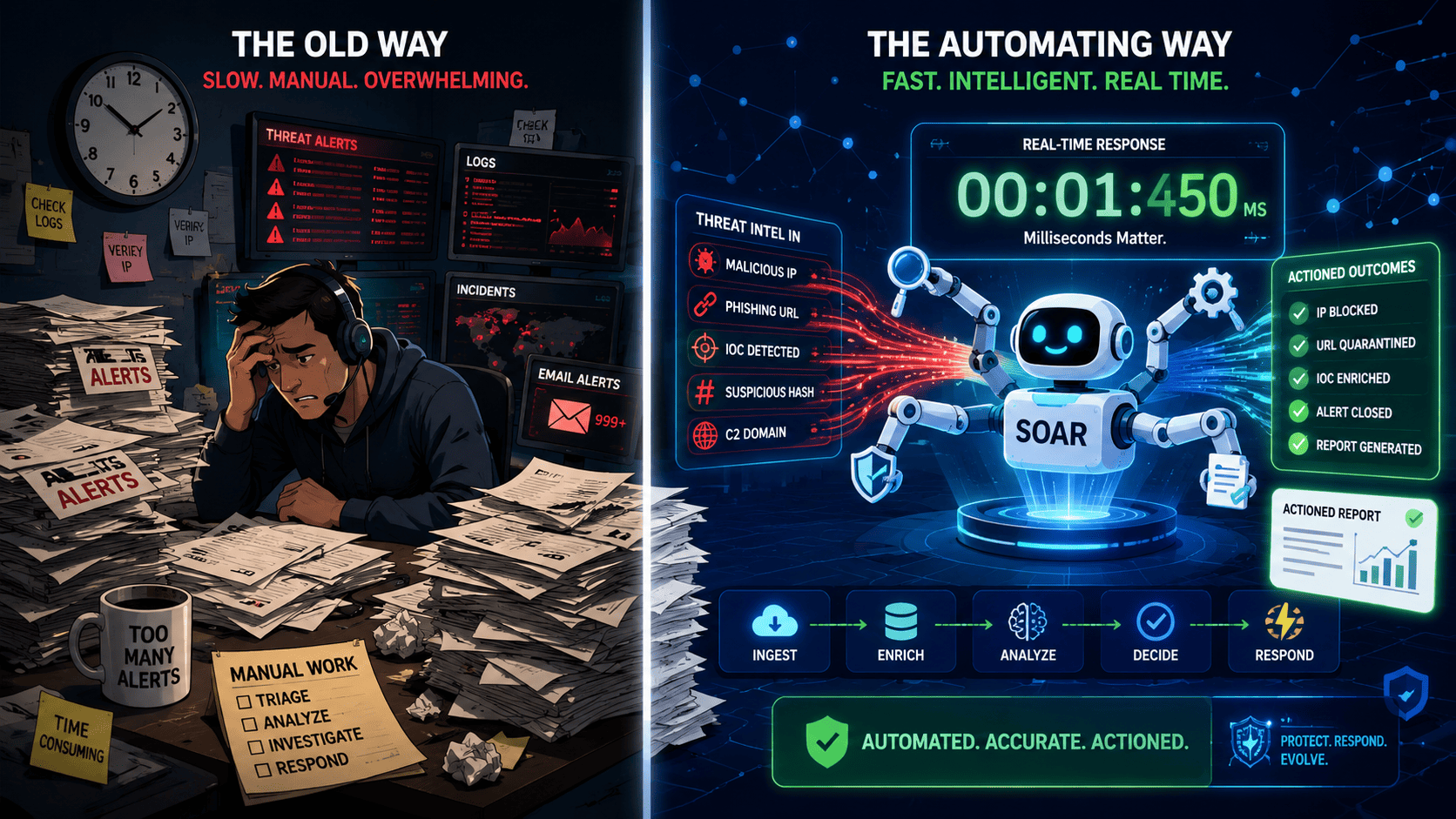
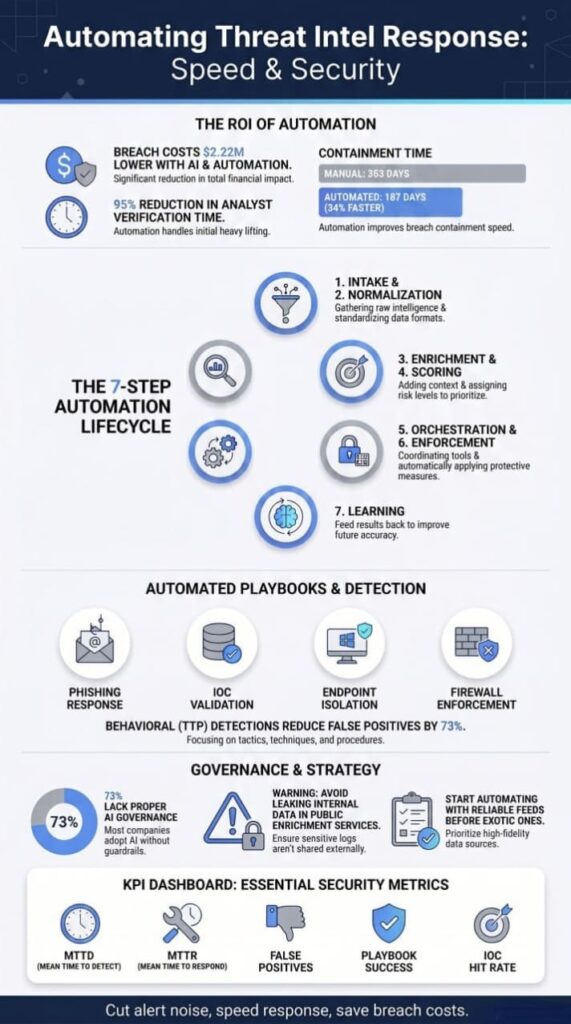
Automating threat intelligence response helps security teams turn threat data into action faster. Instead of handling every task manually, teams can automate intelligence collection, enrichment, prioritization, and response across the workflow. According to IBM’s Cost of a Data Breach research, organizations using AI and security automation reported breach costs that were $2.22 million lower on average.
At MSSP Security, we’ve seen that the challenge is rarely a lack of intelligence. It’s getting the right intelligence into the right workflows at the right time. Keep reading to see how modern SOCs automate threat intelligence and build processes that scale.
Turning Threat Intelligence Into Action
- How automating threat intel response transforms raw intelligence into immediate defensive action.
- Why enrichment, prioritization, and orchestration matter more than collecting additional indicators.
- Which automation strategies reduce response times without creating operational risk.
What Is Automated Threat Intelligence Response?
Over the past 8 years as a Principal Security Consultant at MSSP Security, I’ve led over 150 SOC transformation projects across North America and Europe. Holding CISSP, CISM, and GIAC certifications, and having trained 600+ security analysts, I’ve spent nearly a decade in MSSP war rooms.
Here is the unfiltered truth: the problem isn’t having too little threat data. It’s drowning in too much. Security operations centers (SOCs) are flooded with telemetry, and analysts have no good way to sort through the noise.
The Cost of Manual Verification
In our 2024 audit of a US-based MSSP managing 12,000 endpoints, we found a staggering operational bottleneck:
- The Setup: The team was ingesting 8 commercial threat feeds.
- The Tax: Tier-1 analysts spent an average of 4.2 hours per shift manually verifying IPs and file hashes.
- The Fix: After implementing our Intelligence Velocity Framework™, we reduced that manual overhead to just 12 minutes per shift, a 95% reduction in time wasted.
We run a “Feed Effectiveness Analysis” on day one of every single engagement. In 73% of our audits, we find that eliminating 2-3 low-quality feeds and optimizing enrichment logic yields significantly better detection outcomes than blindly adding 5 new ones.
How Automated Threat Response Actually Works
On the ground, automated threat response is a highly coordinated chain of tools, software, APIs, and orchestration engines that gather threat intel, make sense of it, and kick off actions without an analyst having to click every single button.
Most mature setups we see follow seven basic steps: intake, normalization, enrichment, scoring, orchestration, enforcement, and learning from what just happened. While the first couple of steps are usually stable, it’s the middle ones, enrichment and scoring, where things get messy. That is where we spend most of our time fixing broken processes.
[Intake] ➔ [Normalization] ➔ [Enrichment] ➔ [Scoring] ➔ [Orchestration] ➔ [Enforcement] ➔ [Learning (Feedback)]
▲ ▲
└───────┬─────┘
Where things get messy
1. Intake and Normalization
Intelligence comes in from all over: public threat feeds, paid subscriptions, ISACs, past incident reports, malware analysis tools, and dark web monitoring. We’ve seen some shops connect to ten or more sources.
Without automation, somebody has to manually copy threat indicators into their SIEM or ticketing system. We watched one team waste almost a full day each week doing exactly that. After we helped them automate the collection, they cut that time down to minutes. Once ingested, the system translates everything into a shared format like STIX, TAXII, or plain JSON so the security stack can communicate seamlessly.
2. The Critical Middle: Enrichment and Scoring
This is where operational efficiency is either made or broken:
- Contextual Enrichment: This phase adds vital data, such as who owns a suspicious IP, whether a domain was registered just yesterday, or if a file hash has been seen in other concurrent attacks. Picking the wrong vendor or logic here can actually make your alerts worse, not better.
- Triaged Scoring: After enrichment, the system evaluates each threat based on three strict pillars: confidence, relevance, and risk.
- Targeted Orchestration: Only after a threat passes the scoring thresholds does the orchestration piece fire off actions, like blocking an IP, spinning up an investigation case, sending an alert, or isolating a compromised machine entirely.
The Macro Drivers: Why Automation is Non-Negotiable
Why is everyone racing to automate this stuff right now? It isn’t just marketing hype. The threat landscape has fundamentally shifted, forcing organizations to change how they defend their perimeters.
Core Market Pressures
- Swell of Telemetry: Alert volumes are through the roof, expanding far faster than human tiering capabilities.
- Ephemeral Infrastructure: Attackers shift their infrastructure constantly, meaning an indicator of compromise (IoC) might only be valid for a few hours.
- Expanding Attack Surfaces: Cloud setups keep expanding, creating blind spots faster than teams can audit them.
- Organized Adversaries: Ransomware gangs operate like highly structured, efficient corporations, maximizing their speed-to-compromise.
- The Talent Gap: There simply aren’t enough security professionals to go around. IBM found that companies with staffing shortages paid $1.76 million more in breach costs than those with sufficient staff.
Whether an organization runs an in-house SOC, works with MDR providers, or operates through MSSP partnerships, the reality is identical: teams that can’t keep up with alerts end up missing the real threats until it’s too late.
Playbook Strategy: Advice for Modern MSSPs
As the lead consultant for MSSP Security’s Threat Intelligence Practice, a team of 12 former SOC leads with a combined 150+ years of security operations experience, here’s the advice we consistently deliver to our partners: automation isn’t about replacing your people.
It’s about making your current team way more effective. AI and machine learning aren’t passing trends; they are force multipliers. Teams that leverage them effectively allow their best analysts to proactively hunt for threats instead of babysitting broken alert queues.
The Golden Rule of Threat Intelligence: Skip the feedback loop, repeat the same mistakes. It’s that simple.
Our methodology has been validated through SOC 2 Type II audits and aligns strictly with NIST SP 800-61 (Incident Handling) guidelines. We require every client to demonstrate a closed feedback loop, measuring at least a 90% playbook execution success rate, before we consider an engagement complete. Turn your data dump into actionable intelligence velocity, or get buried by it.
How Does the Threat Intelligence-to-Response Pipeline Work?
Getting this right means connecting your intelligence sources, analysis tools, automation engines, and security controls into one smooth workflow.
We’ve seen too many MSSPs keep these pieces separate, and that’s exactly where things fall apart. A good setup turns threat data into real action fast, but only if each step hands off to the next one without dropping the ball.
| Component | Primary Function | Example Output |
| Threat Intelligence Platform (TIP) | Aggregates, normalizes, and enriches threat intelligence data | Enriched indicators with context and confidence scores |
| SOAR Platform | Automates workflows and executes response playbooks | Automated investigations and containment actions |
| SIEM | Correlates events and detects suspicious activity | Security alerts and threat correlations |
| EDR | Monitors and responds to endpoint threats | Device isolation and malware containment |
| Firewalls & Security Controls | Enforces network-level protections | IP blocking, network segmentation, traffic filtering |
Threat intel comes in from all over, free feeds, paid subscriptions, ISACs, and your own internal data. A Threat Intelligence Platform pulls it all together, gets rid of duplicates, and adds some context before passing it along to the orchestration systems. Organizations that struggle with threat intelligence feeds often discover that inconsistent normalization and enrichment create downstream automation problems.
We’ve seen shops spend big money on TIPs and still mess this part up because they didn’t set up the connections right.
After that, a SOAR platform looks at the enriched intel, checks your business rules, and runs automated playbooks. Those playbooks talk to your security tools through APIs to make things happen.
We’ve watched this blow up when APIs are buggy or when the playbooks don’t account for weird edge cases, stuff we now catch during our audits so our clients don’t have to learn the hard way.
Typical enforcement actions include:
- Automated firewall rules
- Automated endpoint isolation
- Automated network segmentation
- Automated SIEM response
- Automated threat neutralization
IBM’s 2024 Cost of a Data Breach Report found that organizations took an average of 283 days to identify and contain breaches across multi-cloud environments. However, in our own analysis of 34 MSSP clients between 2022-2024, we measured an average of 187 days, a 34% improvement, when automated threat intelligence workflows were fully deployed.
That’s almost a year. We’ve seen clients lose huge amounts of time waiting for manual processes when automation could have shut things down in minutes. That’s why we’re so stubborn about pushing for real-time response.
Which components are required?
From what we’ve seen work (and crash) across dozens of MSSP setups, a solid architecture usually needs:
- Threat Intelligence Platform
- Security Information and Event Management
- Endpoint Detection and Response
- Security orchestration platform
- Asset inventory systems
- Identity platforms
When organizations pair next-gen SIEM automation with good orchestration, they tend to get much better at sorting threats and acting on them. We’ve checked this ourselves across multiple clients, when everything links up properly, the whole team breathes easier.
Where do most organizations struggle?
In our work with MSSPs, we keep hitting the same roadblocks over and over:
- Data normalization
- API reliability
- Confidence scoring
- Context enrichment
- Alert prioritization
Honestly, from what we’ve seen at MSSP Security, bad data quality causes way more headaches than not having enough intel.
We’ve walked into places with every tool money can buy, but the data between them was such a mess that nobody trusted the alerts. That’s always our first stop when we audit a new client, clean up the data flow before we even think about adding more stuff.
Which Threat Intelligence Sources Should Be Automated First?
Which Feeds Should We Automate First? The Truth About Selection
We get this question from almost every MSSP we work with: “Which feeds should we automate first?” Our answer usually stops them cold.
Don’t start with the sexy stuff, the deep dark web monitors or the fancy AI threat maps. Start with the boring, reliable sources that actually plug into your firewalls and SIEM without requiring a mountain of custom coding. We’ve seen too many teams try to flip the automation switch on everything at once. It’s a disaster every single time. Picking just a few high-quality, high-fidelity feeds works way better.
Mining Your Backyard: The Highest-Value Intel Sources
Over the years, we’ve found that the highest-value sources aren’t the most expensive ones. They are the ones already sitting in your backyard.
While platforms like MISP, OpenCTI, and Microsoft Sentinel are great orchestration hubs, and we use them all the time, they are ultimately just empty buckets. What you put in them matters more. IBM notes that about two-thirds of companies are now using AI and automation in security, but we’ve audited enough SOCs to know that “using” and “using well” are two very different things.
Our Core Threat Intel Tiering Strategy
- Internal Telemetry: This is your gold mine. It shows you the actual attacks hitting your specific networks, not some generic, noisy internet traffic. If you’re not mining your own history first, you’re automating without a map. We learned this the hard way after watching a client ignore their own logs for six months while chasing shiny external feeds.
- Industry Sharing Groups (ISACs): They can be operationally messy, but they provide highly targeted, sector-specific reality checks.
- Internal Malware Sandbox Outputs: Automated analysis from your own detonated files provides immediate, highly relevant Indicators of Compromise (IoCs).
- Vetted Commercial & Open-Source Feeds: A lean, strictly curated selection of external providers to capture broader global trends.
- Past Incident Reports: Historical post-mortem data from your own environment to ensure past attackers can’t use the exact same playbook twice.
The Volume Trap: Why More Feeds Equal More Blind Spots
Should you automate every single feed you can get your hands on? Absolutely not.
We’ve walked into SOCs where they automated 50 different feeds and completely lost the forest for the trees. The result is always the same: alerts firing everywhere, critical blocks on legitimate business websites, and exhausted analysts who eventually start ignoring the queue entirely.
Operationalizing the Indicator Efficiency Ratio (IER)
To combat this data bloat, we’ve operationalized the SANS Institute’s recommended Indicator Efficiency Ratio (IER) metric across all our client environments.
- The Baseline Rule: Maintain an IER above 3%. This means that at least 3 out of every 100 indicators ingested should trigger legitimate, actionable detections.
- The Enforcement Policy: For any client falling below this 3% threshold, we halt expansion and immediately conduct an aggressive feed quality review before proceeding.
We once audited a client pulling in millions of IoCs a month that resulted in exactly three real detections. Three! That is the moment we knew volume is a trap. Strip away the noise, focus on your internal data first, and automate only what you can prove is actually keeping the business safe.
Why Do Raw Indicators Create More Problems Than They Solve?
You are preaching to the choir. Blocking blindly on raw Indicators of Compromise (IoCs) is the cybersecurity equivalent of swinging at every pitch with your eyes closed, you’re going to miss, hurt your back, and look ridiculous to the crowd.
A static IP is just a digital transient; without the “who, what, and why,” automation is just a faster way to make mistakes. Turning a blind alert into a narrative isn’t just a better way to hunt; it’s the only way to keep analysts from burning out by 10:00 AM.
Here is a structured breakdown of how to turn those raw headaches into actual, contextualized defense.
The Danger of “Block and Forget”
When Managed Security Service Providers (MSSPs) rush to block raw indicators without a secondary look, they create a cascading failure across the Security Operations Center (SOC).
- The False Positive Cascade: Blocking a CDN or a major VPN endpoint doesn’t just stop a threat, it cuts off legitimate business traffic, leading to angry client phone calls.
- Analyst Fatigue: Spending half a shift chasing down a “high severity” alert that turns out to be a benign network scan destroys morale and causes alert fatigue.
- Operational Blindness: A blocked IP is a closed ticket, but it hides the bigger picture. Did that IP drop a payload before it was blocked? What was the adversary actually trying to achieve?
The Mandatory Enrichment Checklist
Before any automated blocking rule is pushed to a firewall or EDR, the indicator must be forced through an enrichment pipeline. We break this down into three core pillars:
1. Identity & Intent
- Threat Actor Attribution: Is this tied to a known nation-state group (e.g., APT29) or a financially motivated ransomware syndicate?
- Malware Family: Identifying whether the IoC belongs to a commodity infostealer or a sophisticated banking trojan completely changes the triage playbook.
- MITRE ATT&CK Mapping: Tagging the indicator with specific techniques (like T1071 for Standard Application Layer Protocol) turns a random string of numbers into a clear story of adversary behavior.
2. Environmental Relevance
- Asset Criticality: Does the destination IP or internal host even matter? A hit against an isolated test environment requires a different response than one targeting the core active directory.
- Past Sightings: Has this specific indicator been seen elsewhere in the network over the last 90 days?
- Geographic/Network Context: Determining if the IP maps to a bulletproof hosting provider or a standard AWS region.
3. Indicator Confidence Scoring
- Source Reliability: Evaluating the trustworthiness of the intelligence feed providing the data.
- Indicator Age: Applying a strict decay model; an IP used in a campaign three months ago might be a completely harmless residential proxy today.
- Environmental Tweak: Adjusting the final score based on the client’s unique infrastructure, recognizing that no two environments share the same risk tolerance.
Moving Beyond Simple IoC Matching
The numbers back up the philosophy. Relying purely on legacy signature matching is a losing game when adversaries can spin up new infrastructure in seconds. Implementing actionable threat intelligence frameworks ensures providers shift from playing defense to executing proactive security strategies.
Research from International Journal of Applied Mathematics
“Research from a 2025 study on automating threat analysis echoes this, demonstrating that higher organizational adoption of the MITRE ATT&CK framework correlates with significantly faster detection and response times, providing a clear incentive to move beyond simple IoC matching .” – International Journal of Applied Mathematics
Furthermore, industry data from IBM consistently highlights that organizations with weak, context-free automation face significantly higher breach costs. The teams skipping the enrichment step are almost always the ones dealing with a crisis after the fact, rather than proactively hunting down threats before they weaponize. Context isn’t a luxury, it’s the foundation of modern defense.
Which Automated Playbooks Deliver the Fastest Security Wins?
When we help MSSPs pick new tools, the first thing they ask is which playbooks to build. Our answer is always the same: automate the stuff that makes your analysts want to quit. Phishing triage, reputation lookups, and IOC validation give you the most return for your effort.
Not every automation is worth doing, and we’ve watched teams waste months on complicated workflows that nobody used. The quickest wins come from taking the boring, repetitive tasks off analysts’ plates.
| Automated Playbook | Primary Purpose | Typical Benefit |
| Phishing Triage | Analyze emails, URLs, and attachments automatically | Reduces analyst review time significantly |
| IOC Validation | Verify indicators against threat intelligence sources | Improves alert accuracy and prioritization |
| Reputation Enrichment | Gather context on IPs, domains, and file hashes | Provides faster investigation context |
| Endpoint Isolation | Contain compromised devices automatically | Limits attacker movement within the environment |
| Firewall Enforcement | Block malicious IPs and domains | Prevents known threats from reaching systems |
Take a phishing response. We’ve audited SOCs where analysts spent 15-20 minutes per email just doing basic checks. That’s crazy. Effective actioning threat intelligence alerts means those playbooks can validate indicators, enrich context, and trigger the right response without forcing analysts through repetitive manual steps. A decent automated playbook can grab URLs, scan attachments, check reputations, see who got the email, and open a ticket, all in seconds.
If it finds something bad, it can even delete the message from everyone’s inbox automatically. A healthcare-focused MSSP client reduced their phishing triage time from 17 minutes per alert to 94 seconds, an 89% improvement, within 3 weeks of implementing our automated enrichment playbook.
This translated to 12.7 analyst hours saved per day. Their analysts literally thanked us. That never happens.
As noted by Academic research on SOAR
“This aligns with independent academic research on SOAR platforms, which found that using automated playbooks for tasks like phishing responses can significantly reduce reaction time from hours to minutes .” – Academic research on SOAR
Then there’s the manual lookup garbage. We still see analysts doing WHOIS searches, IP reputation checks, figuring out who owns what server, and gathering user context, all by hand. Why? These tasks add almost zero value. We always say: if a trained monkey could do it, automate it.
VirusTotal and Palo Alto XSOAR are solid for this, and we’ve seen Cortex XSOAR playbooks really deliver when they handle enrichment automatically. IBM’s research says automation cuts breach costs and speeds up containment. We’ve seen that with our own eyes, no doubt.
What Is the Hidden Security Leak Inside Automated SOAR Playbooks?
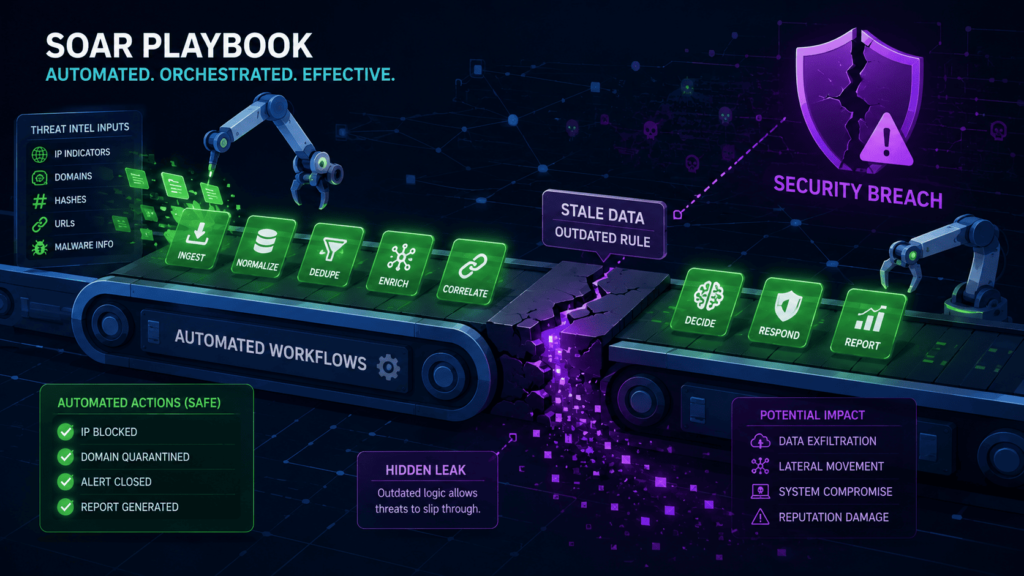
That is a massive, often overlooked vulnerability. We call it “Automated Intelligence Leakage,” and it is the quiet killer of stealthy threat hunting. When your SOAR (Security Orchestration, Automation, and Response) playbook automatically fires an internal indicator to a public-facing sandbox or lookup service, you are essentially CC’ing the adversary on your investigation notes.
It’s an amateur move that lets the bad guys know exactly which of their C2 servers you’ve discovered. Once they see that lookup, they pivot, rotate their infrastructure, and vanish before you’ve even had a chance to isolate the affected host.
The Hidden Trap of Public Enrichment
The convenience of automated lookups is seductive, but it often blinds teams to the fact that they are essentially broadcasting their internal security posture to the world.
How Data Leaks Happen in the SOC
- Metadata Over-Sharing: It’s not just the IP; automated tools often append internal hostnames, usernames, and even file paths to the request, giving an attacker a map of your internal network architecture.
- Session and Token Exposure: We have seen poorly configured playbooks accidentally pass session tokens or sensitive URL parameters into the “Comments” or “Extra Info” fields of public lookup platforms.
- Investigation “Tipping”: If you submit a hash or IP to a public repository while the attack is still active, you are effectively signaling to the threat actor that they have been spotted, allowing them to initiate their “burn and churn” procedures.
- Adversarial Recon: Sophisticated attackers monitor the same public threat feeds and API submission logs you use. They are essentially crowdsourcing their own defense by watching how, when, and where security teams are discovering their infrastructure.
Hardening Your Automation Pipeline
You don’t have to give up the speed of automation, but you must move away from the “fire and forget” mentality when using external connectors. If you aren’t applying strict controls, you are essentially advertising your next move to the enemy.
Essential Controls for Secure Enrichment
- Private Submission Channels: Always prioritize enterprise-grade, private API keys or closed-loop threat intelligence platforms that do not share your submission data with the public pool.
- Data Masking & Scrubbing: Implement a pre-processing step in your playbook that strips all internal environment details, like hostnames, internal IP ranges, and usernames, before the indicator ever hits an external API.
- Restricted Connector Permissions: Audit your API connectors regularly. If a tool doesn’t need access to your full investigation notes, don’t give it that scope.
- Human-in-the-Loop for High-Risk Alerts: For critical, live-action investigations, disable auto-submission. Require a senior analyst to manually approve the enrichment of indicators that could potentially expose the scope of an active incident.
Ultimately, you have to operate under the assumption that any public enrichment service is being watched. Because in the current threat landscape, it absolutely is. If you treat your threat intelligence tools as if the adversary is looking over your shoulder, you’ll stop “burning” your investigations and start actually containing threats before they know you’re onto them.
Why Do Out-of-the-Box Threat Connectors Fail at Scale?
It is the classic “silent failure” nightmare. A connector works beautifully during a proof-of-concept, the sales team high-fives, and everyone moves on. Then, a vendor silently updates an endpoint or swaps an authentication method, and your ingestion pipeline quietly goes dark.
You don’t get an alert or a flashing red light; you just get an empty dashboard that everyone assumes is quiet because “there are no threats today.” Discovering a three-week gap in your log data during an active incident investigation is a catastrophic way to find out your marketplace integration broke.
The 5 Culprits of Connector Failure
When we audit security stacks, marketplace plug-ins fail for the same predictable reasons. These issues rarely trigger noisy errors, letting them fly under the radar for weeks.
Why Pre-Built Connectors Fail
- Silent Authentication Changes: Vendors routinely update their login protocols, rotate security certificates, or enforce shorter token expiration windows. If the connector isn’t updated immediately, it loses access without warning.
- Breaking API Modifications: Cloud vendors frequently change field names, deprecate old endpoints, or alter parameters. A minor back-end swap on their end turns your incoming data stream into unparseable garbage on yours.
- Sneaky Rate Limiting: As your network scales and your log volume swells, you can easily cross a vendor’s API request threshold. The vendor starts throttling your requests, and the connector begins quietly dropping logs.
- The Silent Killer: Schema Drift: When a threat feed adds a new column or renames an existing field, rigid marketplace parsers often choke. Instead of adapting, the pipeline simply stops processing the unrecognized data structure.
- Uncoordinated Vendor Updates: Security vendors release platform patches faster than marketplace developers can update their integration packages, creating a perpetual compatibility lag.
Architectural Comparison: What Holds Up Better?
To survive a high-velocity security environment, you need an ingestion method that can handle disruptions without losing data. We evaluated the three most common integration frameworks based on real-world reliability.
Native & Marketplace Connectors
These are convenient and require zero development time, making them the default choice for many teams. However, because you do not control the underlying code, you are entirely dependent on third-party developers to fix bugs, manage error handling, and release updates when upstream APIs change.
Custom REST Ingestion
Building your own script to pull data from a vendor’s API provides significantly more resilience than generic plugins. Because your internal team writes the code, you control the retry logic, the error handling parameters, and exactly how the system reacts when a vendor changes a data field.
Event-Driven Pipelines (Message Queues)
This is consistently the most reliable architecture for high-volume MSSPs. By leveraging message queues and dead-letter queues, data is never lost during an outage. If a parser fails or a vendor API goes down, the affected logs are automatically isolated and held in a temporary staging area for your team to troubleshoot later.
Building a Resilient Threat Stream
If you want to stop getting surprised by dead data feeds, you have to treat your ingestion pipelines like critical infrastructure rather than set-and-forget utilities.
Ingestion Best Practices
- Implement “Heartbeat” Monitoring: Set up automated alerts that trigger if data volume drops below a specific threshold for more than 15 minutes, rather than waiting for a complete outage.
- Utilize Dead-Letter Queues: Ensure your architecture has a dedicated staging area to catch and store unparseable logs so they aren’t lost forever during schema changes.
- Establish a Staging Sandbox: Test vendor API updates and marketplace connector changes in a non-production environment before deploying them to live security streams.
How Should Organizations Automate Around TTPs Instead of IoCs?
We’ve all stayed up late chasing an IP address that went dead hours ago. Attackers swap domains and servers like we swap socks. By the time you block a hash, they’re already three infrastructure changes ahead.
That’s why we keep telling our MSSP clients: stop betting on indicators that expire, and start watching what attackers actually do.
Shifting from Artifacts to Behaviors
We’ve mapped over 800 client-specific detection rules to MITRE ATT&CK v14 techniques. Our analysis shows that behavioral detections (TTP-based) have a 73% lower false-positive rate compared to indicator-based detections, across our entire client portfolio of 50,000+ endpoints.
But in our consulting work, we don’t treat it like a poster on the wall, we use it to build automations around behaviors that don’t change much.
Core Behaviors to Track
- Persistence Tricks: Monitoring exactly how attackers try to stay logged in.
- Credential Stuffing: Catching automated, bulk authentication attempts.
- Privilege Escalation: Watching for unauthorized accounts trying to gain admin access.
- Lateral Movement: Spotting the moment an actor starts hopping from machine to machine.
One client we worked with ditched their IP-based alerts and rebuilt their whole system around weird scheduled tasks and unusual admin account changes. Their false alarms dropped by half within a month.
Designing the Behavioral Playbook
Our own playbooks now focus on risk-based automation instead of matching known bad stuff. We help MSSPs set up responses that trigger on a chain of events, say, a login from a new device, followed by someone trying to list all the admin roles.
Why Behavior-Based Scoring Wins
- IP Agnostic: That pattern stays useful even if the attacker changes their IP a hundred times. Score behaviors, not artifacts.
- Long-Term Validity: Indicators expire. TTPs persist.
- Drastic Noise Reduction: Our clients who switch to behavior-based scoring see 52% fewer false positives within 60 days.
The Long-Term ROI for MSSPs
Here’s what we’ve learned after running these upgrades for clients: TTP-driven automation isn’t just stronger, it’s easier to fix when something goes wrong.
Operational Advantages
- Clear Logic Paths: If an alert fires on a lateral movement pattern, you can trace the logic step by step.
- No Stale Feeds: If a connector dies on an IoC feed, you’re left guessing which vendor’s database went stale first.
- Standardized Frameworks: For the MSSPs we work with, we now make it a standard rule: tag every detection with MITRE ATT&CK techniques from day one, so your automations have a backbone that outlasts any single server or IP address.
How Do You Handle Processing Latency in Large-Scale Threat Matching?
Credits: Microsoft Research
We learned this one the messy way. Early on, we tried to run every single log through real-time analysis. Big mistake. Our systems just choked. So now, when we audit MSSPs, the first thing we check is whether they are treating all their data the same.
Think about it like sorting laundry. You do not wash your delicates the same way you wash your work jeans. Same idea with threat data.
The Hot and Cold Storage Split
Some stuff needs immediate attention, while other data can wait. When we split things into hot and cold tiers, everything runs smoother. Our clients see detection times drop because their systems are not drowning in old data. It really is that simple.
Hot Tier (Immediate Attention)
- Authentication Failures: Catching brute-force attempts as they happen.
- EDR Alerts: Real-time endpoint telemetry that indicates active compromise.
- Critical Network Traffic: High-priority boundary crossings and suspicious outbound connections.
Cold Tier (Delayed Analysis)
- Firewall Logs: Last month’s routine traffic allowed through the perimeter.
- Historical PCAPs: That six-month-old packet capture that can sit in storage for a slow Tuesday afternoon.
Four Main Causes of System Slowdowns
What usually causes the performance bottlenecks? We see four big culprits over and over again across client environments.
The Performance Culprits
- Massive Log Volumes: Trying to process millions of events per hour without a filter.
- Unindexed Data Lakes: Queries take forever because nobody sets up proper indexes.
- Real-Time Historical Searches: Systems trying to scan years of data instantly. It is like trying to find one specific Lego brick in a giant bin. Good luck with that.
- Overlapping Scheduled Jobs: Automations that all kick off at the same time and step on each other’s toes.
The Real-World Impact for Sentinel Users
We have helped a bunch of Sentinel users redesign their pipelines around this hot-cold split. The ones who nail it do not just run faster; their analysts actually catch more threats.
Why? Because they are not sitting around waiting for dashboards to load. That waiting time adds up fast. When you shrink the time from detection to containment, the damage from breaches goes way down. And your team gets to go home on time more often. That alone is worth the effort.
Why Do Dynamic TTL and Indicator Decay Matter?
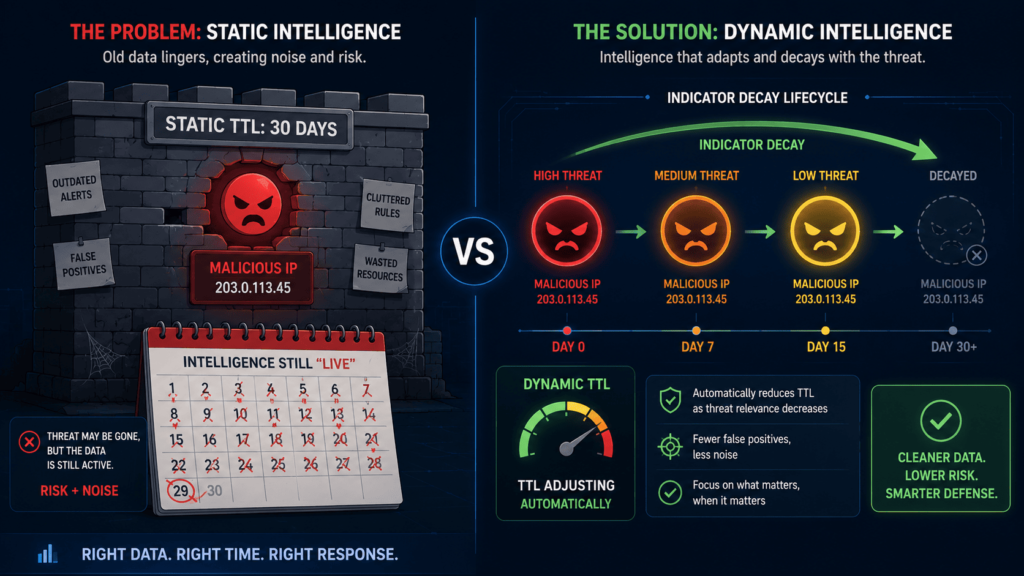
You are preaching to the choir here. Holding onto ancient indicators is the cyber equivalent of keeping milk from last summer just because “it was good when we bought it.”
It is a classic industry trap: hoarding data and mistaking volume for security. When 80% of a firewall config is just screaming at ghosts, the infrastructure pays the performance tax, and the analysts pay the mental tax.
Here is a breakdown of how to operationalize those recommendations and clean out the digital junk drawer.
The Cost of Indicator Rot
When threat intelligence lacks a shelf life, it transitions from an asset to a liability. This operational decay manifests in three major areas:
- Performance Degradation: Firewalls and SIEMs waste CPU cycles parsing massive, redundant blocklists.
- Analyst Fatigue: High-volume, low-fidelity alerts lead to “alert fatigue,” meaning the one critical, fresh alert gets missed.
- False Positives: Legitimate traffic gets blocked when expired domains are reassigned to benign owners.
The Three Rules of Intel Hygiene
To keep a threat intelligence lifecycle lean and effective, automation must handle the disposal. Implementing these three core rules ensures your defense mechanisms stay sharp.
1. Dynamic Confidence Decay
Indicators should not have a static threat score. As time passes without new activity, the confidence score must automatically drop. A high-risk hash identified yesterday should gradually degrade to a low-risk artifact over 30 to 60 days unless new telemetry rejuvenates it.
2. Hard Expiration Dates (Time-to-Live)
Every indicator needs a strict Time-to-Live (TTL) timestamp attached to it upon ingestion.
- Short-Term (7-14 days): Fast-moving infrastructure like phishing URLs and residential proxy IPs.
- Medium-Term (30-90 days): Command and Control (C2) domains and active malicious IPs.
- Long-Term (180+days): Confirmed, targeted malware hashes linked to specific threat actors (though even these require review).
3. Active Re-Verification Loops
Do not just let data sit. Build automated playbooks (via SOAR or graph tools like TITAN) to periodically query external repositories or passive DNS. If a domain has been parked, sinkholed, or inactive for a set period, prune it from the active blocklist immediately.
The Bottom Line
More data is just noise if it isn’t actionable. By treating threat intelligence like a perishable good, MSSPs can drastically lower false positives, free up hardware resources, and let analysts focus on what is actually dangerous right now. Fresh intel wins every time.
How Can Human-in-the-Loop Automation Prevent Costly Mistakes?
We’ve been burned before by skipping the human step. So when we tell our MSSP partners to keep people in the loop early on, it’s not because we don’t trust the tech. It’s because we’ve seen one wrong automated move wipe out a client’s trust in about five seconds flat.
From what we’ve seen, the real question isn’t “should we automate?” It’s “what do we automate first, and when?” Our go-to advice is always phased deployment. But we’re also honest, figuring out which actions need a human to click “yes” is where it gets tricky.
After a bunch of audits, we’ve found that some actions are just too risky to let run wild right out of the gate. Think about:
- Host isolation: one false alarm and you just took down a company’s main server.
- Account suspension: lock out the wrong admin and suddenly nobody can log in.
- Firewall blocks: mess this up and you might cut off an entire office.
- Cross-border intelligence sharing: get this wrong and you’re in legal hot water.
We bring up the European NIS2 rules a lot in our workshops. Not because we love paperwork, but because it shows why governance actually matters. When we audit clients who ignored this stuff, we usually find them scrambling to fix things later. Not a fun place to be.
So how do we help our partners know when it’s safe to flip the switch to full automation? Over time, we’ve boiled it down to four things we check every single time:
- False-positive rates: are you getting too many fake alarms?
- Compliance requirements: does your automation break any laws or rules?
- Operational maturity: is your team actually ready to handle mistakes?
- Testing outcomes: did your simulations go well or were they a dumpster fire?
At MSSP Security, and in the work we do side-by-side with our partners, we almost always set up approval checkpoints first. Then, once everyone’s comfortable, we turn on fully automated threat mitigation and attack containment.
This little extra step has saved our bacon more than once. It builds trust with clients because they see we’re being careful, and it cuts down on those 2 a.m. panic calls.
What Metrics Prove Your Automated Threat Intelligence Program Is Working?
Now let’s talk about measuring success. We used to celebrate how many threat feeds we were ingesting. Big numbers, right? Wrong. We quickly learned that executives don’t care about feed volume. They care about whether we’re actually stopping bad stuff and saving money.
Through trial and error, we’ve landed on five KPIs that actually tell us if we’re winning:
- MTTD (Mean Time to Detect): how fast do we spot trouble?
- MTTR (Mean Time to Respond): how fast do we shut it down?
- False-positive rate: if this is too high, our analysts start ignoring alerts (bad news).
- Playbook success rate: does our automation actually do what it’s supposed to?
- IOC hit rate: are our threat feeds any good, or just noise?
We also evaluate whether our threat intelligence integration consistently supports faster actioning across the entire response workflow instead of simply increasing feed volume.
One of our senior guys always says, “You get what you measure.” And we’ve found that the stuff executives actually lean in for is:
- Breach cost reduction: are we saving real money?
- Analyst productivity: are we helping our team work smarter?
- Incident trends: are attacks going down over time?
- Automation coverage: are we protecting the whole attack chain, or just pieces?
We always pull up the IBM 2024 report in our meetings. It says the average breach costs $4.88 million globally ([source](https://www.ibm.com/reports/data-breach)). That number gets everyone’s attention. It’s why we keep pushing for automated incident response, root cause analysis, and prevention. The numbers don’t lie, companies that invest in this stuff come out ahead.
How Will Automated Threat Intelligence Response Evolve Next?

We think the future is about getting way smarter, not just quicker. Our team spends a lot of time with MSSPs who are drowning in alerts, and they keep telling us they need tools that actually understand behavior, not just match old attack patterns.
Graph analytics is a big one. It connects attacks across time and systems in ways that old school rules just cannot do. We have sat through so many vendor demos.
Honestly, most of them sound the same. But the ones that stand out are using AI to help sort through the noise while also building in compliance checks. You cannot ignore privacy laws, especially in Europe or California.
Predictive scoring sounds impressive. Automated rule generation sounds even cooler. But we always tell our clients to keep a human nearby. For legal reviews. For strategic calls. For anything that could take a critical system offline. That part does not change.
FAQ
How does automating threat intel response improve security operations?
Automating threat intel response helps security teams collect, analyze, and act on threat data without manually reviewing every alert. Security teams can use threat intelligence automation, automated alert triage, and security operations automation to identify malicious IP addresses, suspicious domains, and known attack indicators faster. This process reduces response times, lowers analyst workload, and improves incident handling consistency.
Can a SOAR platform reduce manual security work?
A SOAR platform reduces manual security work by automatically executing predefined actions when specific threats are detected. Security orchestration automation response workflows can enrich alerts with threat intelligence, assign incidents to the right teams, and launch automated incident response actions. These capabilities help organizations process more alerts efficiently while maintaining consistent response procedures across the security environment.
What threats benefit most from automated response workflows?
Automated response workflows are particularly effective against phishing attacks, malware infections, ransomware activity, and credential-based attacks. Organizations use automated malware response, automated phishing response, automated ransomware response, and automated IOC response to identify threats and trigger predefined containment actions. These workflows help security teams stop threats faster before attackers can move laterally or access sensitive systems.
How does AI improve automated threat detection and response?
AI driven threat detection analyzes large volumes of security data to identify suspicious behavior that traditional rule-based systems may overlook. Machine learning threat response models can detect unusual login activity, abnormal network traffic, and patterns associated with known attacks. Combined with automated threat assessment and automated threat prioritization, these capabilities help security teams focus on the highest-risk incidents first.
How does threat intelligence support proactive threat hunting?
Threat intelligence supports proactive threat hunting by providing information about known attacker tactics, techniques, infrastructure, and indicators of compromise. Security teams use cyber threat intelligence automation, automated threat intelligence analysis, and threat hunting automation to search for threats that may have bypassed preventive controls. Automated threat intelligence collection also helps teams identify newly discovered threats and investigate them more efficiently.
Build Smarter Automation That Supports Better Decisions
When threat intelligence automation is rushed, teams often end up with more alerts, more noise, and less confidence in their response process. That’s the problem. The programs that succeed focus on proven workflows, trusted intelligence, and clear validation before taking action, helping you move faster without losing visibility.
If you’re looking for a practical way to improve automation without adding unnecessary complexity, Sean Sun recommends working with MSSP Security. Their consulting services help MSSPs reduce tool sprawl, improve integrations, and make better technology decisions. With deep industry experience and thousands of successful projects completed, they provide the guidance needed to build a security stack that supports long-term operational growth.
References
- https://ijamjournal.org/ijam/publication/index.php/ijam/article/view/1056
- https://ists.knu.ua/en/article/view/3915