

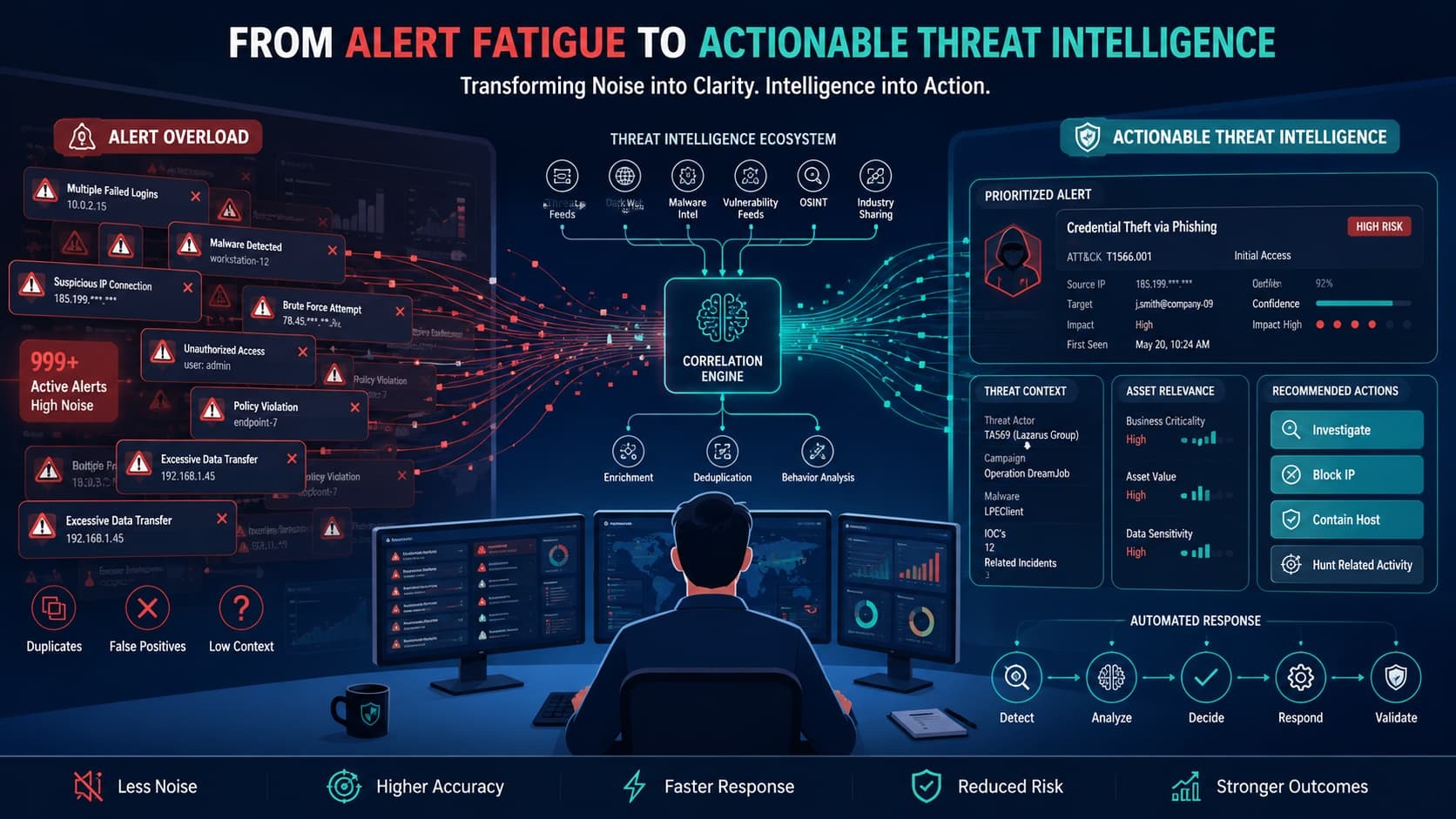
Threat intelligence alerts only matter if you act on them. It means turning security data into a clear decision like blocking an IP, investigating a user, or closing a false positive. The real problem isn’t getting more data; it’s building a process that consistently turns that data into action.
At MSSP Security, we’ve seen many organizations struggle with alert overload despite having access to large volumes of threat data. Too many teams drown in alerts without a clear workflow, creating noise, slowing investigations, and making it harder to focus on genuine threats. A defined system for filtering, prioritizing, and responding is what turns intelligence into measurable security outcomes.
Want to build that system? Keep reading.
Building Consistent Outcomes from Threat Intelligence
The following takeaways highlight the core elements organizations need to turn threat intelligence alerts into consistent, measurable security outcomes.
- Actionable threat intelligence combines context, asset relevance, and response guidance instead of relying on raw indicators alone.
- Effective threat intelligence alert management depends on enrichment, correlation, prioritization, and automation working together.
- Organizations achieve better results when they combine IOC-based detection, TTP-based threat detection, and structured response playbooks.
Why Most Threat Intelligence Feeds Fail to Reduce Alert Fatigue?
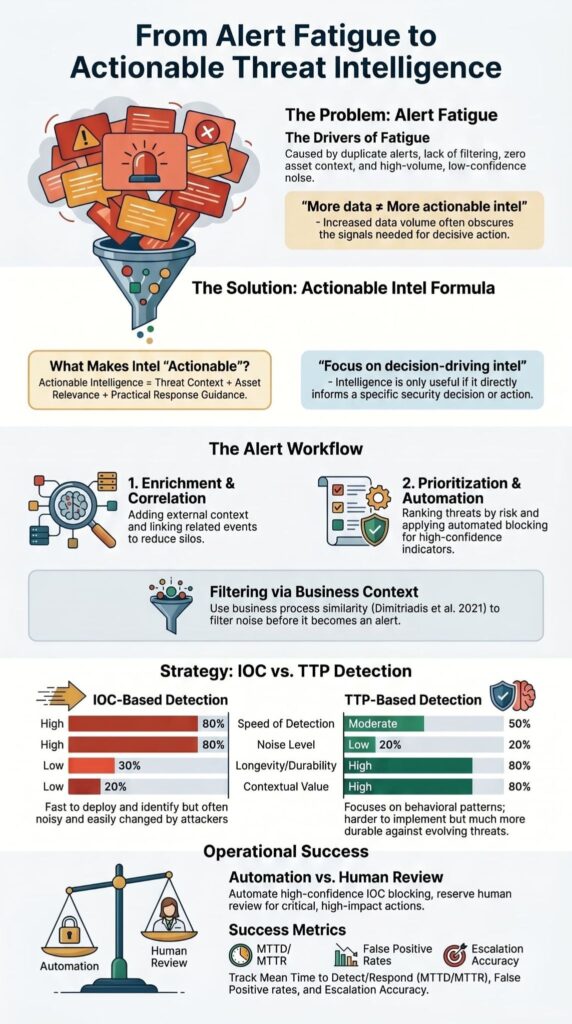
Many security managers mistakenly equate raw data volume with defensive capability. Consequently, operations teams ingest unrated Indicators of Compromise (IOCs) directly into their correlation engines, exposing analysts to thousands of redundant daily alerts. We frequently encounter this phenomenon, the “IOC Firehose” during our initial technical audits.
The intelligence itself wasn’t necessarily bad. The real failure was in the filtering, or the complete lack of it. A study by Ndichu (2026) on SOC alert fatigue backs this up, noting that under sustained, low-signal alert streams, analysts inevitably adopt coping behaviors like
“blanket suppression rules, severity-based skimming, and over-reliance on tool severity scores, creating blind spots exploitable by sophisticated adversaries” – arXiv.
Extra data only helps if it directly informs a decision. From our experience in streamlining security operations, the first crucial step to solving this problem is operationalizing threat intelligence soc so that every incoming data stream has a clear, structured workflow.
From our work with MSSPs, we see the same root causes again and again:
- Duplicate indicators popping up everywhere.
- No real filtering of the intel alerts.
- Weak or missing correlation with what assets the company actually owns.
- Zero business context to judge if a threat even matters.
- A constant stream of low-confidence alerts that go nowhere.
What Happens Before a Threat Intelligence Alert Is Generated?
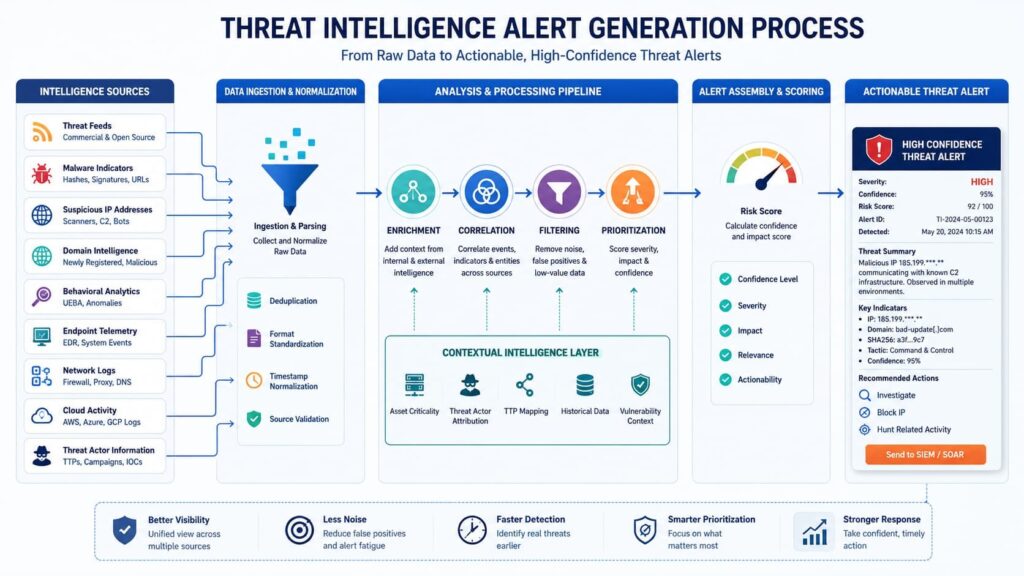
The work on a threat alert starts way before an analyst sees it. Good teams build a system to get the intel ready. They don’t just pour data into the security team’s lap. You start by gathering the raw stuff from different places. This includes bad IPs, malware reports, vulnerability details, and info on how attackers behave. Then, you have to make all that data look the same.
We’ve seen a good process for making intel useful. It goes like this:
- Gather the intelligence feeds.
- Make all the data formats match.
- Give each piece of data a confidence score.
- Add more context to the alert.
- Check the intel against your list of actual computers and software.
- See how it fits with attack patterns like MITRE ATT&CK.
- Put your final detections into the SIEM, EDR, and SOAR tools.
Adding context in the SIEM is the most valuable part. This data enrichment process runs smoothly when you master the technical implementation of integrating threat intelligence feeds siem to ensure internal and external logs correlate perfectly. This is where a bad IP address gets linked to a real person’s account, an important server, or a key business app.
How Should Security Teams Triage Threat Intelligence Alerts?
This is where the rubber meets the road. Triage is the moment threat intelligence becomes something you can actually use.
How to check if an alert is real?
First, an analyst has to validate the evidence. They can’t just trust the alert. They need to look at the source logs, check the endpoint data, and verify any network traffic. They confirm the indicator actually matches and look for other detections that support it. Doing this stops useless investigations dead in their tracks.
In our work, we see this step alone can cut an analyst’s workload significantly.
How to decide what matters most?
Prioritizing risk isn’t about one thing. You have to weigh several factors together:
- How critical is the affected asset?
- Is the threat actor known to target us or our clients?
- Is there active exploitation happening right now?
- What’s the potential business impact?
- Has there been similar historical activity?
Here’s a simple example from one of our audits. A malicious IP hitting a public information kiosk might just get logged for monitoring. That exact same IP trying to talk to a payment processing system? That’s an immediate, all-hands escalation. The difference is entirely in the business context, which is something many feeds and tools completely miss.
Getting this right is a core part of the service selection. We help MSSPs with finding products that bake this context into the triage process.
Possible Outcomes
| Decision | When to Use | Typical Action |
| Escalate | High confidence and business impact | Incident response |
| Monitor | Limited evidence | Continued observation |
| Suppress | Confirmed benign activity | Rule tuning |
Managed service providers often struggle with keeping their detection rules clean, but we treat alert suppression as a continuous optimization cycle rather than a set-it-and-forget-it task. When we audit a client’s SIEM logic, our primary goal is building filters that ruthlessly prune out background noise without blinding the engineering team to active threat actor movements.
In our consulting engagements, we have found that enforcing standardized playbook guidelines routinely slashes an analyst’s initial triage cycle by up to 40%, keeping their focus on real incidents.
How Does Modern Detection Engineering Leverage Threat Intelligence from IOCs to TTPs?
Mature teams combine indicators and attacker behaviors to build detections that survive changing infrastructure and campaigns. Traditional detection programs focused heavily on IOCs. While indicators remain valuable, adversaries frequently rotate infrastructure.
Behavioral detections last longer because attackers often reuse techniques even after changing domains, IPs, and malware variants.
The table below illustrates the difference.
| Detection Type | Key Characteristics | Focus Area |
| IOC-Based Detection | Fast deployment, Higher false positives, Easier automation | Infrastructure focused |
| TTP-Based Detection | Longer lifespan, Better context, Better threat hunting | Behavior focused |
Organizations increasingly map detections to MITRE ATT&CK techniques rather than relying exclusively on indicators.
Examples include:
- Credential dumping detection
- PowerShell abuse monitoring
- Lateral movement analytics
- Command and control behavior detection
Threat intelligence alert correlation becomes more powerful when indicators and behaviors are combined. This hybrid model improves resilience and strengthens threat intelligence alert execution across changing campaigns. Many practitioners also use MISP to structure intelligence sharing and connect indicators with associated tactics and techniques.
This creates more durable detection content that remains relevant beyond a single campaign.
What Should Be Automated and What Requires Human Review?
High-confidence, low-risk actions can be automated, while business-critical decisions typically require analyst approval. Threat intelligence workflow automation can dramatically reduce response times.
At MSSP Security, we have repeatedly observed that carefully scoped automation removes repetitive work while allowing analysts to focus on higher-value investigations. Accelerating incident response time is highly achievable by automating threat intel response to effectively minimize the attacker’s dwell time within your network environment.
The key is understanding where automation creates value and where human judgment remains essential.
| Action | Automation Suitability | Human Review Needed |
| IP blocking | High | Sometimes |
| Domain blocking | High | Sometimes |
| Endpoint isolation | Medium | Asset-Dependent |
| Account disabling | Medium | Often |
| Production system containment | Low | Usually |
Automation commonly supports:
- IOC blocking threat intelligence workflows
- Threat intelligence alert blocking
- Threat intelligence alert deployment
- Threat intelligence orchestration
- SOAR threat intelligence alerts
Organizations should maintain human-in-the-loop approval processes for actions that could impact production systems or business operations. Threat intelligence alert automation succeeds when rules are narrow, confidence scores are high, and rollback procedures are documented. Those safeguards help prevent operational disruption as automation coverage expands.
Why Real-Time Threat Intelligence Is Harder Than It Sounds?
Many teams think real-time intelligence is a silver bullet. It rarely works out that way. In practice, real-time intel often shows up without enough proof, context, or confidence to act on. The idea is that faster data means better security. Our experience tells a different story. Indicators frequently arrive too late, after an attacker’s campaign has already changed.
Security folks call this “chasing burned indicators.” You’re running after something that’s already useless. Security teams love open-source feeds because platforms like X can distribute zero-day indicators in seconds, but roughly 80% of that data turns out to be recycled noise or unverified panic.
During our product evaluation projects, we look for tools that can handle strict dynamic aging rather than just dumping raw data into a database. In our own lab environments, we recommend a workflow where open-source indicators must pass automated sandbox validation within 15 minutes, or they are purged.
Can Dark Web Intelligence Be Actioned Reliably?
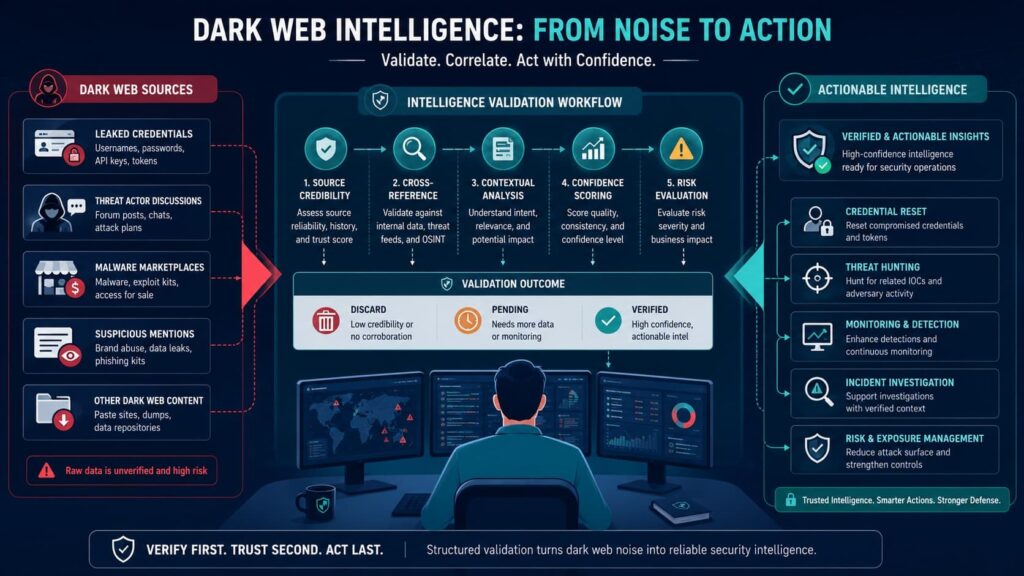
Dark web intelligence sounds exciting. It can show stolen passwords, leaked company data, new malware, and criminal plans. But most of what’s found there never turns into something you can actually do. For dark web intel to be useful, it has to be linked to your specific stuff. This means your assets, your employee credentials, your brand names, or your network.
To make this happen, teams need a process:
- Collect the relevant underground data.
- Clean it up and put it in a standard format.
- Add more context to the finding.
- Match the data against your internal asset list.
- Validate that the finding is real.
- Finally, generate an operational alert.
Platforms like AlienVault OTX and MISP can help with the enrichment and correlation steps. But the core requirement is asset mapping. Without it, you’re just collecting scary stories. According to guidelines and studies evaluating the NIST framework, data ingestion should not be uncalculated; rather, as emphasized by Dimitriadis et al. (2021),
“a relevant Cyber Threat Intelligence Product (CTIP) is expected to be actionable to the organization consuming it when the utilization of its content leads to a decision or an action to control an ongoing, imminent, or a future threat” – MDPI.
The organizations that do this well, and the MSSPs that support them, focus on finding actionable connections. They don’t just collect intelligence for the sake of having it. In our product audits, we look for tools that build this correlation in from the start, because a feed full of unmatched dark web data is just a cost center, not a security tool.
How Do Security Teams Investigate Threat Intelligence Alerts?
An investigation is about connecting the dots. You take the outside intelligence and link it to what’s happening inside your own network. The goal is to figure out the scope, the timeline, which assets are hit, and what the attacker wants.
When investigations follow a clear process, the whole response gets better. A typical workflow looks like this:
- Initial alert review
- IOC pivoting
- Threat actor analysis
- Timeline reconstruction
- Scope determination
- Impact assessment
- Escalation decision
First, an analyst reviews the original alert and checks the supporting evidence. Is it real? Then they start pivoting. They take the bad IP, domain, or file hash from the alert and use it to find more related activity across the network. Good alert enrichment during this phase can show connections to larger campaigns, specific malware families, or past incidents.
The next useful step is mapping what you see to a framework like MITRE ATT&CK. This helps an analyst guess what the attacker might do next and where to look for more clues.
In the end, the investigation usually boils down to three simple questions:
- Which specific systems are affected?
- What actually happened, and when did it start?
- What is the attacker probably trying to achieve?
How Does Threat Intelligence Support Containment and Remediation?
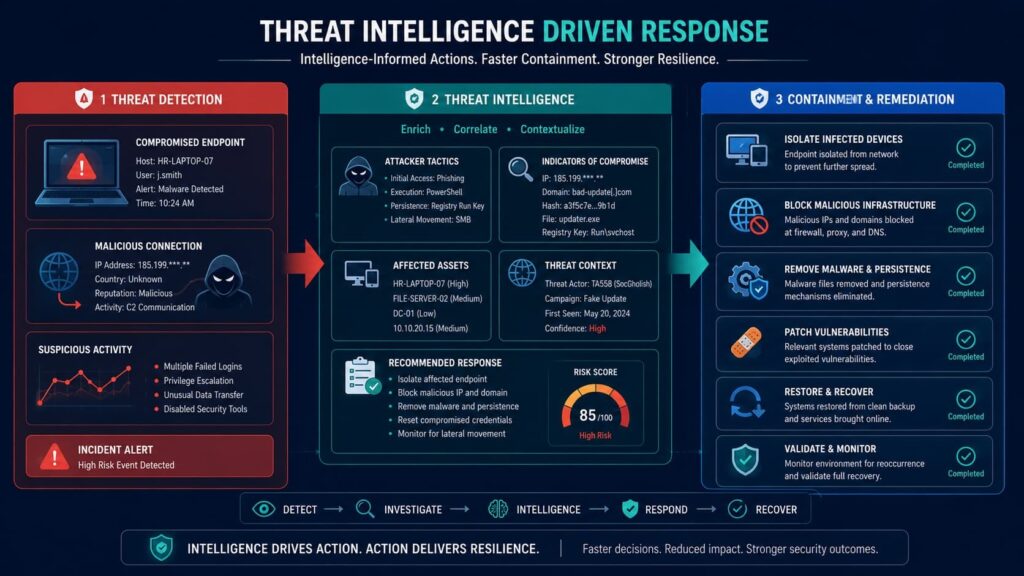
Good threat intelligence should tell you not just what happened, but what to do about it. The findings from an investigation need to connect directly to the steps for fixing the problem.
Common actions to contain a threat include:
- Isolating an infected computer from the network.
- Blocking a malicious IP address.
- Blocking a bad domain.
- Locking down a compromised user account.
- Terminating a suspicious VPN session.
Intelligence also guides the cleanup, or eradication. This means:
- Removing malware from a system.
- Forcing a password reset for affected accounts.
- Revoking access tokens.
- Finding and deleting the attacker’s backdoors.
- Fixing the misconfigurations they exploited.
Many teams use standards like STIX to formally describe these “courses of action.” This lets them automate some steps or follow a clear manual checklist. The strongest security programs we’ve seen treat every incident as a lesson. What they learn feeds back into their systems.
How Security Leaders Measure Success When Actioning Threat Intelligence Alerts?
Effective programs track operational outcomes rather than feed volume or indicator counts. Many organizations measure intelligence programs incorrectly. Feed volume is not a meaningful success metric. Operational outcomes are.
The following metrics provide stronger visibility.
| Metric | Why It Matters |
| Mean Time to Detect (MTTD) | Detection speed |
| Mean Time to Respond (MTTR) | Response efficiency |
| False Positive Rate | Alert quality |
| Escalation Accuracy | Analyst effectiveness |
| Automation Coverage | Operational scale |
Additional performance indicators include:
- Threat intelligence alert reduction rates
- Threat intelligence alert tuning effectiveness
- Threat intelligence alert suppression rates
- Automation success rates
We have found that the most mature organizations review these metrics monthly and adjust workflows accordingly. Continuous measurement supports threat intelligence alert optimization while improving stakeholder confidence. Governance remains equally important.
Defined ownership, escalation procedures, and reporting standards help align security operations with broader business objectives.
FAQs
How can I improve actioning threat intelligence alerts in a busy SOC?
Improving actioning threat intelligence alerts requires a structured process for reviewing, prioritizing, and responding to alerts. Security teams should perform threat intelligence alert triage to determine relevance, validate indicators before taking action, and enrich alerts with asset and user context.
A documented threat intelligence alert response workflow helps analysts make consistent decisions and reduces delays during investigations.
What causes alert fatigue when working with threat intelligence alerts?
Alert fatigue threat intelligence problems occur when analysts receive large numbers of low-priority, duplicate, or poorly contextualized alerts. Threat intelligence alert filtering, suppression rules, and alert tuning help reduce unnecessary notifications before they reach the SOC.
Regular threat intelligence alert optimization reviews can identify noisy data sources and ineffective detection rules, allowing analysts to focus on incidents that present genuine security risks.
When should organizations use automated threat intelligence response?
Organizations should use automated threat intelligence response when response actions follow predictable rules and have a low risk of disrupting business operations. Common examples include IOC blocking threat intelligence activities, malicious domain blocking, and indicator-based containment actions.
Threat intelligence workflow automation should include validation checks, approval requirements when necessary, and monitoring controls to ensure that automated actions remain accurate and effective.
How does threat intelligence alert enrichment help investigations?
Threat intelligence alert enrichment improves investigations by adding relevant context to alerts before analysts begin their review. Enrichment data may include asset criticality, known threat actor associations, historical activity, and related indicators. Threat intelligence alert correlation becomes more effective when enriched data is available.
Threat intelligence enrichment SIEM capabilities help analysts understand the significance of alerts and prioritize investigations more accurately.
What metrics should be tracked for threat intelligence alert response?
Organizations should track threat intelligence alert response metrics such as mean time to detect, mean time to respond, validation accuracy, false-positive rates, and containment success rates. Threat intelligence alert response KPIs should also measure alert volume, prioritization effectiveness, and response consistency.
These metrics help security leaders evaluate the effectiveness of operationalizing threat intelligence and identify opportunities for process improvement.
What Does It Take to Build a Sustainable Intelligence-Driven SOC Through Actioning Threat Intelligence Alerts?
When threat intelligence isn’t tied to action, your SOC can quickly become overwhelmed by alerts that lead nowhere. The difference comes from turning intelligence into clear decisions, backed by the right processes and consistent tuning. Results matter.
For organizations looking to strengthen how intelligence supports daily operations, practical guidance can make the process much easier. At MSSP Security, we’ve worked with MSSPs across thousands of engagements and have seen firsthand how the right tools, careful product evaluation, and regular auditing improve visibility and reduce operational friction.
References
- https://arxiv.org/abs/2605.08316
- https://www.mdpi.com/1424-8220/21/14/4890