


Evaluating MSSP Portal Usability helps organizations assess whether their security portal is secure, efficient, and easy for clients to use.
A well-designed portal enables users to monitor alerts, access reports, track incidents, and communicate with security teams through intuitive navigation and streamlined workflows.
At MSSP Security, we review both technical capabilities and real user behavior to identify usability gaps affecting adoption and transparency. Continue reading to learn how MSSP portal usability can be improved.
What To Know Before Evaluating Your MSSP Portal?
Before reviewing an MSSP portal, it is important to understand how usability affects both security operations and client experience.
- Identifies usability gaps that may impact client adoption, productivity, and service transparency.
- Balances security requirements with simple interfaces, clear dashboards, and streamlined workflows.
- Our experience at MSSP Security shows that effective improvements require reviewing both technical features and real user behavior.
Why MSSP Portal Usability Impacts Client Experience And Security Operations?
When helping MSSPs evaluate security products, we often find that technical capabilities are prioritized while daily user experience is overlooked. A managed security portal may offer vulnerability reports, incident alerts, analytics dashboards, and performance reporting, but these features only provide value when clients can access and understand information quickly.
At MSSP Security, we include usability reviews in product selection and audit processes to help MSSPs identify platforms that support better client interactions. Evaluating MSSP Portal Usability involves reviewing:
- Navigation and ease of access
- Security information clarity
- Workflow efficiency
- Communication features
- Permission management
Our experience shows that poor navigation, unclear dashboards, or complicated workflows can reduce user adoption and delay responses. A proper mssp portal usability evaluation focuses on real user behavior, ensuring the portal delivers strong portal user experience, intuitive navigation, and streamlined workflows. without unnecessary complexity.
Why MSSP Portal Usability Impacts Client Experience And Security Operations?

When helping MSSPs select and audit security products, we often find that technical capabilities receive more attention than how users interact with the platform. A managed security portal may include:
- Vulnerability reports
- Incident alerts
- Analytics dashboards
- Performance reporting
- Security notifications
However, these features are only valuable when clients can quickly access and understand the information they need. In our experience, unclear navigation, complex workflows, or poor dashboard structure can slow responses during critical events.
Evaluating MSSP Portal Usability means reviewing the complete user journey, including:
- Platform access and navigation
- Security information clarity
- Task completion speed
- Team communication
- Permission management
Our product audits focus on whether these features work effectively in real situations, helping MSSPs improve mssp portal usability, incident visibility, status tracking, and overall portal user experience..
What Is The Best Way To Evaluate MSSP Portal Usability?
An effective MSSP portal usability evaluation helps MSSPs determine whether a security platform supports both client expectations and operational needs. When we help MSSPs select and audit security products, we review usability alongside technical capabilities to identify potential gaps before they affect users.
An effective MSSP portal usability evaluation helps MSSPs determine whether a security platform supports both client expectations and operational needs. When we help MSSPs select and audit security products, we review usability alongside technical capabilities to identify potential gaps before they affect users.
“Usability is a quality attribute that assesses how easy user interfaces are to use.” – Nielsen Norman Group
This highlights why MSSP usability evaluations should focus not only on security capabilities but also on how easily users can navigate, understand, and complete tasks within the portal.
The evaluation process typically covers:
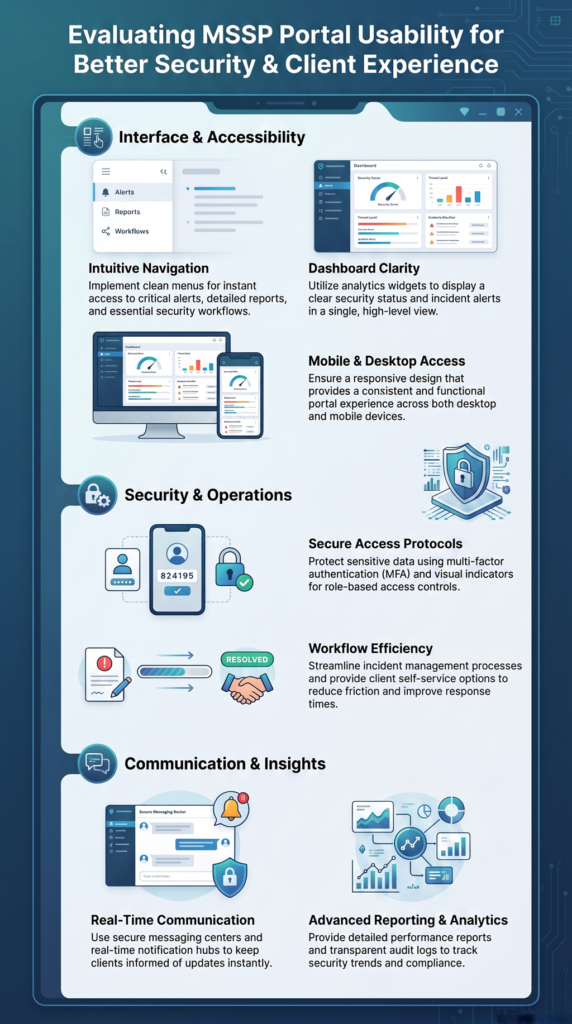
- Portal structure, navigation, and dashboard organization
- User journeys for reports, incidents, tickets, and notifications
- Security access features such as secure login, MFA, and role-based access
- Workflow testing for incident response, approvals, and client self-service
To perform a complete review, MSSPs should evaluate each usability area based on how users interact with the portal in real situations.
| Evaluation Area | What To Review | Why It Matters |
| Navigation And User Experience | Menu structure, information hierarchy, and ease of access | Helps users find security information faster and improves portal usability |
| Dashboard Clarity | Security status, incident visibility, analytics dashboard, and reporting views | Allows users to understand risks and make faster decisions |
| Secure Access | Secure login, MFA, role-based access, and permission-based views | Protects sensitive information while maintaining a smooth user experience |
| Workflow Efficiency | Incident workflows, approvals, ticket management, and client self-service | Reduces delays and improves operational efficiency |
| Communication Features | Secure messaging, notifications, and collaboration tools | Improves transparency and strengthens client communication |
| Reporting And Analytics | Report access, audit logging, and performance reporting | Helps clients understand security activities and service performance |
From our experience, usability issues often appear when users face unnecessary steps or unclear information flows. Reviewing intuitive navigation, dashboard clarity, and streamlined workflows helps MSSPs choose platforms that improve client portal usability and overall portal user experience. A strong evaluation ensures security controls remain effective while making daily interactions easier for clients and security teams.
How Intuitive Navigation Improves MSSP Portal User Experience?
When evaluating MSSP portal usability, we review how easily users can navigate the platform and access important security information. In our product selection and audit services for MSSPs, we assess whether portals support both technical teams and business users with a clear, efficient experience.
A strong portal should provide:
- Clear menu structures and logical information hierarchy
- Quick access to reports, incidents, and support tickets
- Simple interface design with consistent navigation
- Easy access to notifications and security updates
Our experience shows that many usability issues come from complex navigation paths rather than missing features. Users need information organized around business priorities, not only technical categories.
A well-structured Customer Portal Service Interface helps MSSPs create clearer user journeys by organizing important features, security information, and client actions in a more accessible way. This approach supports better navigation, reduces friction, and improves the overall portal user experience.
By improving intuitive navigation, dashboard clarity, and user experience design, MSSPs can increase client portal usability, reduce friction, and help clients interact with security services more effectively. A proper evaluation ensures the portal supports real workflows instead of adding unnecessary complexity.
How Dashboard Clarity Improves MSSP Portal Security Visibility?
When evaluating MSSP portal usability, dashboard clarity is a key factor in determining how effectively users understand security information. In our MSSP product selection and audit process, we often find that platforms contain valuable data but fail to present it in a way that supports quick decisions.
A strong dashboard should highlight:
- Current security status and active incidents
- Risk priorities and required actions
- Recent updates and performance trends
Different users need different levels of visibility. Security analysts may require detailed alerts, while executives may need simplified risk summaries. This makes customizable dashboards and analytics dashboards essential features for modern MSSP portals.
Our experience shows that improving dashboard clarity, incident visibility, and status tracking helps reduce confusion and improves response efficiency. A well-designed dashboard turns complex security data into practical insights, helping clients interact with the portal with greater confidence.
How Secure Access Improves MSSP Portal Usability?
Credit: IBM Technology
When evaluating MSSP portal usability, secure access design is an important factor because users need both protection and a smooth experience. In our MSSP product selection and audit process, we often find that overly complex access controls can reduce adoption, while weak controls can expose sensitive security information.
A well-designed portal should support:
- Secure login and multi-factor authentication
- Role-based access and permission-based views
- Identity governance and access governance
- Delegated access with limited access interfaces
Different users require different levels of visibility. Security teams may need detailed incident workflows, while executives may only need summaries, risk indicators, and reports.
Our experience shows that effective secure portal usability depends on balancing strong protection with simple workflows. Reviewing the authentication flow, access control, and user permissions helps MSSPs choose platforms that improve portal user experience without compromising security.
How Workflow Efficiency Improves MSSP Portal Usability?
When evaluating MSSP portal usability, workflow efficiency is a key factor because it affects how quickly users can complete security tasks and respond to incidents. In our MSSP product selection and audit process, we often find that platforms have strong features but lack connected workflows that support daily operations.
An effective portal should help users manage:
- Incident reporting and alert triage
- Support ticket access
- Approval workflows
- Security investigations
- Client self-service requests
Our experience shows that disconnected processes can create delays, missed updates, and limited status visibility. By improving streamlined workflows, workflow automation, and incident workflow management, MSSPs can reduce manual tasks and improve portal efficiency.
A well-designed self-service portal allows clients to access information, track progress, and communicate with security teams more effectively. Evaluating these workflows helps MSSPs select platforms that provide better client portal usability and a smoother overall user experience.
How Communication Features Improve MSSP Portal Usability?

When evaluating MSSP portal usability, communication features are an important factor because clients need simple ways to receive updates, ask questions, and collaborate with security teams. In our MSSP product selection and audit process, we review whether a portal supports clear communication without relying on disconnected channels.
A modern MSSP portal should provide:
- Secure messaging and threaded chat
- Two-way communication
- Notification center
- Collaboration tools
- Secure collaboration features
Our experience shows that scattered communication across emails, chat platforms, and ticket systems can make it difficult to track incident discussions and response actions. A centralized communication hub helps MSSPs improve service transparency, maintain historical records, and strengthen support responsiveness.
A well-designed portal communication notification center allows users to receive security updates, track conversations, and manage important alerts from a single location. This improves real-time communication while helping MSSPs maintain clearer records of client interactions.
By reviewing communication workflows, we help MSSPs select platforms that improve client portal usability, enable better real-time updates, and create a smoother portal user experience for both clients and security teams.
How Mobile Access Improves MSSP Portal Usability?
When evaluating MSSP portal usability, mobile access and responsive design are important factors because users increasingly need security information beyond desktop environments. In our MSSP product selection and audit process, we review whether platforms provide a consistent experience across desktops, tablets, and smartphones.
A mobile-friendly portal should allow users to:
- Review alerts and incident status
- Access reports
- Receive notifications
- Respond to security requests
Our experience shows that desktop-focused portals often create issues such as difficult navigation, poor dashboard scaling, and limited notification visibility on smaller screens. A strong responsive design ensures users can interact with the platform efficiently from any device.
Reviewing mobile access mssp portal features helps MSSPs identify whether their platforms support consistent experiences across smartphones and tablets. Features such as mobile notifications, incident tracking, and report access can improve flexibility for users managing security operations remotely.
By assessing mobile access, simple interface design, and overall portal usability, we help MSSPs select products that deliver a consistent portal user experience and support faster access to critical security information.
How Reporting Improves MSSP Portal Usability And Security Transparency?
When evaluating MSSP portal usability, reporting features are an important consideration because clients rely on security data to understand risks and make informed decisions. In our MSSP product selection and audit process, we review whether reports are accessible, clear, and useful for different user roles.
Key areas we assess include:
- Report access
- Audit logging
- Activity tracking
- Performance reporting
- Security analytics
Our experience shows that having detailed technical data is not enough if users cannot understand what happened, why it matters, or what action is required. Effective audit logging improves accountability, while clear performance reporting supports better service transparency.
By reviewing reporting capabilities and usability, we help MSSPs select platforms that improve managed security portal experiences, strengthen customer trust, and provide clients with clearer visibility into security operations.
How Usability Testing Improves MSSP Portal Usability Over Time?
When evaluating MSSP portal usability, usability testing should be treated as an ongoing process rather than a one-time review. In our MSSP product selection and audit services, we help identify whether security platforms continue to support changing user needs, workflows, and business requirements.
“Usability refers to evaluating a product by testing it with representative users performing representative tasks.” – NIST
This reinforces the importance of testing MSSP portals with real users and realistic security workflows to identify usability issues before they affect adoption and operational efficiency.
A continuous review process may include:
- User interviews
- Task completion testing
- Navigation reviews
- Workflow analysis
- Feedback collection
Our experience shows that regular usability testing helps uncover friction points before they affect user adoption. By using feedback loops, MSSPs can improve portal efficiency, platform usability, and overall portal user experience.
Key areas to measure include:
- Ease of use
- User adoption
- Support responsiveness
- Workflow effectiveness
Continuous improvement allows MSSPs to refine their managed security portal, improve client interactions, and ensure the platform remains practical as security operations evolve.
How MSSP Security Improves MSSP Portal Usability?
Improving a managed security portal requires more than adding security features. The platform must also support clear communication, efficient workflows, and a better experience for users. At MSSP Security, we help MSSPs select and audit security products by reviewing both technical capabilities and real user needs.
When evaluating MSSP portal usability, we focus on key areas such as:
- Portal user experience
- Secure access design
- Dashboard clarity
- Workflow optimization
- Access governance
- Reporting usability
Our experience shows that strong security tools can still create challenges when users struggle with navigation, visibility, or daily workflows. By improving intuitive navigation, streamlined workflows, and client self-service, MSSPs can increase adoption and operational efficiency.
A successful managed security portal should make security information easier to understand while maintaining strong protection. Continuous usability evaluation helps MSSPs build platforms that improve transparency, collaboration, and long-term client relationships.
FAQ
What is the purpose of evaluating MSSP portal usability?
Evaluating MSSP portal usability helps identify issues with navigation, workflows, access control, and user experience. The goal is to improve client adoption, operational efficiency, and service transparency.
What features should be reviewed in an MSSP portal evaluation?
Key areas include intuitive navigation, dashboard clarity, secure login, multi-factor authentication, role-based access, workflow automation, client self-service, reporting, and audit logging.
How does portal usability impact client experience?
Better usability helps clients access security information faster, track incidents, and communicate with security teams more effectively. Poor usability can reduce adoption and slow responses.
Why should MSSP portals balance security and usability?
Strong security controls protect sensitive data, while simple workflows help authorized users access important information without unnecessary complexity.
How often should MSSPs test portal usability?
Usability testing should be performed continuously to identify issues, collect user feedback, and improve the portal as security needs and client expectations change.
How Does Continuous Evaluation Improve MSSP Portal Usability?
Evaluating MSSP portal usability helps MSSPs create secure, efficient, and user-friendly platforms. At MSSP Security, we support MSSPs through vendor-neutral product selection, auditing, and stack optimization to identify usability gaps and improve operations.
With 15+ years of experience and 48K+ projects completed, we help organizations choose the right tools and enhance visibility. Learn how our consulting services can support your goals: MSSP Security Consulting Services.
References
- https://www.nngroup.com/articles/usability-101-introduction-to-usability/
- https://www.nist.gov/programs-projects/usability-testing