


Choosing Threat Intelligence Platform (TIP) starts with understanding your security operations. The right platform should support your SOC workflows, improve investigations, and fit into the tools your team already uses. At MSSP Security, we’ve helped managed security providers evaluate and audit threat intelligence platforms based on real operational needs instead of product demos.
A practical assessment focuses on intelligence quality, integrations, automation, governance, and analyst experience. Taking this approach makes it easier to compare solutions and select one that delivers long-term value. Keep reading for a practical framework to evaluate a Threat Intelligence Platform (TIP) with confidence.
TIP Buying Essentials
Before comparing vendors, keep these practical evaluation principles in mind to choose a threat intelligence platform that supports real security operations.
- Start with operational needs, not vendor features. Define your SOC, incident response, and threat hunting use cases before evaluating any threat intelligence platform.
- Prioritize intelligence quality and integrations. Choose a TIP that delivers contextual, high-confidence intelligence and integrates seamlessly with SIEM, SOAR, XDR, and existing security workflows.
- Validate with a real-world PoC. Measure success using operational KPIs such as MTTR reduction, analyst productivity, automation effectiveness, and multi-tenant support before making a purchasing decision.
Why Should You Start with Security Use Cases Instead of Vendor Features?

It is easy to get excited by product demos. But a polished presentation doesn’t always show how a platform will perform during a busy day in the SOC. We’ve seen this happen many times while helping MSSPs review new security tools. The demo looked great. The daily workflow told a different story.
A threat intelligence platform should solve real problems before adding new features. Most security teams already have a SIEM, endpoint tools, ticketing systems, or some level of automation. Adding another platform without a clear purpose often creates another dashboard instead of improving investigations.
Our team always begins with the same question: What problem are analysts trying to solve? That conversation usually reveals where threat intelligence can save time or improve decisions.
Common operational use cases include:
- Alert enrichment
- Incident response
- Threat hunting
- Detection engineering
- Vulnerability prioritization
- Executive reporting
Before comparing products, map how intelligence moves through the organization’s cyber threat intelligence lifecycle. That step shapes every later decision, from deployment to automation.
Which intelligence use cases matter most?
Not every organization uses threat intelligence the same way. Strategic intelligence helps leaders understand long-term trends, industry threats, and changes in the threat landscape.
Operational intelligence supports the SOC by adding context to alerts, tracking campaigns, and helping analysts make quicker decisions. Technical intelligence focuses on indicators, malware, YARA rules, Sigma rules, and other investigation data.
Then there is tactical intelligence. We think this is where many teams see immediate value because it connects threat research with detection engineering. Instead of reading reports, analysts can turn what they learn into better detections.
For most SOCs, operational and tactical intelligence provide the fastest return because they improve work analysts already perform every day.
Why do MSSPs prioritize operational intelligence?
Managed security providers work across many customer environments. That changes what matters.
Our customers rarely ask how many threat feeds are connected. They care about why an alert matters, whether similar activity has appeared elsewhere, and how fast their team responded. Those questions can only be answered with useful context.
Operational intelligence helps by supporting:
- Faster investigations
- Better dark web threat intelligence
- Stronger threat intelligence automation
- Lower MTTR
- Better SLA performance
- More accurate identity-focused investigations
We’ve learned that reducing investigation time often delivers more value than adding another feed. Analysts spend less time searching across different tools and more time making informed decisions, which reflects the broader benefits of using TIP in security operations when threat intelligence is integrated into everyday SOC workflows.
Should Your Organization Consume Intelligence, Produce It, or Both?
Every organization has different goals. Teams that already understand what a threat intelligence platform is often find it easier to decide whether they only need trusted intelligence feeds or whether producing their own intelligence will add operational value over time.
Others create their own intelligence during investigations. Mature SOCs and MSSPs often do both because they learn from every incident and share those lessons across their teams.
We don’t recommend building an internal intelligence program unless there is a clear reason. Producing intelligence takes skilled people, repeatable processes, and ongoing governance. Technology alone won’t do it.
A better starting point is understanding how intelligence will support daily operations. Once that process becomes consistent, organizations can decide whether creating their own intelligence adds value.
| Model | Best fit |
| Consumer | Teams using commercial intelligence feeds |
| Producer | Internal CTI teams publishing intelligence |
| Hybrid | MSSPs or large organizations doing both |
The right model depends on how information is shared. Some organizations only enrich alerts. Others publish new indicators after every investigation.
We’ve found that hybrid models become more useful as security operations mature.
When does hybrid become essential?
Hybrid deployments are common when multiple customers, regions, or business units share one security operation.
Examples include:
- Multi-tenant environments
- Customer-specific intelligence
- Shared detections
- Internal IOC publishing
- Campaign tracking
- Cross-customer analysis
One investigation can often help protect several customers. We’ve seen a phishing campaign discovered in one environment lead to stronger detections across many others within hours. That shared knowledge is hard to achieve without a platform that supports both consuming and producing intelligence.
What Makes Threat Intelligence High Quality Instead of High Volume?
More data doesn’t always mean better security. Some vendors highlight millions of indicators. That sounds impressive at first. But outdated or low-confidence indicators create noise, and noise slows analysts down. We’ve audited environments where teams ignored alerts because too many turned out to be false positives.
Context matters far more than raw numbers. In our experience, many of the long-term Threat Intelligence Platform (TIP) benefits come from delivering accurate, actionable intelligence rather than simply collecting larger volumes of indicators.
A good threat intelligence platform should organize and normalize information before sending it to downstream tools. Analysts should see relationships instead of isolated indicators.
The platform should normalize:
- IOCs
- Threat actors
- Campaigns
- Malware families
- Infrastructure
- TTPs
Strong normalization also improves threat intel data normalization, making correlation easier across SIEM, SOAR, and case management platforms. That has been our experience across many security assessments.
What should every TIP normalize?
Modern platforms should create one consistent view of intelligence. That includes IOC confidence, malware families, infrastructure clusters, ATT&CK techniques, campaign links, and threat actor relationships. When the data follows one structure, analysts spend less time translating information between tools.
We’ve also found that confidence scoring becomes much more useful when every source follows the same model. Otherwise, analysts end up comparing information that isn’t measured the same way.
Why is signal-to-noise ratio more important than feed count?
Large feed collections look good on a feature list. They don’t always improve detection quality.
Most teams don’t need another thousand indicators. They need reliable intelligence that supports decisions. We tell clients to measure how many alerts become actionable, not how many feeds they can subscribe to.
Compare confidence scoring, ATT&CK mapping, intelligence decay, and context before comparing feed volume. Behavior-based detections usually stay useful longer than indicator-only detections because attackers change infrastructure far more often than they change their behavior.
How Well Should a TIP Integrate with Your Existing Security Stack?
Credits: MyDFIR
A threat intelligence platform shouldn’t become another tool that analysts have to check every day. It should fit into the tools they already use. We’ve reviewed environments where the platform itself worked well, but the integrations were weak. That forced analysts to copy data between systems, which slowed investigations and increased mistakes.
Our team looks beyond connector lists. We want to know whether integrations reduce work during real incidents. A connector that needs constant maintenance or custom scripts usually becomes a burden over time.
Look closer.
A practical evaluation should include:
- SIEM integration
- SOAR workflows
- XDR support
- Ticketing systems
- REST APIs
- STIX/TAXII support
- MISP compatibility
The goal is simple. Intelligence should move naturally from detection to investigation and response. Analysts shouldn’t have to think about where the data came from because the platform should already place it where they need it.
Which integrations should be mandatory?
Native integrations often reduce deployment time, but flexibility also matters. A strong platform should support APIs, webhooks, standard formats, and custom workflows without locking organizations into one ecosystem.
During audits, we also ask practical questions instead of feature questions.
- Can intelligence be pushed and pulled?
- Are connectors vendor-supported?
- Are API limits reasonable?
- Does it support multi-tenant deployments?
- Can automated actions be reversed?
- How are feeds managed across customers?
Those answers usually reveal more than another product demo.
Can Automation Improve Security Without Creating New Risks?
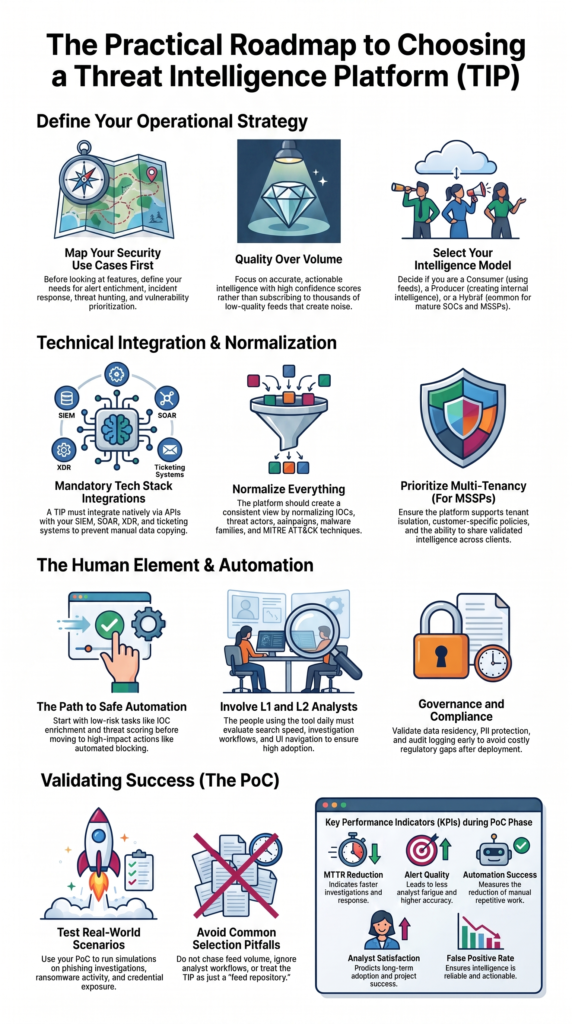
Automation saves time when it supports analysts instead of replacing them. We’ve seen organizations rush into automatic blocking because it sounds impressive. Then they spend weeks undoing false positives. That usually hurts trust in the platform.
Our advice is different. Automate the repetitive work first.
Good starting points include:
- IOC enrichment
- Threat scoring
- Case enrichment
- Detection suggestions
- Feed management
Those tasks remove manual effort while leaving important decisions with the analyst.
Teams often notice faster investigations before they notice fewer alerts. That’s because analysts spend less time gathering information and more time deciding what matters.
Which workflows should you automate first?
Alert enrichment usually delivers the quickest improvement. Instead of opening several tools, analysts receive campaign details, ATT&CK mappings, malware context, and threat actor information inside the investigation. That doesn’t replace experience.
As confidence grows, organizations can automate more of the workflow without increasing operational risk.
When should automated blocking be introduced?
Blocking should come later, after intelligence quality has been tested over time.
We’ve had the best results with a gradual approach.
- Enrichment
- Detection guidance
- Analyst approval
- Controlled response
- Continuous tuning
Keep human approval for high-impact actions until confidence scoring has proved reliable across real incidents.
Why Is Multi-Tenancy Critical for MSSPs?
For an MSSP, multi-tenancy affects daily operations far more than licensing. We’ve helped providers review platforms that looked capable on paper but became difficult to manage once several customers were onboarded.
Each customer has different priorities. Some care about phishing. Others focus on cloud threats or compliance. A good platform lets analysts support those differences without creating separate environments for every tenant.
Our reviews normally look for:
- Tenant isolation
- Shared intelligence
- Role-based access
- Audit logs
- Customer policies
- Flexible licensing
Those features make growth easier while protecting customer data.
A mature platform should let analysts share validated intelligence across customers without exposing sensitive information.
We’ve also found that customer-specific reporting and delegated administration become more valuable as an MSSP grows. Those capabilities save time every week, especially for larger security teams.
Every proof of concept should test real operational scenarios.
- Customer segregation
- Policy inheritance
- Intelligence sharing
- Report customization
- Tenant automation
- Administrative delegation
Testing those workflows early often prevents expensive redesigns after deployment.
How Can Analyst Experience Determine TIP Success?
The people using the platform every day should help decide whether it succeeds. Procurement teams often compare features, pricing, and licensing. Analysts notice something different. They notice how quickly they can answer questions during an investigation.
We’ve watched excellent products fail because analysts found them difficult to search or navigate. After a few weeks, they returned to older tools they trusted more.
A good platform should help analysts move faster without adding extra steps.
Important areas to evaluate include:
- Search speed
- Investigation workflow
- IOC pivoting
- Timeline views
- Documentation
Small improvements add up over hundreds of investigations.
As noted by Cyware
“The value of threat intelligence is directly tied to how well it is ingested, processed, prioritized, and acted upon.” – Cyware
Why should L1 and L2 analysts join evaluations?
They spend the most time inside the platform. Their feedback often identifies issues that managers never see, such as slow searches, confusing navigation, or inconsistent workflows. We’ve found those comments more valuable than long feature checklists because they reflect real daily work.
If analysts don’t want to use the platform, the project is unlikely to succeed.
Which Compliance and Governance Requirements Matter Most?
Compliance and governance are easy to overlook during a product evaluation. In our experience auditing security tools for MSSPs, they often become major concerns after deployment. A platform may perform well in testing, but weak governance features can create extra work when teams begin sharing intelligence.
When we help clients review a threat intelligence platform, we always check whether it supports the controls needed for long-term operations. Key areas include:
- Data residency
- PII protection
- Audit logging
- Retention policies
- Sharing controls
These features make it easier to enforce consistent security processes from the start instead of fixing governance gaps later.
We’ve also seen governance become more important as organizations expand their intelligence programs. Teams need clear visibility into who can access threat data, where that information is stored, and how long it is retained. Those questions come up regularly during product audits, especially for MSSPs supporting multiple customers.
Strong governance does more than satisfy compliance requirements. It reduces operational risk, improves accountability, and gives customers greater confidence that threat intelligence is handled securely. From what we’ve seen, organizations that evaluate these capabilities early avoid costly changes and smoother day-to-day operations after deployment.
How Should You Structure a Successful TIP Proof of Concept?
A successful proof of concept should reflect what actually happens during a normal week in the SOC. We have reviewed many TIP evaluations where teams spent hours exploring features but never tested the workflows analysts rely on every day. In our experience, those projects rarely produce enough evidence to support a confident buying decision.
Instead, build the PoC around realistic security scenarios. We often recommend testing situations such as:
- Phishing investigations
- Ransomware activity
- Credential exposure
- Cloud account compromise
- Insider threats
These exercises show how well the platform supports investigations, enriches alerts, and fits into existing analyst workflows. They also reveal problems that product demonstrations usually hide.
Before testing begins, agree on the success metrics. We encourage clients to define measurable goals so every platform is judged using the same criteria.
| KPI | Why it matters |
| MTTR | Faster investigations |
| Alert quality | Less analyst fatigue |
| Detection coverage | Better visibility |
| Analyst satisfaction | Higher adoption |
| Automation success | Less manual work |
| False positives | Better accuracy |
From what we’ve seen during product audits, teams that set these benchmarks early make better comparisons and avoid decisions based on demos alone. The results are clearer, easier to defend, and more useful when selecting the right platform.
Which Common TIP Selection Mistakes Should You Avoid?

Most failed implementations aren’t caused by the platform. They’re caused by the evaluation process. We’ve seen the same mistakes repeated across many product reviews.
Common pitfalls include:
- Chasing feed volume
- Ignoring analyst workflows
- Automating too much too soon
- Skipping realistic PoCs
- Never updating intelligence
- Treating the TIP as a feed repository
Those problems reduce long-term value, even when the technology itself is capable.
Research from Tophoff et al. (2017) shows
“One of the biggest gaps is the lack of a common definition and characterization of threat intelligence sharing platforms.” – Tophoff, L., et al. (2017)
How can you avoid these pitfalls?
Create a feedback loop between CTI, the SOC, incident response, and detection engineering.
Every investigation teaches something new. Feed those lessons back into the platform. That improves future detections and helps analysts respond faster the next time they see similar activity.
We’ve found that organizations with consistent feedback processes usually get more value from their TIP than those that focus only on adding new intelligence sources.
FAQ
How do I compare an open source and a commercial threat intelligence platform?
Comparing an open source threat intelligence platform with a commercial threat intelligence platform starts with your organization’s security goals. Open source options often provide greater flexibility and customization, while commercial platforms typically offer dedicated support, built-in automation, and broader integrations.
During the process of choosing threat intelligence platform solutions, evaluate long-term costs, maintenance requirements, scalability, and how well each option supports your existing security operations.
How should I structure a TIP proof of concept?
A TIP proof of concept should evaluate real security workflows instead of focusing only on product features. Test common scenarios such as phishing investigations, incident response, and IOC enrichment.
You should also validate SIEM and TIP integration and SOAR and threat intelligence workflows if your organization uses security automation. Defining clear TIP selection criteria and measurable success metrics before testing will help you compare platforms fairly and confidently.
How can I reduce false positives with a threat intelligence platform?
Reducing false positives requires accurate and well-managed threat intelligence. Look for features such as IOC confidence scoring, threat intel decay modeling, and threat intel data normalization to improve the quality of detections.
A platform that provides campaign and TTP visibility gives analysts more context during investigations. These capabilities help security teams prioritize meaningful alerts, reduce unnecessary investigations, and improve overall response efficiency.
Why are integrations important when choosing a threat intelligence platform?
A threat intelligence platform should integrate smoothly with the security tools your team already uses. Evaluate support for threat intelligence APIs, STIX TAXII integration, XDR with threat intelligence, and an integration-friendly threat intel platform architecture.
Strong integrations reduce manual work, improve threat intelligence workflows, and allow intelligence to move efficiently between detection, investigation, and response without creating additional operational overhead.
How can I measure the return on a threat intelligence platform?
Start by defining the business and operational outcomes you want to achieve before making a purchase. When evaluating threat intelligence ROI, measure improvements in investigation speed, analyst productivity, and incident response quality.
A practical threat intelligence buying guide should also consider threat intelligence automation, operationalizing threat intelligence, and support for an enterprise threat intelligence strategy to ensure the platform continues delivering value as security operations grow.
Build an Intelligence Driven SOC With the Right Strategy
The right threat intelligence platform supports analysts, fits existing workflows, and helps teams make better security decisions. Organizations that define operational goals before comparing products often build stronger security operations and achieve better long term results.
Practical automation, clear governance, and continuous improvement create a security program that grows with changing threats. A successful evaluation starts with real workflows instead of feature lists. Learn how MSSP Security helps managed security providers evaluate and select threat intelligence platforms for lasting operational success.
References
- https://www.ciso2ciso.com/top-tips-for-successful-threat-intelligence-usage/
- https://aisel.aisnet.org/wi2017/track08/paper/2/