

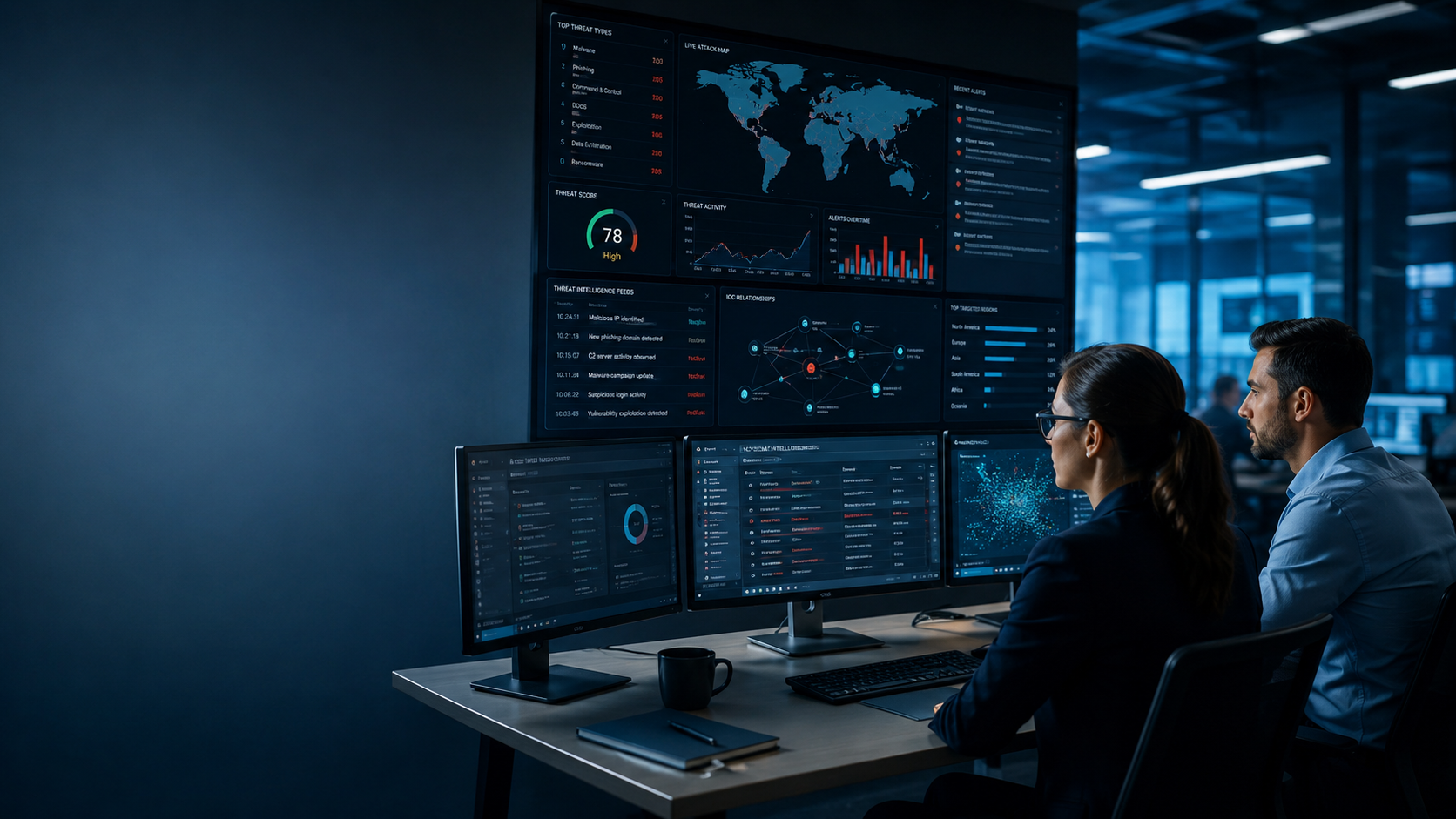
What is Threat Intelligence Platform? A threat intelligence platform is software that collects, enriches, correlates, and shares threat intelligence, helping security teams detect, investigate, and respond to cyber threats more efficiently. As cyberattacks become more frequent and complex, security teams need intelligence they can act on, not just more data.
At MSSP Security, we’ve worked with MSSPs that struggled with threat information spread across multiple tools. Once intelligence became centralized and easier to use, investigations became faster and decisions more consistent. Keep reading to see how a TIP works, where it fits in security operations, and what to consider before choosing one.
Threat Intelligence Platform in a Minute
A threat intelligence platform helps security teams turn scattered threat data into intelligence they can trust, making investigations faster and more consistent across the SOC. These quick points capture the biggest ideas you’ll learn in this guide.
- A threat intelligence platform transforms raw threat data into actionable intelligence by collecting, enriching, correlating, and distributing information across security tools.
- A TIP supports analysts throughout the threat intelligence lifecycle through automation, contextual enrichment, and integration with existing security operations.
- Organizations with mature SOCs, multiple security tools, or managed security services often gain the most value from a well-integrated cyber threat intelligence platform.
What Should You Know Before Evaluating a Threat Intelligence Platform?
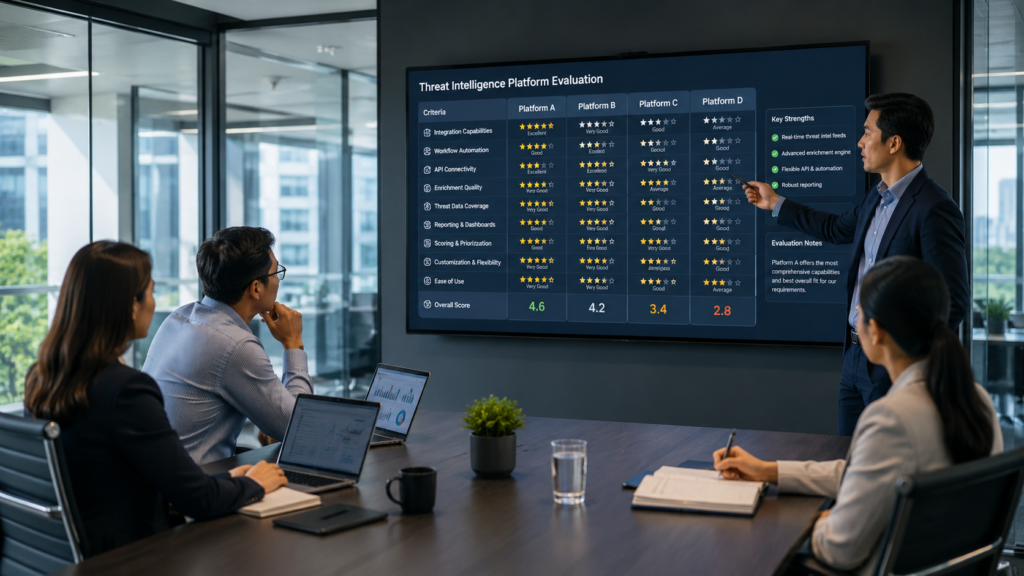
Before comparing platforms, it helps to understand what a TIP is designed to do. Many people mix up threat intelligence with the software that manages it, but they’re not the same thing.
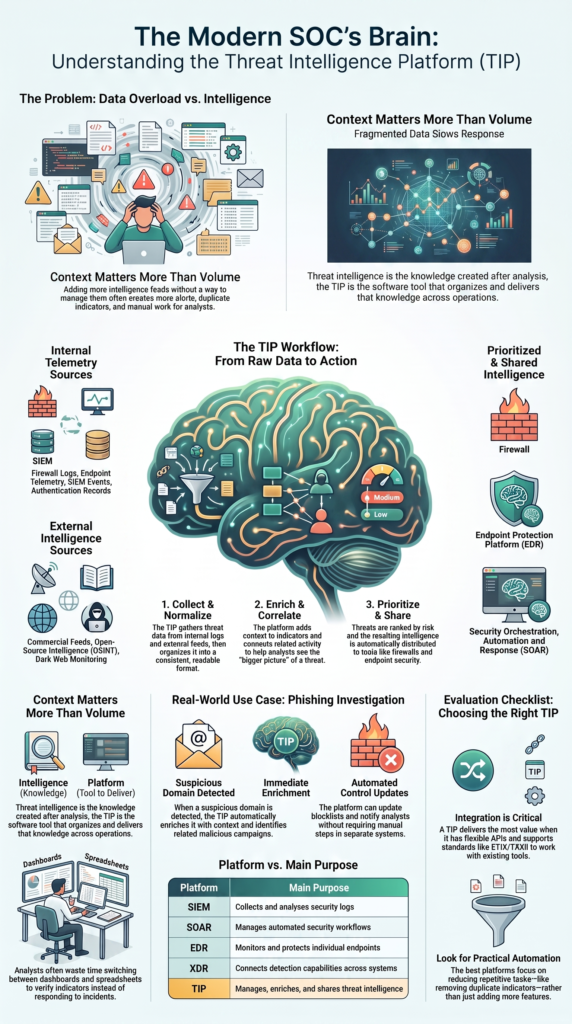
Threat intelligence is the knowledge created after collecting and analyzing information about cyber threats. The platform is the tool that organizes and delivers that knowledge across security operations.
We often see MSSPs assume that buying more intelligence feeds will improve protection. It rarely works that way. More data without context usually creates more alerts, more duplicate indicators, and more work for analysts. That’s one of the first things we look for during product evaluations.
Keep these ideas in mind:
- Intelligence is the result.
- The TIP manages the workflow.
- It does more than store IOCs.
- Context matters more than volume.
- Automation supports analysts.
- Clear workflows matter before new tools.
A strong platform helps security teams act on intelligence instead of collecting data they never use.
What Is a Threat Intelligence Platform (TIP)?
Credits: Cyber Sense Technologies
A threat intelligence platform collects information from many sources, organizes it into a consistent format, adds useful context, connects related activity, and shares that intelligence with security teams and tools. Instead of looking at isolated indicators, analysts can see the bigger picture.
We’ve reviewed platforms for MSSPs that already had plenty of security data but still struggled during investigations. The problem wasn’t a lack of information. It was that the information lived in different systems that didn’t work well together. Analysts wasted time switching between dashboards instead of investigating threats.
A modern TIP brings together information from places like internal security logs, open intelligence sources, commercial feeds, and analyst research. That’s why choosing a threat intelligence platform (TIP) with strong enrichment capabilities matters, as it turns raw data into information that is much easier to understand.
Rather than acting as another dashboard, the platform becomes a working part of daily security operations. It supports analysts, improves consistency, and helps security teams make quicker decisions when new threats appear.
Why Do Organizations Need a Threat Intelligence Platform?
Security teams now manage data from cloud platforms, endpoints, email systems, identity services, firewalls, vulnerability scanners, and many other tools. As environments grow, it becomes much harder to keep track of everything manually.
We’ve seen this during product assessments for MSSPs. Analysts often spend more time checking whether an indicator is trustworthy than responding to the incident itself. After intelligence becomes centralized and enriched automatically, investigations move much faster.
The table below shows a few common challenges.
| Challenge | How a TIP Helps |
| Multiple data sources | Centralizes intelligence |
| Duplicate indicators | Removes duplicates |
| Manual research | Adds context automatically |
| Slow investigations | Speeds up response |
| Disconnected tools | Shares intelligence across systems |
Fragmented intelligence slows every stage of incident response. Analysts jump between portals, spreadsheets, notes, and alerts to answer basic questions. That repeated work creates alert fatigue and delays decisions.
A well-integrated TIP reduces that friction and gives analysts the context they need before they begin investigating. Many security teams start seeing the benefits of using a TIP in security operations as manual research decreases, response times improve, and intelligence becomes easier to share across existing security tools.
How Does a Threat Intelligence Platform Work?
Most threat intelligence platforms follow a similar process. They collect threat data, clean it up, enrich it with additional information, connect related activity, rank threats by risk, and distribute intelligence to security tools.
Although vendors build these workflows differently, the overall process stays much the same. Good intelligence starts with reliable data, but it becomes far more useful after enrichment and correlation.
From what we’ve seen while helping MSSPs evaluate platforms, automation makes the biggest difference in this stage. Analysts can’t manually review thousands of indicators every day. The platform handles repetitive tasks so people can focus on investigation and decision-making instead.
A typical workflow looks like this:
- Collect threat data
- Normalize information
- Enrich indicators
- Correlate related activity
- Prioritize risk
- Share intelligence automatically
Many platforms also connect directly with SIEM, SOAR, endpoint security, cloud platforms, and case management tools. That allows intelligence to move across existing workflows instead of sitting inside another isolated application.
Automation doesn’t replace analysts. It removes repetitive work so they can spend more time solving real security problems.
Which Data Sources Feed a Threat Intelligence Platform?
A threat intelligence platform becomes much more useful when it combines information from several trusted sources instead of relying on a single feed. Internal data shows what is happening inside an environment. External intelligence explains whether that activity matches known threats, malware campaigns, or attacker behavior.
During our work with MSSPs, we’ve found that the strongest results come from balancing both. Some teams focus too much on outside feeds and overlook valuable internal telemetry. Others only monitor their own environment and miss the wider picture. Neither approach gives analysts enough context.
Common internal sources include:
- Firewall logs
- Endpoint telemetry
- SIEM events
- Email activity
- DNS records
- Authentication logs
- Cloud services
External intelligence often comes from:
- Commercial intelligence feeds
- Open-source intelligence
- Industry sharing groups
- Malware research
- Vulnerability databases
- Dark web monitoring
When these sources work together, analysts receive far more than a list of suspicious indicators. They gain context that helps them understand why an alert matters and whether immediate action is needed.
Why Do Analysts Say “More Feeds Aren’t Better”?
Adding more threat feeds sounds like a smart idea. In practice, it often creates more noise than value. Many feeds contain the same indicators, different confidence scores, or incomplete information. Instead of helping analysts, they increase the amount of data that needs reviewing.
We’ve seen this happen during security product audits. An MSSP may subscribe to several intelligence providers yet still struggle to prioritize incidents. The real issue usually isn’t missing data. It’s missing context.
Common problems include:
- Duplicate indicators
- Low-confidence alerts
- Missing background information
- Conflicting reputation scores
- Poor prioritization
A good TIP helps solve these issues by grouping related indicators, removing duplicates, and adding meaningful context before analysts begin their work.
The most successful security teams also define clear intelligence goals before collecting more data. They ask practical questions, such as which threats target their customers, which vulnerabilities matter most, or which phishing campaigns are active. That approach produces better decisions than adding another feed that delivers more of the same information.
How Does a TIP Integrate With Existing Security Tools?
A TIP delivers the most value when it works with the security tools already in use. Instead of becoming another dashboard, it acts as the link between different parts of the security environment.
We’ve helped MSSPs review products where analysts spent too much time copying indicators from one system to another. After proper integration, that manual work dropped sharply. Intelligence flowed automatically, giving teams more time to investigate genuine threats.
Many platforms connect with:
- SIEM solutions
- SOAR platforms
- Endpoint security
- XDR tools
- Firewalls
- Email security
- Ticketing systems
- Cloud security tools
Automation also supports everyday tasks such as:
- IOC sharing
- Threat enrichment
- Rule updates
- Case creation
- Alert prioritization
As highlighted by Queensland Government
“By streamlining the collection and integration of Indicators of Compromise (IOCs), Tactics, Techniques and Procedures (TTPs), and other contextual data, the platform helps your situational awareness and threat detection response.” – Queensland Government
Imagine a suspicious domain appears during an investigation. The TIP can enrich the domain, search historical events, update blocklists, and notify analysts without requiring several separate steps. That saves time and keeps investigations consistent across the security team.
What Is the Difference Between a TIP and Other Security Platforms?
A threat intelligence platform is designed to manage and share intelligence. It does not replace the other technologies found in a modern security operation. Each platform has a different job, and they work best together.
We often explain this during consulting engagements because many buyers expect a TIP to solve every security challenge. It can’t. Its role is to strengthen the tools already in place by providing better intelligence.
| Platform | Main Purpose |
| SIEM | Collects and analyzes logs |
| SOAR | Automated workflows |
| EDR | Monitors endpoints |
| XDR | Connects detection across systems |
| TIP | Manages and shares intelligence |
Insights from Automatika Journal indicate
“The purpose of a TIP is to gather, process, analyse, and distribute data on possible cyber dangers to an organization. Through the provision of real-time threat information, monitoring, and detection capabilities, it helps organizations defend their internet connections, applications, and systems.” – Automatika Journal
Organizations often benefit from a TIP when they:
- Use several intelligence feeds
- Operate a SOC
- Manage many security tools
- Perform threat hunting
- Support multiple customers
The platform becomes even more valuable as security operations grow. Rather than replacing existing investments, it helps those technologies work together more effectively.
What Should You Look for When Choosing a Threat Intelligence Platform?
Choosing a threat intelligence platform isn’t about finding the one with the longest feature list. The best fit depends on how an MSSP works, the maturity of its security operations, and what analysts need to investigate threats efficiently. We’ve found that products matching existing workflows usually deliver better long-term results than those.
During product evaluations, we spend more time looking at real-world performance than marketing claims. A platform should help analysts investigate faster, reduce repetitive work, and improve visibility across security operations. If it doesn’t support those goals, the extra features rarely make a meaningful difference.
Look for capabilities such as:
- Strong data collection
- Automated enrichment
- Reliable risk scoring
- Flexible APIs
- Standards support
- Collaboration features
- Case management
- Clear dashboards
- Workflow automation
Watch for warning signs like:
- Weak integrations
- Poor automation
- Limited enrichment
- Few collaboration features
- Complicated workflows
Our experience auditing security products has shown that technology alone never fixes weak processes. The strongest outcomes come from combining experienced analysts, practical workflows, and the right platform. That’s why we help MSSPs evaluate and audit solutions that fit their operations instead of creating unnecessary complexity.
How Does a Threat Intelligence Platform Work in a Real Incident?
A phishing investigation is a good example of where a TIP saves time.
An employee reports a suspicious email containing an unknown website. Without a TIP, an analyst may need to check reputation services, investigate infrastructure, search historical logs, and compare notes from several different systems. That takes time.
With a TIP, much of that work happens automatically.
The process often looks like this:
- Suspicious domain detected
- Domain enriched with context
- Related campaigns identified
- Risk score assigned
- Historical events searched
- Security controls updated
- Analyst begins investigation
We’ve watched this change the pace of investigations during customer assessments. Analysts start with useful context instead of raw indicators, making it easier to decide whether an alert deserves immediate action.
The platform may also reveal related infrastructure, known malware, previous sightings, or links to larger campaigns. That extra information supports quicker decisions while reducing the amount of manual research needed during an incident.
When Does a Threat Intelligence Platform Deliver the Most Value?

A threat intelligence platform delivers the most value when security teams manage intelligence from many different sources every day. Organizations with mature security programs are often the first to experience the broader Threat Intelligence Platform (TIP) benefits because they already have established workflows.
We’ve seen MSSPs reach a point where analysts spend too much time sorting data instead of investigating threats. That’s usually when a well-integrated TIP starts making a real difference.
Organizations that often benefit the most include:
- Security Operations Centers (SOCs)
- Large enterprises
- MSSPs
- Threat hunting teams
- Organizations with many security tools
Smaller teams can still benefit, but they often see better results by improving their processes first. Clear intelligence goals, repeatable workflows, and skilled analysts create a stronger foundation before adding another security platform. In our experience, technology works best when it supports an established process instead of trying to replace it.
Through our consulting work, we’ve helped MSSPs evaluate new products, audit existing deployments, and identify where a TIP will have the biggest operational impact. The best results come from choosing a platform that fits daily workflows, reduces manual effort, and helps analysts make faster, more confident decisions.
FAQ
What is the difference between a threat intelligence platform and threat intelligence software?
A threat intelligence platform manages the complete intelligence process, while threat intelligence software may focus on only one or two functions. Modern threat intelligence platforms support threat data aggregation, threat intelligence enrichment, and the threat intelligence lifecycle.
A cyber threat intelligence platform also helps security teams organize data, improve collaboration, and turn raw threat information into actionable intelligence for daily security operations.
How do threat intelligence feeds improve cyber threat data analysis?
Threat intelligence feeds provide updated information about emerging threats, but they deliver the best results when combined with cyber threat data analysis and threat data normalization.
A threat intel platform removes duplicate indicators, adds valuable context, and improves data quality. This process helps analysts focus on high-priority threats instead of spending time reviewing scattered or incomplete threat information.
Why are SIEM, SOAR, EDR, and XDR threat intelligence integrations important?
SIEM threat intelligence integration, SOAR threat intelligence integration, EDR threat intelligence integration, and XDR threat intelligence integration allow security tools to exchange intelligence automatically.
These integrations support threat intelligence automation, improve incident response threat intelligence, and speed up investigations. By sharing intelligence across connected systems, security teams can detect threats faster, reduce manual work, and respond more consistently to security incidents.
How do AI-powered threat intelligence and machine learning help security analysts?
AI-powered threat intelligence and machine learning threat intelligence help analysts process large amounts of security data more efficiently. These technologies improve risk-based threat prioritization, strengthen a threat scoring system, and provide contextual threat insights.
When combined with a threat correlation engine, they help analysts identify meaningful threats faster while reducing false positives and unnecessary manual investigation.
What should organizations evaluate before choosing a threat intelligence platform?
Organizations should review several TIP evaluation criteria before selecting a platform. Important factors include integration capabilities, automation, reporting, scalability, and ease of use.
They should also evaluate support for STIX threat intelligence, TAXII threat intelligence, IOC management platform features, threat intelligence sharing platform capabilities, and recognized cyber threat intelligence best practices to ensure the platform supports long-term security operations.
Choose a Threat Intelligence Platform That Fits Your Operations
A threat intelligence platform delivers the greatest value when it supports existing workflows and helps analysts make faster, more confident decisions. Organizations that combine reliable data, practical automation, and consistent processes often improve investigations while reducing alert fatigue.
Finding the right solution starts with understanding your operational needs and long term goals. Learn how MSSP Security helps MSSPs evaluate, audit, and select threat intelligence platforms that deliver measurable value.
References
- https://www.forgov.qld.gov.au/information-technology/cyber-security/cyber-security-services/cyber-defence-offerings/cyber-threat-intelligence/cyber-threat-intelligence-platform
- https://www.tandfonline.com/doi/pdf/10.1080/00051144.2023.2295146