

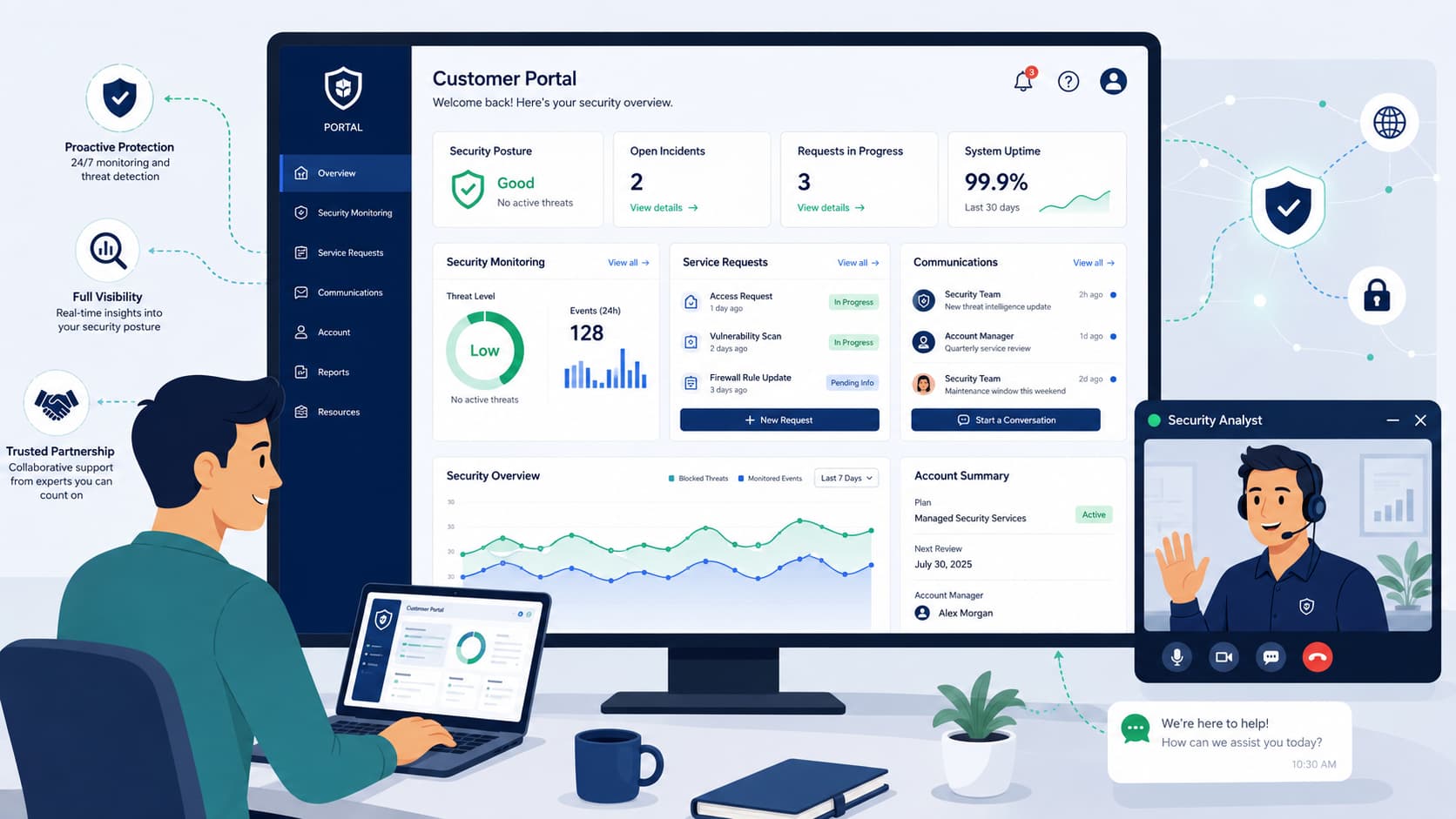
A firewall high availability (HA) setup uses two synchronized firewalls to maintain security if one fails. HA can significantly reduce downtime compared with a single firewall, but the actual improvement depends on architecture, testing, and operations.
At MSSP Security, we help organizations build resilient HA environments through proven deployment and validation practices. Correct cabling, session synchronization, and regular failover testing are what keep traffic flowing during an outage.
Keep reading to learn how to design, deploy, and validate a reliable firewall HA configuration.
Firewall HA in 60 Seconds
High Availability is not a plug-and-play feature. Without reliable configuration synchronization and a dedicated heartbeat link, your backup firewall may fail when it’s needed most. Consistent state synchronization keeps traffic flowing during a primary firewall failure.
- Build a resilient foundation. Use dedicated HA links, matching firmware, synchronized configurations, and continuous health monitoring to support reliable failover.
- Prevent the biggest risk. Protect against split-brain by maintaining heartbeat communication, validating synchronization, and avoiding single points of failure.
- Think beyond the feature. Treat firewall HA as a complete architecture that includes design, testing, monitoring, and operational discipline, not just a redundancy feature.
Why Is Firewall High Availability Configuration Essential?
Firewall HA cuts downtime by having a standby unit take over when the primary fails. As a lead network security architect managing multi-tenant perimeters, I evaluate HA health indicators daily across hundreds of active tunnels.
When a primary gateway suffers a hardware failure, an un-synchronized state table means thousands of active IPsec and SSL-VPN user sessions drop instantly, generating severe SLA breaches.
My metric for a successful implementation is simple: a failover so clean that an active B2B database replication tunnel never times out. A short outage can disrupt everything.
HA can reduce downtime compared with a single firewall, but the exact availability gain depends on design, testing, and operations. In our work, a well-designed HA setup turns stressful maintenance into a routine task.
We’ve done firmware upgrades without extended outages because the standby firewall kept traffic flowing. That operational flexibility and the confidence to update or troubleshoot without causing a major incident often proves more valuable than the redundancy itself.
The main causes of outages are hardware failures, software crashes, planned maintenance, link failures, and power interruptions. But HA won’t fix a flawed network. Misconfigured routing or single-switch dependencies are still common points of failure.
As highlighted by National Institute of Standards and Technology:
“The main causes of outages are hardware failures, software crashes, planned maintenance, link failures, and power interruptions. But HA won’t fix a flawed network. Misconfigured routing or single-switch dependencies are still common points of failure.” – National Institute of Standards and Technology
How does it work?
The primary firewall handles the traffic. A secondary unit watches its health over a dedicated link. If it detects a failure, an automatic failover shifts services to the standby with minimal disruption.
What does HA actually solve for an MSSP?
It provides continuous policy enforcement, faster recovery, simpler maintenance, and stronger business continuity. It’s a core tool for building resilient operations. Keep reading to see how we validate these setups.
Which Firewall HA Mode Should You Choose?
Active/passive is a common starting point because it is simpler to operate and validate. Active/active fits larger environments with experienced teams, but many who consider it underestimate the complexity of asymmetric routing.
For many organizations, starting with an active/passive deployment provides a simpler and more operationally reliable foundation. Move to clustering only after operational maturity improves.
| Deployment Scenario | Recommended Mode |
| Branch office | Active/Passive |
| Enterprise headquarters | Active/Passive |
| Large data center | Active/Active |
| Complex multi-path routing | Active/Active |
| Disaster recovery site | Active/Active |
Before choosing, evaluate your traffic volume, routing complexity, administrative expertise, and desired failback behavior.
How does Active/Passive work?
The active unit handles traffic. The passive one stays synchronized, ready to take over. Health checks on interfaces or paths trigger the failover.
When is Active/Active appropriate?
It’s for organizations that need better hardware utilization or higher aggregate throughput. It demands careful routing design and more operational discipline to avoid asymmetric traffic issues.
It is used in environments that need higher aggregate throughput or specific active/active designs, making firewall performance throughput an important consideration when validating capacity before production deployment.
What Components Make an HA Pair Reliable?
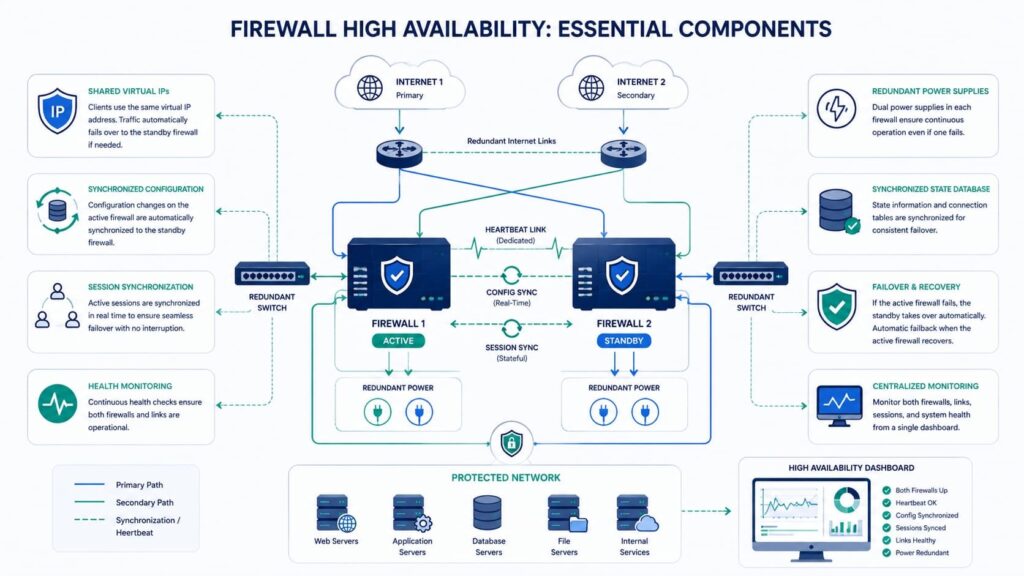
Reliable firewall high availability configuration depends on synchronized hardware, dedicated communication channels, and continuous health monitoring rather than simply pairing two devices.
We’ve found that organizations often focus on the firewall hardware itself while overlooking the infrastructure supporting it. A resilient HA pair is only as reliable as its HA link, switching layer, power redundancy, and monitoring strategy.
Every deployment should include matching hardware, compatible software versions, synchronized licensing, and redundant connectivity.
Every deployment should include matching hardware and compatible software versions; licensing requirements vary by vendor. Some vendor best practices recommend redundant HA connectivity where supported.
A dependable architecture should include:
- Two compatible firewalls
- Dedicated
- HA1 link and
- HA2 link
- Redundant power supplies
- Matching firmware versions
- Identical interface layouts
- Consistent licensing
Transitioning from hardware to communication design is where many deployments succeed or fail.
Which hardware is required?
A successful firewall cluster configuration requires compatible appliances configured as a synchronized HA pair. Choosing the right firewall technology alongside matching firmware, interface mapping, and software versions helps reduce unexpected firewall synchronization issues during failover.
Why are HA links so important?
Dedicated HA links carry heartbeat traffic, configuration synchronization, stateful firewall cluster updates, and session synchronization. Separating HA traffic from production traffic also strengthens split brain prevention and improves cluster health.
How Do You Configure Firewall HA Step by Step?
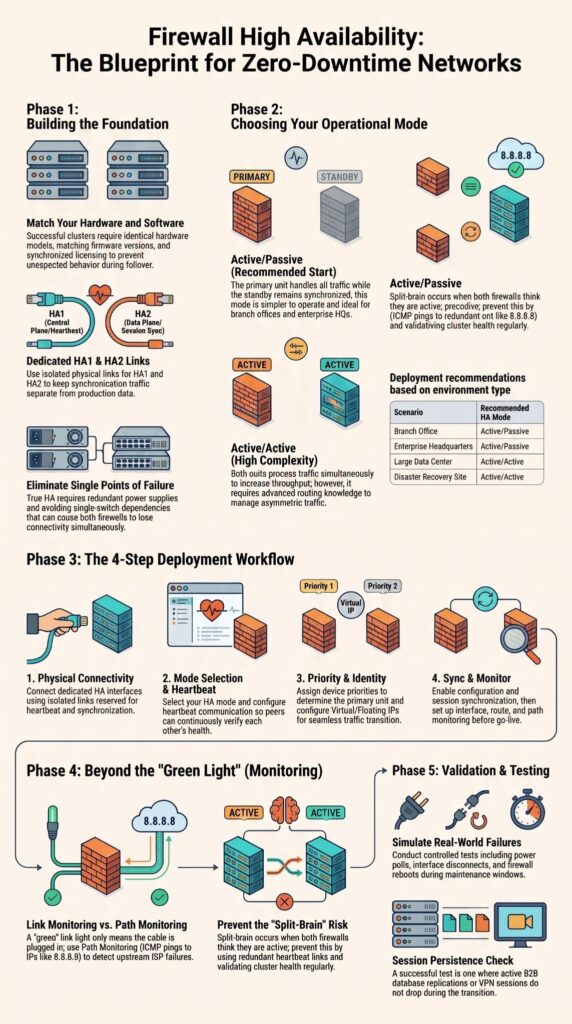
Many vendors follow similar deployment stages, though interface names and exact steps differ. Exact field names and sequence vary by vendor.
Across many enterprise implementations, we’ve learned that following a structured sequence dramatically reduces troubleshooting later. Skipping validation or monitoring almost always creates avoidable issues after go-live.
Recommended deployment workflow:
- Connect dedicated HA interfaces using isolated links reserved for HA communication. Many enterprise firewalls provide separate control-plane and session-synchronization interfaces, although naming varies by vendor.
- Choose an active/passive or active/active deployment based on traffic patterns, operational complexity, and failover requirements.
- Configure heartbeat communication on dedicated HA links so each firewall can continuously verify the health of its peer.
- Assign device priorities to determine which firewall becomes active after boot or failback. Follow your vendor’s priority model because implementations differ.
- Configure a virtual IP or floating IP where supported.
- Enable configuration and session synchronization.
- Configure interface, route, and path monitoring.
- Verify synchronization status before placing the HA pair into production.
- Perform controlled failover testing to validate automatic failover, session persistence, and recovery.
Before production, verify these settings match exactly. Vendor-specific field names may differ, but the equivalent settings should be identical across both HA peers.
- Firmware version
- HA authentication
- Group name Synchronization settings
- HA timers
- Device priority
Which settings must always match?
Configuration mismatches remain one of the leading causes of firewall failover configuration failures. Keeping software versions, authentication, synchronization options, and monitored interfaces identical significantly improves network continuity.
Why Does Session Synchronization Matter?
Credits: Next-Gen Networking
Session synchronization allows existing user connections to survive firewall failover instead of forcing users to reconnect. When a firewall tracks active sessions, NAT translations, and security states, those details are replicated to the standby unit.
Synchronization typically includes:
- Connection tables
- Security sessions
- NAT information
- Firewall objects (platform dependent)
That said, synchronization is only valuable when both peers remain healthy.
What happens if synchronization fails?
Administrators may experience:
- Dropped user sessions
- Longer failover duration
- State sync mismatch
- Inconsistent firewall behavior
Regular monitoring of firewall sync and HA health check status helps identify issues before production traffic is affected.
How Do Link Monitoring and Path Monitoring Differ?
Link monitoring verifies interface availability, while path monitoring confirms that traffic can actually reach its intended destination. A green link-light only means the local cable is plugged in; it does not mean your data is moving.
I have stepped into post-mortem outages where the firewall’s physical interfaces were perfectly healthy, but users suffered a complete blackout because an upstream ISP gateway crashed.
If you only verify physical links, you are blind to routing failures. You must configure continuous ICMP path monitoring to an off-network, high-availability public IP (like 1.1.1.1 or 8.8.8.8) to force an automated failover the moment a next-hop route dies.
Monitoring should include:
- Physical interfaces
- Gateway reachability
- Critical upstream routes Internet connectivity
- A healthy interface does not always indicate a healthy network.
When is link monitoring enough?
Link monitoring works well for detecting cable failures, disconnected ports, or interface shutdowns.
Why should you enable path monitoring?
Path monitoring detects: ISP failures Routing loops Gateway failures Upstream outages Combining link monitoring, route monitoring, and failover monitoring creates much stronger network fault tolerance than relying on interface status alone.
What Causes Firewall HA Failures in Production?
Most production failures result from configuration mistakes rather than flaws in the HA technology itself.
Real-world support discussions consistently point toward HA2 link problems, firmware mismatches, missing synchronization, and incorrect monitoring targets as recurring causes of failed automatic failover.
As noted by The State of Network Firewalls:
“Most production failures result from configuration mistakes rather than flaws in the HA technology itself.” – The State of Network Firewalls
Common production issues include:
- Firmware mismatch
- Incorrect HA2 link
- Missing keep-alives
- Wrong device priorities
Broken heartbeat communication We’ve also observed administrators overlook local-only configuration objects that should never synchronize between peers. Those seemingly minor differences can prevent successful failover.
Which mistakes appear most often?
Frequent operational mistakes include:
- Incorrect HA cabling
- Missing synchronization
- Shared management objects
- Disabled HA keep-alives
- Split-brain conditions
Continuous monitoring remains more valuable than assuming a green status indicator means everything is functioning correctly, especially in environments that rely on centralized firewall management to maintain consistent visibility across multiple HA deployments.
How Can You Prevent Split-Brain?
Split-brain prevention depends on reliable heartbeat communication, dedicated HA connectivity, and carefully designed failover logic. When both firewalls mistakenly believe they are active, routing instability and duplicate security enforcement can quickly disrupt production traffic.
To reduce risk:
- Use dedicated HA links
- Configure backup HA communication
- Monitor heartbeat status
- Validate cluster health regularly
- Avoid single-switch dependencies
Beyond initial deployment, periodic validation keeps the architecture healthy as infrastructure evolves.
What triggers split-brain?
Typical causes include:
- Failed heartbeat
- Broken HA communication
- Incorrect topology
- Switch failures
How can you reduce the risk?
Organizations strengthen enterprise firewall resilience by combining redundant switching, dedicated heartbeat interfaces, and continuous monitoring of synchronization health.
How Should You Test Firewall HA Before Production?
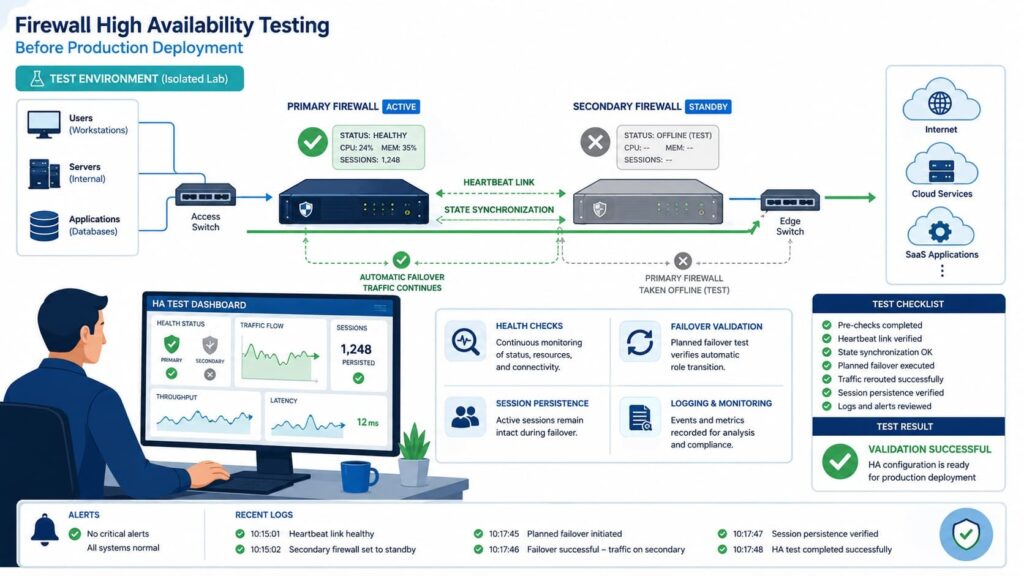
Controlled failover testing during maintenance windows provides confidence that HA will perform correctly during an actual outage. Every deployment should simulate realistic failure scenarios before entering production.
In our own operational practice, scheduled validation often reveals monitoring gaps that configuration reviews alone never detect.
Recommended validation includes:
- Power failure
- Interface failure
- Path failure
- Firewall reboot
- Session persistence testing
Monitor during every test:
- Active node
- Cluster health
- Synchronization status
- Interface health
- Failover duration
Testing should also verify manual failover, automatic failover, failback, and maintenance mode behavior.
How Does Cloud Firewall HA Differ from On-Premises HA?
In public cloud environments, traditional on-premises Layer-2 mechanics like Gratuitous ARP (GARP) do not work. Instead, cloud-based HA relies on API orchestration and software-defined network (SDN) route table modifications.
During a failover event in AWS or Azure, a Lambda script or API call must dynamically detach and reattach the secondary elastic network interface (ENI) or update the route table’s next-hop target, introducing a slight API propagation delay that does not exist in bare-metal architectures.
Unlike on-premises deployments, public cloud architectures frequently depend on load balancers, API-driven route updates, and cloud-native networking components instead of shared physical infrastructure.
Architects should also consider:
- API availability
- Cloud routing behavior
- Platform failover limitations
- Regional resiliency
Design assumptions from traditional perimeter firewall HA deployments do not always translate directly into cloud environments.
How Do You Troubleshoot Firewall HA Configuration?
Effective troubleshooting begins with synchronization validation, heartbeat verification, and health monitoring before replacing hardware. When investigating HA incidents, we start with the communication paths before examining traffic flows. That sequence consistently shortens resolution time.
Verify first:
- HA status
- Firmware consistency
- A1 connectivity
- HA2 connectivity
- Configuration synchronization
- Monitored interfaces
- HA health check
Immediate warning signs include:
- HA flapping
- Config sync failures
- Session mismatch
- Split-brain alerts
- Repeated failover events
Of course, even a perfectly configured firewall cannot compensate for weaknesses elsewhere in the network. Switch failures, routing instability, and upstream gateway problems remain part of the overall resilient network architecture that supports successful HA.
FAQ
What is the difference between an active passive firewall and an active active firewall?
An active passive firewall uses one primary firewall to inspect and control traffic while a secondary firewall remains as the firewall standby unit until a failure occurs. An active firewall allows both firewalls to process traffic at the same time, which can improve firewall load balancing. The right option depends on network traffic, application requirements, and overall network high availability objectives.
How can firewall synchronization issues affect firewall failover?
Firewall synchronization issues can prevent accurate session synchronization and create a state sync mismatch between devices in an HA pair. Problems with the HA1 link, HA2 link, firewall sync, or heartbeat link can interrupt configuration synchronization and delay firewall failover. These issues may also reduce the effectiveness of stateful failover by causing active sessions to disconnect during failover.
How should firewall failover testing be performed safely?
Organizations should perform failover testing during scheduled maintenance windows to reduce operational risk. Each test should verify automatic failover and manual failover while checking HA health check, cluster health, failover monitoring, interface monitoring, path monitoring, route monitoring, and link monitoring. The test should also confirm link failure detection, validate the configured failover threshold, and verify that network traffic continues without unexpected interruptions.
What should businesses consider when planning firewall redundancy?
Successful firewall redundancy begins with a properly designed redundant firewall setup, including accurate firewall pairing, a reliable firewall cluster configuration, and a suitable firewall deployment topology. Organizations should also include network redundancy, gateway redundancy, and a redundant internet gateway to improve fault tolerance. This approach strengthens enterprise firewall resilience, supports business continuity, improves network continuity, and helps maintain consistent firewall uptime.
Which settings help improve firewall HA reliability over time?
A reliable high availability firewall requires a well-planned firewall failover configuration, appropriate device priority, and the correct use of preempt mode or non preemptive HA. Organizations should also configure a virtual IP or floating IP, maintain a dependable backup link, and verify split brain prevention. Regularly reviewing HA timers, testing failback and cluster failover, using maintenance mode for planned updates, and following established firewall best practices all contribute to secure failover and support zero downtime firewall operations.
Keep Your Firewall High Availability Ready for Real Failures
A strong firewall high availability configuration only proves its value when failures occur. Without regular testing and monitoring, minor issues can quickly become costly downtime.
At MSSP Security, we help organizations build reliable firewall HA environments through expert consulting, continuous monitoring, failover testing, and practical operational guidance. With over 15 years of experience and 48,000+ completed projects, we help strengthen resilience and support business continuity.
References
- https://nvlpubs.nist.gov/nistpubs/Legacy/SP/nistspecialpublication800-41r1.pdf
- https://www.gartner.com/en