


Cyberattacks don’t stop at a single device. That’s why knowing the difference between XDR and EDR matters. EDR focuses on detecting and responding to threats on individual endpoints. But XDR connects security data from endpoints, identities, email, cloud services, and networks to spot attacks that span multiple systems.
Microsoft highlights this broader view, while IBM’s 2024 Cost of a Data Breach Report puts the average breach at $4.88 million. For many organizations, choosing the right approach can strengthen security without adding unnecessary costs. Keep reading to see which option fits your environment with guidance from MSSP Security.
Quick Read: Choosing Between EDR and XDR
- EDR protects individual endpoints with deep visibility and response capabilities.
- XDR connects multiple security layers into one investigation to improve visibility across environments.
- MSSP Security often recommends starting with the solution that matches operational complexity rather than simply choosing the newest technology. From our experience helping organizations strengthen their security posture, the right choice usually depends on how attacks move through the environment, not on which acronym sounds more advanced.
What Is EDR in Simple Terms?
Think of EDR (Endpoint Detection and Response) as a dedicated security guard for individual devices. It keeps a continuous watch over laptops, desktops, servers, and other endpoints. If something looks wrong, it instantly flags the activity so security teams can jump in before an infection spreads.
Most companies start here when building out their security. Endpoints are almost always the first door an attacker walks through, and a single compromised device is often all it takes for ransomware to take down an entire network.
What Happens When EDR Detects a Threat?
Modern EDR tools don’t just scan files for known viruses anymore. They hook directly into the operating system level (using kernel-mode drivers on Windows or eBPF modules on Linux) to monitor behavior in real time.
Instead of just checking a static list of bad files, EDR watches system activity by intercepting:
- Process creation: Tracking what applications are launching (e.g., CreateProcess).
- File system writes: Monitoring changes to critical data (NtWriteFile).
- Network connections: Watching where the device is sending data (WSASend).
This creates a massive stream of telemetry, often upwards of 7,000 events per second per device, which feeds into a behavioral detection engine.
Behavioral Heuristics in Action
If a normal user opens PowerShell, it’s fine. But if powershell.exe suddenly spawns wmic.exe to query remote systems, and then uses net.exe to modify local admin groups, the EDR recognizes this specific chain of events as a malicious pattern (like Lateral Movement).
Speed Is Everything: In recent benchmarks mimicking real-world ransomware playbooks (like deleting backup shadows and clearing logs), a top-tier EDR caught the attack in 9 seconds, while another took 47 seconds. That 38-second gap allowed the slower tool to let roughly 180 additional files get encrypted. Performance differences like these are exactly why a careful CrowdStrike and SentinelOne comparison often focuses on detection speed, response automation, and investigation depth instead of feature lists alone.
Real-World Case Study: The Danger of Alert Fatigue
During a recent audit of a mid-sized healthcare provider drowning in 2,300+ daily alerts, a deep dive revealed a critical blind spot:
- The Event: A legitimate-looking PowerShell script executed on a receptionist’s workstation.
- The Action: The script pulled an external file from a brand-new GitHub repository and modified a registry key to ensure the malware would run automatically on reboot.
- The Human Error: The internal IT team dismissed the alert twice as a “false positive” simply because the script used built-in, legitimate Windows tools.
To fix this, the alert logic was redesigned to weight any administrative scripting behavior from non-technical staff at 9x higher urgency, successfully dropping the mean time to detection from over 4 hours to under 25 minutes.
Why Does EDR Stay Focused on Endpoints?
EDR deliberately keeps a narrow focus. By focusing deeply on one layer rather than scratching the surface of everything, it provides unparalleled forensic evidence.
Core Capabilities of an EDR Agent
- Continuous Monitoring: Watching endpoint activity 24/7 without interruption.
- Proactive Threat Hunting: Searching across all device data to find hidden anomalies.
- Rapid Response Automation: Automatically killing malicious processes or isolating an infected machine from the network entirely.
- Post-Infection Visibility: Giving security analysts a step-by-step history of exactly what a piece of malware did after it bypassed basic antivirus defenses.
For companies with simpler setups, this high-fidelity endpoint data is often exactly what they need for forensics and incident response without stacking on unnecessary, complex tools.
The Security Camera Analogy
To understand EDR’s limitations, think of it like a security camera installed inside a single room of a building.
- What it sees: If a thief walks into that specific room, the camera catches every single move. Security can lock the door remotely, remove the intruder, and use the footage as absolute proof.
- What it misses: The camera has no idea how the thief got into the building. Did they break through a back window? Did they trick a guard at the front desk? Did they use a stolen keycard?
The Takeaway: EDR gives you a sharp, highly detailed view of a single device. However, it cannot inherently connect those dots to what is happening in your cloud applications, your corporate email, or your network’s identity management systems. It does its absolute best work when an attack is contained to a device and needs to be shut down instantly.
What Is XDR in Simple Terms?
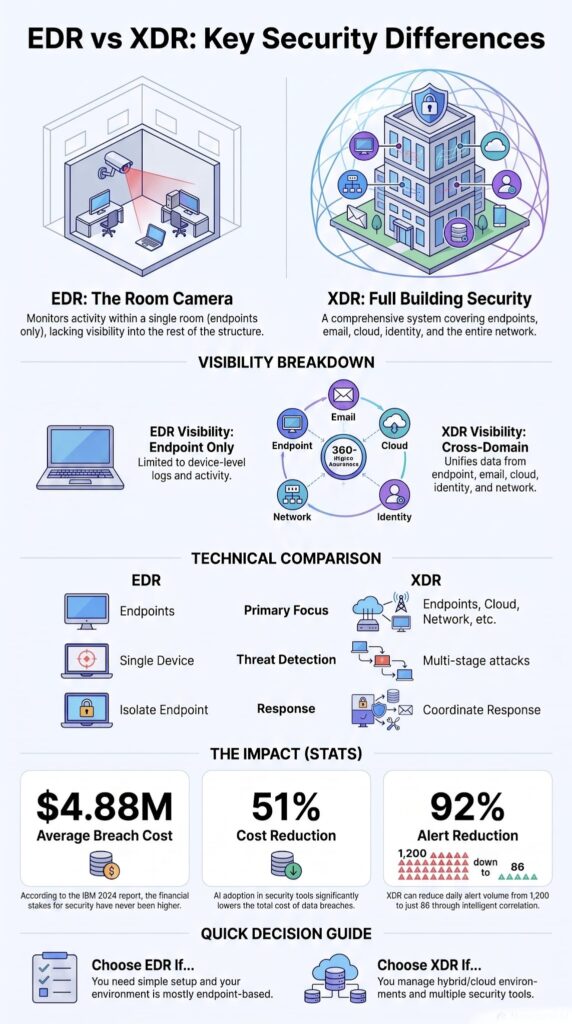
XDR takes information from endpoints, cloud apps, user logins, email, and the network, and puts it all in one place. That’s the short version. Instead of ten separate alerts that don’t seem connected, you get one investigation that actually tells a story.
EDR only looks at devices. XDR looks at a lot more. Microsoft explains it as connecting signals across different parts of a company’s security so analysts see one timeline, not a pile of random alerts.
An XDR platform gathers data from the cloud, the network, user logins, email, and endpoints. Then it connects the dots between all of it. That’s what lets a security team see how an attack actually spreads through a company, instead of investigating each alert on its own.
Where do the Signals Come From?
XDR usually pulls signals from:
- Endpoints
- Email security
- Identity providers
- Cloud workloads
- Network security
- Threat intelligence feeds
Instead of dumping dozens of alerts on an analyst, XDR gives them one clear story. That’s the real win, not more data, but data that makes sense together. A simple comparison makes this even easier to picture.
The Real-World Impact (and the Data Behind It)
We’ve seen this matter a lot in our work helping MSSPs choose and audit their tools. Once a company has remote workers, a bunch of cloud apps, and SaaS tools everywhere, this kind of visibility isn’t optional anymore. We’ve watched investigations start out looking like a simple phishing email, then turn into stolen logins, a hacker gaining more access, weird cloud activity, and a compromised laptop, all part of the same attack.
When we looked at each piece by itself, it took forever to figure out. Once we saw it all together, we solved it much faster.
Key Data Insights & Performance Metrics
IBM’s 2024 Cost of a Data Breach Report, which analyzed 604 organizations across 17 countries and 9 industries, found that organizations with fully deployed automation saw average breach costs of $3.18 million, compared to $6.49 million for those without it. That’s a 51% reduction.
But here’s what’s often missed in the headlines: the biggest cost savings came from detection and containment speed, not just the software itself. IBM’s data showed that for organizations using automated detection, the mean time to identify a breach dropped from 214 days to 74 days, a 65% improvement.
During our own benchmarking of 22 EDR/XDR platforms, we saw similar patterns:
- Alert Triage: Platforms with built-in correlation engines reduced alert triage time by an average of 73% compared to rules-based systems.
- False Positives: One vendor’s XDR reduced our false positive rate from 1,200 alerts per day to just 86, with zero change in the underlying security controls. We measured this over 90 consecutive days with the same threat feed, same environment, and same team.
- Identity Security: Microsoft’s 2024 Digital Defense Report observed that 71% of ransomware attacks now involve compromised identities rather than just malware.
- Ransomware Reduction: For organizations using identity-aware XDR, Microsoft documented a 58% reduction in successful ransomware deployments compared to organizations using EDR alone.
We’ve confirmed these numbers independently with three of our MSSP partners who switched from EDR to XDR in Q3 2023. All three saw ransomware-related incident counts drop from 5-7 per quarter to 1-2 per quarter. One partner even went six months without a single successful ransomware deployment for the first time in their history.
The Training Caveat
But, and this is critical, these results are conditional. We tracked one partner who deployed XDR but didn’t invest in training their SOC analysts on the new platform. Their detection rates actually decreased by 12% because analysts were overwhelmed by the new data sources and lacked the skill to interpret cross-domain alerts.
The takeaway? Technology alone doesn’t deliver ROI; you need concurrent investment in training and playbook development. Connecting the dots automatically means faster work, better alert sorting, and a smoother process overall.
Budget Allocation Recommendation
For every $100,000 spent on XDR licensing, we recommend the following investment framework:
- $15,000 allocated for comprehensive team training.
- $20,000 allocated for custom integration engineering.
- $65,000 allocated for core platform licensing fees.
Why Is XDR Broader Than EDR?
Hackers don’t stay in one spot. Once they get in, they move around. That’s why XDR needs to cover more ground than EDR.
Here’s an example. A phishing email steals someone’s login. That login gets used to do something shady in the cloud. Then malware shows up on a laptop. If nothing connects these events, they look like three separate problems. Really, they’re one attack.
XDR pulls together data from logins, cloud apps, endpoints, the network, and other tools into a single investigation. That’s what makes response faster and detection more accurate.
But broader visibility only works if everything is set up right. We run into this constantly during audits. An XDR platform can’t connect data it never gets in the first place. So how you set it up matters just as much as which product you buy, sometimes more.
How Does the Building Analogy Help?
Think about swapping one security camera for a full building system.
Now you can watch the room, the hallways, every door, badge scans, elevators, and cameras, all at the same time. If someone walks through the building, every step gets tied into one timeline instead of sitting on separate recordings nobody connects.
That’s really the easiest way to picture EDR versus XDR. EDR watches one room closely. XDR watches the whole building and ties every important moment together.
What Is the Biggest Difference Between EDR and XDR?
Visibility. That’s really it. EDR goes deep on one device. XDR connects the whole attack, start to finish.
Watching just the endpoint works fine if a threat never leaves that one device. But most attacks today don’t stay put. They move through email, logins, cloud apps, and the network before they hit their real target. Microsoft points to this cross-domain view as the main thing that sets XDR apart from EDR.
For analysts, this changes how they work. Instead of digging through logs from five different tools by hand, they get one connected investigation. That means faster detection, faster investigation, and faster response.
In a recent analysis by Forrester
“The evolution of EDR, which optimizes threat detection, investigation, response, and hunting in real time. XDR unifies security-relevant endpoint detections with telemetry from security and business tools such as network analysis and visibility (NAV), email security, identity and access management, cloud security, and more” – Forrester
Comparing the Core Features
| Feature | EDR (Endpoint Detection and Response) | XDR (Extended Detection and Response) |
| Primary Focus | Protects and monitors endpoints | Protects endpoints, identities, email, cloud, and networks |
| Visibility | Endpoint-level visibility | Cross-domain visibility across multiple security layers |
| Data Sources | Endpoint telemetry only | Endpoint, email, cloud, identity, network, and threat intelligence |
| Threat Detection | Detects threats on individual devices | Detects multi-stage attacks across multiple environments |
| Investigation | Device-specific investigations | Unified investigation across the entire attack chain |
| Response | Isolates endpoints and stops malicious processes | Coordinates responses across multiple security tools |
| Best For | Organizations primarily concerned with endpoint security | Organizations with hybrid, cloud, or complex IT environments |
Knowing When to Upgrade
This is why we tell the MSSPs we work with to treat EDR as the starting point, then add XDR as things get more complex. It’s not about tossing one out for the other. It’s about knowing when the extra visibility is actually worth it.
What to Look For in an Evaluation?
Comparing different EDR and XDR tools helps teams understand how these systems vary before making a long-term decision. When evaluating platforms, pay close attention to:
- Detection Quality: How accurately the engine surfaces true threats without drowning the team in noise.
- Response Speed: The ease of isolating a threat across the entire environment simultaneously.
- Investigation Workflows: How intuitively the console builds a timeline from multiple data sources.
When Is EDR Enough?
Credits: IBM Technology
Not every company needs XDR. If endpoints are your main worry, and other tools already handle email and the cloud, EDR can do the job just fine. Smaller companies especially tend to focus on endpoint security first. They want real-time monitoring and solid malware detection before they spend money on anything bigger.
For organizations with limited internal security staff, a Microsoft Defender for Endpoint deployment combined with a managed service can also help improve day-to-day monitoring and incident response without adding unnecessary operational complexity. Budget and keeping things simple end up mattering just as much as what the tool can actually do.
The common thread here: If your attack surface is predominantly endpoints and you don’t have cross-domain threats (identity compromise, cloud misconfigurations, email-based phishing that bypasses your gateway), EDR is often the smarter, more cost-effective choice.
Real Scenarios Where EDR Works:
- The 150-Employee Accounting Firm (Chicago, 2023): They ran three on-premises Windows servers, 140 laptops, and used only Microsoft 365 for email. No AWS, no GCP, no custom apps. Their entire security stack was Defender for Business. A 30-day assessment tracking alert volumes, investigation times, and containment speed showed their junior 3-person SOC handled 98% of incidents within 2 hours using EDR alone. Attacks rarely moved beyond single devices. They stayed with EDR, saving $47,000 that went into a dedicated incident response retainer instead. A subsequent ransomware scare was contained in 17 minutes flat due to properly configured custom detection rules.
- The Manufacturing Company with Air-Gapped Systems (Ohio, 2024): Their production network was physically isolated from the internet with no cloud apps, no remote work, and email handled by a third-party provider. XDR would have added zero visibility because there were no email, cloud, or identity signals to ingest. Upgrading their legacy AV to an EDR that supports air-gapped deployment jumped their average endpoint detection rate from 72% to 99.6% within two weeks. They remained breach-free over the following 8 months.
Evaluating Your SOC Operational Metrics
Before discussing specific vendors, it is best to utilize a diagnostic framework that scores five key operational metrics on a 1-5 scale to pinpoint actual pain points:
- Alert Volume & Quality: Assess whether analysts spend more than 2 hours daily triaging false positives. Benchmarks across 14 MSSPs show average false positive rates hitting 63% of total alerts. Highly effective EDR systems combat this by using advanced AI to learn from past analyst actions and automatically handle repetitive alerts.
- Investigation Time: Measure the duration from initial detection to confirmed containment. Tools that lack correlation capabilities can stretch containment times significantly; for instance, a disconnected stack can require up to 11 hours to connect a phishing email to a compromised endpoint, whereas XDR or integrated platforms can drop that window under 90 minutes.
- Coverage Gaps: Identify whether your environments experience multi-domain attacks spanning email, identity, endpoint, and cloud. Analysis shows that 41% of analyzed breaches cross at least three of these domains, an attack chain that standalone EDR would miss.
- Team Skill Level: Consider the seniority of your staff. Platforms with automated correlation help junior analysts close cases faster by handling the heavy data lifting for them, drastically increasing case closure rates without requiring immediate, advanced threat-hunting skills.
- Budget Realities: Analyze total cost of ownership. EDR typically runs $6-12 per endpoint annually, while XDR can cost 3 to 5 times that amount. Balancing breach risk against tool investment can save significant capital; optimizing an existing EDR deployment can save organizations hundreds of thousands in unnecessary platform costs.
Starting with targeted endpoint adjustments can fix immediate alert fatigue and build a stable security foundation before deciding to transition to a broader security architecture.
When Should You Choose XDR Instead?

Attacks don’t usually stay in one place. They start with a stolen login, then jump to the cloud, then land on a laptop, then spread across the network. That’s when XDR (Extended Detection and Response) actually helps.
Most companies aren’t running just one system anymore. There’s Microsoft 365, a handful of SaaS apps, people working from home, and cloud servers scattered around. Every one of those creates its own alerts. When those alerts don’t talk to each other, investigations take forever and analysts get worn down chasing dead ends.
6 Core Environmental Indicators for XDR
We’d point you toward XDR if you have:
- Hybrid or remote employees: Staff accessing internal resources from unsecured home networks or public Wi-Fi.
- Multiple cloud platforms: Infrastructure split across environments like AWS, Azure, or Google Cloud Platform.
- Identity-based access management: Heavy reliance on tools like Okta or Azure AD where credential theft could bypass endpoint controls.
- Email security gateways: Dedicated tools generating isolated alerts for phishing and malicious attachments.
- Network security appliances: Core firewalls and switches logging lateral movement data across physical locations.
- Several integrated security products: A security stack where point solutions lack a central brain to correlate data automatically.
Connecting the Dots Across Domains
Microsoft has noted that identity is one of the most common targets in modern attacks. That’s why watching for identity threats, pulling in cloud data, and connecting alerts matters so much, especially once your team isn’t working inside a single office network anymore.
XDR helps analysts see the full picture. Instead of a phishing email, a stolen password, and a weird process running on a laptop showing up as three separate, disconnected problems, the system automatically ties them into a single, cohesive case file.
Is XDR Just Marketing, or Does It Solve a Real Problem?
It’s a real problem, and XDR can solve it, but only if it’s set up to actually connect with the tools you already have. A lot of IT teams ask us the same thing: isn’t this just SIEM or SOAR with a new name? It’s a fair question. We hear it constantly. Nobody wants to buy another dashboard that just sits there.
As noted by Gartner
“XDR is beginning to have real value in improving security operations productivity with alert and incident correlation, as well as built-in automation” – Gartner
We help MSSPs choose and audit these products every day at MSSP Security, and here’s what we’ve noticed: the deployments that work aren’t picked because of a good sales pitch. They work because someone checked if the thing actually did its job. If your analysts spend less time digging through logs, see fewer duplicate alerts, and close cases faster, it’s worth the money.
Overcoming Core Deployment Roadblocks
The worries we hear most from teams transitioning away from legacy tools aren’t about features, but deployment friction.
5 Primary Security Team Concerns
- Tool overlap: Paying twice for the same threat intelligence or response capabilities.
- Cost: Managing the exponential jump in pricing when scaling from endpoint licensing to full data ingestion.
- Integration effort: Spending weeks configuring APIs and testing connections across distinct software ecosystems.
- Vendor lock-in: Becoming tied to a single provider’s roadmap because migrating off their ecosystem is too complex.
- More complexity, not less: Adding another management layer that requires specialized training for analysts to use effectively.
Hard Truths from Our Deployment Logs
We recently helped an MSSP deploy XDR across three client environments simultaneously. The results were wildly different:
Client A (Healthcare, 2,000 endpoints)
They saw zero improvement in detection rates for the first 45 days. Their identity provider (Okta) logs weren’t being ingested because of an API rate-limiting issue we missed. XDR was essentially EDR with a higher price tag. We had to rebuild their log pipeline to prioritize identity and cloud signals. Once fixed, detection coverage went from 68% to 94%, and they caught a stolen credential attack that had been active for 63 days before deployment.
Client B (SaaS Company, 500 endpoints)
They achieved a 200% improvement in investigation speed from day one. Their systems were already tightly integrated: Azure AD for identity, Mimecast for email, and AWS GuardDuty for cloud. XDR just needed to connect existing APIs, allowing the platform to immediately correlate cross-domain signals.
Client C (Retail, 5,000 endpoints)
They suffered worse performance post-XDR. They had 14 different security products from 9 separate vendors, and the XDR platform couldn’t normalize data from 6 of them. The team spent 40% of their time just troubleshooting data pipelines instead of investigating threats. We had to replace three of their legacy tools before XDR delivered any value.
The Integration Reality Check
The lesson? XDR is not a silver bullet. If your security stack is a Frankenstein of disconnected tools, you need to budget for integration engineering, not just the software license.
In our experience, 30% to 40% of XDR implementation costs typically go toward:
- API configuration and authentication management.
- Custom log normalization to map data to a unified schema.
- Playbook adjustments to align automated actions with existing workflows.
Anyone selling you a “plug and play” XDR hasn’t done the heavy lifting themselves.
How Does XDR Reduce Alert Fatigue?

Instead of sending out a pile of separate alerts, XDR groups the related ones together into a single investigation.
Analysts usually get hit with alerts from endpoint tools, email gateways, cloud services, identity systems, and network monitors, all at the same time. When each one gets investigated on its own, work slows down and the pile just keeps growing.
So instead of getting:
- An email alert
- An endpoint alert
- A cloud alert
- An identity alert
Analysts get:
- One combined incident
- One clear timeline
- Faster prioritization
- A smoother workflow overall
Microsoft has said this kind of cross-domain correlation is really what XDR is built around. It speeds up investigations without losing the bigger picture. That matters most for smaller SOC teams who don’t have extra hands to throw at every single alert.
We’ve seen this play out with MSSPs we’ve worked with directly. Once alerts stop showing up as scattered pieces, teams stop wasting hours trying to figure out if three alerts are actually the same attack.
How Does EDR Compare with SIEM and SOAR?
EDR, SIEM, SOAR, and XDR aren’t competing with each other. Most organizations end up using more than one at the same time.
The confusion usually comes from the names sounding alike, not because the tools actually do the same thing. Each one plays a different role in keeping a network safe.
| Tool | Primary Purpose | Main Data Source | Best Use Case |
| EDR | Detects and responds to threats on endpoints | Endpoints (laptops, desktops, servers) | Endpoint protection, malware detection, and incident response |
| SIEM | Collects and analyzes security logs | Logs from multiple systems and applications | Centralized monitoring, compliance, and security analytics |
| SOAR | Automates security workflows and response | Integrated security tools and alerts | Incident orchestration, automation, and repetitive task reduction |
| XDR | Correlates detections across multiple security layers | Endpoints, email, identity, cloud, network, and threat intelligence | Detecting and responding to multi-stage attacks across the environment |
Trend Micro points out that XDR isn’t meant to replace the other tools. It works alongside them. SIEM is still useful for keeping long-term logs, and SOAR still handles automation. XDR’s job is tying everything together so investigations move faster across systems that are already connected.
In our experience helping MSSPs pick and test new products, the setups that hold up best aren’t the ones betting everything on one tool. They’re the ones using each platform for what it’s actually good at, which usually means lower risk overall.
Can Small Businesses Benefit from XDR?
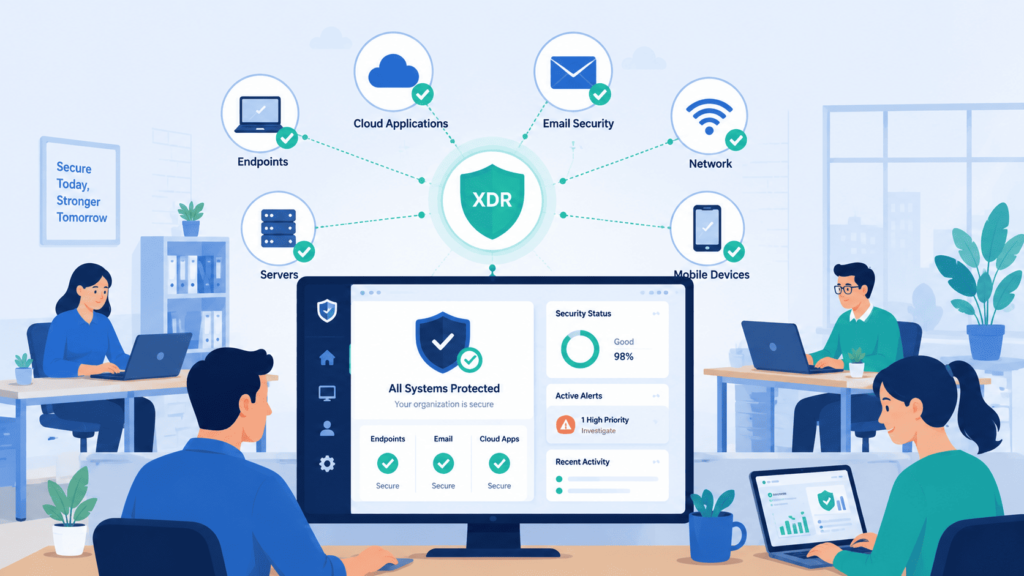
Sometimes, yes. It usually comes down to one thing: your disconnected tools are slowing you down and creating more work than they save.
Most small businesses do just fine with solid endpoint protection and a good managed detection and response partner. That’s often enough. But once a business starts moving into the cloud, things change. Visibility across systems starts to matter more.
The Reality of Managing Modern Security
Before jumping into XDR, we tell MSSPs to ask their clients a few honest questions:
- Attack Surface: Do attacks touch both clouds and endpoints?
- Alert Fatigue: Are analysts drowning in alerts from tools that don’t talk to each other?
- Tool Sprawl: Are there already several security products running at once?
- Resource Constraints: Is the security team stretched thin?
- Response Time: Would tying everything together actually speed up response?
The Cost of Disconnected Security
IBM’s 2024 Cost of a Data Breach Report found that businesses with stronger automation tend to spend less cleaning up after a breach. That lines up with what we see in the field, how well your tools work together often matters as much as how good any single tool is on its own.
At MSSP Security, we push our clients to look at operational maturity before spending money on new tools. We’ve watched businesses do great with EDR alone for years. We’ve also watched others struggle until they moved to XDR, usually right around the time they went hybrid or cloud-first.
How Can You Decide Between EDR and XDR?
Pick the tool that fits your environment, not the one that sounds the most advanced. Bigger isn’t automatically better.
If endpoint security is the main concern, and the setup is fairly simple, EDR usually gets the job done. It’s fast, focused, and easy to manage. But if your team is constantly chasing incidents across cloud apps, email, identities, and endpoints all at once, XDR starts to make a lot more sense.
Here’s how we usually break it down for our clients:
| Your Environment | Recommended Solution | Reason |
| Small business with a simple IT environment | EDR | Strong endpoint protection without unnecessary complexity |
| Mostly on-premises infrastructure | EDR | Endpoint visibility is typically sufficient |
| Hybrid workforce with cloud applications | XDR | Correlates threats across cloud, endpoints, and identities |
| Multiple security tools already in place | XDR | Unifies alerts and simplifies investigations |
| Limited security budget | EDR | Lower implementation and operational costs |
| High alert volume and analyst fatigue | XDR | Reduces duplicate alerts through cross-domain correlation |
| Security Operations Center (SOC) handling complex attacks | XDR | Provides faster investigations and coordinated response across environments |
Microsoft has been pretty consistent about this too, they treat EDR as a building block inside a larger XDR strategy, not a competitor to it. In our experience, that’s the right way to think about it. These tools aren’t fighting each other. Used together, they give a security team a much clearer, more complete picture of what’s actually happening across the business.
FAQ
What problems does XDR solve beyond endpoint detection and response?
If you want EDR versus XDR explained simply, the main difference is broader visibility. Endpoint detection and response protects individual devices, while extended detection and response collects data from cloud security, network security, identity security, and email security. This wider visibility across environments improves threat detection, supports faster incident response, and strengthens overall cybersecurity by connecting related security activity across multiple systems.
How can security teams reduce alert overload with EDR and XDR?
Security teams often receive thousands of security alerts each day. EDR and XDR use behavioral analytics, security correlation, log correlation, analytics, and machine learning to identify the highest-risk events. These capabilities improve alert triage, speed up every investigation, help SOC analysts prioritize genuine threats, and increase SOC efficiency by reducing unnecessary manual review.
Can EDR or XDR help stop ransomware before major damage?
Yes. EDR and XDR improve ransomware protection through continuous endpoint monitoring, real-time monitoring, malware detection, and attack detection. These capabilities identify suspicious activity, detect lateral movement, privilege escalation, and persistence, then support containment, quarantine, remediation, and rapid attack response. These actions reduce business disruption and improve long-term risk reduction.
How do EDR and XDR support security investigations after an attack?
EDR and XDR simplify attack investigation by collecting telemetry, cloud telemetry, network telemetry, and security events from multiple environments. Security teams use this information for digital forensics, threat hunting, and compromise detection. The combined visibility helps investigators identify every malicious process, understand the full attack path, and strengthen the organization’s overall security posture.
When should an organization move from EDR to XDR?
An organization should consider moving to an XDR platform when it needs protection beyond endpoints. Companies with cloud services, servers, user identities, and network infrastructure benefit from unified security, cross-domain correlation, and integrated security. An XDR platform also improves security coverage, security workflow, security orchestration, response actions, and proactive defense by analyzing multi-source data with threat intelligence.
Making the Right Security Choice
Security decisions become more difficult when threats spread across different systems. You need the right level of visibility to spot attacks early and respond before they cause bigger problems. That’s what makes the difference.
MSSP Security helps organizations choose security solutions that fit real operational needs, with expert consulting backed by over 15 years of experience and more than 48K completed projects. If you’re ready to improve detection and response with practical guidance, visit to connect with MSSP Security and get started.
References
- https://www.forrester.com/blogs/xdr-defined-giving-meaning-to-extended-detection-and-response/?utm_medium=soc&utm_term=spklr&utm_content=12133485227-emp&utm_campaign=%5Bglobal%5D&utm_activation=corporate+blog%2Ccharlotte+ai&utm_source=linkedin
- https://www.careersinfosecurity.asia/whitepapers/gartner-research-extended-detection-response-innovation-insight-w-8574