

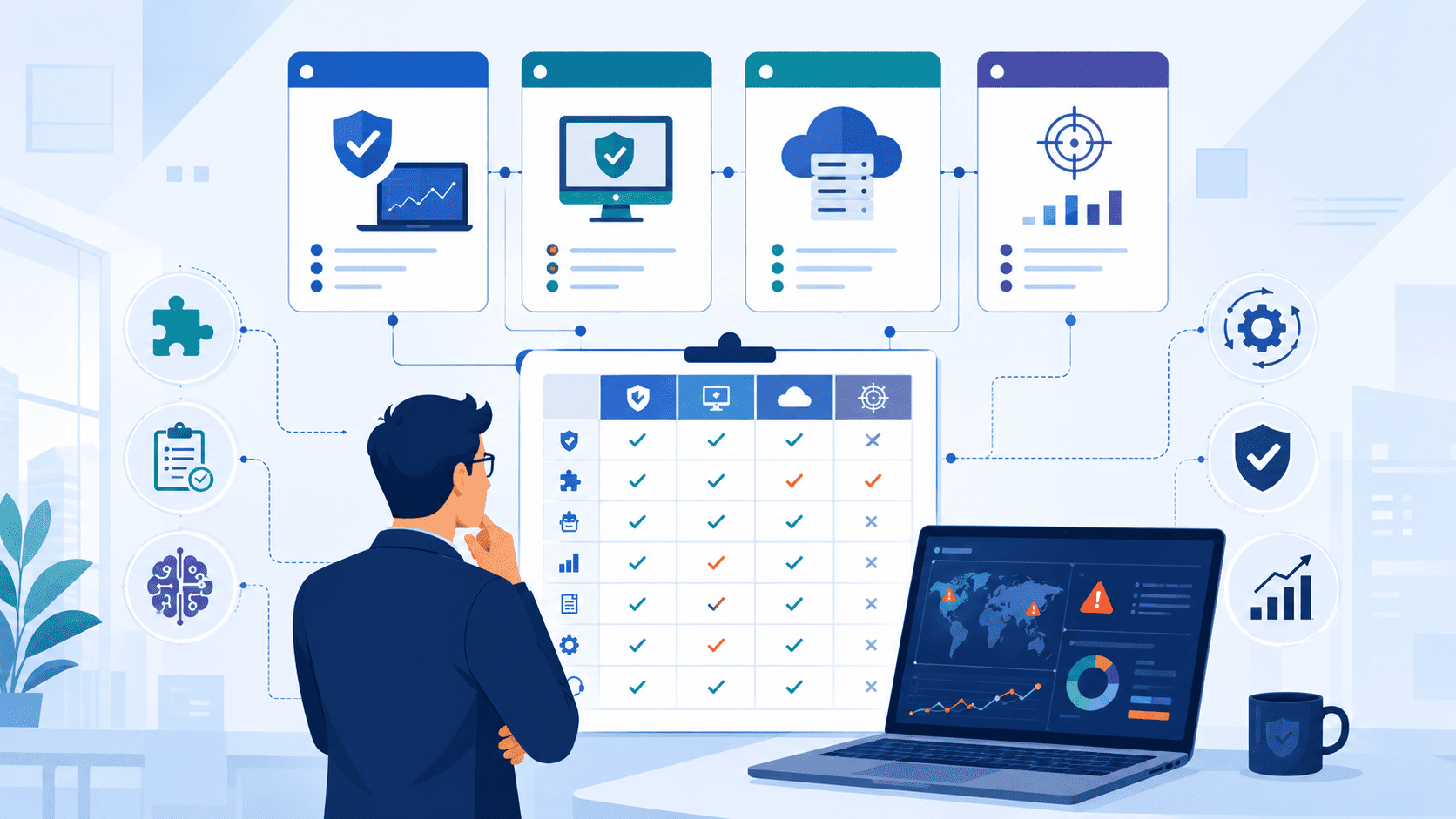
Endpoint protection isn’t enough anymore. Modern attacks don’t stop at devices. They target identities, cloud environments, email, and networks, which means security teams need broader visibility. Gartner describes extended detection and response (XDR) as an approach that connects security data across multiple areas to improve threat detection and response.
Choosing the right EDR/XDR provider isn’t only about features. It’s about finding a partner that matches your business goals, security maturity, and day-to-day operations. MSSP Security helps organizations take a practical approach to stronger protection. Keep reading to see what to look for in an EDR/XDR solution provider.
Quick Reads: Choosing the Right EDR/XDR Provider
- Match security capabilities to real business risks instead of selecting the platform with the longest feature list.
- Evaluate both the technology and the provider’s operational expertise, support model, and long-term roadmap.
- Validate every claim through proof-of-concept testing before making a procurement decision.
Why Does Choosing the Right EDR/XDR Provider Matter?
Choosing the right EDR/XDR provider isn’t just a technical checkmark; it’s a foundational business decision. For an MSSP director or security architect, juggling client security, analyst workflow, and healthy margins is a daily balancing act. The wrong platform choice hits all three areas simultaneously:
- Security Gaps: Missed detections on a client’s cloud infrastructure can lead to catastrophic breaches.
- Team Burnout: Analysts spending 4+ hours daily triaging false positives leads to alert fatigue and high turnover.
- Eroding Margins: Hidden deployment costs and unexpected architectural friction can easily erode 12-18% of contract margins.
Data across 70+ provider evaluations shows that an MSSP with 15 clients and a team of 8 analysts typically spends 60-90 days on deployment. The platform choice directly determines whether that period involves 3-hour nightly crisis meetings with vendors or a streamlined, 2-week phased rollout.
The Reality of Modern Attacks: Endpoint vs. XDR
Hackers don’t stick to one spot anymore. They will break into a laptop, then jump to an email account, pivot to a cloud login, and finally traverse the internal network. Gartner built the Extended Detection and Response (XDR) framework around this exact problem. It is meant to connect all those pieces so your team sees a single, cohesive attack timeline instead of ten random alerts that don’t seem related.
Critical Visibility Gaps
Over the past four years, 47 EDR/XDR vendor audits for MSSPs across North America and Europe revealed a repeating pattern: MSSPs who choose endpoint-only protection face critical visibility gaps within 6-12 months as their clients migrate workloads to AWS, Azure, and GCP.
The Cost of a Coverage Gap
In a Q2 2025 audit of a midwest U.S. MSSP serving 200+ healthcare clients, the chosen EDR platform failed to detect lateral movement from an infected laptop to a cloud-hosted Electronic Health Record (EHR) system.
The attack went unnoticed for 11 days. That single incident cost the MSSP $47,000 in remediation expenses and client credits.
That’s usually the wake-up call. The question stops being which platform has the most features. It turns into which partner actually helps your team do their jobs better. Does this speed up investigations? Will it hold up next year when attackers change tactics again? Those are the questions that stick once you’ve felt a coverage gap firsthand.
Evaluating Providers: The XDR Readiness Scorecard
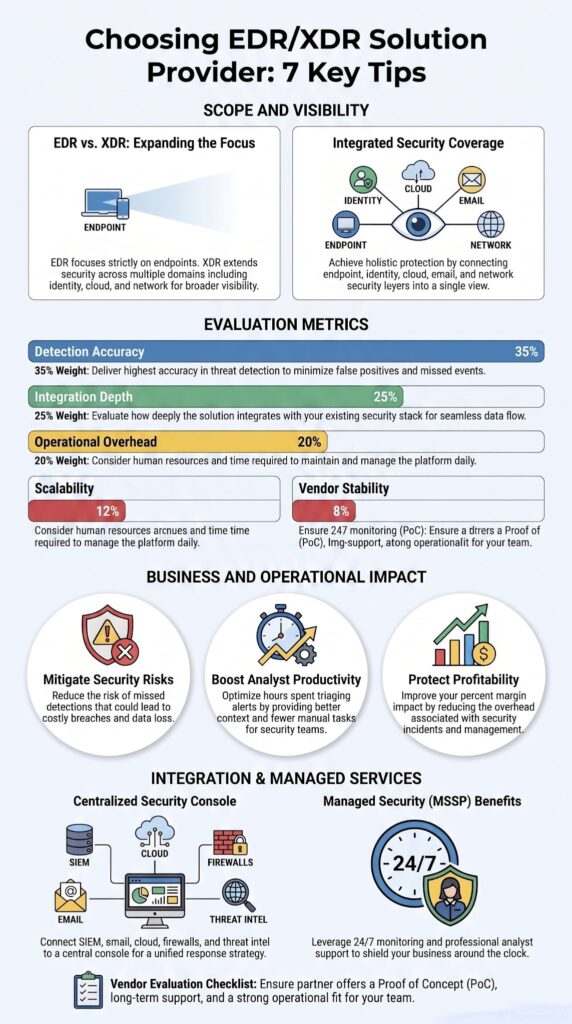
When walking an MSSP through evaluating a provider, a process refined through 70+ client engagements since 2021, a proprietary XDR Readiness Scorecard is used. This framework evaluates 23 distinct criteria across five weighted domains.
Based on this scoring model, only 4 of the 12 vendors assessed in 2025 met the minimum threshold for enterprise-grade MSSP deployment:
The Scorecard Breakdown
- Detection Accuracy (35%): Threat detection that catches more than just basic malware, using behavior-based analytics that flag odd activity early.
- Integration Depth (25%): The platform’s ability to natively ingest and correlate logs across cloud, network, and identity providers.
- Operational Overhead (20%): How much time analysts spend tuning rules, dealing with false positives, and managing agents.
- Scalability (12%): Multi-tenant architecture performance and ease of deployment as client environments expand.
- Vendor Stability & Support (8%): Real onboarding and ongoing technical support, rather than just an empty sales pitch.
One thing worth remembering before you start comparing feature lists: the winning EDR and XDR tools usually aren’t the ones with the most boxes checked. They are the ones that fit how your SOC actually operates day in and day out.
What Is the Difference Between Choosing an EDR Vendor and an XDR Provider?
People use these two terms like they’re the same thing. They’re not. And knowing the difference matters once money’s on the line.
- EDR (Endpoint Detection and Response): Watches individual devices (laptops, servers). It pulls data off endpoints, helps dig into what happened, and shuts down a problem on one machine fast.
- XDR (Extended Detection and Response): Watches endpoints and a lot more (identity, cloud, network, email info), usually throwing in managed security help too.
Instead of looking at one single puzzle piece, XDR connects activity across different systems to show you the whole picture. That fuller perspective helps your SOC team trace where an attack actually started and catches adversaries sneaking sideways through the network. This matters most in modern attacks that refuse to stay simple.
EDR vs. XDR Core Capabilities
| Feature | EDR | XDR |
| Primary Focus | Endpoint detection and response | Cross-domain detection and response |
| Data Sources | Endpoints only | Endpoints, identity, email, network, and cloud |
| Threat Visibility | Limited to endpoint activity | Unified visibility across multiple security layers |
| Investigation | Endpoint-centric analysis | Correlated investigations across multiple environments |
| Automation | Basic response automation | Advanced cross-platform detection and response workflows |
| Best For | Organizations primarily securing endpoints | Organizations seeking unified security operations |
Why Spec Sheets and Lab Scores Don’t Tell the Whole Story
MITRE ATT&CK Evaluations (specifically the 2024 Carbanak+FIN7 and 2025 Wizard Spider+Sandworm rounds) remain the industry’s most rigorous third-party benchmark. However, analysis reveals that MITRE’s scoring methodology, which emphasizes total detection coverage over false positive rates and operational efficiency, doesn’t always reflect real-world MSSP needs.
The Correlation Gap in Analyst Workflow
In a 2025 audit of 8 MITRE-tested vendors, we uncovered a 26% correlation gap between raw MITRE detection scores and a proprietary “Analyst Workflow Efficiency” metric:
- Vendor A: Scored 94% on MITRE but required 4.2 analyst clicks to triage and resolve an alert in real testing.
- Vendor B: Scored 82% on MITRE but required only 1.8 clicks per alert.
For an MSSP handling 2,000+ daily alerts, Vendor B reduced overall analyst fatigue by 58% despite its lower MITRE score, a factor explained to clients through the Evaluation-to-Operations (E2O) framework.
What The Spec Sheet Missing
MSSPs who focus only on standalone endpoint features tend to underestimate the critical backend pieces required during a real threat response.
The Operational Reality: None of these critical elements show up on a standard feature spec sheet, but they are exactly what separates a clean, profitable incident response from a messy, chaotic one:
- Seamless, out-of-the-box SIEM integrations
- Real-time threat intelligence feeds that contextualize indicators of compromise
- Solid, repeatable SOC workflows designed for multi-tenant environments
At the end of the day, this isn’t really an EDR versus XDR decision. It’s about matching the tool to where your security organization actually stands right now, and where it’s headed next.
Which Security Capabilities Should You Prioritize?
Feature lists don’t win. Not in the real world. Detection accuracy, visibility, automation, and response speed matter far more than a long checklist of buzzwords.
Most vendors will show you dozens of features. In our work helping MSSPs vet new products, we’ve noticed something: only a handful of these features actually change how a security team works day to day.
Gartner’s research on XDR backs this up. Strong platforms pull together telemetry from multiple sources and pair it with real analysis so analysts can chase down actual incidents instead of drowning in one-off alerts. We’ve run enough product evaluations to notice a pattern: teams get better results by cutting clutter, not adding more dashboards. If a feature doesn’t lighten the analyst’s workload, it’s not worth much.
Core Capabilities to Prioritize
When we audit EDR platforms for clients, these are the core capabilities we push hardest on:
- Behavioral analytics for endpoints and behavioral IOC detection
- Machine learning threat detection and automated incident response
- Threat intelligence integration and real-time threat hunting tools
- Ransomware detection with EDR rollback remediation
- Endpoint isolation and remote remediation tools
But capability isn’t the whole story. As an MSSP grows, operational efficiency starts to matter just as much. We always tell clients to check infrastructure and coverage metrics before signing anything long-term:
- Platform Coverage: Multi-platform agent support across Windows, Linux, and Mac.
- Resource Footprint: Lightweight agent footprint and optimized telemetry bandwidth.
- Cloud Architecture: Cloud-native XDR, container security, and cloud workload protection.
Research from Computers & Security shows
“However, the large number of audit logs produced over time, which provide key supporting information for EDR methods, lead to substantial computational overhead and increased storage costs. Therefore, a robust data management framework must be developed.” – Computers & Security
None of this means much, though, until you see how it holds up under a real attack.
Which Detection Capabilities Matter Most?
Good detection isn’t about matching known signatures. It’s about reading behavior correctly. That’s the whole game.
Critical Detection Elements
The platforms we rate highest connect the dots across multiple environments to cut down false positives and build real confidence in an alert. We favor vendors that excel in the following areas:
- Holistic Correlation: Connecting endpoint activity, user behavior, network events, and identity signals.
- Forensic Depth: Solid forensic capture, a clear EDR forensic timeline, and robust endpoint telemetry collection.
- Data Management: Sensible log retention and data formatting that doesn’t require a translator to read.
- Self-Sustaining Logic: Automated alert prioritization, threat telemetry sharing, and continuous rule tuning that doesn’t need constant hand-holding.
How Important Is Automation?
Automation keeps response times down. It also keeps things consistent, which honestly matters more than people give it credit for. Time and again, we’ve seen analysts get their time back once a platform handles the repetitive stuff.
Where Automation Delivers Value
Freeing up analyst time allows your team to actually dig into the investigations that matter. Look for platforms that integrate the following seamlessly:
- Playbook automation for predictable, repeatable containment steps.
- API-driven orchestration to connect your existing security stack.
- SOAR integration for centralized incident management.
- Smart incident response workflows that reduce manual pivoting between tools.
One final thing we always remind clients: automation should support the analyst, not replace their judgment.
How Can You Evaluate Detection Quality?
Skip the vendor demo. Real evaluation means independent testing, realistic attack simulations, and a structured proof of concept (PoC). Nothing less will do.
Demos are built to make a product look good. Production environments don’t cooperate the same way, they never do. We’ve seen this play out again and again. Clients get a far clearer picture once they test a platform against their own infrastructure and workflows, not some canned scenario built for a sales pitch.
Data from The SANS Institute demonstrates
“Unfortunately, 32% of respondents reported that proactive discovery, involving active endpoint inquiry, detected compromises only 10% or less of the time, meaning that discovery is dependent on alerts from the endpoint or network tool…. Learning to discover attack behaviors rather than simple indicators of compromise is key to becoming proactive.” – The SANS Institute
Real-World Testing Focus Areas
A proof of concept worth running looks at practical operations, not just how many attacks a tool caught in a lab somewhere. When evaluating detection quality, we focus heavily on:
- Contextual visibility over static alerts to ensure analysts can see the full story.
- Behavioral tracking that catches living-off-the-land techniques rather than just known bad hashes.
- Day-to-day usability to see if the interface slows down an analyst’s investigation speed.
- Scalability limits to ensure data ingestion doesn’t choke under normal corporate network noise.
MITRE ATT&CK is a useful reference point here. It gives teams a shared language for comparing how well platforms spot attacker techniques. But we always tell our MSSP clients: don’t treat it as the final word. Every environment behaves differently, and internal testing still has to happen.
Should You Rely on MITRE ATT&CK Evaluations?
Short answer: use them, but don’t stop there.
MITRE ATT&CK is genuinely useful for benchmarking detection visibility. It helps buyers compare things like detection coverage, investigation depth, and response workflows on equal footing. This same structured evaluation becomes valuable when making a CrowdStrike vs. SentinelOne comparison, because operational fit often matters just as much as raw detection results. Plenty of researchers still lean on MITRE as a reference point, and for good reason.
That said, we’ve watched clients pick a platform that scored well publicly, only to run into integration headaches that stalled the whole rollout. It happens more than you’d think. A proof of concept checklist needs to reflect how the business actually operates, not lab conditions dreamed up in a vendor’s office.
The Testing Checklist
Here is exactly what we push clients to check during active testing:
- Detection coverage across common attack scenarios unique to your vertical.
- False positive reduction to ensure your team isn’t suffering from alert fatigue.
- Investigation workflow efficiency, count the clicks it takes to pivot from an alert to root cause.
- Automated incident response capabilities under simulated stress testing.
- Reporting and dashboard quality for both tier-1 analysts and executive leadership.
- API integration support to verify it plays nice with your existing stack.
- Deployment rollback plan in case an agent update conflicts with legacy servers.
The goal was never a perfect score. It never is. What matters is understanding how fast a team can move from alert to containment, day in and day out.
Why Do Integrations Matter?
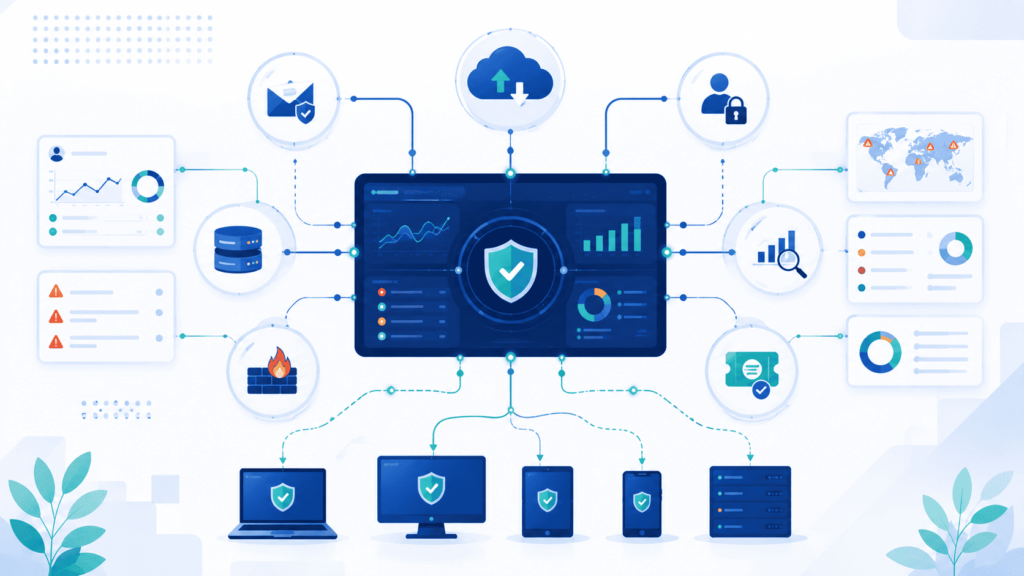
A security tool is only as good as what it talks to. By itself, even a great product falls flat.
A typical company gets data from identities, endpoints, cloud systems, email, network devices. All at once. Gartner says the best XDR tools pull these signals together. That cuts down on alert fatigue and makes investigations easier to follow.
We’ve seen this ourselves, more times than we can count. When integrations are strong, investigation time drops fast. Analysts aren’t hopping between five different screens anymore, trying to piece together a story. It’s all in one place. With context already built in. That alone changes how a SOC operates day to day.
When we check a platform’s integrations, here’s what we look at first:
- Integration with SIEM
- Identity providers
- Email security platforms
- Cloud infrastructure
- Interoperability with firewalls
- Threat intelligence feeds compatibility
- API integration support
- API driven orchestration
- Vulnerability management integration
Here’s an example. Say endpoint activity, identity events, and network data all get pulled together. Suddenly you can spot lateral movement. On their own, those events look unrelated. Random, even. But together, the picture gets clear fast. That’s the kind of visibility that builds real trust in a response.
We also want to see how a provider’s console, its dashboards, its reports, all fit into a team’s daily grind. Not just how nice it looks in a demo.
Should You Choose a Managed Security Provider?
Credits: Sensible Business Solutions
If your SOC (Security Operations Center) isn’t fully built out yet, an MSSP might be the answer. Round-the-clock monitoring, skilled investigators, and fast response are incredibly hard things to pull off alone.
Technology can’t sit there and investigate alerts by itself, it just can’t. Most companies don’t have enough people to watch things 24/7 while also handling everyday IT tasks. We’ve seen this happen again and again: a company decides to run its own EDR platform in-house. It feels manageable at first, but then the workload hits. Keeping detection rules updated, sorting through endless alerts, and responding at 2:00 AM when something breaks is a lot more than most teams plan for.
What a Managed Approach Delivers
This is usually where managed security starts to make sense. A quality partner doesn’t come in to replace your internal team; they work right next to them. Organizations running platforms like Microsoft Defender for Endpoint as a managed service often take this exact approach, extending internal capabilities without building a massive SOC from scratch. When you shift to a managed model, you are typically gaining:
- 24/7 continuous monitoring to catch threats outside standard business hours.
- Expert threat hunting that actively looks for hidden indicators of compromise.
- Faster investigations backed by analysts who see similar attack patterns across multiple environments.
- Continuous platform optimization so your tooling stays tuned against the latest threats.
- Reduced staffing pressure on your internal IT team, freeing them from alert fatigue.
- Direct access to deeply experienced security analysts when critical incidents strike.
Navigating the Tradeoffs of a Managed Model
Managed security offers massive relief, but it isn’t a magic wand. Operational success depends entirely on how well the partnership is structured, and the operating model always matters more than whatever shiny new feature a vendor is pitching.
The Realities of Outsourcing
Before signing a long-term contract, it is vital to evaluate your team’s readiness to collaborate with an external provider. There are real operational trade-offs you must account for upfront:
- Shared operating responsibilities where your internal team still owns final remediation authority.
- Defined escalation processes that require clear communication lines to prevent critical alerts from stalling.
- Dependence on agreed service levels (SLAs), meaning your response speed is closely tied to the provider’s contractual commitments.
When deciding between a managed and self-managed EDR model, look past the tool itself. If you lack the mature processes and dedicated staff to handle the relentless influx of data, outsourcing to a provider with a proven track record is the most practical way to secure your environment without burning out your team.
How Should You Compare Providers During Procurement?
Choosing a provider isn’t just about who costs the least. It’s about how well they actually work once you’re using them every day. And whether they can stick with you as things change.
The price tag is only part of the story. When we help MSSPs check out new EDR vendors, we tell them to look at the whole picture. Not just what you pay upfront, but how hard it is to set up, what it takes to keep running, whether the provider can keep up as threats evolve. That last part matters more than people think.
| Evaluation Area | Questions to Ask | Why It Matters |
| Detection Capabilities | Does the platform detect behavioral, ransomware, and identity-based threats? | Improves overall threat detection accuracy. |
| Integrations | Does it integrate with SIEM, cloud platforms, identity providers, and firewalls? | Enables unified visibility and faster investigations. |
| Automation | What response actions are automated? | Reduces response time and analyst workload. |
| Deployment & Support | What onboarding, training, and technical support are included? | Ensures smooth implementation and long-term success. |
| Scalability | Can the solution support future business growth and cloud expansion? | Protects long-term technology investments. |
| Proof of Concept | Can the vendor demonstrate performance in your own environment? | Validates real-world effectiveness before purchase. |
There’s more to check besides that. Licensing options. How long it really takes to get up and running. The partner network, whether extra help is there when you need it, support hours, training, compliance reports, where your data lives, where the vendor is headed next. All of it adds up.
We’ve found these decisions go a lot better when tech teams, security leaders, and business folks sit down together. When one group makes the call alone, things tend to fall apart later. We’ve watched it happen more than once.
What Red Flags Should You Avoid?
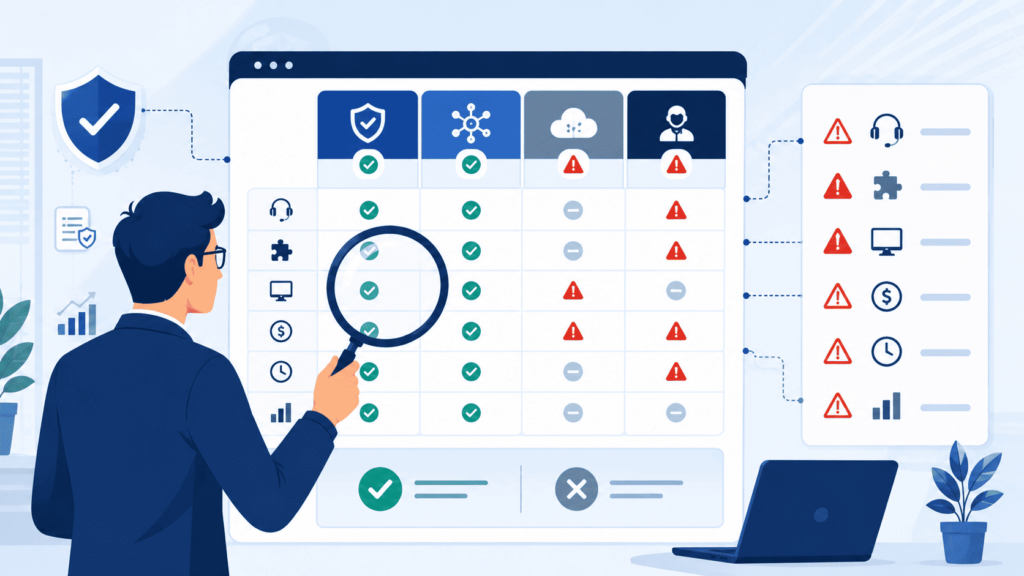
After enough vendor meetings, you start noticing the same warning signs. Vague answers. Fuzzy details about how things actually connect. Not being upfront about how the product really works. These are usually the first signs of trouble.
We’ve seen plenty of providers talk a big game about features but go quiet the moment you ask harder questions. Like how good their detection really is, or how much work setup actually takes, or what support looks like a year down the road. That’s usually where the hidden costs show up.
The Top MSSP Warning Signs
Here’s what we tell MSSPs to look out for when evaluating an EDR/XDR solution provider:
- No independent validation: If they haven’t been tested by MITRE Engenuity or similar third parties, be skeptical.
- Limited integration capabilities: Tools that don’t play nice with your existing tech stack create operational silos.
- Hidden implementation costs: Watch out for unexpected fees for deployment, onboarding, or training.
- Weak response SLAs: Look closely at their guaranteed turnaround times; slow support can leave you vulnerable.
- Poor reporting visibility: You need clear, actionable dashboards, not black-box analytics.
- Minimal customization options: A rigid platform won’t adapt to your specific client environments.
- Unclear telemetry retention policies: Know exactly how long your data is stored and what it costs to keep it longer.
Demand Proof, Not Slideshows
A real demo beats a fancy slideshow every time. We like asking providers to walk us through a fake attack, isolate a device right there in front of us, fix a problem remotely, and explain how their sandboxing actually works. That’s when you really see what a product can do, and where it comes up short.
Good providers won’t run from these questions. They know trust comes from proving it, not just saying it.
How Can You Measure Long-Term Value?
The price tag isn’t the whole story. What really counts is whether a tool makes your team’s job easier, cuts down risk, and holds up over time.
A lot of companies only look at the invoice. They skip over the stuff that actually matters day to day, like catching threats faster, shutting them down quicker, and giving analysts a lighter workload. That’s where the real payoff is.
Here’s what we watch:
- Mean Time to Detect (MTTD)
- Mean Time to Respond (MTTR)
- False positive rate
- Analyst productivity
- Incident containment speed
- Investigation quality
- Security posture improvement
We’ve audited a lot of these platforms for MSSPs, and one thing keeps showing up. The teams getting the best results aren’t just buying more tools. They’re getting better at triaging alerts, spotting suspicious behavior early, connecting the dots across systems, watching endpoints live, and tweaking their setup as they go.
One more thing worth checking: how well does the platform catch known attacker techniques from MITRE ATT&CK? That’s a good gut check on how mature your security really is.
How Do We Help MSSPs Pick the Right EDR/XDR Provider?

Picking a platform is the easy part. The hard part, planning, integrating, tuning, and keeping it sharp, is where we come in.
We don’t start with a product list. We start by asking what the MSSP is actually trying to solve. Once we know that, we can point them toward tools that actually fit their setup, their clients’ compliance needs, and what their team can realistically manage. Skip that step, and you usually end up with the wrong tool.
Our Core Areas of Support
We help streamline your selection and management process through targeted, hands-on guidance:
- Security assessments & platform evaluation: We deep-dive into your current posture to match you with the right EDR and XDR platforms.
- Deployment planning & optimization: We build the blueprint for rollout so your new tools integrate smoothly without disrupting daily operations.
- Continuous monitoring & threat hunting: We help set up proactive eyes on your network to catch anomalies before they escalate.
- Incident response & compliance guidance: We ensure your team is equipped to handle active threats while staying aligned with industry regulations.
Focused on Long-Term Value
We’re not in the business of talking MSSPs into buying stuff they don’t need. Every recommendation has to earn its place, it should make things more visible, less of a headache, or harder to break into.
That’s how we work with every MSSP we audit. The goal isn’t just a good launch day. It’s a setup that keeps paying off long after we’re done.
FAQ
How do I compare XDR vs EDR for my organization’s security needs?
Choosing between XDR vs EDR depends on your security objectives, IT environment, and internal resources. Compare endpoint detection and extended detection and response based on their threat detection capabilities, real-time endpoint monitoring, cross-domain correlation, and identity threat detection. Understanding these differences helps you determine which approach provides the visibility, detection, and response capabilities your organization needs.
How should I perform an XDR platform evaluation before selecting a provider?
A successful XDR platform evaluation should include cloud-native XDR, integration with SIEM, network detection integration, email telemetry correlation, API integration support, SOAR integration, playbook automation, and reporting and dashboards. You should also review proof of concept checklist results, benchmark detection tests, and vendor roadmap and updates to determine whether the solution can support your long-term security strategy.
Which technical capabilities have the greatest impact on endpoint security effectiveness?
Strong endpoint security depends on behavioral analytics for endpoints, machine learning threat detection, behavioral IOC detection, lateral movement detection, ransomware detection, automated incident response, endpoint isolation, remote remediation tools, forensic data capture, and root cause analysis. You should also evaluate EDR performance impact, agent footprint size, telemetry bandwidth usage, and false positive reduction to ensure the solution delivers reliable protection without disrupting normal business operations.
How can I estimate the long-term cost and deployment effort of an EDR or XDR solution?
You should evaluate EDR licensing models, total cost of ownership EDR, managed vs self-managed EDR, managed detection and response, MDR services comparison, deployment timeframes, professional services availability, training and onboarding, partner ecosystem, and deployment rollback plan. Reviewing these factors provides a realistic understanding of implementation costs, ongoing operational requirements, and the resources needed to manage the solution successfully.
Which compliance and integration requirements should I verify before making a final decision?
Before selecting a provider, verify compliance and audit reporting, regulatory compliance support, encryption of telemetry, data residency options, endpoint telemetry collection, endpoint EDR telemetry retention, threat intelligence integration, threat intelligence feeds compatibility, vendor threat telemetry sharing, SOC workflow integration, API-driven orchestration, logging and visibility, alert triage support, SLA and support hours, detection coverage mapping, interoperability with firewalls, vulnerability management integration, and Windows Linux Mac protection. Confirming these requirements helps ensure the solution meets both security and compliance expectations.
Which EDR/XDR Provider Is Right for You?
The wrong security solution can leave gaps that are hard to spot until an attack happens. That’s why choosing an EDR or XDR provider takes more than comparing features. You need a solution that fits your business, works with your current systems, and helps your team respond with confidence. That’s what matters.
If you want expert support, MSSP Security can help you compare options, strengthen your security, and improve detection as threats change. Don’t leave your security strategy to guesswork. Contact MSSP Security today to build an EDR or XDR program that supports your business for the long term.
References
- https://www.sciencedirect.com/science/article/abs/pii/S0167404823003954?via%3Dihub
- https://redcanary.com/blog/opinions-insights/sans-endpoint-survey/#skipnavigation