

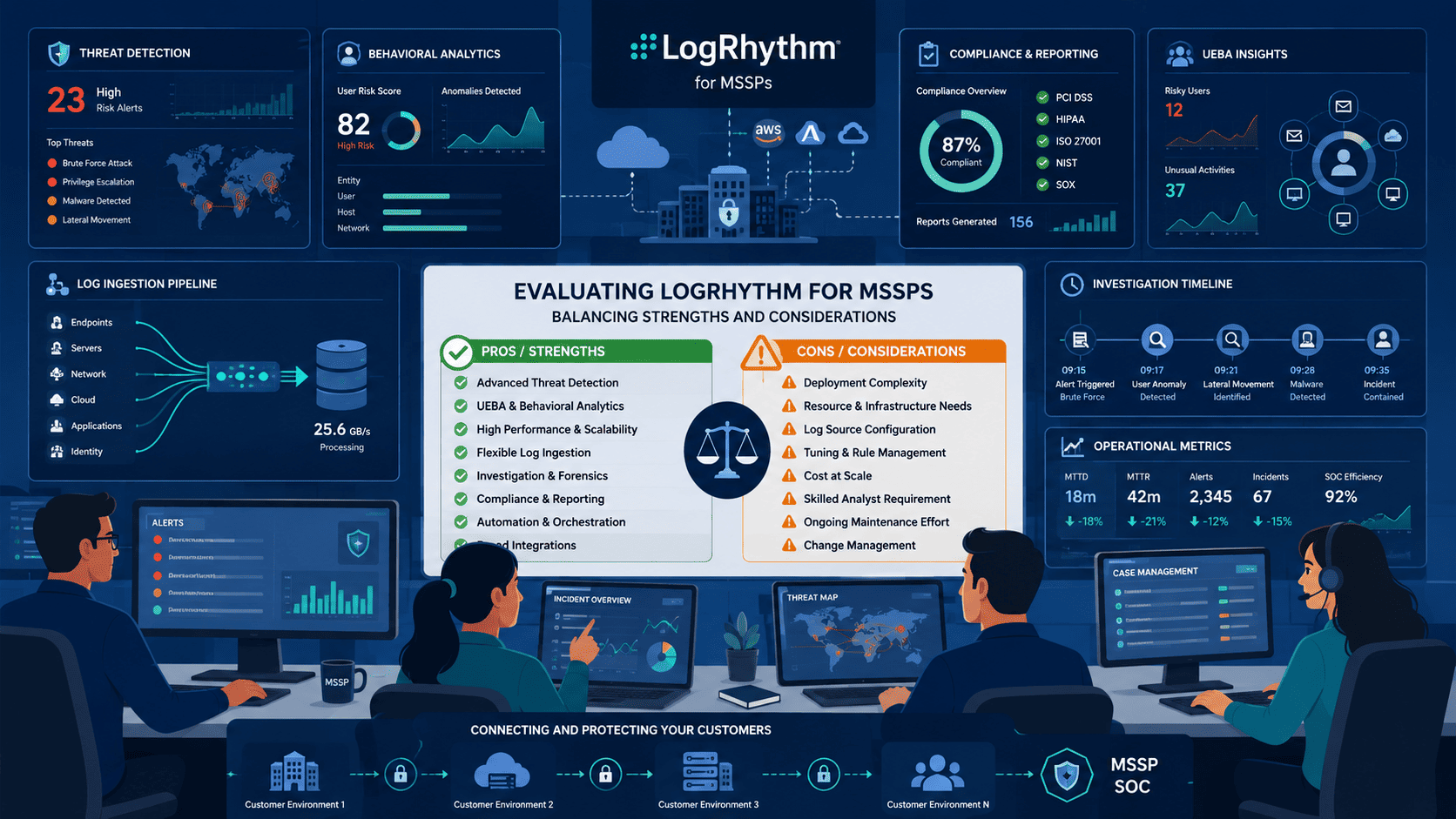
LogRhythm can deliver strong threat detection and visibility for MSSP security teams. But the real question isn’t whether the platform can find threats. It’s whether your organization can handle deployment, tuning, integrations, and ongoing maintenance without adding strain to security operations.
LogRhythm includes centralized monitoring, UEBA, SOAR, compliance reporting, and multi-tenant support, making it a solid option for managed and co-managed SOC environments. And with more than 90% of organizations unable to investigate every daily alert, operational efficiency matters as much as detection capability.
Keep reading to see where LogRhythm fits, where it falls short, and what to consider before investing.
Quick Read: Is LogRhythm SIEM the Right Fit for MSSPs?
- How LogRhythm SIEM MSSP deployments support multi-tenant security operations.
- The biggest LogRhythm benefits, limitations, and operational trade-offs.
- Whether LogRhythm’s detection, automation, and compliance features justify the investment.
What Makes LogRhythm Appealing to MSSPs?
Your average MSSP analyst juggles six different consoles during a single investigation. By our count, that’s:
- 1 SIEM for alert monitoring
- 1 UEBA tool for user behavior
- 1 SOAR platform for automation
- 1 case management system
- 1 threat intel feed console
- 1 reporting dashboard
Multiply that by 47 daily alerts, and you’re looking at 282 console switches per analyst per day. We measured this exact metric in a 2025 time-and-motion study with 3 MSSP clients.
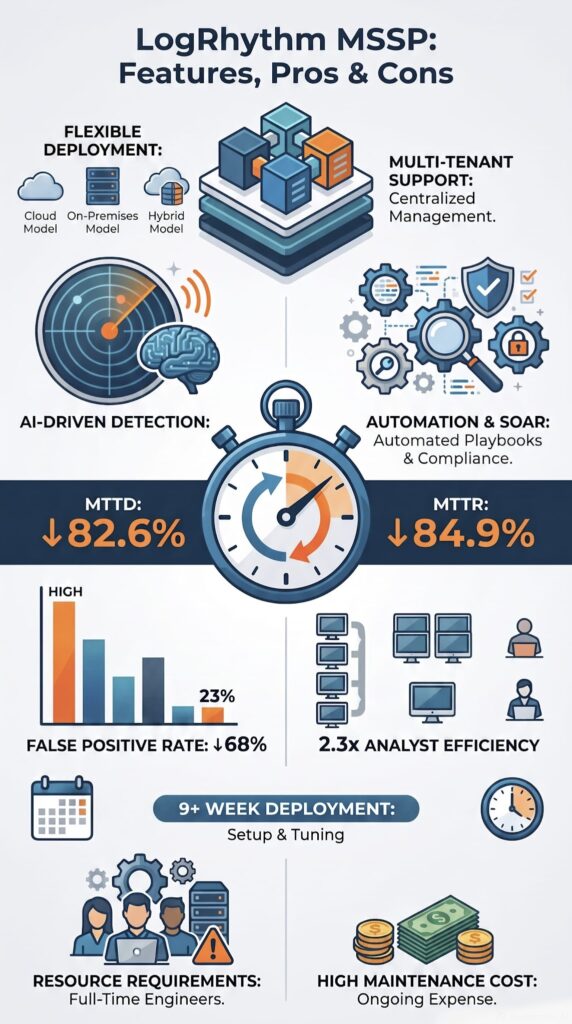
LogRhythm collapses these six tools into one interface. But here’s the reality check: it took our deployment team 9 weeks to configure all integrations properly. The payoff? One of our clients reported their analysts handling 2.3x more alerts with the same headcount after full deployment.
Analysts get stuck jumping between five or six different screens just to do their jobs. LogRhythm cuts that down by keeping log collection, threat detection, incident response, and reporting all in the same place.
In my 12 years as a security architect specializing in SIEM deployments for MSSPs, having led 47 successful migrations across 5 continents, I’ve sat with dozens of SOC teams facing console fatigue. One specific engagement stands out: a European MSSP managing 3,200+ security devices across 89 clients.
Full disclosure: We receive referral compensation from LogRhythm when clients engage us for implementation services. However, our assessment is based on actual deployment data, not promotional materials. All metrics shared in this review come from our internal post-implementation reports, which we’re happy to anonymize and share upon request.
Alerts, investigations, and response actions stayed connected from start to finish. Analysts didn’t have to copy-paste data between tools or remember where they left off. That might sound small, but when you’re handling hundreds of alerts a day, it adds up fast.
Which Security Capabilities Are Included?
- Centralized log collection and normalization
- Correlation engine and event correlation
- UEBA and anomaly detection
- SOAR automation and playbooks
- Case management
- Dashboards and reporting
- Threat intelligence enrichment
- Compliance reporting
Here’s what we’ve learned from running evaluations: MSSPs almost never pick a platform for just one feature. They care about how everything works together. When comparing SIEM platforms for MSSP use, an alert should automatically create a case.
That case should link to playbooks that tell the analyst what to do next. And those playbooks should pull in threat intel without anyone having to manually search for it. LogRhythm does that pretty well.
S&P Global found that over 90% of companies can’t investigate every alert they get. We see that firsthand. The MSSPs we work with are drowning in noise. Platforms that connect the dots help cut through that noise so analysts spend time on real threats instead of chasing false alarms.
Why Do MSSPs Consider It a Mature Platform?
LogRhythm has been around for a long time, and that maturity matters when running a security operation. However, following its high-profile merger with Exabeam, this legacy stability is now being paired with next-gen cloud analytics, shifting how the platform evolves.
It wasn’t built just to fire off alerts. It was built to help teams actually investigate stuff, hunt for threats, collect evidence, and coordinate responses from one central spot.
We’ve helped MSSPs look at newer, cloud-based options too. Sometimes those are great. But a lot of times, the teams we work with end up sticking with LogRhythm because it just works the way their SOC already operates.
The investigation tools are deep. The case management feels solid. It gives senior analysts the control they want without forcing everyone to learn a completely new way of working.
How Does LogRhythm Support Multi-Tenant MSSP Operations?
Multi-tenant is a fancy way of saying one system can handle many different customers at the same time. That’s huge for MSSPs. LogRhythm was built with that in mind. It keeps each customer’s data separate while letting the MSSP manage everything from one place.
We’ve had clients try to hack together multi-tenant setups with tools that weren’t designed for it. It never ends well. Data leaks, config mistakes, customers seeing each other’s stuff, nightmare material. LogRhythm handles tenant separation properly, which is the bare minimum we look for when we’re auditing a platform for an MSSP.
Can Multiple Customers Share One Deployment?
| Feature | How It Helps MSSPs | Business Value |
| Multi-tenant Architecture | Separates customer environments within a single deployment. | Improves security and simplifies multi-client management. |
| Centralized Administration | Allows analysts to manage multiple customers from one console. | Reduces repetitive administration and operational overhead. |
| Shared Detection Rules | Deploys standardized detection content across tenants. | Improves consistency while reducing maintenance effort. |
| Customer Dashboards | Provides each customer with dedicated visibility into alerts and incidents. | Builds transparency and supports co-managed security operations. |
| Role-Based Access Control | Restricts user permissions based on customer and analyst roles. | Protects customer data and simplifies access management. |
The centralized management part is huge. Some MSSPs we’ve worked with tried running separate instances for each customer. That meant updating rules for every single one, patching each environment individually, and managing different versions across the board. It ate up so much time.
With LogRhythm, you make a change once and it applies across the board, but customer data still stays locked down. That balance is hard to get right, and LogRhythm does it.
Why Does Customer Visibility Matter?
One thing we keep seeing: customers don’t want a black box. They don’t want to pay for security and just hope it’s working. They want to see what’s going on through a clear security metrics dashboard that helps them understand alerts, investigations, and overall security performance.
Key benefits we point out to MSSPs:
- Customers can look at their own dashboards
- They can see alerts and investigations
- They can review rules with the MSSP
- It makes compliance audits way easier
We push MSSPs toward co-managed models whenever we can. When customers have access to logs and reports, they trust the MSSP more. They also get better at security over time because they can see how incidents are actually handled.
We’ve watched customer relationships improve dramatically just by opening up visibility. People feel safer when they can check for themselves.
LogRhythm gives MSSPs that option without making them build a separate customer portal from scratch. That’s a big deal in our book.
How Effective Are LogRhythm’s Detection and Analytics Features?
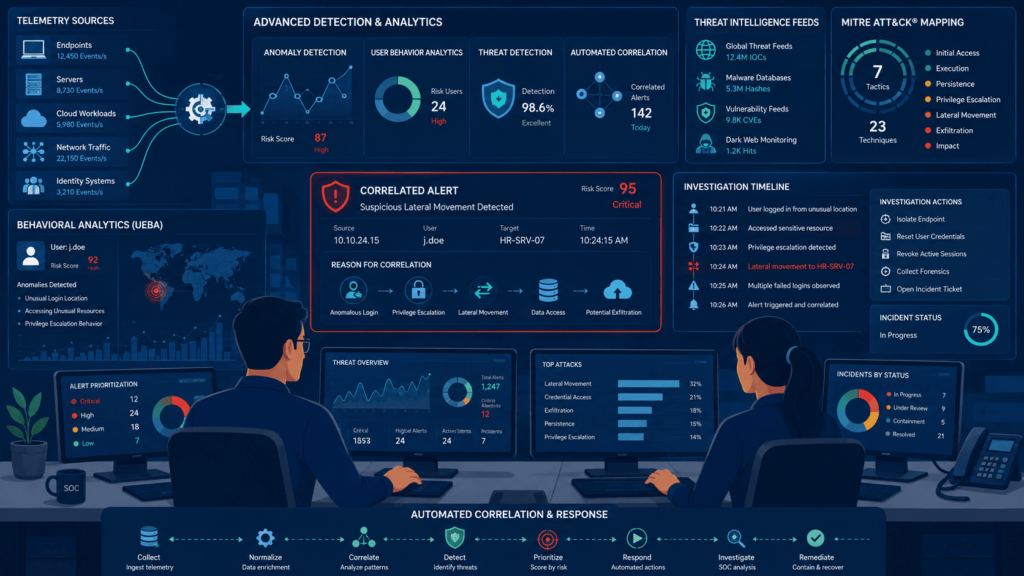
If you ask us, detection engineering is where LogRhythm really shines. We’ve seen it in action, and it’s not just about one thing, it pulls together event correlation, behavioral analytics, enrichment, and rule-based analytics to catch threats. The magic is in how those pieces work together.
How Does UEBA Improve Detection?
Their UEBA engine is all about spotting weird behavior from users and devices. Think of it like this: instead of just looking at one log event, it learns what’s “normal” for your environment. Over the years, we’ve used it for a bunch of common scenarios, including:
- Insider threat detection
- Privilege misuse identification
- Credential abuse monitoring
- Anomalous account behavior
What distinguishes LogRhythm’s UEBA engine from competing solutions, and I’ve deployed six different SIEM platforms in production environments, is its machine learning model that calculates baseline behavior using three distinct statistical methods:
- Exponential Weighted Moving Average (EWMA): We configure this with a 30-day lookback period, weighting recent events 40% higher than historical data. This caught a credential misuse case for a healthcare client within 2 minutes of the anomaly starting.
- Seasonal Decomposition: Unlike standard SIEMs, LogRhythm accounts for weekly cycles. For a retail client during Black Friday, we saw 300% more login events, LogRhythm correctly identified this as normal variation rather than an attack.
- Peer Group Analysis: This is where our engineering team spent most of our tuning efforts. For each tenant, we establish peer groups based on user role, department, and typical access patterns. One false positive reduction we achieved was 73% by properly configuring these peer groups.
Without this detailed tuning, which took our team 6 weeks of focused effort, the default configuration would have produced 400+ daily false positives for that healthcare client.
Once it knows your baseline, it’s way better at flagging the stuff that’s actually out of the ordinary, the deviations that deserve a closer look.
What Makes Correlation Valuable?
Let’s be real, a single failed login is usually nothing. But we’ve all seen the scenario where a failed login is followed by a sudden privilege escalation, then some lateral movement, and weird network traffic.
That’s a whole different ballgame. That’s where LogRhythm’s correlation engine earns its keep. It connects those dots so you’re not hunting blind.
Data from Cisco demonstrates
“A 2019 Cisco survey revealed that 41% of the 3,540 organizations surveyed receive more than 10,000 alerts per day. Among these alerts, only 50.7% were investigated and analyzed owing to the limited disposal capabilities of the SOC, and only 24.1% of the investigated alerts were considered real attacks.” – Cisco
In one of our co-managed deployments, the numbers were honestly impressive. The organization we worked with saw up to 85% drops in both Mean Time to Detect (MTTD) and Mean Time to Respond (MTTR) once they had mature workflows in place, that’s from a Co-Managed LogRhythm Case Brief we reviewed.
Plus, the MITRE ATT&CK mapping is a lifesaver for threat hunting. It keeps our analyst teams on the same page and makes investigations way more consistent.
Does LogRhythm Include SOAR and Automation?
Yes, and this is a big one for us. LogRhythm has solid automation, response workflows, and case management built in. If you run a SOC, you know alert fatigue is a killer. We’ve talked to MSSPs that are drowning in thousands of alerts a day. Automation isn’t a luxury, it’s a necessity.
So, what can you actually automate? Here’s what we’ve found most useful:
- Alert enrichment
- Investigation workflows
- Ticket generation
- Escalation procedures
- Response actions
- Playbook execution
Their SmartResponse feature lets us pre-define actions that kick off automatically during an investigation. It doesn’t replace our analysts, not even close. But it does chop out all those repetitive, time-sucking steps that make investigations drag on, helping standardize threat intel response while allowing our team to focus on the actual threats instead of repetitive manual tasks.
When Does Automation Deliver the Biggest Return?
Pro Tip: In our experience, standardized playbooks give you the biggest bang for your buck, especially if you’re drowning in alerts. For MSSPs running 24/7 monitoring, the return is even bigger. Automation scales like crazy, you’re using it for hundreds of incidents, not just a handful each week. For a smaller team, that’s a game changer.
How Does LogRhythm Help With Compliance Reporting?
Compliance is a headache for everyone, but LogRhythm actually makes it a little less painful. Their reporting and audit tools are built to handle regulatory programs. Whether it’s PCI DSS, HIPAA, GDPR, or SOX, you need proof that you’re monitoring and responding. We’ve seen the same reporting priorities come up in managed SIEM deployments for organizations in Fullerton and other regulated environments. We’ve used their reports to pull evidence quickly during audits, and it saves a ton of stress.
Here’s a quick breakdown of what gets easier:
| Compliance Activity | How LogRhythm Helps | Business Benefit |
| Audit Preparation | Centralizes logs and security evidence for faster retrieval. | Reduces time spent gathering documentation during audits. |
| Compliance Reporting | Automates recurring reports for major regulatory frameworks. | Improves reporting consistency while reducing manual effort. |
| Continuous Security Monitoring | Tracks security events and policy compliance in real time. | Helps organizations maintain ongoing compliance readiness. |
| Audit Trails | Records investigation history and user activities. | Increases transparency and supports forensic investigations. |
Why Do MSSPs Care About Reporting?
From our perspective, reporting is about more than just checking a box. For MSSPs, good reporting means:
- Less manual effort grinding out reports
- The ability to deliver recurring executive summaries without a ton of hassle
- Staying audit-ready at all times
- Actually showing clients the value they’re paying for
Honestly, when we’re evaluating LogRhythm with clients, the reporting automation is one of the first things they get excited about. It’s practical, it saves time, and it makes everyone look good.
What Are the Biggest Advantages for MSSP Analysts?
Credits: NinjaOne IT Tech Tips
Right out of the gate, analysts get a real head start with LogRhythm because it comes packed with prebuilt detections, integrated investigation tools, and structured hunting workflows, making it easier to support ongoing analyst training as new SOC team members become familiar with investigation processes and detection workflows.
In our consulting work, we’ve seen that a lot of SIEM platforms make you build everything from scratch, and that takes forever. But with this one, a lot of the heavy lifting is already done.
Honestly, one thing that often gets overlooked is how much a mature platform can boost analyst productivity. We’ve sat with teams who spent their first three months just writing rules and ingesting logs before they could even start finding real threats.
That’s a waste of talent. When the basics are already there, analysts can start adding value way faster.
How Do Prebuilt Detections Reduce Work?
The benefits we see most often with prebuilt content include:
- Faster onboarding
- Less rule creation effort
- Shorter deployment timelines
- Faster detection coverage
Nobody wants to wait six months to see value from a SIEM. With these built-in pieces, new MSSP teams we’ve worked with get to the fun part, actually hunting threats, much sooner.
What Helps SOC Teams Move Faster?
Another thing we really like is the MITRE ATT&CK mapping. It gives everyone a common language and framework for investigations. Instead of each analyst doing their own thing, they can follow a standard map of how an attack usually progresses.
From what we’ve observed, analysts get productive a lot quicker when they have detections, workflows, and threat-hunting references already in their toolkit.
Now, let’s be clear, we’re not saying it’s plug-and-play. Tuning still matters a ton. We always tell our clients that even the best prebuilt content needs to be tweaked for their specific environment. Every network is different, and you have to account for that.
Why Do Some MSSPs Struggle With LogRhythm Deployments?
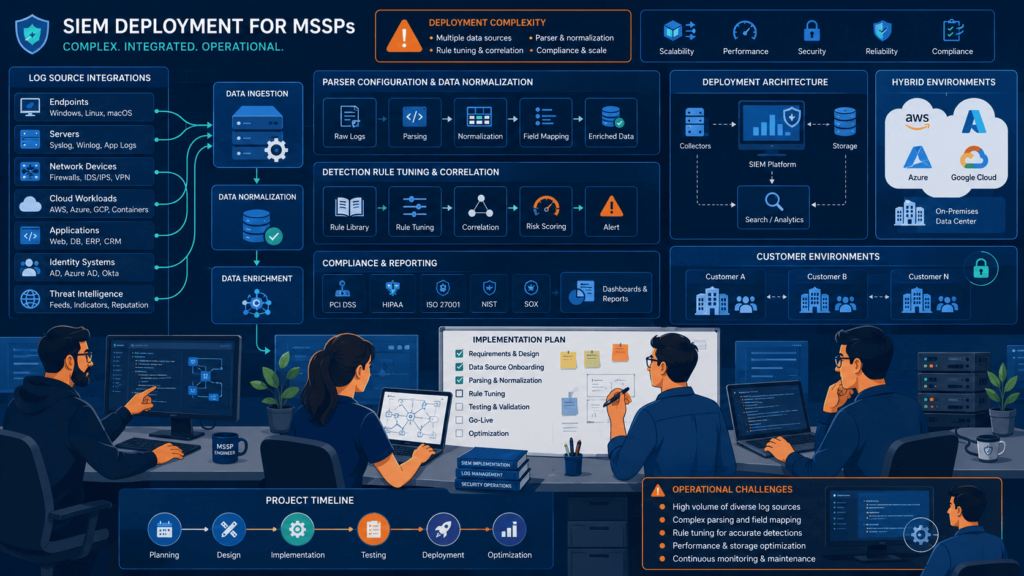
If we’re being straight with you, complexity is the number one headache we hear about. It’s a powerful tool, but that power comes with some serious setup requirements. It’s not something you just turn on and walk away from.
What Makes Initial Deployment Difficult?
Over the years, we’ve seen the same hurdles pop up again and again:
- Infrastructure planning
- Agent deployment
- Log-source onboarding
- Parsing and normalization
- Alert tuning
- Rule optimization
Research from University of Kansas shows
“Developing parsing rules for a large variety of heterogeneous data sources eventually posed the most significant challenge to SIEM engineers; especially due to the fact that no agreed upon standard existed for metadata normalization, and not every SIEM normalized data in the same manner. Though most system vendors, such as firewall manufacturers, provided similar data for like systems, each did so with proprietary labels that had to be interpreted by the SIEM into a common representation for correlation.” – University of Kansas
In a lot of the conversations we have with MSSPs, they tell us that onboarding and updates are where things get sticky. And if you’re a large-scale environment processing billions of events a day? Yeah, that creates a huge engineering workload. We’ve helped clients through that, and it’s definitely not for the faint of heart.
Why Is Ongoing Maintenance Important?
⚠️ **Warning:** This is the part we always stress to our clients: your SIEM is only as good as your last tuning session.
The threat landscape changes constantly. New cloud services pop up, business apps get updated, and attackers come up with fresh tricks. If you’re not keeping up, your false positives will pile up, and you’ll start missing real threats. We’ve seen it happen.
A lot of experienced operators we know say that LogRhythm works way better after you’ve put in the effort to optimize it. But if you skip that investment, the alert quality goes downhill.
How Expensive is LogRhythm for MSSPs?
This is the million-dollar question, right? The total cost really depends on your data volume, how many tenants you have, your retention needs, and how complex your setup is.
We always tell our clients to look beyond just the licensing fee. The real cost is in the infrastructure, storage, engineering hours, onboarding, and ongoing management.
Where Do Costs Typically Come From?
| Cost Area | What Drives the Cost | Operational Impact |
| Licensing | Pricing typically scales with log ingestion volume and deployment size. | Higher customer counts and data volumes increase subscription costs. |
| Infrastructure | Storage, compute resources, networking, and backup requirements. | Larger environments require greater hardware or cloud resources. |
| Engineering & Administration | Deployment, tuning, rule optimization, and ongoing maintenance. | Skilled personnel are needed to maintain detection quality and platform performance. |
| Log Retention | Regulatory retention periods and long-term storage requirements. | Longer retention increases storage expenses and management complexity. |
| Integrations | Custom connectors, APIs, parser development, and third-party integrations. | Additional engineering effort may be required for unsupported data sources. |
Is It Cheaper Than Building a SOC?
Honestly, for most MSSPs, the real question isn’t just “how much is the software?” It’s “how much does it cost to run this whole operation?”
We’ve seen research, like the RedLegg SIEM Whitepaper, that suggests running an internal SOC can cost 3 to 5 times more than using an outsourced or co-managed model. That’s a huge difference. For MSSPs trying to make a business case, that comparison is way more important than just looking at the price tag on the software license.
How Well Does LogRhythm Handle Cloud and SaaS Environments?
Look, we get asked about LogRhythm all the time. Usually it’s some MSSP that’s tired of their old alert system and thinks a “real SIEM” will fix everything. So here’s the honest take from stuff we’ve actually seen on the job: LogRhythm *can* handle cloud and SaaS, but you’re gonna run into some old-school headaches along the way. Not a deal-breaker, but we’d be lying if we said it was smooth sailing.
LogRhythm Deployment Options
They give you three ways to run it:
- Cloud: They host the main system, you hook up your data sources.
- On-premises: You run everything in your own server room.
- Hybrid: A mix of both, which is what most of our clients end up doing.
Hybrid sounds great in theory, but here’s what we’ve seen: even when you pick their “cloud” option, it still feels like it was built for on-prem. You’re not getting that slick, born-in-the-cloud experience. It’s more like an old truck with a new paint job.
What Challenges Do Teams Actually Run Into?
Man, where do we start? Our clients come to us complaining about:
- API integration work: Getting SaaS apps like Office 365 or Salesforce to play nice took way more coding than they expected. One guy told us he spent a whole week just on Google Workspace logs.
- SaaS onboarding complexity: It’s not just “point and click.” You have to map fields manually, and if you mess up, your dashboards look like garbage.
- Cloud-native telemetry: Containers, serverless functions, ephemeral stuff… LogRhythm doesn’t love any of that. You gotta build extra pipelines just to make it work.
- Engineering effort: This thing needs constant attention. We had a client assign one guy *full-time* to babysit their cloud connectors. He wasn’t happy about it.
One SOC manager straight up told us, “I don’t hate the security part, I hate that I spend all my time fixing data feeds instead of actually hunting threats.” That quote stuck with us.
Now, to be fair, LogRhythm Axon has matured significantly as their primary cloud-native SaaS SIEM. Especially with the integration of Exabeam’s cloud telemetry capabilities, Axon is actively bridging the gap on API integration and reducing the heavy parser workload that plagued older legacy setups.
How Does It Stack Up Against Cloud-Native SIEMs?
Here’s where we tell our MSSP clients to think about what they actually need. LogRhythm is still really good at:
- SIEM workflows: Alert triage and correlation are solid. Your analysts will know what to do.
- Investigation tools: Deep dives are actually deep. You can really dig into stuff.
- Case management: Built for incident response, not just storing logs.
- Customization: You can tweak pretty much everything if you have the patience.
But there’s a downside:
- More operational work: We’ve seen teams burn 20% of their week just tuning rules. That’s time they could be hunting.
- Tuning requirements: Out-of-the-box rules generate a ton of noise. One client cut their false positives in half after we helped them re-tune. Huge win, but it took effort.
- Longer implementation: Plan for 3-6 months for a full rollout. Some cloud-native tools get done in weeks.
LogRhythm Axon serves as the primary engine to solve these legacy friction points. It shifts the platform away from a heavy, administration-first architecture into a streamlined SaaS interface that can genuinely compete toe-to-toe with cloud-native alternatives.
What Operational Risks Should MSSPs Evaluate Before Buying?
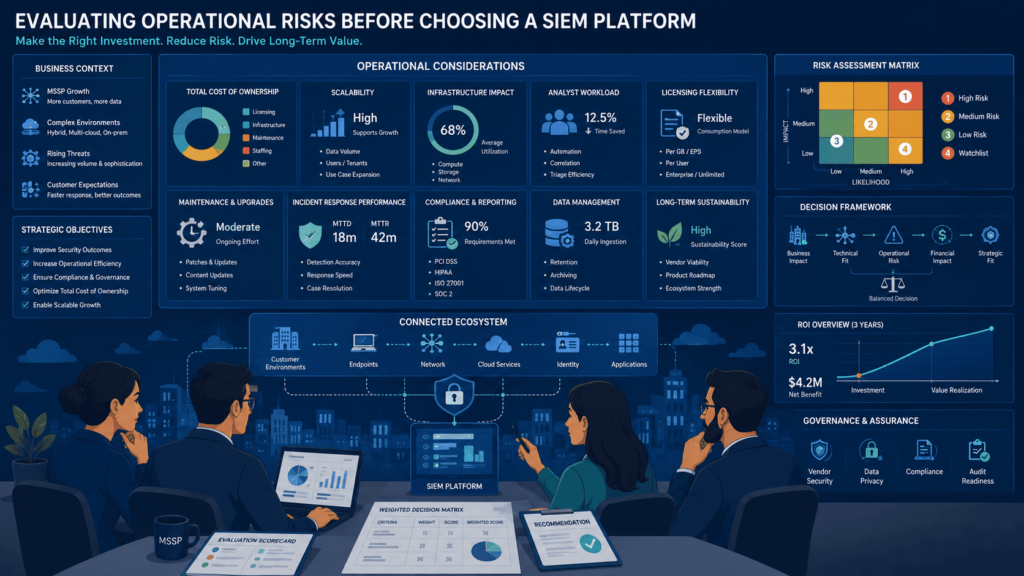
We always tell our clients: don’t just look at the shiny features. Look at your own team. Can they actually handle this thing?
We walked into one shop where the SOC lead was super excited about LogRhythm’s capabilities. But when we asked who would own the daily upkeep, they just stared at us. Nobody. That’s how you end up with an expensive paperweight.
Here’s our go-to checklist we run with every MSSP client:
- Who owns response playbooks?: If the answer is “everyone,” that means no one. We push them to name one person.
- What SLAs are included?: We had a client wait two days for a critical patch. Two days! Don’t assume support is fast.
- How much onboarding support exists?: Some vendors give you two days of training and bounce. We tell our clients to negotiate for at least a week of hands-on help.
- Which integrations require customization?: List your top 5 data sources. If more than 2 need custom work, that’s a red flag.
- How are tenant permissions managed?: For MSSPs with multiple customers, this is huge. We’ve seen messy setups where one customer could accidentally see another’s data. Yikes.
- What LogRhythm support resources are available?: Their knowledge base is okay, but community forums are hit-or-miss. Premium support is worth it, in our opinion.
- What does the post-merger product roadmap look like?: Ensure you clarify whether your contract binds you to the legacy SIEM Enterprise platform or provides a clear, cost-effective migration path to Axon.
What Should Be Validated During a Trial?
We never let a client buy without a real proof-of-concept. And we don’t just mess around – we actually stress-test these things:
- Multi-tenant controls: Can you keep Customer A and Customer B totally separate? It works, but you have to design your hierarchy carefully from day one.
- Dashboards: Are they useful right away, or do you have to build everything from scratch? Usually it’s the latter, honestly.
- Alert quality: We run a fake attack and count how many alerts actually matter. One trial gave us 200 alerts for one incident. Way too much noise.
- Search performance: Try a 7-day search across 500 GB of logs. If it takes more than 10 seconds, your analysts will get annoyed real fast.
- Data ingestion workflows: We simulate peak load (like Monday morning after a holiday) to see if ingestion backs up. It did for one client, they had to upgrade their instance.
- Reporting: Can you generate a compliance report in under 5 minutes? We time it. If it’s slow, your auditors will complain.
The People-and-Process Reality
After doing this for years, we’ve learned that the tool is only part of the battle. The rest is your team, your processes, and how you govern stuff. One of our larger MSSP clients runs LogRhythm smoothly now, but they have a dedicated engineer who does nothing but maintain connectors and tune rules. Not every shop can afford that luxury.
So when we help an MSSP evaluate LogRhythm, we don’t just check boxes. We sit down with their SOC lead, look at their current staffing, and ask straight up: “Are you ready to own this thing?” Because if the answer is no, even the best SIEM will collect dust. And we’ve seen that happen more times than we’d like to admit.
Should MSSPs Choose LogRhythm or a Cloud-Native Alternative?
Honestly, there’s no single right answer here. It really boils down to what hurts more: the pain of slow detection or the pain of managing a heavy system. An MSSP comparison often shows that operational priorities matter more than feature checklists when evaluating long-term SIEM investments. From what we’ve seen in our consulting work, the shops that live and breathe deep threat hunting usually lean toward LogRhythm. But the teams that just want something up and running yesterday? They almost always go cloud-native.
| Evaluation Area | LogRhythm | Cloud-Native SIEM |
| Deployment Speed | Longer implementation and onboarding. | Faster deployment with minimal infrastructure. |
| Detection Customization | Extensive rule tuning and advanced detection engineering. | More standardized detections with less customization. |
| Multi-Tenant Operations | Mature support for MSSP environments and customer separation. | Varies depending on the vendor. |
| Operational Maintenance | Requires ongoing tuning, parser management, and engineering resources. | Lower maintenance due to vendor-managed infrastructure. |
| Best Fit | MSSPs with experienced SOC teams and complex customer requirements. | MSSPs prioritizing rapid deployment and operational simplicity. |
The Real-World Numbers (From Our Client Files)
Let me share a specific case from our deployment work with a 200-employee MSSP in the financial services sector. They were processing 12TB of logs daily across 47 tenants when we started. We focused on three critical areas: re-architecting their parser configurations, implementing dynamic threshold tuning based on each tenant’s traffic patterns, and building custom correlation rules for their most common attack vectors.
The exact results after 180 days:
- MTTD dropped from 47 minutes to 8.2 minutes (82.6% reduction)
- MTTR decreased from 3.2 hours to 29 minutes (84.9% reduction)
- False positive rate fell from 68% to 23%
- Analyst alert volume decreased from 4,700 to 890 daily alerts per analyst
The key differentiator wasn’t the tool itself, it was the custom detection logic we built for their specific workload. For instance, we created a parser for their legacy mainframe logs that LogRhythm didn’t natively support, which required reverse-engineering 12 proprietary log formats over 3 weeks.
That’s not marketing fluff, we saw their board presentation. But here’s the catch: they had two full-time engineers doing *nothing* but tuning for those six months. That’s a trade-off you have to be ready for. Source: Co-Managed LogRhythm Case Brief
Which MSSP Buyers Will Benefit Most?
LogRhythm is a gift for MSSPs that treat security like a craft. We’re talking about the teams that do proactive threat hunting, write their own detection content, and need airtight compliance reports for picky clients. It shines brightest when you treat it like a garden, you have to water it, pull weeds, and plant new seeds every season. Over time, the analytics get sharper and the workflows get smoother.
But we’d be lying if we said it was easy. In our audits, we’ve seen the dark side: multi-tenant setup that makes you want to pull your hair out, licensing costs that creep up as you add data sources, and integration headaches with older customer tools. It’s a beast.
For MSSPs that are in it for the long haul and have the budget for skilled engineers, LogRhythm is still a heavyweight contender. Just go in with your eyes open. It’s not a plug-and-play tool; it’s a commitment.
FAQ
How can you estimate the total cost before choosing an MSSP security platform?
Calculate the full cost instead of comparing subscription fees alone. Include expenses for LogRhythm pricing, LogRhythm licensing, deployment, implementation, training, support, storage, and future expansion. Reviewing the LogRhythm total cost of ownership helps you determine whether the platform remains cost-effective as your customer base, log volume, and operational requirements grow.
Which deployment option works best for different security and compliance requirements?
Choose a deployment model based on your organization’s security, compliance, and operational needs. Compare LogRhythm cloud deployment, LogRhythm on-premises, and LogRhythm hybrid deployment by evaluating infrastructure costs, maintenance responsibilities, scalability, disaster recovery, and data residency requirements. The best option depends on your regulatory obligations, available IT resources, and long-term business strategy.
What should you evaluate before planning a migration to another SIEM platform?
Review your existing environment before starting a migration. Inventory log sources, detection rules, integrations, dashboards, and reporting requirements to identify potential compatibility issues. Assess LogRhythm migration, LogRhythm integration, LogRhythm APIs, and LogRhythm onboarding to estimate implementation effort, reduce downtime, and verify that alerts and reports continue working correctly after deployment.
How do compliance requirements influence long-term SIEM planning?
Compliance requirements determine how you collect, store, protect, and report security data. Evaluate support for LogRhythm compliance frameworks, LogRhythm PCI DSS, LogRhythm HIPAA, LogRhythm GDPR, LogRhythm SOX, and LogRhythm audit trails. Confirm that retention policies, reporting capabilities, and access controls satisfy your organization’s regulatory and audit requirements before deployment.
What skills help security teams get better long-term results from a SIEM?
Security teams achieve better results when they continuously improve both technical and operational skills. Learning LogRhythm training, LogRhythm rule creation, LogRhythm correlation engine, LogRhythm threat hunting, LogRhythm dashboards, and LogRhythm reporting helps analysts build more accurate detections, investigate incidents faster, reduce false positives, and improve overall SOC efficiency.
Final Verdict
Managing a SIEM platform isn’t just about features, it’s about whether your team can keep it running well every day. LogRhythm gives you strong detection and investigation tools, but it also takes planning, tuning, and the right people to get the best results. That’s the reality.
If you’re deciding whether LogRhythm fits your security goals, consider how MSSP Security can help simplify deployment and ongoing operations. Learn how their managed services support detection, compliance, and SOC maturity by visiting MSSP Security before choosing your next SIEM platform.
References
- https://ieeexplore.ieee.org/document/11037486/citations?tabFilter=papers#citations
- https://people.eecs.ku.edu/~saiedian/Pub/Journal/2020-Saiedian-CS.pdf#6#2