

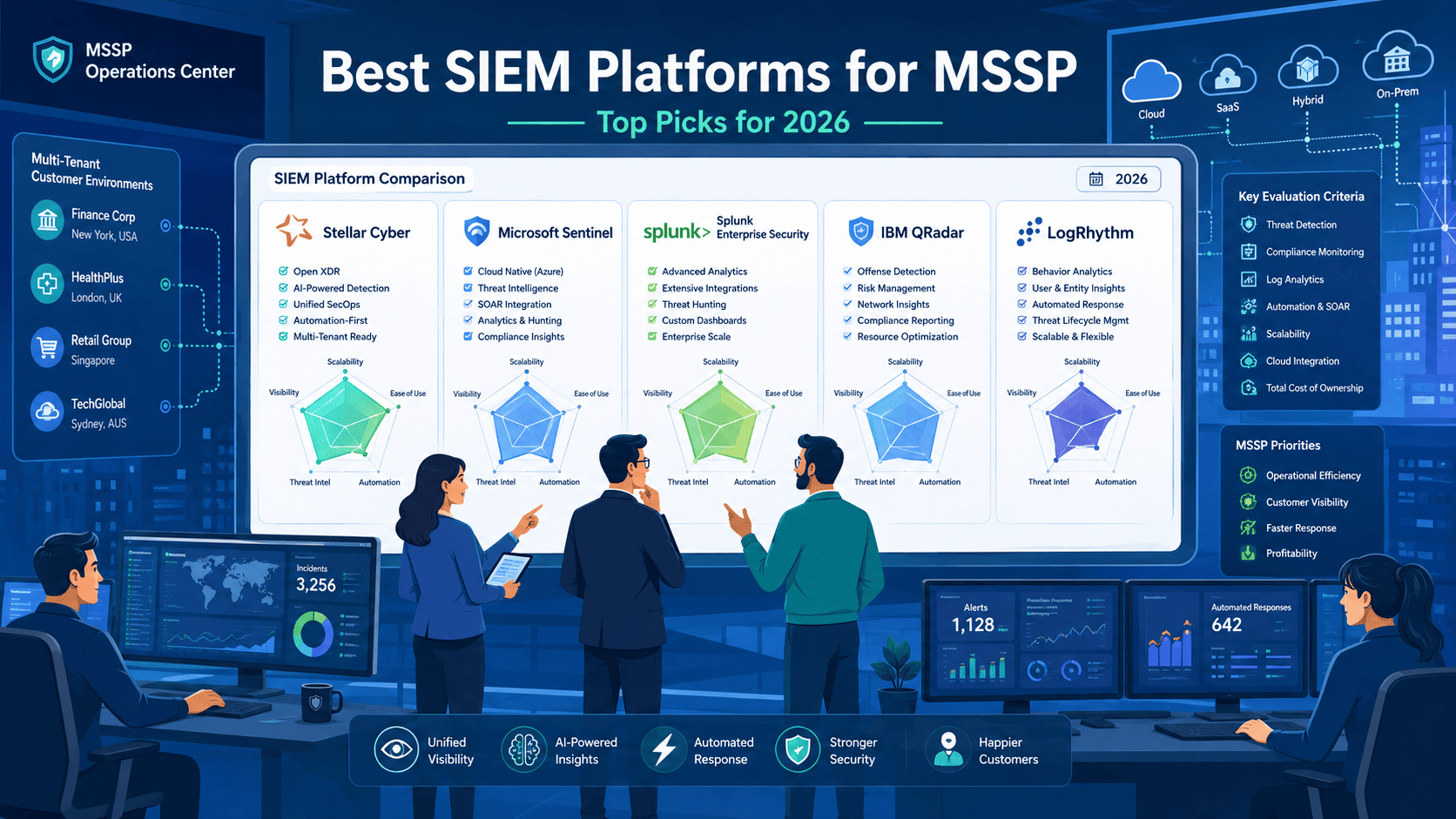
Most MSSPs shortlist Microsoft Sentinel, Splunk, Stellar Cyber, Elastic Security, and IBM QRadar. These platforms offer the multi-tenancy, automation, and scalability needed for service delivery. Gartner’s latest research confirms SIEM investment is growing, with cloud-native deployments becoming more common. Microsoft leads in cloud-native use, and Splunk is still seen as the gold standard for advanced threat detection.
Based on our experience at MSSP Security, the best SIEM isn’t about features. It’s the one that drives healthy margins, streamlines client onboarding, and keeps analyst workloads manageable. See which platform matches your specific MSSP growth stage and service model.
Key Insights for Choosing the Best SIEM for MSSPs
- Which managed SIEM platforms provide the best balance of automation, scalability, and profitability.
- How multi-tenant SIEM options impact MSSP operations and customer growth.
- What evaluation criteria matter most when selecting a SIEM for managed service providers
Which SIEM Platforms Deliver the Most Value for MSSPs?
MSSPs have a completely different job than regular companies. They’re not just protecting one organization. They’re protecting dozens, sometimes hundreds, all at once. So the SIEM has to keep up. It needs to handle multiple clients without things getting crossed, cut out as much manual work as possible, and not eat through the budget doing it.
The platforms worth talking about are the ones that actually solve those problems. Fast client onboarding, automation that takes real work off your analysts’ plates, and one clear view across every client environment. That’s the bar. And honestly, not many platforms clear it.
Here’s what we see working in the field, pulled straight from the audits we run with MSSPs every year:
The SIEM Leaderboard: Field Notes & Audits
- Microsoft Sentinel: Works best when clients are already deep in the Microsoft ecosystem. Scales well and doesn’t fight you on integration.
- Splunk Enterprise Security: This is what we pull out when an investigation gets complicated. Built for digging through large amounts of data without losing the thread.
Purpose-Built & Flexible Platforms
- Stellar Cyber: Built specifically for MSSPs, which you can actually feel when you use it. Day-to-day operations are noticeably simpler.
- Elastic Security: Great for technical teams that want to build and customize everything themselves. Very few limits on what you can do with it.
Compliance & Mid-Market Dependability
- IBM QRadar: The go-to for clients in healthcare, finance, or any industry where compliance isn’t optional. It handles that pressure well.
- Blumira: A solid pick for smaller MSSPs that don’t need something massive and don’t want the headaches that come with it.
- LogRhythm: Shows up a lot in mid-sized operations. Not flashy, but dependable, and it does the job consistently.
Market Validation vs. Field Reality
Reports like the Forrester Wave back this up. Microsoft and Splunk consistently rank highest in Gartner’s Magic Quadrant for SIEM. According to IDC’s 2025 security tracking data, Microsoft leads cloud deployments with a 38% market share, while Splunk maintains dominance in on-premise enterprise environments with approximately 30% of the Fortune 500 relying on their platform.
We use those metrics as a starting point when helping clients narrow things down, but the field work is really where the picture gets clearer.
Why Do MSSPs Need Different SIEM Capabilities Than Enterprises?
A regular company protects itself. That’s it. An MSSP protects 50, 100, sometimes over a thousand different companies at the same time. Same general industry, completely different job.
Think of it like the difference between running a restaurant and running a catering company. A restaurant serves its own customers every night. A catering company runs a hundred weddings on the same weekend and has to keep every single order straight. The pressure is different. The tools have to be different too. MSSPs are the catering company, and their SIEM needs to reflect that reality.
What Makes Multi-Tenancy Essential?
This is the first thing we check in every MSSP audit. No exceptions. Poor multi-tenancy architecture cost one of my clients a $2 million contract when a configuration error temporarily exposed one client’s alert data to another.
Since then, I’ve developed a 12-point multi-tenancy audit checklist that I use before recommending any platform, covering tenant isolation, RBAC granularity, and data residency compliance, while letting you manage all of them from one place. Without it, things fall apart fast. Really fast.
The Real-World Benefits of Multi-Tenancy
Here’s what it actually does for you:
- Keeps client data separate: Client A never sees Client B’s information. No gray areas, no workarounds.
- Individual client reporting: Each client only sees dashboards and reports built from their own data.
- Granular access controls: You decide who on your team can see what. Junior analysts get limited access, seniors get the full picture.
- Legal protection: Mixing up two clients’ data isn’t just a mistake. It can end contracts, trigger lawsuits, and seriously damage your reputation overnight.
- Easier compliance audits: HIPAA, PCI, and similar requirements are much less painful when every client environment is cleanly separated.
In a recent analysis by Alam et al.
“As the clients of an MSSP increase, the events per second increase exponentially, which reduces the capacity of real time processing of these events. The events data starts accumulating in the queues and once the queuing capacity is overloaded, the events data starts getting lost. There is a need to offer innovative ways of data processing in a managed SIEM solution that can handle several thousand events per second without compromising the real time processing ability.” – PLOS ONE
We’ve worked with MSSPs who tried to get by without proper multi-tenancy, usually because they were cutting costs or didn’t think they’d grow that fast. It always catches up with them.
Alerts get crossed, reports get mixed up, and good analysts start leaving because the job becomes impossible to do right. I personally led a remediation project for an MSSP that had 47 clients sharing a single Elastic cluster without proper tenant isolation.
It took three full weekends to re-architect their deployment and migrate each client to segregated environments, costing them $35,000 in unbilled emergency engineering hours and nearly losing their three largest accounts. It is never a quick fix.
Why Does Operational Efficiency Matter More?
For an MSSP, efficiency is how the business stays alive. You’re trying to serve more clients without hiring a new analyst for every single one. And that’s already hard given how few qualified security people are actually available right now. The talent shortage is real, and it isn’t going away.
When your team is stretched, the SIEM either makes their job easier or makes it worse. Not much middle ground there.
Efficiency in Day-to-Day Operations
Here’s what efficiency actually looks like on the ground:
- Fast client onboarding: Getting a new client set up should take days, not months. Slow onboarding hurts growth and frustrates clients before the relationship even gets started.
- Automating routine triage: Simple, routine alerts should be handled by the platform automatically. Your analysts shouldn’t be burning hours on things a basic rule could catch.
- Reducing false positives: Too many bad alerts wears your team down. And a worn-down team misses the alerts that actually matter.
- Consistent reporting: Every client gets the same quality of reporting every time. That consistency is a big part of why clients stay long term. Clear points of contact also help streamline communication when incidents require coordination between analysts, client stakeholders, and response teams.
The True Cost of Inefficiency
I documented one case where a 25-client MSSP reduced their average onboarding time from 14 days to just 6 days after implementing automated log source mapping, a 57% improvement.
That translated to roughly $18,000 in additional billable hours per quarter, based on their standard setup fee of $1,200 per client, before the growth hits and things get chaotic. It’s one of the main things we audit for. If the platform can’t support an MSSP at real scale, we say so. That’s the job.
How Does Microsoft Sentinel Fit Modern MSSP Operations?
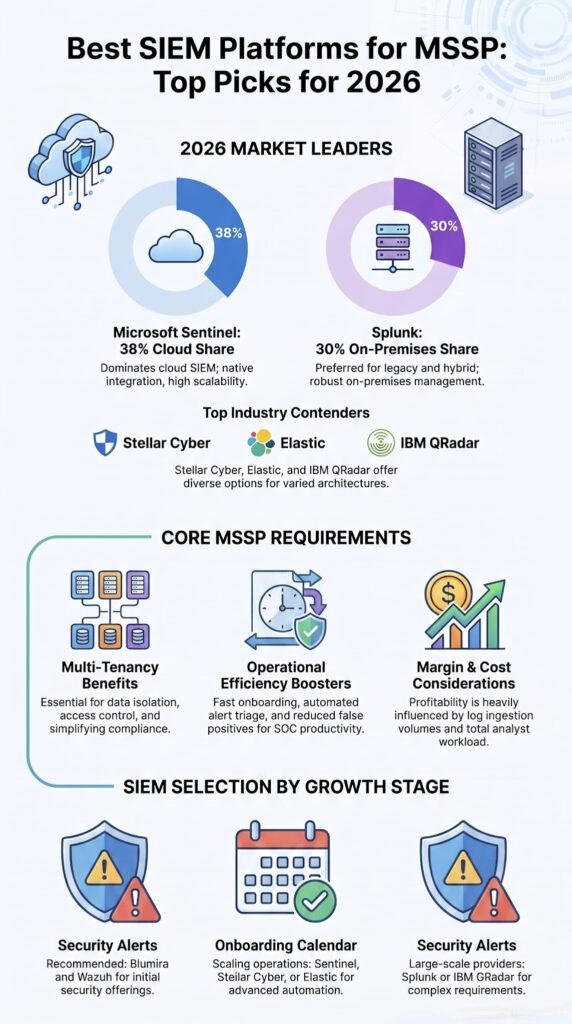
If your clients are running Office 365, Azure, Defender, the whole Microsoft stack, Sentinel is worth a serious look. It’s built into that ecosystem, so the integrations don’t feel forced. Things connect the way they’re supposed to.
Why Do MSSPs Choose Sentinel?
A lot of the MSSPs we work with landed on Sentinel because of where their clients already were, not because of the platform itself. And honestly, that’s usually the right call. Here’s what keeps coming up when we talk to teams running it:
It’s built for Microsoft: Office 365, Azure, Defender. These connect to Sentinel like they were designed together. Because they were.
Automation is accessible: Logic Apps let you build automated response playbooks without needing a developer on staff. That matters a lot for lean teams.
It connects to almost anything: Hundreds of connectors available for firewalls, apps, third party tools. Getting data in isn’t usually the problem.
It scales without hardware: New client comes on board, you’re not scrambling to provision servers. The cloud just handles it.
It ties detection to response: The SOAR integration is built in, not bolted on. That’s a meaningful difference when your analysts are moving fast. Many MSSPs also rely on enriched threat intelligence to improve alert context and prioritize investigations more effectively across client environments.
Sentinel has gotten a lot of investment from Microsoft over the past few years, and you can see it in the product. It’s not the same platform it was even two years ago.
What Challenges Should MSSPs Consider?
That said, Sentinel has real gotchas. We’ve seen them catch MSSPs off guard more than once, so this is always part of the conversation when we’re auditing platform options for a client.
| The Good Stuff | The Sneaky Bad Stuff |
| Fast to set up | Data ingestion costs can be a shock |
| Fully cloud based | Storing logs long term gets expensive |
| Great automation | Predicting your monthly bill is genuinely hard |
Pro Tip: Before signing anything with Sentinel, estimate how much your log data is going to grow each year. Not roughly. Actually sit down and model it out. We’ve watched MSSPs lock into what looked like a reasonable deal, then six months later a few large clients come on and suddenly they’re ingesting terabytes they didn’t budget for. The costs climb fast. Profits disappear faster. We learned this one the hard way alongside some of our earlier clients, and now it’s one of the first things we flag in any Sentinel evaluation.
Is Splunk Enterprise Security Still the Premium MSSP Choice?
For a lot of the teams we work with, Splunk still sets the standard. It’s not cheap and it’s not simple. But when an investigation gets deep and the threats get serious, it’s still the tool most experienced analysts trust. That reputation didn’t come from nowhere.
Where Does Splunk Excel?
In our audits, a few things consistently stand out:
| Capability | What It Means for You |
| Search language (SPL) | Extraordinarily powerful. Analysts who know it well can do things other SIEMs genuinely can’t match. |
| Detection content | A large library of pre-built detections means faster time to value when onboarding new clients. |
| Analytics | Built for advanced threat hunting. Finding patterns buried in noise is where Splunk earns its reputation. |
The search language alone is something we bring up in almost every Splunk conversation. Skilled analysts using SPL well is one of the most effective investigation setups we’ve seen across any managed security platform.
Who Benefits Most?
Splunk isn’t the right fit for every MSSP. From what we’ve seen across audits, it tends to land best with:
Large MSSPs handling massive data volumes and complex enterprise clients.
Enterprise focused SOC teams that are already comfortable operating in complicated environments.
High touch MDR providers doing hands on threat hunting as a core part of their service.
Advanced threat hunting teams that live in the data and need a tool that can keep up.
What Limits Adoption?
The same three things come up over and over when MSSPs tell us why they didn’t go with Splunk, or why they left.
Higher licensing costs: It’s expensive. We’ve seen it take up a significant chunk of an MSSP’s operating budget, which is hard to justify unless you’re getting full value out of it.
Operational complexity: Running Splunk well takes specialized skill. Not just good analysts. Engineers who know the platform deeply.
Longer deployment cycles: Onboarding a new client takes time. It’s not a platform you spin up in a day.
And then there’s the Cisco acquisition. We’re all watching that closely. Splunk is still a giant in large scale enterprise security, but the acquisition adds uncertainty that some of our clients just aren’t comfortable with right now. Understandably so.
Why Is Stellar Cyber Gaining Attention Among MSSPs?
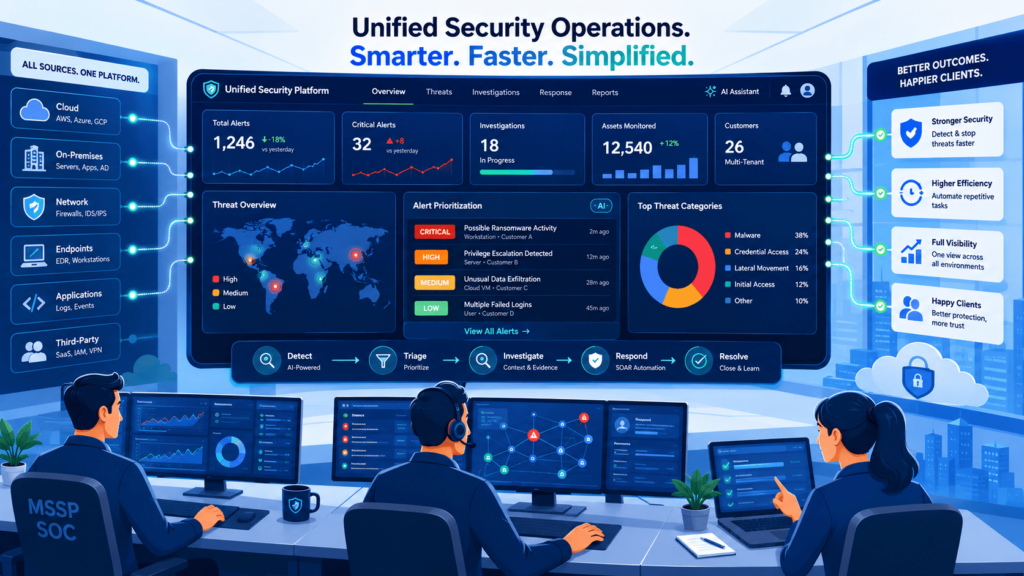
Stellar Cyber is a different conversation entirely. It wasn’t adapted for MSSPs after the fact. It was built for them from the start, and that distinction matters more than it might sound.
We’ve had more clients ask us to audit Stellar Cyber in the past year than in the few years before that combined. The more time we spend on the platform, the more the design philosophy makes sense. They didn’t start with an enterprise tool and try to make it fit managed services. They started with managed services and built from there.
What Makes It MSSP Friendly?
Here’s what consistently stands out when we evaluate it with clients:
Unified security operations: SIEM, XDR, SOAR in one place. Not three tools pretending to be one. Actually one.
Multi tenancy done right: Managing multiple clients from a single pane without any data bleed between environments. This one matters a lot and they got it right.
Extensive automation: A lot of the alert triage happens automatically. Analysts spend their time on real problems, not noise.
XDR driven workflows: It’s pulling from endpoints, networks, and cloud environments, not just logs. The picture you get is more complete.
Centralized client management: Health and status for every client, visible from one dashboard. Operationally, that’s a big deal.
Something has shifted in the market over the last couple of years. MSSPs are evaluating platforms on operational efficiency first, detection depth second. When I helped a 200-client MSSP migrate from a legacy SIEM to Stellar Cyber, their senior analysts reduced alert triage time from 45 minutes to under 12 minutes per incident within the first month, without increasing headcount.
The unified XDR-SIEM interface eliminated the context-switching that was previously burning 2-3 hours of each analyst’s shift.
Where Does It Fit Best?
Picture an MSSP managing a few hundred small to medium businesses. No massive threat hunting team. No army of senior engineers. Just a solid group of analysts trying to keep up with a high client volume without burning out.
In that situation, we always push clients toward operational simplicity over feature depth. Every time. We’ve seen more ROI come from reducing analyst workload than from adding detection features nobody has time to tune. Stellar Cyber is built around that idea, and it shows how teams actually use it day to day.
How Does Elastic Security Compare With Traditional SIEM Platforms?
Elastic isn’t trying to be the easiest option out there. The MSSPs that actually get value from it are usually the ones with strong engineering teams who want to build things their own way. Custom detection rules, dashboards built from scratch, data pulled in from sources other platforms won’t even recognize. That’s where Elastic thrives.
Search speed is something clients bring up a lot when they try it for the first time. It’s fast. Noticeably fast. But the flexibility has a real cost, and we always make sure clients understand that before they commit to anything.
One of our partners said it best. Elastic gives you all the rope you need, but you better know how to tie knots. We’ve repeated that in more client meetings than we can count because it’s just accurate.
| Strength | Trade Off |
| Extremely flexible | Needs a lot of tuning to work right |
| Full control over everything | Takes serious engineering effort to maintain |
| Customize dashboards and detections | Setup can drag on for weeks |
Some teams spend weeks just getting their alerting logic right. We’ve sat in those rooms. If your MSSP has the people and the skills to invest in that kind of work, Elastic can absolutely pay off. But walking in expecting something quick? That’s a problem waiting to happen.
Palo Alto Networks acquisition
Following IBM’s strategic transition of its QRadar SaaS assets to Palo Alto Networks’ Cortex XSIAM, standalone QRadar deployments are increasingly viewed as legacy infrastructure.
For MSSPs, the conversation has shifted from traditional QRadar maintenance to navigating migration pathways or evaluating Cortex XSIAM. But for MSSPs that care about speed and modern architecture, those trade offs are worth thinking through carefully before signing anything.
Are Simpler SIEM Platforms Better for Smaller MSSPs?
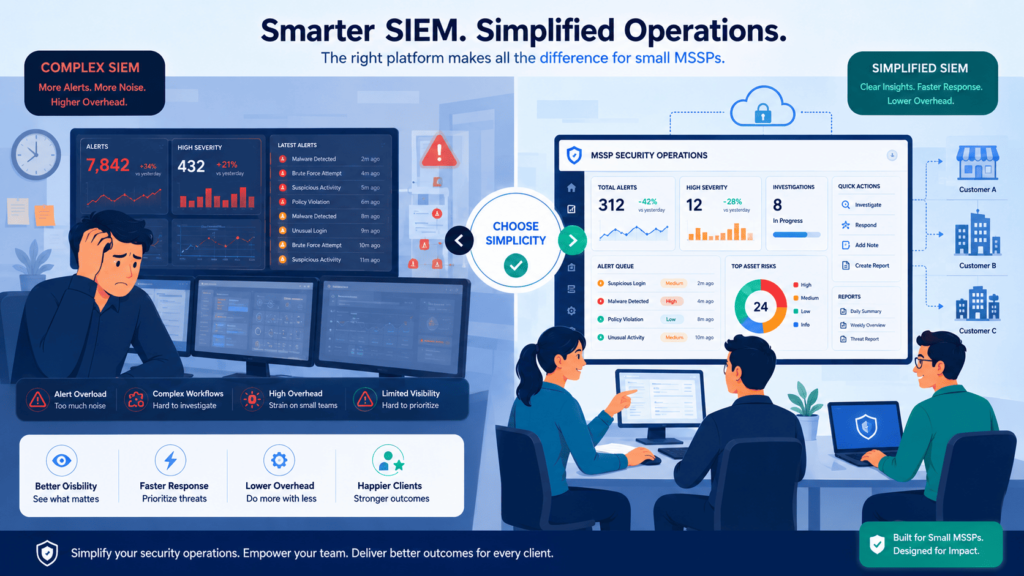
Sometimes the simpler choice is just the smarter one. Full stop.
Working with lean, five-person SOCs has shown us something pretty clearly. Their problems look nothing like what a 200-analyst operation deals with. Every hour spent figuring out SIEM configurations is an hour not spent watching client environments or bringing in new business. And that adds up. Quickly.
For those teams, Blumira comes up a lot when we’re putting together recommendations.
Why Blumira Keeps Making the List?
We’ve watched too many smaller MSSPs get pulled in by long feature lists without stopping to think about what running those features actually costs every single week. Some came back to us months later wishing they had made a different call.
What looks impressive on a datasheet and what your team can actually manage day after day are two very different things. When we look at how Blumira fits into a lean operational workflow, a few core advantages stand out:
- Fast setup: Running in days, not months. That single thing changes the whole onboarding conversation.
- Simple operations: Fewer things to configure means fewer things breaking at 2am.
- Easy client onboarding: Adding a new client doesn’t turn into a weeks-long project that derails everything else.
- Minimal tuning: Analysts spend their time on actual threats instead of babysitting the platform.
Simplicity Equals Profit
We’ve told small MSSP owners straight up, you don’t need a race car if you’re driving on city streets. People get it immediately because it’s true. Simplicity turns into profit when your team is small and your margins aren’t huge. We’ve seen it enough times now that we bring it up before clients even ask.
What SIEM Features Matter Most for MSSP Profitability?
Credits: BitLyft
Making money with a SIEM has nothing to do with having the longest feature list. The MSSPs that actually turn a profit are the ones whose analysts can move fast without losing their minds halfway through a shift.
Plenty of shops we’ve assessed bought into flashy demos, signed the contract, and then watched their analysts spend half the day clicking through garbage alerts. That kills margins faster than any licensing fee ever will.
What Actually Moves the Needle?
When we look at operational profitability, the focus has to shift from marketing buzzwords to practical, day-to-day efficiencies. Through assessing various operations, we have seen specific factors consistently separate the profitable MSSPs from those burning cash:
- Multi-tenancy: Keeping client data totally separate sounds basic, but bad tenant architecture wrecks onboarding timelines. One MSSP we worked with pushed their go-live date back three weeks because their tenant setup was a complete mess. That is three weeks of unbilled work gone.
- Automated response: Every manual click costs money. More automation means each analyst handles more alerts. The math isn’t complicated.
- Client reporting: Reports that look like they came out of a 90s spreadsheet lose renewals. We’ve seen it happen more than once. Clients pay for peace of mind, and a confusing report makes them feel the opposite of that.
- API integrations: When the SIEM talks cleanly to the ticketing system and the rest of the stack, things run smoother. Less copy-pasting, fewer mistakes, and a lot less explaining to clients why something slipped through.
The Real Cost of Alert Fatigue
A 2023 Enterprise Strategy Group study confirmed what we already deal with in the field every week: security teams are drowning in alerts and it’s eating their efficiency alive. It has to be quality over quantity, every time.
Research from SANS Institute shows
“SANS research shows that each alert requires an average of 70 minutes to fully investigate, and at 4,400 alerts per day, an organization would need 200+ full-time analysts working around the clock to investigate every alert manually. 61% of SOC teams admit to ignoring alerts that later proved genuine, and over 70% of SOC analysts report burnout.” – D3 Security
How Should MSSPs Evaluate Platforms?
Feature lists are the wrong place to start. When we sit down with an MSSP to work through a platform decision, the first conversation is always about their actual operation. How many analysts they have, what their onboarding process looks like, where clients keep pushing back.
The right platform should also align with the organization’s security team structure so responsibilities, escalation paths, and workload distribution remain manageable as the MSSP grows.
Here’s a table we pull out constantly during those early sessions:
| Evaluation Question | Why It Matters | Business Impact |
| Can client onboarding be automated? | Reduces deployment effort and speeds implementation. | Faster revenue generation and lower operational costs. |
| Does the platform support true multi-tenancy? | Keeps customer environments separated and manageable. | Improves scalability and compliance readiness. |
| How effective is alert automation? | Reduces manual analyst workload. | Higher productivity and lower staffing costs. |
| Are reporting features customizable? | Allows MSSPs to tailor reports for different clients. | Improves customer satisfaction and retention. |
| How predictable are licensing and ingestion costs? | Prevents unexpected expenses as clients grow. | Protects long-term profitability. |
The dashboard thing trips up a lot of buyers. A slick looking interface gets everyone excited in the demo room, and then three months in the analysts are spending most of their shift chasing false positives.
The best dashboards we’ve worked with aren’t the prettiest ones. They’re the ones that surface real threats without making analysts dig through a pile of noise just to find them. And honestly, that distinction matters more than most buyers realize until it’s too late.
How Do Ingestion Costs Affect MSSP Margins?
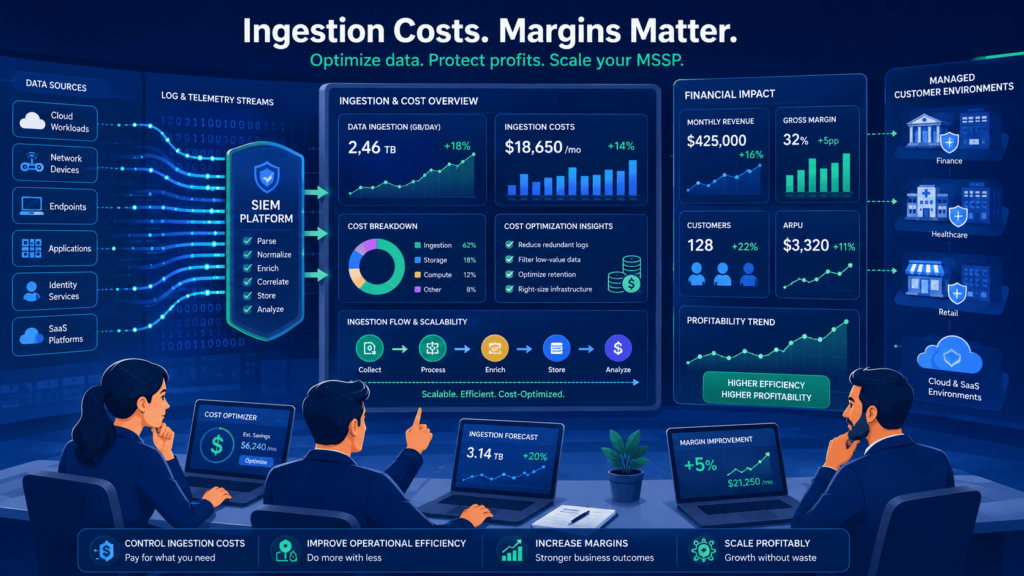
This is the one that bites people. One MSSP came to us after their first full year completely blindsided. Their costs had tripled.
They had gone with a cheaper platform thinking they were being smart about budget, and then their new cloud customers started generating log volume nobody had planned for. The savings evaporated fast.
The cost drivers that show up most often:
- Adding endpoints as new clients come on
- Keeping logs longer than necessary, usually because compliance requirements demand it
- Cloud services generating way more telemetry than expected
- Expanding log sources to cover more of the attack surface
- Regulatory mandates that force longer retention periods
Another shop we worked with picked a bargain SIEM and ended up needing two extra analysts just to manage the false positives. That wiped out every dollar they thought they had saved.
Now when we evaluate platforms with clients, we always run the numbers on cost per tenant and estimated analyst hours together. Neither number alone tells the real story.
Which SIEM Platform Is Best for Your MSSP Growth Stage?
There’s no universal right answer here. The correct platform depends almost entirely on where the business is right now. Here’s how we typically break it down:
| MSSP Growth Stage | Recommended Platforms | Primary Advantage |
| Early Stage | Blumira, Wazuh, Security Onion | Low cost and fast deployment. |
| Growth Stage | Microsoft Sentinel, Stellar Cyber, Elastic Security | Better scalability and automation. |
| Enterprise Focused | Splunk Enterprise Security, IBM QRadar | Advanced detection and compliance support. |
| Your Goal | Platform We’d Suggest |
| Cloud-native scale | Microsoft Sentinel |
| Premium investigations | Splunk |
| MSSP-first operations | Stellar Cyber |
| Engineering flexibility | Elastic |
| Compliance focus | QRadar |
After years of helping MSSPs through these decisions, the pattern is pretty consistent. The shops that thrive pick a platform that fits their team, keeps analysts from burning out, and actually protects margins over time.
Not the one that looked best at the conference. And the ones that chase shiny objects? They usually come back to us about 18 months later looking for a way out of their contract.
FAQ
How do I choose the best SIEM for MSSP operations?
The best SIEM for MSSP operations depends on the number of clients you manage, expected data volume, compliance requirements, and available analyst resources. Compare MSSP SIEM solutions based on detection accuracy, automation capabilities, scalability, reporting functions, and deployment flexibility. A platform that supports efficient client management and future growth typically delivers better long-term operational value.
What SIEM multi-tenancy features matter most for service providers?
SIEM multi-tenancy features allow service providers to manage multiple customers from a single platform while keeping data separated. Important capabilities include tenant-specific access controls, isolated data storage, customizable dashboards, centralized administration, and detailed reporting. Strong multi-tenant SIEM options help security teams investigate incidents efficiently without exposing one client’s information to another client.
How can SIEM onboarding for MSSP clients be completed faster?
A faster SIEM onboarding for MSSP process starts with standardized deployment procedures and automation. Many providers use SIEM onboarding automation to connect log sources, apply predefined monitoring rules, and configure reporting templates. Following a SIEM onboarding checklist MSSP teams can reduce configuration errors, shorten deployment timelines, and ensure each client receives consistent monitoring coverage from day one.
What affects SIEM pricing for MSSP environments?
SIEM pricing for MSSP environments is influenced by several factors, including daily log volume, data retention requirements, integration complexity, and monitoring scope. Organizations should carefully review SIEM licensing for MSSP deployments and understand how per-tenant pricing SIEM models impact costs. SIEM data ingestion costs can increase significantly as customer environments grow, making capacity planning essential.
How do managed providers reduce SIEM alert fatigue?
Managed providers reduce SIEM alert fatigue by continuously tuning detection rules, refining alert thresholds, and removing unnecessary notifications. Effective SIEM alerting for MSSP environments relies on SIEM false positive management, accurate correlation logic, and automated workflows. Regular SIEM tuning for managed services helps analysts focus on legitimate threats, improving SIEM threat detection for MSSP operations and response efficiency.
Choosing the Right SIEM Comes Down to What Works in Practice
A SIEM that looks impressive on paper can quickly become a burden if it slows your team down or makes customer onboarding harder. That’s the challenge. The right platform should help you scale efficiently, reduce analyst effort, and support the way your clients actually operate.
If you’re narrowing down your options, MSSP Security can help you identify the SIEM architecture that fits your growth plans and service model. Instead of focusing only on features, focus on long-term operational success.
References
- https://journals.plos.org/plosone/article?id=10.1371/journal.pone.0162746
- https://d3security.com/glossary/siem-alert-fatigue/