

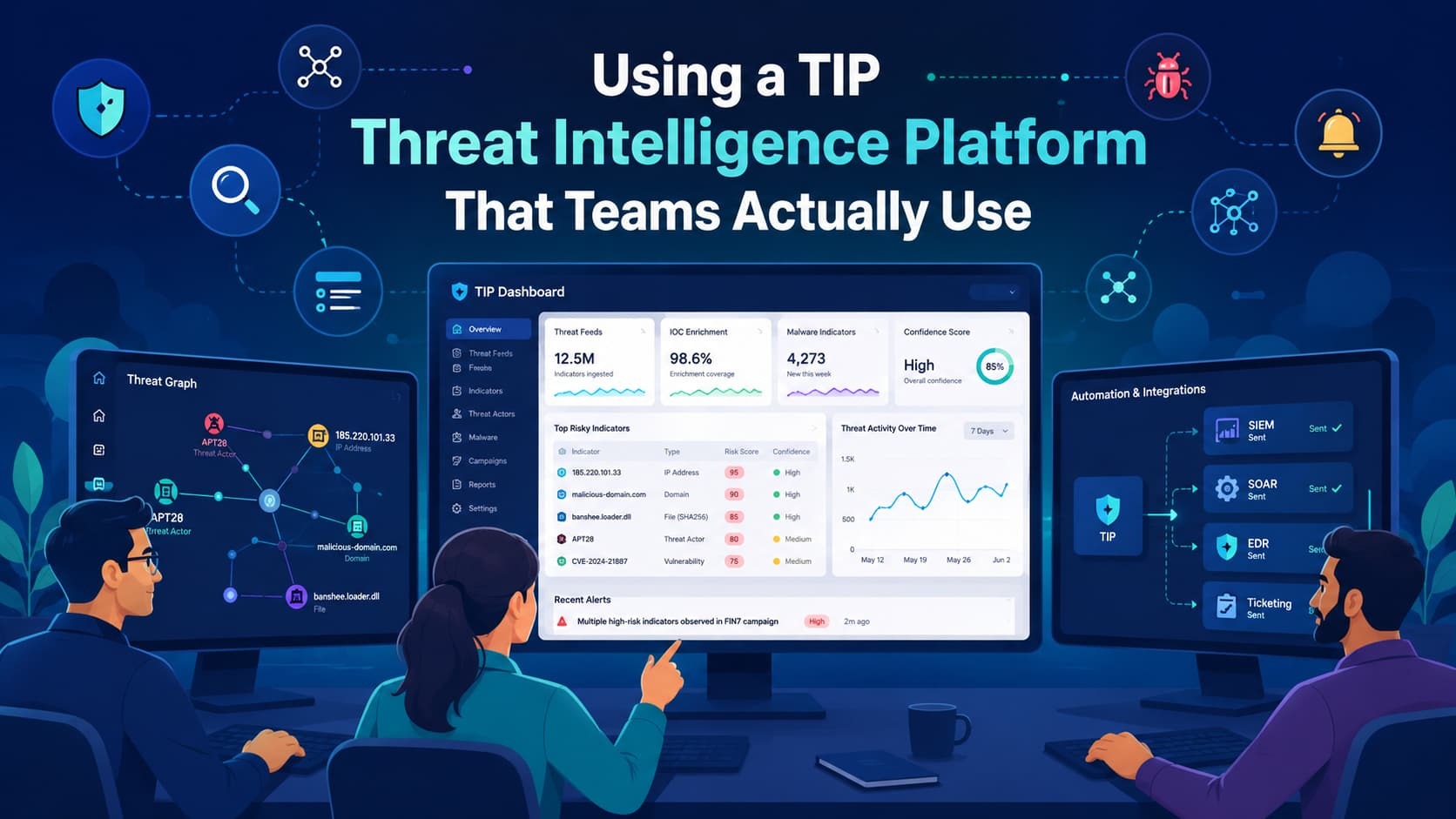
An MSSP Security threat intelligence platform makes threat data usable. It helps your team prioritize risks, investigate faster, and respond better. The problem isn’t a lack of data from feeds or alerts. It’s making that information actually work for you.
A good TIP connects your intelligence sources, analysts, and tools into one coherent process. This turns overwhelming data into clear, actionable steps. Learn how to make it work without the common mistakes that cause failure. Keep reading.
Quick Wins: What You’ll Learn About Using a Threat Intelligence Platform
This guide covers the practical ideas and workflows that help security teams get real value from a threat intelligence platform.
- How a cyber threat intelligence platform converts raw data into actionable intelligence
- How to integrate TIP with SIEM, SOAR, and security controls
- The most valuable threat intelligence automation workflows
What Is a Threat Intelligence Platform and How Does It Work?
A threat intelligence platform is the core of any good cyber defense. Instead of making analysts check dozens of different feeds by hand, a TIP pulls everything together into one workspace. In our engineering daily standups, we watch this play out constantly.
When managing our primary MSSP stack last quarter, we hooked up a central TIP to ingest three premium commercial feeds alongside local AlienVault OTX data, pulling millions of indicators into a normalized pipeline. Then it makes sense of it all by putting that data into a standard format. The real value is in the enrichment.
An IP address isn’t just an IP; it gets linked to malware campaigns, known hacking groups, its physical location, and specific attack methods. This context lets our analysts understand the threat faster, which is something we rely on daily.
Successful execution here requires a deliberate approach to Threat Intelligence Integration Actioning, ensuring that enriched data actively drives defensive measures rather than sitting idle.
Key features you’ll find are:
- Aggregating threat feeds
- Normalizing and deduplicating indicators
- Automating enrichment
- Scoring and prioritizing threats
- Sharing intel and generating reports
- Integrating with other security tools
Why Do Most Threat Intelligence Platforms Become Shelfware?
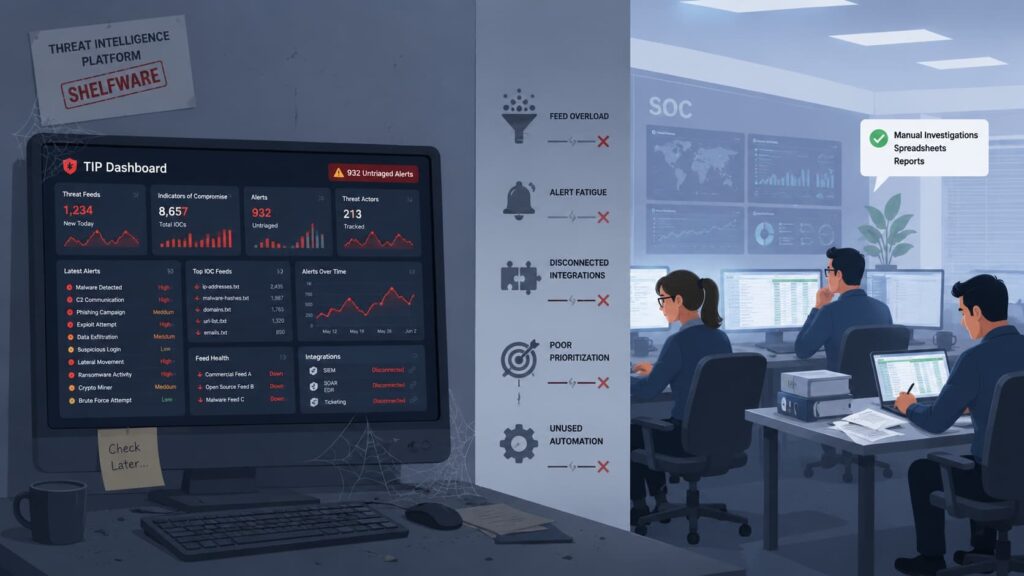
Teams often buy a threat intelligence platform expecting instant results. It rarely works that way. We’ve seen clients connect too many feeds right after deployment. The result is alert overload, poor prioritization, and less trust in the platform.
The failures usually come from a few clear mistakes:
- Buying the tool before deciding how to use it.
- Using the TIP only for research, not for day-to-day operations.
- Adding too many feeds that say the same thing.
- Having no clear owner or process for the platform.
- Failing to connect it to the team’s actual workflow.
- Not setting any goals to measure success.
Research from ScienceDirect shows
“The root cause of this paradox is the positioning of the CTI function in the lowest level of the organizational structure, the profound knowledge gap between Business and IT Groups, and the prevalence of analytical products that lack strategic relevance or analytical rigor” – ScienceDirect.
Intelligence never gets used. We see platforms like MISP succeed because they focus on workflow, not just tech. Without a clear process, even the best platform becomes another forgotten dashboard.
How Should You Start Using a Threat Intelligence Platform?
You’ll get better results by treating a TIP like a new operational process, not just another software purchase. The first step is to set clear goals before you touch any settings. Our work with MSSPs starts by defining security objectives.
We ask what they want to improve, like:
- Responding to incidents faster.
- Making threat hunting stronger.
- Blocking attacks before they happen.
- Patching the right vulnerabilities first.
- Reducing the manual work for their analysts.
These goals tie the platform directly to real security results.
Next, connect your intelligence sources. Focus on quality, not quantity. This usually means a mix of open-source feeds, commercial intel, government alerts, industry groups, and your own internal logs. Finally, set up rules to prioritize alerts. The scoring should match your specific risks.
We look at the confidence in the intel, how critical the targeted asset is, if it’s relevant to your industry or location, and if a known threat actor is involved. This forces the system to highlight only what matters most to you.
What Does a Practical Threat Intelligence Pipeline Look Like?
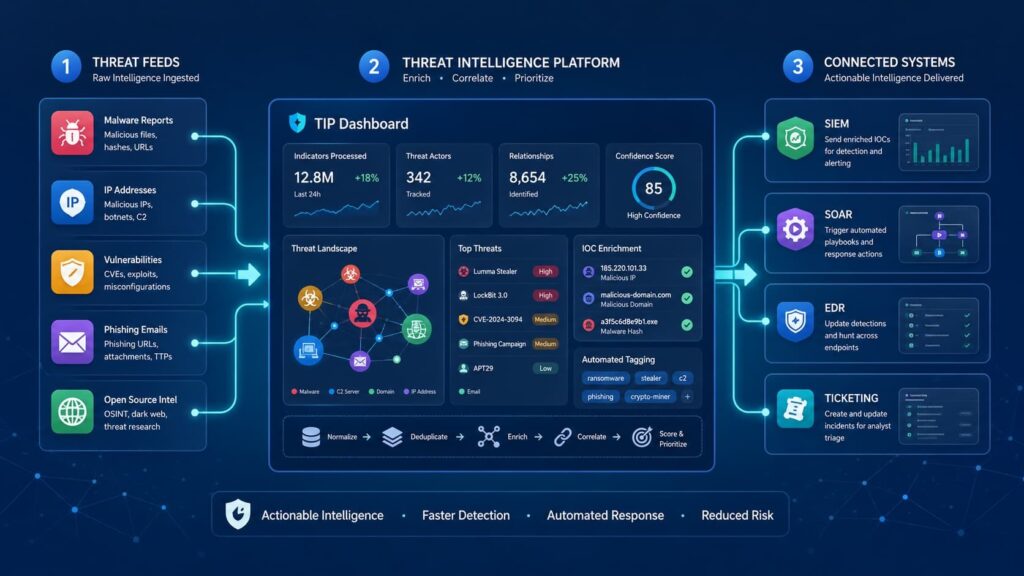
Threat intelligence only works if it follows a clear process. A good platform makes this happen. First, collect the data. This means pulling in threat feeds, bringing in your own internal logs, and accepting shared intel in formats like STIX. Next, normalize and validate the data. The platform takes all that messy data and makes it consistent.
It removes duplicates and checks if the indicators are valid. We see clients waste a lot of time when this step is skipped. The next step is enrichment. This is where raw data becomes useful. You add context like WHOIS info, results from malware analysis, and link it to known attack methods (like MITRE ATT&CK). With clean, enriched data, Analysis begins.
The platform correlates indicators to spot campaigns. Analysts can then figure out if the threat is relevant to them. Finally, intelligence drives Operational Response. This operational response aligns closely with NIST SP 800-61 recommendations and incident handling guidelines.
By pushing these verified blocklists directly to firewalls via automated playbooks, you support SOC 2 Type II controls without manual delays. The companies that use this structured workflow tell us their teams detect and respond to threats much faster. Analysts stop being data collectors and start making real decisions.
How Do Analysts Use a Threat Intelligence Platform Every Day?
Credits: Adam Goss
A threat intelligence platform proves its worth when it fits right into what analysts do every day. Take alert triage. When an alert pops up in the SIEM, a good TIP instantly adds context to the key pieces, like IP addresses, domains, URLs, or malware hashes. This extra information lets analysts decide what to do much faster, which is something we see make a real difference.
Achieving this seamless flow relies heavily on integrating threat intel siem pipelines so that correlated telemetry automatically matches internal alerts without requiring manual cross-checking.
During an investigation, analysts need to connect the dots. The platform helps them do that. A single phishing domain can lead to other IPs, different malware, or entire credential theft campaigns. Seeing these links is crucial. For threat hunting, it’s about starting with a hunch. Threat hunters use intelligence to form hypotheses and validate them against internal data.
Because the platform maps data to frameworks like MITRE ATT&CK, they can then search their own logs for signs of those specific attack methods. Finally, the platform should help teams share what they learn.
Why Does TIP Output Often Fail to Reach SIEM Alerts and Response Workflows?
The biggest failure we see with threat intelligence is a simple gap: the intelligence never gets used. Teams install a TIP, but it stays in its own world. Analysts look at it in one window, while the people handling alerts work in another. This creates a “research console”: a tool used for research instead of operational response.
Doing everything by hand makes it worse. Analysts waste time on repetitive lookups for IPs or domains instead of actually investigating the threats. The process gets stuck.
The gaps are usually pretty clear:
- No automation to add context to alerts.
- No connection to the SIEM.
- No automated playbooks in the SOAR platform.
- No process to turn intel into new detection rules.
- No way to measure if the intel is helping.
In our work with MSSPs, the platform only succeeds when the intelligence feeds directly into the tools that do the work. Bridging these gaps is the core of operationalizing threat intelligence soc environments, ensuring that indicators of compromise automatically trigger playbooks rather than leaving analysts to manually pivot between tools.
How Do You Avoid Feed Fatigue and “IOC Soup”?
More feeds don’t automatically improve security. The goal is to use intelligence that is relevant, reliable, and actionable. You need to be picky. Choose feeds that actually match your world: your industry, your geographic location, the threats you face, and the specific assets you need to protect. Then, make the platform score the threats.
It should weigh each indicator based on how confident we are in the intel, how severe the threat is, how relevant it is to you, and the reliability of the source. Remember, threat intelligence gets old. A good system will automatically lower the confidence score of an indicator as it ages, so stale data doesn’t clutter your view. The data is clear.
When analysts get flooded with low-quality alerts, they get less done. A smaller set of well-chosen, relevant intelligence always works better than a huge pile of unfiltered data.
What Automation Features Deliver the Most Value?
Automation helps security teams scale without increasing analyst workloads. The highest-value automation features usually focus on repetitive tasks that analysts perform every day.
| Automation Function | Benefit |
| Collection | Reduces manual work |
| Enrichment | Adds context |
| Dissemination | Improves prevention |
| Feedback Loops | Improves accuracy |
| Playbooks | Accelerates response |
Modern TIP automation often integrates directly with SOAR workflows.
Key automation use cases include:
- Threat feed ingestion
- Indicator enrichment
- Malware analysis
- Detection updates
- Firewall blocking
- Incident response playbooks
Data from Recorded Future demonstrates
“67% believe AI and automation will reduce analyst workloads by a quarter or more, while 93% see these technologies as an important part of their threat intelligence strategy.” – Recorded Future.
The most successful automation programs still keep analysts involved for high-impact decisions.
What Conditions Must Exist for a Successful TIP Deployment?
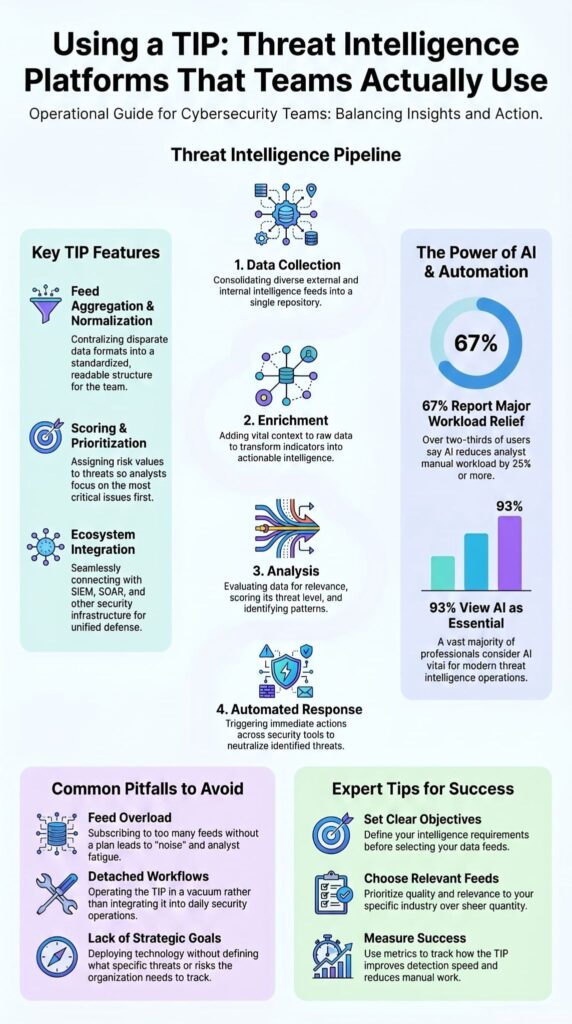
Buying a platform doesn’t create a working intelligence program. You need to check a few things first before you roll it out everywhere.
Based on what we’ve seen fail, here’s a quick checklist:
- Asset inventory visibility: Do you know what you’re protecting?
- Mature SIEM operations: Is your SIEM running smoothly?
- Security automation readiness: Are your other tools ready to receive automated data?
- Intelligence governance: Who owns the platform and the process?
- Analyst training: Are the people who will use it actually trained?
- Defined use cases: What, specifically, are you trying to do with it?
- Executive support: Do the people paying for it understand its purpose?
- Performance metrics: How will you know if it’s working?
A mature team will also use a framework like MITRE ATT&CK. This gives everyone a common language for talking about threats. The most common reason a TIP fails is simple: the organization bought the tool before they built the process. Technology is the last piece. The foundation is always your people and your plan.
How Does a Complete Threat Intelligence Workflow Operate in Practice?
Let’s walk through a real example: a phishing campaign trying to steal employee logins. First, the platform ingests intel and spots new malicious domains. It connects these dots to known credential theft activity. High-confidence indicators are then automatically sent to blocklists in the email security system and firewalls.
When an employee accidentally visits one of those domains, it triggers an alert in the SIEM. Our analysts use the TIP to investigate further, uncovering related IPs, more domains, and malware hashes. The entire incident gets documented inside the platform and shared with the rest of the security team.
This is how you turn a bunch of random indicators into something you can actually use. The result is faster detection, stronger prevention, and a more informed security team. That’s the real point of a threat intelligence workflow.
FAQs
What should I prepare before using a TIP threat intelligence platform?
Before using a TIP threat intelligence platform, identify your security goals, document your existing workflows, and review your available threat intelligence feeds. You should also define who will manage alerts, investigate threats, and maintain integrations.
This preparation helps you create the right TIP setup and TIP configuration while ensuring the platform supports your security processes from the beginning.
How do I integrate TIP with SIEM and SOAR effectively?
To integrate TIP with SIEM and SOAR effectively, first determine which threat intelligence data should enrich alerts and which indicators should trigger automated actions. Next, map these actions to your existing workflows and test them with real scenarios.
Organizations that use TIP gradually often achieve better results because they can refine threat intelligence automation without overwhelming their security teams.
Is a threat intelligence platform useful for small organizations?
Yes. A threat intelligence platform for small business helps security teams collect threat intelligence feeds, prioritize high-risk indicators, and centralize threat intelligence management in one place. Small organizations do not need large teams to benefit from implementing TIP.
They achieve better results when they focus on specific TIP use cases, such as incident response, vulnerability management, and threat intelligence reporting.
What are the most common mistakes during TIP implementation?
The most common mistakes during TIP implementation include collecting too many threat intelligence feeds, failing to define clear objectives, and neglecting threat intelligence integration with existing tools. Some organizations also skip testing before deploying TIP into production.
Successful threat intelligence platform usage requires defined workflows, regular reviews, and threat intelligence best practices that align with operational and business requirements.
How can I evaluate threat intelligence platform capabilities?
Start your threat intelligence platform evaluation by identifying the security problems you want to solve and the workflows you want to improve. Then compare threat intelligence platform features, integration options, automation capabilities, and reporting functions.
A thorough threat intelligence platform comparison should also assess scalability, ease of use, and support for future threat intelligence use cases across your organization.
How Can Security Teams Get Better Results from a Threat Intelligence Platform?
Too much data can slow you down and leave your team chasing alerts that don’t matter. The real goal is simple: make intelligence useful in daily work. That’s what separates strong security teams from the rest.
At MSSP Security, we’ve seen this firsthand across many projects. Our team helps MSSPs choose the right tools, review existing products, and improve how everything works together. The focus is always on clear results and practical advice. If you’re ready to improve your security stack, visit our consultation page to get started.
References
- https://www.sciencedirect.com/science/article/pii/S0167404826001069
- https://www.recordedfuture.com/blog/beyond-the-hype-520-security-leaders-revealed-ai-threat-intelligence