Address
304 North Cardinal St.
Dorchester Center, MA 02124
Work Hours
Monday to Friday: 7AM - 7PM
Weekend: 10AM - 5PM
Address
304 North Cardinal St.
Dorchester Center, MA 02124
Work Hours
Monday to Friday: 7AM - 7PM
Weekend: 10AM - 5PM


The OWASP Top 10 isn’t a checklist. It’s a blueprint for building a website that doesn’t break. Since 2003, it’s listed the flaws attackers actually use. Teams that just tick the boxes still get hacked. The ones who bake these rules into their daily work, they’re the ones who sleep at night.
We’ll show you where those risks hide in a modern site and the straightforward fixes that stick. No fluff, just what works and where most plans fall short.
See how it’s done.
The OWASP Top 10 lists the most critical security risks to web apps. It’s based on real-world attack data, not theory. In our audits for MSSPs, this is our core checklist. Attackers target these exact flaws. Products that fail here are a liability. We see it all the time.
As notes:
“The OWASP Top 10 is a standard awareness document for developers and web application security. It represents a broad consensus about the most critical security risks to web applications… Using the OWASP Top 10 is perhaps the most effective first step towards changing the software development culture within your organization into one that produces more secure code.” – OWASP Foundation [1]
Here’s what we prioritize in an audit:
For an MSSP, a vendor’s grasp of these points reveals their security maturity. It’s the shared language for assessing real risk.

From what we see in the field, a handful of OWASP Top 10 risks cause most of the trouble. Broken Access Control is the big one, it topped the 2021 list for a reason. In simple terms, it lets users see or do things they shouldn’t. We find missing server-side checks all the time.
The prevalence of these issues is backed by industry data :
“Nearly half of all applications contain at least one security flaw listed in the OWASP Top 10. This clearly underscores the need for secure coding practices… [and] emphasizes the importance of frequent and thorough testing.” – Veracode Security Blog [2]
The most frequent high-impact risks we find:
These issues stick around because they’re woven into how apps are built and deployed. That’s why the OWASP Top 10 stays relevant. It documents the flaws attackers never stop using.
Attackers exploit unsanitized or unvalidated inputs to execute malicious commands, bypass business logic, or extract sensitive data from backend systems. Injection has remained a Top 3 risk in the 2021 OWASP Top 10, according to OWASP, despite decades of awareness and tooling.
We have personally investigated breaches where a single unparameterized query exposed millions of records. The root cause was rarely exotic. It was usually a missed validation step under deadline pressure.
Injection attacks succeed because applications accept more trust than they should. Common examples include:
Effective protection combines multiple controls working together:
No single control is sufficient. Defense-in-depth matters here because attackers adapt quickly once one path is blocked, which is why many teams place a managed web application firewall in front of their applications to filter malicious input before it reaches code.
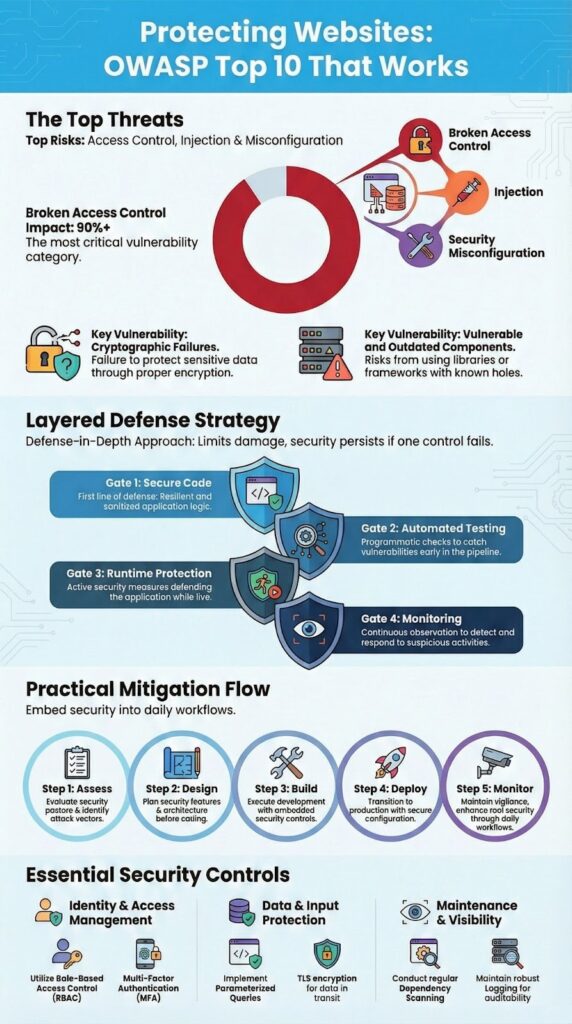
Enforcing deny-by-default access, strong authentication, and hardened session management prevents most privilege abuse scenarios on websites.
In our own work, access control failures are often logic errors, not missing features. The system works as designed, just not as intended.
Effective prevention relies on a few disciplined principles applied everywhere:
Session management also matters. Secure cookies, HTTPS enforcement, and proper logout handling close off common attack paths. Many organizations pair these controls with managed WAF services to reduce automated abuse, credential stuffing, and privilege probing. When these basics are skipped, attackers do not need sophistication to escalate privileges.
At MSSP Security, we apply these controls consistently across environments, because fragmented authorization logic is where breaches hide.

You can’t block every single attack. The goal is to slow them down and limit the damage. That’s what layered defense is for, if one control fails, the next one might catch it.
This is where advanced security services help close gaps across detection, prevention, and response without relying on a single control. It’s the only way to cover the wide range of OWASP Top 10 risks.
Think of it like building a series of gates. Secure code is the first gate. Automated testing is the second. Runtime protection and monitoring are the third and fourth. An attacker has to get through all of them.
Key layers for core risks:
A practical way to view layered protection is by mapping controls directly to risk areas:
| Risk Area | Primary Controls | Example Techniques |
| Access & Authentication | RBAC, MFA, rate limiting | OAuth 2.0, JWT validation |
| Injection & Input | Validation, encoding, prepared statements | Parameterized queries |
| Cryptography & Data | Encryption in transit and at rest | TLS 1.3, strong hashing |
| Components & Config | Dependency scanning, hardening | Patch management |
| Monitoring & Response | Centralized logs, alerts | SIEM and audit trails |
This structure helps teams avoid gaps. When one control misses an issue, another often catches it earlier or limits damage.
Credits: Cyber Cracker YT
Embedding OWASP Top 10 controls into the secure development lifecycle ensures risks are addressed before deployment and monitored afterward. OWASP recommends regular testing and review cycles, including annual penetration testing, as of 2021 guidance.
From experience, implementation fails when security is treated as a phase instead of a habit. Successful teams integrate it into daily workflows.
A practical implementation model looks like this:
We have seen organizations accelerate this process by partnering with experienced providers like MSSP Security, where we operate as an extension of internal teams rather than an external auditor. The goal is resilience, not compliance theater.
OWASP Top 10 protection focuses on reducing the most common web application security risks. Teams should apply input validation, output encoding, and parameterized queries to prevent injection attacks. Secure coding practices, HTTPS enforcement, proper session management, and secure headers help limit authentication failures, broken access control, and security misconfiguration across modern websites.
Broken access control happens when users can access functions or data beyond their role. Organizations should implement role-based access control and follow the principle of least privilege. Server-side validation, strong session management, and regular access reviews are essential. Audit trails and access logs help identify privilege escalation attempts early.
Cryptographic failures occur when encryption is weak, misconfigured, or outdated. Websites should enforce HTTPS with strong TLS encryption and protect stored data using proper data encryption. Secure cookies, correct key management, and modern password hashing methods reduce exposure. Regular reviews ensure cryptographic settings remain aligned with current security standards.
Insecure design results from ignoring security during planning, while security misconfiguration happens when systems use unsafe defaults. Organizations should apply threat modeling, secure architecture, and secure SDLC practices. Server hardening, firewall rules, secure defaults, and correct CORS configuration reduce attack surfaces before applications go live.
Ongoing protection requires continuous visibility and response. Logging and monitoring should capture authentication failures, integrity failures, and unusual access patterns. Regular vulnerability assessment, static analysis, dynamic scanning, and dependency scanning support early detection. Clear incident response processes and consistent patch management help contain and recover from attacks quickly.
Securing a site means building habits around the OWASP Top 10’s real-world risks. It’s a living guide for your code, tests, and monitoring. When teams align on it, breaches become rarer and recovery faster.
Turning this into daily practice is the final step. We help MSSPs cut tool sprawl and build efficient stacks through vendor-neutral selection and auditing.
Simplify your stack. Talk to our experts.

