Address
304 North Cardinal St.
Dorchester Center, MA 02124
Work Hours
Monday to Friday: 7AM - 7PM
Weekend: 10AM - 5PM
Address
304 North Cardinal St.
Dorchester Center, MA 02124
Work Hours
Monday to Friday: 7AM - 7PM
Weekend: 10AM - 5PM


You’re probably wondering how data slips out of organizations unnoticed. We’ve seen it happen too many times, a trusted employee, a compromised account, a cleverly disguised malware. The truth is, data exfiltration isn’t about brute force attacks anymore. It’s about moving quietly through the cracks in your system.
We’ve spent years building defenses against these silent threats, and we’ve learned that prevention starts with understanding how data actually leaves your environment. The good news? You can build a robust defense without making your systems unusable.
Keep reading to discover the practical approaches that actually work in real-world scenarios.
The strange thing about data exfiltration is how ordinary it looks, almost boring on the surface. No movie-style break-ins, no flashing alarms. Just routine activity that blends into the background.
It can look like:
On paper, all of this can pass as normal business. That’s the problem.
We’ve seen that the most effective data theft usually flows through channels that look legitimate. The Verizon 2024 Data Breach Report points out that 34% of breaches involve internal actors. That number isn’t just about angry employees trying to cause damage. Many cases involve:
So the real threat often sits inside normal workflows, not outside the firewall.
The old picture of data theft, someone copying files to a USB drive and walking out the door, still exists, but it’s just one small part of the story now.
Attackers have shifted to methods that hide in plain sight:
All of this makes detection harder, because the behavior overlaps with what normal users do every day.
You can’t defend well against what you don’t recognize, and data exfiltration is built to look harmless.
So the first real step in building stronger defenses is learning to see:
Once those patterns are clear, it becomes possible to design controls that don’t just block everything, but can tell the difference between a regular Tuesday upload and a quiet theft in progress [1].

What often gets overlooked is how many organizations try to secure data they’ve never actually mapped. They build walls first, then realize they’re not even sure what they’re protecting.
You really can’t defend what you haven’t found yet.
Before tools, dashboards, or fancy dashboards, you need a clear picture of where sensitive data lives.
That usually starts with broad discovery across:
The goal is to build an inventory of key data types, such as:
Once those are identified, you can label them in a way that actually matches risk.
Not every document deserves the same level of protection. A lunch menu and a production database shouldn’t be treated as equals.
Most organizations use a simple tiered model, for example:
Once data is labeled, security controls can become:
That’s where classification stops being paperwork and starts guiding real decisions.
Manually tagging every file or record doesn’t scale, especially in larger environments. That’s where automated classification tools help keep the map accurate over time.
They can scan content using:
With this, classification becomes a continuous process instead of a one-time project.
Once you know what you have, where it sits, and how sensitive it is, every other control, DLP, access, monitoring, encryption, has a solid foundation instead of guesswork.
| Data Classification Level | Example Data Types | Business Impact if Exposed | Recommended Security Controls |
| Confidential | Customer PII, source code, financial reports | Severe financial, legal, and reputational damage | Strong encryption, strict access control, detailed logging, DLP enforcement |
| Internal | Internal policies, project documentation | Moderate operational or reputational impact | Role-based access control, monitoring, basic DLP rules |
| Public | Marketing materials, public website content | Minimal or no impact | Minimal restrictions, integrity monitoring |

What stands out about behavioral monitoring is how quietly it works in the background, just watching how people normally move through a system, day after day. No flashing warnings at first, just pattern-building.
Traditional security tools tend to chase what they already know, signatures, known malware, flagged IPs. Behavioral analytics does something different. It studies habits.
Systems like User and Entity Behavior Analytics (UEBA) build a baseline of what “normal” looks like for:
Once those patterns are mapped out, any big shift starts to matter. This kind of managed data loss prevention approach helps detect subtle anomalies that signature-based tools miss, making it a crucial part of stopping quiet threats early.
You notice the real value of UEBA when routine behavior suddenly changes.
For example:
Each of these breaks from the baseline, and UEBA flags them as suspicious, not because they match a known threat, but because they don’t match the user.
Over time, these tools learn the organization’s rhythms, which helps:
We’ve seen UEBA catch compromised accounts within hours of an attacker taking control, sometimes even before any data actually leaves the network.
What gives the attacker away isn’t always dramatic, it’s the small tells:
That early signal matters. Behavioral monitoring doesn’t just react to stolen data, it helps stop exfiltration attempts while they’re still forming, making it one of the strongest layers you can put between your data and a quiet, “normal-looking” theft.
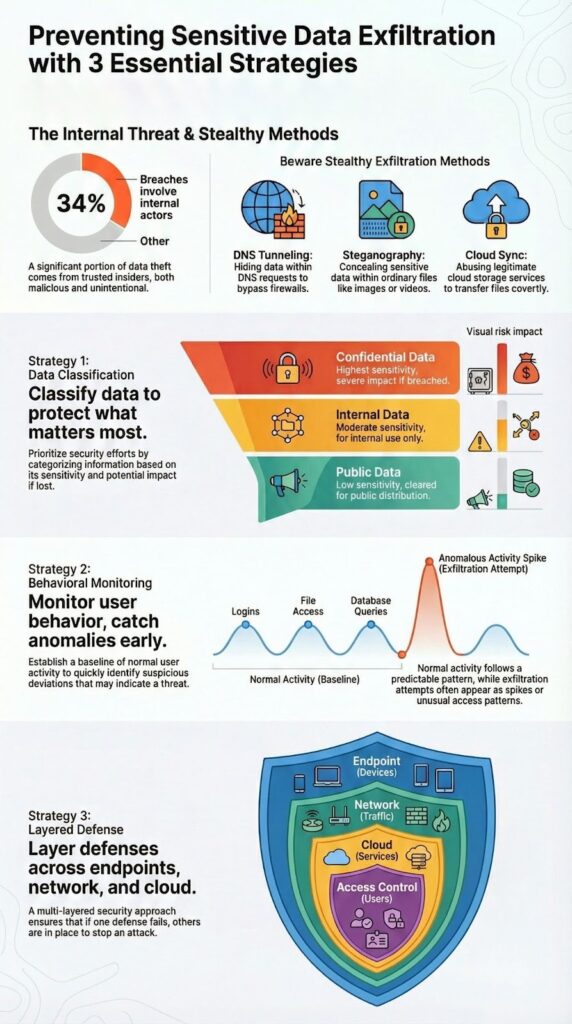
What you notice, once you really look at data leaving an organization, is that it never uses just one door. It seeps through endpoints, networks, cloud apps, and access gaps, all at once. That’s why a single “magic” security tool never holds up for long.
A strong defense has to work in layers, each one catching what the others miss. By outsourcing certain elements of your security stack, such as data loss prevention, you can achieve higher efficiency and cost savings while maintaining comprehensive coverage.
This explains why many organizations are turning to outsourced data loss prevention to complement their internal controls.
Endpoints are where people actually touch data, change it, and move it. That also makes them a favorite path for exfiltration.
Key controls on endpoints often include:
When done well, endpoint security doesn’t just say “no” to everything. It watches how users normally handle data, then steps in when behavior crosses a clear line.
Once data starts moving across the wire, the network becomes your early warning system.
Common layers here include:
The goal is to see both the shape of the traffic and the meaning of what’s inside it.
As more work moves into SaaS platforms, cloud becomes both a workplace and an exit door.
Cloud Access Security Brokers (CASB) sit between users and cloud services to:
Without CASB or a similar layer, a lot of exfiltration can hide inside “normal” web and cloud traffic.
If attackers (or overprivileged users) can’t reach certain data, they can’t steal it. That’s the logic behind tighter access control.
Core practices include:
This doesn’t just reduce risk, it also shrinks the blast radius if an account does get compromised.
Each layer focuses on a different angle:
On their own, they’re helpful. Together, they form a defense that can adapt as attackers change methods.
The real turning point is integration, sharing signals across these layers so an odd login, a strange upload, and a new cloud app don’t look like separate events, but like one incident forming in real time. That’s where layered defense stops being a checklist and starts becoming an actual shield.
| Security Layer | Primary Focus | Exfiltration Risks Addressed | Example Controls |
| Endpoint Security | User interaction with data | USB copying, local file transfers, unauthorized apps | Endpoint DLP, device control, application whitelisting |
| Network Monitoring | Data in transit | Large outbound transfers, hidden tunnels, malicious destinations | IDS/IPS, Network DLP, traffic analysis |
| Cloud Security | SaaS and cloud usage | Shadow IT, public sharing, personal cloud uploads | CASB, SaaS activity monitoring, cloud DLP |
| Access Control | Who can access data | Overprivileged or compromised accounts | Least privilege, MFA, regular access reviews |
Credits : Google Workspace
What usually surprises people is that the riskiest data isn’t always where the strongest protections are. The outside walls look sturdy, but inside, the crown jewels can sit on an open shelf.
A solid defense strategy starts with some very basic, very honest questions about your own data and how people actually work with it. Understanding core principles behind MSSP security fundamentals can help you tailor your controls and resource allocation more effectively, ensuring that your security stack truly protects what matters most.
Considering the insights from MSSP security fundamentals can guide you in balancing security and usability while preparing for evolving threats.
Not all data carries the same weight. Some of it, if stolen, is annoying. Some of it would be devastating.
Begin by mapping your highest-impact data:
Once you know what would hurt the most if it walked out the door, you can:
A lot of organizations spend years hardening the “perimeter” while that sensitive data sits exposed on internal shares or open cloud folders.
If security fights how people actually work, security will lose. Not because the tools are weak, but because people will route around them.
You can reduce that friction by:
Overly strict rules often lead to:
The aim is a balance where users can still do their jobs, while risky behavior is gently nudged into safer patterns, not forced underground.
Total lockdown sounds safe on paper, but in most real environments, it breaks productivity fast.
So instead of trying to block everything, build strong detection and response around your critical paths:
The realistic goal:
You’re not just saying “no,” you’re watching for “this doesn’t look right” and acting fast.
Attackers adjust their methods every time defenders close a door. So a defense strategy that stands still, even if it’s good today, will age out.
To keep pace, build in a regular review rhythm:
Exfiltration methods shift, from USB, to email, to SaaS, to DNS, to whatever comes next. A living strategy doesn’t chase every headline, but it does keep scanning for gaps before attackers find them.
The real defense is less about one perfect tool and more about a clear-eyed, ongoing practice: know what matters, respect how people work, watch closely, and be willing to adjust when the patterns change [2].
Data loss prevention protects data on endpoints, networks, and cloud systems at the same time. DLP solutions use sensitive data classification and discovery scanning to find critical information. They inspect content with pattern matching, regex detection, fingerprinting technology, and exact data match. Automated blocking and real-time alerts stop data leakage prevention failures and trigger fast incident response.
Insider threat mitigation depends on strong access controls. The least privilege principle limits what users can reach. RBAC implementation, multi-factor authentication, and privileged access management reduce misuse. UEBA analytics and behavioral anomaly detection monitor user activity tracking. Audit logging and session recording support breach detection and forensic analysis without disrupting daily work.
Network monitoring analyzes traffic to expose hidden exfiltration techniques. IDS IPS systems and SIEM integration detect protocol anomaly patterns. DNS tunneling block, HTTP inspection, egress filtering, and firewall rules stop covert channel blocking. Proxy servers, bandwidth thresholding, volume-based alerts, destination reputation, IP blacklisting, and geofencing rules reveal suspicious transfers.
Data encryption protects information with encryption at rest and TLS encryption during transfer. Data masking and tokenization reduce exposure during processing. Data governance uses data inventory, asset tagging, and data flow mapping for critical data identification. PII detection, PHI protection, and financial data safeguards support GDPR compliance, HIPAA safeguards, and PCI DSS rules.
Zero trust architecture limits access in cloud security environments. CASB tools enforce SaaS policy enforcement. Secure file sharing, watermarking, and contract clauses protect shared data. Supply chain security and third-party risk management reduce exposure. Hybrid cloud security, BYOD policies, mobile device management, and remote work protections maintain control outside the perimeter.
Preventing sensitive data exfiltration requires strong controls and clear ownership. Tools reduce risk. Awareness keeps them effective. Teams who understand data protection follow policies consistently.
Effective programs combine key actions.
Classify data by business risk.
Monitor user behavior.
Protect every exit point.
As environments change, controls must adapt. Remote work and new apps add exposure.
We help streamline tools, improve integration, and align security stacks with business goals today.
Get expert MSSP guidance here.

