Address
304 North Cardinal St.
Dorchester Center, MA 02124
Work Hours
Monday to Friday: 7AM - 7PM
Weekend: 10AM - 5PM
Address
304 North Cardinal St.
Dorchester Center, MA 02124
Work Hours
Monday to Friday: 7AM - 7PM
Weekend: 10AM - 5PM


Every computer keeps a running diary, these event logs capture the good, the bad, and the ugly of daily operations. From mysterious crashes to sneaky login attempts at midnight, these digital breadcrumbs tell us exactly what went wrong (or right).
Most folks start with built-in tools like Event Viewer or check /var/log files, but face it, staring at endless lines of timestamps and codes isn’t anyone’s idea of fun. But before your eyes glaze over, read on for the no-nonsense guide to making these logs actually useful.
Finding event logs sounds simple on paper, it’s detective work through digital footprints that systems leave behind. Every login attempt, system crash, and security alert gets recorded automatically, creating a detailed timeline of what’s happening across networks.
We’ve spent years helping MSSPs dig through these logs during security audits. Truth is, most providers struggle with messy, disorganized data that’s spread across different tools. Our team has seen firsthand how proper log management for compliance makes the difference between quick incident response and hours of frustrating searches.
Think of event logs as security camera footage for computers, they document both mundane daily operations and suspicious activities. Working with hundreds of MSSPs taught us that having searchable, properly stored logs isn’t just nice to have, it’s essential for proving compliance and catching threats early. [1]
Credit: Prabh Nair
Our years auditing MSSPs revealed that solid log analysis stops disasters before they start. When a client’s system shows multiple failed logins at 2 AM, that’s not just data, it’s a potential breach in progress. These digital records act as an early alarm system, catching odd behavior before real damage happens.
When systems crash, logs become the repair manual. We’ve helped partners cut troubleshooting time by 70% just by knowing where to look. Instead of guessing what went wrong, the answer sits right there in the timestamps and error codes.
Most MSSP clients face strict compliance rules, think HIPAA or PCI DSS. Clean, accessible logs aren’t optional here, they’re proof that security measures actually work. Plus, these records show exactly how teams use systems, pointing to ways to streamline operations and cut costs.
Key benefits our partners see:
Pulling logs from different places feels like herding cats, servers, workstations, firewalls, and apps all speak different languages. We’ve learned the hard way that checking each system separately wastes precious time during incidents.
Most MSSPs we work with now use collection tools that funnel everything into one place. Integrating SIEM log management allows for a more streamlined approach, enhancing our ability to respond quickly to incidents.
Our recent projects show that real-time aggregation makes a massive difference. When logs stream to a central hub and get translated into one format, analysts spend less time formatting data and more time finding actual threats.
Raw logs are messy. They come in different formats, timestamps, and structures. Indexing organizes logs to enable quick searches based on criteria like time, event ID, or severity.
However, indexing isn’t perfect. It can introduce latency or miss unindexed data during urgent investigations. We often supplement indexing with full-text search capabilities and apply secure log storage practices to ensure sensitive data stays protected and accessible when needed.
Setting alerts on critical events, like multiple failed logins or configuration changes, enables us to respond immediately before issues escalate. Automation here saves time and reduces human error.
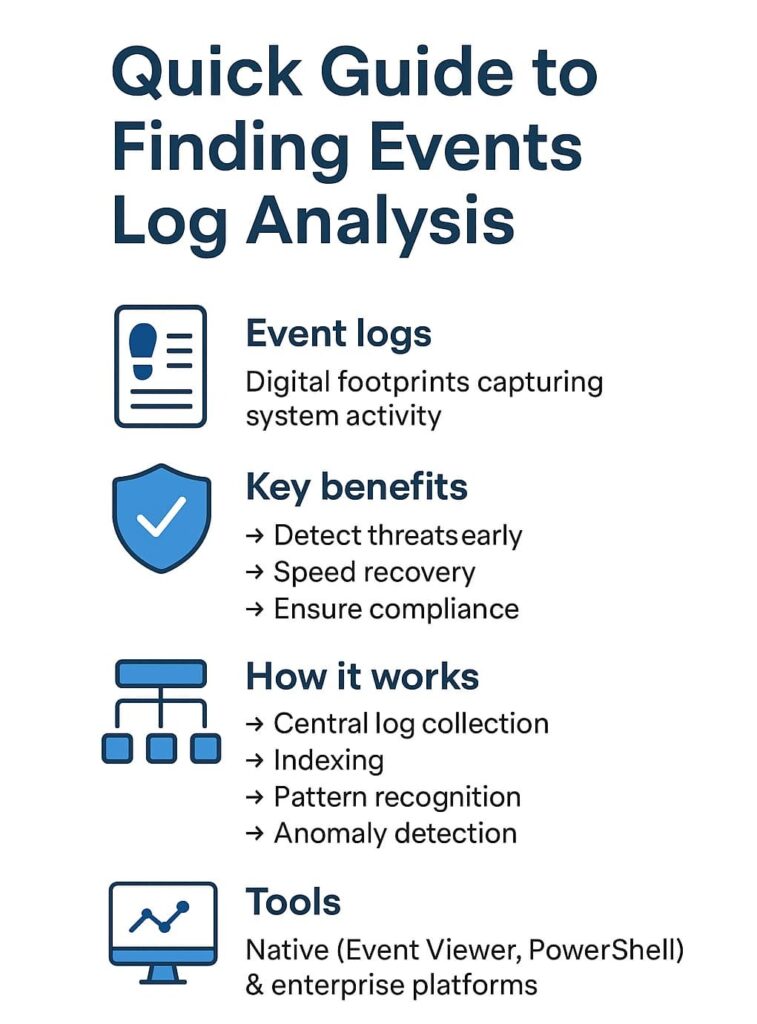
Logs are our frontline defense. By analyzing authentication events (successful and failed logins), privilege changes, and process creations, we catch intrusions or insider threats early. For instance, a surge of failed login attempts from a single IP often signals a brute-force attack. Detecting these patterns quickly lets us isolate and mitigate threats.
Event logs also hold clues to system health, hardware errors, service failures, or application crashes. Early detection helps IT teams prevent downtime and improve user experience.
Auditing changes to system settings or user permissions ensures accountability and helps comply with regulations. Any unauthorized change can be traced and reversed. [2]
When an incident occurs, reconstructing its timeline from logs is invaluable. Logs preserve evidence of actions, enabling a thorough investigation and aiding legal or regulatory processes.
Analyzing logs to understand workflows or user behavior helps identify inefficiencies and optimize processes, contributing to operational excellence.

While manual log review is possible, it’s impractical at scale. That’s where tools come in. As part of our MSSP security services, we rely on a variety of platforms and specialized tools that make finding event logs and analyzing them efficient and effective.
If you’re just starting out, familiarize yourself with native tools but consider how integrating enterprise-grade tools or MSSP security services can enhance your capabilities.
Event logs record system activity such as login attempts, process logs, and error logs. They help detect failed login attempts, identify suspicious behavior, and track user activity logs. Through log analysis and log monitoring, teams can find system events that reveal security or performance issues quickly.
Log management collects and organizes security logs, system logs, and application logs into centralized log management systems. With log aggregation and log correlation, it becomes easier to detect patterns and perform real-time log analysis, helping analysts trace issues back to their event source and improve visibility.
Event log analysis tools handle log parsing, log indexing, and log visualization. Many rely on event correlation and anomaly detection to spot unusual log patterns. These tools also support log filtering and log review, helping teams perform root cause analysis and maintain strong log compliance practices.
Anomaly detection highlights unusual log activity like spikes in authentication logs or repeated warning logs. By analyzing event severity and log timestamps, analysts can identify log anomalies and trigger log alerts. This proactive approach strengthens incident response and supports better forensic analysis during investigations.
Event log analysis isn’t just a technical task, it’s a strategic advantage. When done right, it turns raw data into actionable intelligence that strengthens security, stability, and performance. Whether you’re an IT pro, blue teamer, or business leader, mastering how to find and analyze events leads to smarter decisions and a stronger defense posture.
Feeling overwhelmed by log complexity? Partner with MSSP Security. Our expert consultants streamline operations, reduce tool sprawl, and enhance visibility with 15+ years of experience and 48K+ projects delivered, helping you stay ahead of threats and achieve true operational excellence.

