Address
304 North Cardinal St.
Dorchester Center, MA 02124
Work Hours
Monday to Friday: 7AM - 7PM
Weekend: 10AM - 5PM
Address
304 North Cardinal St.
Dorchester Center, MA 02124
Work Hours
Monday to Friday: 7AM - 7PM
Weekend: 10AM - 5PM


Configuring WAF policies rules means defining how a web application firewall inspects requests and enforces allow or block actions to stop real attacks like SQL injection and XSS. In practice, most breaches exploit misconfigured rules, not missing tools. According to OWASP, application-layer attacks still dominate reported incidents.
We have configured and tuned WAFs across production environments where performance, uptime, and compliance mattered equally. This guide explains how WAF configuration actually works, where teams get stuck, and how to design rules that survive real traffic. Keep reading to avoid the mistakes we see every week.
Think of a WAF policy as a security checklist for your website. It’s the container holding all the rules that inspect incoming traffic, checking headers, URLs, and data against conditions. These policies enforce protections against common threats, primarily the OWASP Top 10.
As notes:
“The OWASP Top 10 is a standard awareness document for developers and web application security. It represents a broad consensus about the most critical security risks to web applications. Globally recognized by developers as the first step towards more secure coding.” – Cloudflare [1]
From our work with MSSPs, the biggest point of confusion is rule order. Priority is critical. A top rule that allows your office IP will override every block rule beneath it. The first matching rule decides the action, block, allow, or challenge, and the inspection stops right there.
The core mechanics are built on three things:
As policies grow, this simple structure is what prevents chaos and keeps your apps safe.

In our work with MSSPs, we see WAF rules as three practical tools. Each one solves a different part of the problem:
Implementing these isn’t just about stopping hackers; it’s about meeting professional expectations. According to notes :
“The OWASP is important for organizations because its advice is held in high esteem by auditors, who consider businesses that fail to address the OWASP Top 10 list as falling short on compliance standards.” – IBM [2]
The table below clarifies the difference.
| Rule type | Scope | Example |
| Managed | Pre-built | Block SQL injection patterns |
| Custom | App-specific | Block /admin from public IPs |
| Rate/Bot | Behavior-based | Throttle 100 requests per minute |
At MSSP Security, we typically start clients with managed rules, then layer custom logic once baseline traffic is understood. This sequencing avoids unnecessary false positives while ensuring you remain audit-ready from day one.
Rule priority is the traffic director in your WAF. It decides which rule gets to speak first, and that decision is final.
Rules are checked from the lowest priority number up. The first rule with a terminating action, like Block or Allow, stops the show, which is why many teams rely on advanced security services to validate priority logic before production rollout. Anything else, like a count or log action, just lets the request move down the line.
Why order matters: A misplaced rule is the #1 cause of self-inflicted outages. We see it all the time. If you block an entire country before allowing your own office IPs in that country, you’ve just locked yourself out.
The safe sequence we recommend is straightforward:
This order protects your own traffic first and processes everything else logically. It’s about building a sensible funnel, not just throwing up walls.
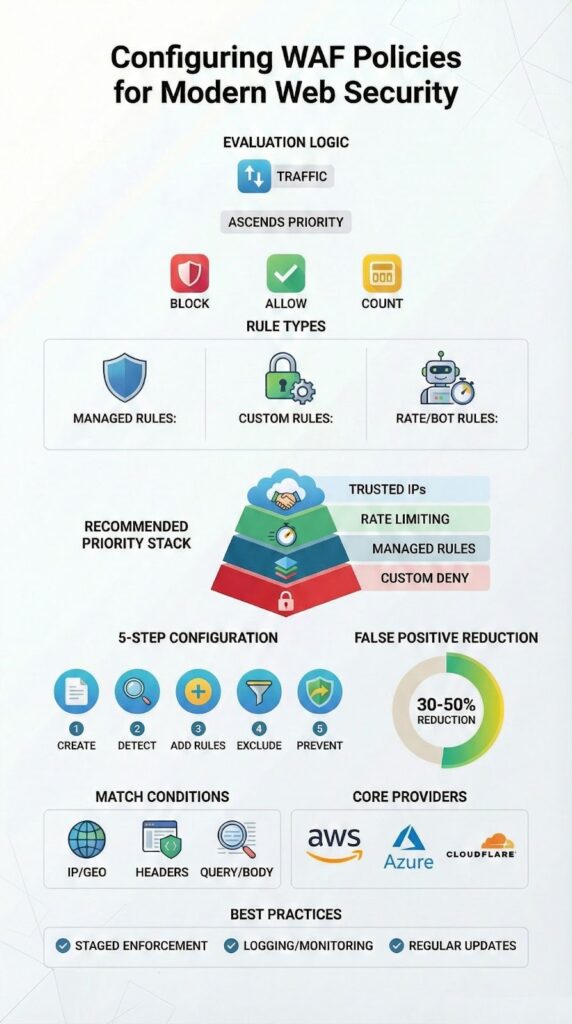
A good WAF setup is a process, not a one-time config. Here’s the basic flow we follow.
The step-by-step approach:
Throughout this, logging is non-negotiable. You need to see every rule hit and block. We integrate these logs directly into SIEMs for our partners, it’s how you connect a WAF alert to a broader attack story.

Exclusions are your precision tool for stopping false alarms. They tell the WAF to ignore specific parts of a request, like a certain parameter or header, without turning off the whole security rule.
When a strict rule meets a real-world app, false positives are guaranteed. A user typing <script> into a search bar shouldn’t be blocked. That’s where exclusions come in. Done right, they can cut false positives by 30-50%.
How to use them smartly:
Common things we exclude:
The key is restraint. Every exclusion is a small bypass. Many organizations pair precise exclusions with managed WAF services so tuning and triage happen continuously rather than only after incidents. Use too many, and you weaken your security posture.
AWS, Azure, and Cloudflare WAFs all do the same core job, but their approaches shape how you work.
A quick comparison:
| Provider | Managed Rules | Key Actions |
| AWS WAF | AWS Managed, OWASP | Allow, Block, CAPTCHA |
| Azure WAF | OWASP CRS | Allow, Block, Log |
| Cloudflare WAF | Vendor Rulesets | JS Challenge, Block |
Where they differ:
For an MSSP, the biggest task isn’t picking a winner. It’s making your security policies work consistently across any of them. We focus on normalizing the logic, so a “block SQLi” rule means the same thing everywhere, regardless of the provider. That’s what lets you manage hybrid environments without rewriting everything.
Credits: F5 DevCentral Community
A WAF policy is a living document, not a static setup. The goal is to stop attacks without breaking your own site.
Here’s what works:
Teams that make a habit of reviewing their WAF metrics every few weeks have far fewer nasty surprises. It turns a black box into a tool you understand. The best policy isn’t the one with the most rules, it’s the one you actively monitor and refine. That’s the difference between just having a WAF and actually having a working defense.
Begin with a clear web application firewall baseline that combines managed rulesets and targeted custom rules. Enable core OWASP rules to deliver SQL injection protection and XSS blocking.
Set a strict default action, activate detailed logging configuration, and review rule hit counts. Tune match conditions for header inspection, URI matching, and query string filtering to reduce false positives early consistently.
Place high-confidence items from your primary security ruleset at the top of rule ordering. Use terminating rules only for unmistakable attacks and let lower-risk traffic reach the default action.
Group related rule groups together, check action precedence and override settings, and resolve rule priority conflicts before publishing. Always run rule validation and a syntax checker in simulation mode before deployment.
Start in detection mode to capture baseline traffic without blocking users. Review sampled requests carefully, adjust the exclusions list, and refine regex patterns or size constraints.
Move gradually into prevention mode, apply count action to sensitive rules, and monitor latency impact through continuous log analysis and proactive alert setup with strong rule monitoring using centralized dashboards and metrics for visibility.
Use rate limiting to stop login brute force attempts and protect API endpoints. Layer geo-blocking and IP reputation to filter high-risk regions and known bad networks.
Apply scope-down statements so rules target specific resources, set sensible burst limits, and whitelist trusted IPs for admins. Add bot management with challenge response and CAPTCHA integration on risky pages while keeping DDoS mitigation.
Use a dedicated staging environment or canary deployment to validate changes safely. Replay baseline traffic, run realistic attack simulation, and review rule hit counts. Keep rule overrides minimal and documented for rollback plans.
Integrate rule testing into CI/CD using security as code practices, and enable logging configuration, alert setup, and continuous rule monitoring before go-live across all association targets always.
Configuring a WAF is about balance, sequencing rules and understanding your traffic. When policies match real application behavior, security improves without blocking users.
We help MSSPs achieve this through hands-on tuning and automation. The same principles apply for a single site or a global deployment: move deliberately, measure everything, keep refining.
Need expert guidance on your WAF or overall security stack? Let’s talk.

