

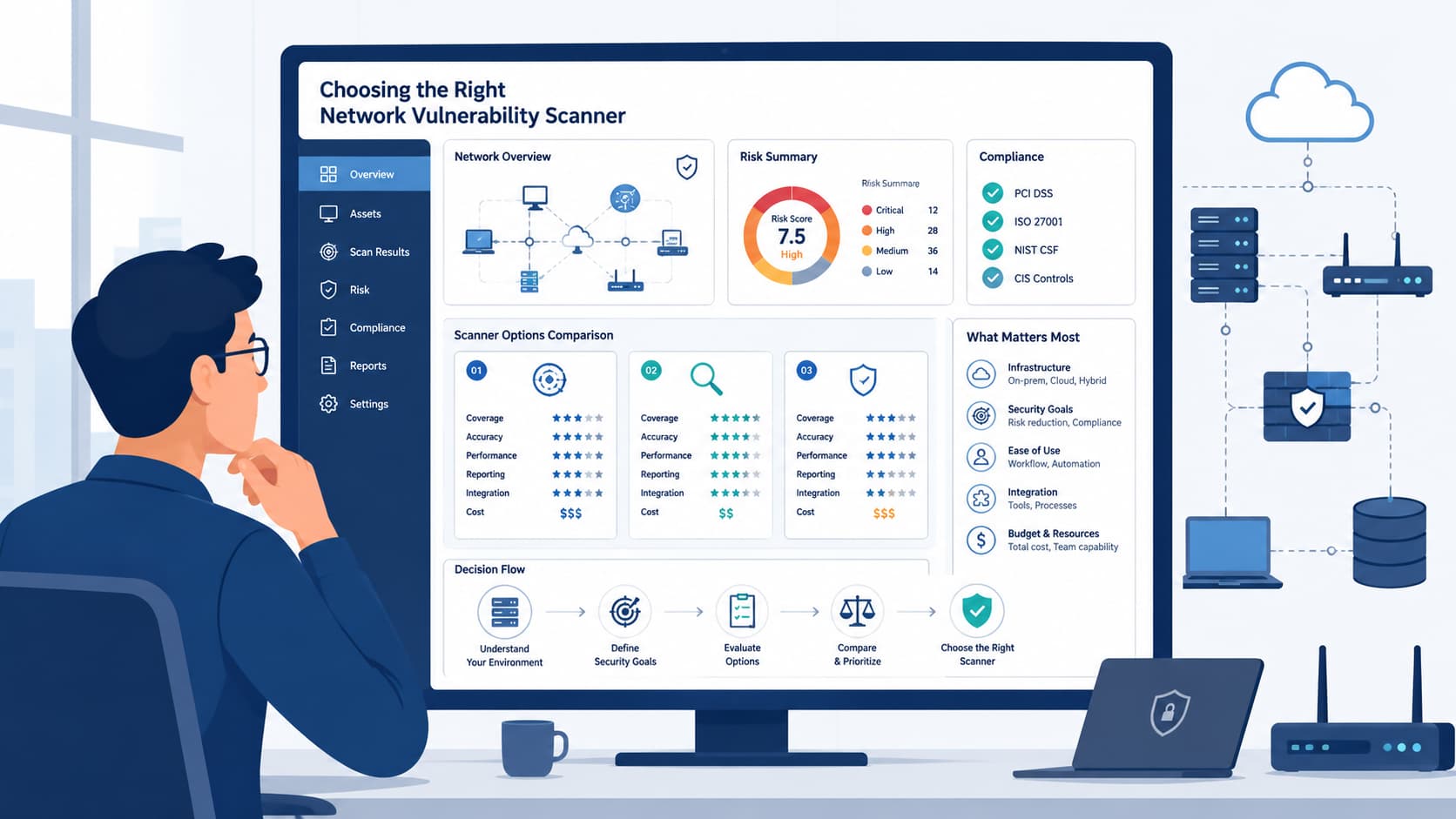
Choosing a network vulnerability scanner is less about comparing feature lists and more about understanding how well a solution performs in your own environment. Even a scanner with broad vulnerability coverage can generate false positives or miss important findings if deployed incorrectly.
This guide explains the practical criteria security teams use to evaluate detection accuracy, deployment models, operational workflows, and long-term suitability before selecting a solution.
Drawing on industry best practices and the expertise of MSSP Security, you’ll learn how to make informed decisions that support effective and sustainable vulnerability management.
Scanner Selection at a Glance
Choosing the right network vulnerability scanner starts with validating detection accuracy, testing real-world performance, and ensuring the platform supports your long-term security operations.
- Prioritize detection quality over feature count. Validate scanner accuracy through authenticated scans and structured pilots instead of relying on vendor claims.
- Evaluate operational fit. Review reporting, integrations, remediation workflows, and deployment options to ensure the scanner works with your existing environment.
- Adopt a layered approach. Combine one primary network vulnerability scanner with targeted validation techniques and periodic manual assessments for stronger security coverage.
Why Does Choosing the Right Scanner Matter?
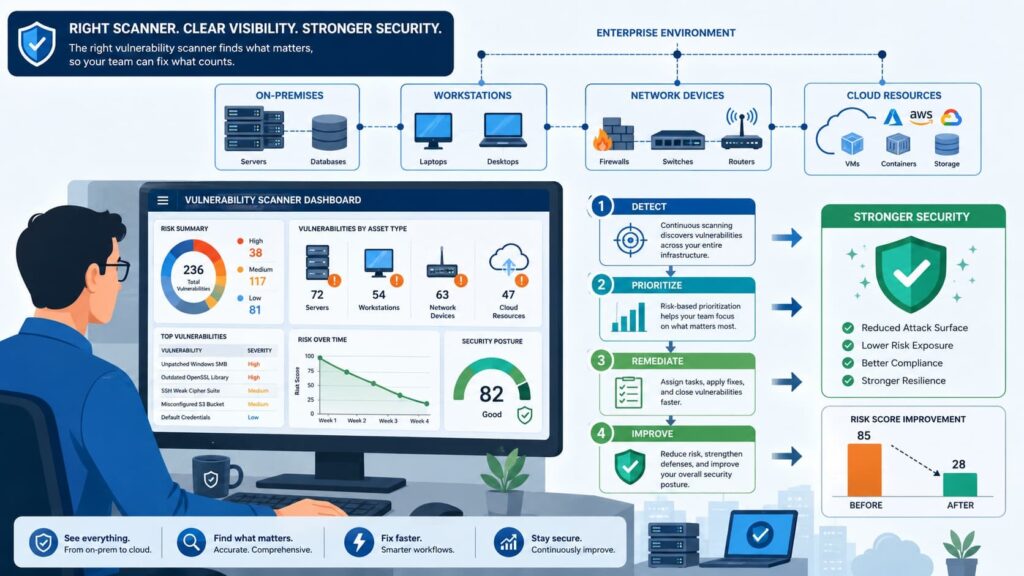
The tool you choose for network vulnerability scanning directly affects what your security team finds, what it misses, and how quickly issues can be remediated. Many organizations compare long feature lists, but real-world detection accuracy matters far more than marketing claims.
After more than a decade managing vulnerability operations across 40+ global networks, we have found that selecting a scanner before understanding the environment often leads to poor results. Start by evaluating your infrastructure before comparing vendors. Focus on:
- Active Directory architecture and network topology
- Cloud assets, routing, and overall asset complexity
- Pilot deployments with authenticated scans
Independent testing supports this approach. A 2024 Pentest-Tools benchmark found one commercial web application scanner detected only 22.66% of tested vulnerabilities under default settings, despite much broader advertised coverage.
Network scanner performance also varies by environment and configuration, making validation essential.
- When a scanner underperforms, organizations often face:
- False positives that waste analyst time
- False negatives that leave exploitable vulnerabilities undiscovered
- Slower remediation and misleading compliance reports
- Missed critical CVEs despite healthy-looking dashboards
No vulnerability scanner performs equally well across cloud, legacy, containerized, and specialized network environments. Evaluate every solution against your own infrastructure rather than relying on vendor claims or advertised coverage.
What Should Every Vulnerability Scanner Detect?
A capable network security scanner should do more than identify open ports. It must discover assets, detect vulnerabilities accurately, prioritize risk, and support efficient remediation.
Modern scanners combine asset discovery, service identification, OS fingerprinting, vulnerability mapping, and compliance validation to provide a complete view of your security posture.
Understanding how vulnerability scanner technology identifies assets and correlates known weaknesses also helps explain why authenticated scanning delivers more complete results. Authenticated scanning is especially important.
NIST recommends credentialed assessments because they reveal host-level vulnerabilities that remote-only scans often miss. In practice, remediation consumes far more time than discovery, so scanners should integrate smoothly with existing workflows rather than creating operational bottlenecks.
| Capability | Why It Matters |
| Network asset discovery | Helps identify unmanaged or unexpected devices earlier in the vulnerability management process. |
| Authenticated scanning | Detects configuration weaknesses and missing patches internally. |
| Risk scoring | Uses CVSS scores and asset value to tell you what to fix first. |
| Security compliance scanning | Generates reports for standards like PCI DSS, HIPAA, or NIST CSF. |
| Vulnerability scanner API | Allows findings to feed directly into automation and orchestration tools. |
| SIEM/SOAR integration | Brings vulnerability data into centralized security operations and enables automation/orchestration workflows |
| Ticketing system integration | Automates the creation of remediation tickets for IT teams. |
Coverage should include:
- On-premises servers
- AWS, Azure, and GCP workloads
- Containers and Kubernetes
- APIs and network devices
Finally, reporting should deliver executive-ready risk summaries and detailed technical findings from the same scan, making authenticated assessment the foundation of an effective vulnerability management program.
Why Are Authenticated Scans So Important?
Authenticated scanning reveals operating system, application, and configuration weaknesses that unauthenticated scans often miss. Credentialed assessments provide visibility into installed software, missing patches, registry settings, service configurations, permissions, and operating system policies.
In our experience, external scans typically identify exposed services, while authenticated scans uncover the internal misconfigurations that present the greatest operational risk. Using both methods together delivers the most complete assessment.
As noted by Royal Institute of Technology:
“The overall findings suggest that a vulnerability scanner is a usable security assessment tool, given that credentials are available for the systems in the network. Results also show that a scanner more accurate in terms of remediating vulnerabilities generally also is better at detecting vulnerabilities, but is in turn also more prone to false alarms. This is independent of whether the scanner is provided system credentials or not.” – Royal Institute of Technology
Unauthenticated scanning commonly misses: Missing operating system patches Local privilege escalation risks Registry misconfigurations Weak security policies Installed software vulnerabilities Configuration drift It remains valuable for:
- Internet-facing infrastructure
- External attack surface discovery
- Initial asset identification
- Public service validation
- Firewall exposure verification
Combining both approaches improves CVE detection, reduces blind spots, and provides stronger evidence for security audits.
How Do You Compare Scanner Accuracy?
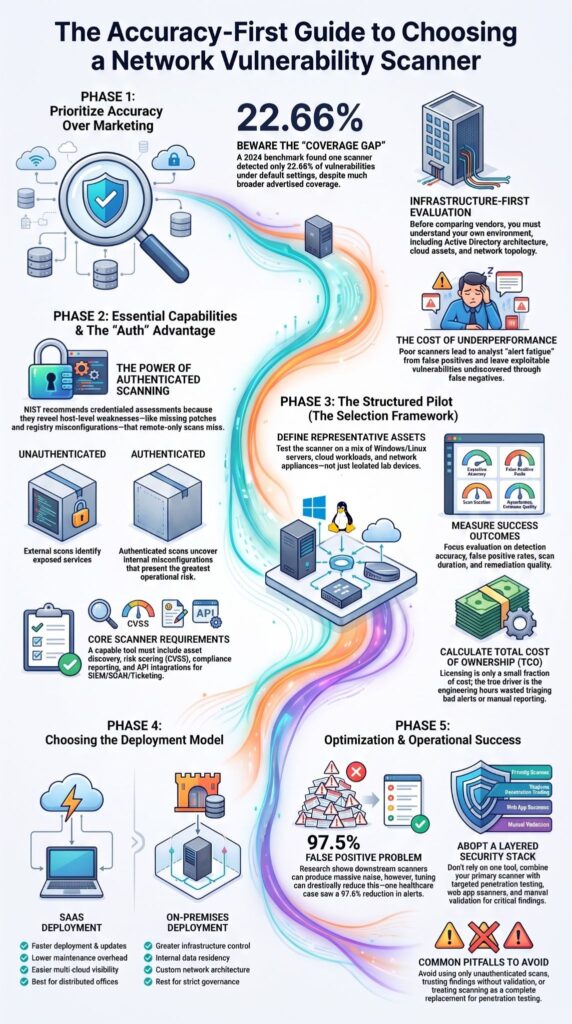
The most reliable way to evaluate a network vulnerability scanner is through a controlled pilot that measures detection quality, false positives, and operational fit.
Marketing materials frequently emphasize plugin counts or vulnerability databases, yet practitioners consistently judge scanners by the quality of their findings. Independent
Pentest-Tools benchmarking demonstrated meaningful differences between advertised detection capabilities and actual scan performance, making real-world evaluation far more valuable than specification sheets alone.
We recommend beginning every evaluation with a representative sample of production-like systems instead of isolated lab devices. Our assessments typically include Windows servers, Linux hosts, cloud workloads, network appliances, and selected internet-facing assets because production environments rarely consist of identical systems.
A structured pilot should include:
- Known vulnerable
- Windows hosts
- Linux servers
- Cloud infrastructure
- Authenticated scans
- Unauthenticated scans
- Internal and external assessments
- Representative business applications
The evaluation should measure several outcomes rather than simply counting findings. Compare:
- Detection accuracy
- False positive rate
- False negative observations
- Scan duration
- Reporting quality
- Remediation guidance
- Integration with ticketing systems
Evidence: Detection quality should always outweigh the total number of reported vulnerabilities. A scanner generating thousands of findings provides little value if analysts spend days validating incorrect results or manually reprioritizing alerts.
Which Deployment Model Fits Your Environment?
The right deployment model depends on infrastructure, compliance obligations, operational resources, and long-term management preferences.
As organizations expand across hybrid infrastructure, choosing between an on-premise vulnerability scanner and a SaaS vulnerability scanner becomes as important as comparing detection capabilities.
Industry analyses and vendor offerings reflect continued growth in cloud-managed vulnerability platforms, particularly for multi-cloud and distributed teams, due to simpler updates and centralized policy management.
We have seen both approaches work well. Organizations with strict data residency requirements often prefer on-premises deployments for greater control, while distributed teams typically appreciate the operational simplicity of SaaS-based platforms.
Rather than assuming one model is universally better, we evaluate which option aligns with existing governance and operational workflows.
| SaaS Deployment | On-Premises Deployment |
| Faster deployment | Greater infrastructure control |
| Lower maintenance overhead | Custom network architecture |
| Automatic updates | Internal data residency |
| Easier multi-cloud visibility | Greater customization options |
Deployment also affects scanner placement. Internal sensors improve local vulnerability scanning, while internet-facing sensors strengthen remote vulnerability detection and attack surface discovery.
Organizations should generally consider SaaS when they have:
- Distributed offices
- Hybrid cloud environments
- Limited infrastructure staff
- Frequent platform updates
- Centralized vulnerability management needs
Beyond infrastructure, deployment decisions should also account for API integrations, scan scheduling, production environment scanning controls, and reporting requirements. Selecting the right operational model early often reduces administrative overhead for years.
Which Scanner Is Best for Your Use Case?
No single enterprise vulnerability scanner is the best fit for every organization because infrastructure, compliance requirements, and security priorities vary.
Evaluating differences through a Nessus, Qualys, and Rapid7 comparison can also help organizations understand how detection workflows and management capabilities vary across enterprise platforms.
Practitioner experience consistently shows that selecting a scanner based on business needs delivers better long-term results than choosing the most popular platform.
Different environments typically benefit from:
- Enterprise environments: Commercial scanners with broad asset coverage, centralized management, and detailed reporting.
- Cloud-first organizations: SaaS-based vulnerability management platforms with continuous visibility.
- Risk-driven security teams: Platforms that combine asset discovery, risk prioritization, and remediation workflows.
- Budget-conscious organizations: Open-source scanners supported by in-house expertise.
- DevSecOps teams: Security scanners integrated into CI/CD pipelines.
Network validation: Specialized penetration testing tools that verify high-risk findings. Many experienced security teams also avoid relying on a single solution.
A practical security stack often includes:
- One primary network vulnerability scanner
- Targeted penetration testing tools
- A web application or API security scanner because web application vulnerability scanners help identify application-layer weaknesses that network scanning alone may not detect.
- A vulnerability aggregation platform
- Manual validation for critical findings
This layered approach provides greater confidence than automated scanning alone. While modern scanners identify most vulnerabilities, targeted validation helps confirm high-risk exposures and reduces the chance of missing environment-specific security issues.
Why Are Teams Overwhelmed by False Positives?
Alert fatigue is usually caused by default configurations, poor scan tuning, and limited asset context rather than the scanner itself. Many security teams report hundreds or thousands of alerts requiring manual verification, showing that deployment quality is as important as tool selection.
In one healthcare environment, tuning credentialed scans, disabling unnecessary plugins, and improving asset classification reduced 14,200 critical alerts to 340 actionable findings, a 97.6% reduction achieved without changing scanners.
Research from King Abdullah University of Science and Technology shows:
“Downstream vulnerability scanners produce a staggering 97.5% false positive rate. We pinpoint the primary cause as the flagging of vulnerabilities within unreachable code. We then demonstrate that function call analysis can effectively prune 63.3% of these false alarms.” – King Abdullah University of Science and Technology
Common causes of false positives include:
- Default plugin configurations
- Missing authenticated scanning
- Duplicate assets
- Asset misclassification
- Outdated vulnerability databases
- Inappropriate scan policies
Effective ways to reduce scanner noise:
- Suppress verified exceptions
- Tune noisy plugins
- Validate critical findings manually
- Maintain accurate asset inventories
- Review scan policies regularly
False positive reduction should never compromise visibility. A balanced tuning strategy improves analyst efficiency while preserving meaningful security coverage.
Do Vulnerability Scanners Really Miss Important Vulnerabilities?
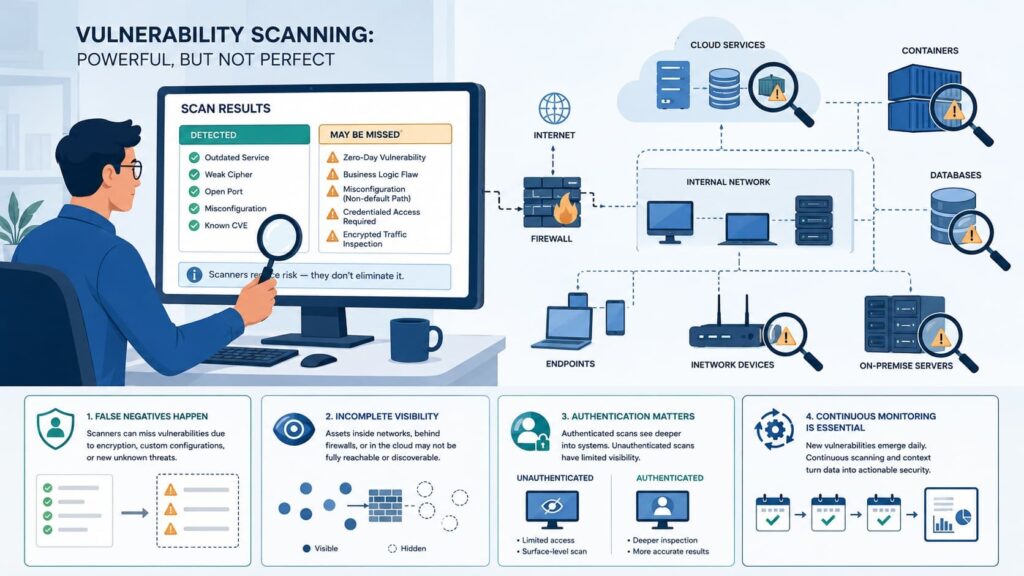
Yes. Every network vulnerability scanner has coverage limitations, making independent validation an essential part of a mature security program.
Independent benchmarks, practitioner discussions, and academic research all point toward the same conclusion: automated scanners cannot identify every vulnerability. Coverage depends on plugin quality, authentication, supported software, configuration logic, and environmental complexity.
We have seen scanners successfully identify thousands of routine vulnerabilities while overlooking isolated configuration issues that later surfaced during manual assessments. Those experiences reinforce why automated scanning complements, rather than replaces, skilled security analysis.
Several factors contribute to missed detections:
- Unsupported software
- Plugin dependency limitations
- Vendor-specific detection logic
- Configuration restrictions
- Incomplete asset discovery
For high-risk systems, organizations should always supplement automated scanning with:
- Manual verification
- Configuration reviews
- Periodic penetration testing
- Threat-informed risk assessments
Of course, missing a vulnerability does not necessarily indicate poor software. No scanner maintains perfect coverage across every operating system, application, cloud service, and container platform. Layered validation remains the most practical strategy.
How Should You Evaluate a Scanner Before Buying?
A structured pilot produces more reliable purchasing decisions than comparing feature lists alone. Before committing to any commercial vulnerability scanner or open source vulnerability scanner, organizations should test realistic workloads using measurable success criteria.
Licensing fees represent only a small fraction of the total cost of ownership. Over a three-year lifecycle, the true cost driver is the engineering hours wasted triaging bad alerts, making integration into your existing CI/CD pipeline and ticketing system the single most critical factor in your ROI calculation.
Focus less on the number of supported CVEs and more on how well the scanner integrates with existing remediation workflows. A technically capable platform loses value if analysts struggle to prioritize findings or operations teams cannot act on reports quickly.
A practical evaluation framework includes:
- Define representative assets.
- Run authenticated and unauthenticated scans.
- Compare known vulnerabilities against findings.
- Measure false positives and false negatives.
- Review reporting quality.
- Test SIEM and ticketing integrations.
- Measure production performance.
- Compare total cost of ownership.
An effective scorecard should evaluate:
- Detection accuracy
- Vulnerability scanner performance
- Reporting quality
- Compliance templates
- API functionality
- Patch management integration
- Risk scoring
- Total operational cost
Organizations should also verify support for continuous vulnerability monitoring, network mapping tools, and future infrastructure expansion. Buying for today’s environment alone often creates limitations later.
What Mistakes Should You Avoid?
Most implementation failures result from configuration decisions rather than software limitations. Technical forums repeatedly demonstrate that incomplete configurations, empty scan policies, missing credentials, and poor asset inventories often create misleading results.
Those operational mistakes are usually preventable with proper planning. We have observed several recurring implementation issues during assessments. Organizations frequently assume default configurations represent best practices, yet tuning scanners for production environments often improves both accuracy and usability.
Common mistakes include:
- Using only unauthenticated scanning
- Ignoring vulnerability scanner optimization
- Running CVE-only scans without asset inventory
- Trusting every finding without validation
- Treating vulnerability scanning as penetration testing
- Forgetting production environment scanning controls
One practical lesson stands out. A network vulnerability scanner supports security operations, but it cannot replace patch management, system hardening, threat monitoring, or manual penetration testing. The strongest security programs combine all of these disciplines into a continuous improvement process.
Analysis of Top Vulnerability Assessment Tools
Credits: SecOps Insider
This video by SecOps Insider delivers an in-depth comparison of three industry-leading vulnerability scanners: Nessus, Qualys, and Rapid7 (InsightVM). The breakdown focuses on their core features, scanning methodologies, and how each platform measures and prioritizes security risks.
This analysis serves as a valuable guide for cybersecurity professionals to determine which tool best aligns with their network architecture and corporate compliance requirements.
FAQ
How accurate is a network vulnerability scanner at identifying security risks?
A network vulnerability scanner can identify many known security weaknesses, but no vulnerability assessment tool can detect every vulnerability. Detection quality depends on vulnerability scanner accuracy, CVE detection, the completeness of the vulnerability database, and the use of authenticated scanning. Regular tuning improves false positive reduction, minimizes vulnerability scanner false negatives, and strengthens overall cyber vulnerability detection.
Should I choose an open source or commercial vulnerability scanner?
The best option depends on your budget, technical expertise, and security requirements. An open source vulnerability scanner can meet the needs of smaller environments, while a commercial vulnerability scanner often provides broader vulnerability management, more advanced vulnerability scanner reporting, and dedicated vendor support. Reviewing a vulnerability scanner comparison, reading a vulnerability scanner review, and testing a vulnerability scanner trial will help you make a well-informed decision.
Can a vulnerability scanner replace penetration testing?
No. A network security scanner automates routine checks, but it cannot replace manual penetration testing. Experienced security teams often combine automated vulnerability scanning with penetration testing tools because each approach uncovers different types of security issues. Together, they improve security posture assessment, strengthen network risk assessment, and support more effective vulnerability remediation.
Which vulnerability scanner features should I prioritize?
Choose vulnerability scanner features that align with your infrastructure and operational needs. Important capabilities include network asset discovery, scan scheduling, continuous vulnerability monitoring, risk scoring, CVSS scoring, patch management integration, SIEM integration, ticketing system integration, and flexible scan policy configuration. Careful vulnerability scanner deployment also helps reduce the impact of production environment scanning on business operations.
How do I choose a scanner for cloud environments and compliance?
Start by evaluating your infrastructure, workloads, and regulatory requirements. You may need a cloud vulnerability scanner, hybrid cloud security scanning, container vulnerability scanning, Kubernetes security scanner, or Docker vulnerability assessment depending on your environment. If your organization must meet compliance standards, choose a solution that supports security compliance scanning, PCI DSS scanning, HIPAA compliance scanner requirements, and the NIST cybersecurity framework.
Choosing the Right Network Vulnerability Scanner for Long-Term Success
Choosing the right network vulnerability scanner helps reduce missed security risks, prioritize real vulnerabilities, and improve long-term security operations. A structured evaluation with accurate testing and clear reporting gives you confidence that your chosen solution will continue to meet your organization’s needs.
If you need expert guidance, explore MSSP Security’s consulting services. Their vendor-neutral experts provide tool selection, PoC support, stack optimization, and actionable recommendations to help you build a security program aligned with your business goals.
References
- https://www.sciencedirect.com/science/article/pii/S0167404811001780
- https://ar5iv.labs.arxiv.org/html/2511.20313