

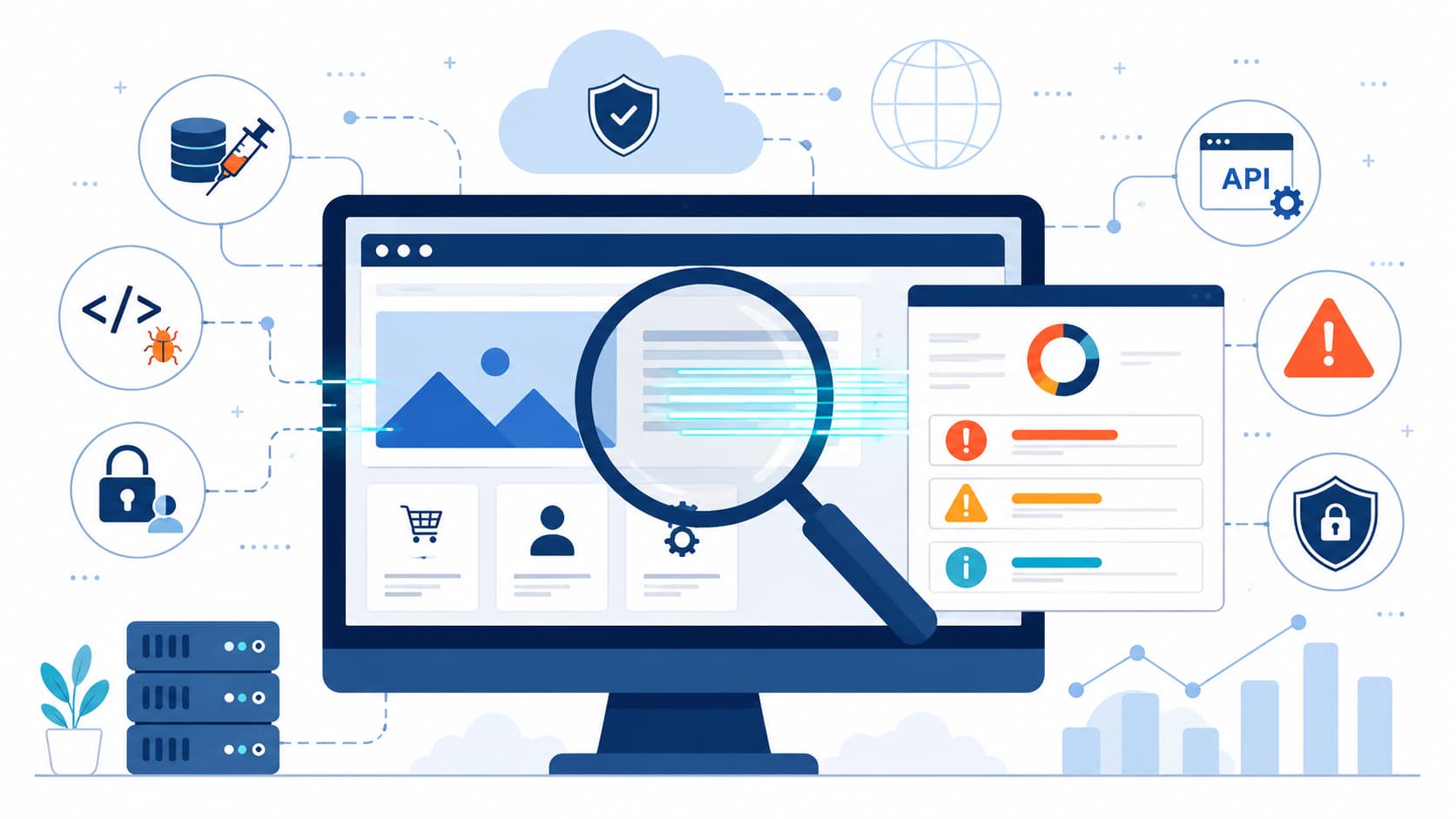
A web application vulnerability scanner helps identify security weaknesses in live web applications and APIs before attackers can exploit them. At MSSP Security, we believe automated scanning is essential for reducing manual effort, prioritizing real risks, and supporting continuous application security.
Effective scanners detect issues such as SQL injection, cross-site scripting, misconfigurations, and outdated components, while working alongside secure coding, manual testing, and ongoing monitoring. Want to learn how web application vulnerability scanners work and how to choose the right solution? Keep reading.
Scan Smarter, Stay Ahead of Web Threats
- Use web application vulnerability scanners to continuously identify security risks across live web applications and APIs before they can be exploited.
- Combine automated scanning with secure development and manual testing to uncover both common vulnerabilities and complex security issues.
- Choose scanners that provide proof-based findings and DevSecOps integration so security teams can prioritize real risks and remediate them faster.
Together, these practices create a stronger, more effective web application security strategy that keeps pace with evolving threats.
What Is a Web Application Vulnerability Scanner?
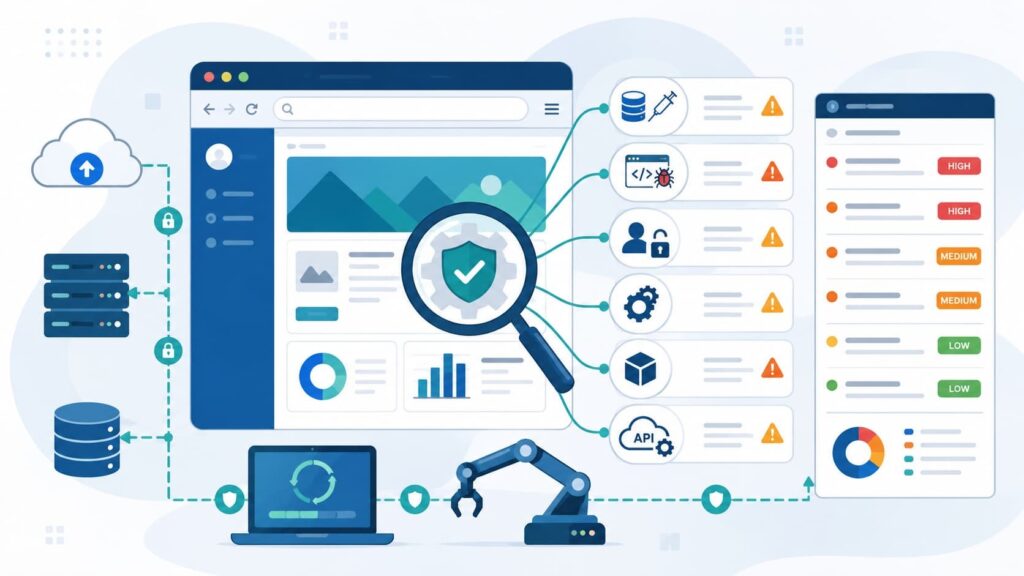
In our work with MSSPs, we often explain web app scanning like this: it’s a piece of software that acts as an ethical attacker. It crawls a live app or API, mapping pages, following links, testing forms, and sending controlled payloads to find the same weaknesses a real attacker would look for.
We’ve found the platforms that work best use proof-based detection. They don’t just guess; they confirm the flaw exists before raising an alert. This is vital, because dynamic testing, as OWASP points out, catches runtime problems that static code reviews can miss.
The real value, in our view, comes from making this a continuous process, not a yearly box-ticking exercise. A scanner constantly re-evaluates an application as it changes, checking new code, updated third-party libraries, authentication flows, and cloud deployments.
This ongoing assessment is non-negotiable now. Before any testing begins, a scanner has to do its groundwork. It crawls everything: websites, APIs, and JavaScript-heavy single-page apps, to build a complete inventory of the attack surface.
Then it runs a mix of active and passive security checks, finishing with reports that include solid evidence for developers to fix.
How a scanner actually works?
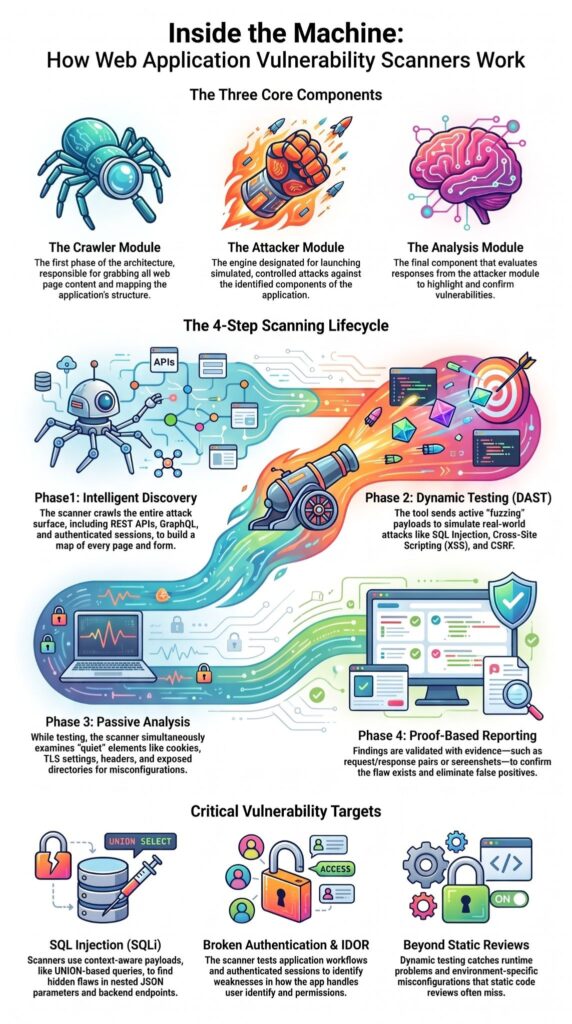
Modern tools don’t just blindly request every URL. They use intelligent discovery. A good scanner has a security-focused crawler that can follow complex application workflows, handle authenticated sessions, and find hidden endpoints across websites, REST APIs, GraphQL, and SPAs.
Once the map is built, dynamic application security testing (DAST) starts. The tool sends controlled payloads to simulate attacks, checking for SQL injection, cross-site scripting, CSRF, SSRF, XXE, broken authentication, and IDOR vulnerabilities. It watches the application’s responses for signs of success.
A capable platform also performs passive analysis, examining cookies, headers, TLS settings, exposed directories, and technology fingerprints.
The goal isn’t to flood teams with alerts. Leading scanners now prioritize validated findings, backing them up with request/response pairs, screenshots, or out-of-band verification to cut down on false positives.
Research from IEEE shows:
“The design of a WVS includes three core components as per the usage scenario. First, the crawler module grabs the content of the web pages. Second, the attacker module is designated for launching the attacks. Third, the analysis module highlights vulnerabilities.” – IEEE Access
What it can find?
Here are some common vulnerabilities and how a scanner typically catches them:
- SQL Injection: Instead of just throwing generic quotes into every text box, we configure our active fuzzers to inject context-aware payloads (like UNION-based queries) into nested JSON parameters. In our last three audits, this is exactly how we uncovered blind SQLi hidden inside backend analytics endpoints that standard automated sweeps sailed right past.
- Cross-Site Scripting (XSS): We don’t just check if <script> alerts reflect back in the HTML. A true DAST pipeline verifies stored XSS by using dual-session active workflows: session A injects a heavily obfuscated payload into a profile field, and session B executes a headless browser instance to see if that payload triggers in the administrative dashboard context.
- Server-Side Request Forgery (SSRF): Blind SSRF is invisible to classic response checking. We force our scanners to route interactions through specialized out-of-band (OOB) listener servers. If a server-side field forces the application to secretly call back to our infrastructure, we capture the immediate timestamped HTTP/DNS request as definitive proof of vulnerability.
- Security Misconfiguration: Spotted through passive analysis of server responses and headers.
- Outdated Components: Identified by technology fingerprinting and matching versions against known CVE databases.
Our experience auditing these tools for MSSPs shows that the workflow of intelligent discovery, proof-based active testing, and thorough passive analysis is what separates a useful security asset from a noisy one.
How Do Web Application Vulnerability Scanners Work?
A scanner’s job is to combine intelligent crawling, passive inspection, and active attack simulation against a live application. This combination of techniques reflects modern vulnerability scanner technology designed to identify security weaknesses with greater accuracy while reducing unnecessary alerts.
This approach starts with discovery, and frankly, that’s where many organizations are weakest. Industry surveys indicate low visibility into app inventories.
We see this all the time in our audits: forgotten staging systems, legacy APIs, and temporary cloud deployments left exposed long after a project ends.
This lack of visibility is why automated discovery is now essential. Modern web environments have outgrown simple HTML parsing.
If your scanner relies on basic GET and POST requests, it is essentially blind to modern frontends. In our SOC pipeline, we mandate engine testing that handles asynchronous DOM rendering natively.
Authentication is another critical layer.
- Unauthenticated scans only look at your public doorstep. They find open infrastructure holes, but nothing else.
- Real damage happens deeper inside the application. Attackers target the private dashboard areas behind your login screen.
- To find these flaws, we run authenticated scans. We give the scanning tool active user credentials.
- The scanner uses these logins to bypass forms, validate OAuth tokens, and read JWT cookies.
- This access lets the tool test the real business logic. It checks if a regular user can secretly view an admin’s private data.
The typical workflow breaks down into five stages, illustrating how vulnerability scanners work in modern environments:
- Discover applications and APIs.
- Authenticate where required.
- Inject controlled payloads.
- Validate findings with exploit evidence.
- Generate prioritized remediation reports.
For enterprise environments, risk-based vulnerability prioritization is a game-changer. It helps security teams focus on what’s actually exploitable instead of just counting total flaws.
Which vulnerabilities can these scanners detect?
Modern scanners cover the OWASP Top 10 and a lot more. In our work with MSSPs, clients often start by looking for the obvious risks like SQL injection or cross-site scripting. A mature security posture, however, goes much further, evaluating authentication, authorization, APIs, and cloud-native deployments.
Common detection capabilities we look for in a platform include:
- SQL injection scanner
- Cross-site scripting detector / XSS vulnerability scanner
- CSRF detection tool
- SSRF scanner
- XXE vulnerability checker
- Broken authentication scanner
- Security misconfiguration scanner
- Outdated component detector
- OAuth security scanner / OIDC vulnerability scanner / JWT security scanner
- Session handling scanner
- WAF interaction scanner
Beyond that, advanced scanners are adding support for containerized apps, cloud-native architectures, headless CMS platforms, microservices, and even specific platforms like WordPress.
It’s important to remember automation has limits. Business logic flaws, race conditions, and complex authorization chains are still tough for any scanner to catch reliably. These areas require experienced analysts and periodic manual penetration testing to uncover.
Why Are DAST, SAST, and IAST Different?
Each testing approach identifies different classes of security issues and fits a different phase of the software lifecycle.
| Testing Method | Best For | Limitation |
| DAST | Running applications | Cannot inspect source code |
| SAST | Source code analysis | Cannot validate runtime behavior |
| IAST | Runtime instrumentation | Requires application agents |
We generally recommend treating these approaches as complementary instead of competing. A DAST tool validates the application’s behavior from the outside, while SAST identifies coding flaws earlier in development and IAST combines runtime insight with code awareness. That figure reinforces why relying on only one testing method rarely provides sufficient coverage.
As noted by Elder, S., et al.:
“With each technique, we found unique vulnerabilities not found using the other techniques.” – Elder, S., et al.
A practical Secure SDLC often includes:
- SAST during development.
- DAST before deployment.
- Manual penetration testing before major releases.
- Continuous monitoring after production.
Which Features Should You Prioritize?
Accuracy matters far more than the number of reported vulnerabilities. From our experience at MSSP Security, organizations gain more value from scanners that produce actionable findings than platforms that generate thousands of unverified alerts. Security teams should evaluate how well a solution handles authentication, modern frameworks, reporting, and automation.
Key capabilities include:
- API security scanner support.
- GraphQL security scanner.
- SPA vulnerability scanner.
- Multi-step login scanner.
- Authenticated vulnerability scan.
- OAuth and SSO vulnerability scanner.
- Read-only scan mode.
- Destructive scan prevention.
- Proof-based vulnerability detection.
- Exploit evidence scanner.
- Out-of-band detection tool.
- REST API for scanner integration.
- Scanner reporting tool.
- Vulnerability management platform.
What Are the Biggest Limitations?
Automated scanners cannot replace experienced security professionals. They excel at identifying repeatable technical weaknesses but struggle with complex business logic, chained authorization issues, and application-specific workflows. Even today, automation alone cannot identify every meaningful security risk.
To reduce false positives, organizations should:
- Configure authentication correctly.
- Tune scan intensity.
- Review exploit evidence.
- Validate critical findings manually.
- Re-scan after remediation.
That said, automation dramatically reduces repetitive work and allows specialists to focus on higher-value security analysis.
How Should You Run Scans Safely?
Careful planning protects both application stability and scan quality. We encourage organizations to define scope before running any production-safe scanner. Production environments often require rate limiting, maintenance windows, stakeholder approval, and carefully tuned scan profiles.
Recommended practices include:
- Define allowed targets.
- Configure rate-limited vulnerability scan settings.
- Exclude destructive endpoints.
- Use database snapshot scanner workflows when appropriate.
- Test with synthetic data generator scanner capabilities.
- Whitelist approved scanner IP addresses.
How Can You Integrate Scanners into DevSecOps?
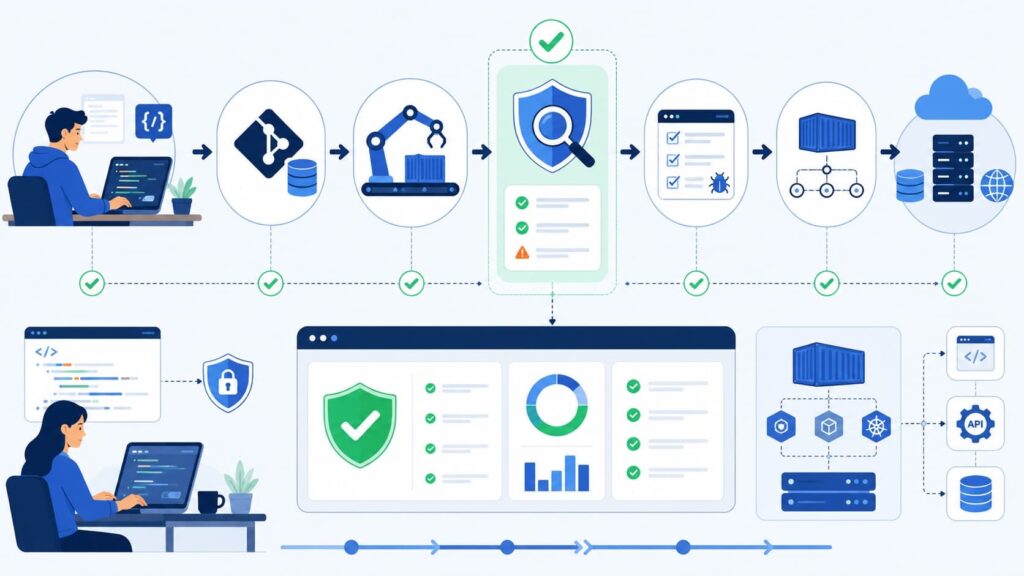
Continuous scanning improves security without unnecessarily slowing development. Modern organizations increasingly integrate a CI/CD security scanner, pipeline security scanner, GitHub Actions security scan, GitLab CI vulnerability scan, Jenkins security plugin, and command-line vulnerability scanner into automated release pipelines.
A balanced workflow typically includes:
- Lightweight scans during pull requests.
- Full authenticated scans before release.
- Scheduled production-safe assessments.
- Regular compliance verification.
This approach enables faster feedback while giving developers enough context to fix issues before deployment.
How Do You Choose the Right Scanner?
The best web application vulnerability scanner matches your technology stack, security maturity, compliance requirements, and operational workflow.
Organizations comparing platforms such as Nessus, Qualys, and Rapid7 should evaluate detection accuracy, authentication support, automation capabilities, and reporting based on their own operational requirements.
When we work with organizations through MSSP Security, the discussion rarely starts with features alone. Instead, we first examine application architecture, authentication complexity, regulatory obligations, and internal security resources.
That practical assessment usually produces better long-term outcomes than selecting a platform based solely on marketing claims.
Before making a decision, consider these questions:
| Requirement | What to Evaluate |
| Modern applications | JavaScript-heavy apps, APIs, GraphQL support |
| Authentication | OAuth, OIDC, SSO, JWT handling |
| Compliance | PCI DSS, ISO 27001, SOC 2 reporting |
| Automation | CI/CD integration and REST APIs |
| Accuracy | Proof-based validation and false-positive reduction |
| Reporting | Executive dashboards and developer guidance |
Organizations with compliance obligations should also evaluate PCI DSS web scanner, ISO 27001 vulnerability scanner, and SOC 2 web app scanner capabilities alongside reporting and remediation workflows.
Integrating Vulnerability Scanning into the CI/CD Pipeline
Credits: Tenable Product Education
Modern DevSecOps practices integrate vulnerability scanning directly into the CI/CD pipeline so security checks occur automatically during every build and deployment. Instead of waiting until an application reaches production, the scanner evaluates code, dependencies, and application behavior early in the development lifecycle.
This approach helps teams identify vulnerabilities sooner, reduce remediation costs, and ensure that only builds meeting predefined security requirements progress to deployment, making security a continuous part of software delivery rather than a final checkpoint.
FAQ
What is the difference between a web application vulnerability scanner and a DAST tool?
A web application vulnerability scanner automatically examines running websites and APIs for known security weaknesses. A DAST tool, which stands for dynamic application security testing, analyzes applications from the outside while they are running instead of reviewing source code. Many solutions combine automated vulnerability assessment, crawl and scan tool functionality, and proof-based vulnerability detection to produce reliable findings with fewer false positives.
Which vulnerabilities can a web app security scanner identify?
A web app security scanner can detect many common security issues, including SQL injection, cross-site scripting, broken authentication, security misconfiguration, outdated components, insecure deserialization, IDOR, SSRF, XXE, and CSRF vulnerabilities. Features such as an OWASP Top 10 scanner, SQL injection scanner, cross-site scripting detector, XSS vulnerability scanner, and CSRF detection tool help identify these risks before they become serious security incidents.
Can a vulnerability scanner test APIs and modern JavaScript applications?
Yes. Modern scanners often include an API security scanner that supports both REST API vulnerability scanner and GraphQL security scanner capabilities. Many tools also use a headless browser scanner to evaluate single-page applications through SPA vulnerability scanner and JavaScript-heavy app scanner features. An authenticated vulnerability scan can assess protected areas, while an unauthenticated web scan evaluates publicly accessible pages.
How do vulnerability scanners support DevSecOps and compliance requirements?
Organizations often integrate scanning into software delivery by using a CI/CD security scanner, DevSecOps integration tool, or pipeline security scanner. Many platforms also support GitHub Actions security scan, GitLab CI vulnerability scan, Jenkins security plugin, and a REST API for scanner automation. Compliance scanning tool features help organizations verify security controls for PCI DSS, ISO 27001, and SOC 2 requirements.
How can organizations reduce false positives during automated vulnerability scanning?
Organizations can improve scan accuracy by enabling features such as a false positive reduction scanner, exploit evidence scanner, out-of-band detection tool, authenticated vulnerability scan, and session handling scanner. A production-safe scanner, read-only scan mode, destructive scan prevention, and risk-based vulnerability prioritization also help security teams identify verified vulnerabilities without disrupting production environments.
Build Security Into Every Stage of Your Web Applications
Web application threats don’t stay the same, and waiting until the end of development often leaves gaps that are harder to fix. Regular vulnerability scanning helps you catch real security issues sooner, giving your team more time to respond before they become costly problems.
Making automated scanning part of your daily workflow is a simple way to strengthen long-term security. If your organization needs additional expertise, MSSP Security’s consulting services help MSSPs streamline operations, reduce tool sprawl, optimize security stacks, and improve service quality through vendor-neutral recommendations, technology assessments, proof-of-concept support, and actionable guidance backed by more than 15 years of experience and 48,000+ completed projects.
References
- https://xplorestaging.ieee.org/ielx7/6287639/9668973/09739725.pdf
- https://arxiv.org/abs/2208.01595