

A vulnerability scanner checks systems against databases of known security flaws, but that’s only the beginning. Most scanners detect known CVEs, misconfigurations, weak settings, and policy deviations. The real challenge is identifying which findings require immediate action while filtering out false positives and validating genuine risks.
At MSSP Security, we believe vulnerability scanning delivers the greatest value when it’s part of an ongoing security strategy rather than a one-time task. Keep reading to learn how vulnerability scanners work, why inaccurate findings happen, and how security teams can prioritize remediation effectively.
Quick Scan Snapshot: How Vulnerability Scanners Really Work
Vulnerability scanners automatically discover assets, compare them against known security weaknesses, and help prioritize what should be fixed first. They work best when combined with credentialed scanning, human validation, and continuous vulnerability management rather than one-time security checks.
- Understand how a vulnerability scanner discovers assets and identifies security weaknesses.
- Learn why credentialed scanning produces more accurate results than external-only assessments.
- See how organizations prioritize remediation using business context instead of relying only on CVSS scores.
What Is a Vulnerability Scanner?
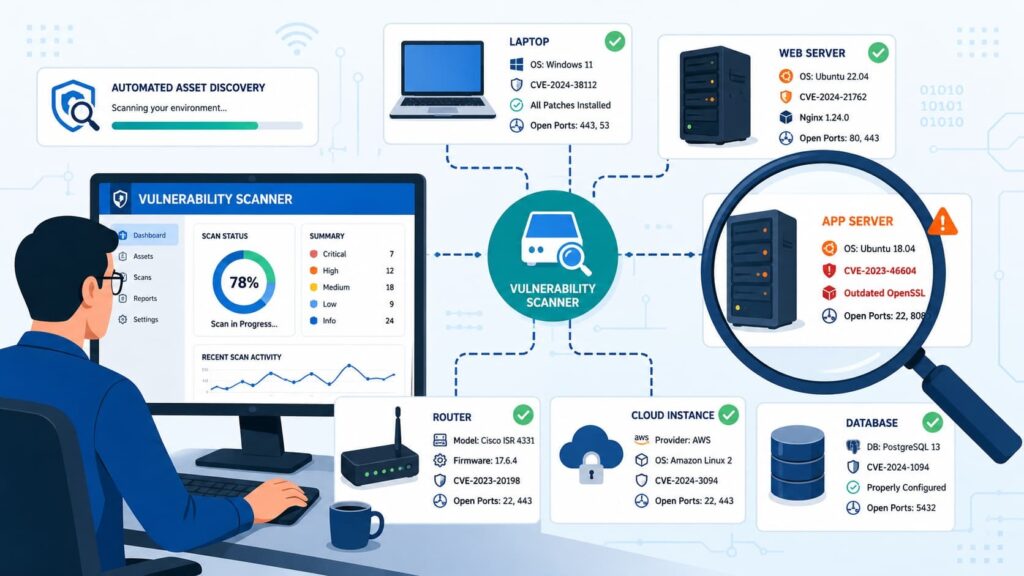
The common analogy is checking every door and window before you leave the house. A vulnerability scanner works in much the same way.
It automatically checks your systems for known security weaknesses by examining installed software, configurations, missing patches, and other security settings.
It then compares that information with trusted databases such as the National Vulnerability Database (NVD).
Rather than thinking like an attacker, a vulnerability scanner performs a structured audit against thousands of known security conditions, including:
- Missing security patches
- Weak or outdated protocols
- Default or insecure passwords
- Software versions with known CVEs
- Configuration settings that do not follow security benchmarks
With tens of thousands of new CVEs published each year, manually checking every system is unrealistic. Automated scanning makes this process practical, but human review is still necessary to validate findings, reduce false positives, and prioritize remediation.
After collecting the results, the scanner compares software versions, configurations, and benchmarks before assigning severity ratings using CVSS scores such as Critical, High, Medium, or Low.
The most valuable part of the process is turning that prioritized list into a clear remediation plan so security teams can address the highest-risk vulnerabilities first.
How Does a Vulnerability Scanner Work Step by Step?
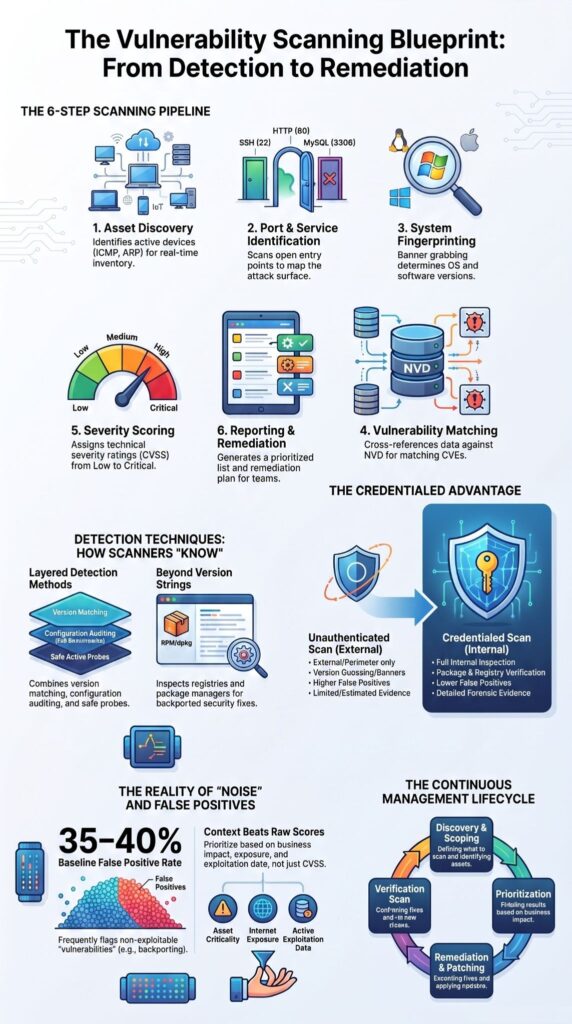
The scanning process follows a structured pipeline that systematically identifies and evaluates security weaknesses, demonstrating how modern vulnerability scanner technology builds an accurate picture of an organization’s attack surface before prioritizing findings.
It starts by discovering active devices on the network using protocols such as ICMP and ARP to build an accurate asset inventory.
From there, the scanner identifies the exposed attack surface and gathers evidence about the systems it finds.
The main stages include:
- Discovering active assets across the network
- Identifying open ports such as 22 (SSH), 80 (HTTP), and 3306 (MySQL)
- Collecting evidence through banner grabbing and fingerprinting
- Determining the exact operating system and software versions
- Comparing collected data with the NVD, vendor advisories, and other vulnerability databases
- Assigning CVSS severity ratings and generating remediation recommendations
This fingerprinting stage is especially important because the scanner relies on accurate system identification before matching vulnerabilities. We’ve seen cases where a service was misidentified, resulting in irrelevant findings that wasted an analyst’s time.
Once the scanner has collected versions, configurations, and running services, it cross-references that information with known CVEs. If a match is found, the vulnerability is recorded and prioritized using a CVSS score such as Critical, High, Medium, or Low.
With thousands of new CVEs published every year, automated matching has become essential because manual verification is no longer practical.
When auditing scanners for an MSSP, we pay close attention to the accuracy of the fingerprinting and vulnerability matching process, since every remediation decision depends on those results.
How Do Vulnerability Scanners Know Something Is Vulnerable?
Scanners combine version matching, configuration auditing, authenticated inspection, and safe verification requests instead of relying on a single detection technique. Many newcomers assume a scanner simply checks software versions.
In reality, mature platforms layer several detection methods together because software versions alone rarely tell the complete story. Version matching remains the fastest technique. If a scanner identifies software matching a vulnerable release listed in the CVE database, it flags the finding for further evaluation.
Configuration analysis provides another layer. Configuration auditing compares settings against recognized security frameworks like the CIS Benchmarks and DISA STIGs, identifying insecure defaults, unnecessary services, weak encryption, and policy violations.
Additional validation comes from carefully designed non-intrusive scanning techniques. Rather than exploiting systems, scanners send safe requests that verify whether specific weaknesses appear present.
Detection commonly combines:
- Version matching
- Configuration validation
- Safe active probes
- Registry inspection
- Package inspection
- Policy verification
- Security baseline comparison
One lesson we’ve consistently observed at MSSP Security is that organizations dramatically reduce unnecessary remediation work after enabling credentialed scanning.
Instead of guessing from visible banners, scanners inspect installed packages directly using mechanisms such as RPM verification, dpkg verification, Windows registry checks, package managers, and local policy inspection.
That additional visibility significantly reduces both false positives and false negatives, especially within enterprise Linux environments using backported patches.
Why Are Credentialed Scans More Accurate?
Credentialed scans log into systems to inspect actual configurations and installed patches, dramatically improving accuracy compared with external-only observations. Without credentials, scanners only see what an external attacker could observe.
They estimate software versions through banner grabbing and behavioral analysis, but estimates can be misleading. Credentialed scans authenticate through SSH, SMB, WMI, APIs, or platform-specific agents. This enables direct inspection of installed packages, configuration files, registry settings, patch levels, local security policies, and system metadata.
| Unauthenticated Scan | Credentialed Scan |
| External visibility | Internal inspection |
| Version guessing | Package verification |
| Higher false positives | Lower false positives |
| Limited evidence | Detailed forensic evidence |
Credentialed scanning works especially well for:
- Internal infrastructure
- Enterprise servers
- Patch management validation
- Compliance scanning
- PCI DSS scanning
- Configuration auditing
PCI DSS increasingly emphasizes authenticated internal assessments because direct inspection produces stronger evidence than version guessing alone.
Beyond compliance, credentialed scanning also improves security controls validation, firewall rule auditing, and long-term continuous monitoring, giving security teams a far clearer understanding of their actual exposure.
Why Do Vulnerability Scanners Generate So Many False Positives?
False positives occur because scanners identify known patterns, not business context, exploitability, or vendor-specific patch backporting. One of the biggest frustrations we hear is, “Our scanner found hundreds of Critical vulnerabilities. Where do we even start?”
That experience is common. Scanner reports often overwhelm teams because every finding isn’t equally dangerous.
A scanner may flag software based on version information alone, even when the operating system vendor has already applied a security fix through backported patches. This is especially common on Red Hat, Debian, and other enterprise Linux distributions.
Research evaluating web vulnerability scanners has reported baseline false-positive rates of approximately 35–40% in certain testing scenarios. That doesn’t mean scanners are unreliable. It means findings require context before action.
Research from International Conference on Software Engineering (SEIP) shows:
“Downstream vulnerability scanners produce a staggering 97.5% false positive rate” – International Conference on Software Engineering (SEIP)
Common reasons for false positives include:
- Version-based detection
- Vendor backported patches
- Custom software builds
- Modified packages
- Duplicate findings
- Incomplete scan permissions
That said, false negatives deserve just as much attention. A scanner cannot detect vulnerabilities that are unknown, hidden behind unsupported authentication workflows, or dependent on business logic.
Zero-day vulnerabilities also remain invisible until detection signatures become available. Scanners also miss business-logic flaws and multi-step attack paths that require human reasoning.
From our experience at MSSP Security, mature security teams never launch massive remediation projects solely from raw scan output. They validate high-risk findings first, correlate exposure with business importance, and then prioritize remediation.
Why Doesn’t a Vulnerability Scanner Work Like a Penetration Test?
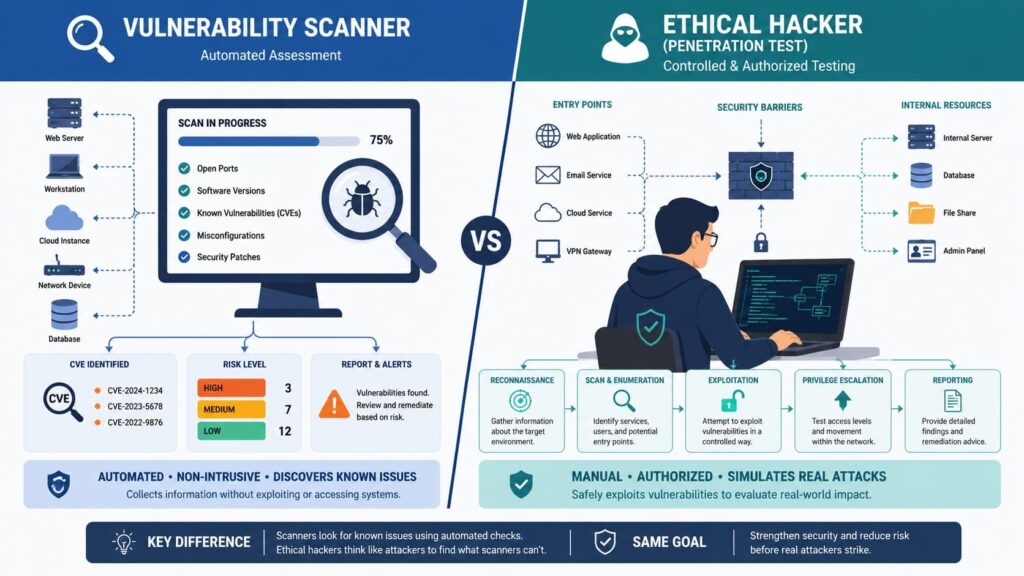
Vulnerability scanners identify known weaknesses automatically, while penetration testers chain vulnerabilities, validate business impact, and uncover logic flaws automation rarely detects. Although both activities improve cybersecurity, they answer different questions.
A vulnerability scanner asks, “What known weaknesses exist?” A penetration tester asks, “Can these weaknesses actually be exploited to compromise the business?” This distinction matters because scanners intentionally avoid destructive exploitation. They perform non-intrusive scanning by default to reduce operational risk.
Vulnerability scanners:
- Automated
- Detect known vulnerabilities
- Perform safe validation
- Provide broad coverage
Penetration testing:
- Human-led
- Finds unknown attack paths
- Uses controlled exploitation
- Provides deeper analysis
Organizations typically use scanners for:
- Continuous monitoring
- Exposure management
- Compliance assessments
- Internal and external scans
Penetration testing is better suited for:
- Business logic flaws
- Privilege escalation
- Multi-step attack paths
- Security validation after major changes
According to OWASP, automated scanning and penetration testing complement one another rather than compete. Together they provide a more complete picture of organizational risk.
What Types of Vulnerability Scanners Exist?
Different scanners specialize in networks, web applications, hosts, containers, and cloud infrastructure because every environment exposes different attack surfaces.
Modern environments span physical servers, virtual machines, Kubernetes clusters, APIs, cloud platforms, IoT devices, and remote endpoints. One scanner rarely covers every layer effectively.
| Scanner Type | Primary Focus |
| Network scanner | Ports, services, operating systems |
| Web application scanning (DAST) | SQL injection, XSS, CSRF |
| Host-based scanning | Missing patches, local configuration |
| Container scanning | Image vulnerabilities, secrets |
| Cloud security scanning | IAM, storage, security groups |
Additional assessment capabilities may include:
- SAST
- IAST
- Agent-based scanning
- IoT scanning
- OT scanning
- Edge network scanning
- Wi-Fi security scanning
- Host-based scanning
- External scan
- Internal scan
Modern organizations increasingly combine these capabilities to improve attack surface mapping, identity correlation, and data sensitivity mapping instead of relying on a single assessment method, since platforms such as Nessus, Qualys, and Rapid7 each provide different strengths across enterprise environments.
Why Are Teams Drowning in CVEs?
Most organizations have more findings than resources, making prioritization more important than simply identifying additional vulnerabilities. Security teams rarely struggle to find vulnerabilities.
They struggle to decide which ones deserve immediate attention. Recent practitioner discussions consistently show organizations receiving hundreds or even thousands of Critical findings during a single assessment, while only a small percentage prove immediately exploitable within their environment.
As noted by International Conference on Sentiment Analysis and Deep Learning (ICSADL):
“CVSS frameworks offer standardized severity estimates, but they do not provide the necessary organizational context. This paper presents a framework for context-aware vulnerability prioritization and remediation recommendations which help organizations prioritize and remediate vulnerability based on its risk it poses to organization and not its technical severity score.” – International Conference on Sentiment Analysis and Deep Learning (ICSADL)
Effective vulnerability prioritization combines:
- CVSS scoring
- Asset criticality
- Internet exposure
- Active exploitation
- Reachability analysis
- Data sensitivity
- Business impact
Lower priority findings often include:
- Informational issues
- Duplicate alerts
- Systems protected by compensating controls
- Low-value internal assets
Of course, no prioritization model is perfect. Risk changes constantly as attackers publish new exploits or infrastructure evolves.
That is why continuous monitoring, exploitability assessment, and security posture reviews remain essential components of modern vulnerability management.
At MSSP Security, we’ve found that organizations make faster progress when they treat vulnerability reports as operational work queues rather than compliance documents. Context consistently beats raw vulnerability counts.
Why Can Banner-Based Detection Be Misleading?
Banner-based detection assumes software versions accurately reflect patch status, which breaks when vendors backport security fixes without changing version strings. Enterprise Linux distributions often prioritize stability over version changes.
Rather than upgrading software to the newest release, vendors frequently apply security fixes directly to existing packages. A scanner may therefore observe an older Apache or OpenSSL version and associate it with a published CVE, even though the vulnerability has already been fixed.
Teams reduce uncertainty by following a straightforward validation process:
- Run a credentialed scan
- Perform RPM verification or dpkg verification
- Review installed packages
- Check the vendor security tracker
- Confirm remediation before opening tickets
This approach dramatically reduces unnecessary remediation efforts while improving reporting accuracy. Repositories maintained by Red Hat and Debian remain valuable references for validating backported security fixes.
Can Vulnerability Scanners Break Production Systems?
Usually no, but aggressive scanning configurations can overload applications, trigger security controls, or interfere with sensitive production workloads. Most scanners are designed for non-intrusive scanning, yet configuration still matters.
Aggressive scanning performed by web application vulnerability scanners, extensive fuzzing, or poorly tuned authentication workflows may increase server load or activate defensive technologies.
Potential issues include:
- IDS evasion detection
- WAF interference
- Temporary application slowdowns
- Firewall rate limiting
- Authentication lockouts
Teams reduce operational risk by:
- Scheduling maintenance windows
- Performing scan tuning
- Rate-limiting requests
- Whitelisting scanner IP addresses
- Testing against staging environments first
Communicating scan windows to app owners and SREs, and excluding fragile endpoints when needed. We’ve seen carefully planned scanning programs operate continuously with minimal disruption.
The difference almost always comes down to preparation, communication, and sensible configuration rather than the scanner itself.
How Does Vulnerability Scanning Fit Into Vulnerability Management?
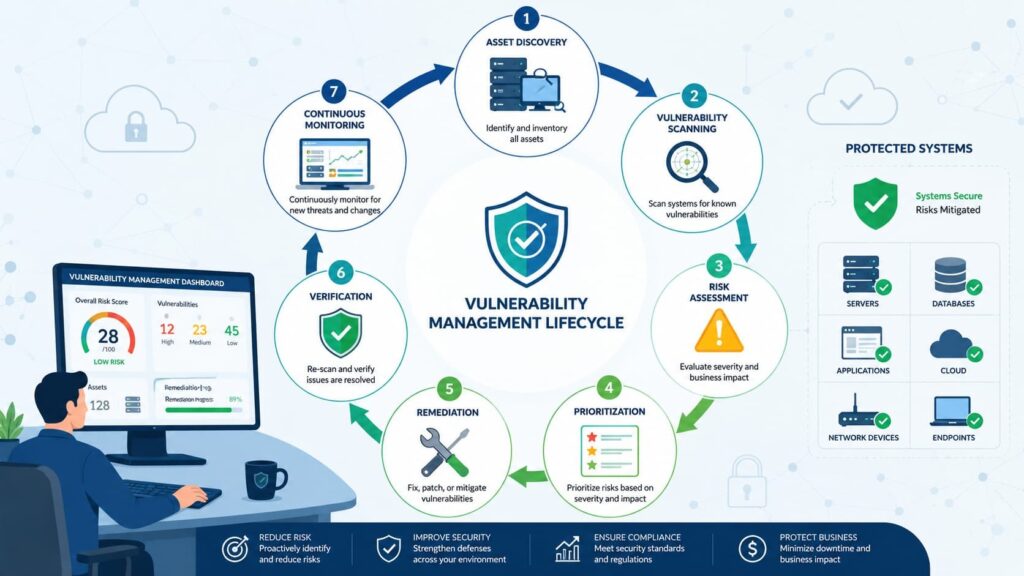
Scanning is only the discovery phase; effective vulnerability management includes prioritization, remediation, verification, and continuous improvement. Finding vulnerabilities creates awareness.
Reducing risk requires action. According to NIST SP 800-115, effective programs follow a repeatable lifecycle that measures progress over time instead of treating scans as isolated events.
Modern programs often integrate these steps with NIST CSF/SP 800-40-style patch/risk processes and use SIEM/SOAR for workflow automation.
The workflow typically follows this sequence:
- Asset inventory
- Scope definition
- Vulnerability scanning
- Vulnerability prioritization
- Remediation workflow
- Patch management
- Remediation scan
- Continuous monitoring
- Metrics and reporting
Key performance indicators often include:
- Time to remediate
- Open Critical findings
- Repeat vulnerabilities
- Risk reduction
- Compliance status
Organizations increasingly integrate scanners with SIEM platforms, SOAR workflows, ticketing systems, and asset inventories to automate much of this lifecycle.
to deduplicate findings, track remediation SLAs, and measure time-to-fix. That integration improves visibility while helping engineering teams focus on the issues that genuinely reduce organizational risk.
How Vulnerability Scanners Identify Security Weaknesses
Credits: Cybersecurity Dojo
A vulnerability scanner works by systematically inspecting systems for known security weaknesses without attempting to exploit them. As demonstrated by Cybersecurity Dojo, the scanner first identifies live hosts, operating systems, running services, open ports, and installed software versions.
It then compares this information against vulnerability databases to detect missing patches, outdated software, insecure configurations, and publicly known CVEs. The final result is a report that prioritizes findings by severity, allowing security teams to focus remediation efforts on the vulnerabilities that present the greatest risk.
FAQ
How often should a vulnerability scanner run on business systems?
The right scanning frequency depends on how often systems, applications, and configurations change. A vulnerability scanner should support continuous monitoring through scheduled network scanning, internal scan, and external scan activities. Regular scans help identify missing patches, outdated software, and newly introduced risks, allowing security teams to maintain effective vulnerability management and improve their overall security posture.
What’s the difference between authenticated and unauthenticated scans?
An authenticated scan, also known as credentialed scanning, uses valid credentials to inspect installed software, system settings, and configurations. An unauthenticated scan evaluates only the resources that are publicly accessible without logging in. Running both scan types provides better attack surface mapping, improves misconfiguration detection, and creates a more complete automated security assessment.
Why do vulnerability scan reports sometimes contain inaccurate findings?
A scan report can contain false positives, which report vulnerabilities that do not actually exist, and false negatives, which fail to identify real security weaknesses. Security teams should perform scan tuning, validate results against a trusted vulnerability database, and compare findings with the NVD and CVE database to improve CVE detection accuracy before starting remediation.
Can vulnerability scanning replace penetration testing?
No. Vulnerability management and penetration testing have different objectives. A scanner identifies known weaknesses by using techniques such as DAST, SAST, IAST, and container scanning, while penetration testing verifies whether attackers can successfully exploit those weaknesses. Using both methods together provides a more accurate risk assessment, stronger exploitability assessment, and a better understanding of an organization’s security posture.
What should happen after vulnerabilities are identified?
After vulnerabilities are identified, security teams should prioritize them with CVSS scoring and vulnerability prioritization, then follow a structured remediation workflow that includes patch management, configuration auditing, and security controls validation. A remediation scan should verify that every fix has been applied correctly and that the organization continues to maintain a secure security baseline.
Building Stronger Security Starts with Smarter Vulnerability Management
Vulnerability scanners help you find security gaps quickly, but the real value comes from knowing what needs attention first. Reports only matter when they lead to clear action. By validating findings, prioritizing the highest-risk issues, and following a consistent remediation process, organizations can strengthen their security posture over time.
If you’re looking to improve your vulnerability management strategy, MSSP Security provides expert consulting to help MSSPs optimize security operations, simplify complex tool stacks, and make informed technology decisions. With practical guidance tailored to your environment, you can build a more effective vulnerability management program and reduce risk with confidence. Join MSSP Security to discuss your security needs and explore the right approach for your organization.
References
- https://ar5iv.labs.arxiv.org/html/2511.20313
- https://dtic.dimensions.ai/details/publication/pub.1199988091