

Securing web applications compliance should feel like steady engineering, not last-minute chaos. We’ve all seen the panic when an audit notice lands and teams scramble for proof their app is secure. In our work with managed security providers, we’ve learned it’s not about rushing through checklists.
It’s about putting real technical controls in place that meet requirements and lower breach risk. When teams treat compliance as part of daily development, audits turn into routine reviews instead of emergencies. Frameworks like OWASP keep raising expectations, so this approach matters. Keep reading to see how it works.
Key Takeaways
- Securing web applications blends technical controls with governance across the entire development lifecycle.
- Major standards overlap a lot, which means we can build shared controls and cut down on audit fatigue.
- Continuous monitoring and testing matter way more than hitting a one-time certification milestone.
What Does Securing Web Applications For Compliance Mean?
It means building security into our web applications from the start, so they meet regulatory standards while cutting down on real risks like data breaches and downtime.
“The software quality assurance goal is to confirm the confidentiality and integrity of private user data is protected as the data is handled, stored, and transmitted. This implies that the acceptable risk levels and threat modeling scenarios are established up front, so the developers and QA engineers know what to expect and what to work towards.” – Northwestern IT [1].
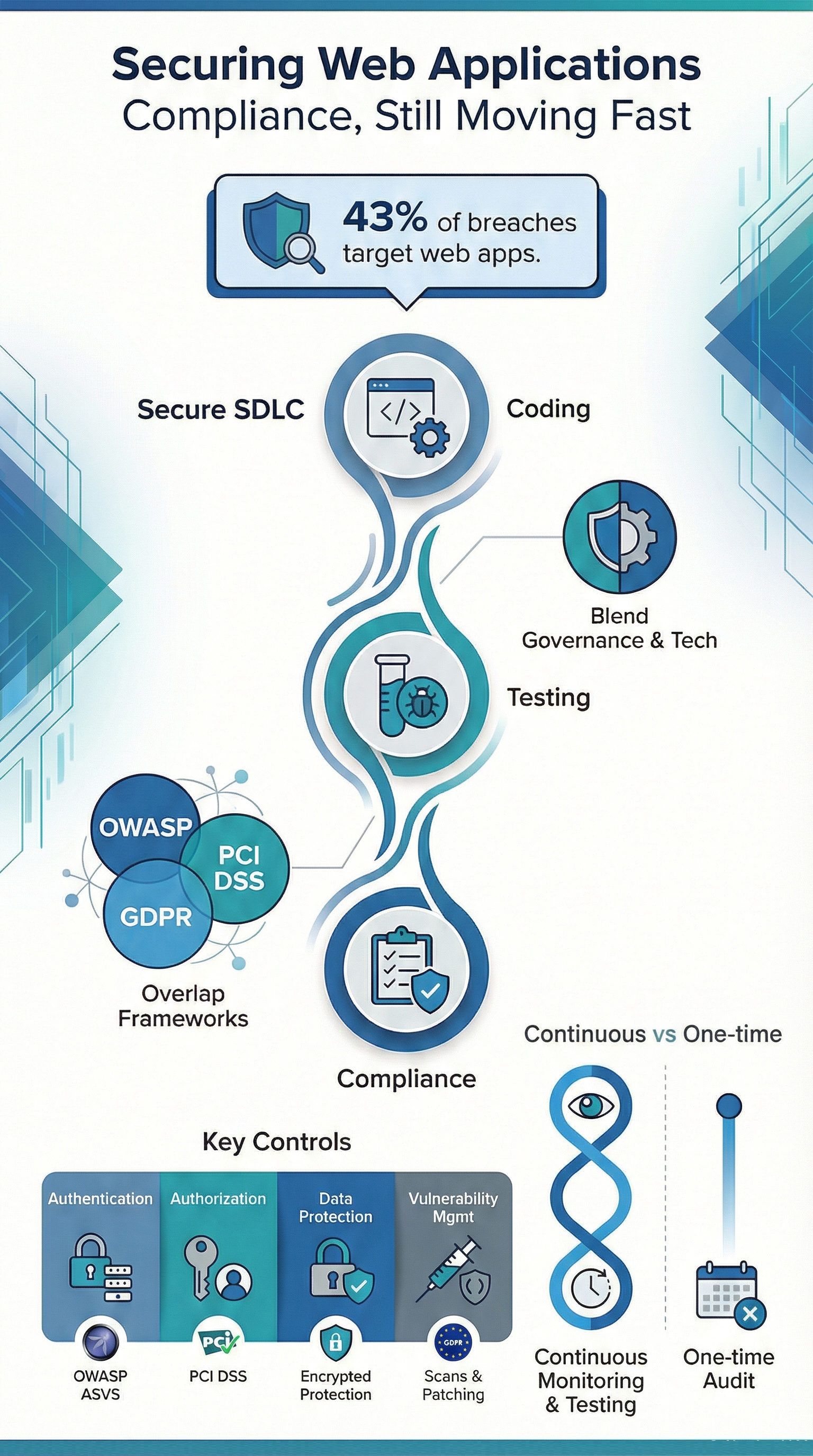
Here’s a sobering fact: in 2023, 43% of reported breaches targeted web applications. Attackers love exposed forms, APIs, and login pages because they’re everywhere and often poorly defended. Compliance, in this light, isn’t abstract paperwork. It’s the concrete reason we write input validation rules a certain way, or why we enforce multi-factor authentication.
The teams that struggle are usually the ones trying to bolt security on at the end. We’ve watched it happen. When security is part of the secure development lifecycle from the first sprint, audits are far less painful and findings drop off fast.
A few truths we’ve observed:
- Compliance applies to our code, infrastructure, and people.
- Controls have to be provable with evidence, not just good intentions.
- Managing change over time is just as important as the initial design.
Which Compliance Frameworks Apply to Web Application Security?
We’re not dealing with just one rulebook. Web app compliance pulls from multiple frameworks based on our industry, the data we handle, and where we operate.
Globally, there are at least seven major frameworks that commonly come into play. In our projects, most organizations are juggling three or more at once. A lot of the guidance traces back to NIST, their publications shape many of the sector-specific rules we’ll encounter.
Here’s the good news: these frameworks overlap heavily. Areas like access control, encryption, and logging come up again and again. That overlap is our biggest opportunity. Build a control once, and we can use it to satisfy multiple requirements.
OWASP Focused Standards
The OWASP ecosystem is great because it turns compliance language into something we can actually test.
- OWASP ASVS defines three verification levels that map neatly to different risk profiles.
- OWASP Top 10 highlights the most common web risks, like injection flaws and broken access control.
We regularly use ASVS controls to build penetration testing checklists and static code analysis rules. It makes audits predictable because everyone’s speaking the same language.
Regulatory and Enterprise Frameworks
Outside of OWASP, these are the frameworks with real enforcement teeth.
- PCI DSS 4.0.1 for anything involving payment cards.
- ISO 27001 for building an information security management system.
- GDPR for protecting personal data.
- CIS Benchmarks for hardened system configurations.
Studies on breach costs show that aligning controls early slashes regulatory exposure. That alignment step, figuring out how one control satisfies several requirements, is where most compliance programs either get traction or stall out completely.
How do OWASP Standards Support Compliance Requirements?
Credits: Mallabolts
OWASP standards give us actionable testing and control guidance that maps directly to what auditors are looking for: input validation, access control, secure session handling.
The OWASP Top 10 lists the ten primary risk categories that keep showing up in audits and breach reports. We use OWASP ASVS as a translation layer between developers and auditors. It works.
Three things stand out from hands-on work:
- ASVS requirements sound a lot like the control language in PCI DSS and ISO 27001.
- They give developers clear instructions instead of vague policy mandates.
- They’re built for automation through SAST, DAST, and IAST tools.
Common areas where OWASP directly backs up our compliance work include:
- Writing input validation rules and output encoding techniques.
- Setting up authentication, MFA, and managing user sessions properly.
- Fixing broken access control and protecting against CSRF attacks.
When teams adopt OWASP guidance early, the audit conversation changes. It shifts from “here’s what we did wrong” to “show us how we’re doing this right.”
What Secure Coding Practices are Required For Compliant Web Applications?
OWASP research often cites that about 70% of security flaws are introduced when the code is written. We’ve seen the truth of that in legacy applications we’ve been asked to review, places where security was an afterthought for years. Untangling that mess is painful and expensive.
The alternative is to treat secure coding as a system, woven into our development lifecycle.
A strong program has a few key components:
- Guidelines developers will actually use. Not a 200-page PDF, but a living, searchable set of secure coding standards for our specific tech stack.
- Tools that work in the background. Dependency scanners that check for vulnerable libraries every time we build. Software composition analysis (SCA) tools that keep a bill of materials for our software.
- Gates in our pipeline. Code review checklists that include security items. Security tests that must pass before a merge is allowed.
The core practices that show up in every successful program we’ve worked with are:
- Input validation and output encoding. This is the bedrock. Never trust data from the user. Always sanitize it on the way in and encode it on the way out.
- Regular dependency scanning. Our application is only as secure as the worst library we’ve imported. Scan them all, and have a process for patching fast.
- Secure API design. Use standard, well-vetted protocols like OAuth 2.0. Validate every JWT token. Rate-limit our endpoints to stop abuse.
When these practices are standard, the findings from a penetration test shift. We go from critical vulnerabilities that need emergency fixes to minor configuration tweaks. It’s a completely different, and much less stressful, world.
How Should Authentication and Access Control be Implemented?
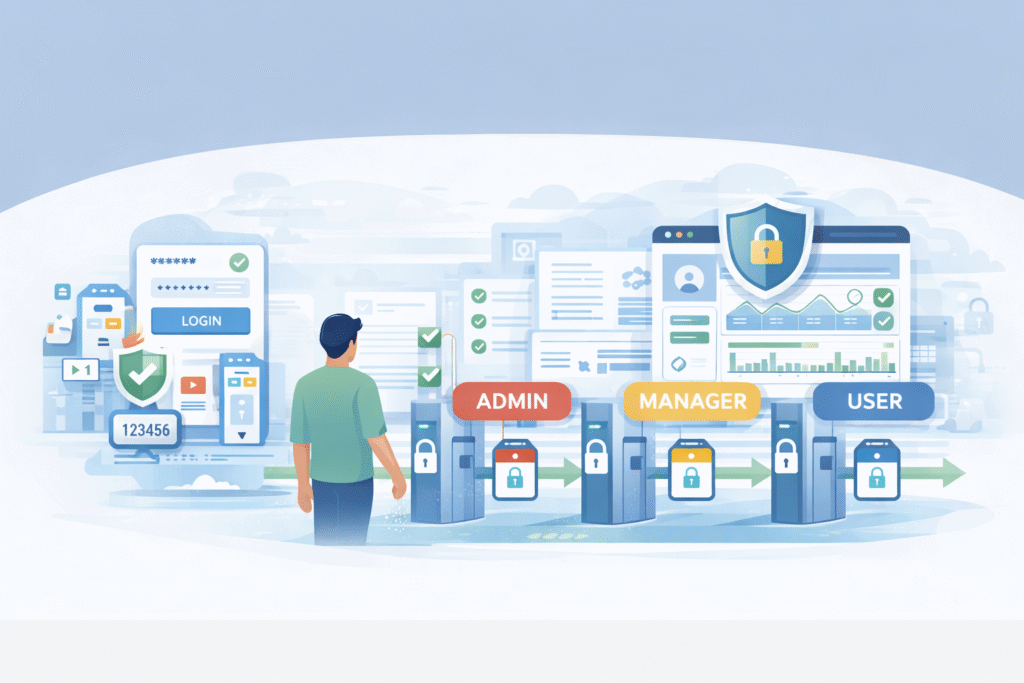
Analyses that align with NIST guidelines suggest roughly 80% of breaches involve stolen or misused credentials. In practical terms, if our authentication or authorization fails, we will fail our audit. It’s that straightforward.
A strong program makes it hard to do the wrong thing. It enforces multi-factor authentication (MFA) for any privileged or remote access, no exceptions.
It implements role-based access control (RBAC) so people only have the permissions they absolutely need for their job. And it doesn’t just set these rules once; it audits permissions regularly to catch “permission creep” as people change roles, supported through structured user access review support that keeps permissions aligned over time.
We’ve seen the biggest improvements when organizations start thinking in terms of zero trust. Every access request, whether it’s from the internet or our own office, is treated the same. It’s a more secure model, and it naturally satisfies a lot of compliance requirements around least privilege and access verification.
What are auditors looking for?
- MFA everywhere it matters. For admin panels, for accessing customer data, for remote logins.
- Smart session management. Automatic timeouts, session rotation, and cookies marked with HttpOnly and Secure flags.
- Proof of least privilege. Documentation and logs that show we regularly review who has access to what, and remove access that’s no longer needed.
These controls do double duty. They protect our users and data, and they create the clear, auditable trail that compliance demands.
What Data Protection Measures Ensure Regulatory Compliance?
Most regulations have a simple expectation for sensitive data: encrypt it. GDPR explicitly calls for “data protection by design and by default.” In our experience, the concept isn’t hard. The execution is where teams get tripped up.
“Compliance with these stringent regulations is both a prerequisite and a necessity. It emphasizes transparency in processing health data and enhances patients’ control over their use. These [measures] include deidentification processes, stringent access controls, safeguards against cyberattacks, regulatory compliance, and governance structures defining authorized users and use parameters.” – JMIR [2]
The first, and most critical, step is data mapping. We can’t protect what we don’t know we have. We need to document what personal data we collect, where it flows, where it’s stored, and who can access it. This map becomes the blueprint for our controls. Once we have it, applying encryption becomes a straightforward technical task.
The technical measures are now well-established:
- Encryption in transit: Use TLS 1.3. It’s not just a best practice; for many standards, it’s a requirement.
- Encryption at rest: Sensitive data in databases and file stores should be encrypted. The real challenge here is key management, keeping those encryption keys safe and separate from the data.
- Application-level protection: Use secure cookies (with those HttpOnly and Secure flags), and don’t store sensitive data like passwords in plain text logs.
European Commission guidance has shown that organizations who can demonstrate they had these proactive encryption controls in place before a breach face significantly lower penalties. It’s seen as evidence we were taking our responsibilities seriously.
Why are WAFs and Monitoring Critical For Compliant Security?
Security telemetry tells us that about 90% of attack attempts are automated bots, scanning for easy wins. This is a huge focus under standards like PCI DSS. In our security operations work, a well-tuned Web Application Firewall (WAF) stops this background noise cold.
It blocks the obvious SQL injection attempts and XSS probes before they ever reach our application, and many teams rely on a managed Web Application Firewall (WAF) approach to keep those defenses consistent without adding operational strain.
But a WAF is just a shield. We also need eyes.
Monitoring and logging are our evidence. Without centralized logs that track user logins, data access, and configuration changes, we have no way to prove our controls are working. Those logs need to be tamper-proof, too, once written, they shouldn’t be able to be altered or deleted.
A compliant monitoring setup usually includes:
- A WAF with rules updated to catch current attack patterns.
- A centralized logging system (like a SIEM) that aggregates logs from our apps, servers, and network.
- An incident response plan that’s actually tied to the alerts from these systems. Who gets paged when the WAF blocks a major attack?
When these systems are tested regularly, through simulated attacks or tabletop exercises, the audit process loses its fear factor. We’re just showing the auditor the reports we look at every week.
What Testing and Auditing Activities are Required For Compliance?
Most standards require an annual audit. But the best compliance programs treat that audit as a single checkpoint in a race we run every day. The real requirement is continuous assurance.
We advise our clients to blend automation with human expertise. Automated vulnerability scans run constantly, catching common issues in code and configuration. But we also need manual penetration testing at least once a year.
A skilled human tester will find the business logic flaws and complex access control bypasses that automated tools miss, the kind of issues that lead to real breaches.
Our testing cadence should include:
- Automated vulnerability scanning of our web apps and networks, with a tracked process for fixing what’s found.
- Annual penetration tests that specifically target the OWASP Top 10 risks and our critical business functions.
- Internal and external audit reviews, especially after we launch a major new feature or change our infrastructure.
This rhythm does more than check a box. It builds institutional confidence. Our team starts to know the application is secure, instead of just hoping it is.
What does a Practical Web Application Compliance Checklist Include?
A good compliance checklist isn’t a bureaucratic form. It’s a shared map for our engineers and our compliance team. It translates abstract standards into actionable tasks. Most frameworks group their controls into about five core categories, a structure that ISO 27001 also uses.
We build these collaboratively. The security team knows the standards, but the engineering team knows the application. Together, they build a list that’s both accurate and practical.
Here’s a simplified version of what that map can look like:
| Category | What We Need to Do (Key Controls) | Which Standards Care |
| Authentication | Enforce MFA, implement account lockout after failed attempts. | OWASP ASVS, NIST Access Control family |
| Authorization | Use Role-Based Access Control (RBAC), follow the least privilege principle. | OWASP Top 10 (Broken Access Control) |
| Data Protection | Encrypt sensitive data at rest and in transit, use secure cookies. | GDPR, ISO 27001 Annex A.10 |
| Vulnerability Management | Run regular scans, have a patching schedule for found issues. | PCI DSS Requirement 6 |
| Monitoring & Logging | Keep centralized, tamper-proof logs, use a WAF. | NIST Audit & Accountability family |
Used right, this isn’t just for auditors. It’s a living document that helps prioritize our security backlog and clarifies what needs to be fixed first.
Which Tools Support Secure and Compliant Web Applications?
We can’t do this manually at scale. The right tools automate the protection, the testing, and the evidence collection. In the managed programs we run, we see three main categories of tools forming the backbone of a compliant security stack.
The goal isn’t to buy every tool. It’s to integrate a few good ones deeply into our workflow.
- Protection & Runtime Security: A Web Application Firewall (WAF) is essential, especially when organizations apply the practical managed WAF service benefits of reduced noise, stronger rule tuning, and better audit-ready visibility.
- Automated Testing & Scanning: This is our safety net. SAST tools check our source code. DAST tools test our running application. IAST tools combine both. SCA tools scan our open-source libraries. These should all plug into our CI/CD pipeline.
- Compliance & Posture Management: Tools that continuously check our cloud configuration (like CSPM) and monitor our overall security posture against frameworks like CIS Benchmarks. They show us compliance status in real-time, not just once a year.
When these tools are connected, something powerful happens. Compliance evidence, logs, test reports, configuration snapshots, becomes a natural byproduct of our daily operations. Our SOC isn’t just defending; it’s simultaneously building the case for our next audit.
FAQ
How do teams start securing web applications compliance without slowing development?
Teams can start by making security part of everyday development, not something done only for audits. Using secure SDLC practices, clear coding rules, and automated security testing in the DevSecOps pipeline helps reduce risk early. SAST finds problems in code quickly, while DAST checks the running application later. This keeps vulnerability management steady and avoids last-minute fixes.
What technical controls matter most for OWASP compliance and enterprise frameworks?
The most important controls are the ones that stop common attacks. Teams should use strong input validation, proper output encoding, and clear SQL injection prevention. They also need protection against XSS, CSRF, and broken access control. Regular configuration reviews and secure HTTP security headers add another layer of defense and support compliance goals.
How can companies meet PCI DSS requirements and GDPR data protection together?
Companies can meet both standards by protecting sensitive data throughout its lifecycle. They should encrypt data in transit with TLS 1.3 and use data at rest encryption for storage. Strong MFA, secure cookie settings, and solid session management also reduce unauthorized access. This approach supports both payment security and privacy compliance.
What should a penetration testing checklist include for compliance readiness?
A compliance-focused penetration test should cover the application and access controls. Teams should verify RBAC, enforce least privilege, and confirm JWT token validation for APIs. Testing should also include CORS settings, content security policy (CSP), and rate limiting defenses. Tracking fixes with remediation tools helps organizations prove progress during audits.
How do organizations maintain continuous compliance monitoring after audits?
Organizations maintain compliance by running security checks all year, not just during audits. They should keep audit logs active, update incident response plans, and hold threat modeling sessions. Automated dependency scanning, SCA, and container security scanning inside CI/CD gates help detect issues early. This keeps securing web applications compliance consistent over time.
Securing Web Applications Compliance as a Living Program
Securing web applications compliance works best. When teams see it as an ongoing process that adapts to new threats, changing technology, and updated regulations. We have watched organizations make real progress. By connecting OWASP guidance, regulatory frameworks, and continuous monitoring into one clear roadmap.
At MSSP Security, we focus on long-term support, not one-time audit fixes. So compliance becomes a strength instead of a roadblock. If you want help improving operations and reducing tool sprawl, join us here.
References
- https://www.it.northwestern.edu/about/policies/webapps.html
- https://medinform.jmir.org/2025/1/e63754