

A Managed Email Security Gateway works because it removes guesswork from email defense. Instead of relying on tools alone, it pairs advanced filtering with people who watch email threats every hour of the day. We have seen how a single missed phishing email can unravel weeks of work.
Most organizations already know email is their biggest risk. What they want is fewer alerts, fewer breaches, and a system that quietly does its job. That is where a managed secure email gateway earns its place. Keep reading, because the way email attacks work has changed, and the way protection works has too.
Key Takeaway
- A managed email security gateway blocks threats before and after delivery with layered controls.
- Outsourced monitoring reduces business email compromise and ransomware risk.
- The right provider blends technology, process, and human judgment.
Why a Managed Email Security Gateway Matters Now
Email remains the front door for attackers because it is trusted, familiar, and constant. Every invoice, calendar invite, and shared document looks routine until it is not.
Threat actors no longer rely only on noisy malware. They use subtle social engineering, compromised vendors, and patient reconnaissance. A secure email gateway acts as a perimeter email defense that inspects every message with context, not just signatures.
We have watched organizations struggle with alert fatigue. Tools flag hundreds of emails, but no one has time to tune policies or investigate every quarantine item. A managed SEG changes that dynamic by making email security a service, not a side task.
Early in most environments, protection starts with a few core layers.
- Reputation filtering to stop obvious spam and known bad senders.
- Email authentication checks using SPF DKIM and DMARC enforcement.
- Malware scanning with attachment detonation and URL scanning.
Those layers matter, but on their own they are no longer enough.
How Managed Secure Email Gateways Work in Practice
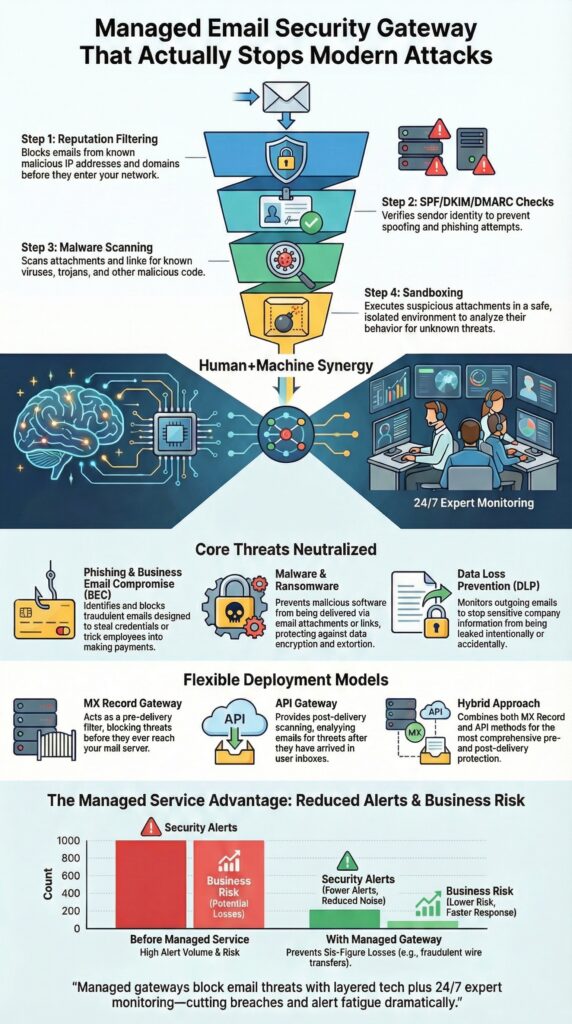
Most people think email security is just spam blocking, but a managed secure email gateway works more like a checkpoint between the internet and your mailboxes.
It usually connects in two ways:
- MX record redirect (inline)
- Email hits the gateway first.
- Bad messages can be blocked before delivery.
- API-based (post-delivery)
- Connects directly to Microsoft 365 or Google Workspace.
- Scans mail already in inboxes, and can pull or tag messages.
At MSSP Security, real deployments are usually hybrid: inline for obvious threats, API for subtle or behavioral attacks.
For inbound mail, the flow looks like this:
- Check sender reputation, domain age, SPF/DKIM/DMARC.
- Scan content with machine learning and heuristic rules.
- Detonate risky attachments in a sandbox.
- Rewrite URLs and scan at click time.
Outbound filtering matters too:
- DLP policies watch for sensitive data (cards, IDs, confidential terms).
- Messages can be blocked, encrypted, or flagged.
- Unusual sending patterns can reveal compromised accounts.
Done well, users just notice fewer bad emails, while security teams gain control and visibility without drowning in noise.
Core Threats a Managed Email Security Gateway Stops
Phishing and Business Email Compromise
Phishing has shifted from cliché scams to careful impersonation of:
- Executives
- Vendors and partners
- Internal teams
A managed SEG looks for:
- Display name spoofing
- Reply-To manipulation
- Timing and behavior anomalies
BEC protection is context-heavy, and that context gets sharper when humans review borderline messages. We have seen cases where a single blocked wire transfer prevented six-figure losses. That is not theory. That is lived incident response.
Malware, Ransomware, and Zero Day Threats

Signature-based AV still helps, but it misses new or customized payloads. A managed gateway adds:
- Sandboxing and attachment detonation
- File behavior analysis (processes, changes, callbacks)
- Detection of unusual macros and document tricks
AI models assist, while managed analysts confirm high-risk decisions. CISA continues to list phishing—especially attachments and links—as a leading initial access vector for ransomware. A layered gateway cuts that path down sharply.
Data Loss and Compliance Failures
Outbound controls handle:
- DLP for financial, health, and regulated data
- Encryption triggers based on content and recipients
- Logging, archiving, and policy enforcement for GDPR and HIPAA contexts
TLS and S/MIME help keep sensitive email private in transit.
Managed Versus Self Managed Email Security
A lot of organizations begin with a self-managed secure email gateway. On paper, it looks cheaper:
- You own the license.
- You run the policies.
- You handle the incidents.
But the hidden costs come later:
- Missed or late-detected threats
- Alert fatigue and staff burnout
- Slow response to new attack techniques
A managed email security service shifts that weight off the internal team and turns it into an ongoing, specialist function.
What Managed Email Security Actually Adds
Managed services don’t just “host” the tool, they actively run it. That usually includes:
- Continuous policy tuning
- Adjusting rules and models as attackers change domains, lures, and payloads.
- 24/7 monitoring and incident response
- Analysts triage alerts, pull messages, and coordinate containment.
- Live threat intelligence
- Feeds that update in real time based on global attack data.
From a resource angle, this is the core benefit: most IT teams do not want to become email forensics experts. They want fewer successful attacks, faster answers, and less noise. Managed email security is built around that outcome.
Deployment Options and What Fits Best
Before you sign with a provider, it helps to line up the main models side by side.
1. MX record gateway
- How it works:
- Your MX records point to the gateway.
- All inbound mail passes through it before reaching mailboxes.
- Strength:
- Strong pre-delivery blocking for obvious spam, malware, and crude phishing.
2. API email gateway
- How it works:
- Connects to Microsoft 365 or Google Workspace via API.
- Scans mail already in users’ inboxes.
- Strength:
- Deep visibility, user behavior insights, and true post-delivery remediation.
3. Hybrid email security
- How it works:
- Uses both MX redirection and API integration together.
- Strength:
- Layered defense: early blocking plus ongoing detection and clean-up.
- More resilient if one layer misses or fails.
Continuity and Failover
Email continuity is part of the fit, not an extra. If the gateway goes down, users still need:
- Access to current and recent mail
- The ability to send and receive during outages
Managed providers usually design for:
- Automatic failover routes
- Emergency webmail or spooling
- Seamless recovery once systems are back online
The best fit often ends up hybrid: strong front-line blocking, rich post-delivery control, and continuity plans baked in.
| Deployment Type | How It Works | Strength |
| MX record gateway | Routes email through the gateway before delivery | Strong pre delivery blocking |
| API email gateway | Scans mailboxes after delivery via API | Deep visibility and remediation |
| Hybrid email security | Combines both models | Layered defense and resilience |
Advanced Capabilities That Make the Difference
A modern managed email security gateway is built for more than just filtering junk. Here are the capabilities that usually make the real difference:
- Email anomaly detection
- Watches for unusual sending volume, new geographies, odd recipient lists.
- Flags behavior that doesn’t match the sender’s normal history.
- Behavioral analysis
- Learns how users, departments, and partners usually communicate.
- Notices when tone, timing, or targets shift in suspicious ways.
- Post-delivery remediation
- Lets analysts search and remove malicious messages from inboxes after delivery.
- Reacts to new threat intelligence (for example, when a URL or file is newly classified as malicious).
- Cuts dwell time by cleaning up across all users, not just the first reporter.
Integration with the Wider Security Stack
Email doesn’t live alone, so its signals should not either. Key integrations include:
- SIEM
- Gateway logs flow into centralized analytics.
- Correlates email events with endpoint, identity, and network data.
- SOAR and MDR
- Automated playbooks for pulling messages, blocking senders, or starting investigations.
- Managed Detection and Response teams use email telemetry as part of broader incident handling.
The National Institute of Standards and Technology (NIST) stresses layered controls and ongoing monitoring for email, especially in cloud environments. These advanced capabilities are exactly what turn that guidance into working practice.
Choosing the Right Managed Email Security Provider

Technology features are baseline. Most serious providers can check the boxes on spam, phishing, sandboxing, and APIs. The real separation is in how they run the service day to day.
A few practical questions help cut through the noise:
- Who reviews quarantined messages, and how often?
- Is it automated only, or do human analysts review edge cases?
- How fast can a wrongfully held email be released?
- How does incident response work after hours?
- Is response truly 24/7, or “best effort outside business hours”?
- Who has authority to pull mail, block senders, or change policies at night?
- Does reporting meet executive and compliance needs?
- Can CISOs get clear summaries, not just raw logs?
- Are there views tailored for auditors and regulators?
At MSSP Security, we treat email as part of the larger threat surface, not a separate island. Seeing patterns across many clients and industries helps us spot emerging attacks faster, then tune defenses across the board.
That mindset is what you want to test for. You’re not just buying a filter. You’re choosing a partner that treats email as a living system that needs constant attention, context, and adjustment.
Email Security Awareness and Human Factors
Even the best managed email security gateway can’t fully shield against human decisions. Users still:
- Click on urgent-looking links
- Trust messages that imitate executives or vendors
- Approve routine requests that quietly break policy
A strong managed service leans into this reality instead of ignoring it.
Key support areas:
- Simple reporting
- Clear “report phishing” buttons or mailbox workflows
- Short, direct guidance on what should be reported
- Active feedback loops
- Reported messages feed back into:
- Updated filters and ML models
- New blocklists and rules
- Users see emails they reported get removed or labeled, which builds trust.
- Reported messages feed back into:
Over time, that mix of technology and training changes outcomes, not just theory. We’ve seen phishing click rates drop when:
- Users feel safe reporting “false alarms”
- Security teams respond quickly and visibly
- Awareness content matches real, recent attack patterns
People and Gateways Have to Work Together
The most effective email defenses pair a managed gateway with informed users. The gateway catches what it can, and people help catch the rest, turning every reported email into training data for the whole system.
Configuration, Quarantine, and Day to Day Operations
A good managed email security setup should feel controlled but not heavy. The goal is to keep users safe without turning every harmless message into a helpdesk ticket.
What Good Day-to-Day Looks Like
- Admin consoles that simplify, not overwhelm
- Clear views of policies, quarantine, and logs
- Role-based access so the right people can act quickly
- Quarantine that balances safety with usability
- Users can review or request release in a guided way
- High-risk items stay tightly controlled
- Low-risk or common false positives are handled efficiently
What the Managed Provider Takes On
Managed email security providers typically handle:
- Policy tuning as attacker tactics shift
- False positive review and pattern analysis
- Escalation paths for suspicious or high-impact cases
Inline scanning and policy enforcement run quietly in the background. Most emails just flow. When something serious shows up, response is:
- Structured
- Documented
- Tied into incident response playbooks
That structure lets internal teams stay focused on projects that actually move the business forward, instead of babysitting quarantine queues all day.
Managed Email Security Gateway in Real Environments
A managed email security gateway is built for those real, shifting conditions, not just neat diagrams.
For Small and Midsize Businesses
Smaller teams often assume “enterprise-grade” email protection is too complex or too expensive. Managed services break that barrier by providing:
- A shared, expert-operated platform
- Predictable costs instead of surprise tooling and staffing needs
- Policies and playbooks refined across many customers
A scalable model means you can:
- Start with a small number of mailboxes
- Add users, domains, and locations without redesign
- Keep the same core controls as you grow
The underlying principles—phishing defense, malware control, DLP, monitoring—stay the same, even if you triple headcount.
For Larger and Enterprise Teams
Enterprises face a different kind of complexity:
- Hybrid environments (on-prem + cloud)
- Mergers and acquisitions
- Ongoing cloud migrations
A managed secure email gateway helps by:
- Providing one consistent control point across multiple platforms
- Normalizing policies and logging during transitions
- Giving security teams a single place to enforce, monitor, and investigate
In both small and large settings, managed email security serves as a stabilizing layer, keeping protection steady while everything around it keeps changing.
Managed Email Security Gateway as a Long Term Strategy
Credits : Professor Messer
Email is not disappearing, and attackers know that very well. So the real question isn’t whether to “fix email this year,” but how to keep it under control every year.
A managed email security gateway works less like a one-time product and more like an operating model. At its best, it combines:
- Cloud-native protection
- Coverage for Microsoft 365, Google Workspace, and hybrid setups
- Inline and API-based controls working together
- Expert oversight
- Specialists who tune policies, investigate incidents, and handle edge cases
- 24/7 monitoring rather than “best effort when someone notices”
- Continuous improvement
- Policies and detections updated as attackers shift tactics
- Lessons from one incident applied across the entire environment
Over time, we’ve seen organizations move from constant reactive cleanup to a quieter, more stable state:
- Fewer major incidents
- Clearer visibility into what’s really happening in mail
- More time for strategic projects—and yes, better sleep for the people on call
That’s what a managed email security gateway looks like when it’s treated as a long-term strategy instead of a short-term plug.
FAQ
What does a managed email security gateway protect against daily email threats?
A Managed Email Security Gateway protects email systems from spam, phishing attacks, malware, ransomware, and business email compromise. It applies email threat filtering, URL scanning, attachment detonation, and reputation filtering. Using machine learning email analysis and zero-day threat detection, it blocks malicious messages, impersonation attempts, and reconnaissance emails before they reach user inboxes.
How is a secure email gateway deployed without disrupting existing email systems?
A secure email gateway is deployed using an MX record proxy or an API email gateway. This setup enables inline email scanning without changing how users send or receive messages. It supports inbound email security, outbound email filtering, hybrid email security, and cloud email protection while maintaining email continuity and failover protection during outages.
How does managed SEG stop phishing and business email compromise attacks?
Managed SEG prevents phishing and business email compromise through behavioral analysis, heuristic analysis, and email anomaly detection. It verifies sender identity using DMARC enforcement, SPF DKIM, and email authentication. Real-time blocking, spear phishing filters, and user impersonation blocks ensure suspicious emails are quarantined before users can engage with them.
Can an email security service prevent data loss from outgoing emails?
An email security service prevents data loss by applying DLP email controls and outbound email filtering. Data loss prevention rules inspect message content, attachments, and sensitive data patterns. Email encryption, TLS encryption, and S/MIME support secure confidential information and help organizations meet GDPR email and HIPAA email security compliance requirements.
What management and monitoring features come with enterprise email protection?
Enterprise email protection provides a centralized admin console for quarantine management and email policy enforcement. It includes threat intelligence feeds, SIEM email logs, and SOAR integration for faster response. With 24/7 email monitoring, MDR email support, post-delivery remediation, and clear incident workflows, security teams maintain strong, scalable email defense.
Managed Email Security Gateway as a Long-Term Defense
A Managed Email Security Gateway is not a one-time fix; it’s a long-term defense layer that shifts as attackers change their tactics. The control itself stays in place, but the rules, intelligence, and response patterns keep moving with the threat landscape.
If you’re weighing options, starting with a managed approach usually cuts risk faster and with less operational drag. At MSSP Security, we treat email protection as foundational, not optional, and we extend that mindset to your broader MSSP stack. See how our consulting services can help you choose the right tools, reduce tool sprawl, and optimize your stack.
References
- https://www.ibm.com/think/topics/email-security
- https://en.wikipedia.org/wiki/Amavis
Related Articles
- https://msspsecurity.com/advanced-threat-protection-email/
- https://msspsecurity.com/benefits-managed-email-security/
- https://msspsecurity.com/outsourced-email-filtering-protection/
- https://msspsecurity.com/prevent-phishing-business-email-compromise/
- https://msspsecurity.com/choosing-email-security-provider-in-fullerton/
- https://msspsecurity.com/spam-filtering-malware-blocking-email/
- https://msspsecurity.com/secure-email-gateway-configuration/
- https://msspsecurity.com/email-security-awareness-integration/
- https://msspsecurity.com/quarantine-management-email-security/