

Cloud security is a mess these days. Regular security tools don’t cut it anymore, they’re too slow and clunky for systems that change every few minutes. That’s where cloud threat detection comes in handy.
It’s basically a security camera system for your cloud setup, but smarter. It spots the sketchy stuff right away, weird logins, suspicious file changes, configuration mess-ups, and alerts your team before hackers can do real damage.
Wondering how to set this up Cloud Threat Detection Response without losing your mind? Read on.
Key Takeaway
- Cloud threat detection leverages real-time telemetry, AI, and behavioral analytics to catch threats early.
- Effective response combines automated actions with expert human intervention to reduce damage and dwell time.
- Integrating CDR with existing cloud tools and continuous monitoring is vital for unified, proactive security.
The Growing Need for Cloud Threat Detection and Response
Most cloud setups we audit these days are tangled webs of tech, containers running next to serverless apps, virtual machines talking to dozens of APIs, all spread across different cloud providers. Each piece adds another spot hackers can target.
Bad actors aren’t dumb. They’ve gotten scary good at moving sideways through systems, grabbing admin rights, and hijacking cloud resources to mine crypto. Our incident response team dealt with three cases just last month.
Here’s the kicker: breach costs keep climbing. Recent data shows companies hemorrhaging millions when clouds get compromised. Old-school security tools just can’t handle it, they’re built for networks that barely change. We see this issue constantly during product audits.
The problem? These tools miss half the action. Cloud workloads pop up and vanish in minutes, access rights shift constantly, and most traditional scanners don’t even notice. Security teams end up working in the dark. No wonder our MSSP partners keep asking for better ways to spot threats with cloud security monitoring that adapts in real time.
Understanding Cloud Threat Detection
Credit: SANS cloud security
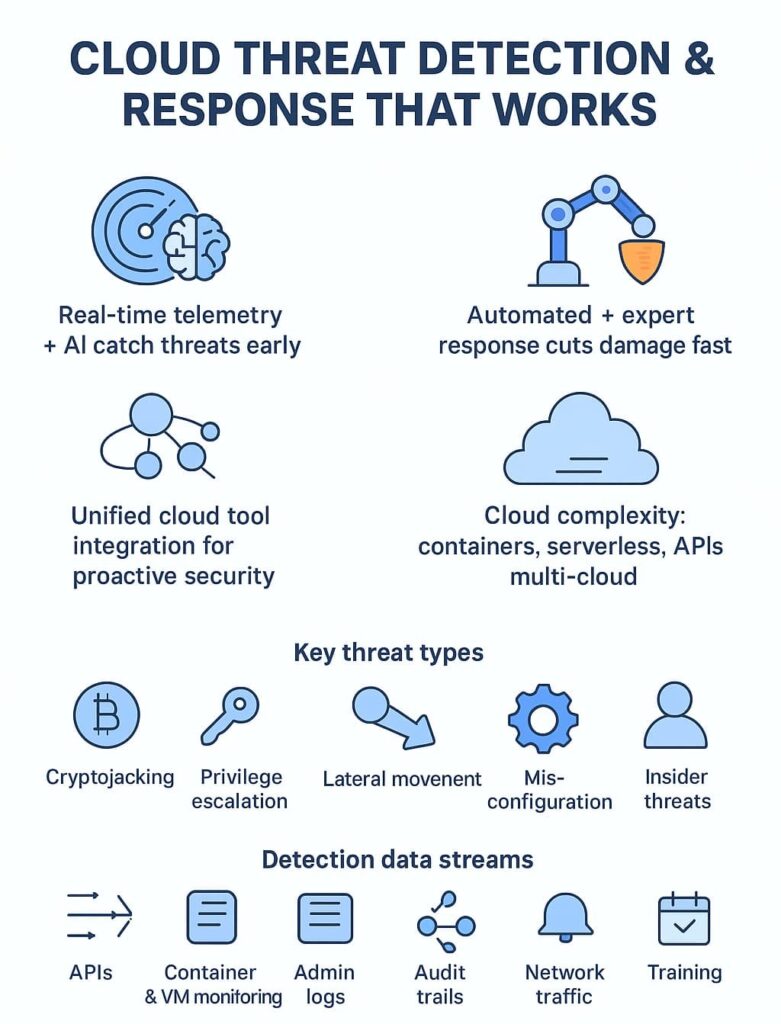
Catching bad actors in the cloud means watching everything. Through years of auditing cloud security products, we’ve found five key data streams that matter most:
- Service APIs showing who’s doing what in the cloud
- Live monitoring of containers and VMs (these can get weird fast)
- Admin activity logs that might show someone’s up to no good
- Detailed audit trails of every cloud operation
- Network traffic patterns that don’t quite add up
Most detection tools we test use two approaches: good old-fashioned threat rules plus some fancy behavior tracking. Last week, one of our partner MSSPs caught a ransomware attempt just because their tool spotted weird API calls at 3 AM.
Another flagged an admin logging in from Russia when they’re based in Texas. This combo of rules and behavior analysis means fewer blind spots – exactly what our MSSP clients need. [1]
Key Steps in Cloud Threat Response
Detecting a threat is only half the battle. Acting swiftly and accurately is what stops attackers in their tracks. Cloud environments demand rapid response due to their dynamic nature.
We rely on two main response types:
- Automated responses: These include isolating compromised workloads, suspending suspicious compute instances, revoking risky credentials, and disabling vulnerable configurations. Automation slashes response times and reduces the window attackers have to do damage.
- Manual responses: When automation isn’t enough or needs human oversight, our security teams receive clear, actionable alerts. Analysts investigate, confirm incidents, and orchestrate containment or remediation steps.
The goal is reducing attacker dwell time, the period between initial compromise and detection. The faster the response, the lower the risk of data loss, service disruption, or compliance violations.
Essential Features of a Cloud Detection and Response Solution
A modern CDR solution should deliver:
- Real-time monitoring across multi-cloud environments: Whether AWS, Azure, GCP, Kubernetes clusters, or serverless platforms, continuous visibility is a must.
- Behavioral analytics and machine learning: To detect both known threats and novel attack patterns.
- Integration with existing security tools: This ensures a unified view, combining logs, telemetry, and alerts for efficient investigation.
- Credential and identity threat detection: Protecting CI/CD pipelines and DevOps workflows is critical since attackers often exploit identity sprawl.
- Simulated attack paths: Prioritize vulnerabilities by understanding how attackers could move through your environment.
- End-to-end visibility: Correlate data from workloads, control planes, and network activity to get rich context for incident response and strengthen cloud infrastructure visibility.
Implementing an Effective Cloud Threat Detection and Response Strategy
We’ve learned that falling behind in cloud security can be costly. Here’s a practical approach we’ve taken to strengthen defense:
- Assess your cloud security posture: Map out your cloud architecture, pinpoint blind spots, and understand your risk exposure.
- Set clear objectives: Define what success looks like, such as reducing mean time to detect (MTTD) and mean time to respond (MTTR).
- Choose a CDR solution aligned with your needs: It should fit your cloud ecosystem, integrate smoothly, and scale with you.
- Implement cloud monitoring across regions and automated alerting: This helps catch threats early without overwhelming your team.
- Develop and test incident response plans regularly: Practice makes perfect, simulate attacks and review playbooks.
- Invest in ongoing training and awareness: The cloud security landscape changes fast; your team must stay sharp.
Using a managed security services provider (MSSP Security) can be a smart move. We bring expertise and round-the-clock monitoring that many organizations struggle to maintain in-house. This partnership frees your team to focus on strategic priorities while we handle threat detection and response.
Best Practices for Cloud Threat Detection and Response
- Use both agent and agentless monitoring to cover every cloud asset.
- Understand attack paths to prioritize the most critical risks.
- Detect early signs using behavioral analytics and threat intelligence.
- Ensure alerts come with full context to speed up investigations.
- Integrate threat intelligence feeds for timely, relevant updates.
- Unify security, compliance, and forensic capabilities to streamline operations.
- Protect AI workloads and accelerate detection with AI-powered analytics.
Common Cloud Threat Techniques and How CDR Helps
Cloud environments face unique threats. Here’s how CDR tackles some of the toughest:
- Cryptojacking: CDR detects suspicious mining activity by analyzing usage patterns, resource spikes, and network anomalies with machine learning.
- Privilege escalation: Behavioral analytics flag unusual permission changes or suspicious identity activities, alerting teams before attackers gain admin control.
- Lateral movement: By correlating identity logs, network flows, and container behavior, CDR exposes attackers as they try to move sideways across cloud resources.
- Container escape: Runtime monitoring spots abnormal system calls or attempts to access host resources, triggering immediate containment.
- Misconfiguration exploitation: Continuous configuration monitoring highlights risky settings or deviations, preventing attackers from exploiting exposed services.
- Insider threats: CDR watches for anomalous insider behavior, such as unusual data downloads or access outside normal hours, helping stop insider misuse before damage occurs. [2]
Overcoming Challenges in Cloud Threat Detection and Response
Cloud security isn’t without hurdles:
- Complexity: Diverse cloud services and rapid changes require adaptable security solutions.
- Evolving threats: Attackers constantly find new ways to breach defenses.
- Resource and skills gaps: Experienced cloud security experts are scarce.
- Alert fatigue: Too many false positives can overwhelm teams.
- Integration: Security tools need to work together seamlessly.
We address these by leveraging automation, AI, and MSSP Security’s expertise to filter alerts, maintain continuous visibility, and coordinate responses efficiently.
The Future of Cloud Threat Detection and Response
AI and automation will increasingly drive cloud security. The fusion of Cloud Detection and Response with Cloud-Native Application Protection Platforms (CNAPP) offers a more proactive and holistic defense. Organizations that embrace these advances can expect faster detection, smarter response, and a stronger security posture against evolving threats.
FAQ
1. What is cloud threat detection response, and why does it matter?
Cloud threat detection response helps find and stop cyberattacks in real time. It uses cloud security tools like cloud monitoring, cloud anomaly detection, and cloud threat intelligence to spot unusual behavior. By combining these signals, teams can act quickly through cloud incident response to prevent data breaches and limit cloud risk exposure.
2. How does cloud monitoring improve cloud security and visibility?
Cloud monitoring gives constant insight into workloads, configurations, and network activity. It supports cloud vulnerability management and cloud workload protection by catching early warning signs of attacks.
With cloud event monitoring and cloud audit logs, organizations can track every action, detect suspicious cloud access anomalies, and strengthen overall cloud environment visibility.
3. What role does cloud threat intelligence play in response planning?
Cloud threat intelligence provides context behind alerts and helps predict risks. It connects data from multiple cloud threat correlation sources, enabling faster decisions in cloud incident response.
When integrated with cloud SIEM and cloud security analytics, it builds a clearer picture of active threats across multi-cloud environments and supports smarter response actions.
4. How do companies prevent cloud data breaches before they happen?
Preventing a cloud data breach starts with strong cloud identity and access management, cloud encryption monitoring, and cloud security posture management. These tools reduce attack surfaces while cloud intrusion detection and cloud malware detection catch hidden risks.
Regular cloud risk assessment and cloud compliance monitoring keep systems secure and standards up to date.
Conclusion
Cloud threat detection and response is essential for any organization serious about securing its cloud assets. With the right tools, strategies, and trusted partners like MSSP Security, you can stay ahead of attackers, protect sensitive data, and maintain business continuity in an uncertain world.
We offer expert consulting tailored for MSSPs to streamline operations, reduce tool sprawl, and boost service quality. From vendor-neutral product selection and auditing to stack optimization and decision support, our team helps you build a cloud security framework that truly fits your environment.
With 15+ years of experience and 48K+ projects completed, we deliver clear, actionable guidance, from needs analysis and vendor shortlisting to PoC support, ensuring your tech stack aligns with your goals and operational maturity.
Let’s talk and tailor a solution that fits your environment perfectly.
References
- https://www.wiz.io/academy/what-is-cloud-detection-and-response-cdr
- https://www.tenable.com/cybersecurity-guide/learn/cloud-detection-and-response-cdr